Reflected XSS in tokopedia train ticket
A reflected XSS filter only encoded GET parameters containing '<' followed by '>', so splitting a closing script tag across two parameters bypassed it. An attacker could execute JavaScript in a victim's browser and steal the session cookie, which was stored in a JavaScript variable despite being HTTP-only.
 Published on visat.me
There was an XSS filter that would encode GET parameter if it contains < character followed by > character. The filter could be bypassed by splitting </script/> closing tag into </script/ and > in two reflected parameters.
The full write-up lives on its author's site
It belongs to its author, so we link to it rather than copy it. The other two tabs are our own rewrites, checked against it.
Context
Tokopedia's train ticket search lives at tiket.tokopedia.com/kereta-api/. When you search for a train ticket, the application redirects you to a URL that carries the search parameters in the query string, for example:
https://tiket.tokopedia.com/kereta-api/search/Jakarta-Gambir-GMR/Bandung-Bandung-BD?adult=1&infant=0&trip=departure&dep_date=16-09-2019&ori=GMR&dest=BD
That means the reflected values land directly in a JavaScript context, not in HTML text, which is what makes the page interesting from an XSS point of view.
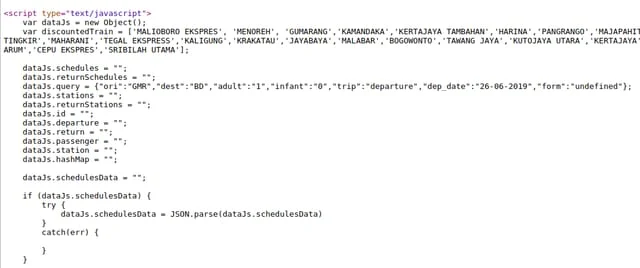
The screenshot shows the page source with the parameters collected into dataJs.query.
Setup
No special accounts or tooling are described. The work was done against the public search page, testing payloads in the browser. In March 2019 he found the old report in his email, re-tested, and fuzzed the parameters again until he found the vulnerability on the same page.
Finding it
Because the parameters are written into a JavaScript variable, there are two classic ways to get script execution:
- Break out of the JavaScript context. Insert
</script><script>alert(1)</script>into one of the parameters. This malforms the HTML parser so it closes the script context, the previous JavaScript errors out (which does not matter), and a new attacker-controlled script context starts. - Break out of the JavaScript variable
dataJs.query. Insert"}; alert(1); //into one of the parameters. The JavaScript parser closes the variable, runs the injected statement, and the rest is commented out.
The earlier 2018 report used the first method: at that time the server did not encode dangerous characters such as < into <. It did, however, encode " into \" and \ into \\, so the second method was not usable.
On re-testing, the encoding behaviour had changed, and not uniformly. The ori and dest parameters were encoded differently from the rest. In the other parameters, the " character was encoded into %22.
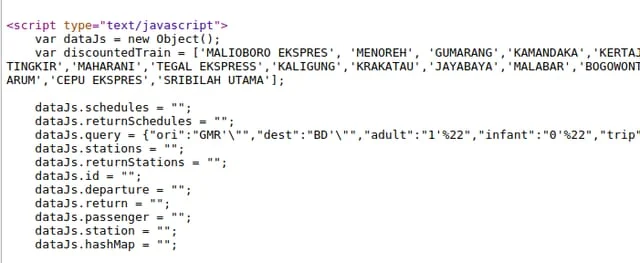
The screenshot compares the encoding of the parameters and shows that ori and dest behave differently.
He then tried another dangerous character, >.
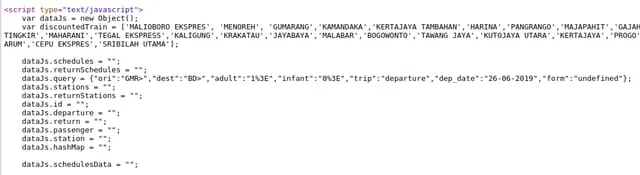
In ori and dest, > was not encoded. Next he tried both characters together.
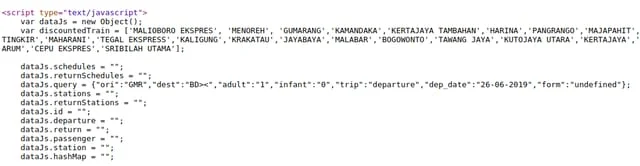
With >< in the parameters, nothing was encoded.
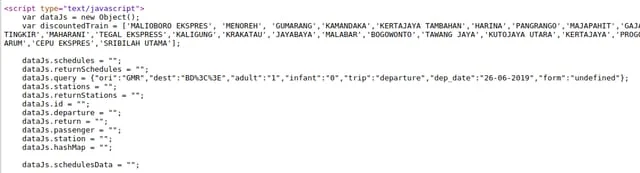
With <>, the value was encoded. So the server did sanitise the parameters, but only when the pattern <.*> appeared inside a single parameter. Splitting the angle brackets across parameters avoided the filter entirely.
Exploitation
Step 1: try to close the tag with //
At first it looked unexploitable, since < and > could not appear together in one parameter. Searching for XSS payload ideas led to the AwesomeXSS repository, which notes:
You can use
//to close a tag instead of>.
Trying that produced an error.
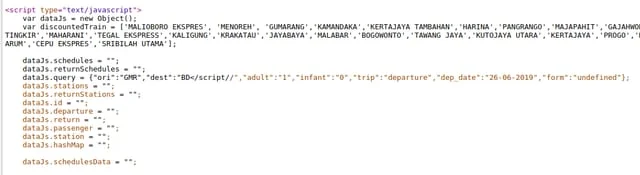
Chrome threw Uncaught SyntaxError: Invalid or unexpected token, which showed the injection point was reachable but the payload was not yet valid.
Step 2: try an XSS payload directly
He then inserted an XSS payload.
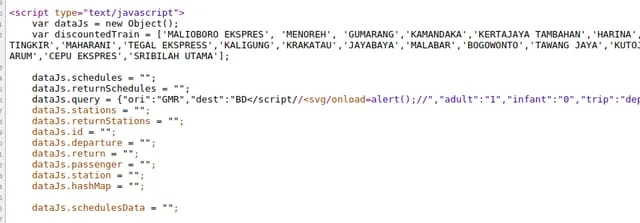
It did not work: the JavaScript parser does not treat that construct as a closing tag.
Step 3: split </script/> across two parameters
Re-reading the repository, the "Bypass tag blacklisting" section mentioned </script/>. The constraint was that < and > could not appear in the same parameter, because the filter would encode them. But the two halves could be placed in different parameters, ori and dest. Between them the page would emit other characters, in this case </script/","dest":">. The question was whether that still counts as a valid closing tag.
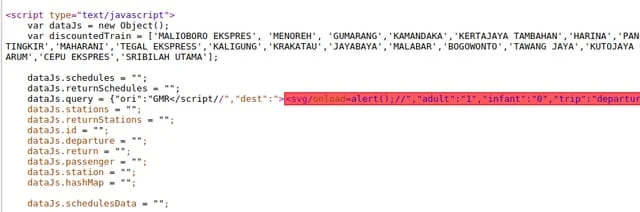
Chrome's XSS auditor highlighted the payload and blocked the page, which indicated a reflected XSS. Then he tried it on Firefox, and it worked. The full URL used was:
https://tiket.tokopedia.com/kereta-api/search/Jakarta-Gambir-GMR/Bandung-Bandung-BD?dep_date=26-06-2019&adult=1&infant=0&trip=departure&ori=</script//&dest=><svg/onload=alert(document.location.href))//
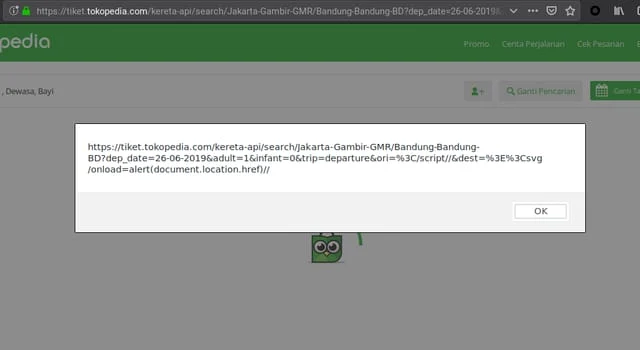
The full URL used was the payload above, with ori and dest carrying the two halves of the closing tag.
Step 4: session theft
The session cookie, _SID_Tokopedia, is HTTP-only, so it cannot be read directly through document.cookie. However, the session cookie was also stored in a JavaScript variable named dataSession.session.cookies, which defeats the purpose of the HTTP-only attribute. With the XSS in place, an attacker can read that variable and steal the victim's session. The proof of concept video demonstrates this.
Root cause
The server-side filter only encoded a parameter when the pattern <.*> matched inside that single parameter, so a tag could be assembled from fragments in two parameters that each passed the filter. The ori and dest parameters were also encoded differently from the rest, leaving > unencoded there, which made the split possible. The HTTP-only flag on the session cookie was undermined by the application itself writing the cookie value into a JavaScript-accessible variable.
Impact
An attacker who can get a victim to open a crafted search URL can run script in the victim's browser on the Tokopedia page. Because the session cookie is exposed through dataSession.session.cookies, the attacker can steal the victim's session despite the HTTP-only attribute. The report does not describe any further capabilities beyond session theft.
Fix
The underlying issues to address are the parameter-specific encoding differences, the single-parameter <.*> filter that ignores concatenation across parameters, and the exposure of the session cookie value in a JavaScript variable.
Timeline
- 28/03/2019: reported to the Tokopedia security team.
- 08/04/2019: follow-up email; the vulnerability was fixed and the report was accepted as valid with high severity.
- 11/06/2019: Tokopedia rewarded IDR 3.000.000 and a certificate.
Variants to test
- Send
<and>in separate parameters that are concatenated into the same script or attribute, and check whether the rendered page contains a valid closing tag. A positive result is a browser executing a handler such asonloadoronerror. - Compare encoding across every parameter of a multi-parameter endpoint. A positive result is one parameter that leaves
>,"or\unencoded while others do not. - Try
</script//in one parameter and the rest of the tag in another, as in this report. A positive result is the XSS auditor or the browser treating the combined output as a closing tag. - Look for sensitive values duplicated into JavaScript variables, such as session identifiers, even when the cookie is HTTP-only. A positive result is a variable readable from the console that contains the session value.
- Test the same split-tag technique against other Tokopedia search or listing pages that reflect query parameters into JavaScript.
What happened, in plain words
Tokopedia is a large online shopping site in Indonesia, and one of the things it sells is train tickets. You can search for a train ticket on a page, and the site puts the details of your search (how many adults, which date, which station you leave from, which station you go to) into the web address itself, the part after the question mark. That part is called the query string.
The page then takes those values from the address and writes them into a small piece of JavaScript, which is the programming language that runs inside your browser. A variable is just a named box that holds a value, like a labelled drawer in a kitchen. The page puts all the search values into a drawer called dataJs.query.
The problem is that the page put those values into a JavaScript variable, so special characters could break out of that context. So if an attacker could sneak special characters into the address, the browser would read them as instructions rather than as data. That kind of flaw is called cross-site scripting, or XSS for short. The everyday comparison: imagine a form where you write your name, and the clerk reads your name out loud to the next customer as if it were an instruction. If you write "give this person all the money", the clerk might actually do it.
The site did have a filter, a piece of software that looks at what you typed and removes or scrambles dangerous characters. But the filter had a gap: it only checked each value on its own, and it only scrambled the value if it saw a < followed later by a > inside that same value. The researcher found that by putting the < in one value and the > in another value, the filter never noticed, and the browser still put the two halves together into a working piece of code.
The result was that an attacker could send a victim a link to the Tokopedia train ticket page, and when the victim clicked it, the attacker's JavaScript would run inside the victim's browser on the Tokopedia site. That script could then read the session value stored in a JavaScript variable and steal the victim's session.
The page and the address
The train ticket search lives at tiket.tokopedia.com/kereta-api/. When you search, the site sends you to a new address that carries all your search choices in the query string, for example:
https://tiket.tokopedia.com/kereta-api/search/Jakarta-Gambir-GMR/Bandung-Bandung-BD?adult=1&infant=0&trip=departure&dep_date=16-09-2019&ori=GMR&dest=BD
Line by line, in plain words:
https://is the secure version of the web protocol, the same one your browser shows with a padlock.tiket.tokopedia.comis the name of the server, the machine that answers the request./kereta-api/search/Jakarta-Gambir-GMR/Bandung-Bandung-BDis the path, the part that tells the server which page you want. Here it says: search, from Jakarta Gambir station (code GMR) to Bandung station (code BD).?marks the start of the query string, the part that carries extra details.adult=1means one adult passenger.infant=0means no infant.trip=departuremeans a one-way trip leaving from the origin.dep_date=16-09-2019is the departure date, 16 September 2019.ori=GMRis the origin station code.dest=BDis the destination station code.&separates one parameter from the next. A parameter is just a name and a value, like a label on a jar.
The page takes all of those GET parameters and stores them in a JavaScript variable called dataJs.query. A GET request is simply the kind of request your browser makes when you type an address or click a link: you are asking the server to give you something, and any details you want to send travel in the address itself. The server then builds the page and sends it back, and the page includes a script that copies the values from the address into that variable.
The screenshot shows the page source, the raw text the server sent, with the parameters collected into dataJs.query. If you have never looked at page source, you can right-click any web page and choose "View page source" to see the same kind of text.
Why does this matter? Because the values land inside a JavaScript context, not in ordinary visible text. In ordinary text, a < character is just a less-than sign. Inside a script, certain characters have meaning to the browser's JavaScript engine, and if an attacker can inject those characters, the engine will treat them as code. That is the seed of the whole vulnerability.
How the researcher got there
No special accounts or tools are described. The work was done against the public search page, trying payloads in the browser. A payload here just means the piece of text you put into a parameter to see what the page does with it.
The researcher had already reported a reflected XSS on the same page in May 2018. Reflected means the malicious value bounces back from the server into the page you see, rather than being stored on the server for later. That earlier report was closed as a duplicate, meaning someone else had reported the same thing first, and he did not check whether it had been fixed.
In March 2019 he found the old report in his email, re-tested, and fuzzed the parameters again. Fuzzing means throwing lots of different inputs at a page and watching for anything unusual, the way you might jiggle every handle on a machine to see which one is loose. Eventually he found the vulnerability on the same page.
Two classic ways to break out
Because the parameters are written into a JavaScript variable, there are two classic ways to get script execution. Script execution means the browser runs code the attacker wrote, as if it were part of the site.
- Break out of the JavaScript context. Insert
</script><script>alert(1)</script>into one of the parameters. This malforms the HTML parser so it closes the script context, the previous JavaScript errors out (which does not matter), and a new attacker-controlled script context starts. - Break out of the JavaScript variable
dataJs.query. Insert"}; alert(1); //into one of the parameters. The JavaScript parser closes the variable, runs the injected statement, and the rest is commented out.
Let us unpack both.
A web page is written in HTML, a language made of tags. A tag is a label in angle brackets, like <script> to start a script and </script> to end it. The browser reads the page from top to bottom and switches between "this is text to show" and "this is code to run" depending on the tags it meets. The HTML parser is the part of the browser that does this reading.
In method 1, the attacker's text contains </script>, which the HTML parser reads as "end of script". Then <script> starts a brand new script, and everything until the next </script> is run as code. The old script, which was cut off in the middle, throws an error, but the browser does not care: the new script still runs. alert(1) is the classic harmless test: it pops up a box with the number 1, proving code ran.
In method 2, the attacker stays inside the existing script but closes the variable early. The page was building something like dataJs.query = {"adult":"1", ...}. By inserting "}; the attacker ends the string and the object, then writes alert(1); as a fresh statement, and // turns the rest of the line into a comment, which the JavaScript engine ignores. A comment is text the engine skips, like a note in the margin.
The earlier 2018 report used the first method: at that time the server did not encode dangerous characters such as < into <. Encoding here means replacing a character with a safe stand-in. < is the HTML way of writing a less-than sign so the browser shows it as text instead of treating it as the start of a tag. The server did, however, encode " into \" and \ into \\, so the second method was not usable. A backslash is an escape character in JavaScript: it tells the engine "the next character is literal, not special". So \" is a literal quote mark inside a string, not the end of the string.
On re-testing, the encoding behaviour had changed, and not uniformly. The ori and dest parameters were encoded differently from the rest. In the other parameters, the " character was encoded into %22. %22 is the URL encoding of a quote mark: URLs cannot contain certain characters directly, so they are written as a percent sign and two hex digits.
The screenshot compares the encoding of the parameters and shows that ori and dest behave differently. In other words, the same character typed into two different boxes came out looking different on the page. That is a strong hint that the code handling those two boxes was written separately, or by a different person, or at a different time.
He then tried another dangerous character, >.
In ori and dest, > was not encoded. Next he tried both characters together.
With >< in the parameters, nothing was encoded.
With <>, the value was encoded. So the server did sanitise the parameters, but only when the pattern <.*> appeared inside a single parameter. Sanitise means clean up before use. The pattern <.*> is a regular expression, a way of describing a shape of text: a <, then any number of any characters, then a >. The filter was looking for that shape inside each parameter on its own, and only then did it step in. Splitting the angle brackets across parameters avoided the filter entirely, because neither parameter on its own contained the full shape.
Exploitation
Step 1: try to close the tag with //
At first it looked unexploitable, since < and > could not appear together in one parameter. Searching for XSS payload ideas led to the AwesomeXSS repository, which notes:
You can use
//to close a tag instead of>.
A repository here is a public collection of notes and examples on a code-sharing site, and this one collects tricks for getting past filters. The tip says that in some situations the browser will accept // where you would normally need >. Trying that produced an error.
Chrome threw Uncaught SyntaxError: Invalid or unexpected token, which showed the injection point was reachable but the payload was not yet valid. An error message like this is actually good news for a tester: it proves the browser tried to read the attacker's text as code and got confused, which means the text was not being treated as harmless data.
Step 2: try an XSS payload directly
He then inserted an XSS payload.
It did not work: the JavaScript parser does not treat that construct as a closing tag. The JavaScript parser is the part of the browser that reads script text and turns it into instructions. It has its own rules, different from the HTML parser's rules, and it did not accept the trick in this position.
Step 3: split </script/> across two parameters
Re-reading the repository, the "Bypass tag blacklisting" section mentioned </script/>. Bypass means getting around a defence. Blacklisting means keeping a list of forbidden things and blocking them. The constraint was that < and > could not appear in the same parameter, because the filter would encode them. But the two halves could be placed in different parameters, ori and dest. Between them the page would emit other characters, in this case </script/","dest":">. The question was whether that still counts as a valid closing tag.
Chrome's XSS auditor highlighted the payload and blocked the page, which indicated a reflected XSS. The XSS auditor was an old built-in feature of Chrome that tried to spot reflected XSS and refuse to load the page. It was removed from Chrome in 2019, but at the time it was a useful signal: if the auditor blocks the page, you have almost certainly found a real XSS. Then he tried it on Firefox, and it worked. The full URL used was:
https://tiket.tokopedia.com/kereta-api/search/Jakarta-Gambir-GMR/Bandung-Bandung-BD?dep_date=26-06-2019&adult=1&infant=0&trip=departure&ori=</script//&dest=><svg/onload=alert(document.location.href))//
Line by line:
- The path and the first parameters are the same as before: a search from GMR to BD on 26 June 2019, one adult, no infant, one-way.
ori=</script//puts the first half of a closing tag into the origin parameter. It starts with</script, which is the beginning of the end-of-script tag, but it has no>to finish it. The//is there to comment out whatever the page adds after it.dest=><svg/onload=alert(document.location.href))//puts the second half into the destination parameter. It starts with>, which finishes the tag thatoribegan. Then it opens an<svg>element. SVG is a way of drawing pictures in a web page, and like many HTML elements it can carry anonloadattribute, which is a piece of JavaScript the browser runs when the element has finished loading. Here that piece isalert(document.location.href), which pops up the current address, proving the script ran in the page's context. The final//comments out the rest of the generated JavaScript.document.location.hrefis simply the address of the page you are on, read from inside the browser.
Why does the split work? The filter looked at each parameter separately and never saw the full shape, but the page output still contained a valid closing tag when the two halves were combined.
The screenshot is the proof of concept: the pop-up box appearing on the Tokopedia page, which is the visible sign that the attacker's code ran.
Step 4: session theft
The session cookie, _SID_Tokopedia, is HTTP-only, so it cannot be read directly through document.cookie. A cookie is a small piece of data a site asks your browser to keep and send back with every request, and a session cookie is the one that proves you are logged in. HTTP-only is a setting that tells the browser: never let JavaScript read this cookie. It is a safety catch, like a lock on a drawer. document.cookie is the JavaScript way of reading cookies, and with HTTP-only set, the session cookie simply is not there.
However, the session cookie was also stored in a JavaScript variable named dataSession.session.cookies, which defeats the purpose of the HTTP-only attribute. The site itself had copied the cookie value into a place JavaScript could read. That is like locking the drawer but leaving the key on the table. With the XSS in place, an attacker can read that variable and steal the victim's session. The proof of concept video demonstrates this.
Stealing a session means taking the pass that proves you are logged in, and using it from another computer to act as you, without needing your password.
Root cause
The server-side filter only encoded a parameter when the pattern <.*> matched inside that single parameter. It did not account for the fact that the values of several parameters are concatenated into the same JavaScript object literal, so a tag can be assembled from fragments that each pass the filter. Concatenated means joined end to end. An object literal is the JavaScript way of writing a collection of named values in one go, like a form filled in with labels.
The ori and dest parameters were also encoded differently from the rest, leaving > unencoded there, which made the split possible. And the HTTP-only flag on the session cookie was undermined by the application itself writing the cookie value into a JavaScript-accessible variable.
Impact
An attacker who can get a victim to open a crafted search URL can run script in the victim's browser on the Tokopedia page. In the context of a site means the script runs as if it came from that site, so it can read that site's data and act with the victim's permissions. Because the session cookie is exposed through dataSession.session.cookies, the attacker can steal the victim's session despite the HTTP-only attribute. The report does not describe any further capabilities beyond session theft.
Fix
The underlying issues to address are the parameter-specific encoding differences, the single-parameter <.*> filter that ignores concatenation across parameters, and the exposure of the session cookie value in a JavaScript variable.
Timeline
- 28/03/2019: reported to the Tokopedia security team.
- 08/04/2019: follow-up email; the vulnerability was fixed and the report was accepted as valid with high severity.
- 11/06/2019: Tokopedia rewarded IDR 3.000.000 and a certificate.
Variants to test
- Send
<and>in separate parameters that are concatenated into the same script or attribute, and check whether the rendered page contains a valid closing tag. A positive result is a browser executing a handler such asonloadoronerror. - Compare encoding across every parameter of a multi-parameter endpoint. A positive result is one parameter that leaves
>,"or\unencoded while others do not. - Try
</script//in one parameter and the rest of the tag in another, as in this report. A positive result is the XSS auditor or the browser treating the combined output as a closing tag. - Look for sensitive values duplicated into JavaScript variables, such as session identifiers, even when the cookie is HTTP-only. A positive result is a variable readable from the console that contains the session value.
- Test the same split-tag technique against other Tokopedia search or listing pages that reflect query parameters into JavaScript.
Glossary
- API: a defined way for one piece of software to ask another for something, like a service counter with a fixed list of requests it accepts.
- Attribute: an extra setting written inside an HTML tag, such as
onload, that changes how the element behaves. - Blacklisting: a defence that keeps a list of forbidden things and blocks them, which fails whenever something not on the list achieves the same effect.
- Bypass: getting around a defence without removing it.
- Comment: text in code that the engine skips, written as
//in JavaScript. - Concatenation: joining pieces of text end to end into one longer piece.
- Context: the surroundings in which a value is placed, such as HTML text, an HTML attribute, or JavaScript code, which decide what characters mean.
- Cookie: a small piece of data a site asks your browser to store and send back with later requests.
- Cross-site scripting (XSS): a flaw where an attacker's text is treated as code by a victim's browser on a site the victim trusts.
- CSS: the language that describes how a web page looks; not used in this report but often confused with JavaScript.
- CVSS: a scoring system for the severity of a vulnerability; this report does not give a score.
- DOM: the browser's in-memory model of the page, which scripts can read and change.
- Encoding: replacing a character with a safe stand-in, such as
<for<or%22for". - Endpoint: a specific address on a server that accepts requests, such as the search page here.
- Escape character: a character, such as
\in JavaScript, that tells the engine the next character is literal. - Filter: software that inspects input and removes or scrambles what it considers dangerous.
- Fuzzing: sending many varied inputs to a page and watching for unusual behaviour.
- GET parameter: a name and value carried in the query string of a URL.
- HTML: the language web pages are written in, made of tags in angle brackets.
- HTML parser: the part of the browser that reads HTML and decides what is text and what is a tag.
- HTTP-only: a cookie setting that stops JavaScript from reading that cookie.
- JavaScript: the programming language that runs inside web browsers.
- JavaScript parser: the part of the browser that reads script text and turns it into instructions.
- Object literal: JavaScript syntax for writing a collection of named values in one go, such as
{"a":"1"}. - Payload: the piece of text an attacker puts into an input to try to trigger a flaw.
- Proof of concept: a demonstration that a flaw is real, often a harmless pop-up or a short video.
- Query string: the part of a URL after the
?, carrying parameters. - Reflected XSS: XSS where the malicious value comes back from the server in the page you requested, rather than being stored.
- Regular expression: a way of describing a shape of text, such as
<.*>meaning a<, then anything, then a>. - Repository: a public collection of code or notes, often on a code-sharing site.
- Sanitise: clean up input before using it, for example by encoding dangerous characters.
- Session: the period during which a site remembers that you are logged in.
- Session cookie: the cookie that proves you are logged in.
- Session identifier: the value inside a session cookie that identifies your session.
- SVG: a way of drawing pictures in a web page using tags, which can carry event attributes such as
onload. - Tag: a label in angle brackets in HTML, such as
<script>or</script>. - URL: the address of a resource on the web.
- Variable: a named box in a program that holds a value.
- XSS auditor: an old Chrome feature that tried to detect reflected XSS and block the page; it was removed in 2019.