GraphQL abuse: Bypass account level permissions through parameter smuggling
A restricted user could add the licenseKey field to a GraphQL query and receive the account license key, bypassing admin-only permissions. A separate GraphQL logging endpoint also exposed the license key to restricted users.
 Published on labs.detectify.com
Since its release in 2015, Facebook’s GraphQL has gained steady adoption from organizations large and small. In my recent bug hunting I’ve encountered a few instances where I run into GraphQL queries, and I’ve found a few situations where they have led to juicy bugs – especially in the realm of privilege escalation…
The full write-up lives on its author's site
It belongs to its author, so we link to it rather than copy it. The other two tabs are our own rewrites, checked against it.
Context
GraphQL is Facebook's query language, released in 2015 and adopted steadily by organisations large and small. In its most basic use case it lets a client call specific fields on objects, but the interesting part is that a single request can retrieve multiple arguments at once, as if several REST queries were being performed at the same time. To find a user's name, their favourite post, and all the data from their profile and settings, REST would need four separate requests; GraphQL returns the structured data in one.
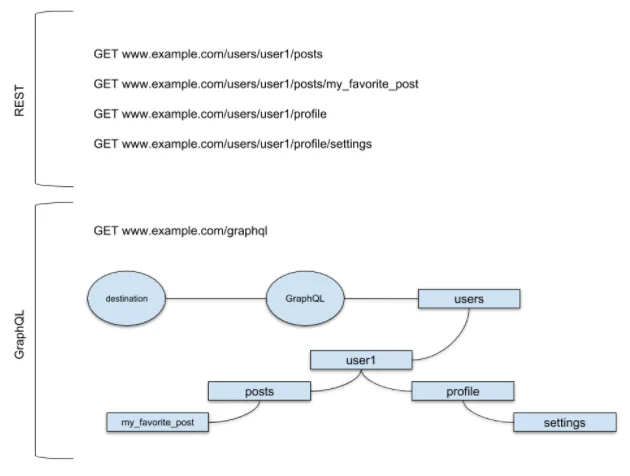
That convenience is also where the abuse lives. This write-up covers two bugs found in New Relic's GraphQL implementation: a privilege escalation by "smuggling" a parameter into a query, and an information disclosure found with a Burp filter. The researcher calls the technique smuggling queries, and notes that a more technical name probably exists.
Setup
The researcher had two accounts on New Relic: an administrator account and a restricted user account. New Relic exposes a few user level permissions that administrators can configure. One of them, admin, has the ability to view the account licence key, which provides extra functionality such as the ability to write metrics to the account. A restricted user account cannot view this licence key.
Tools used were Burp Suite, including its filter option, and a fresh Burp project for the restricted user session. The GraphQL endpoint observed in the requests is under /accounts/REMOVED/graphql, with the account identifier removed from the write-up.
Finding it
The researcher compared the GraphQL queries sent on the administrator account with those sent on the restricted user account, to see whether they differed and whether an administrator's query would be accepted on a restricted account. From a developer's point of view it can be difficult to map user level account permissions so that they are the same across the regular application and GraphQL. When they are not mapped properly, additional parameters can be smuggled within regular GraphQL endpoints to call data the account should not have access to.
Exploitation
Step 1: capture a normal query from the restricted account
A normal GraphQL query in New Relic, sent from the restricted user account, looks like this:
POST /accounts/REMOVED/graphql HTTP/1.1

{
  currentUser {
    email
    currentAccount {
      name
      capabilities {
        name
      }
      apmSubscription: subscription(productLine: "apm") {
        productLine
      }
      infraSubscription: subscription(productLine: "infrastructure") {
        trialEligibility {
          state
        }
        trial {
          endTime
        }
      }
    }
  }
}
The response:
{"data":{"currentUser":{"email":"[redacted]","currentAccount":{"name":"This is the account name”,”infraSubscription":{"trialEligibility":{"state":false},"trial":null},"capabilities":[huge list of capabilities],"apmSubscription":{"productLine":"apm"}}}}}
Translated into English, the query says: within the current user tell me their email address, and within the current account tell me the account name and capabilities, trial eligibility and trial states. The query uses aliases (apmSubscription, infraSubscription) to request the same subscription field with different productLine arguments in one request, which is the multi-argument behaviour described above.
Step 2: smuggle the licenseKey field into currentAccount
The application failed to identify whether the user performing the query was an admin. Because of that, a value could be smuggled into the currentAccount section of the query. Adding licenseKey there returns the licence key for the whole account, bypassing the user permission that should have prevented a restricted account from seeing it.
The smuggled request:
POST /accounts/REMOVED/graphql HTTP/1.1

{
  currentUser {
    email
    currentAccount {
      name
      licenseKey
      capabilities {
        name
      }
      apmSubscription: subscription(productLine: "apm") {
        productLine
      }
      infraSubscription: subscription(productLine: "infrastructure") {
        trialEligibility {
          state
        }
        trial {
          endTime
        }
      }
    }
  }
}
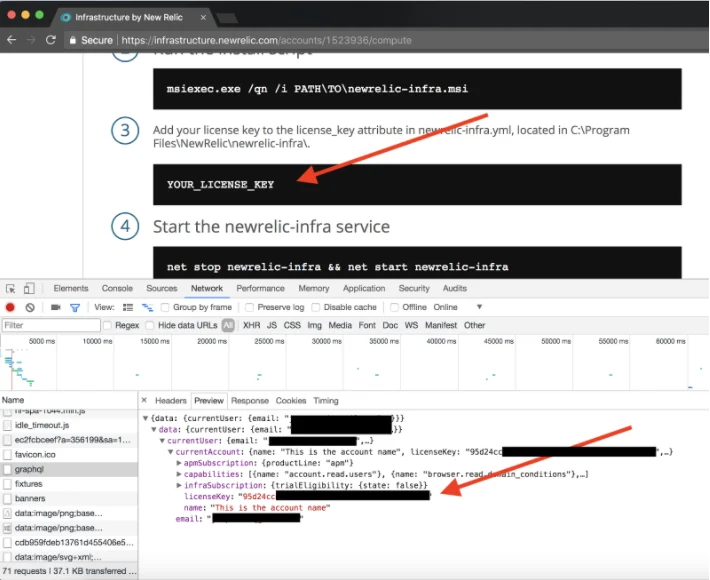
The only difference from the normal query is the added licenseKey field under currentAccount. The response:
A restricted user with no access to the account licence key was able to pull the key for the entire account by adding one field to the query.
Step 3: hunt for the key with a Burp filter
The second test needed Burp Suite. Since the researcher had an administrator account and knew the account licence key, the key value belonging to the administrator's account was copied and pasted into the filter settings of a fresh Burp instance. A fresh Burp project was then created for the restricted user account, to see whether the licence key was ever revealed to the restricted user by accident. Navigating around the site on the restricted account produced traffic, and the filter was left to match against it.
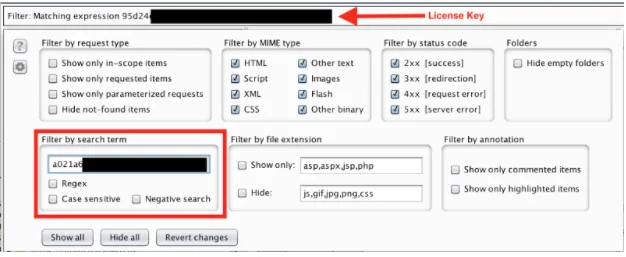
After a few seconds there was a match:
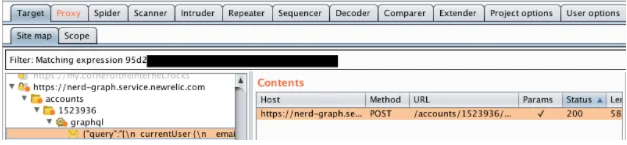
The match showed that the account licence key was still exposed to a restricted user through a GraphQL logging request. The final proof of concept sent to New Relic:
Root cause
The application failed to identify whether the user performing the query was an admin, so the licenseKey field could be smuggled into currentAccount. The researcher notes it can be difficult to map user level account permissions so they match across the regular application and GraphQL. The second bug was a stray endpoint that disclosed the licence key through a GraphQL logging request.
Impact
A restricted user, who should not be able to see the account licence key, could obtain the key for the entire account. The key provides extra functionality, such as the ability to write metrics to the account. The second issue exposed the same key to a restricted user through a logging request.
Fix
New Relic patched both bugs. A restricted user can no longer smuggle the licenseKey parameter: doing so results in a null response. The stray endpoint that was disclosing the licence key was removed.
Variants to test
- Compare queries between roles. Capture the GraphQL traffic of an administrator and of a restricted user, diff the field selections, then replay the administrator's fields on the restricted session. A positive result is any field that resolves with data instead of
nullor an error. - Add privileged fields to objects you can already query. Take a query you are allowed to run, such as one returning the current account, and add fields that the UI only shows to admins, like keys, tokens, billing details or member lists. A positive result is the sensitive value appearing in the response.
- Search captured traffic for known secrets. Paste a secret you can legitimately read as an administrator into a Burp filter, browse the application as a restricted user, and watch for matches. A positive result is the secret appearing in a request or response the restricted user should never see, including logging or telemetry calls.
- Test aliases and fragments. Request the same field under different aliases or through fragments with arguments that the UI never sends, and check whether permission checks are applied per alias or only to the shape the client normally uses.
- Check mutations as well as queries. Attempt admin-only mutations from a restricted session with extra input fields added. A positive result is a state change the restricted role should not be able to make.
What happened, in plain words
New Relic is a service that companies use to watch how their websites and applications are performing. Each company that signs up gets its own space inside New Relic, called an account, and inside that account there are different kinds of user. Some users are administrators, who can change settings and see sensitive information. Others are restricted users, who can only do a limited set of things.
One piece of sensitive information in a New Relic account is the account licence key. Think of it like the master key to a building: anyone who holds it can do things that ordinary visitors cannot, such as writing data (metrics) into the account. Only administrators are supposed to be able to see it. A restricted user should never be able to read it.
A security researcher, Jon Bottarini, found two separate problems in how New Relic handled requests made through a technology called GraphQL. The first problem let a restricted user ask for the licence key anyway, simply by adding one extra word to a request, and get it back. The second problem was a leftover piece of the system that quietly handed the same key to restricted users through a logging request. Both were fixed by New Relic after he reported them.
To follow the story you only need a handful of ideas, explained as we go: what an API is, what GraphQL is, what a permission is, and what a tool called Burp Suite does.
Some background you need first
What an API is
When you use a website, your browser shows you pages with buttons and menus. Behind those pages, the browser is constantly talking to the company's servers, asking questions like "who is logged in?" or "what is the name of this account?" and getting answers back. The doorway through which those questions and answers travel is called an API, short for Application Programming Interface. A simple comparison: a restaurant. You do not walk into the kitchen and cook; you tell the waiter what you want, and the waiter brings it back. The API is the waiter. Your browser is you at the table, and the server is the kitchen.
What GraphQL is
GraphQL is a particular style of API, released by Facebook in 2015. With older styles of API (often called REST), each question is a separate trip to the kitchen: one request for the user's name, another for their favourite post, another for their profile, another for their settings. Four trips for four things.
GraphQL works differently. You write one request that describes exactly which pieces of information you want, and the server sends back all of them together, neatly structured. It is like handing the waiter a single shopping list instead of making four separate visits. The researcher's example: to find a user's name, their favourite post, and all the data from their profile and settings, REST would need four separate requests, while GraphQL returns the structured data in one.
That convenience is exactly where the abuse lives. Because a GraphQL request is a list of fields you ask for, if the server does not carefully check who is asking, you can add fields to the list that you were never meant to see. That is the heart of both bugs in this article.
What a permission is
A permission is a rule about what a particular user is allowed to do. In New Relic, administrators can configure a few user level permissions. One of them, called admin, includes the ability to view the account licence key. A restricted user account cannot view this licence key. The whole point of a permission is that the server enforces it: even if the restricted user's browser never shows a button for the key, the server must also refuse to hand the key over if asked directly. The bugs here are cases where the server did not refuse.
What Burp Suite is
Burp Suite is a tool used by security researchers. It sits between your browser and the website, like a recording device on the phone line: it lets you see every request your browser sends and every response that comes back, and it lets you change a request before it goes out. It also has a filter option, which watches all the traffic passing through and highlights anything containing a word or value you specify. The researcher used Burp to capture requests and later to search all the traffic for a known secret.
The setup
The researcher had two accounts on New Relic: an administrator account and a restricted user account. He used Burp Suite, including its filter option, and a fresh Burp project for the restricted user session. The GraphQL endpoint seen in the requests is under /accounts/REMOVED/graphql, where the account identifier has been removed from the write-up. An endpoint is simply the address on the server that a particular kind of request goes to, like a specific counter in a large office.
Finding it
The researcher compared the GraphQL queries sent on the administrator account with those sent on the restricted user account. He wanted to see whether they differed, and whether an administrator's query would be accepted on a restricted account. This is a simple but powerful idea: if the same request works for both roles, the server may not be checking the role at all.
From a developer's point of view, it can be difficult to map user level account permissions so that they are the same across the regular application and GraphQL. In other words, the normal website might correctly hide the licence key from restricted users, while the GraphQL doorway, built separately, forgets to apply the same rule. When the two are not mapped properly, additional parameters can be smuggled within regular GraphQL endpoints to call data the account should not have access to. The researcher calls this smuggling queries, and notes that a more technical name probably exists.
Exploitation
Step 1: capture a normal query from the restricted account
First, the researcher captured what a perfectly ordinary GraphQL request looks like when sent from the restricted user account. You need this baseline so that later you can see exactly what changed. A normal GraphQL query in New Relic, sent from the restricted user account, looks like this:
POST /accounts/REMOVED/graphql HTTP/1.1

{
  currentUser {
    email
    currentAccount {
      name
      capabilities {
        name
      }
      apmSubscription: subscription(productLine: "apm") {
        productLine
      }
      infraSubscription: subscription(productLine: "infrastructure") {
        trialEligibility {
          state
        }
        trial {
          endTime
        }
      }
    }
  }
}
Line by line, in plain words:
POST /accounts/REMOVED/graphql HTTP/1.1is the first line of the request.POSTis the method, meaning "I am sending data to the server"./accounts/REMOVED/graphqlis the address being called, the GraphQL endpoint for a particular account (the account identifier is removed here).HTTP/1.1is the version of the web protocol being used.currentUser {starts a block asking about the user who is currently logged in. The opening brace means "here come the fields I want about this thing".emailasks for that user's email address.currentAccount {starts a block asking about the account the user belongs to.nameasks for the account's name.capabilities { name }asks for the list of capabilities, meaning the features or permissions the account has, and for each one just its name.apmSubscription: subscription(productLine: "apm") { productLine }asks about the subscription for the product line called apm. The part before the colon,apmSubscription, is an alias: a nickname for this particular answer, so that the same underlying field can be asked for twice in one request without the answers colliding.infraSubscription: subscription(productLine: "infrastructure") { productLine }does the same for the infrastructure product line, under a different alias. This is the multi-argument behaviour described earlier: one request, several questions.- Inside that block,
trialEligibility { state }asks whether the account is eligible for a trial, andtrial { endTime }asks when the trial ends. - The closing braces
}at the end simply close each block that was opened, in reverse order.
The response:
{"data":{"currentUser":{"email":"[redacted]","currentAccount":{"name":"This is the account name”,”infraSubscription":{"trialEligibility":{"state":false},"trial":null},"capabilities":[huge list of capabilities],"apmSubscription":{"productLine":"apm"}}}}}
This is the answer coming back, in a format called JSON, which is just a way of writing structured data with curly braces and labels. Reading it:
"data"is the outer wrapper holding the answer."currentUser"holds the details of the logged-in user, and"email"is that user's address (redacted here)."currentAccount"holds the account details:"name"is the account name,"infraSubscription"shows the trial eligibility asfalseand the trial asnull(meaning nothing),"capabilities"is a huge list of capabilities, and"apmSubscription"shows the product line as apm.
Translated into English, the query says: within the current user tell me their email address, and within the current account tell me the account name and capabilities, trial eligibility and trial states. Nothing here is sensitive, and nothing here should be a problem for a restricted user.
Step 2: smuggle the licenseKey field into currentAccount
The application failed to identify whether the user performing the query was an admin. Because of that, a value could be smuggled into the currentAccount section of the query. Adding licenseKey there returns the licence key for the whole account, bypassing the user permission that should have prevented a restricted account from seeing it. The researcher's comparison is a smuggled parameter: an extra item slipped into a request that the server accepts without checking whether the asker is allowed to have it.
The smuggled request:
POST /accounts/REMOVED/graphql HTTP/1.1

{
  currentUser {
    email
    currentAccount {
      name
      licenseKey
      capabilities {
        name
      }
      apmSubscription: subscription(productLine: "apm") {
        productLine
      }
      infraSubscription: subscription(productLine: "infrastructure") {
        trialEligibility {
          state
        }
        trial {
          endTime
        }
      }
    }
  }
}
The only difference from the normal query is the added licenseKey field under currentAccount. Everything else is identical: same address, same method, same fields, same aliases. That is the whole trick. The restricted user simply asks for one more thing than the website's interface would ever offer them.
The response:
Reading the new part: inside "currentAccount", right after the account name, there is now a "licenseKey" entry holding the key value (partly redacted here). The rest of the answer is the same as before. A restricted user with no access to the account licence key was able to pull the key for the entire account by adding one field to the query.
Step 3: hunt for the key with a Burp filter
The second test needed Burp Suite. Since the researcher had an administrator account and knew the account licence key, the key value belonging to the administrator's account was copied and pasted into the filter settings of a fresh Burp instance. A fresh Burp project was then created for the restricted user account, to see whether the licence key was ever revealed to the restricted user by accident. Navigating around the site on the restricted account produced traffic, and the filter was left to match against it.
The idea is like putting a word into a search box that watches every conversation in a building: you do not know where the word might be spoken, so you let the tool listen everywhere and tell you when it hears it.
After a few seconds there was a match:
The match showed that the account licence key was still exposed to a restricted user through a GraphQL logging request. A logging request is a call the application makes to record what is happening, for example for monitoring or telemetry; such calls can carry more data than the user ever sees on screen. The final proof of concept sent to New Relic:
A proof of concept is the evidence you send with a bug report: the smallest, clearest demonstration that the problem is real, so the company can reproduce it themselves.
Root cause
The application failed to identify whether the user performing the query was an admin, so the licenseKey field could be smuggled into currentAccount. The researcher notes it can be difficult to map user level account permissions so they match across the regular application and GraphQL. The second bug was a stray endpoint that disclosed the licence key through a GraphQL logging request.
In everyday terms: the building had a rule that only managers get the master key, and the front desk followed it. But there was a second, forgotten service window around the back where anyone who asked was handed the key. The rule was real; it just was not applied at every door.
Impact
A restricted user, who should not be able to see the account licence key, could obtain the key for the entire account. The key provides extra functionality, such as the ability to write metrics to the account. The second issue exposed the same key to a restricted user through a logging request. In other words, no special access was needed: an ordinary restricted user, logged in normally, could get the key.
Fix
New Relic patched both bugs. A restricted user can no longer smuggle the licenseKey parameter: doing so results in a null response, meaning the server now answers "nothing" instead of handing over the key. The stray endpoint that was disclosing the licence key was removed.
Variants to test
If you want to look for similar problems yourself, these are the same ideas generalised. Each one is a way of asking: does the server check who is asking, or does it only check what is being asked?
- Compare queries between roles. Capture the GraphQL traffic of an administrator and of a restricted user, diff the field selections, then replay the administrator's fields on the restricted session. A positive result is any field that resolves with data instead of
nullor an error. - Add privileged fields to objects you can already query. Take a query you are allowed to run, such as one returning the current account, and add fields that the UI only shows to admins, like keys, tokens, billing details or member lists. A positive result is the sensitive value appearing in the response.
- Search captured traffic for known secrets. Paste a secret you can legitimately read as an administrator into a Burp filter, browse the application as a restricted user, and watch for matches. A positive result is the secret appearing in a request or response the restricted user should never see, including logging or telemetry calls.
- Test aliases and fragments. Request the same field under different aliases or through fragments with arguments that the UI never sends, and check whether permission checks are applied per alias or only to the shape the client normally uses. A fragment is a reusable named chunk of a GraphQL query.
- Check mutations as well as queries. Attempt admin-only mutations from a restricted session with extra input fields added. A mutation is a GraphQL request that changes data rather than just reading it. A positive result is a state change the restricted role should not be able to make.
Glossary
- API: the doorway through which a browser and a server exchange questions and answers; like a waiter carrying orders between you and the kitchen.
- Account: a company's own separate space inside a service like New Relic, holding its data and its users.
- Administrator: a user with extra permissions, such as viewing sensitive settings and keys.
- Alias: a nickname given to a field in a GraphQL request so the same field can be asked for more than once in one request.
- Authenticated: proven to be logged in as a particular user.
- Burp Suite: a tool that sits between browser and website, letting you see and modify requests and responses, and filter traffic for chosen words.
- Capabilities: the features or permissions an account has, listed by name in the responses here.
- Endpoint: the specific address on a server that a kind of request is sent to.
- Field: one piece of information you ask for in a GraphQL request, such as
emailorname. - Filter (Burp): a setting that watches all traffic and highlights anything containing a value you specify.
- Fragment: a reusable named chunk of a GraphQL query.
- GraphQL: a style of API, released by Facebook in 2015, where one request describes exactly which fields you want and the server returns them all together.
- HTTP: the protocol browsers and servers use to exchange requests and responses on the web.
- Information disclosure: a bug where data that should be kept private is revealed to someone who should not see it.
- JSON: a text format for structured data, written with curly braces and labels, used for the responses in this article.
- Licence key: a secret value for a New Relic account that grants extra functionality, such as writing metrics to the account; only administrators should see it.
- Logging request: a call the application makes to record activity, for example for monitoring or telemetry, which can carry more data than the user sees on screen.
- Metrics: measurements written into an account, one of the things the licence key allows.
- Mutation: a GraphQL request that changes data rather than only reading it.
null: a value meaning "nothing" or "no data".- Parameter: an extra value supplied with a request, such as a field name or an argument like
productLine. - Permission: a rule about what a particular user is allowed to do, enforced by the server.
- POST: an HTTP method meaning "I am sending data to the server".
- Privilege escalation: a bug where a user with limited rights manages to do something reserved for a more powerful user.
- Proof of concept: the smallest, clearest demonstration that a bug is real, sent with a report so the company can reproduce it.
- Query: a GraphQL request that reads data.
- REST: an older style of API where each piece of information is usually a separate request.
- Restricted user: a user with limited permissions, who should not see sensitive values like the licence key.
- Schema: the map of what fields and types a GraphQL service offers.
- Smuggling: the researcher's term for slipping an extra parameter into a normal GraphQL request so the server returns data the user should not have access to.
- Telemetry: automatic reporting of activity and measurements from an application, often to a monitoring service.
- Token: a value that stands in for proof of identity or access, similar in spirit to a key.
- User level permissions: the set of rules, configurable by administrators, that decide what each kind of user can do.