Using Burp Suite match and replace settings to escalate your user privileges and find hidden features
A feature flag returned false, and by using Burp Suite match and replace to change false to true, the client displayed unreleased UI elements. This gave the researcher access to a beta feature before public release, where other bugs were found.
 Published on jonbottarini.com
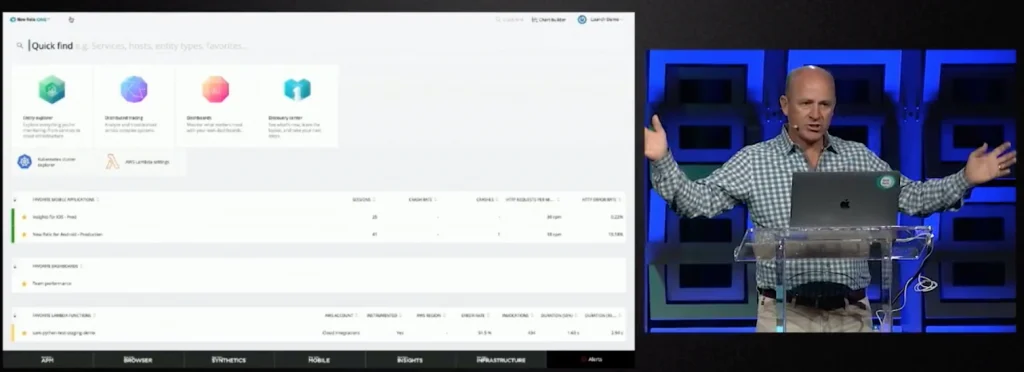
On May 14th, Lew Cirne, the CEO of New Relic, announced a new platform called New Relic One. The platform, featuring a fresh new design and better data visualizations, came as a surprise to investors and New Relic users alike.
The full write-up lives on its author's site
It belongs to its author, so we link to it rather than copy it. The other two tabs are our own rewrites, checked against it.
Context
On 14 May, Lew Cirne, the CEO of New Relic, announced a new platform called New Relic One, with a fresh design and better data visualisations. The announcement surprised investors and New Relic users. It did not surprise Jon Bottarini (@jon_bottarini), who had found out about the platform months earlier while working on the New Relic bug bounty program, using a technique he calls the FALSE2TRUE trick: a Burp Suite match and replace rule that rewrites false values in server responses to true.
The idea behind the trick is simple. Many client-side features are gated on boolean flags that the server sends down in a response body. If you flip those flags from false to true in the response before the browser sees it, the client may render UI elements that were previously hidden or unreachable. The researcher notes that this is not a secret and has been a known method for a long time; he cites a public tip from BugBountyHQ describing match and replace of false to true as a way to find hidden functionality and endpoints without scraping through JavaScript.
Setup
The only tool involved is Burp Suite, with its Proxy match and replace rules. The rule lives under the Proxy settings in Options.
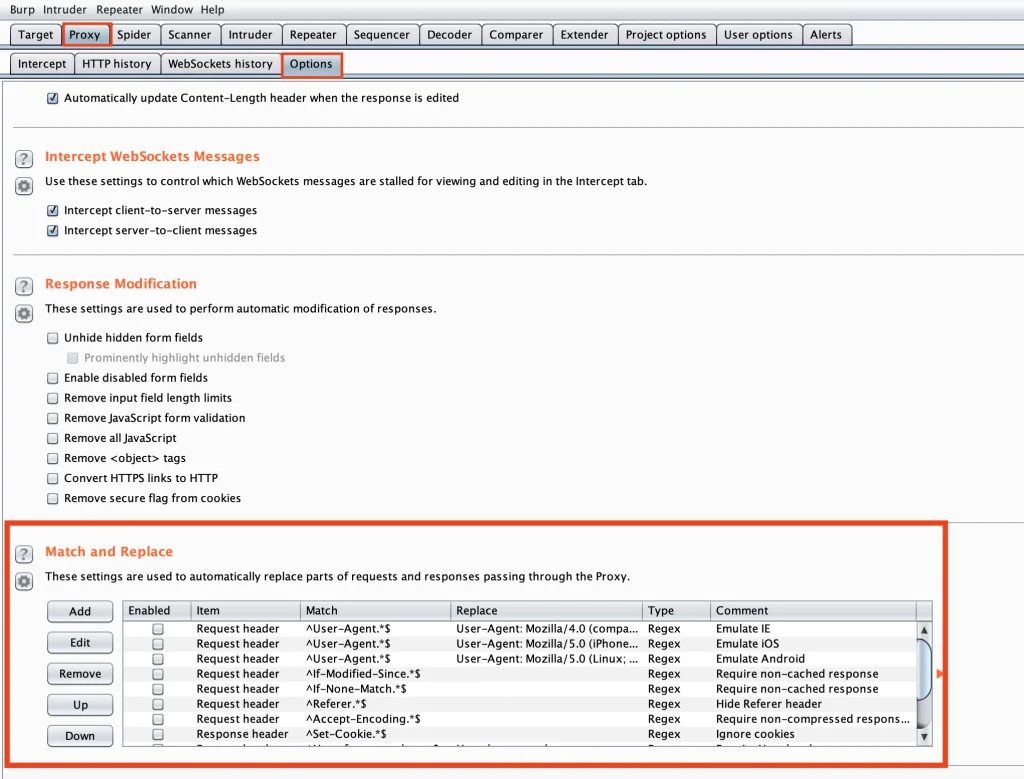
The researcher points readers new to the feature to an external article on writing Burp Suite match and replace rules. No account roles, versions or other preconditions are described beyond a logged-in New Relic account whose responses carried a feature flag that always returned false.
Finding it
While using the FALSE2TRUE trick against New Relic, the researcher noticed a feature flag on his account that was always returning false. That constant value was the signal: a flag that never changes for a given user is a candidate for a client-side gate, and flipping it in the response is cheap to try.
Exploitation
Step 1: Understand what match and replace can do
Before the New Relic case, the report walks through a generic privilege escalation example. Imagine the server checks the permissions of the user tied to the current session. The request might look like this:
POST /api/getUserDetails HTTP/1.1
Host: myserver.jonbottarini.com
Cookie: mycookies

{"user":"123"}
and the response like this:
HTTP/1.1 200 OK

{"data":{"currentUser":{"userData":[
{"userLevel":READONLY,"subscriptionLevel":"BASIC"}
]}}}
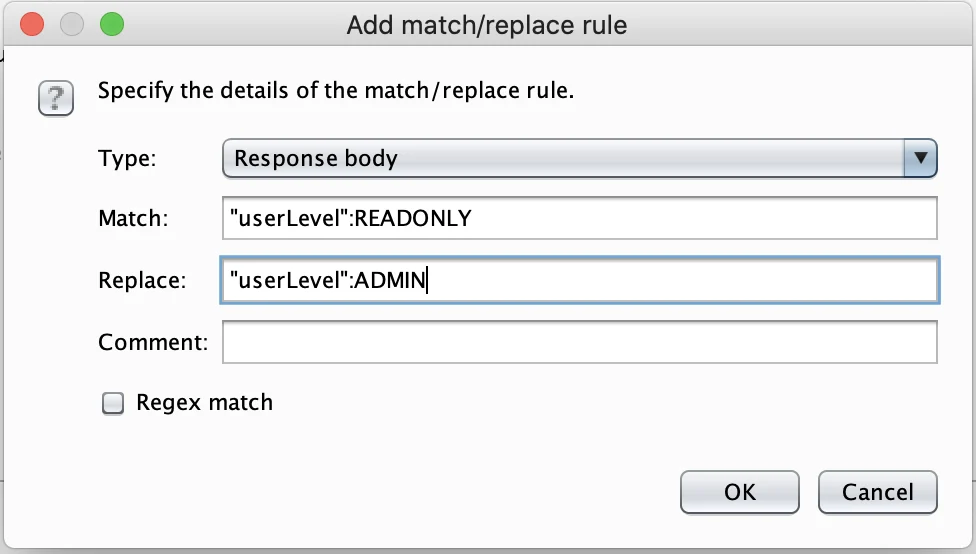
In that response the client assumes the user is in READONLY mode with a BASIC subscription. A match and replace rule that rewrites "userLevel":READONLY to "userLevel":ADMIN tricks the client into displaying UI elements meant only for administrators.
Step 2: Extend the rule to the subscription level
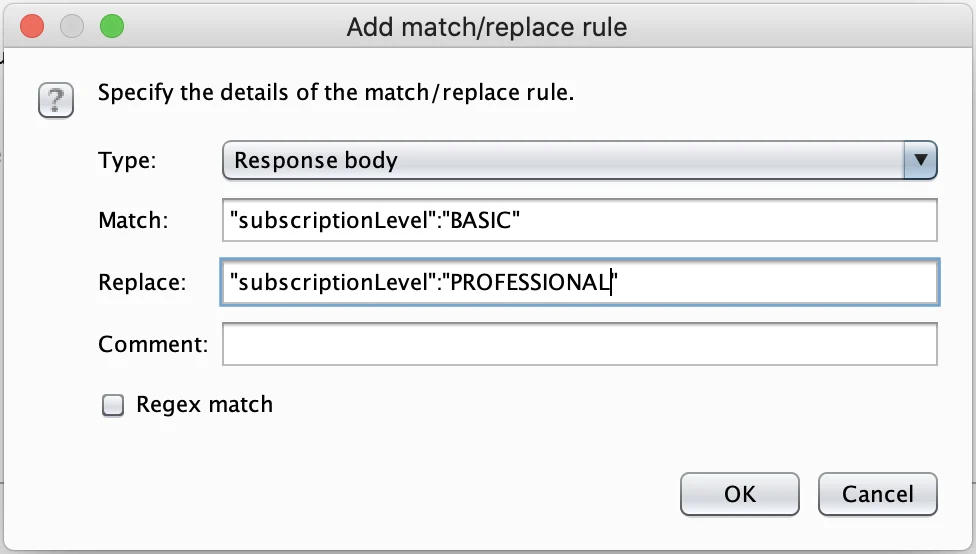
The researcher goes one step further and adds a rule for the subscription level, so the client also shows UI elements meant only for a PROFESSIONAL subscription.
With both rules in place, the response the client receives looks like this:
HTTP/1.1 200 OK

{"data":{"currentUser":{"userData":[{"userLevel":ADMIN,"subscriptionLevel":"PROFESSIONAL"}]}}}
The report also mentions a related trick from @daeken: using match and replace to inject payloads into forms instead of typing out the entire payload each time.
Step 3: Apply FALSE2TRUE to New Relic
Back on New Relic, the researcher configured a match and replace rule that changed all false values in responses to true. The baseline, logging in without FALSE2TRUE, is the New Relic landing page:
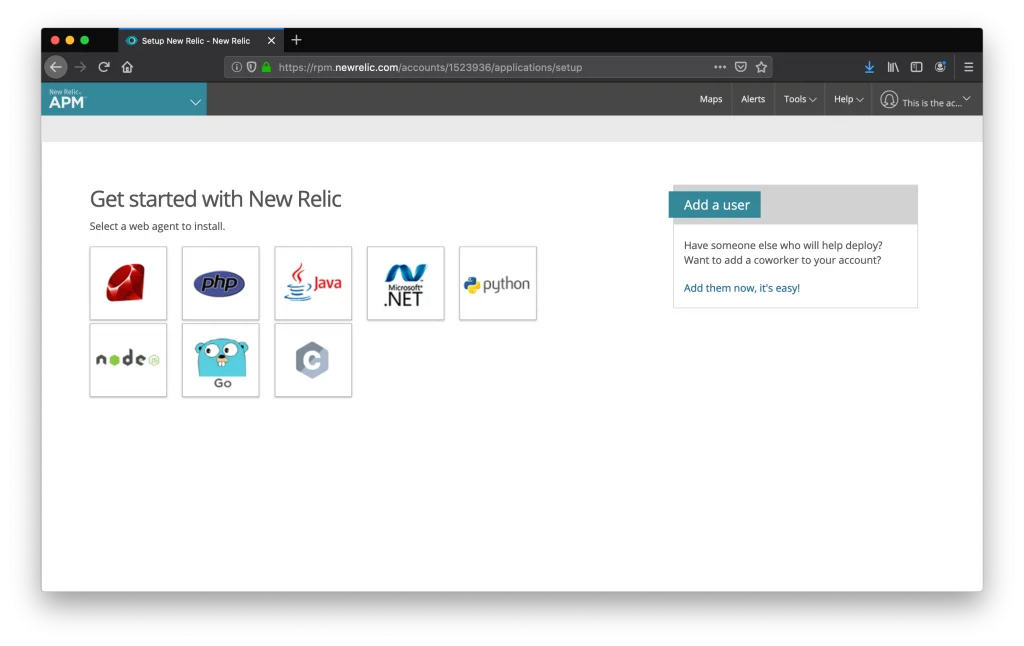
With the rule active, additional UI elements appeared on the page:
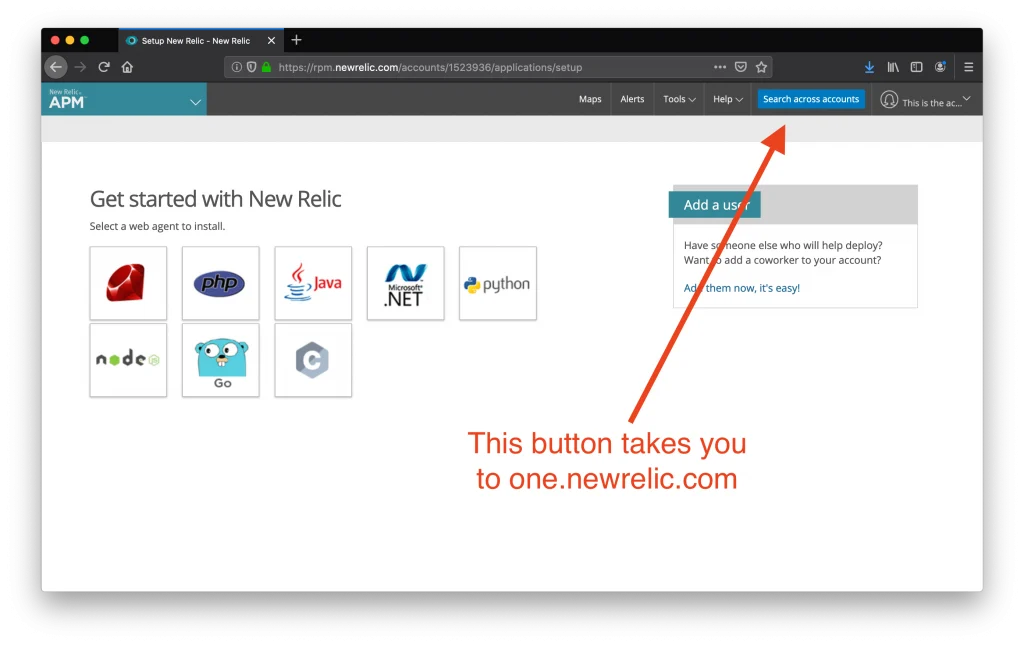
Among them was a Search across accounts button leading to one.newrelic.com. A screenshot in the post shows HackerOne report #520623, covering access to one.newrelic.com without the proper feature flags.
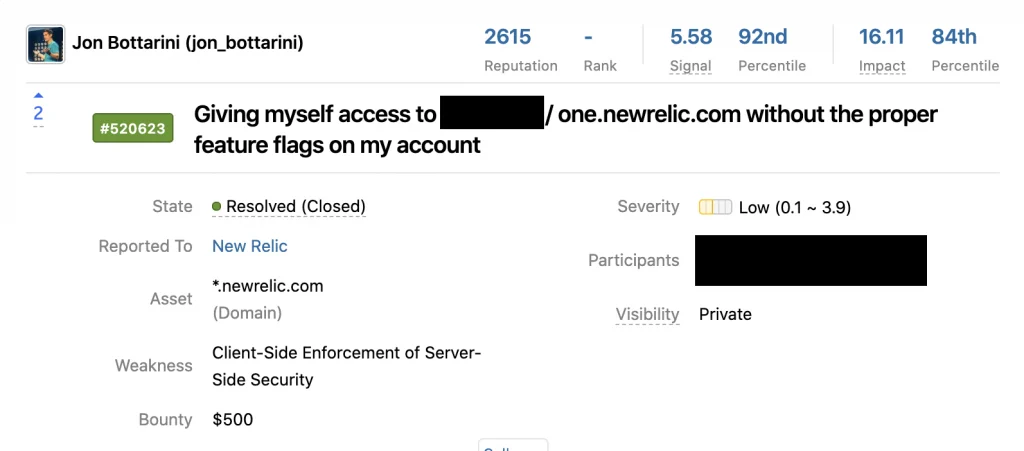
The rule gave him access to a completely unreleased feature with a large amount of new functionality, and he found other bugs in it as well, all before the public release.
Root cause
The client trusted boolean flags delivered in the server response to decide which UI elements to render, and the server sent those flags to users who should not have had the corresponding feature. Flipping the values in transit was enough to make the client render the gated UI. The report does not describe any server-side authorisation check that would have stopped the client from acting on the flipped values, so the gating appears to have been enforced only in the client, with the server relying on the flag values it sent rather than re-checking entitlement on each request. That reading is likely, since the report shows only the response rewriting and the resulting UI, not the follow-up requests.
Impact
The researcher gained access to a completely unreleased feature before its public announcement, and used that access to find further bugs in the new functionality prior to release. The report does not state what those additional bugs were or what data or actions the unreleased feature exposed.
The researcher adds a warning: be careful when using the FALSE2TRUE trick on large websites, because you can really mess up your session, or even your entire account.
Fix
The New Relic security team reviewed the post in full before publication and agreed to let the researcher use one of his reports as an example.
Variants to test
- Boolean feature flags in JSON responses. Add a match and replace rule that rewrites
falsetotrueacross response bodies and reload the application. A positive result is new UI appearing, as with theSearch across accountsbutton pointing atone.newrelic.com. - Role and permission fields. Rewrite values such as
READONLYtoADMINin user detail responses. A positive result is administrator-only controls rendering in the client; confirm whether the corresponding server endpoints actually accept the actions. - Subscription or plan fields. Rewrite
BASICtoPROFESSIONALalongside the role change. A positive result is paid-tier UI appearing for an account that should not have it. - Form payload injection. Use match and replace to insert a payload into form fields automatically, as described by @daeken, to speed up repeated testing of the same input.
- Flags that never change. Watch for a flag that always returns the same value for your account; that constancy is what marked the New Relic flag as worth flipping.
What happened, in plain words
New Relic is a company that makes software for watching how other software behaves: dashboards, charts, alerts when something goes wrong. On 14 May, its CEO Lew Cirne stood on a stage and announced a brand new version of the product, called New Relic One, with a fresh design and better charts. Investors and customers were surprised.
Jon Bottarini (@jon_bottarini) was not surprised. He had already seen the new platform months earlier, while taking part in New Relic's bug bounty program. A bug bounty program is a deal a company offers to outside researchers: if you find a security problem in our systems and report it privately, we pay you a reward (the bounty) instead of calling lawyers.
How did he see an unreleased product months early? Not by breaking into a server. He used a trick that works entirely inside his own browser traffic, which he calls the FALSE2TRUE trick. The idea: when a website's server sends a page or a chunk of data back to your browser, some of that data is a simple on/off switch, the word false or the word true. If you intercept that reply on its way to your browser and quietly change false to true, the browser believes the switch is on, and it may show you buttons, menus and pages that were meant to stay hidden.
This article walks through that trick from zero: what the tools are, what the requests and responses look like, why each step was taken, and what he found at New Relic. No prior security knowledge is assumed.
The pieces you need to understand first
Before the steps, here are the basic ideas, in everyday terms.
- Your browser and the server. When you open a website, your browser (Chrome, Firefox, Safari) asks a computer somewhere else, the server, for things: the page, images, data. The server answers. This back and forth is the whole of the web.
- A request. The message your browser sends to the server. It says what it wants: "give me this page", "save this form", "tell me about my account".
- A response. The message the server sends back. It contains the thing you asked for, plus some bookkeeping information.
- An API. A way for software to talk to software, rather than a human clicking pages. Instead of a full web page with buttons, the server sends raw data, usually in a format called JSON (explained below), and the browser-side code turns that data into what you see. Think of a restaurant: the menu and the dining room are the website you see, the kitchen is the server, and the API is the waiter carrying orders and plates between them. You never walk into the kitchen yourself; you talk to the waiter.
- JSON. A simple text format for data, made of names and values in curly braces.
{"colour":"red"}means "the thing called colour has the value red". It is just structured text, readable by humans and machines. - A cookie. A small piece of text your browser stores for a website and sends back with every request to that site. It is how the site recognises you between page loads. A cookie often holds a session identifier: a long random string that acts like a wristband at an event. You show the wristband, the staff know who you are without asking for your name every time. If someone else copies your wristband, they can pretend to be you, which is why cookies are sensitive and are redacted wherever they appear in examples.
- A feature flag. A switch inside a product that turns a feature on or off for certain users. Companies use them to release things gradually: the code for a new feature ships to everyone, but the switch is off except for chosen accounts. It is like a shop that has already built a new upstairs floor but keeps the door locked until opening day. The switch value often travels to your browser as
trueorfalse. - Client-side versus server-side checks. A check done in your browser (client-side) is a rule written into the page's code: "if the switch is true, show this button". A check done on the server is a rule enforced in the kitchen: "this account is not allowed this dish, refuse the order". Client-side checks are easy for a user to influence, because the browser is on the user's own machine. Server-side checks are the real security boundary.
- Privilege escalation. Gaining more rights than you were given. In a normal life comparison: your office badge opens your floor; privilege escalation is finding a way to make the lift believe your badge also opens the executive floor. It can happen because the system trusts something the user can change.
- Intercepting proxy. A program that sits between your browser and the internet, like a postal worker who opens every letter, reads it, and can rewrite it before delivering it. You configure your browser to send all its traffic through the proxy. This is how a researcher sees and edits requests and responses.
- Burp Suite. A popular intercepting proxy used by security researchers. It has many features; this article only uses one, called match and replace.
- Match and replace rule. A find-and-replace instruction that Burp applies automatically to traffic passing through it. You give it a piece of text to look for (the match) and a piece of text to put in its place (the replace). Every time the pattern appears, Burp swaps it, without you doing anything by hand. It is the same idea as find-and-replace in a word processor, except it runs on network traffic as it flows past.
Where the trick lives in Burp
The only tool used here is Burp Suite, and the only feature is the match and replace rule. The rule is not on the main screen; it lives under the Proxy settings, in the Options tab.
The screenshot shows the Burp Proxy options page with the Match and Replace section highlighted, which is where you add a rule: the text to find, the text to substitute, and whether the rule applies to requests, responses, or both. The researcher points readers who are new to the feature to an external article on writing these rules. Beyond being logged in to a New Relic account whose responses carried a feature flag that always came back false, no other preconditions are described.
Why flip false to true at all
The reasoning is simple once you know about feature flags. Many parts of a modern web application are switched on or off by boolean values (true/false values) that the server sends down inside a response. The browser-side code reads those values and decides what to draw. If the value says false, the button is not drawn; if it says true, the button appears.
So if you can change the value in the response before your browser reads it, the browser may draw things that were never meant for you: beta features, admin menus, links to other products. The researcher stresses that this is not a secret; it has been a known method for a long time. He quotes a public tip from BugBountyHQ that describes exactly this: match and replace of false to true as a quick way to find hidden functionality and endpoints without having to read through the site's JavaScript code by hand.
Why does this matter for a bug hunter? Because bug bounties are often a race. The first person to find and report a problem gets the reward. A trick that reveals hidden surfaces in seconds, instead of hours of reading code, is valuable for that reason alone.
Step 1: A generic example of privilege escalation
Before showing the New Relic case, the report walks through a made-up example so the mechanics are clear. Imagine a server that checks the permissions of the user tied to the current session. The browser asks the server for the current user's details, and the request might look like this:
POST /api/getUserDetails HTTP/1.1
Host: myserver.jonbottarini.com
Cookie: mycookies

{"user":"123"}
Line by line, in plain words:
POST /api/getUserDetails HTTP/1.1is the first line of the request.POSTis the type of request, used when you are sending data rather than just asking for a page./api/getUserDetailsis the address on the server being asked, and the name suggests it returns details about a user.HTTP/1.1is the version of the language the request is written in.Host: myserver.jonbottarini.comtells the server which website name the request is for. One server can host many sites, so this line says which one.Cookie: mycookiesis where the browser attaches its wristband, the session identifier. In a real capture this would be a long secret string; here it is a placeholder, and in a published report it would be redacted.- The blank line separates the headers (the bookkeeping lines above) from the body (the actual content).
{"user":"123"}is the body: a small JSON object asking about the user with identifier 123.
The server's answer might look like this:
HTTP/1.1 200 OK

{"data":{"currentUser":{"userData":[
{"userLevel":READONLY,"subscriptionLevel":"BASIC"}
]}}}
Line by line:
HTTP/1.1 200 OKis the status line.200is the standard code for "everything went fine", andOKis its human-readable label.- The blank line again separates headers from body.
- The body is JSON. Reading from the outside in: there is a
dataobject, inside it acurrentUserobject, inside that auserDatalist, and inside the list one entry with two fields. "userLevel":READONLYsays this user's permission level is read-only, meaning they can look but not change things."subscriptionLevel":"BASIC"says the user is on the basic paid plan, not a higher tier.
Now the key point. The browser-side code reads this response and assumes the user is in READONLY mode with a BASIC subscription, so it draws the interface accordingly: no editing controls, no premium features. If we add a match and replace rule that rewrites "userLevel":READONLY to "userLevel":ADMIN, the browser is told the user is an administrator, and it draws the administrator-only interface elements.
The screenshot shows the rule itself: the text to match on the left, the replacement on the right, turning the read-only level into the admin level.
Why take this step? Because it demonstrates the general shape of the problem before applying it to a real target. The client trusts a value in the response to decide what to show. Change the value, change what is shown. Whether that is a real vulnerability depends on a question the example does not answer: does the server also refuse the actions when they are attempted? The report shows only the display side.
Step 2: Extend the rule to the subscription level
The researcher goes one step further and adds a second rule for the subscription level, so the browser also shows interface elements meant only for a PROFESSIONAL subscription.
The screenshot shows the second rule, rewriting the basic subscription value to the professional one.
Why bother with a second field? Because products often gate different features on different values. Admin rights might unlock user management, while a higher subscription might unlock reports or extra data. Changing both at once gives the widest view of what the interface can show, which is useful when you are hunting for hidden functionality.
With both rules in place, the response the browser receives looks like this:
HTTP/1.1 200 OK

{"data":{"currentUser":{"userData":[{"userLevel":ADMIN,"subscriptionLevel":"PROFESSIONAL"}]}}}
Line by line:
HTTP/1.1 200 OKis the same successful status line as before.- The body is the same structure as before, but the two values have changed:
"userLevel":ADMINinstead ofREADONLY, and"subscriptionLevel":"PROFESSIONAL"instead of"BASIC". Everything else is untouched. The browser has no way to know the values were edited in transit; it simply reads what it was given.
The report also mentions a related trick from @daeken: using match and replace to inject payloads into forms instead of typing out the entire payload each time. A payload here means the test input a researcher puts into a form field to see how the site reacts. If you test the same input over and over, a rule that inserts it automatically saves a lot of typing.
Step 3: Apply FALSE2TRUE to New Relic
Back to the real target. While using the FALSE2TRUE trick against New Relic, the researcher noticed a feature flag on his account that was always returning false. That constant value was the signal. A flag that never changes for a given user is a candidate for a client-side gate, and flipping it in the response costs nothing to try.
Why is the constant value the clue? Because a flag that sometimes flips on its own is probably tied to real behaviour you have already triggered. A flag that is always off, no matter what you do, suggests a feature that exists in the code but is being held back from you. That is exactly the kind of door worth pushing.
He configured a match and replace rule that changed all false values in responses to true. The baseline, logging in without FALSE2TRUE, is the New Relic landing page:
The screenshot shows the ordinary "Get started" setup page a user sees after logging in, with the feature flag still off.
With the rule active, additional interface elements appeared on the page:
The screenshot shows the same setup page, now with an extra Search across accounts button that leads to one.newrelic.com. That address is a different product surface.
A screenshot in the post shows HackerOne report #520623, covering access to one.newrelic.com without the proper feature flags. HackerOne is a platform where companies run their bug bounty programs and where reports are filed and tracked.
The screenshot shows the filed report, titled around accessing one.newrelic.com without the proper feature flags.
The rule gave him access to a completely unreleased feature with a large amount of new functionality, and he found other bugs in it as well, all before the public release. The report does not say what those additional bugs were, or what data or actions the unreleased feature exposed.
Why it worked
The browser trusted boolean flags delivered in the server response to decide which interface elements to draw, and the server sent those flags to users who should not have had the corresponding feature. Flipping the values in transit was enough to make the browser draw the gated interface.
The report does not describe any server-side authorisation check that would have stopped the browser from acting on the flipped values. The likely reading is that the gating was enforced only in the browser, with the server relying on the flag values it had sent rather than re-checking entitlement on each request. That reading is likely rather than proven, because the report shows only the response rewriting and the resulting interface, not the follow-up requests.
This is the heart of the lesson. A lock that exists only in the browser is not a lock, because the browser belongs to the user. The real question for any hidden feature is not "can I make the button appear?" but "can I make the server do the thing behind the button?".
What the impact was
The researcher gained access to a completely unreleased feature before its public announcement, and used that access to find further bugs in the new functionality before release. The bounty recorded for the report is 500.00 USD.
He adds a warning: be careful when using the FALSE2TRUE trick on large websites, because you can really mess up your session, or even your entire account. This is practical advice. If you rewrite every false to true on a big site, you can really mess up your session, or even your entire account.
What the fix would be
In the restaurant comparison: do not rely on the menu not listing the dish; have the kitchen refuse the order.
The New Relic security team reviewed the post in full before publication and agreed to let the researcher use one of his reports as an example.
Things to try yourself
If you want to practise the idea, these are the variations the report lists. They are described for a beginner, but only test on systems you own or that explicitly invite testing through a bug bounty program.
- Boolean feature flags in JSON responses. Add a match and replace rule that rewrites
falsetotrueacross response bodies and reload the application. A positive result is new interface appearing, as with theSearch across accountsbutton pointing atone.newrelic.com. - Role and permission fields. Rewrite values such as
READONLYtoADMINin user detail responses. A positive result is administrator-only controls rendering in the browser; then check whether the corresponding server endpoints actually accept the actions. - Subscription or plan fields. Rewrite
BASICtoPROFESSIONALalongside the role change. A positive result is paid-tier interface appearing for an account that should not have it. - Form payload injection. Use match and replace to insert a payload into form fields automatically, as described by @daeken, to speed up repeated testing of the same input.
- Flags that never change. Watch for a flag that always returns the same value for your account; that constancy is what marked the New Relic flag as worth flipping.
Glossary
- API: a way for software to talk to software, sending raw data instead of full web pages.
- Boolean: a value that is either true or false.
- Bug bounty program: a scheme where a company pays outside researchers for privately reported security problems.
- Burp Suite: a tool that sits between your browser and the internet so you can inspect and edit traffic.
- Client-side: happening in your own browser, on your own machine.
- Cookie: a small piece of text a site stores in your browser and gets back with each request, often holding a session identifier.
- Entitlement: the right an account has to use a particular feature or plan.
- Feature flag: an on/off switch inside a product that controls whether a feature is shown to a given user.
- HackerOne: a platform where companies run bug bounty programs and reports are filed and tracked.
- Header: a bookkeeping line in a request or response, such as the host name or the cookie.
- HTTP: the language browsers and servers use to exchange requests and responses.
- Intercepting proxy: a program that sits between your browser and the internet and lets you read and rewrite traffic.
- JSON: a simple text format for structured data, made of names and values in curly braces.
- Match and replace rule: an automatic find-and-replace that a proxy applies to traffic passing through it.
- Payload: the test input a researcher sends to see how a system reacts.
- Request: the message your browser sends to a server asking for something.
- Response: the message a server sends back.
- Server-side: happening on the server, where the user cannot directly change it.
- Session: the period during which a site remembers who you are, usually via a cookie.
- Status code: a number in a response saying how the request went, such as
200for success. - UI (user interface): the buttons, menus and pages you see and click.