Approval app's file-freshness check can be bypassed by omitting the etag parameter, allowing approval of unreviewed file changes
The approval app only checked a file's etag against the reviewed version when the etag field was present in the approve request. An attacker could strip that field so a file modified after review was still approved or rejected.

- Triaged in 4 hours
- Fixed in 48 days
- Paid in 6 months
- Disclosed after 6 months
Summary by the program
Advisory: https://github.com/nextcloud/security-advisories/security/advisories/GHSA-7php-cxrr-v4m3
The report
Summary:
The approval workflow includes a protection intended to prevent an approver from approving or rejecting a file whose contents changed after review, using the file etag. However, the backend only enforces this check when the etag parameter is present and non-empty. An attacker can intercept the request from the UI, remove the etag field, and successfully approve or reject a file even after it was modified.
This breaks the integrity of the approval process because the approver may approve a different file state than the one they reviewed. ##Prerequisites
A valid approval workflow exists. test1 is allowed to request approval. test2 is allowed to approve. test2 has access to the pending file.
Steps To Reproduce:
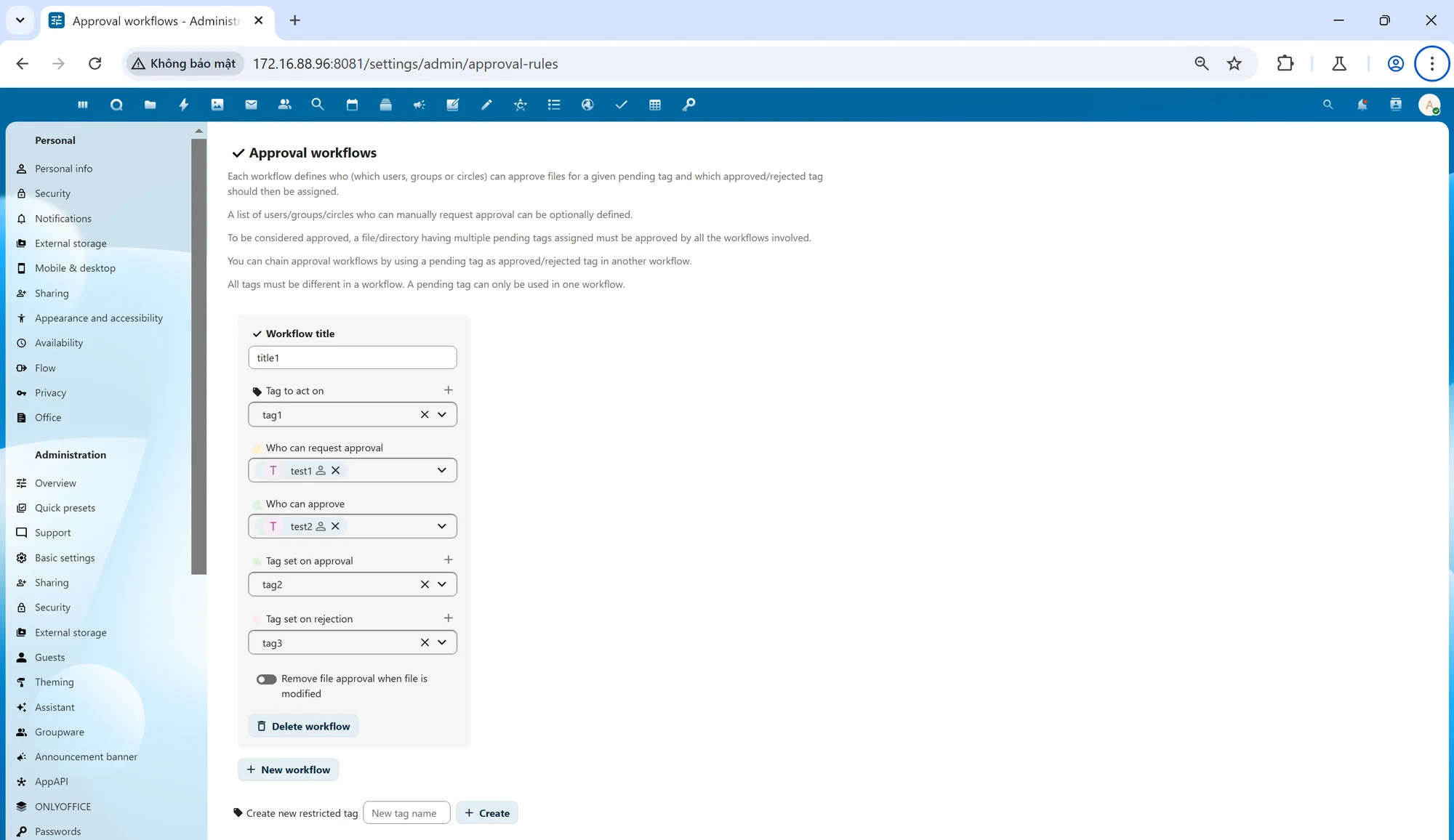
- Create an approval workflow:
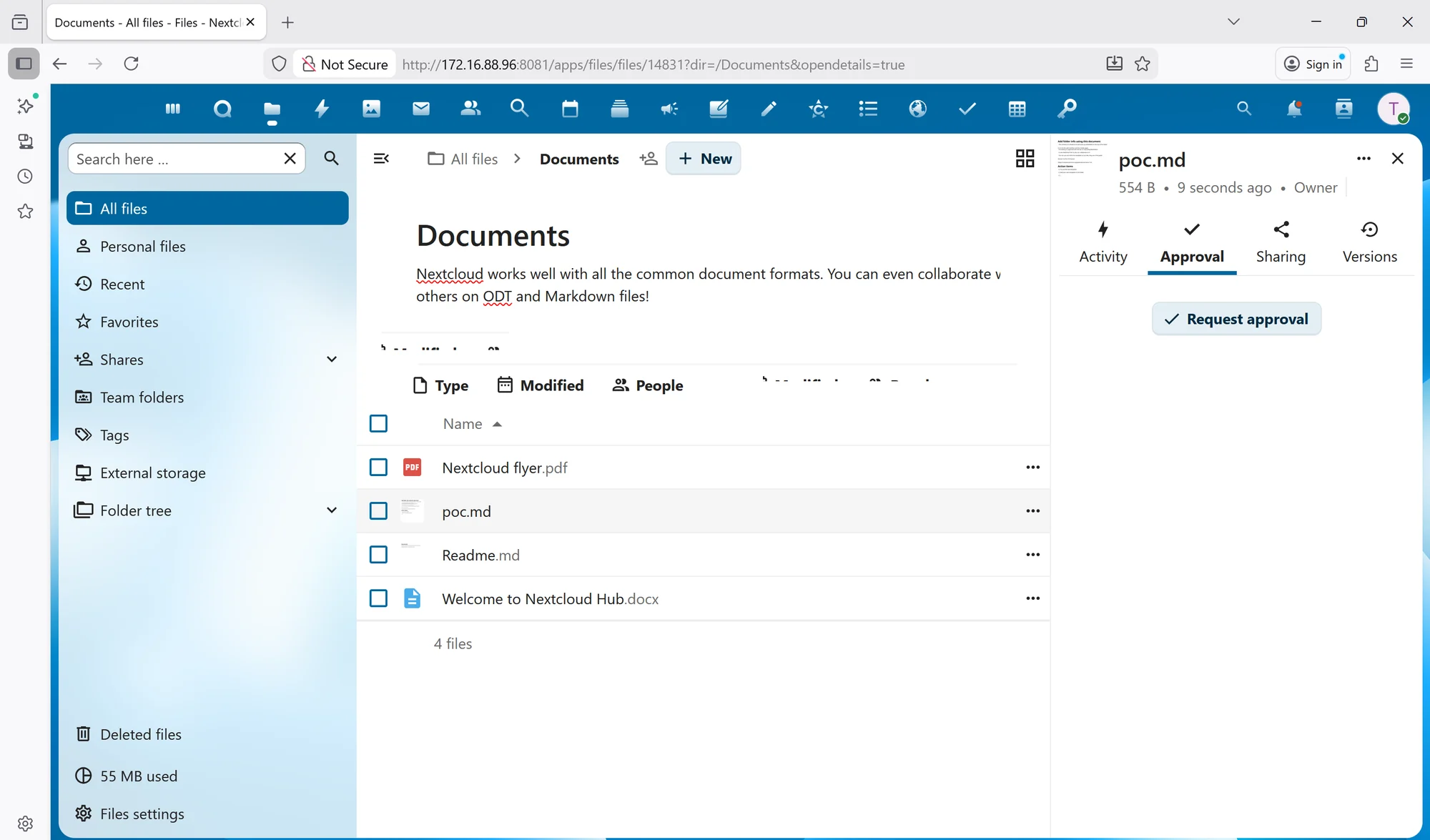
- Log in as test1 and upload a file such as poc.md
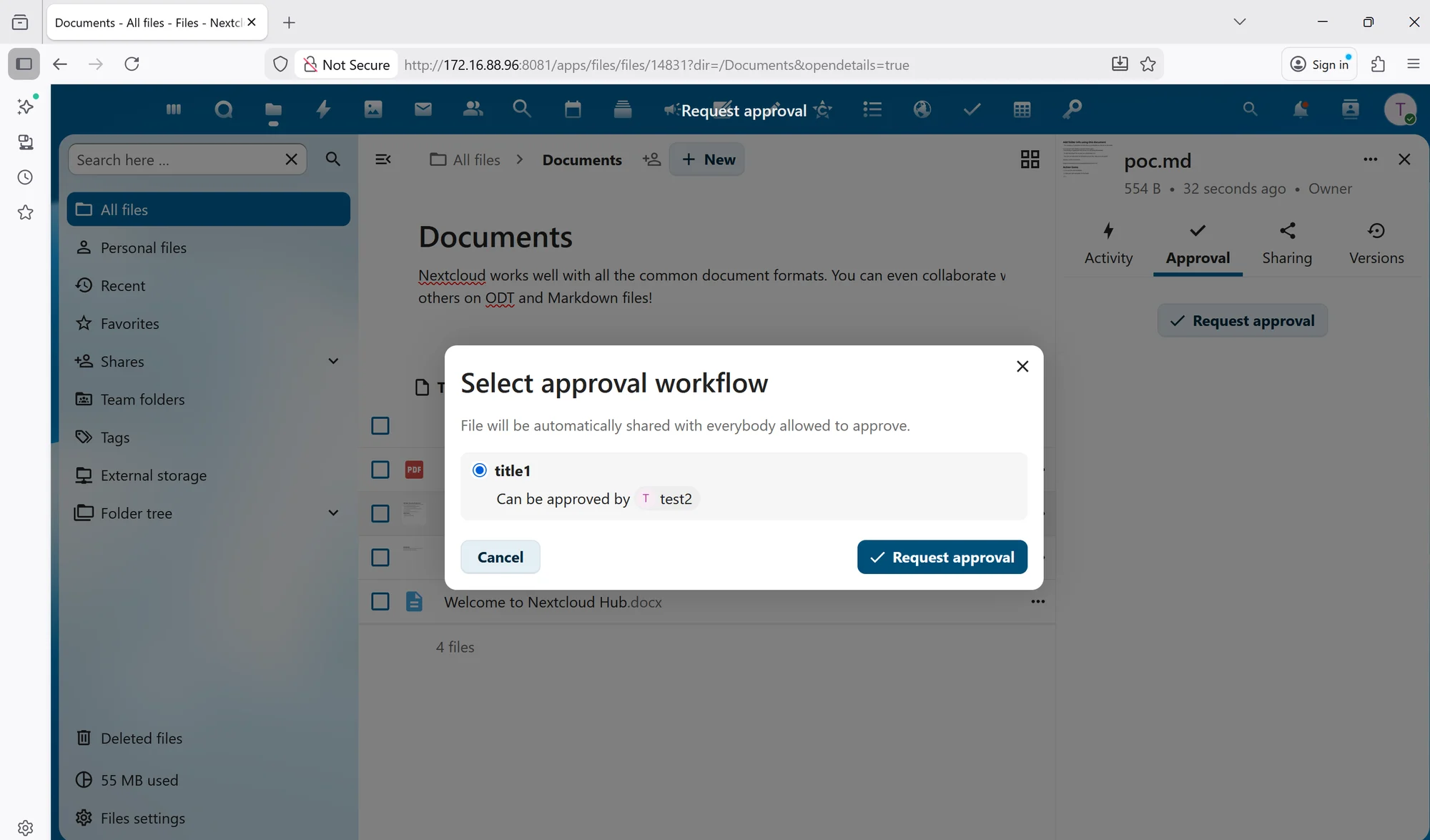
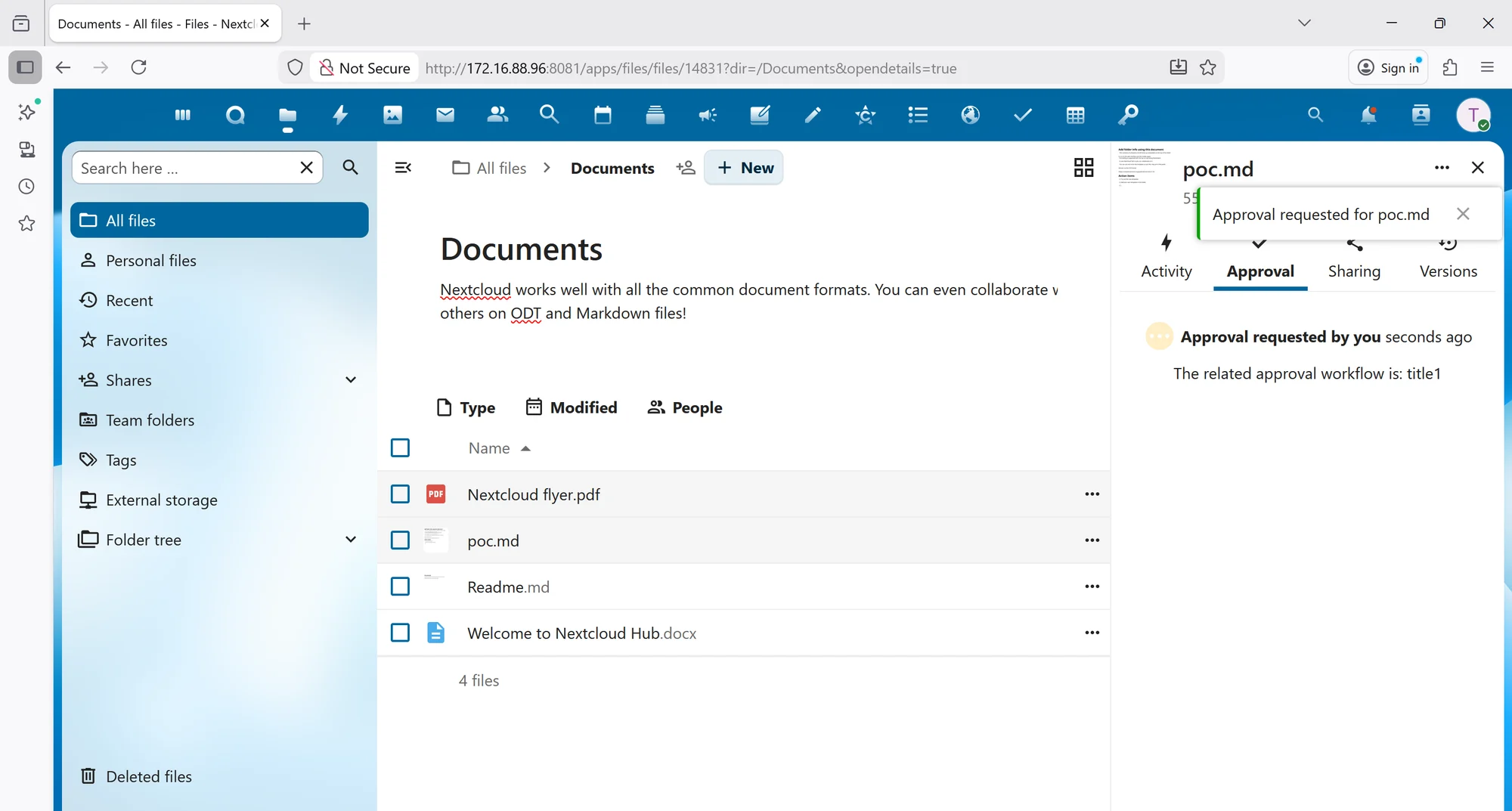
- Request approval for that file.
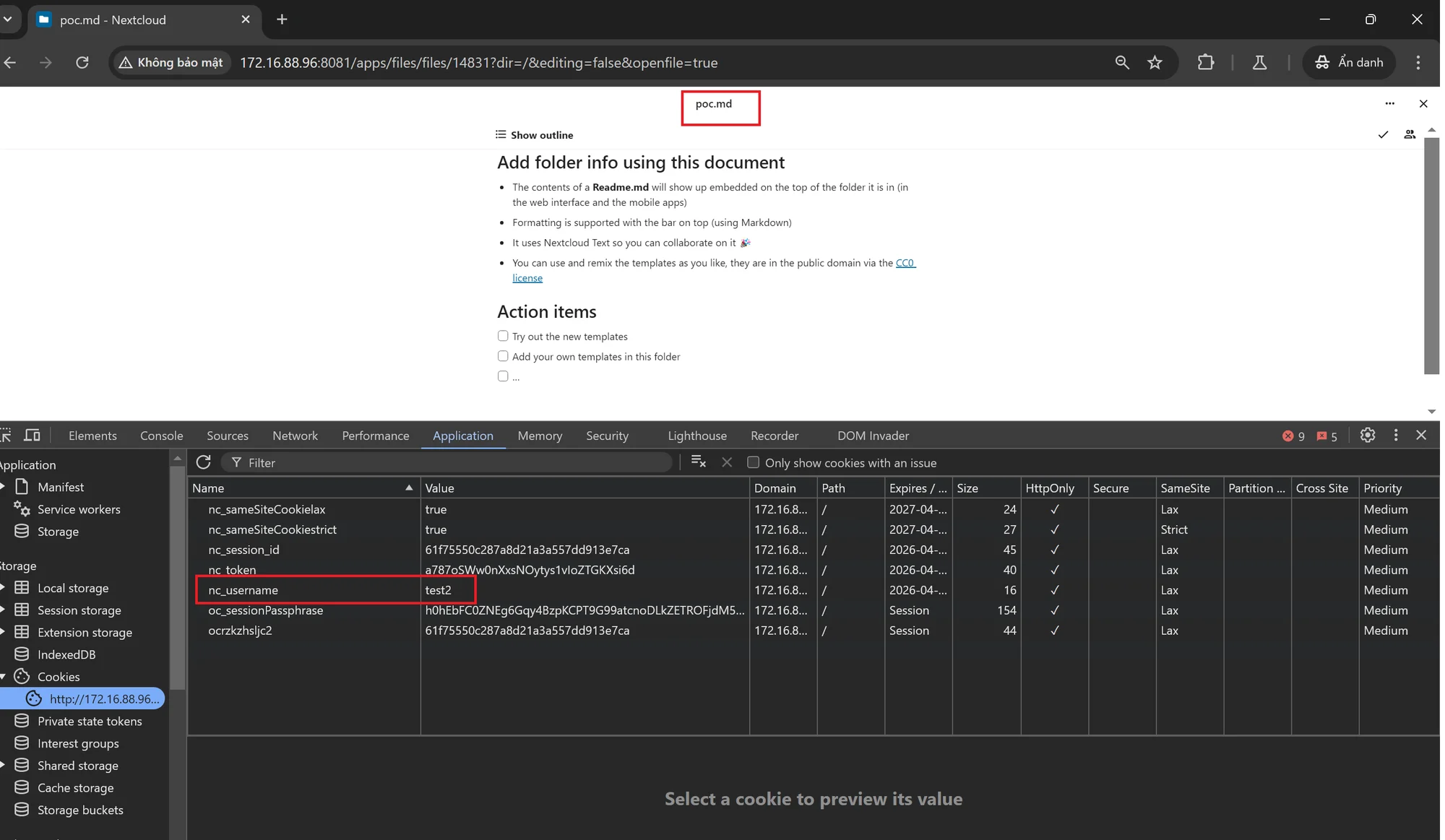
- Log in as test2 and review the file contents.
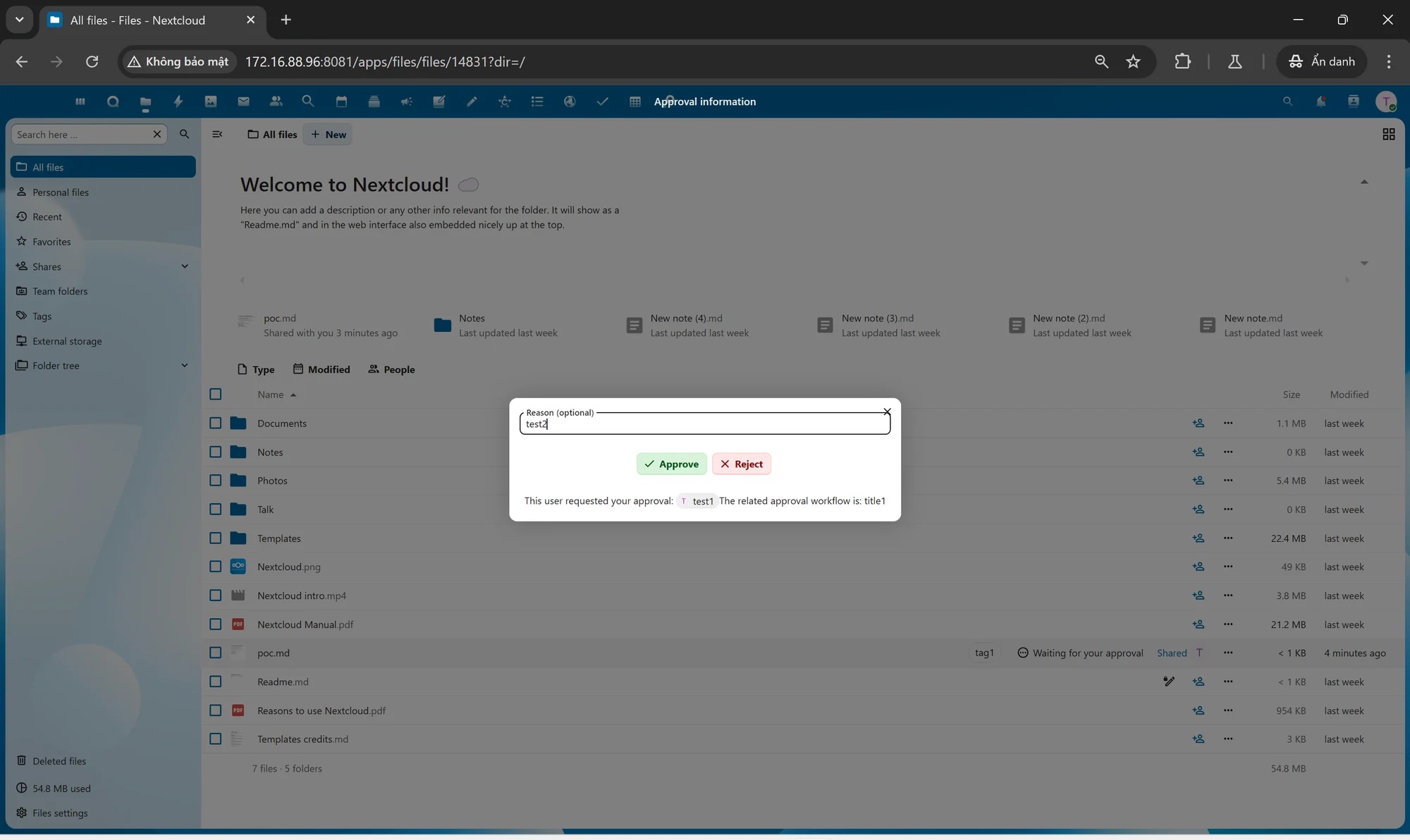
- As test2, click Approve and intercept the request with Burp
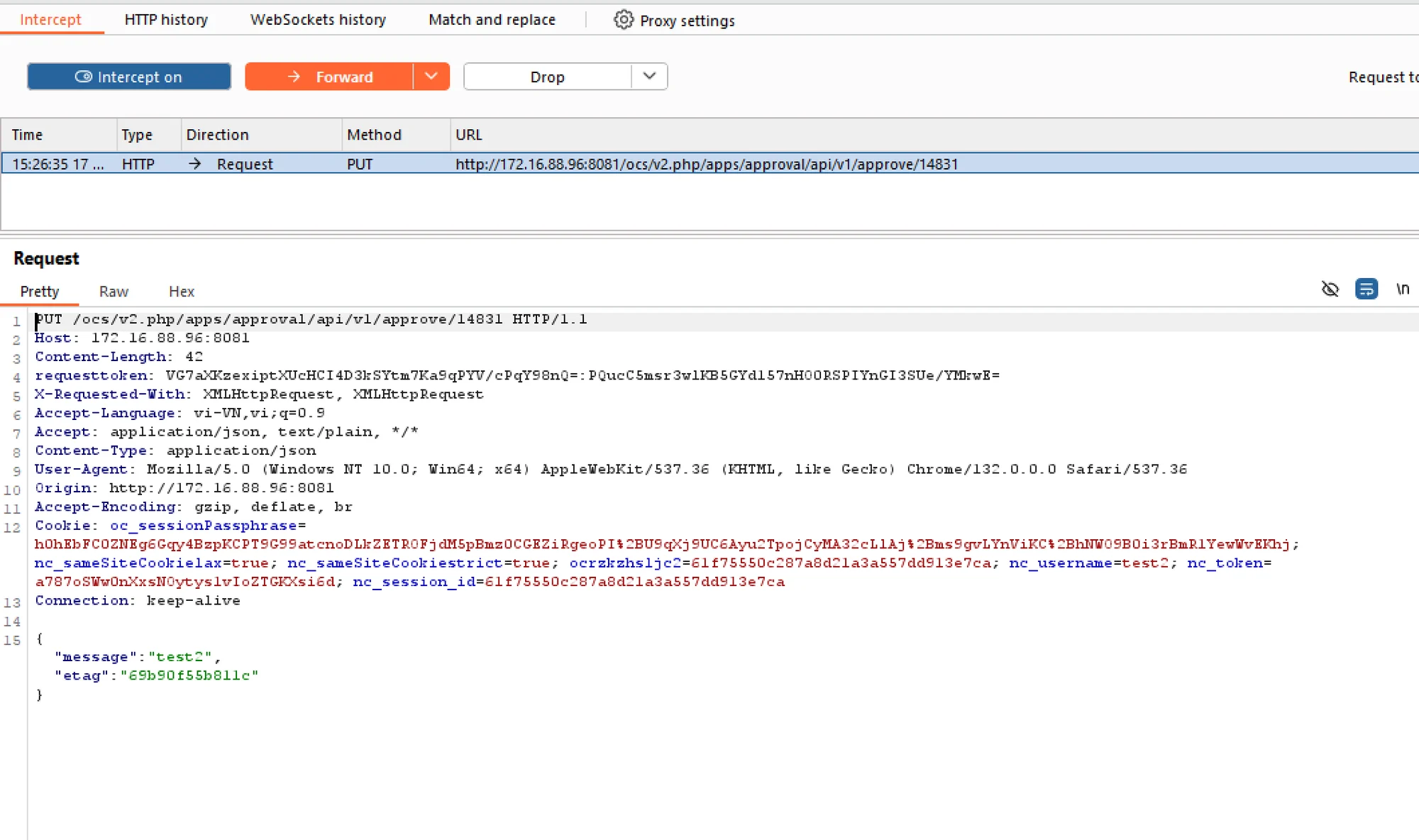
- Log back in as test1 and modify the file.
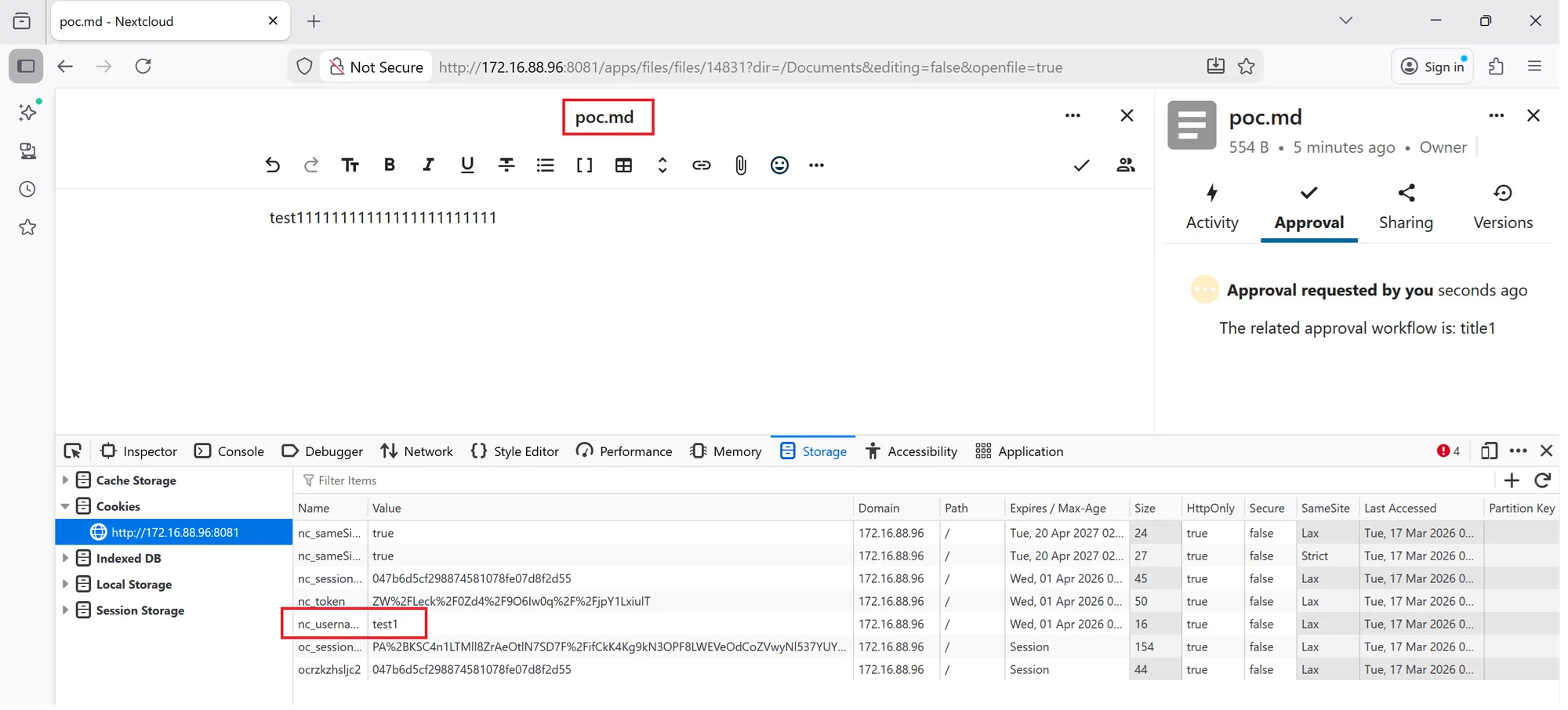
- As test2, It is unacceptable when content has just been edited.
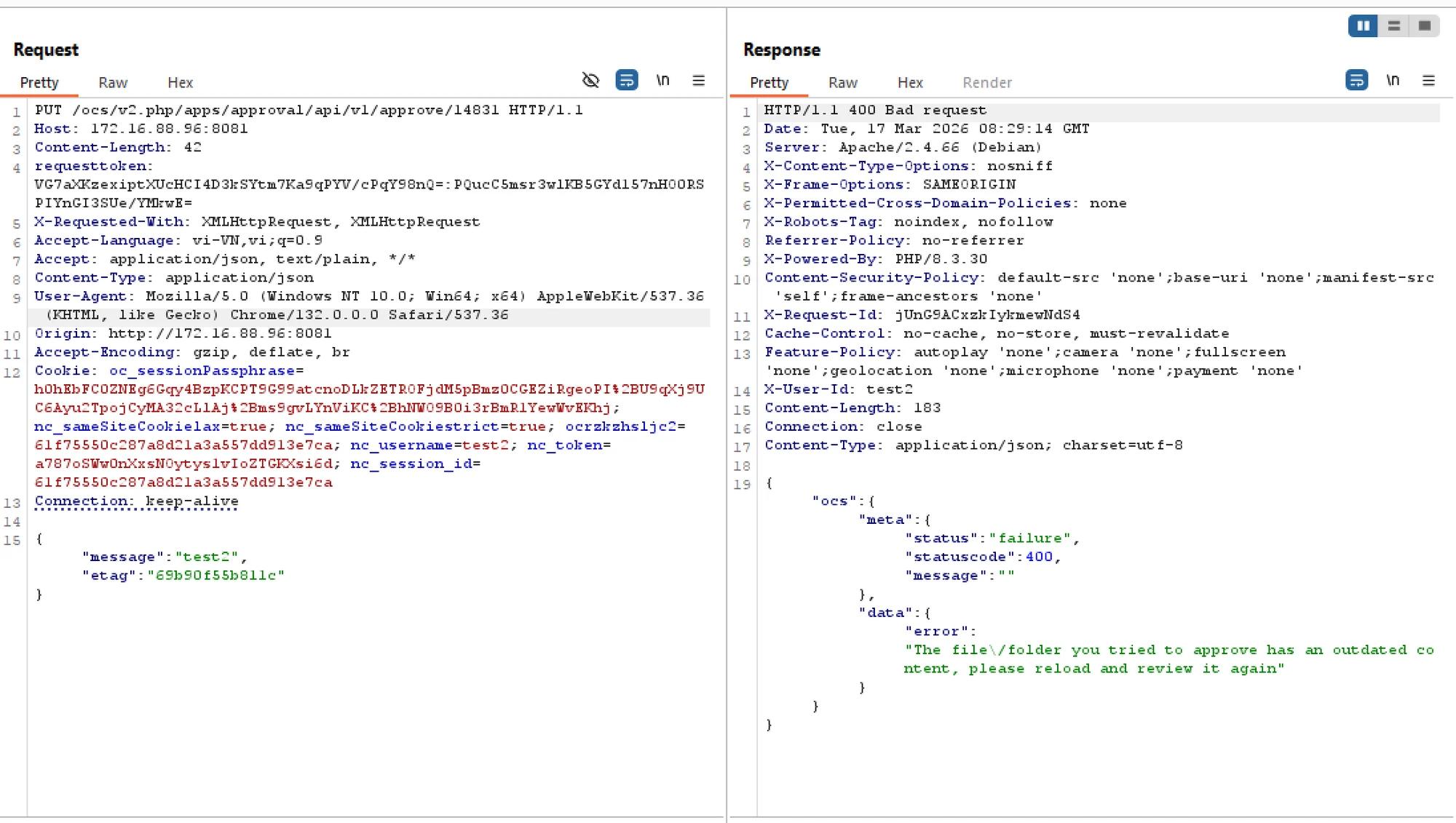
- As test2, remove the etag field from the JSON body and Forward the request.
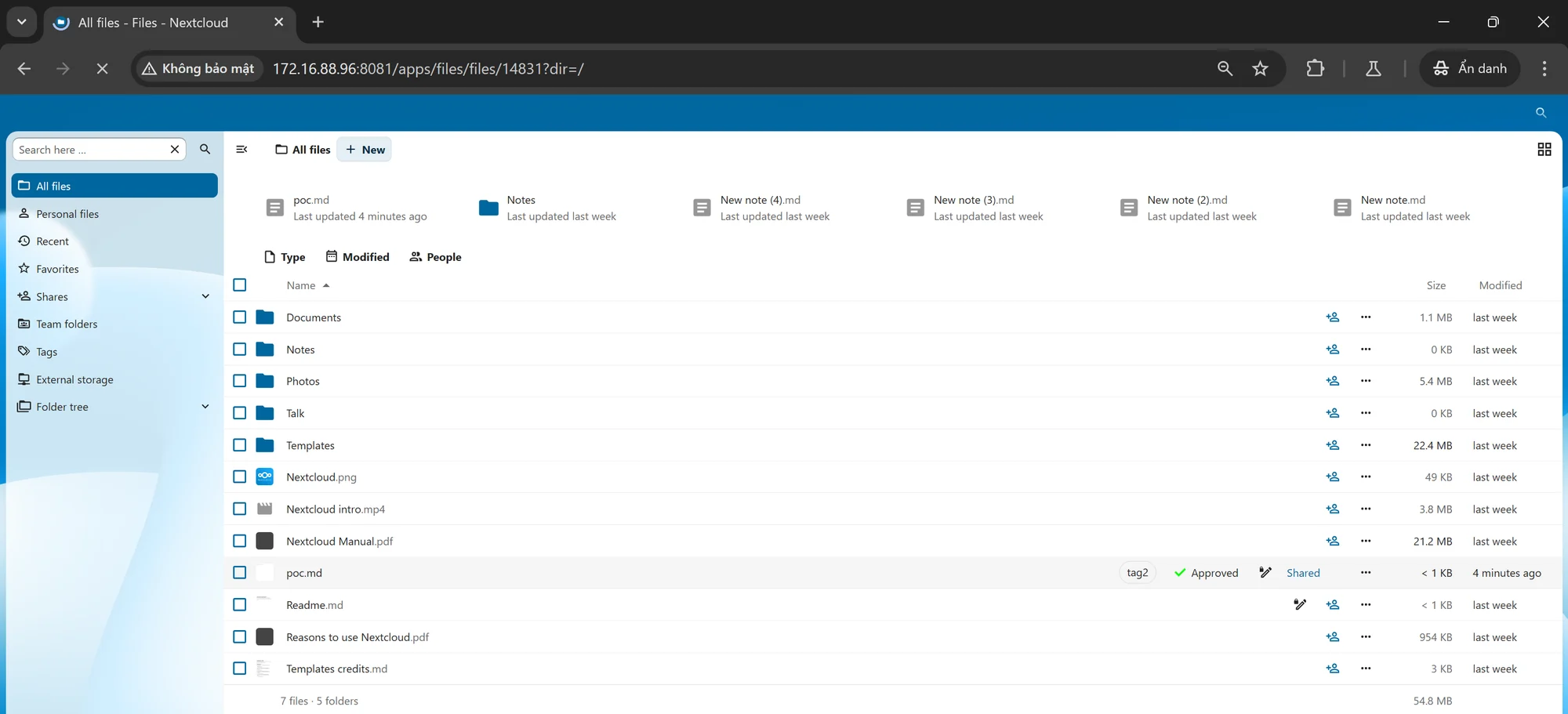
Verified PoC
PUT /ocs/v2.php/apps/approval/api/v1/approve/14831 HTTP/1.1
Host: 172.16.88.96:8081
Content-Length: 19
requesttoken: VG7aXKzexiptXUcHCI4D3kSYtm7Ka9qPYV/cPqY98nQ=:PQucC5msr3wlKB5GYd157nHO0RSPIYnGI3SUe/YMkwE=
X-Requested-With: XMLHttpRequest, XMLHttpRequest
Accept-Language: vi-VN,vi;q=0.9
Accept: application/json, text/plain, */*
Content-Type: application/json
User-Agent: Mozilla/5.0 (Windows NT 10.0; Win64; x64) AppleWebKit/537.36 (KHTML, like Gecko) Chrome/132.0.0.0 Safari/537.36
Origin: http://172.16.88.96:8081
Accept-Encoding: gzip, deflate, br
Cookie: oc_sessionPassphrase=h0hEbFC0ZNEg6Gqy4BzpKCPT9G99atcnoDLkZETROFjdM5pBmz0CGEZiRgeoPI%2BU9qXj9UC6Ayu2TpojCyMA32cLlAj%2Bms9gvLYnViKC%2BhNWO9B0i3rBmR1YewWvEKhj; nc_sameSiteCookielax=true; nc_sameSiteCookiestrict=true; ocrzkzhsljc2=61f75550c287a8d21a3a557dd913e7ca; nc_username=test2; nc_token=a787oSWw0nXxsNOytys1vIoZTGKXsi6d; nc_session_id=61f75550c287a8d21a3a557dd913e7ca
Connection: keep-alive

{"message":"test2"}
Observed response
HTTP/1.1 200 OK
Date: Tue, 17 Mar 2026 08:30:21 GMT
Server: Apache/2.4.66 (Debian)
X-Content-Type-Options: nosniff
X-Frame-Options: SAMEORIGIN
X-Permitted-Cross-Domain-Policies: none
X-Robots-Tag: noindex, nofollow
Referrer-Policy: no-referrer
X-Powered-By: PHP/8.3.30
Content-Security-Policy: default-src 'none';base-uri 'none';manifest-src 'self';frame-ancestors 'none'
X-Request-Id: 8xMLCrwKUw0gFWKsJVTu
Cache-Control: no-cache, no-store, must-revalidate
Feature-Policy: autoplay 'none';camera 'none';fullscreen 'none';geolocation 'none';microphone 'none';payment 'none'
X-User-Id: test2
Content-Length: 74
Keep-Alive: timeout=5, max=100
Connection: Keep-Alive
Content-Type: application/json; charset=utf-8

{"ocs":{"meta":{"status":"ok","statuscode":200,"message":"OK"},"data":[]}}
Impact
This vulnerability allows bypassing the content freshness protection in the approval workflow. In practice, it can lead to:
- Approval of a file version different from the one reviewed
- Loss of integrity in internal sign-off or approval processes
- Approval of altered compliance, legal, financial, or release artifacts
- Abuse by a requester who modifies the file after review but before final approval
If this app is used in sensitive approval workflows, the impact may be higher depending on deployment context.
Context
Nextcloud ships an Approval app (nextcloud/approval) that adds a review step to file workflows: a requester asks for approval of a file, and a designated approver reviews the contents and then approves or rejects it. Because the approver's decision is meant to apply to a specific version of the file, the workflow includes a freshness protection built on the file etag. The idea is that if the file's contents change after review, the etag no longer matches and the approval or rejection is refused.
The report shows that this protection is only enforced when the client sends the etag parameter, and that it is non-empty. Removing the field from the request body is enough to approve a file whose contents changed after the approver looked at it.
Setup
The researcher used two accounts with distinct roles:
test1, allowed to request approval.test2, allowed to approve, with access to the pending file.
A valid approval workflow had to exist before testing. Requests were captured and modified with Burp. The proof of concept was run against a host on port 8081; the response headers show Apache/2.4.66 (Debian) and PHP/8.3.30, and the request carries a Chrome 132 user agent on Windows.
Finding it
The freshness check depends on a value supplied by the client. The backend only enforces it when the etag parameter is present and non-empty, so a request that simply omits the field skips the comparison entirely. Since the approval request is issued from the UI and can be intercepted, the approver's browser is not a barrier: the etag can be deleted from the JSON body before the request is forwarded, and the server will process the approval as if nothing had changed.
Exploitation
Step 1: Create an approval workflow
An approval workflow is configured so that test1 can request approval and test2 can approve.
Step 2: Upload a file as the requester
Log in as test1 and upload a file, for example poc.md.
Step 3: Request approval
As test1, request approval for the uploaded file.
Step 4: Review the file as the approver
Log in as test2 and review the file contents. This is the version the approver believes they are signing off.
Step 5: Intercept the approval request
As test2, click Approve and intercept the outgoing request with Burp.
Step 6: Modify the file as the requester
Log back in as test1 and change the file. The contents now differ from what test2 reviewed.
Step 7: Observe the freshness warning
As test2, the application reports that the content has just been edited and that approving it is unacceptable. The protection is working as intended at this point.
Step 8: Remove the etag and forward
As test2, delete the etag field from the JSON body of the intercepted request and forward it. The verified proof of concept request is:
PUT /ocs/v2.php/apps/approval/api/v1/approve/14831 HTTP/1.1
Host: [redacted]:8081
Content-Length: 19
requesttoken: [redacted]
X-Requested-With: XMLHttpRequest, XMLHttpRequest
Accept-Language: vi-VN,vi;q=0.9
Accept: application/json, text/plain, */*
Content-Type: application/json
User-Agent: Mozilla/5.0 (Windows NT 10.0; Win64; x64) AppleWebKit/537.36 (KHTML, like Gecko) Chrome/[redacted] Safari/537.36
Origin: http://[redacted]:8081
Accept-Encoding: gzip, deflate, br
Cookie: [redacted]
Connection: keep-alive

{"message":"test2"}
The request targets the approval endpoint for a specific approval id (14831) and carries only a message in the JSON body; the etag field is gone. The request carries a requesttoken header and session cookies, and the response shows X-User-Id: test2. The server accepted it:
HTTP/1.1 200 OK
Date: Tue, 17 Mar 2026 08:30:21 GMT
Server: Apache/2.4.66 (Debian)
X-Content-Type-Options: nosniff
X-Frame-Options: SAMEORIGIN
X-Permitted-Cross-Domain-Policies: none
X-Robots-Tag: noindex, nofollow
Referrer-Policy: no-referrer
X-Powered-By: PHP/8.3.30
Content-Security-Policy: default-src 'none';base-uri 'none';manifest-src 'self';frame-ancestors 'none'
X-Request-Id: 8xMLCrwKUw0gFWKsJVTu
Cache-Control: no-cache, no-store, must-revalidate
Feature-Policy: autoplay 'none';camera 'none';fullscreen 'none';geolocation 'none';microphone 'none';payment 'none'
X-User-Id: test2
Content-Length: 74
Keep-Alive: timeout=5, max=100
Connection: Keep-Alive
Content-Type: application/json; charset=utf-8

{"ocs":{"meta":{"status":"ok","statuscode":200,"message":"OK"},"data":[]}}
The OCS envelope reports status: ok and statuscode: 200, and X-User-Id: test2 confirms the request was processed as the approver. The approval succeeded even though the file had been modified after review.
Root cause
The backend treats the etag as optional input rather than as a mandatory part of the approval decision. The check is conditional on the parameter being present and non-empty, so an absent etag is not treated as a mismatch but as a reason to skip the comparison. The protection looks complete during normal use, but the server does not require the etag. Any client that can shape the request, including an approver using an intercepting proxy, can drop the field and bypass the freshness check. The report does not describe the server-side code, so the exact implementation is not shown; the behaviour is inferred from the observed request and response.
Impact
The bypass breaks the integrity of the approval process. The report lists the practical consequences:
- Approval of a file version different from the one reviewed.
- Loss of integrity in internal sign-off or approval processes.
- Approval of altered compliance, legal, financial or release artifacts.
- Abuse by a requester who modifies the file after review but before final approval.
The report notes that if the app is used in sensitive approval workflows, the impact may be higher depending on deployment context. The platform rated the issue medium severity with a CVSS score of 4.3 and a bounty of 150.00 USD.
Fix
The report does not describe the code change. The behaviour it demonstrates points to the fix: the server should require the etag on approve and reject requests and fail closed when it is missing, rather than skipping the freshness comparison. A missing or empty etag should be treated the same as a mismatch.
Variants to test
- Send an empty etag (
"etag":"") instead of omitting it, to see whether the non-empty condition is the only gate. - Send a stale etag from the reviewed version after modifying the file, to confirm the comparison itself works when a value is supplied.
- Try the same omission on the reject endpoint, which the report says is affected by the same check.
- Try other optional integrity fields in similar workflow features (version ids, hashes, timestamps) and check whether omitting them skips validation.
- Replay the approve request with a different approval id to check whether the endpoint validates that the approver is acting on the expected file state at all.
A positive result is an OCS response with status: ok and statuscode: 200 for a file whose contents changed after review.
Hunting notes
This kind of bug hides in workflow and approval features where the client is trusted to supply the state being validated. During recon, look for endpoints that accept a version, etag or hash alongside an action, and check whether the server rejects the action when that field is absent. The signal is a UI that shows a freshness warning while the underlying request carries the value as an ordinary JSON field. The researcher demonstrated impact by walking the full workflow: two accounts, a real file, a review, a modification after review, and a captured request whose only change was the removal of the etag, backed by the server's 200 OK response. That end-to-end proof, rather than a theoretical omission, is what makes the case for the program.
What happened, in plain words
Nextcloud is a piece of software that organisations run on their own servers to store and share files, a bit like a private version of Google Drive or Dropbox. It can be extended with extra apps, and one of those apps is called Approval (nextcloud/approval). The Approval app adds a review step to file handling: one person asks for a file to be signed off, and a second person, the approver, looks at the file and then clicks Approve or Reject.
Because the approver's decision is supposed to apply to the exact version of the file they looked at, the app has a safety check. Every file has a small fingerprint called an etag, which changes whenever the file's contents change. When the approver clicks Approve, the browser sends the etag of the version that was reviewed. If someone edits the file in the meantime, the etag on the server no longer matches, and the app refuses the approval. That is the intended behaviour.
The researcher found that this check only runs when the etag is actually included in the request. If the etag field is simply left out, the server does not treat that as a mismatch. It treats it as a reason to skip the comparison altogether, and the approval goes through. So an approver can review a file, someone can change it afterwards, and the approver can still approve the changed version by deleting one field from the request before it is sent.
This is a business logic error. That term means the software works exactly as coded, but the rules it enforces do not match the rules the business intended. Nothing crashes, no memory is corrupted, no password is stolen. The workflow simply accepts a decision it should have refused.
The platform rated the issue medium severity with a CVSS score of 4.3 and a bounty of 150.00 USD.
The pieces you need to know
Before walking through the steps, here are the few concepts the report relies on.
A request and a response. When you click a button in a web page, your browser sends a message to a server (the request) and the server sends one back (the response). The request says what you want to do; the response says whether it worked. Most of the time you never see these messages, because the browser builds them for you.
An API. An API is the set of addresses a program offers so that other programs can talk to it. Instead of a page meant for human eyes, an API address returns raw data, usually in a format called JSON. Think of a restaurant: the menu is the API, and you order by name rather than walking into the kitchen. Here the app exposes an approval API, and the browser's Approve button is simply a customer ordering from that menu.
JSON. JSON is a way of writing data as labelled values, for example {"message":"test2"}. The label is called a key and the value sits after a colon. It is plain text that both humans and programs can read.
A cookie. A cookie is a small piece of text that a website asks your browser to store and send back with every later request. It is how the server recognises you between clicks, because the web itself has no memory. In Nextcloud, cookies carry your session, meaning proof that you already logged in.
A token. A token is a secret string that stands in for something, usually a login. If a cookie is a wristband at an event, a token is the number printed on it. Anyone holding it is treated as you, which is why tokens must never be shared.
A CSRF token. CSRF stands for Cross-Site Request Forgery, an attack where a malicious site tricks your browser into sending a request to another site where you are logged in. To prevent it, the app also requires a second secret, the requesttoken, which only the real page can know. It proves the request came from the app's own interface and not from somewhere else.
An etag. An etag is a short identifier attached to a file version. Change the file, and the etag changes. It is like a wax seal on an envelope: if the seal is broken, you know the contents may have been swapped.
Burp. Burp Suite is a tool that sits between your browser and the server. It lets you pause an outgoing request, look at it, edit it, and then let it continue. It is the standard way to test what a server really accepts, as opposed to what the browser normally sends.
An intercepting proxy. A proxy is a middleman. An intercepting proxy is a middleman that stops the traffic and waits for you to decide what to do with it. That pause is where the whole attack happens.
The OCS envelope. Nextcloud wraps many API answers in a standard shape called OCS, with a meta section describing the result and a data section holding the content. A successful call shows status: ok and statuscode: 200.
Setup
The researcher used two accounts with different roles:
test1, allowed to request approval.test2, allowed to approve, with access to the pending file.
Two accounts are needed because the whole point of an approval workflow is that one person asks and a different person decides. If one account did both, there would be nothing to approve. A valid approval workflow had to exist before testing, and requests were captured and modified with Burp. The proof of concept ran against a host on port 8081; the response headers show Apache/2.4.66 (Debian) and PHP/8.3.30, and the request carries a Chrome 132 user agent on Windows.
Finding it
The freshness check depends on a value supplied by the client, meaning the browser. The backend only enforces it when the etag parameter is present and non-empty, so a request that simply omits the field skips the comparison entirely. Since the approval request is issued from the UI and can be intercepted, the approver's browser is not a barrier: the etag can be deleted from the JSON body before the request is forwarded, and the server will process the approval as if nothing had changed.
Exploitation
Step 1: Create an approval workflow
An approval workflow is configured so that test1 can request approval and test2 can approve. This is the ordinary administrative setup, done once, so that the rest of the test has a realistic process to abuse.
Step 2: Upload a file as the requester
Log in as test1 and upload a file, for example poc.md. The file's contents do not matter, only the fact that they can be changed later.
Step 3: Request approval
As test1, request approval for the uploaded file. This creates a pending approval for the file.
Step 4: Review the file as the approver
Log in as test2 and review the file contents. This is the version the approver believes they are signing off. Everything that follows depends on this moment: the approver has now seen one specific set of contents and formed a judgement about it.
Step 5: Intercept the approval request
As test2, click Approve and intercept the outgoing request with Burp. The click is genuine; the request is paused on its way out so it can be inspected and altered. This is the step that turns a normal user into someone who can shape what the server receives.
Step 6: Modify the file as the requester
Log back in as test1 and change the file. The contents now differ from what test2 reviewed. In a real organisation this is the dangerous moment: the thing being approved is no longer the thing that was checked.
Step 7: Observe the freshness warning
As test2, the application reports that the content has just been edited and that approving it is unacceptable. The protection is working as intended at this point. This step matters because it proves the app does know the file changed; the bug is not that the app is blind, but that it can be talked out of caring.
Step 8: Remove the etag and forward
As test2, delete the etag field from the JSON body of the intercepted request and forward it. The verified proof of concept request is:
PUT /ocs/v2.php/apps/approval/api/v1/approve/14831 HTTP/1.1
Host: [redacted]:8081
Content-Length: 19
requesttoken: [redacted]
X-Requested-With: XMLHttpRequest, XMLHttpRequest
Accept-Language: vi-VN,vi;q=0.9
Accept: application/json, text/plain, */*
Content-Type: application/json
User-Agent: Mozilla/5.0 (Windows NT 10.0; Win64; x64) AppleWebKit/537.36 (KHTML, like Gecko) Chrome/[redacted] Safari/537.36
Origin: http://[redacted]:8081
Accept-Encoding: gzip, deflate, br
Cookie: [redacted]
Connection: keep-alive

{"message":"test2"}
Line by line:
PUT /ocs/v2.php/apps/approval/api/v1/approve/14831 HTTP/1.1is the first line of the request.PUTis the method, the verb telling the server what kind of action this is. The path points at the approval API and names approval14831, so the server knows exactly which pending approval is being decided.HTTP/1.1is the version of the protocol being spoken.Host: [redacted]:8081says which server and port the request is addressed to. Port8081is where this test instance listens.Content-Length: 19states how many bytes of body follow, so the server knows where the body ends.requesttoken: [redacted]is a header the request carries.X-Requested-With: XMLHttpRequest, XMLHttpRequestis a header the request carries.Accept-Language: vi-VN,vi;q=0.9tells the server which languages the client prefers.Accept: application/json, text/plain, */*says the client would like JSON back, but will take plain text or anything else.Content-Type: application/jsonannounces that the body is JSON, so the server parses it accordingly.User-Agent: Mozilla/5.0 (Windows NT 10.0; Win64; x64) AppleWebKit/537.36 (KHTML, like Gecko) Chrome/[redacted] Safari/537.36identifies the browser. It is the normal Chrome string, which is expected because the request started life as a real browser click.Origin: http://[redacted]:8081states which site the request came from.Accept-Encoding: gzip, deflate, brlists the compression formats the client can handle in the response.Cookie: [redacted]carries the session cookies sent with the request.Connection: keep-aliveasks to keep the network connection open for further requests.- The blank line separates headers from body.
{"message":"test2"}is the entire body: a JSON object with one key,message. The etag field is gone. That absence is the whole attack.
The request targets the approval endpoint for a specific approval id (14831) and carries only a message in the JSON body. The request carries a requesttoken header and session cookies, and the response shows X-User-Id: test2. The server accepted it:
HTTP/1.1 200 OK
Date: Tue, 17 Mar 2026 08:30:21 GMT
Server: Apache/2.4.66 (Debian)
X-Content-Type-Options: nosniff
X-Frame-Options: SAMEORIGIN
X-Permitted-Cross-Domain-Policies: none
X-Robots-Tag: noindex, nofollow
Referrer-Policy: no-referrer
X-Powered-By: PHP/8.3.30
Content-Security-Policy: default-src 'none';base-uri 'none';manifest-src 'self';frame-ancestors 'none'
X-Request-Id: 8xMLCrwKUw0gFWKsJVTu
Cache-Control: no-cache, no-store, must-revalidate
Feature-Policy: autoplay 'none';camera 'none';fullscreen 'none';geolocation 'none';microphone 'none';payment 'none'
X-User-Id: test2
Content-Length: 74
Keep-Alive: timeout=5, max=100
Connection: Keep-Alive
Content-Type: application/json; charset=utf-8

{"ocs":{"meta":{"status":"ok","statuscode":200,"message":"OK"},"data":[]}}
Line by line:
HTTP/1.1 200 OKis the status line.200is the standard code for success, the same family as the 404 you may have seen for a missing page.Date: Tue, 17 Mar 2026 08:30:21 GMTis when the server produced the response.Server: Apache/2.4.66 (Debian)names the web server software and its version.X-Content-Type-Options: nosniff,X-Frame-Options: SAMEORIGIN,X-Permitted-Cross-Domain-Policies: none,X-Robots-Tag: noindex, nofollowandReferrer-Policy: no-referrerare security headers that tell the browser not to guess content types, not to embed the site in a frame, not to load cross-domain policy files, not to index the page and not to leak the referring address.X-Powered-By: PHP/8.3.30reveals the programming language and version behind the site.Content-Security-Policy: default-src 'none';base-uri 'none';manifest-src 'self';frame-ancestors 'none'restricts what the page may load and where it may be embedded.X-Request-Id: 8xMLCrwKUw0gFWKsJVTuis an identifier for this one request, useful when searching logs.Cache-Control: no-cache, no-store, must-revalidatetells browsers and proxies not to keep a copy.Feature-Policy: autoplay 'none';camera 'none';fullscreen 'none';geolocation 'none';microphone 'none';payment 'none'switches off browser features the app does not need.X-User-Id: test2confirms which account the server processed the request as.Content-Length: 74is the size of the body in bytes.Keep-Alive: timeout=5, max=100andConnection: Keep-Alivedescribe how long the connection may stay open.Content-Type: application/json; charset=utf-8says the body is JSON encoded in UTF-8.- The body
{"ocs":{"meta":{"status":"ok","statuscode":200,"message":"OK"},"data":[]}}is the OCS envelope. Themetasection reportsstatus: okandstatuscode: 200, anddatais empty because there is nothing to return beyond the confirmation.
The OCS envelope reports status: ok and statuscode: 200, and X-User-Id: test2 confirms the request was processed as the approver. The approval succeeded even though the file had been modified after review.
Root cause
The backend treats the etag as optional input rather than as a mandatory part of the approval decision. The check is conditional on the parameter being present and non-empty, so an absent etag is not treated as a mismatch but as a reason to skip the comparison. The protection looks complete during normal use, but the server does not require the etag. Any client that can shape the request, including an approver using an intercepting proxy, can drop the field and bypass the freshness check. The report does not describe the server-side code, so the exact implementation is not shown; the behaviour is inferred from the observed request and response.
A useful comparison is a bouncer who checks IDs only when someone holds one out. The rule says "no entry without ID", but the guard has been told "if an ID is shown, check it". Someone with no ID at all walks straight past. The fix is not a better check; it is making the check unconditional.
Impact
The bypass breaks the integrity of the approval process. Integrity here means that what was approved is what was reviewed, and that this remains true. The report lists the practical consequences:
- Approval of a file version different from the one reviewed.
- Loss of integrity in internal sign-off or approval processes.
- Approval of altered compliance, legal, financial or release artifacts.
- Abuse by a requester who modifies the file after review but before final approval.
The report notes that if the app is used in sensitive approval workflows, the impact may be higher depending on deployment context.
Fix
The report does not describe the code change. The behaviour it demonstrates points to the fix: the server should require the etag on approve and reject requests and fail closed when it is missing, rather than skipping the freshness comparison. A missing or empty etag should be treated the same as a mismatch. Fail closed is the principle that when a safety check cannot be performed, the safe answer is no, not yes.
Variants to test
- Send an empty etag (
"etag":"") instead of omitting it, to see whether the non-empty condition is the only gate. - Send a stale etag from the reviewed version after modifying the file, to confirm the comparison itself works when a value is supplied.
- Try the same omission on the reject endpoint, which the report says is affected by the same check.
- Try other optional integrity fields in similar workflow features (version ids, hashes, timestamps) and check whether omitting them skips validation.
- Replay the approve request with a different approval id to check whether the endpoint validates that the approver is acting on the expected file state at all.
A positive result is an OCS response with status: ok and statuscode: 200 for a file whose contents changed after review.
Hunting notes
This kind of bug hides in workflow and approval features where the client is trusted to supply the state being validated. During recon, look for endpoints that accept a version, etag or hash alongside an action, and check whether the server rejects the action when that field is absent. The signal is a UI that shows a freshness warning while the underlying request carries the value as an ordinary JSON field. The researcher demonstrated impact by walking the full workflow: two accounts, a real file, a review, a modification after review, and a captured request whose only change was the removal of the etag, backed by the server's 200 OK response. That end-to-end proof, rather than a theoretical omission, is what makes the case for the program.
Glossary
- Nextcloud: self-hosted software for storing and sharing files, extended with apps.
- Approval app: a Nextcloud app that adds a request-and-decide review step to files.
- Approver: the person who reviews a file and approves or rejects it.
- Requester: the person who asks for a file to be approved.
- Workflow: a defined sequence of steps and roles in a business process.
- Business logic error: a flaw where the software does what it was coded to do, but that behaviour breaks the intended rule.
- Integrity: the guarantee that data has not been changed unexpectedly, here that the approved file is the reviewed file.
- Etag: a short identifier for a file version that changes when the contents change.
- Freshness check: a comparison that confirms the file has not changed since it was reviewed.
- Request: the message a browser or client sends to a server.
- Response: the message a server sends back.
- API: the set of addresses and rules a program offers so other programs can interact with it.
- Endpoint: one specific address in an API that performs one action.
- JSON: a plain-text format for labelled data, written as keys and values.
- Key and value: in JSON, the label before the colon and the data after it.
- Body: the part of a request or response that carries the actual data, after the headers.
- Header: a labelled line in a request or response carrying metadata such as cookies or content type.
- Method: the verb in a request, such as
PUT, saying what kind of action is wanted. - PUT: an HTTP method typically used to send data that updates or creates something.
- HTTP: the protocol browsers and servers use to exchange requests and responses.
- Status code: a number in the response saying how it went, such as
200for success. - Cookie: a small piece of text stored by the browser and sent back with later requests, used to recognise a logged-in user.
- Session: the server-side record of a logged-in user, referenced by a cookie.
- Token: a secret string that stands in for a login or permission.
- CSRF: Cross-Site Request Forgery, an attack that tricks a logged-in browser into sending an unwanted request.
- CSRF token: a secret value the app requires in a request to prove it came from its own interface.
requesttoken: the header carrying the CSRF token in this app.- Origin: a header stating which site a request came from.
- User-Agent: a header identifying the browser and operating system.
- Burp Suite: a tool that intercepts, inspects and edits traffic between a browser and a server.
- Intercepting proxy: a middleman that pauses traffic so it can be examined and changed.
- Forward: to release an intercepted request so it continues to the server.
- Parameter: a named input in a request, such as a field in the JSON body.
- OCS: Nextcloud's standard response wrapper, with a
metaresult section and adatasection. - Fail closed: refusing an action when a required safety check cannot be completed, rather than allowing it.
- CVSS: a scoring system for the severity of a security issue.
- Severity: a rating of how serious an issue is, here medium.
- Bounty: a payment made to a researcher for reporting a valid issue.
- Recon: the information-gathering phase of security testing.
- Proof of concept (PoC): a concrete demonstration that an issue can actually be exploited.
- Replay: sending a captured request again, sometimes with changes, to see how the server reacts.