[http_server] Stored XSS in the filename when directories listing
The http_server module lists directory contents in HTML without sanitising filenames, so a file with a crafted name containing script code is stored on the server and executed in a visitor's browser when they view the directory listing. An attacker could run arbitrary JavaScript in the context of the server's origin.
 Originally disclosed on HackerOne
- Triaged in 22 hours
- Fixed in 4 months
- Disclosed after 4 months
I would like to report Stored XSS in module "http_server". It allows to inject malicious scripts in the file name, store them on the server, then execute these scripts in the browser via the XSS vulnerability.
Module
- module name: http_server
- version: 1.0.12
- npm page: https://www.npmjs.com/package/http_server
Module Description
一个静态服务器 means "a static server"
Module Stats
- [14] downloads in the last week
- [116] downloads in the last month
Vulnerability
##Vulnerability Description This XSS vulnerability occurs due to the module represents filename(s) in HTML without any sanitization in listing directory page. In a result, any malicious scripts which are injected and stored on the server, would be executed in the client's browser.
##Steps To Reproduce:
- Install the module
npm install -g http_server
- In the directory which will be served via http_server, create file with following names in directories ~/Desktop/:
" onmouseover=alert(1) "
or
<img src=x onmouseover=alert(1)>
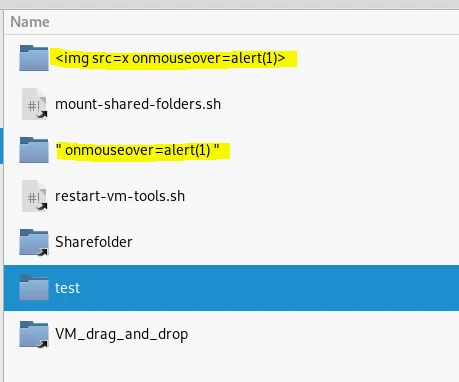
- Run 'http_server in "~/Desktop" directory :
root@kali:~/Desktop# http_server
server running is :http://localhost:8888
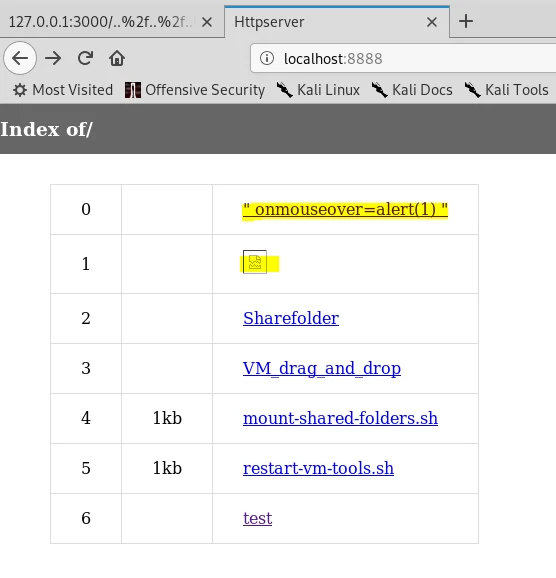
- When mouseover event is triggered on BOTH 2 payloads, a message will be popup via XSS vulnerability.
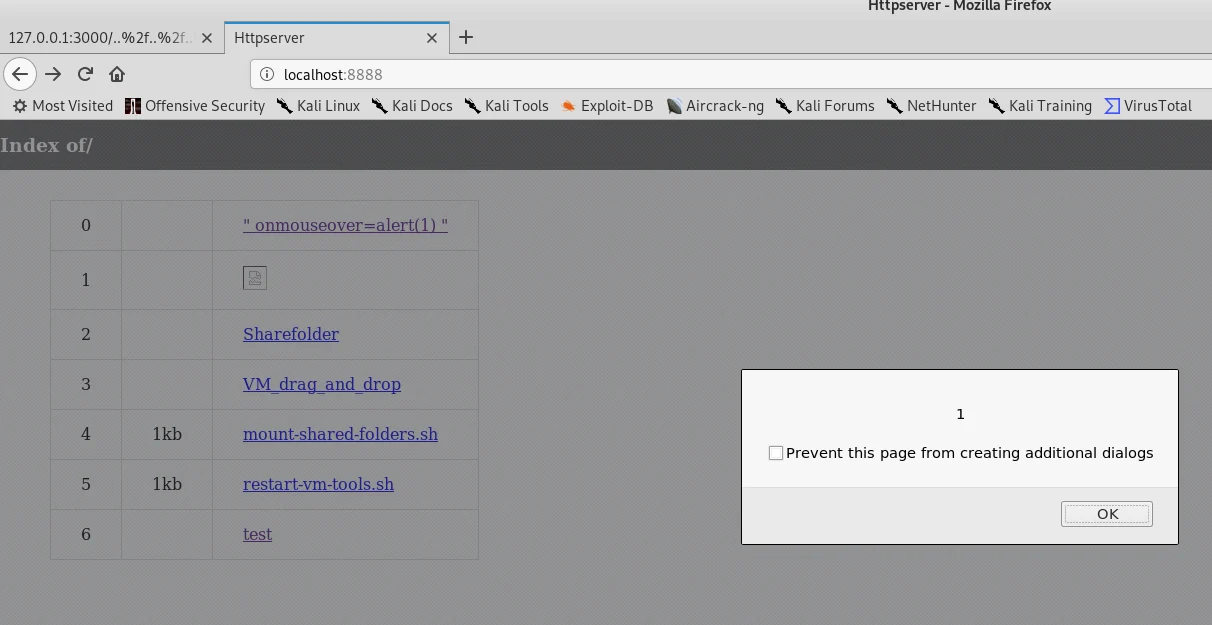
##Patch User input should be properly sanitized and filtered both at the client and server side. Dangerous characters such as < > ' " % ; ) ( & + should either be disallowed or HTML encoded before displaying them on screen.
##Supporting Material/References:
- Linux kali 4.15.0-kali2-amd64
- node 10.15.3
- npm 6.9
- Firefox ESR 52.7.3 (64-bit)
##Wrap up
- I contacted the maintainer to let them know: N
- I opened an issue in the related repository: N
Impact
It allows to inject malicious scripts in the file name, store them on the server, then execute these scripts in the browser via the XSS vulnerability.
Context
The target is the npm module http_server, a small static file server. The report describes it as "a static server" (the module description is given in Chinese as 一个静态服务器). Its job is to serve files from a directory over HTTP, and, when a request arrives for a directory, to produce a listing page that shows the files it contains.
The vulnerability is a stored cross-site scripting issue in that directory listing. The module writes file names into the HTML of the listing page without sanitisation, so a file name that contains HTML markup is rendered as markup by the browser rather than as text. Because the file name is stored on the server as part of the file system, the script is persistent: it executes for anyone who opens the listing.
The report was filed against the Node.js third-party modules program, with a low severity and a CVSS score of 3.9, classified as stored cross-site scripting. It was disclosed on 13 September 2019.
Setup
The researcher worked on a local Kali installation and served a directory from their own desktop. The environment recorded in the report is:
| Component | Version |
|---|---|
| Module | http_server 1.0.12 |
| Node.js | 10.15.3 |
| npm | 6.9 |
| Browser | Firefox ESR 52.7.3 (64-bit) |
| OS | Linux kali 4.15.0-kali2-amd64 |
The module is installed globally, and the directory to be served is ~/Desktop. No account, role or remote host is involved: the whole reproduction is local, with the server listening on http://localhost:8888.
At the time of the report the module had 14 downloads in the last week and 116 in the last month, which is worth keeping in mind when judging how widely the flaw could be reached.
Finding it
The researcher's observation is that the module represents file names in HTML without any sanitisation on the directory listing page. Any script that is injected into a file name and stored on the server is therefore executed in the browser of a client that views the listing. The listing feature is the only place involved: the flaw is in how names are written into the page, not in how file contents are served.
Exploitation
Step 1: install the module
npm install -g http_server
This installs the server globally so that the http_server command is available on the path.
Step 2: create files whose names carry the payload
In the directory that will be served, ~/Desktop, the researcher created files with the following names:
" onmouseover=alert(1) "
and
<img src=x onmouseover=alert(1)>
The first name contains a double quote followed by an onmouseover handler, and the second is a complete HTML element with the same handler. The second name is a complete HTML element with a broken image source and the same event handler, which fires when the pointer moves over the rendered element. Both payloads are stored simply by existing as file names in the served directory.
Step 3: start the server
root@kali:~/Desktop# http_server
server running is :http://localhost:8888
Running the command from ~/Desktop serves that directory on port 8888, and the server prints the URL it is listening on.
Step 4: open the listing
The researcher opened http://localhost:8888/ in Firefox.
Step 5: trigger the handlers
Moving the mouse over either of the two entries triggered the onmouseover handler, and an alert box appeared, confirming script execution through the stored XSS.
Root cause
The module writes file names into the HTML of the directory listing page without sanitisation. Because the names are inserted without sanitisation, a name containing HTML is treated as markup by the browser. The report does not include the listing template or the code that builds it, so the exact insertion point is not shown; the behaviour described is consistent with names being concatenated into the page without HTML encoding.
The report states that file names are represented in HTML without any sanitisation. The report's patch section states the general remedy rather than describing an existing defence: user input should be sanitised and filtered on both the client and server side, and dangerous characters such as < > ' " % ; ) ( & + should be disallowed or HTML encoded before being displayed.
Impact
An attacker who can place a file with a crafted name into a served directory can store script that runs in the browser of anyone who opens the directory listing. The report frames the impact in exactly those terms: inject malicious scripts in the file name, store them on the server, then execute them in the browser via the XSS vulnerability. The severity assigned was low (CVSS 3.9), and the module's download figures at the time were small.
Fix
The report does not record a patch being applied or a fixed version. Its recommendation is to sanitise and filter user input on both the client and server side, disallowing or HTML-encoding dangerous characters such as < > ' " % ; ) ( & + before they are displayed. The report recommends sanitising and filtering user input on both the client and server side.
Variants to test
- Attribute-context breakout, as in the first payload: a file name beginning with a double quote followed by an event handler. A positive result is an alert when the pointer moves over the entry in the listing.
- Tag injection, as in the second payload: a file name that is a complete element such as
<img src=x onmouseover=alert(1)>. A positive result is the element being rendered and its handler firing.
Hunting notes
During recon, a static file server or file-sharing component that renders a browsable index is the signal to look at; the test is cheap, since it only requires creating a file with a crafted name in a directory you can serve or upload to and then loading the listing.
The researcher demonstrated impact by showing the full chain locally: install, create the two named files, start the server, open the listing and trigger the handlers until the alert appeared, with screenshots at each stage. The report also notes that the maintainer was not contacted and no issue was opened in the related repository.
What happened, in plain words
A small program called http_server can turn a folder on your computer into a website. You point it at a folder, it starts running, and anyone who opens the address in a browser can see the files inside that folder. When a visitor asks for a folder rather than a single file, the program builds a simple web page that lists what is in the folder, so the visitor can click on things.
The problem is in that list page. The program takes each file name and drops it straight into the page without cleaning it up first. Normally a file name is just text, like holiday.jpg. But a browser does not only understand text: it also understands instructions written in a language called HTML, which is how web pages are built. If a file name happens to contain HTML, the browser treats it as instructions rather than as a name. Someone who can create a file with a clever name can therefore put a small program (a script) into the page, and that script runs in the browser of everyone who opens the folder listing.
This kind of bug is called stored cross-site scripting, or stored XSS. "Stored" because the harmful name sits on the server as a real file, waiting; "cross-site scripting" because code written by one person ends up running inside another person's browser session. The report was filed against the Node.js third-party modules program, rated low severity with a CVSS score of 3.9, and disclosed on 13 September 2019.
The product and the feature
The target is an npm module called http_server. npm is the package manager for Node.js: a public library where people publish small pieces of reusable software, and where you download them with a single command. Node.js is a program that lets JavaScript run outside a browser, for example on a server.
http_server is described in the report as "a static server" (the module description is given in Chinese as 一个静态服务器). "Static" means it simply hands out files that already exist on disk, as opposed to generating pages on the fly. Its job is to serve files from a directory over HTTP, the protocol browsers use to fetch web pages. When a request arrives for a directory, it produces a listing page showing the files it contains.
The vulnerability lives in that listing page. The module writes file names into the HTML of the page without sanitisation. Sanitisation means cleaning input so that characters with special meaning cannot do harm; here, nothing cleans the names. Because the name is stored on the server as part of the file system, the script is persistent: it runs for anyone who opens the listing.
At the time of the report the module had 14 downloads in the last week and 116 in the last month, which is worth keeping in mind when judging how widely the flaw could be reached.
Setting up
The researcher worked on a local Kali installation. Kali is a Linux distribution aimed at security testing; Linux is an operating system, the software that runs the machine, like Windows or macOS. They served a directory from their own desktop, so no account, role or remote host is involved: the whole reproduction is local, with the server listening on http://localhost:8888. localhost means "this same computer", and 8888 is the port, a numbered door on the machine that the server listens at.
The environment recorded in the report is:
| Component | Version |
|---|---|
| Module | http_server 1.0.12 |
| Node.js | 10.15.3 |
| npm | 6.9 |
| Browser | Firefox ESR 52.7.3 (64-bit) |
| OS | Linux kali 4.15.0-kali2-amd64 |
Finding it
The researcher's observation is that the module represents file names in HTML without any sanitisation on the directory listing page. Any script that is injected into a file name and stored on the server is therefore executed in the browser of a client that views the listing. The listing feature is the only place involved: the flaw is in how names are written into the page, not in how file contents are served.
Exploitation
Step 1: install the module
npm install -g http_server
This is a command typed into a terminal, a text window where you type commands instead of clicking. npm install tells npm to download and set up a package; -g means globally, so the program is installed for the whole machine rather than just one project folder; http_server is the name of the package. The result is that the http_server command becomes available on the path, meaning you can type it from any folder.
Step 2: create files whose names carry the payload
In the directory that will be served, ~/Desktop, the researcher created files with the following names:
" onmouseover=alert(1) "
and
<img src=x onmouseover=alert(1)>
A payload here is the piece of text that carries the attack. The first name contains a double quote followed by an onmouseover handler, and the second is a complete HTML element with the same handler. A handler is a piece of script the browser runs when something happens to an element; onmouseover means "when the mouse pointer moves over it". alert(1) is the simplest possible script: it opens a pop-up box showing the number 1, which proves code ran.
The second name is a complete HTML element: <img> is an image tag, src=x points it at an image that does not exist, and the same onmouseover handler fires when the pointer moves over the rendered element. Both payloads are stored simply by existing as file names in the served directory. No upload form or special permission is needed: creating a file is enough.
The screenshot shows the two crafted file names sitting in the served folder before the server is started.
Step 3: start the server
root@kali:~/Desktop# http_server
server running is :http://localhost:8888
The first line is the shell prompt, the text the terminal shows while waiting for you to type. root@kali means the user is root on a machine called kali; ~/Desktop is the current folder, where ~ stands for the user's home directory; # marks the end of the prompt. The command typed is http_server. Running it from ~/Desktop serves that directory on port 8888, and the server prints the URL it is listening on, http://localhost:8888, so you know where to point the browser.
Step 4: open the listing
The researcher opened http://localhost:8888/ in Firefox. That is the heart of the bug: the browser cannot tell that these characters came from a file name, so it follows them as instructions.
The screenshot shows the listing page in the browser with the crafted entries in place.
Step 5: trigger the handlers
Moving the mouse over either of the two entries triggered the onmouseover handler, and an alert box appeared, confirming script execution through the stored XSS. The alert is the proof: the browser ran code that came from a file name, not from the page's own author.
The screenshot shows the pop-up that appears when the pointer moves over an entry.
Root cause
The module writes file names into the HTML of the directory listing page without sanitisation. Because the names are inserted without sanitisation, a name containing HTML is treated as markup by the browser. The report does not include the listing template or the code that builds it, so the exact insertion point is not shown; the behaviour described is consistent with names being concatenated into the page without HTML encoding. Concatenation means gluing strings together, so the page is built as "some HTML" plus "the file name" plus "more HTML", and the browser sees the result as one document.
The report states that file names are represented in HTML without any sanitisation. Output encoding means converting special characters into harmless equivalents before they reach the page, so that < is displayed as a less-than sign rather than starting a tag. The report's patch section states the general remedy rather than describing an existing defence: user input should be sanitised and filtered on both the client and server side, and dangerous characters such as < > ' " % ; ) ( & + should be disallowed or HTML encoded before being displayed.
Impact
An attacker who can place a file with a crafted name into a served directory can store script that runs in the browser of anyone who opens the directory listing. The report frames the impact in exactly those terms: inject malicious scripts in the file name, store them on the server, then execute them in the browser via the XSS vulnerability. The severity assigned was low (CVSS 3.9), and the module's download figures at the time were small. CVSS is a standard scoring system for how serious a flaw is; 3.9 sits in the low band.
Fix
The report does not record a patch being applied or a fixed version. Its recommendation is to sanitise and filter user input on both the client and server side, disallowing or HTML-encoding dangerous characters such as < > ' " % ; ) ( & + before they are displayed. The report recommends sanitising and filtering user input on both the client and server side.
Variants to test
- Attribute-context breakout, as in the first payload: a file name beginning with a double quote followed by an event handler. A positive result is an alert when the pointer moves over the entry in the listing.
- Tag injection, as in the second payload: a file name that is a complete element such as
<img src=x onmouseover=alert(1)>. A positive result is the element being rendered and its handler firing.
Hunting notes
Recon, short for reconnaissance, means looking around a target before attacking it. During recon, a static file server or file-sharing component that renders a browsable index is the signal to look at; the test is cheap, since it only requires creating a file with a crafted name in a directory you can serve or upload to and then loading the listing.
The researcher demonstrated impact by showing the full chain locally: install, create the two named files, start the server, open the listing and trigger the handlers until the alert appeared, with screenshots at each stage. The report also notes that the maintainer was not contacted and no issue was opened in the related repository.
Glossary
- npm: the package manager for Node.js, a public library of reusable software you download with one command.
- Node.js: a program that runs JavaScript outside a browser, often on servers.
- Module: a packaged piece of software published for others to install and use.
- Static server: a program that hands out files that already exist on disk, rather than generating pages on the fly.
- HTTP: the protocol browsers use to request and receive web pages and files.
- Directory listing: a web page that shows the files inside a folder so a visitor can browse them.
- HTML: the language web pages are written in, made of text and tags that tell the browser what to display.
- Tag / element: a piece of HTML such as
<img>that tells the browser to render something. - Attribute: extra information attached to an HTML element, written as
name="value". - Handler: a piece of script the browser runs when something happens to an element, such as a mouse moving over it.
- Script: a small program, here JavaScript, that the browser executes.
- XSS (cross-site scripting): a bug where an attacker's code ends up running in another person's browser.
- Stored XSS: XSS where the harmful content is saved on the server and runs for everyone who views the affected page.
- Payload: the piece of text or code that carries out the attack.
- Sanitisation: cleaning input so characters with special meaning cannot do harm.
- Output encoding: converting special characters into harmless equivalents before they are placed on a page.
- Concatenation: gluing strings of text together into one.
- localhost: the name for "this same computer".
- Port: a numbered door on a machine that a server listens at, such as 8888.
- Terminal / shell: a text window where you type commands; the prompt is the text it shows while waiting.
- Kali: a Linux distribution aimed at security testing.
- Linux: an operating system, the software that runs the machine.
- CVSS: a standard scoring system for how serious a security flaw is.
- Recon: reconnaissance, looking around a target before attacking it.
- Maintainer: the person who looks after a software package.
- Repository: the place where a project's source code is kept and tracked.




