[serve] XSS via HTML tag injection in directory lisiting page
The serve module's directory listing page did not sanitise filenames before inserting them into HTML, so a file with a crafted name could inject HTML and execute JavaScript in a visitor's browser. An attacker could run malicious script in the context of another user's browser.

- Triaged in 34 days
- Fixed in 58 days
- Disclosed after 58 days
I would like to report HTML injection in serve module. It allows malicious HTML tags injection and execution of arbitrary JS code
Module
module name: serve
version: 9.6.0
npm page: https://www.npmjs.com/package/serve
Module Description
Assuming you would like to serve a static site, single page application or just a static file (no matter if on your device or on the local network), this package is just the right choice for you.
It behaves exactly like static deployments on Now, so it's perfect for developing your static project. Then, when it's time to push it into production, you deploy it.
Furthermore, it provides a neat interface for listing the directory's contents:
Module Stats
95,383 weekly downloads
Vulnerability
Vulnerability Description
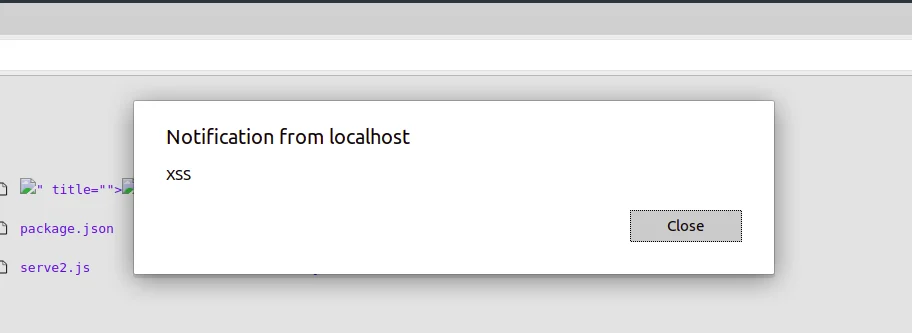
serve module provides a neat directory listing feature in it's HTTP server but it does'nt sanitize the filename hence a malicious payload in the filename cane be used to invoke an XSS. For example a file can be strategically named as <img src=x onerror=alert('XSS')> and we can see the XSS executing in the browser.
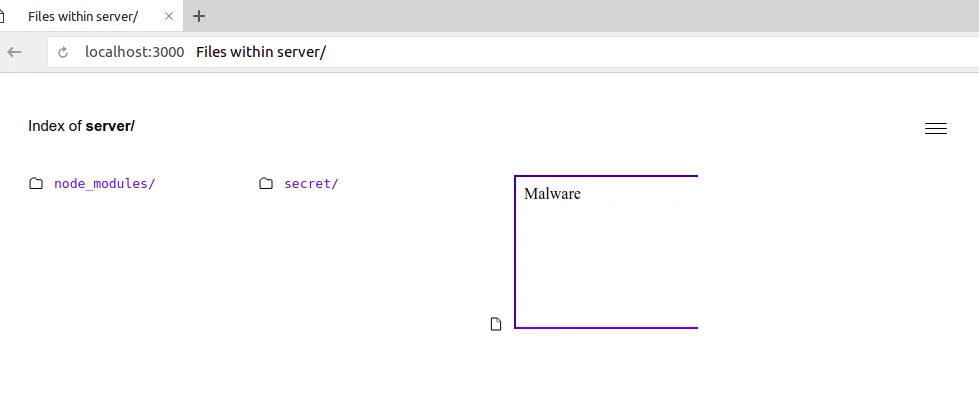
Alternatively a file can be created containing iframe tag with src attribute pointing to a malicious html which executes javascript on loading as pointed out in https://hackerone.com/reports/355458
Steps To Reproduce:
- Install
serve
yarn global add serve
or
npm i serve -g
- Create a file and name it
<img src=x onerror='alert("XSS")'>
or
"><iframe src="malware_frame.html">
- Start
servein the folder containing the payload file
serve
- Open up
localhost:5000in browser
Patch
In serve-handler the file directory.js takes in a list of all files in directory and adds it in <a> tag without sanitizing.
var out = '<!DOCTYPE .............
.
.
.
out += ' <a href="/<a' + (value.url) + '">' + (value.name) + '</a> '
Fixing this here might mitigate the issue IMO
Supporting Material/References:
- Ubuntu 16.04
- Node v10.9.0
- npm v6.2.0
- Firefox 61.0.1
Wrap up
- I contacted the maintainer to let them know: N
- I opened an issue in the related repository: N
Impact
An attacker is able to execute malicious JavaScript in context of other user's browser.
Attachments
Not written yet. The AI write-up for this report has not been written yet. The Original tab links to the source.
How it worked
Root cause
The directory listing code inserted the raw filename into an anchor tag without HTML-escaping it.
Impact
An attacker could execute malicious JavaScript in the context of another user's browser when that user viewed the directory listing.
What the attacker needed
Serve is used to host a directory listing; attacker can create a file with a crafted name; victim visits the listing page
The fix
The directory listing should HTML-escape filenames before placing them into the anchor tag.
How it was found
- Install the serve package globally.
- Create a file whose name contains an HTML payload.
- Start serve in the folder containing that file.
- Open the local server address in a browser and observe the script running.
Explained by bugbounty.wiki with AI from the original and checked against quotes from it; it can still be wrong. Read the original before relying on a detail.
Not written yet. The AI write-up for this report has not been written yet. The Original tab links to the source.
When you run a small web server to share files, it shows a list of filenames. This tool put the filename straight into the web page without cleaning it, so a filename containing HTML code would be treated as part of the page. That let an attacker make a file with a tricky name and run their own JavaScript when someone opened the folder listing.
What is XSS?
Script an attacker supplies runs in another user's browser, on the target's origin, with that user's session.




