How 403 Forbidden Bypass got me NOKIA Hall Of Fame (HOF)
A Nokia subdomain returned 403 Forbidden for restricted files, but changing the HTTP request method from GET to TRACE returned 200 OK and allowed downloading .htaccess and .htpasswd files. The files contained no sensitive information, but the bypass could expose sensitive files if present.
 Published on infosecwriteups.com
Hello, amazing people and bug bounty hunters, This is JD ( Jaydeepsinh Thakor ) I hope you all are fine ❤, In this write-up, I would like to share how I got my first HOF & how I was able to bypass 403 using simple method technique on Nokia Subdomain So let’s start,
The full write-up lives on its author's site
It belongs to its author, so we link to it rather than copy it. The other two tabs are our own rewrites, checked against it.
Context
Nokia runs a public bug bounty programme with a wild scope covering Nokia.com, and this write-up describes a 403 Forbidden bypass found on a Nokia subdomain during recon. The target was a host the author refers to as https://subs.nokia.com, which returned a 403 Forbidden response to normal requests. The report does not describe what the application on that host is meant to do; the only behaviour shown is that the server refuses access to the requested paths.
The author frames the finding around two definitions. A 403 status code is returned when a user tries to access a restricted page and the server refuses it, with access reserved for authorised users such as administrators. A 403 bypass means the client was able to communicate with the server but the server would not let it access what was requested, and the bypass makes the server return the content anyway.
Setup
The work was manual recon against the wild scope. The methodology the author lists is:
- Subdomain enumeration with different tools, such as amass, sub-finder and asset finder.
- Manual assessment of the discovered websites, intercepting requests and understanding how they work.
- Checking different functionalities.
The main tool was Burp Suite, used to intercept a request and send it to Repeater. The author notes that the same thing can be done with curl but prefers Burp. No accounts, roles or credentials are mentioned, and no versions are given. The only precondition is a host that answers with 403.
Finding it
During recon the author found several domains returning 403 Forbidden and picked one to attack, the subdomain https://subs.nokia.com.
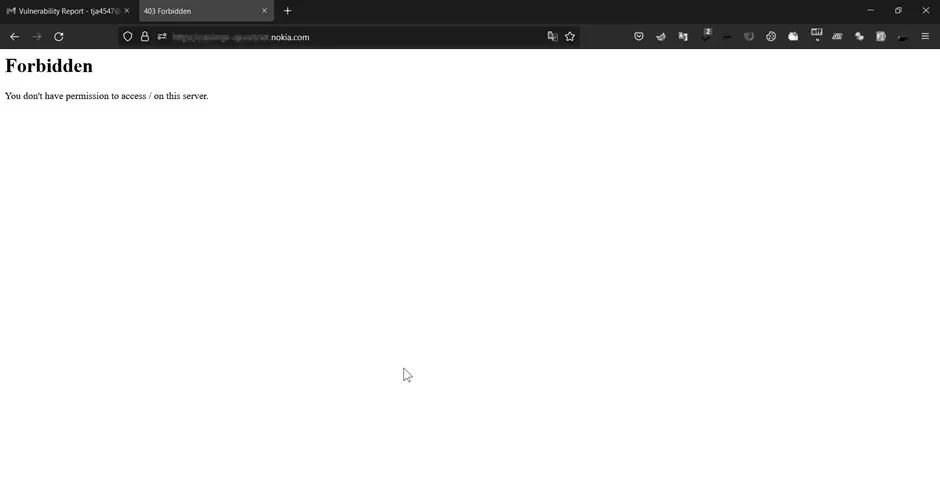
The screenshot shows the 403 Forbidden page returned by that subdomain.
Before moving to bypass techniques, the author tried simple content spoofing, an iFrame injection and a text injection, using these URLs and payloads:
https://subs.nokia.com/!!Site-is-an-down-visit-evil.com
"/><p>INJECTION</p>
Neither worked, and the author moved on to the 403 bypass.
The first check was whether the site contains hidden files. The author requested the .htaccess path and got a 403 instead of a 404 Not Found, which was taken as evidence that the file exists on the subdomain:
https://subs.nokia.com/.htaccess
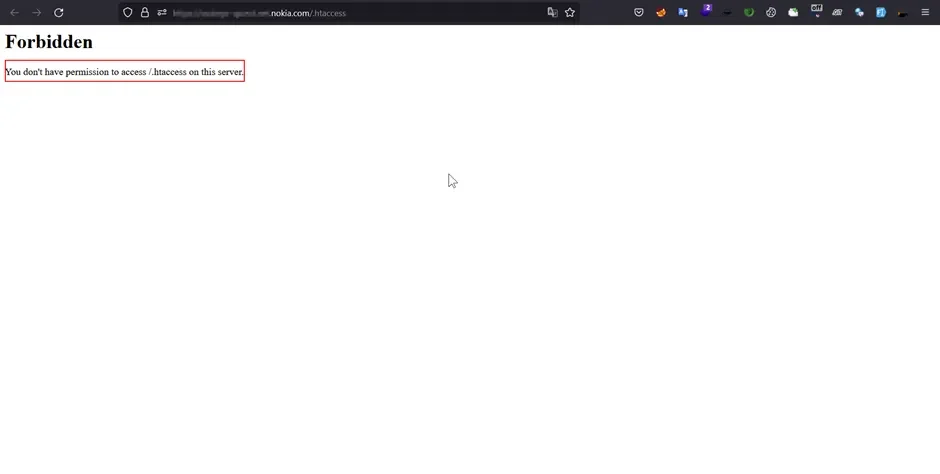
The distinction matters because a missing file would normally produce 404, while a 403 on a specific filename indicates the server knows about it and is refusing access.
Exploitation
Step 1: try the common path tricks
The author first tried basic and common 403 bypass techniques, such as appending / (slash) and /; to the path. None of them worked.
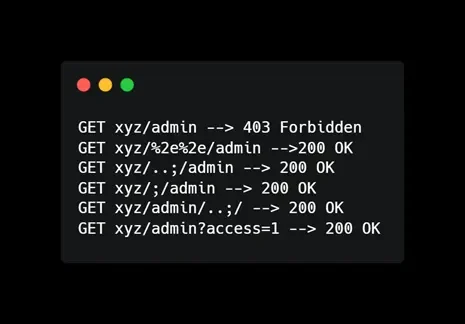
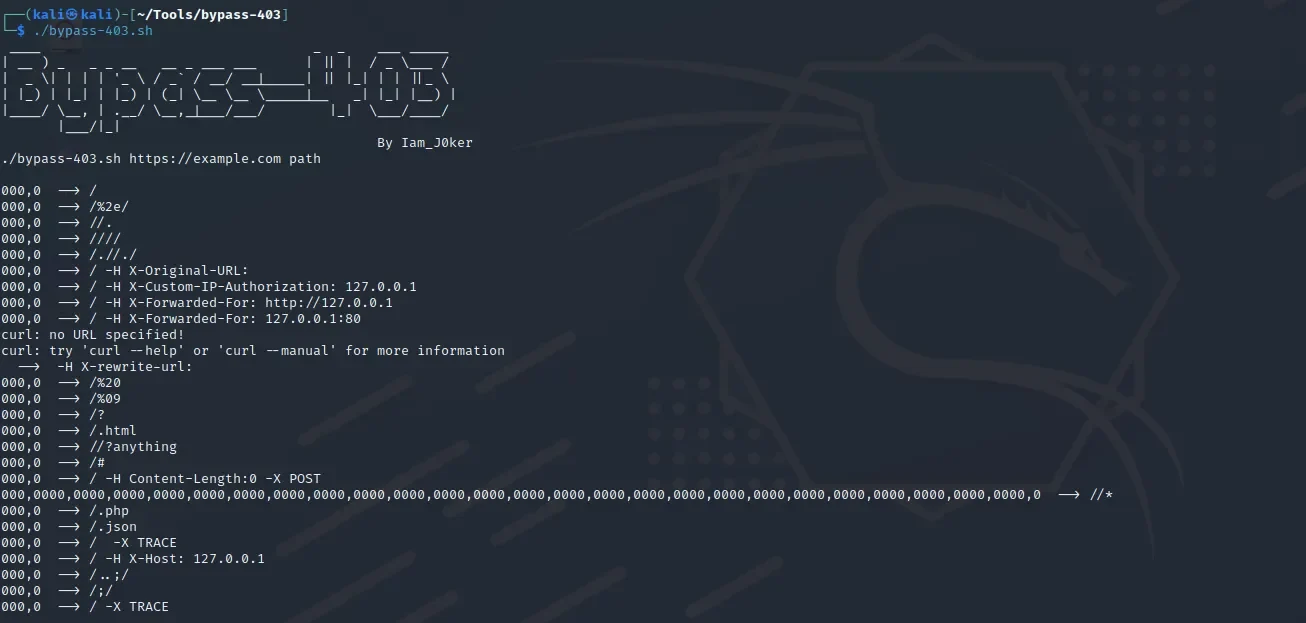
The author also points out that the process can be automated, since several 403 bypass tools are available on GitHub, and links two of them: iamj0ker/bypass-403 and yunemse48/403bypasser.
Step 2: change the HTTP method
The next method was changing the request method, for example GET to POST or GET to TRACE. The request was intercepted in Burp Suite and sent to Repeater, and the method was edited there.
Changing GET to POST did not work: the server still returned 403.
Changing GET to TRACE did work, and the server returned 200 OK.
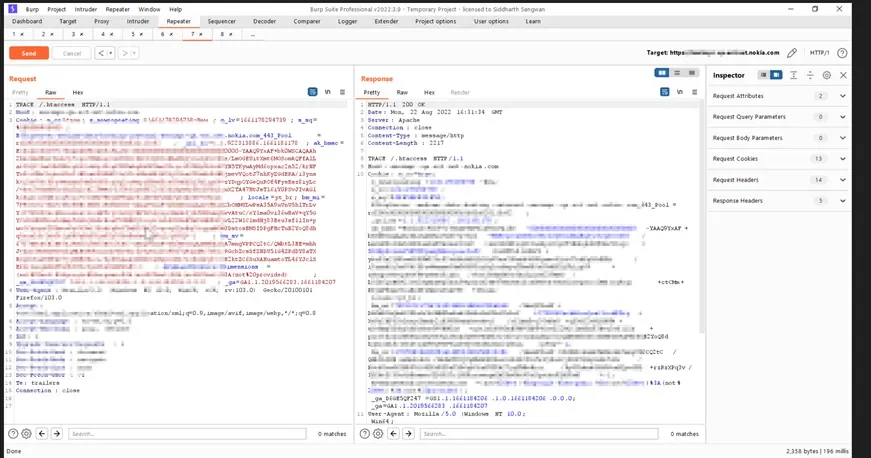

The screenshots show the Repeater response after the method change, with the 200 OK result.
Step 3: read the file through the browser
With the 200 OK response in Repeater, the author used Show Response In Browser, pasted the resulting URL into the browser, and the .htaccess / .htpasswd file was offered for download.
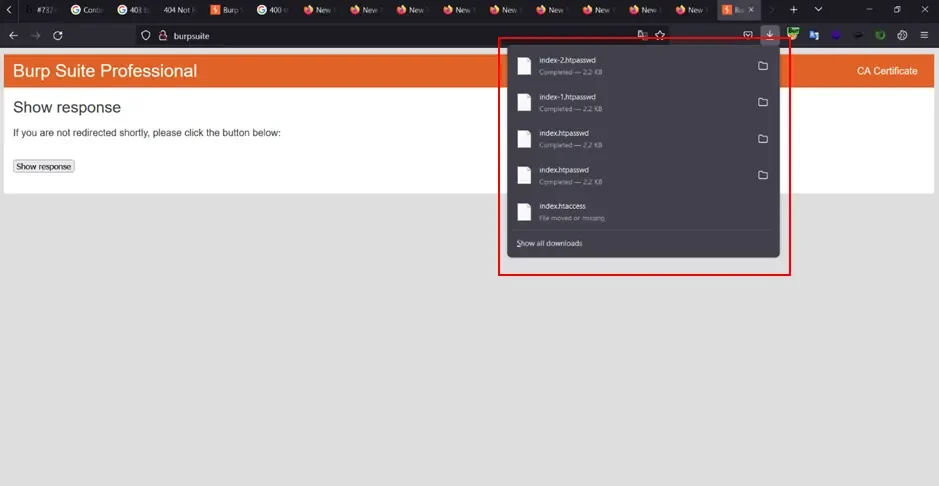
Step 4: inspect the contents
When the downloaded files were opened, they did not contain any crucial information. The author describes being a little sad about this.

Step 5: report it anyway
Despite the empty result, the author reasoned that the 403 mechanism itself had been bypassed, so the issue was worth reporting. The argument was a flip scenario: nothing sensitive was found in these particular files, but if important material were maintained on the site in the same way, an attacker might be able to bypass the control and see, dump or access any sensitive file.
A detailed report with proof of concept was sent by email to [redacted]. Nokia validated the finding from their side and confirmed it was valid.
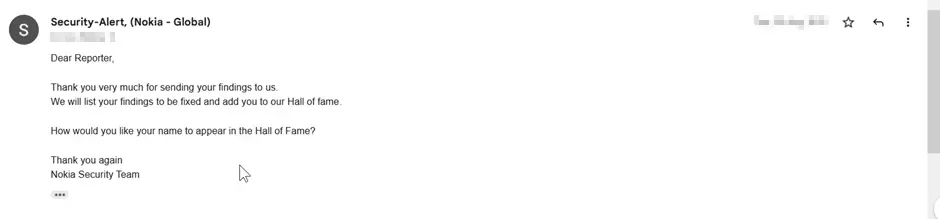
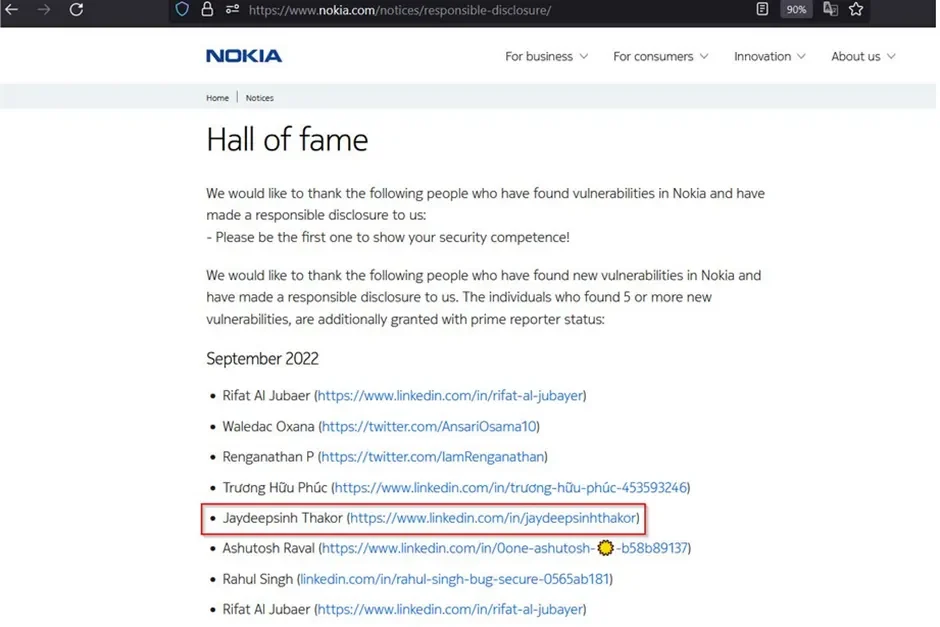
Some days later the author was added to Nokia's Hall of Fame page.
Root cause
The report does not describe the server configuration or the code behind the access control, so the exact cause is not stated. What the behaviour shows is that the restriction on /.htaccess and /.htpasswd was applied to some request methods but not to TRACE: a GET was refused with 403 while a TRACE to the same path returned 200 and the file contents. The likely explanation is that the access rule was written per method, or that the handler for TRACE did not pass through the same authorisation check as GET. The path-based tricks (/, /;) were handled correctly, so the weakness was specific to the method dimension rather than to path normalisation.
Impact
The direct impact in this case was limited: the files that could be downloaded, .htaccess and .htpasswd, contained no crucial information, passwords or other sensitive data. The author is explicit that nothing important was found.
The wider impact is conditional. If other sensitive files on the same host were protected by the same mechanism, an attacker could read them by switching the request method, which would mean disclosure of files the server intended to keep private. The report presents this as a possibility rather than a demonstrated result, and the only files actually retrieved are the two named above.
Fix
The fix implied by the finding is to apply the access control to every request method, so that TRACE (and any other method the server accepts) is subject to the same authorisation check as GET, and to disable methods the application does not need.
Variants to test
- Request a known-protected file with each method the server accepts (
POST,PUT,TRACE,OPTIONS,HEAD, and less common ones) and compare status codes. A positive result is a 200 whereGETreturns 403. - Probe for hidden files by comparing 403 and 404 on likely names such as
/.htaccess,/.htpasswd,/.git/configand backup files. A 403 where a random name gives 404 suggests the file exists. - Combine method switching with the path tricks that failed here (
/,/;, encoded characters) to see whether a method that is otherwise allowed still respects path normalisation. - Run the same checks through an automated 403 bypass tool and then verify each hit manually in Repeater, since a tool result alone does not show whether real content came back.
- When a file is retrieved, check whether the response body is the file itself or an error page rendered with a 200 status. A positive result is the actual file contents, as happened here with
.htaccessand.htpasswd.
What happened, in plain words
A security researcher was looking around Nokia's public websites, which Nokia invites people to test through a bug bounty programme. On one of Nokia's subdomains, the server kept refusing to show a file and answered with an error page instead. The researcher tried a few common tricks to get past that refusal, and most of them failed. Then he changed one small part of the request, the "method", and the server suddenly handed over the file. The file turned out to contain nothing secret, but the fact that the protection could be stepped around at all was a real weakness, so he reported it. Nokia confirmed the finding and later added him to their Hall of Fame, a public page that thanks people who report security problems.
This article walks through the same steps for someone who has never done security testing before. You only need to be comfortable using a browser and a computer. Every technical word is explained the first time it appears, and there is a glossary at the end.
The two ideas you need first
Before the story makes sense, two ideas need to be clear.
What a 403 is. When your browser asks a web server for a page, the server answers with a short number, called a status code, that says how the request went. You have probably seen 404, which means "I looked and there is nothing at that address". A 403 means something different: the server found what you asked for, but it will not let you have it. Think of a locked cabinet in an office. The cabinet is definitely there, but only certain people are allowed to open it. The researcher's own definition is that a 403 is what you get when an ordinary user tries to reach a restricted page that is meant only for authorised users, such as administrators.
What a 403 bypass is. A bypass means getting around that refusal. The client (your browser, or a tool acting like one) can talk to the server perfectly well, but the server will not hand over what was asked for. A bypass is a way of asking that makes the server hand it over anyway. In the cabinet comparison, it is finding a second door to the same cabinet that nobody remembered to lock.
Setting up
The researcher chose Nokia.com as his target. Nokia runs a public bug bounty programme, and the scope (the list of what you are allowed to test) was "wild", meaning very broad. He then did what people in this field call recon, short for reconnaissance: looking around to see what exists before trying anything.
His method had three steps:
- Find subdomains using different tools, such as amass, sub-finder and asset finder. A subdomain is a smaller address that belongs to a bigger one. If
nokia.comis a large building, subdomains are the individual offices inside it, each with its own door, such assubs.nokia.com. Tools like these search public information to list as many of those office doors as possible. - Visit those websites by hand, watch the requests the browser makes, and understand how each site works. Watching requests means using a tool that sits between your browser and the server and shows you the exact message being sent, rather than hiding it as a normal browser does.
- Check the different things each site can do.
The main tool was Burp Suite. Burp is a program that acts as a middleman: your browser sends its request to Burp, Burp shows it to you, and then Burp forwards it to the real server. One part of Burp is called Repeater, which lets you take a single request and send it again and again, changing one thing each time, to see how the server reacts. The researcher notes that the free command-line tool curl can do the same job, but he prefers Burp. No accounts, passwords or software versions are mentioned anywhere in the report. The only thing needed to start is a web address that answers with 403.
Finding it
During recon the researcher found several domains that answered with 403 Forbidden, and picked one to work on: a subdomain he refers to as https://subs.nokia.com. The report does not say what that site is actually for. The only behaviour shown is that the server refuses access to the paths that were requested.
The screenshot shows the 403 Forbidden page that this subdomain returned.
Before trying to bypass anything, he tested a different, simpler kind of problem: content spoofing. That means trying to make the site display text or content that the site's owners did not intend, for example by slipping extra content into a page. He tried an iFrame injection (an iFrame is a way of embedding one web page inside another, so the idea is to make the site load a page of the attacker's choosing) and a text injection, using these two pieces:
https://subs.nokia.com/!!Site-is-an-down-visit-evil.com
This is a web address with a made-up path added to the end. The path is written to look like a warning message ("Site is down, visit evil.com"). The idea is that if the site copies part of the address into the page without checking it, the visitor would see that fake warning. Nothing happened, so this line did not achieve anything.
"/><p>INJECTION</p>
This is a small piece of HTML, the language web pages are written in. <p> starts a paragraph and </p> ends it, so this snippet tries to close whatever the page had open and insert a paragraph reading INJECTION. The "/> at the start is an attempt to break out of an attribute in the page's code. If the site had inserted this text into its page without cleaning it, the word INJECTION would have appeared. It did not work either, so he moved on to the 403 bypass.
The next check was whether the site has hidden files. Many web servers keep small configuration files in the top folder of a site, and those files are not meant to be readable by visitors. He asked for one of them by name:
https://subs.nokia.com/.htaccess
This is a request for a file called .htaccess in the site's top folder. The dot at the start of the name is a convention for hidden files on many systems. The important part is the answer: the server replied with 403, not 404. A 404 would have meant "no such file here". A 403 means "the file is here, but you may not have it". That difference is how you can tell a file exists even when you cannot read it. In the report the researcher writes the address with subdomain in one place and subs in another; the host he was working on is subs.nokia.com.
That message confirms the server knows the file and is refusing to serve it.
Trying to get past the refusal
Step 1: the common path tricks
There are many known ways to try to get around a 403, and the researcher started with the simplest. These tricks change the path part of the address slightly, hoping the security rule checks one spelling of the path while the server serves another. He tried adding / (a slash) and /; to the end of the path. Neither worked.
He also points out that this trial-and-error can be automated, because several free tools on GitHub do exactly this. GitHub is a website where people share code. He links two tools, iamj0ker/bypass-403 and yunemse48/403bypasser. An automated tool simply tries a long list of tricks for you; it does not understand the site, so its results still need checking by hand.
Step 2: change the request method
Every request your browser makes starts with a word called the method, which tells the server what kind of action you want. The most common is GET, which means "give me this page". POST usually means "here is some data, please process it", for example when you submit a login form. TRACE is an older method that asks the server to echo the request back, so the client can see what, if anything, was changed along the way. A server may accept several methods on the same address.
The researcher's next idea was to keep the same address but change the method. He intercepted the request in Burp Suite, sent it to Repeater, and edited the method there. Changing GET to POST did not work: the server still answered 403. Changing GET to TRACE did work, and the server answered 200 OK. A 200 is the standard "everything went fine, here is your content" answer.
Step 3: read the file through the browser
A 200 in a tool window is not the same as holding the file. Burp has a button called Show Response In Browser, which takes the answer the server gave and opens it in a real browser window. The researcher used it, and the .htaccess and .htpasswd files were offered for download. .htaccess is a small settings file that tells a web server how to behave in a folder. .htpasswd is a file that can hold usernames and scrambled passwords for protecting a folder with a login prompt. Both are files a website owner normally wants kept private.
Step 4: look inside
He opened the downloaded files. They did not contain any crucial information. He says he was a little sad about that, which is a fair reaction: the whole point of getting past a lock is usually to find something valuable behind it.
Step 5: report it anyway
Even with nothing valuable inside, the researcher argued the issue was worth reporting, because the protection itself had been defeated. His reasoning was a "flip scenario": these particular files held nothing sensitive, but if the site kept important material somewhere protected in the same way, an attacker could use the same trick to see, dump or access it. "Dump" here means copying out a large amount of data at once.
He wrote a detailed report with a proof of concept and emailed it to [redacted]. A proof of concept, often shortened to PoC, is a small, repeatable demonstration that the problem is real, usually the exact request and the exact answer showing it worked. Nokia checked it from their side and confirmed it was a valid finding.
Some days later he was added to Nokia's Hall of Fame page, a public list of people who have reported valid security issues.
Why it worked
The report does not describe the server's settings or the code behind the access rule, so the exact cause is not stated. What the behaviour shows is that the restriction on /.htaccess and /.htpasswd applied to some request methods but not to TRACE. A GET was refused with 403, while a TRACE to the same address returned 200 and the file contents. The likely explanation is that the rule was written per method, or that whatever handled TRACE did not go through the same permission check as GET. The path tricks with / and /; were handled correctly, so the weakness was in the method, not in how the path was cleaned up.
What it means in practice
The direct impact here was small: the two files that could be downloaded contained no crucial information, no passwords and nothing else sensitive. The researcher says so plainly.
The wider impact depends on what else is on the same server. If other sensitive files were protected by the same mechanism, an attacker could read them by switching the method, which would mean files the server meant to keep private became readable. The report presents that as a possibility, not something demonstrated. The only files actually retrieved are the two named above.
The fix
The fix the finding points to is to apply the access rule to every request method, so that TRACE and any other method the server accepts goes through the same permission check as GET, and to switch off methods the application does not need.
Things worth trying on your own
- Ask for a known-protected file with each method the server accepts (
POST,PUT,TRACE,OPTIONS,HEADand less common ones) and compare the answers. A good sign is a 200 whereGETgives 403. - Look for hidden files by comparing 403 and 404 on likely names such as
/.htaccess,/.htpasswd,/.git/configand backup files. A 403 where a random name gives 404 suggests the file exists. - Combine method switching with the path tricks that failed here (
/,/;, encoded characters) to see whether a method that is otherwise allowed still respects the path rules. - Run the same checks with an automated 403 bypass tool, then check every hit by hand in Repeater, because a tool result alone does not show whether real content came back.
- When a file is retrieved, check whether the answer is the file itself or just an error page dressed up with a 200. A real result is the actual file contents, as happened here with
.htaccessand.htpasswd.
Glossary
- 403 Forbidden: a status code meaning the server found what you asked for but will not let you have it.
- 404 Not Found: a status code meaning there is nothing at that address.
- 200 OK: a status code meaning the request succeeded and the content follows.
- Status code: the short number a server sends back to say how a request went.
- 403 bypass: a way of asking that gets the server to hand over content it would normally refuse.
- Bug bounty programme: a scheme where an organisation invites outsiders to test its systems and rewards valid reports.
- Scope: the list of systems a tester is allowed to test.
- Wild scope: a very broad scope, covering many hosts under a domain.
- Recon: short for reconnaissance; looking around to see what exists before testing.
- Subdomain: a smaller address belonging to a larger one, such as
subs.nokia.comundernokia.com. - Subdomain enumeration: finding and listing as many subdomains as possible.
- Burp Suite: a tool that sits between your browser and a server so you can see and edit requests.
- Repeater: the part of Burp that lets you resend one request many times with small changes.
- curl: a command-line tool for sending web requests.
- Intercept: to catch a request on its way to the server so you can inspect or change it.
- Request: the message your browser sends to a server asking for something.
- Response: the message the server sends back.
- Method: the word at the start of a request saying what kind of action you want, such as
GET,POSTorTRACE. - GET: the method used to ask for a page or file.
- POST: the method usually used to send data to the server, for example a form.
- TRACE: an older method that asks the server to echo the request back.
- Content spoofing: making a site display content its owners did not intend.
- iFrame injection: trying to make a site embed a page of the attacker's choosing inside it.
- Text injection: trying to make a site display text the attacker supplied.
- HTML: the language web pages are written in.
.htaccess: a small settings file that tells a web server how to behave in a folder..htpasswd: a file that can hold usernames and scrambled passwords for protecting a folder with a login prompt.- Proof of concept (PoC): a small, repeatable demonstration that a problem is real.
- Hall of Fame: a public page listing people who have reported valid security issues.
- Dump: to copy out a large amount of data at once.
- GitHub: a website where people share and collaborate on code.
- Path: the part of a web address after the domain, pointing to a specific file or page.
- Root cause: the underlying reason a problem exists, as opposed to its visible symptom.
- Impact: the harm a problem could cause.
- Authorisation check: the step where a server decides whether you are allowed to do what you asked.

