How i made the multiple hall of fame in Nokia within 2 minutes
Several Nokia domains could be loaded inside an attacker's iframe because they lacked framing protections, so a victim could be tricked into clicking buttons on the real Nokia page while believing they were clicking something else. The author reports receiving multiple hall-of-fame entries for this.
 Published on systemweakness.com
Bug Bounty Writeup
The full write-up lives on its author's site
It belongs to its author, so we link to it rather than copy it. The other two tabs are our own rewrites, checked against it.
Context
Nokia runs a vulnerability disclosure program, and this write-up describes a single class of bug, clickjacking (UI redressing), reported against several Nokia domains. The author states that he received several Hall of Fame entries for reporting the same issue on multiple domains. The report does not name the individual domains, the affected applications or the features involved; the only hostname that appears in the proof of concept is the placeholder example.website.nokia.com.
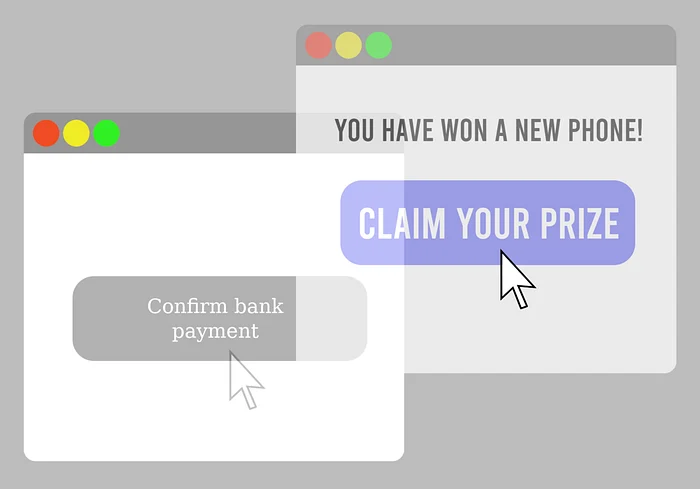
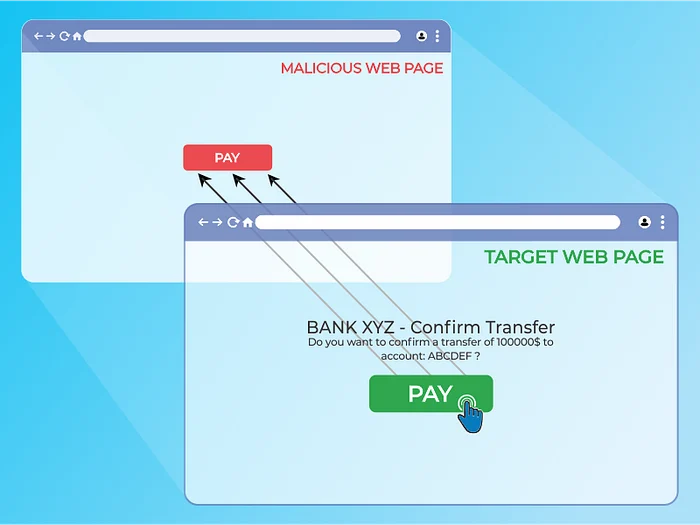
Clickjacking, as the author defines it, is when an attacker uses multiple transparent or opaque layers to trick a user into clicking a button or link on another page when they intended to click on the top level page. The attacker hijacks clicks meant for their own page and routes them to another page, most likely owned by another application, domain, or both. The same technique can hijack keystrokes: with a combination of stylesheets, iframes and text boxes, a user can be led to believe they are typing a password for their email or bank account while actually typing into an invisible frame controlled by the attacker.

The author's illustration of the concept: a page that says "click here for a free iPod" has an iframe of the victim's mail account loaded on top of it, with the "delete all messages" button lined up exactly over the "free iPod" button. The victim tries to click the free iPod button and instead clicks the invisible delete button.
Setup
No accounts, roles or special access are described. The work is manual and browser based, with one optional step that uses Burp Suite's Clickbandit. The tools referenced are:
- A text editor and a browser, for the local HTML proof of concept.
- https://securityheaders.com/, to inspect response headers.
- https://clickjacker.io, to test whether a target URL can be framed.
- The browser's network tab and developer console.
- Burp Suite, specifically burp clickbandit, for the higher-severity demonstration.
The precondition for every method is that the target page can be loaded inside a frame, which in practice means the response does not prevent framing through X-Frame-Options or an equivalent frame-ancestors policy. The report only discusses X-Frame-Options.
Finding it
The author does not describe a particular feature or a moment of noticing something odd. The approach is to test Nokia domains for the absence of framing protection, using the methods below, and to report each domain that loads in a frame. The report presents the bug as simple and the testing as quick, and the title claims multiple Hall of Fame entries within two minutes.
Exploitation
Step 1: local HTML proof of concept
Save the following as an .html file and open it in a browser:
<html>
<head>
<title>Clickjacking POC</title>
</head>
<body>
<p>Website is vulnerable to clickjacking</p>
<iframe src=”http://example.website.nokia.com” width=”500" height=”500">
</iframe>
</body>
</html>
The page embeds the target in a 500 by 500 iframe. If the targeted site loads successfully inside the frame, it is vulnerable to clickjacking. Note that the src attribute in the report uses typographic quotation marks rather than straight ones; a browser will not treat those as attribute delimiters, so the value has to be written with ordinary quotes for the test to work.
Step 2: header check with securityheaders.com
Visit https://securityheaders.com/, paste the target and click go. If the X-Frame-Options header is shown in red, the site is vulnerable to clickjacking; if it is shown in green, it is not.
Step 3: framing check with clickjacker.io
Visit https://clickjacker.io and paste the target URL. If the page loads successfully, it is vulnerable to clickjacking.
Step 4: manual inspection of the response header
- Check the network tab and reload the site.
- Visit the target URL and check for the
X-Frame-Optionsheader. - If
X-Frame-Optionsis set to same origin, the site is not vulnerable to clickjacking.
The author gives two reference points. flipkart.com returns an X-Frame-Options header with a same-origin value, so it is not vulnerable. testphp.vulnweb.com returns no X-Frame-Options header, so it is vulnerable.
Step 5: Clickbandit for a stronger demonstration
- In Burp, go to burp, then burp clickbandit, then copy clickbandit to clipboard. Go to the target site, open inspect element, switch to the console tab, paste the script, press enter and press start.
- Click the input fields and click finish to check whether the field is vulnerable. Click the "click" button until it says "You've been clickjacked!".
The report links a video walkthrough of this step: https://www.youtube.com/watch?v=eKt5q2_7Wwc.
Root cause
The pages tested did not stop themselves from being framed. In the author's framing, the presence and value of the X-Frame-Options response header decide the outcome: a same-origin value blocks the attack, and its absence leaves the page frameable. The report does not show the actual response headers from the Nokia domains, so the precise configuration of each one is not documented here. The report does not analyse the cause beyond the absence of framing protection.
Impact
The author's impact statement is the general clickjacking scenario: with a crafted combination of stylesheets, iframes and text boxes, a user can be led to believe they are typing the password to their email or bank account, but is instead typing into an invisible frame controlled by the attacker. The report does not demonstrate a specific action on a Nokia application, such as a state change or an account takeover, and does not state which user actions were reachable through the framed pages. The practical impact therefore depends on what an authenticated user can be made to click on the affected domains, which the report leaves open.
Fix
The defence it describes is the one it tests for: return X-Frame-Options with a same-origin value so the page cannot be framed by other sites.
Variants to test
- Frame each in-scope host directly with the local HTML proof of concept. A positive result is the target page rendering inside the 500 by 500 iframe.
- Check
X-Frame-Optionson authenticated pages after login, not just on the landing page. A positive result is a missing header, or a value other than a same-origin restriction, on a page that performs a sensitive action. - Run Clickbandit against forms and buttons that change state. A positive result is reaching "You've been clickjacked!" on a control whose click has a meaningful effect.
- Compare hosts within the same programme. A positive result is one host enforcing framing protection while a sibling host does not.
Response from Nokia
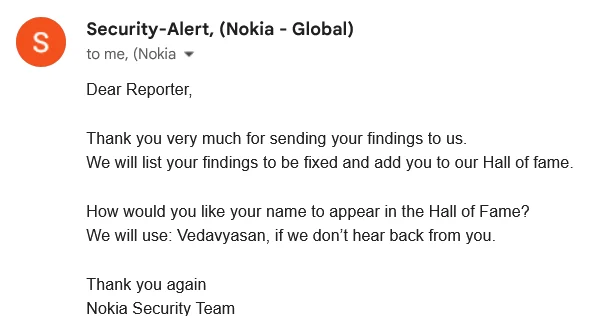
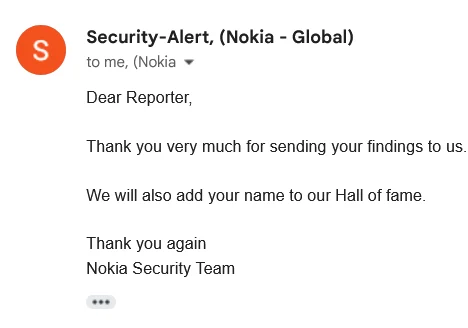
The author reports that he got about four Hall of Fame entries from Nokia for the clickjacking findings.
What happened, in plain words
A security researcher found the same simple bug on several websites run by Nokia. The bug is called clickjacking, or UI redressing. He reported it through Nokia's vulnerability disclosure programme, which is a way for outside people to tell a company about security problems. Nokia gave him several Hall of Fame entries, which are public thank-yous that list the people who reported valid issues. The author says he got about four Hall of Fame entries for the clickjacking findings, and the title says this happened within two minutes. The report does not name the specific Nokia domains, the applications or the features involved. The only hostname that appears in the proof of concept is a placeholder, example.website.nokia.com.
What clickjacking is
Clickjacking, also called UI redressing, is when an attacker uses transparent or opaque layers to trick you into clicking a button or link on another page when you meant to click on the page you can see. The attacker hijacks your click and sends it to a different page, usually owned by another application, domain, or both. The same trick can hijack keystrokes. With a combination of stylesheets, iframes and text boxes, you can be led to believe you are typing the password for your email or bank account, but you are actually typing into an invisible frame controlled by the attacker.
An iframe is a way to embed one web page inside another. Think of it as a window cut into a wall: you look through the window and see another room, but you are still standing in the first room. A stylesheet is a file that tells the browser how a page should look, including where things sit on the screen and whether they are visible. A text box is a field where you type, such as a username or password field.
The author's example: a page says "click here for a free iPod". On top of that page, the attacker loads an iframe of your mail account and lines up the "delete all messages" button exactly over the "free iPod" button. You try to click the free iPod button and instead click the invisible delete button.
How to find it
The author does not describe a particular feature or a moment of noticing something odd. The approach is to test Nokia domains for the absence of framing protection, using the methods below, and to report each domain that loads in a frame. The report presents the bug as simple and the testing as quick, and the title claims multiple Hall of Fame entries within two minutes.
Method 1: a local HTML page
You do not need any special accounts or access. The work is manual and browser based, with one optional step that uses Burp Suite's Clickbandit. The tools mentioned are:
- A text editor and a browser, for the local HTML proof of concept.
- https://securityheaders.com/, to inspect response headers.
- https://clickjacker.io, to test whether a target URL can be framed.
- The browser's network tab and developer console.
- Burp Suite, specifically burp clickbandit, for the higher-severity demonstration.
The precondition for every method is that the target page can be loaded inside a frame. In practice that means the response does not prevent framing through X-Frame-Options or an equivalent frame-ancestors policy. The report only discusses X-Frame-Options.
Save the following as an .html file and open it in a browser:
<html>
<head>
<title>Clickjacking POC</title>
</head>
<body>
<p>Website is vulnerable to clickjacking</p>
<iframe src=”http://example.website.nokia.com” width=”500" height=”500">
</iframe>
</body>
</html>
Line by line:
<html>opens the page. Everything else goes inside it.<head>holds information about the page that is not shown in the main window.<title>Clickjacking POC</title>sets the text shown in the browser tab. POC stands for proof of concept, a small test that shows the bug is real.</head>closes the head section.<body>starts the part of the page you see.<p>Website is vulnerable to clickjacking</p>is a paragraph of text. It is just a label for you; it does not affect the test.<iframe src=”http://example.website.nokia.com” width=”500" height=”500">creates a frame 500 pixels wide and 500 pixels tall, and tells the browser to load the address insrcinside it. The address here is a placeholder for a Nokia site.</iframe>closes the frame.</body>and</html>close the body and the page.
If the targeted site loads successfully inside the frame, it is vulnerable to clickjacking. One detail: the src attribute in the report uses typographic quotation marks rather than straight ones. A browser will not treat those as attribute delimiters, so you have to write the value with ordinary quotes for the test to work.
Method 2: securityheaders.com
Visit https://securityheaders.com/, paste the target and click go. If the X-Frame-Options header is shown in red, the site is vulnerable to clickjacking; if it is shown in green, it is not.
A response header is a small piece of information the web server sends back with the page, before the page content. X-Frame-Options is a header that tells the browser whether other sites are allowed to put this page inside a frame. If it is missing, the browser is free to frame the page.
Method 3: clickjacker.io
Visit https://clickjacker.io and paste the target URL. If the page loads successfully, it is vulnerable to clickjacking.
Method 4: look at the header yourself
- Check the network tab and reload the site.
- Visit the target URL and check for the
X-Frame-Optionsheader. - If
X-Frame-Optionsis set to same origin, the site is not vulnerable to clickjacking.
The network tab is a panel in the browser's developer tools that lists every request the page makes and the response it gets back. Reloading the site fills the list. Same origin means the page may only be framed by pages from the same site, so an attacker's page on another domain cannot frame it.
The author gives two reference points. flipkart.com returns an X-Frame-Options header with a same-origin value, so it is not vulnerable. testphp.vulnweb.com returns no X-Frame-Options header, so it is vulnerable.
Method 5: Clickbandit for a stronger demonstration
- In Burp, go to burp, then burp clickbandit, then copy clickbandit to clipboard. Go to the target site, open inspect element, switch to the console tab, paste the script, press enter and press start.
- Click the input fields and click finish to check whether the field is vulnerable. Click the "click" button until it says "You've been clickjacked!".
Burp Suite is a tool for testing websites. Clickbandit is a feature inside it that builds a clickjacking demonstration for you. The console is a panel in the browser's developer tools where you can type or paste commands that the browser runs. Inspect element opens the developer tools on the part of the page you selected. The report links a video walkthrough of this step: https://www.youtube.com/watch?v=eKt5q2_7Wwc.
Why it works
The pages tested did not stop themselves from being framed. In the author's framing, the presence and value of the X-Frame-Options response header decide the outcome: a same-origin value blocks the attack, and its absence leaves the page frameable. The report does not show the actual response headers from the Nokia domains, so the precise configuration of each one is not documented. The report does not analyse the cause beyond the absence of framing protection.
Impact
The author's impact statement is the general clickjacking scenario: with a crafted combination of stylesheets, iframes and text boxes, a user can be led to believe they are typing the password to their email or bank account, but is instead typing into an invisible frame controlled by the attacker. The report does not demonstrate a specific action on a Nokia application, such as a state change or an account takeover, and does not state which user actions were reachable through the framed pages. The practical impact therefore depends on what an authenticated user can be made to click on the affected domains, which the report leaves open.
Fix
The defence it describes is the one it tests for: return X-Frame-Options with a same-origin value so the page cannot be framed by other sites.
Variants to test
- Frame each in-scope host directly with the local HTML proof of concept. A positive result is the target page rendering inside the 500 by 500 iframe.
- Check
X-Frame-Optionson authenticated pages after login, not just on the landing page. A positive result is a missing header, or a value other than a same-origin restriction, on a page that performs a sensitive action. - Run Clickbandit against forms and buttons that change state. A positive result is reaching "You've been clickjacked!" on a control whose click has a meaningful effect.
- Compare hosts within the same programme. A positive result is one host enforcing framing protection while a sibling host does not.
Response from Nokia
The author reports that he got about four Hall of Fame entries from Nokia for the clickjacking findings.
Glossary
- Clickjacking (UI redressing): tricking a user into clicking something on a hidden page by layering it under or over a visible page.
- Iframe: an element that embeds one web page inside another.
- Stylesheet: a file that controls how a page looks, including position and visibility.
- Text box: a field on a page where you type, such as a password field.
- Proof of concept (POC): a small test that shows a bug is real.
- Response header: information the web server sends back with a page, before the page content.
X-Frame-Options: a response header that tells the browser whether other sites may frame the page.- Same origin: a restriction that only pages from the same site may frame the page.
- Network tab: a panel in the browser's developer tools that lists requests and responses.
- Developer console: a panel in the browser's developer tools where you can run commands.
- Inspect element: a browser feature that opens the developer tools on the part of the page you selected.
- Burp Suite: a tool for testing websites.
- Clickbandit: a feature in Burp Suite that builds a clickjacking demonstration.
- Vulnerability disclosure programme: a way for outside people to report security problems to a company.
- Hall of Fame: a public list that thanks people who reported valid issues.
- Content-Security-Policy
frame-ancestors: a modern header directive that serves the same purpose asX-Frame-Options.


