Stored XSS via Invite leading to Mass Account Takeover at Opera.
A stored cross-site scripting flaw existed in the publisher name field, which did not execute immediately but triggered when another user accepted or declined an invitation to that publisher. An attacker could run script in the victim's browser, potentially leading to mass account takeover.
 Published on sm4rty.medium.com
Hey Guys!! I am Samrat Gupta akaSm4rty, a Security Researcher and a Bug Bounty Hunter.
The full write-up lives on its author's site
It belongs to its author, so we link to it rather than copy it. The other two tabs are our own rewrites, checked against it.
Context
This is a story about a stored cross-site scripting (XSS) bug found on yoyogames.com, one of the domains in scope for the Opera bug bounty programme on Bugcrowd. The feature involved is a publisher creation function: a user can create a publisher, and can then invite other users to access that publisher. The invitation is accepted or declined by the invited user, and the stored payload fired in both cases.
Stored XSS, as the author describes it, is the persistent form of XSS: a malicious script is injected into the application and stored on the server, which makes it more impactful than reflected or DOM-based XSS.
Setup
- Target:
yoyogames.com, in scope for the Opera programme at Bugcrowd. - Two accounts on the website: a first account that creates the publisher and sends the invitation, and a second account that receives it.
- Initial reconnaissance: subdomain enumeration, port scanning, screenshots and running Nuclei, followed by exploring the application's features as a normal user.

Finding it
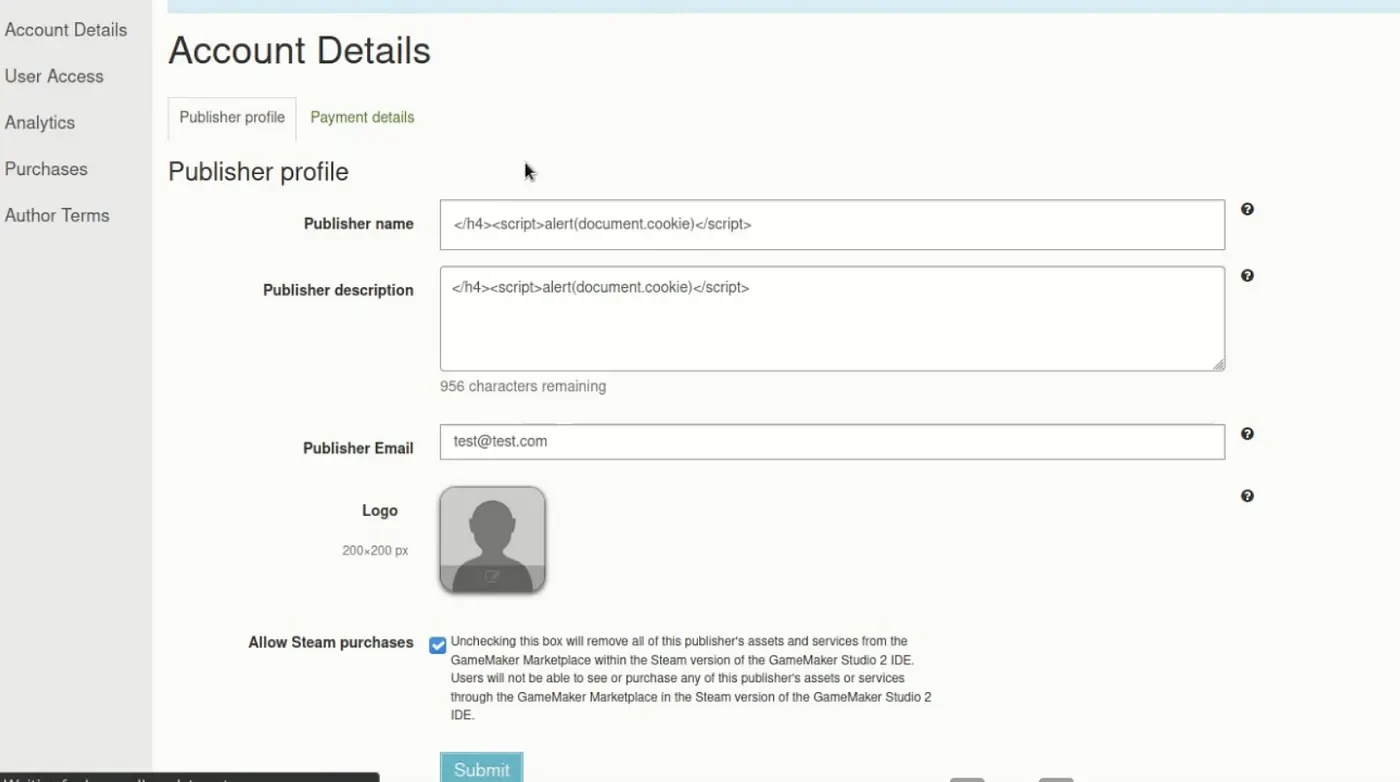
While exploring the application as a normal user, the author found the function that lets a user create a publisher. The publisher has a Name parameter, and the author tried an XSS payload there:
</h4><script>alert(document.cookie)</script>
The payload closes an h4 element and then runs a script that alerts the document cookie. Nothing happened: the XSS did not trigger at that point.
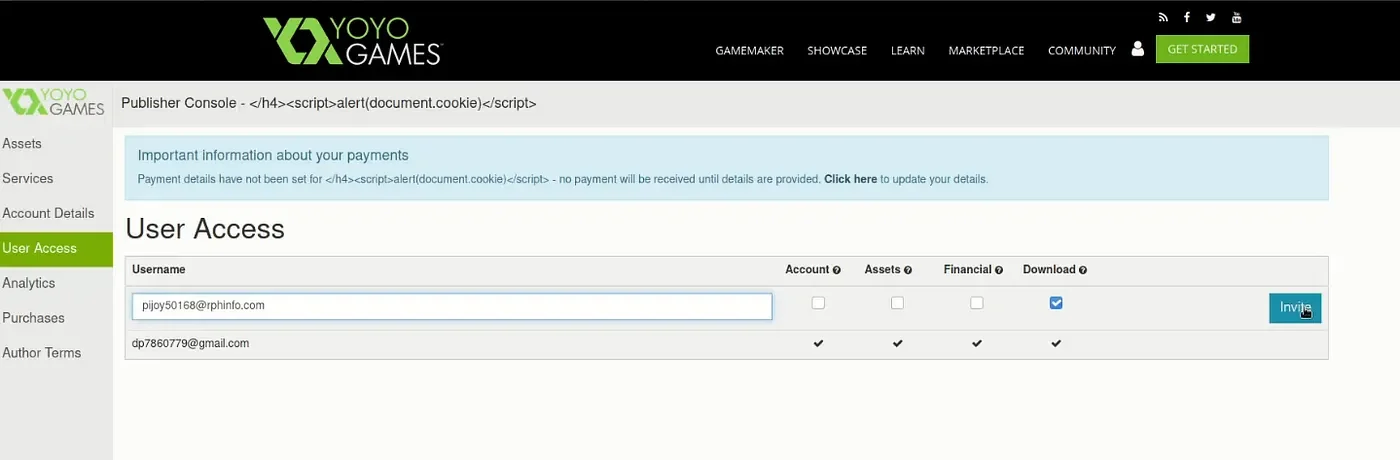
Rather than stopping there, the author continued exploring and found the invitation feature, which lets a user invite other users to access a publisher they created. A second account was created on the website to receive the invitation.
Exploitation
Step 1: create the publisher with the payload in its name
Using the first account, create a publisher and set its Name to the payload above. On its own, viewing the publisher does not trigger the script.
Step 2: invite the second account
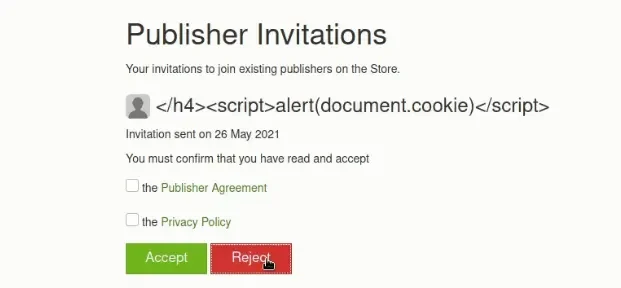
From the first account, invite the second account to the publisher.
Step 3: accept the invitation from the second account
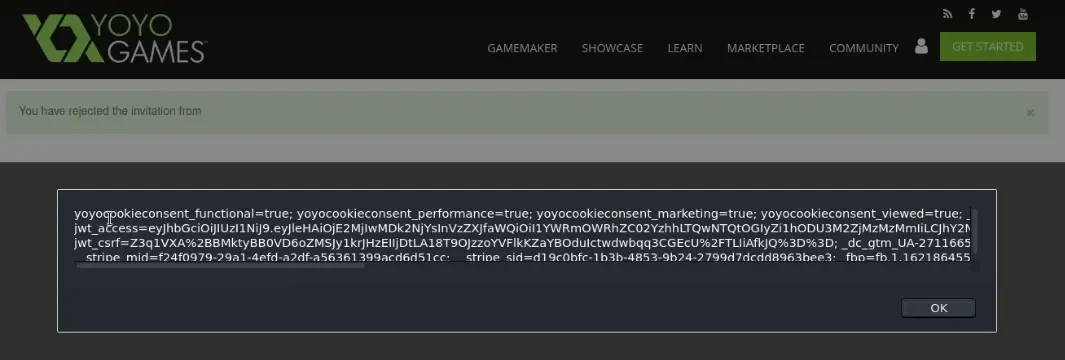
Log in as the second account and click accept on the invitation. The script fires: the XSS triggers at that point.
Step 4: decline instead of accept
Repeat the same steps, but this time click decline on the invitation instead of accept. The XSS triggers again, so both actions on the invitation render the stored publisher name and execute the payload.
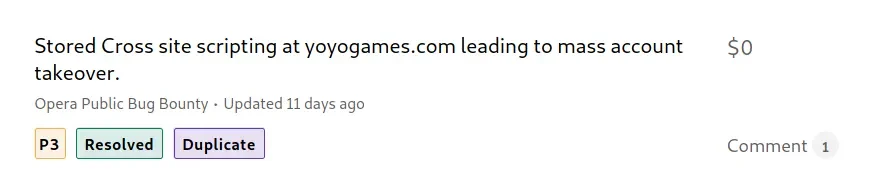
The author reported it to the programme, but someone had already reported the vulnerability first, so it was closed as a duplicate.
Root cause
The publisher name is stored when the publisher is created, and the payload fired when the invited user accepted or declined. That rendering does not neutralise the stored value, so the </h4> in the name breaks out of the surrounding heading element and the following <script> element executes in the invitee's session. The report does not show the server-side code or the exact response, so the specific escaping or encoding mistake is not documented; likely the name was inserted into the invitation page without HTML encoding.
The report does not explain why the initial attempt on the publisher Name parameter did not trigger. The stored value only became dangerous when it was rendered on a different page, the invitation accept/decline view.
Impact
The payload runs in the browser of the invited user when they accept or decline the invitation, in the context of the application's origin. Because the invitation is sent from one account to another, an attacker who can create a publisher and invite a victim can run script in the victim's session. The report does not include a demonstration of session theft beyond the alert(document.cookie) payload, and the programme treated the issue as a duplicate of an earlier report.
Fix
The measure implied by the bug is to HTML-encode the publisher name wherever it is rendered, including the invitation accept and decline views, so that stored markup is displayed as text rather than parsed as HTML.
Variants to test
- Store a payload in any field that is later rendered to a different user, such as a team, project or organisation name, then trigger the render through an invitation, share or notification flow. A positive result is the script executing in the second account's session.
- Test both accept and decline (and any other action) on an invitation, since each may render the stored value through a different template. A positive result is execution on any one of them.
- When a payload fails on the page where the value is entered, follow the value to every other page where it appears. A positive result is execution on a page other than the one used for input.
- Try payloads that break out of different surrounding elements, since the context of the sink may differ from the input page. A positive result is the script running once the correct closing tag is used.

What happened, in plain words
A security researcher found a bug on a website called yoyogames.com, which belongs to the company Opera and was part of Opera's bug bounty programme on a platform called Bugcrowd. A bug bounty programme is a deal in which a company says: if you find a security problem in our systems and tell us about it responsibly, we may pay you a reward. Bugcrowd is one of the websites that runs these programmes.
The bug was a stored cross-site scripting (stored XSS) flaw. In plain words: the website let a user type some text that contained a small piece of computer code (a script), saved that text on its server, and later showed it to a different user in a way that made the other user's browser actually run the code. Because the code runs inside the victim's browser while they are logged in, it can do things on their behalf.
The feature involved is a publisher. On this site a user can create a publisher, which is a kind of profile or workspace, and can then invite other people to access it. The invited person gets an invitation they can accept or decline. The stored script ran when the invited person acted on the invitation.
The researcher reported it, but someone else had reported the same problem first, so it was marked as a duplicate and no reward was paid. The lesson is still useful, and that is what this article walks through.
The concepts you need first
Before the story makes sense, here are the ideas it relies on, explained from zero.
- A web page and a browser. Your browser (Chrome, Firefox, Safari) asks a web server for a page, receives it as text (HTML), and turns that text into what you see. HTML is a markup language: it uses tags like
<h4>(a heading) and<script>(a container for code) to describe the page. - JavaScript. The programming language that browsers run. When a page contains a
<script>element, the browser executes the JavaScript inside it. That is how pages become interactive. - A cookie. A small piece of text that a website asks your browser to store and to send back with every later request to that site. Cookies are commonly used to remember that you are logged in. If someone else gets your cookie, they can often act as you. That is why the researcher's test payload tried to read
document.cookie, which is the browser's way of exposing the site's cookies to JavaScript. - Cross-site scripting (XSS). A class of bug where an attacker manages to get their own JavaScript into a page that other people view, so it runs in those people's browsers. There are several kinds:
- Reflected XSS: the malicious input is bounced straight back in the same response, for example in an error message, and only affects the person who sent it.
- DOM-based XSS: the page's own client-side code takes untrusted input and puts it somewhere dangerous without going through the server.
- Stored XSS (also called persistent XSS): the malicious input is saved on the server and later shown to other users. The author calls this the more damaging kind, because one injection can affect many people over time.
- A parameter. A named piece of data sent to a website, for example the
Namefield of a form. When you fill in a form and press submit, the browser sends the field names and values to the server. - Reconnaissance (recon). The information-gathering phase before testing: finding out which parts of a company's systems exist and what they do. The author lists subdomain enumeration (finding names like
shop.example.comunder a main domain), port scanning (checking which network services a machine exposes), screenshots (capturing what pages look like) and running Nuclei (a tool that automatically checks for known classes of problems). - Scope. The list of systems a bug bounty programme authorises you to test. Testing outside scope is not allowed. Here,
yoyogames.comwas in scope for the Opera programme. - Duplicate. When two researchers report the same bug, the first report is usually the one that counts and later ones are closed as duplicates.
- Account takeover. Getting control of someone else's account, typically by stealing their session cookie or otherwise acting as them. The report does not describe the impact beyond the alert firing in the invitee's browser.
How the researcher found it
It was a month before the researcher was hunting at Opera. He picked the domain yoyogames.com, which was in scope for the Opera programme at Bugcrowd.
He started with initial recon: subdomain enumeration, port scanning, screenshots and running Nuclei. Then he switched to a different approach and simply explored the application's features as a normal user would.
That second approach matters for beginners. Automated tools find known patterns, but a lot of bugs live in ordinary features that no scanner understands: a form, an invitation, a settings page. Using the product the way a customer does is itself a form of testing.
The first attempt, which failed
Inside the application the researcher found a function where a user can create a publisher. The publisher has a Name parameter, so he tried putting an XSS payload into that name:
</h4><script>alert(document.cookie)</script>
Line by line, in plain words:
</h4>is a closing heading tag. The idea is to end whatever heading element the site had wrapped around the name, so that what follows is no longer treated as heading text.<script>opens a script element. Everything until</script>is treated as JavaScript and run by the browser.alert(document.cookie)asks the browser to show a pop-up box containing the value ofdocument.cookie, which is the site's cookies as visible to JavaScript. A pop-up is the classic harmless proof that script execution is possible: if you see the box, your code ran.</script>closes the script element.
The reasoning behind the payload is the </h4>: if the site puts the name inside a heading, closing the heading first may let the script escape into the page proper. As expected, nothing happened and the XSS did not trigger.
This is the most important moment in the story. A failed payload does not mean the site is safe. It may mean the value is not shown on this page at all, or is shown in a place where a script cannot run. The value may still be stored and shown somewhere else.
Following the value to the invitation feature
The researcher kept exploring and found a feature where he could invite other users to access the publisher he had just created. To test what an invited person sees, he created a second account on the website.
Two accounts is a standard technique for testing anything that involves more than one person: invitations, sharing, comments, notifications. One account plays the attacker, the other plays the victim, and you watch what the victim sees.
Making it fire
From the first account he invited the second account to the publisher. Then, logged in as the second account, he clicked accept on the invitation. The script fired: the XSS triggered.
He then repeated the same steps but clicked decline instead of accept, and the XSS triggered again. So both actions on the invitation show the stored publisher name, and both run the payload.
Why did it work here and not before? The publisher name was saved by the server when the publisher was created. The report does not explain why the first attempt did nothing. But when the invited user acted on the invitation, the stored payload ran in their browser.
The likely explanation is that the name was inserted into the invitation page without HTML encoding, meaning the characters < and > were passed through as markup instead of being displayed as text.
He was excited and reported it to the programme straight away. Unfortunately he was a bit late: someone had already reported the vulnerability, so his report was closed as a duplicate. He still says he learned a lot.
Why this matters
Because the script runs in the invited user's browser while they are logged in, an attacker who can create a publisher and send invitations could run code in the session of anyone who accepts or declines. The report does not demonstrate any impact beyond the alert pop-up. The report does not demonstrate session theft beyond the alert(document.cookie) pop-up, and the programme treated the issue as a duplicate of an earlier report.
What the fix would look like
The measure the bug implies is to HTML-encode the publisher name everywhere it is displayed, including the invitation accept and decline pages, so that stored markup is shown as text rather than parsed as HTML. In everyday terms: if a user types <script>, the page should display the characters <script> on screen, not treat them as the start of code.
Things worth trying yourself
- Store a payload in any field that is later shown to a different user, such as a team, project or organisation name, then trigger the display through an invitation, share or notification flow. A positive result is the script running in the second account's session.
- Test both accept and decline, and any other action on an invitation, since each may display the stored value through a different page template. A positive result is execution on any one of them.
- When a payload fails on the page where the value is entered, follow the value to every other page where it appears. A positive result is execution on a page other than the one used for input.
- Try payloads that break out of different surrounding elements, since the place the value ends up may differ from the input page. A positive result is the script running once the correct closing tag is used.
The researcher's own takeaways were: when a payload does not trigger in one place, that does not mean the site is not vulnerable; try every place where the parameter appears; and do not give up after one attempt, dig deeper.
Here is the proof-of-concept video link from the report: https://youtu.be/uoIaAlF1CG0
Glossary
- Bug bounty programme: an arrangement where a company invites researchers to report security problems, often with a reward, under agreed rules.
- Bugcrowd: a platform that hosts bug bounty programmes for companies.
- Scope: the list of systems a programme authorises you to test.
- Duplicate: a report of a bug that someone else already reported first.
- Stored XSS (persistent XSS): a bug where malicious script is saved on the server and later run in other users' browsers.
- Reflected XSS: a bug where malicious input is echoed back in the same response and only affects the person who sent it.
- DOM-based XSS: a bug where the page's own client-side code places untrusted input somewhere dangerous without involving the server.
- HTML: the markup language that describes the structure of a web page using tags such as
<h4>and<script>. - Tag: a piece of HTML markup, usually opened and closed, such as
<h4>and</h4>. - Script: a block of code, here JavaScript, that the browser executes.
- JavaScript: the programming language that browsers run to make pages interactive.
- Payload: the specific piece of input an attacker sends to try to trigger a bug.
- Parameter: a named piece of data sent to a website, such as the
Namefield of a form. - Cookie: a small piece of text a site asks your browser to store and send back, commonly used to keep you logged in.
document.cookie: the browser feature that exposes a site's cookies to JavaScript, which is why it is used in test payloads.alert(): a browser function that shows a pop-up box, used as harmless proof that script ran.- Session: the period during which a site recognises you as logged in, usually tracked by a cookie.
- Account takeover: gaining control of another person's account, often by stealing their session.
- Publisher: the feature on this site where a user creates a profile or workspace and can invite others to access it.
- Invitation: the message sent to another user offering access to a publisher, which they can accept or decline.
- Reconnaissance (recon): the information-gathering phase before testing.
- Subdomain enumeration: finding subdomains such as
shop.example.comunder a main domain. - Port scanning: checking which network services a machine exposes.
- Nuclei: a tool that automatically checks systems for known classes of problems.
- HTML encoding (escaping): converting characters like
<and>so they are displayed as text instead of being treated as markup, which is the fix this bug implies. - Origin: the combination of scheme, host and port that a browser uses to decide which page a script belongs to; script running in a site's origin can act within that site.




