SMB User Authentication Bypass and Persistence
The external user authentication app in OwnCloud validated SMB credentials using a share-listing command that succeeds for non-existent users on default Samba servers, so any username with any password would be accepted and logged in. A second issue is that the SMB host parameter was not escaped, allowing command execution for anyone able to edit the config file.
 Originally disclosed on HackerOne
- Triaged in 2 days
- Fixed in 4 months
- Paid in 9 months
- Disclosed after 5 months
Authentication Bypass
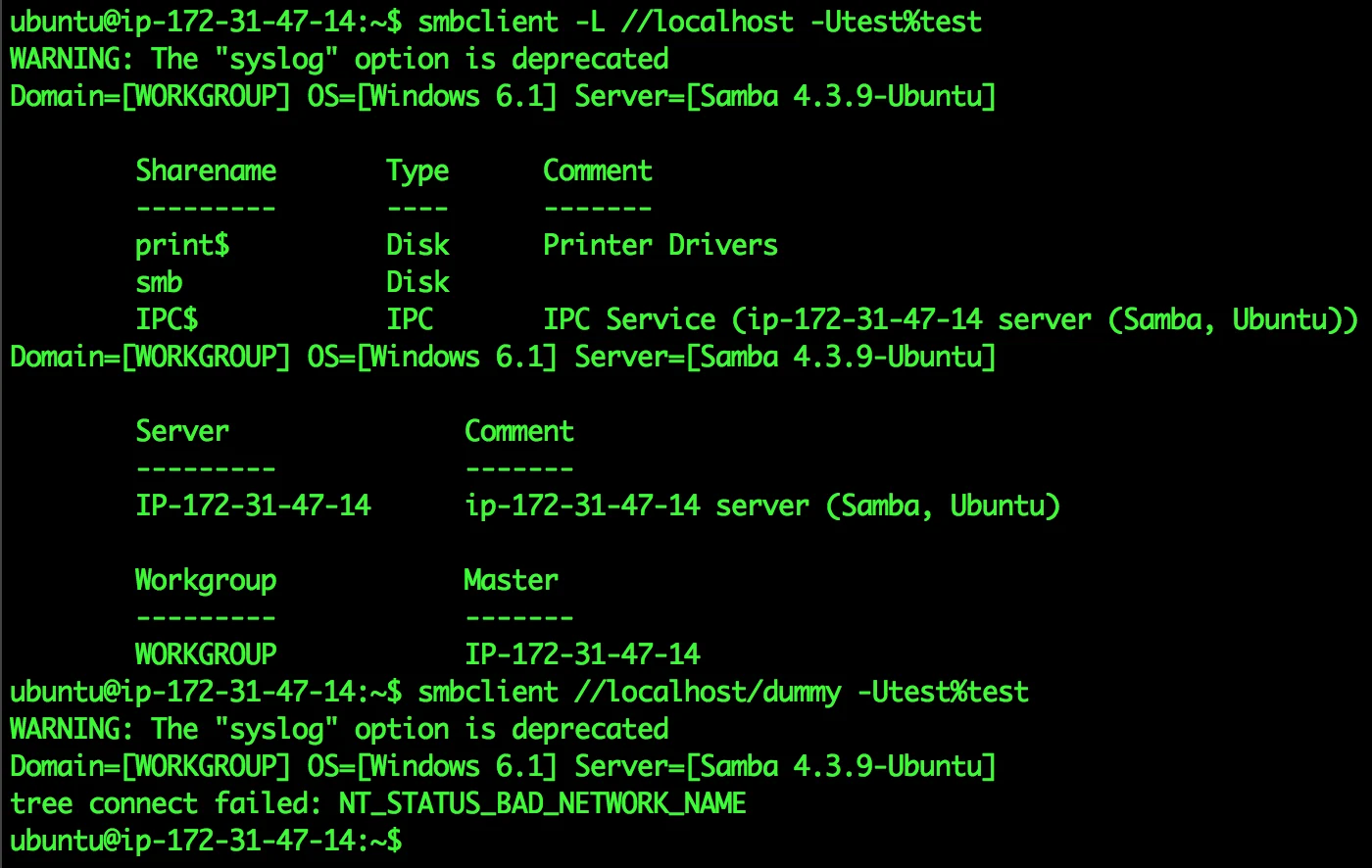
The external user authentication app in OwnCloud does not properly authenticate against an SMB server. In it's current implementation, the file (owncloud/apps/user_external/lib/smb.php, line 46-47) uses the command smbclient -L //host/dummy -Uuser%pass, where the variables user and pass are escaped for shell characters. However, default Samba SMB servers set "map to guest" to the value "bad user". This allows for the listing of shares regardless of user, but not further information.
The image shows the command smbclient -L //localhost/dummy -Utest%test succeeding with an invalid user "test" using password "test", yet the user does not exist as shown by the second command smbclient //localhost/dummy -Utest%test.
When the default "map to guest" parameter is changed to "never" in the smb.conf for the SMB server, both commands fail as required.
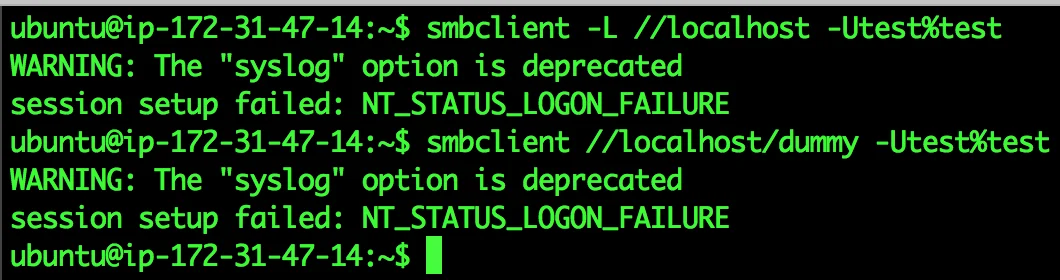
To properly validate the user the command should simply be smbclient //host -Uuser%pass. This properly authenticates the user and returns a valid error message the the script can interpret. In it's current implementation, providing any username to the application will log you in as that user - even creating a new one if necessary.
To Replicate
- Set up a Samba SMB server like detailed on this page:
-
Login to the OwnCloud application and enable the external user authentication app.
-
Edit the config and add:
'user_backends' => array ( 0 => array ( 'class' => 'OC_User_SMB', 'arguments' => array ( 0 => 'SMBHOST', ), ), ),
- If a user already exists and you have the username, you can login using any password (including the administrator account!). If user doesn't exist, it will create said user and log you in.
Untrusted Parameter Host
In the same php file (owncloud/apps/user_external/lib/smb.php, line 46-47) the parameter host is not properly escaped. This allows for code execution every time a user logs into the application if they were able to edit the owncloud/config/config.php file. This could allow for a valid persistence mechanism within the application.
Not written yet. The AI write-up for this report has not been written yet. The Original tab links to the source.
How it worked
Root cause
Likely the authentication check relied on a command that lists shares rather than one that authenticates, and the host value was passed to a shell command without escaping.
Impact
An attacker could log in as any known user, including the administrator, with any password, and could create new accounts; the unescaped host parameter could allow code execution for someone able to edit the config file, giving persistence.
What the attacker needed
Samba server with default map to guest; external user auth app enabled; known username for admin login; config edit access for code execution
The fix
The authentication command should be changed to one that actually authenticates the user, and the host parameter should be properly escaped.
How it was found
- Set up a Samba SMB server.
- Log in to OwnCloud and enable the external user authentication app.
- Add the SMB backend configuration to the config file.
- Log in with an existing username and any password, or with a new username to have an account created.
Explained by bugbounty.wiki with AI from the original and checked against quotes from it; it can still be wrong. Read the original before relying on a detail.
Not written yet. The AI write-up for this report has not been written yet. The Original tab links to the source.
OwnCloud can check logins against a Windows-style file server (SMB). The check it used only asked the server to list shares, and a default server answers that even for made-up users, so the app believed any username and password were valid. Separately, a setting in the app's config file was passed to a system command without cleaning, so someone who could edit that file could run their own commands.
What is Access control?
A user can do something their role should not allow: reach an admin function, act on a feature they have not paid for, or skip a permission check. IDOR is the special case where the object belongs to someone else.

