23000$ for Authentication Bypass & File Upload & Arbitrary File Overwrite
The admin panel accepted a JWT without the 'Bearer' prefix, allowing any logged-in user to authenticate as an admin. The upload endpoint then let the attacker write files to arbitrary paths in a CloudFront-backed S3 bucket, enabling overwriting of existing files served from the main site.
 Published on medium.com
today I’m sharing a vulnerability that I found a while ago, which I believe is quite interesting.
The full write-up lives on its author's site
It belongs to its author, so we link to it rather than copy it. The other two tabs are our own rewrites, checked against it.
Context
The target is a bug bounty program whose name and domain the author withholds because he did not get permission to disclose them, so throughout the write-up the main site is called test.com and the admin panel admin.test.com. The main site authenticates users with JSON Web Tokens (JWT): logging in to test.com issues a token for a regular user. The admin panel is a separate application on a subdomain that exposes its front-end JavaScript as app.js, and that file is where the authentication logic and the list of realms live.
The feature that matters later is a file upload endpoint on the admin panel, https://admin.test.com/upload, which takes a destination value and a file, and stores the file in a location that is served through an Amazon CloudFront distribution.
Setup
The researcher worked with Burp Suite for intercepting and replaying requests, the Wayback Machine and subdomain enumeration for recon, jwt.io to decode tokens, and ffuf for content discovery. No account names, versions or configuration details beyond these are given. The precondition for everything below is a normal user account on test.com, from which a valid JWT can be obtained.
Finding it
After logging in to test.com, the researcher decoded the user token on jwt.io and saw that it carried realm=test-user. Reading the admin panel's app.js (described as 200000 lines of code) showed that the admin panel also uses JWT for authentication and contained a list of realms, the interesting one being test-dashboard. The author notes that the real value was of the form target-dashboard, with the site name in place of test.
The reasoning was simple: the realm parameter is a reserved HTTP authentication parameter that indicates a scope of protection, and if the realm in the token could be changed to test-dashboard, the token might be accepted by the admin panel.
Exploitation
Step 1: changing the realm at login
The login request was sent with realm set to test-dashboard in the body, and the issued token reflected that value. The login request was sent with realm set to test-dashboard:
POST /api/v1/login HTTP/1.1Host: accounts.test.comConnection: closeContent-Length: 79Accept: */*Content-Type: application/json{“email”:”[redacted]”,”password”:”<password>”,”realm”:”test-dashboard”}
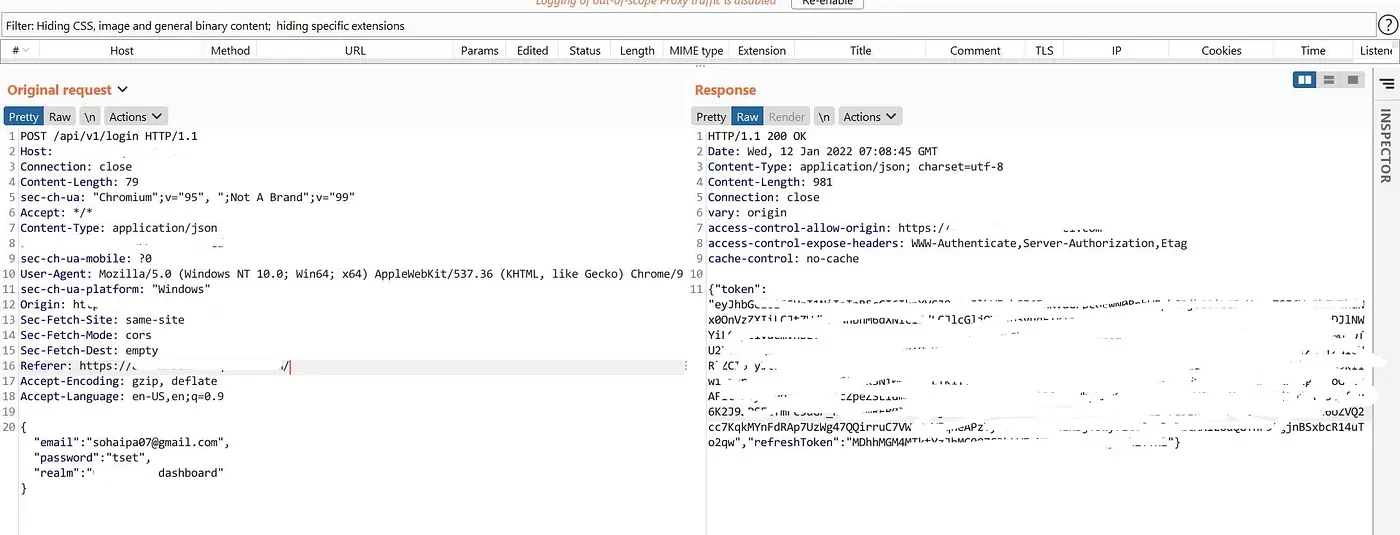
The screenshot shows the login HTTP request with the modified realm. Decoding the returned JWT confirms that the realm claim has been changed:
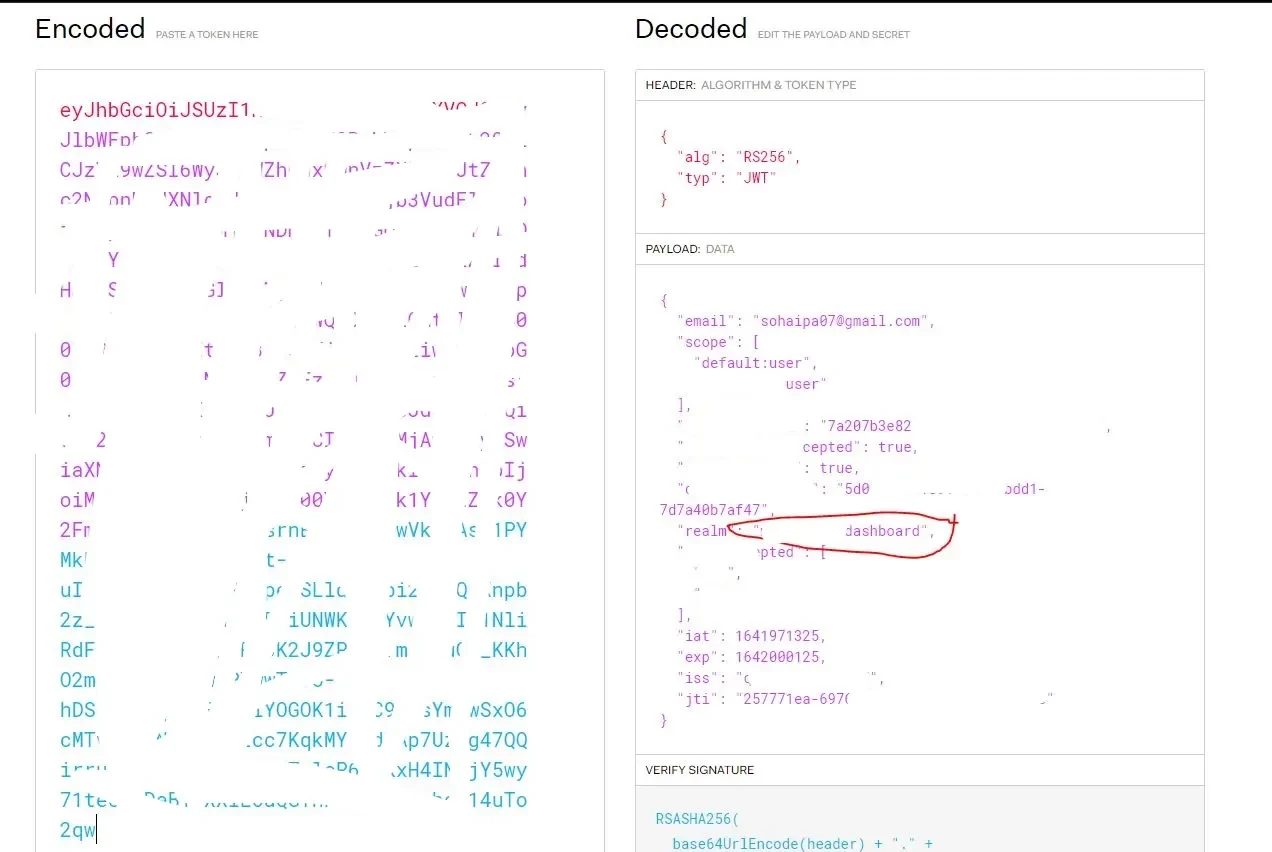
With that manipulated token the researcher could log in to the admin panel. He reported it immediately, and the program lowered the severity from Critical to Medium with this explanation:
We discussed this with the devs and they said that the admin dashboard you've got access to is just a react application that gets rendered client-side (the kind of pages that only need public info to be rendered) and not much else since the actual API is a separate application with endpoints that require a valid auth token with specific scopes. So, unless you can craft a token that will let you interact with the API, we will be lowering the severity of the issue.

The screenshot records the severity change from Critical to Medium. The researcher agreed with the reasoning: to be critical, the scope inside the JWT would have to be manipulated, and he tried every payload he could think of to change the scope without success.
Step 2: finding the upload endpoint
Content discovery with ffuf against admin.test.com found nothing, because ffuf uses GET by default. Switching to POST surfaced https://admin.test.com/upload, which returned 403. The endpoint had already been seen in app.js. Reading the JavaScript further allowed him to build the upload request:
POST /upload HTTP/1.1Host: admin.test.comConnection: closeContent-Length: 300Accept: application/json, text/plain, */*Content-Type: multipart/form-data; boundary=----WebKitFormBoundarypxxxxxxAuthorization: Bearer <JWT>User-Agent: Mozilla/5.0 (Windows NT 10.0; Win64; x64) AppleWebKit/537.36 (KHTML, like Gecko) Chrome/95.0.4629.0 Safari/537.36------WebKitFormBoundarypxxxxxxContent-Disposition: form-data; name="destination"gallery/------WebKitFormBoundarypxxxxxxContent-Disposition: form-data; name="file"; filename="poc.txt"Content-Type: Text/plainh4x0r-dz POC ------WebKitFormBoundarypxxxxxx--
The multipart body carries two parts: a destination field with the value gallery/, and a file part named poc.txt containing the text h4x0r-dz POC. This request returned 401, even with the realm manipulated in the JWT.
Step 3: authentication bypass by removing Bearer
Fuzzing the Authorization: Bearer <JWT> header produced 200 responses. The bypass is that when Bearer is deleted from the Authorization header, the request authenticates against https://admin.test.com and gets admin permissions. The steps as given:
- go to test.com
- login to your account .
- grep the Authorization header
The same upload request, with the scheme removed:
POST /upload HTTP/1.1Host: admin.test.comConnection: closeContent-Length: 300Accept: application/json, text/plain, */*Content-Type: multipart/form-data; boundary=----WebKitFormBoundarypxxxxxxAuthorization: <JWT>User-Agent: Mozilla/5.0 (Windows NT 10.0; Win64; x64) AppleWebKit/537.36 (KHTML, like Gecko) Chrome/95.0.4629.0 Safari/537.36------WebKitFormBoundarypxxxxxxContent-Disposition: form-data; name="destination"gallery/------WebKitFormBoundarypxxxxxxContent-Disposition: form-data; name="file"; filename="poc.txt"Content-Type: Text/plainh4x0r-dz POC ------WebKitFormBoundarypxxxxxx--
This returned 200 with a message saying the file was uploaded.
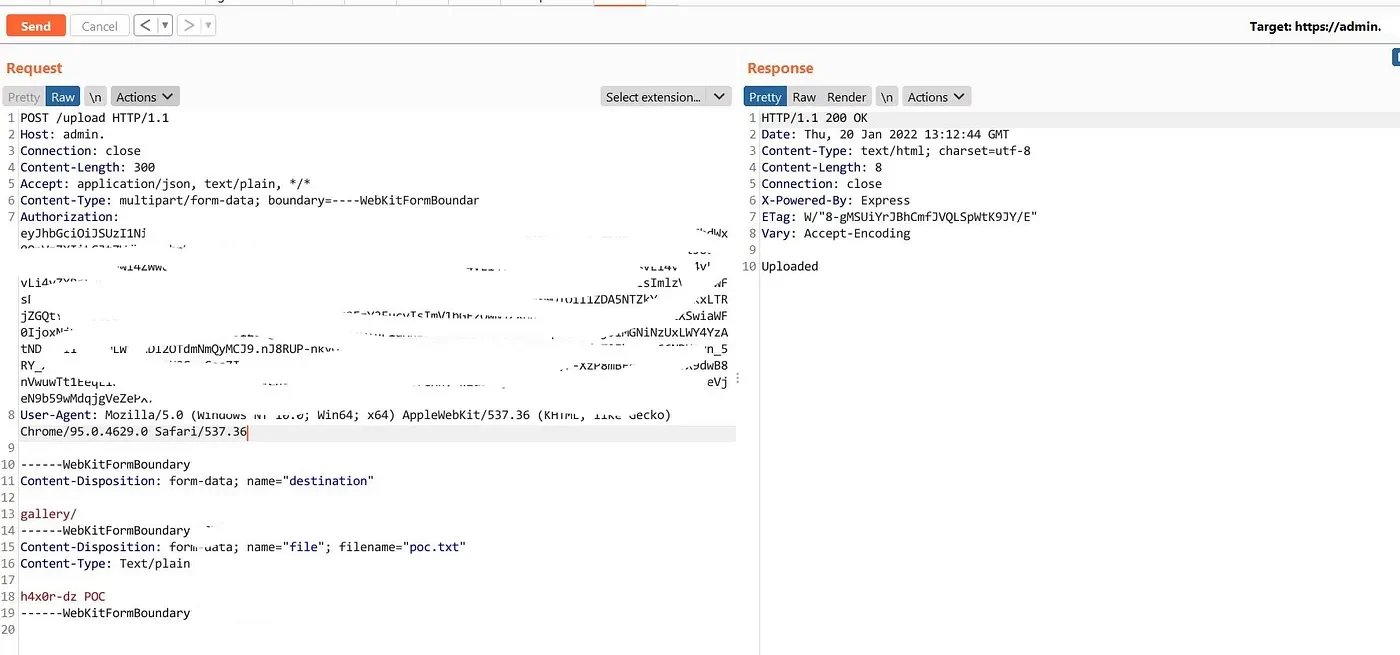
The screenshot shows the request with Bearer removed from the Authorization header and the 200 response with the uploaded message.
Step 4: locating the uploaded file
ffuf against all subdomains looking for something like admin.test.com/uploads/poc.txt found nothing. Going back through the Burp history and reading responses revealed an href=https://xxxxxxxx.cloudfront.net/gallery/xxxxxxxxx. The gallery segment matched the value sent in the destination field, so the file was fetched from:
https://XXXXXXXXX.cloudfront.net/gallery/poc.txt
and it was there.
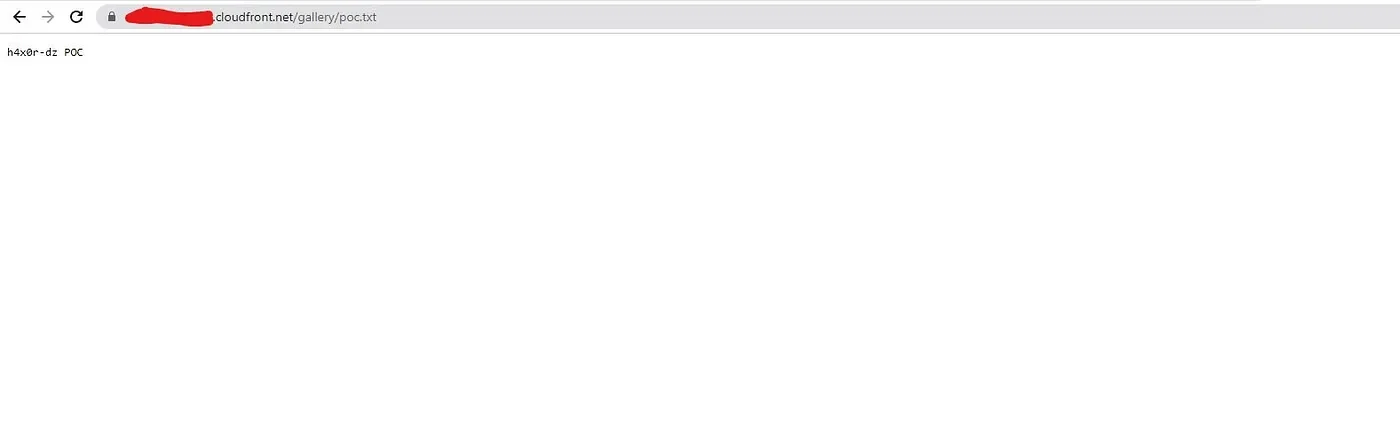
The screenshot shows the uploaded poc.txt being served from the CloudFront path under gallery/. Because the content is served by CloudFront, a CDN, a web shell cannot be executed there, so the file upload alone would have been a low-severity finding.
Step 5: arbitrary file overwrite
The researcher's next observation is that Amazon S3 is by default vulnerable to misconfiguration leading to arbitrary file overwrite when a file is uploaded. The destination parameter in the request body specifies the file path, so an existing file's content can be replaced. The same CloudFront distribution, xxxxxxxx.cloudfront.net, is used by the main website to host JavaScript, HTML and other files, including Windows software and PDFs that users download.

The screenshot shows files hosted on the CloudFront distribution. The first proof-of-concept file is shown here:
Because the browser cache prevented verification in the browser, the check was done with CURL. The overwrite request changes the content of the existing poc.txt:
POST /upload HTTP/1.1Host: admin.test.comConnection: closeContent-Length: 300Accept: application/json, text/plain, */*Content-Type: multipart/form-data; boundary=----WebKitFormBoundarypxxxxxxAuthorization: <JWT>User-Agent: Mozilla/5.0 (Windows NT 10.0; Win64; x64) AppleWebKit/537.36 (KHTML, like Gecko) Chrome/95.0.4629.0 Safari/537.36------WebKitFormBoundarypxxxxxxContent-Disposition: form-data; name="destination"gallery/------WebKitFormBoundarypxxxxxxContent-Disposition: form-data; name="file"; filename="poc.txt"Content-Type: Text/plainArbitrary File Overwrite ------WebKitFormBoundarypxxxxxx--

The terminal output shows the existing file's content being overwritten.
Root cause
Two mistakes combine. First, the admin panel's authentication accepts a JWT in the Authorization header without the Bearer scheme, and in that form it grants admin permissions; the standard Bearer <JWT> form was rejected with 401. The report does not explain the server-side parsing that causes this, so the exact mechanism is not stated. Second, the upload endpoint takes the storage path from the client-supplied destination field and writes to it without restricting it to new files, so an existing object can be replaced. The realm manipulation at login produced a token the admin panel would render for, but on its own it only reached a client-side React application, which is why the program lowered the severity to Medium.
Impact
With the bypass, an attacker holding an ordinary user account can authenticate to the admin panel and upload files. Because the destination value controls the path, the attacker can change the content of files already hosted on the CloudFront distribution used by the main website. The author states that this allows stored XSS and other issues on the main domain, and that by putting malicious code into existing EXE or PDF files (and CSS) that users download, it could lead to code execution on users' computers. These consequences are described as what the attacker could do with the overwrite; the report does not show them being demonstrated. The upload alone, without the overwrite, was limited because CloudFront serves the content and no web shell can run there.
Fix
Based on the findings, the authentication check on the admin panel should reject tokens that are not presented with the expected scheme, and the upload endpoint should not accept a client-controlled path that can point at existing objects.
Variants to test
- Send the same JWT with and without the
Bearerprefix to every authenticated endpoint of an application and compare status codes. A positive result is a 200 or an admin-level response for the scheme-less form where the standard form returns 401. - Change the
realm(or equivalent tenant/scope claim) in the login request body and decode the issued token. A positive result is a token whose claim reflects the supplied value and is accepted by a different application. - Run content discovery with POST as well as GET against admin subdomains. A positive result is an endpoint that returns 403 on GET and behaves differently on POST.
- Upload a file with a
destinationvalue naming an existing object and then fetch it through the CDN. A positive result is the original content replaced by the uploaded content. - Look for CDN hostnames referenced in responses and in the main site's assets, then check whether the upload destination maps directly onto their paths. A positive result is a path segment in the upload request that appears verbatim in the CDN URL.
What happened, in plain words
A security researcher found a way to log in to a company's admin panel without being an admin. He did it by changing one small value in a login request, then by removing one word from a request header. Once inside, he found a file upload feature and discovered that he could use it to replace files that the company's main website served to its visitors. The company paid him 23,000 US dollars in total: 20,000 for the file overwrite and 3,000 for the admin panel access.
The company did not allow him to name the program or the domain, so throughout this article the main website is called test.com and the admin panel is called admin.test.com. Everything below is what he did, explained from the beginning for someone who has never done security testing.
The pieces you need to understand first
Before the steps make sense, here are the ideas that come up again and again.
Websites, servers and subdomains
When you type an address into your browser, your computer asks a server (a computer somewhere that holds the website) to send back a page. A single company often runs several websites. The main one might be test.com, and a related one might be admin.test.com. The part in front, admin, is called a subdomain. Companies use subdomains to separate things: the public shop on one, the staff tools on another.
APIs
An API is the part of a website that the browser talks to behind the scenes to fetch or send data, without loading a whole new page. Think of a restaurant: the menu and the dining room are the website you see, and the kitchen is the API. You do not walk into the kitchen yourself; you tell the waiter what you want, and the waiter carries it to the kitchen and brings back the food. In web terms, the browser sends a request to an address like /api/v1/login, and the server sends back data, usually in a format called JSON (a way of writing data as labelled values, similar to a shopping list).
Tokens and JWTs
When you log in to a website, the server needs a way to remember that you are you on the next request. One common method is a token: a long string of characters the server gives you after login, which you send back with every later request as proof of who you are. It works like a cloakroom ticket: you hand in your coat, you get a ticket, and later the ticket gets your coat back. Anyone holding the ticket can claim the coat, which is why tokens must be kept secret.
A JSON Web Token, or JWT, is a particular kind of token. It is not a random string; it is a small package of information, written in JSON, that the server can read. A JWT has three parts separated by dots. The middle part holds claims, which are labelled facts such as who the user is and what they are allowed to do. Because the contents are only encoded (scrambled into a text-safe form), not encrypted, anyone can read them. A website called jwt.io lets you paste a token and see its contents in plain words.
Realms
A realm is a name for a protected area. The word comes from the HTTP standard, where it is described as a parameter that indicates a scope of protection. In everyday terms, think of a building with several floors, each with its own door and its own key card colour. The realm is the name written on the door: it tells the system which area you are asking to enter. If a token says realm=test-user, it is a ticket for the ordinary users' floor. If it says realm=test-dashboard, it is a ticket for the admin floor.
Authentication bypass
Authentication is the process of proving who you are. An authentication bypass is any trick that gets you past that check without the credentials you are supposed to have. It does not have to be a complicated exploit; sometimes it is a small inconsistency in how a server reads a request.
File upload and unrestricted file upload
A file upload feature lets you send a file from your computer to a server, for example a profile picture. Unrestricted file upload is the weakness that appears when the server does not properly control what kind of file is accepted or where it is stored. If an attacker can upload a program and then make the server run it, that is very serious. If the file is only stored and handed back to visitors as a download, it is less serious on its own.
Arbitrary file overwrite
Arbitrary file overwrite means being able to replace the contents of any file the server can reach, not just add new ones. Imagine a noticeboard where visitors pin announcements. Uploading a new note is one thing; being able to tear down an existing official notice and pin your own text in its place is another, and far more dangerous, because people trust what is already there.
CloudFront and S3
Amazon CloudFront is a content delivery network, or CDN, run by Amazon Web Services. A CDN is a worldwide network of copy machines: it keeps copies of files in many places so that visitors anywhere get them quickly. Amazon S3 is Amazon's file storage service, where the original files live. CloudFront serves what is in S3. If someone can change a file in S3, every visitor who downloads it through CloudFront gets the changed version.
Burp Suite, ffuf, the Wayback Machine and CURL
- Burp Suite is a tool that sits between your browser and the website and lets you see, pause, edit and resend every request. It also keeps a history of everything you sent.
- ffuf is a command-line tool that tries a long list of possible addresses against a website to see which ones exist. This is called content discovery. By default it uses the GET method, which is the method a browser uses when you simply open a page.
- The Wayback Machine is an archive of old versions of websites, useful for finding addresses that used to exist.
- CURL is a command-line tool for sending a single web request and printing the reply, handy when a browser's cache (its stored copy of a page) gets in the way.
HTTP methods and status codes
Every web request has a method. GET means give me something; POST means here is some data, do something with it. The server answers with a three-digit status code: 200 means it worked, 401 means you are not authenticated, 403 means you are authenticated but not allowed.
Fuzzing
Fuzzing means sending lots of slightly malformed variations of a request automatically and watching for a different answer. The idea is that a server's handling of odd input often reveals a mistake.
The setup
The researcher had a normal user account on test.com. He had a normal user account on test.com, which is where the token came from. His tools were Burp Suite for capturing and replaying requests, the Wayback Machine and subdomain enumeration (trying common names like admin, mail, dev in front of the domain to see which exist) for reconnaissance, jwt.io for reading tokens, and ffuf for content discovery.
Finding the first weakness
He logged in to test.com normally and pasted the token he received into jwt.io. The token contained realm=test-user, meaning it was a ticket for the ordinary users' area.
Next he looked at the admin panel. Its front-end code is a JavaScript file called app.js, which the browser downloads to run the page. He read that file, described as 200000 lines of code, and found two useful things: the admin panel also uses JWTs for authentication, and the file contains a list of realms. The interesting one was test-dashboard. In the real program the value was of the form target-dashboard, with the site's name in place of test.
His reasoning was simple. The realm is a name for a protected area. If the token he received at login said test-dashboard instead of test-user, perhaps the admin panel would treat him as an admin. It was, as he puts it, just a feeling.
Step 1: changing the realm at login
He sent the login request again, this time with the realm set to test-dashboard in the body:
POST /api/v1/login HTTP/1.1Host: accounts.test.comConnection: closeContent-Length: 79Accept: */*Content-Type: application/json{“email”:”[redacted]”,”password”:”<password>”,”realm”:”test-dashboard”}
Line by line:
POST /api/v1/login HTTP/1.1says: this is a POST request to the login address, using version 1.1 of the HTTP protocol.Host: accounts.test.comnames the server being asked.Connection: closeasks the server to close the connection after answering.Content-Length: 79says how many bytes of data follow.Accept: */*says the client will accept any kind of reply.Content-Type: application/jsonsays the data being sent is in JSON format.- The last line is the data itself: an email, a password and a realm. The realm is the value he changed. The email and password are placeholders; the real ones are not shown.
The realm in the request was accepted, and the token that came back carried the changed realm.
The screenshot shows the login request with the modified realm.
He then decoded the token that came back. The realm inside it had indeed changed:
The screenshot shows the decoded token with the changed realm. With that token he could log in to the admin panel.
The company's first answer
He reported the finding straight away. The program's reply was that the admin dashboard he had reached is only a React application rendered in the browser, meaning the page is built on the visitor's own computer from public information, and the real API is a separate application whose endpoints require a valid token with specific scopes. A scope is a permission attached to a token, like the list of rooms a hotel key card opens. The reply said that unless he could craft a token that would let him interact with the API, the severity would be lowered.
The screenshot records the severity being changed from Critical to Medium.
He agreed with the reasoning. To be critical, he would have to change the scope inside the token, and he tried every payload he could think of without success. He nearly gave up, then decided to keep digging.
Step 2: finding the upload endpoint
He ran ffuf against admin.test.com to look for existing addresses, and found nothing. The reason is that ffuf uses GET by default, and some endpoints only answer to POST. When he switched to POST, he found https://admin.test.com/upload, which returned 403. That address had already appeared in app.js, so he went back to the JavaScript and read further until he could build the upload request by hand:
POST /upload HTTP/1.1Host: admin.test.comConnection: closeContent-Length: 300Accept: application/json, text/plain, */*Content-Type: multipart/form-data; boundary=----WebKitFormBoundarypxxxxxxAuthorization: Bearer <JWT>User-Agent: Mozilla/5.0 (Windows NT 10.0; Win64; x64) AppleWebKit/537.36 (KHTML, like Gecko) Chrome/95.0.4629.0 Safari/537.36------WebKitFormBoundarypxxxxxxContent-Disposition: form-data; name="destination"gallery/------WebKitFormBoundarypxxxxxxContent-Disposition: form-data; name="file"; filename="poc.txt"Content-Type: Text/plainh4x0r-dz POC ------WebKitFormBoundarypxxxxxx--
Line by line:
POST /upload HTTP/1.1sends data to the upload address.Host: admin.test.comnames the admin server.Content-Type: multipart/form-data; boundary=----WebKitFormBoundarypxxxxxxsays the body is a form with several parts, and gives a marker string that separates the parts. This is the same format a browser uses when you submit a form with a file in it.Authorization: Bearer <JWT>carries the token. The wordBeareris a scheme name that tells the server what kind of credential follows, in the same way a label on an envelope says what is inside.User-Agentidentifies the browser that supposedly sent the request.- The first part,
name="destination"with the valuegallery/, tells the server where to put the file. - The second part,
name="file"; filename="poc.txt", is the file itself, containing the texth4x0r-dz POC. - The final marker line closes the form.
This request returned 401, meaning not authenticated, even with the realm changed in the token.
Step 3: the authentication bypass
He started fuzzing the Authorization: Bearer <JWT> header, sending variations to see whether any got a different answer. One did: removing the word Bearer and leaving only the token produced 200 responses. In other words, when the scheme word is deleted from the header, the request authenticates against https://admin.test.com and receives admin permissions. The standard form with Bearer was rejected; the unusual form without it was accepted.
His steps, as he wrote them:
- go to test.com
- login to your account .
- grep the Authorization header
grep here means: find and copy the Authorization header from the login traffic in Burp Suite, so you can reuse the token.
The same upload request, with the scheme word removed:
POST /upload HTTP/1.1Host: admin.test.comConnection: closeContent-Length: 300Accept: application/json, text/plain, */*Content-Type: multipart/form-data; boundary=----WebKitFormBoundarypxxxxxxAuthorization: <JWT>User-Agent: Mozilla/5.0 (Windows NT 10.0; Win64; x64) AppleWebKit/537.36 (KHTML, like Gecko) Chrome/95.0.4629.0 Safari/537.36------WebKitFormBoundarypxxxxxxContent-Disposition: form-data; name="destination"gallery/------WebKitFormBoundarypxxxxxxContent-Disposition: form-data; name="file"; filename="poc.txt"Content-Type: Text/plainh4x0r-dz POC ------WebKitFormBoundarypxxxxxx--
The only difference from the previous request is the Authorization line: it now reads Authorization: <JWT> with no Bearer in front. Everything else is identical. This time the server answered 200 and said the file was uploaded.
The screenshot shows the request with Bearer removed and the 200 response with the uploaded message.
Step 4: finding where the file went
A successful upload is only useful if you know where the file can be fetched. He first tried ffuf against all subdomains, guessing addresses like admin.test.com/uploads/poc.txt, and found nothing. Then he went back through his Burp history and read the responses carefully. One response contained a link of the form href=https://xxxxxxxx.cloudfront.net/gallery/xxxxxxxxx. The word gallery in that link matched the value he had put in the destination field. So the file should be at:
https://XXXXXXXXX.cloudfront.net/gallery/poc.txt
He opened that address and the file was there.
The screenshot shows the uploaded poc.txt being served from the CloudFront path under gallery/.
This told him two things. First, the destination value controls the path where the file lands. Second, the files are served by CloudFront, a CDN, which only hands files out; it does not run programs. So uploading a web shell, a small program that would give him control of the server, was not possible. On its own, the upload would have been a low-severity finding.
Step 5: overwriting existing files
He then made an observation about Amazon S3: by default it is vulnerable to a misconfiguration that allows arbitrary file overwrite when a file is uploaded. The destination parameter in the request body specifies the file path, so if he named a file that already existed, its content would be replaced. The same CloudFront distribution, xxxxxxxx.cloudfront.net, is used by the main website to host JavaScript, HTML and other files, including Windows software and PDFs that users download.
The screenshot shows files hosted on the CloudFront distribution.
His first proof-of-concept file is shown here:
Because the browser's cache kept showing him the old copy, he could not verify the change in the browser, so he used CURL instead. The overwrite request changes the content of the existing poc.txt:
POST /upload HTTP/1.1Host: admin.test.comConnection: closeContent-Length: 300Accept: application/json, text/plain, */*Content-Type: multipart/form-data; boundary=----WebKitFormBoundarypxxxxxxAuthorization: <JWT>User-Agent: Mozilla/5.0 (Windows NT 10.0; Win64; x64) AppleWebKit/537.36 (KHTML, like Gecko) Chrome/95.0.4629.0 Safari/537.36------WebKitFormBoundarypxxxxxxContent-Disposition: form-data; name="destination"gallery/------WebKitFormBoundarypxxxxxxContent-Disposition: form-data; name="file"; filename="poc.txt"Content-Type: Text/plainArbitrary File Overwrite ------WebKitFormBoundarypxxxxxx--
This is the same request again, with one change: the file content is now the text Arbitrary File Overwrite instead of h4x0r-dz POC. The destination still says gallery/ and the filename is still poc.txt, so the server writes over the file that is already there rather than creating a new one.
The terminal output shows the existing file's content being overwritten.
Why it worked
Two mistakes combined.
- The admin panel's authentication accepts a token in the
Authorizationheader without theBearerscheme, and in that form it grants admin permissions. The normal form withBearerwas rejected with 401. The report does not explain the server-side parsing that causes this, so the exact mechanism is not stated. - The upload endpoint takes the storage path from the
destinationfield supplied by the client and writes to it without restricting it to new files, so an existing file can be replaced.
The realm change at login produced a token the admin panel would render for, but on its own it only reached a page built in the browser, which is why the program lowered the severity to Medium.
What an attacker could do with it
With the bypass, anyone holding an ordinary user account could authenticate to the admin panel and upload files. Because the destination value controls the path, the attacker can change the content of files already hosted on the CloudFront distribution used by the main website. The author states that this allows stored XSS (a script injected into a page that then runs in other visitors' browsers) and other issues on the main domain, and that by putting malicious code into existing EXE or PDF files, and CSS files, that users download, it could lead to code execution on users' computers. These consequences are described as what the attacker could do with the overwrite; the report does not show them being demonstrated. The upload alone, without the overwrite, was limited because CloudFront serves the content and no web shell can run there.
How it should be fixed
Based on the findings, the authentication check on the admin panel should reject tokens that are not presented with the expected scheme, and the upload endpoint should not accept a client-controlled path that can point at existing files.
Things to try on other sites
- Send the same token with and without the
Bearerprefix to every authenticated endpoint of an application and compare status codes. A positive result is a 200 or an admin-level response for the form without the scheme where the standard form returns 401. - Change the
realm(or equivalent tenant or scope claim) in the login request body and decode the issued token. A positive result is a token whose claim reflects the supplied value and is accepted by a different application. - Run content discovery with POST as well as GET against admin subdomains. A positive result is an endpoint that returns 403 on GET and behaves differently on POST.
- Upload a file with a
destinationvalue naming an existing file and then fetch it through the CDN. A positive result is the original content replaced by the uploaded content. - Look for CDN hostnames referenced in responses and in the main site's assets, then check whether the upload destination maps directly onto their paths. A positive result is a path segment in the upload request that appears verbatim in the CDN URL.
The outcome
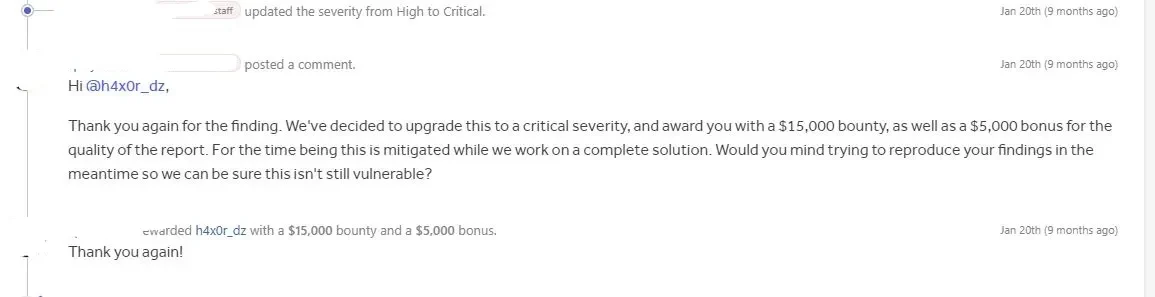
The screenshot shows the team's response. He received 20,000 US dollars for the file overwrite, and 3,000 US dollars for the admin panel access, 23,000 in total.

The screenshot shows the bounty amounts.
Glossary
- API: the part of a website that the browser talks to behind the scenes to fetch or send data, separate from the pages you see.
- Arbitrary file overwrite: the ability to replace the contents of any file the server can reach, not just add new ones.
- Authentication: the process of proving who you are.
- Authentication bypass: any trick that gets past the identity check without the credentials you are supposed to have.
- Authorization header: the part of a web request that carries the credential proving who is asking.
- Bearer: a scheme word placed before a token in the
Authorizationheader to say what kind of credential follows. - Burp Suite: a tool that sits between your browser and a website so you can see, pause, edit and resend requests, and keeps a history of them.
- CDN (content delivery network): a worldwide network of servers that keeps copies of files so visitors get them quickly.
- Claim: a labelled fact inside a JWT, such as who the user is or what they may do.
- CloudFront: Amazon's content delivery network.
- Content discovery: trying a long list of possible addresses against a website to find the ones that exist.
- CURL: a command-line tool for sending a single web request and printing the reply.
- Destination: in this report, the field in the upload request that tells the server where to store the file.
- ffuf: a command-line tool for content discovery that tries many addresses quickly.
- Fuzzing: sending lots of slightly malformed variations of a request automatically and watching for a different answer.
- GET: the HTTP method a browser uses when you simply open a page.
- HTTP: the language browsers and servers use to exchange requests and replies.
- JSON: a way of writing data as labelled values, used by most web APIs.
- JWT (JSON Web Token): a token made of three dot-separated parts that carries readable claims about the user.
- jwt.io: a website that decodes JWTs so you can read their contents.
- Multipart form data: the format used to send a form with several parts, including files, in one request.
- POST: the HTTP method used to send data to the server and ask it to do something with it.
- Realm: a name for a protected area, used to indicate a scope of protection.
- Reconnaissance: the early phase of gathering information about a target, such as subdomains and old addresses.
- S3: Amazon's file storage service, where the original files behind a CloudFront distribution live.
- Scope: a permission attached to a token, defining what the holder may do.
- Status code: the three-digit number a server answers with; 200 means success, 401 means not authenticated, 403 means not allowed.
- Stored XSS: a script injected into content that is saved on the server and later runs in other visitors' browsers.
- Subdomain: a name in front of a domain, such as
admininadmin.test.com, used to separate different services. - Token: a string the server gives you after login, which you send back with later requests as proof of who you are.
- Unrestricted file upload: a weakness where the server does not properly control what kind of file is accepted or where it is stored.
- User-Agent: the part of a request that identifies the browser that supposedly sent it.
- Wayback Machine: an archive of old versions of websites, useful for finding addresses that used to exist.
- Web shell: a small program uploaded to a server that lets an attacker run commands on it.


