Privilege Escalation by abusing non-existent path. (Windows)
Burp Suite tries to load DLLs from a path under C:\Program Files that does not exist by default. Because any authenticated Windows user can create folders on the C: drive, a low-privileged user can create that path and plant a malicious DLL that loads when a privileged user starts Burp Suite.

- Disclosed after 4 months
Vulnerability Overview
When Burpsuite runs, it tries to load some DLLs in the path C:\Program%20Files. Because the folder doesn't exists, it can be created by a low-privileged user which can inject arbitrary DLL into the process when another ** privileged user** runs Burpsuite. I have verified the vulnerability in the Pro Version but I'm pretty sure the community version is also affected.
Vulnerability Description
Monitoring the BurpSuite application in Process Monitor, we can see that it tries to load 2 DLLs from a directory that does not exist.

The interesting thing here is, that on Windows (verified for 7,10,Server 2008 R2 and Server 2012) every authenticated user is allowed to add new folders on the C:\ drive. This in turn allows an attacker to create the folder structure and inject arbitrary DLLs to Burpsuite.
Vulnerability Reproduction Steps
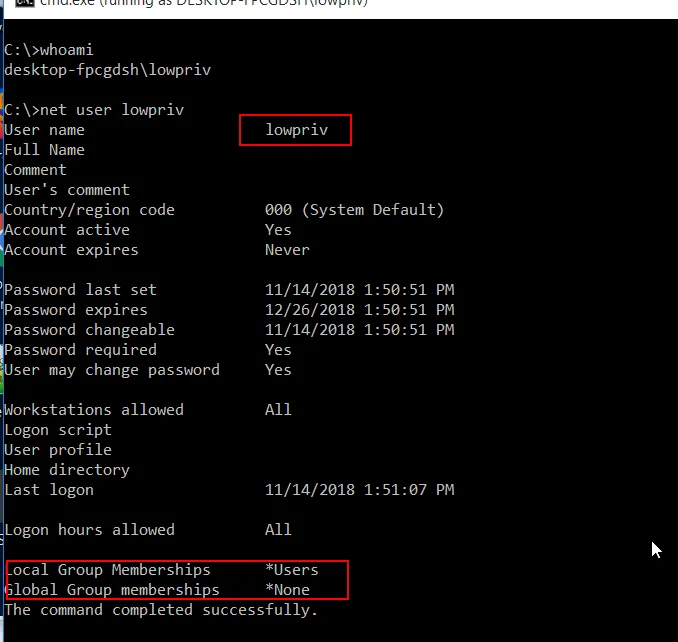
- Login as a low-privileged user on a system which has Burpsuite installed.
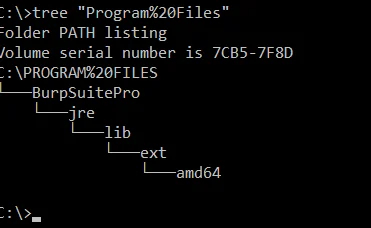
- Create the directory tree as shown in the image below.
- Copy the attached
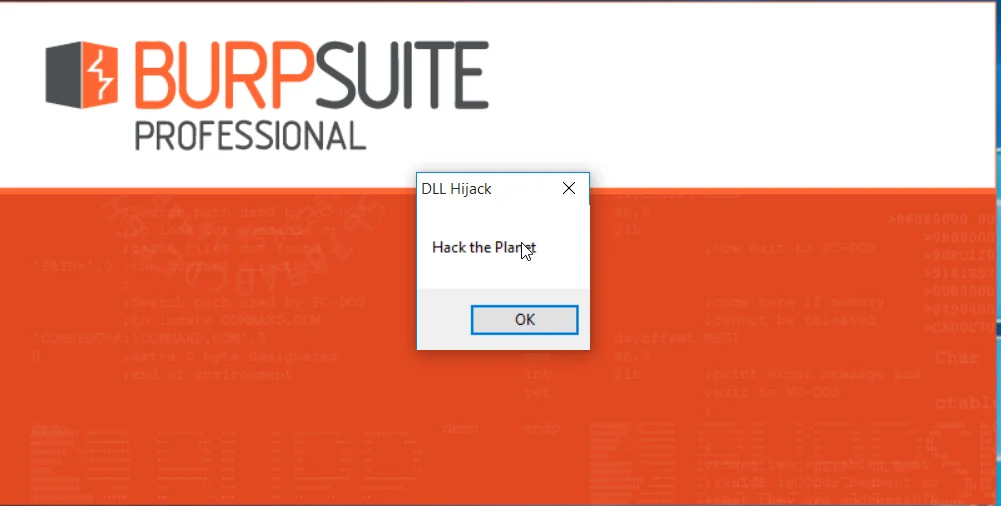
sunec.dllfile to the last directory (amd64). - Simulate the login of a privileged user , run Burpsuite and a message should pop up.
Impact
A low privileged user can execute code as a high privileged user.
Context
Burp Suite is a desktop application for testing web applications. On Windows it is a normal user-mode process, and like many Windows programs it loads a number of DLLs at start-up. This report is about what happens when one of those DLL loads is attempted from a path that does not exist on the machine.
The researcher monitored the Burp Suite process with Process Monitor and observed that the application tries to load two DLLs from a directory under C:\Program Files that is not present on the system. Because the directory is missing, the load fails there, and that location can be created by any authenticated user. That turns a missing folder into a privilege escalation primitive: a low-privileged user plants a DLL there, and the next privileged user who starts Burp Suite loads it.
The researcher verified the issue in the Pro version and states that the Community version is likely affected as well. The report was filed against PortSwigger Web Security's Burp Suite Pro/Community asset, rated medium severity with a CVSS score of 6.3, and disclosed on 13 March 2019.
Setup
The preconditions are simple and that is the point:
- A Windows host with Burp Suite installed.
- A low-privileged, authenticated local account on that host.
- A privileged account that will later run Burp Suite on the same host.
- Process Monitor, used to observe the DLL load attempts.
- A copy of
sunec.dll, which the researcher attached to the report.
The researcher verified the behaviour on Windows 7, Windows 10, Windows Server 2008 R2 and Windows Server 2012. No special tooling beyond Process Monitor is needed to find the issue, and no exploit framework is needed to trigger it.
Finding it
While monitoring the Burp Suite application in Process Monitor, the researcher saw that the process tries to load two DLLs from a directory that does not exist. The relevant path is:
C:\Program%20Files
The %20 is the URL-encoded form of a space, so the path the process is effectively looking for is a folder named Program Files directly under C:\. The important observation is not just that the load fails, but where it fails: the directory is absent, so the loader has nothing to find there, and the question becomes who is allowed to create that directory.
The Process Monitor output above shows the two DLL load attempts against the non-existent directory.
The second observation is a Windows permission detail: on the tested versions, every authenticated user is allowed to add new folders on the C:\ drive. On the tested versions, every authenticated user is allowed to add new folders on the C:\ drive. That means the missing directory is not a dead end, it is a writable location for a low-privileged account.
Exploitation
Step 1: Log in as a low-privileged user
The attacker needs an authenticated session on the target host with an ordinary, unprivileged account. The system must have Burp Suite installed. The screenshot below shows the low-privileged context used for the test.
Step 2: Create the directory tree
Using that low-privileged account, create the directory structure that Burp Suite expects, ending in the amd64 directory. The tree is shown in the image below.
This step works precisely because the account is allowed to create folders on C:\. The attacker is not writing into a protected directory, they are creating a new one at a level where ordinary users have that right.
Step 3: Drop the DLL in place
Copy the attached sunec.dll file into the last directory of the tree, amd64. When Burp Suite starts and attempts to load its DLL from that path, the file the attacker placed there is what the loader finds.
Step 4: Wait for a privileged user to start Burp Suite
Simulate the login of a privileged user, then run Burp Suite. A message should pop up, confirming that the attacker-supplied DLL was loaded and executed inside the privileged process.
The pop-up in the screenshot is the proof of execution: code from the low-privileged user's DLL is now running in the context of the privileged user who launched Burp Suite.
Root cause
The application attempts to load DLLs from a path that does not exist on a default installation, and the location it searches is one that any authenticated user can create. When the privileged user starts Burp Suite, the attacker-supplied DLL is loaded and a message pops up. Because the process runs as the privileged user, the DLL inherits that user's rights.
The application loads DLLs from a directory under C:\ that does not exist and that unprivileged users can create. The report does not describe any code-level mitigation inside Burp Suite, and the behaviour was reproducible across four Windows versions, so the operating system's default permissions did not stop it either.
Impact
A low-privileged user can execute code as a high-privileged user. In practice, an attacker with an ordinary local account plants the DLL and waits for an administrator or other privileged user to launch Burp Suite on the same machine, at which point the attacker's code runs with that user's privileges.
The attack requires local access and an authenticated low-privileged account, and it requires a privileged user to start the application on the affected host. The researcher verified the issue in the Pro version and expects the Community version to be affected too, but that is stated as an expectation rather than a confirmed result.
Fix
The report does not describe a fix or a change made by the vendor.
Variants to test
- Other missing directories under
C:\. Look for any application that probes a path directly under the drive root that is absent on a default install. A positive result is a Process Monitor entry showing a load attempt against a directory that does not exist and that a standard user can create. - Other user-creatable locations. The same reasoning applies wherever an authenticated user can create a folder that a privileged process later searches. A positive result is a successful load of an attacker-placed DLL from such a location.
- Other Windows versions. The researcher verified the folder-creation permission on Windows 7, 10, Server 2008 R2 and Server 2012. Testing further versions shows whether the default permission on
C:\still allows folder creation by ordinary users. - Community edition. The researcher expects the Community version to be affected but did not confirm it. Reproducing the same Process Monitor observation there would settle it.
Hunting notes
This class of bug hides in start-up behaviour rather than in network traffic. The signal is a Process Monitor trace of the target application showing DLL load attempts against paths that do not exist, especially paths directly under C:\ or in other locations where ordinary users can create directories. If the missing directory can be created by a low-privileged account, the finding is worth pursuing.
Impact is easy to demonstrate here: the researcher showed a low-privileged account creating the tree, placing the DLL, and a privileged user starting the application with a pop-up as proof of execution. That chain, from an unprivileged account to code running as a privileged user, is what makes the report convincing.
What happened, in plain words
Burp Suite is a program that people install on their own computer to test websites for security problems. It is a desktop application, meaning it runs as a normal program on Windows, not on a web server somewhere. Like many Windows programs, when it starts up it needs to load extra pieces of code called DLLs. A DLL (Dynamic Link Library) is a file full of ready-made code that a program can borrow at start-up instead of carrying everything inside one big file. Think of it like a recipe book that a cook borrows from a shelf: the cook does not write every recipe, they fetch the right book when they need it.
This report is about what happens when Burp Suite tries to fetch one of those DLL files from a folder that does not exist on the computer. The researcher watched Burp Suite start up with a tool called Process Monitor, which records everything a program does on the machine, and saw it looking for two DLLs in a folder under C:\Program Files that was not there.
That sounds harmless, but it is not. When a program asks for a file in a folder that does not exist, the load from that path fails. The question then becomes: who is allowed to create that missing folder? The answer, on the Windows versions tested, is that any logged-in user can create new folders directly on the C:\ drive. So an ordinary user with no special rights can create the folder Burp Suite is looking for, put their own DLL inside it, and wait. The next time a more powerful user (an administrator, for example) starts Burp Suite on that same computer, the program loads the planted DLL, and the ordinary user's code runs with the administrator's powers.
This kind of attack has a name: privilege escalation. "Privilege" means the level of permission an account has. A standard user can do everyday things; an administrator can change system settings, install software and reach files a standard user cannot. Escalation means moving from the low level to the high level without being given that right. The everyday comparison is a cleaner who is allowed into the building but not into the manager's office: if the cleaner can leave a package in a spot the manager always picks up, and the package does something when opened, the cleaner has effectively reached inside the office.
The researcher confirmed the problem in the Pro version of Burp Suite and said the Community version is probably affected too. The report was filed against PortSwigger Web Security's Burp Suite Pro/Community asset, rated medium severity with a CVSS score of 6.3, and disclosed on 13 March 2019. CVSS is a standard scoring system for how serious a security flaw is; 6.3 out of 10 sits in the medium band.
Setting the scene
The conditions needed to try this are simple, and that simplicity is the point:
- A Windows computer with Burp Suite installed.
- A low-privileged, logged-in local account on that computer. "Local" means the account exists on this machine, not on some remote server.
- A privileged account that will later start Burp Suite on the same machine.
- Process Monitor, the tool used to watch the DLL load attempts.
- A copy of
sunec.dll, the file the researcher attached to the report.
The researcher verified the folder-creation permission on Windows 7, Windows 10, Windows Server 2008 R2 and Windows Server 2012. No special tooling beyond Process Monitor is needed to find the issue, and no exploit framework is needed to trigger it. An exploit framework is a toolkit that automates attacks; here, none was required, because the attack is just creating a folder and copying a file.
Finding it
While monitoring the Burp Suite application in Process Monitor, the researcher saw that the process tries to load two DLLs from a directory that does not exist. The relevant path is:
C:\Program%20Files
Line by line, in plain words:
C:\is the root of the main hard drive on Windows, the top level from which all other folders branch out.Program%20Filesis the name of a folder. The%20is how a space is written when a path is encoded for use in a web address or a URL. A URL is the address you type in a browser, likehttps://example.com/page; certain characters, including the space, cannot appear literally in it, so they are written in this coded form. Decoded,%20becomes a space, so the folder the process is effectively looking for is namedProgram Files, directly underC:\.
The important observation is not just that the load fails, but where it fails: the directory is absent, so the loader has nothing to find there, and the question becomes who is allowed to create that directory.
The Process Monitor output above shows the two DLL load attempts against the non-existent directory.
The second observation is a Windows permission detail: on the tested versions, every authenticated user is allowed to add new folders on the C:\ drive. "Authenticated" simply means logged in with a valid account. On the tested versions, every authenticated user is allowed to add new folders on the C:\ drive. That means the missing directory is not a dead end, it is a writable location for a low-privileged account. The comparison is a building where residents cannot enter the locked storage room, but anyone with a key to the front door may put up a new shed in the car park.
Carrying out the attack
Step 1: Log in as a low-privileged user
The attacker needs an authenticated session on the target host with an ordinary, unprivileged account. The system must have Burp Suite installed. The screenshot below shows the low-privileged context used for the test.
Why this step: the whole attack depends on having a real account on the machine, because only a logged-in user is allowed to create folders on C:\. The attacker does not need administrator rights at any point; that is exactly what makes the finding interesting.
Step 2: Create the directory tree
Using that low-privileged account, create the directory structure that Burp Suite expects, ending in the amd64 directory. The tree is shown in the image below.
A directory tree is simply a set of nested folders, one inside another, like folders inside a filing cabinet. amd64 is the name of the final folder in the chain, the one Burp Suite looks in for its DLL.
This step works precisely because the account is allowed to create folders on C:\. The attacker is not writing into a protected directory, they are creating a new one at a level where ordinary users have that right. Why bother recreating the exact tree? Because the program looks for its DLL at one specific address. If the folders along that address do not exist, the program cannot find anything there. By building the same address themselves, the attacker makes sure the program's search lands on a file the attacker controls.
Step 3: Drop the DLL in place
Copy the attached sunec.dll file into the last directory of the tree, amd64. When Burp Suite starts and attempts to load its DLL from that path, the file the attacker placed there is what the loader finds.
Why this works: the program asks Windows for a file by name at a known location. When Burp Suite starts, the file the attacker placed at that path is what the loader finds. The attacker has replaced the expected content with their own, and the program has no way to tell the difference.
Step 4: Wait for a privileged user to start Burp Suite
Simulate the login of a privileged user, then run Burp Suite. A message should pop up, confirming that the attacker-supplied DLL was loaded and executed inside the privileged process.
The pop-up in the screenshot is the proof of execution: code from the low-privileged user's DLL is now running in the context of the privileged user who launched Burp Suite. "Running in the context of" means the code inherits that user's permissions, so anything the privileged user could do, the planted code can do too.
Why it happens
The application attempts to load DLLs from a path that does not exist on a default installation, and the location it searches is one that any authenticated user can create. When the privileged user starts Burp Suite, the attacker-supplied DLL is loaded and a message pops up. Because the process runs as the privileged user, the DLL inherits that user's rights.
The application loads DLLs from a directory under C:\ that does not exist and that unprivileged users can create. The report does not describe any code-level mitigation inside Burp Suite, and the behaviour was reproducible across four Windows versions, so the operating system's default permissions did not stop it either.
What an attacker gains
A low-privileged user can execute code as a high-privileged user. In practice, an attacker with an ordinary local account plants the DLL and waits for an administrator or other privileged user to launch Burp Suite on the same machine, at which point the attacker's code runs with that user's privileges.
The attack requires local access and an authenticated low-privileged account, and it requires a privileged user to start the application on the affected host. The researcher verified the issue in the Pro version and expects the Community version to be affected too, but that is stated as an expectation rather than a confirmed result.
The fix
The report does not describe a fix or a change made by the vendor.
Other places to look
- Other missing directories under
C:\. Look for any application that probes a path directly under the drive root that is absent on a default install. A positive result is a Process Monitor entry showing a load attempt against a directory that does not exist and that a standard user can create. - Other user-creatable locations. The same reasoning applies wherever an authenticated user can create a folder that a privileged process later searches. A positive result is a successful load of an attacker-placed DLL from such a location.
- Other Windows versions. The researcher confirmed the behaviour on Windows 7, 10, Server 2008 R2 and Server 2012. Testing further versions shows whether the default permission on
C:\still allows folder creation by ordinary users. - Community edition. The researcher expects the Community version to be affected but did not confirm it. Reproducing the same Process Monitor observation there would settle it.
How to hunt for this yourself
This class of bug hides in start-up behaviour rather than in network traffic. Network traffic means data travelling between computers over a connection, which is where most web security testing looks. Here there is no network involved at all: the flaw is in what the program does on the local disk when it starts. The signal is a Process Monitor trace of the target application showing DLL load attempts against paths that do not exist, especially paths directly under C:\ or in other locations where ordinary users can create directories. If the missing directory can be created by a low-privileged account, the finding is worth pursuing.
Impact is easy to demonstrate here: the researcher showed a low-privileged account creating the tree, placing the DLL, and a privileged user starting the application with a pop-up as proof of execution. That chain, from an unprivileged account to code running as a privileged user, is what makes the report convincing.
Glossary
- Burp Suite: a desktop application made by PortSwigger Web Security for testing websites for security problems.
- DLL (Dynamic Link Library): a file containing reusable code that a Windows program loads when it needs it, rather than keeping all code in one file.
- Process Monitor: a Windows tool that records what a program does on the machine, such as which files it opens or tries to open.
- Process: a running copy of a program. When you start Burp Suite, Windows creates a process for it.
- Privilege: the level of permission an account has on a computer. Low privilege means ordinary, everyday rights; high privilege means administrative rights.
- Privilege escalation: an attack that moves an attacker from a low-privilege account to a high-privilege one.
- Low-privileged user: a logged-in account with ordinary rights, unable to change system settings or reach protected files.
- Privileged user: an account with administrative rights, able to change system settings and reach protected files.
- Authenticated: logged in with a valid account.
- Local account: an account that exists on this particular computer, as opposed to a remote or network account.
- Host: the computer on which something runs.
- Directory / folder: a container for files, which can hold other folders inside it.
- Directory tree: a set of nested folders, one inside another.
- Path: the address of a file or folder on a disk, such as
C:\Program Files. C:\: the root of the main hard drive on Windows, the top level from which all other folders branch out.%20: the encoded form of a space character in a URL or encoded path.- URL: the address of something on a network, such as
https://example.com/page. amd64: the name of the final folder in the directory tree the researcher created, where the DLL was placed.sunec.dll: the DLL file the researcher attached to the report and placed in the tree.- CVSS: a standard scoring system for the severity of a security flaw, from 0 to 10.
- Severity: how serious a flaw is, often expressed as low, medium, high or critical.
- Vendor: the company that makes the affected product.
- Mitigation: a change or measure that reduces or removes a security risk.
- Exploit framework: a toolkit that automates attacks.
- Network traffic: data travelling between computers over a connection.
- Trace: a recorded log of what a program did, produced by a monitoring tool.


