Scary Bug in Burp Suite Upstream Proxy Allows Hackers to Hack Hackers
Burp Suite sends traffic to a configured upstream proxy in plain text without enforcing SSL trust, so anyone on the same network running a transparent interception tool can capture other users' HTTPS traffic, including session cookies. An attacker on a shared network such as an office or live hacking event could therefore read the traffic of testers and hunters using Burp.
 Published on medium.com
One day I was playing with a tool debookee (Network Traffic Interception) in the office, I noticed that the tool was intercepting facebook cookies in a plain text.
The full write-up lives on its author's site
It belongs to its author, so we link to it rather than copy it. The other two tabs are our own rewrites, checked against it.
Context
Burp Suite is an interception proxy used by penetration testers and bug hunters. To intercept HTTPS traffic, the user installs Burp's CA certificate in the browser, which makes the browser trust Burp as a man-in-the-middle. The browser then sends its traffic to Burp in plain text, and Burp re-encrypts it towards the destination.
Burp also supports an upstream proxy: a second proxy that Burp forwards its own outgoing connections through. This report is about how Burp behaves towards such an upstream proxy, and what that means for anyone sharing a network with a Burp user.
The tool on the other side of the story is Debookee, described in the report as a network traffic interception tool. According to the report, Debookee can intercept and monitor the traffic of any device in the same subnet through a man-in-the-middle attack. It captures data from mobile devices on a Mac (iPhone, iPad, Android, BlackBerry), or from a printer, TV or fridge, without the need for a proxy. The interception is done in one click and is described as transparent, without network interruption.

Setup
The setup is an office network shared by colleagues. One colleague had configured Burp Proxy in a browser and was browsing Facebook and other websites through it. The researcher was running Debookee on the same subnet. No accounts, versions or special configuration beyond that are given in the report.
Finding it
While using Debookee in the office, the researcher noticed that the tool was intercepting Facebook cookies in plain text. That was not expected: Facebook uses SSL to transfer cookies and other data over HTTPS, so those cookies should not have been readable on the wire. Trying other sites gave the same result: the researcher was able to grab all websites' SSL traffic in plain text.
Asking around, the researcher learned that a colleague had configured Burp Proxy in a browser and was surfing Facebook and other sites through it. That explained the source of the traffic, but not why it was in plain text.
Exploitation
Step 1: Run Debookee on the shared network
The researcher ran Debookee on the same subnet as the Burp user. Debookee performed its man-in-the-middle interception of the colleague's device traffic. At this point the browser-to-Burp leg was already plain text, and the Burp-to-upstream-proxy leg was where the exposure happened.
Step 2: Observe plain-text cookies
Instead of ciphertext, Debookee showed Facebook cookies in plain text, and the same for other websites. The report does not include the captured request or cookie values.
Step 3: Understand the chain
The researcher worked out the sequence of trust relationships:
- The Burp user installs Burp's CA certificate, which trusts Burp to intercept all SSL traffic and turn it into plain text.
- Once the proxy is set up, the browser sends all traffic to Burp in plain text.
- When Debookee runs on the network, Burp treats Debookee as an upstream proxy.
- By design, Burp does not enforce an SSL certificate on the upstream proxy, so Burp sends all the data to Debookee in plain text.
The report illustrates the browser-side configuration and the resulting capture:
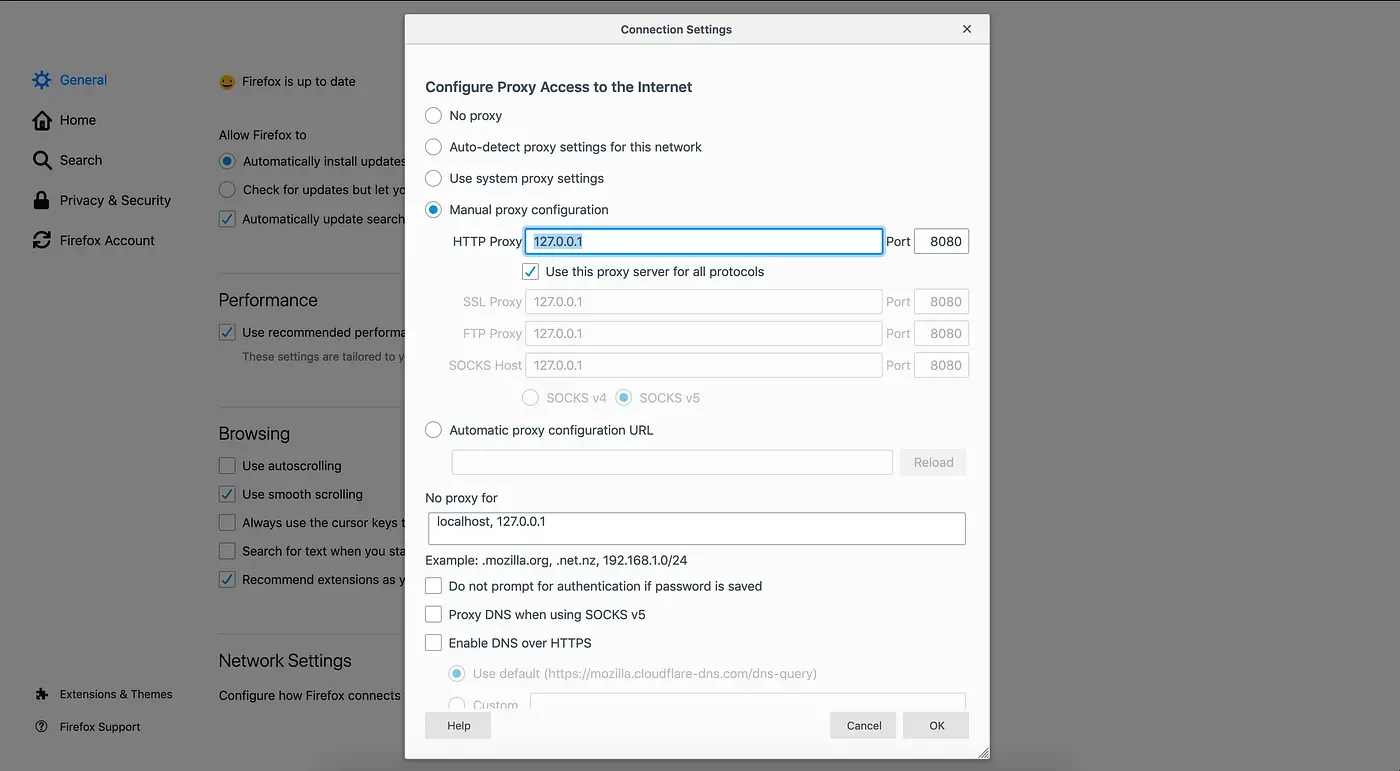
Configuring Burp Proxy in firefox
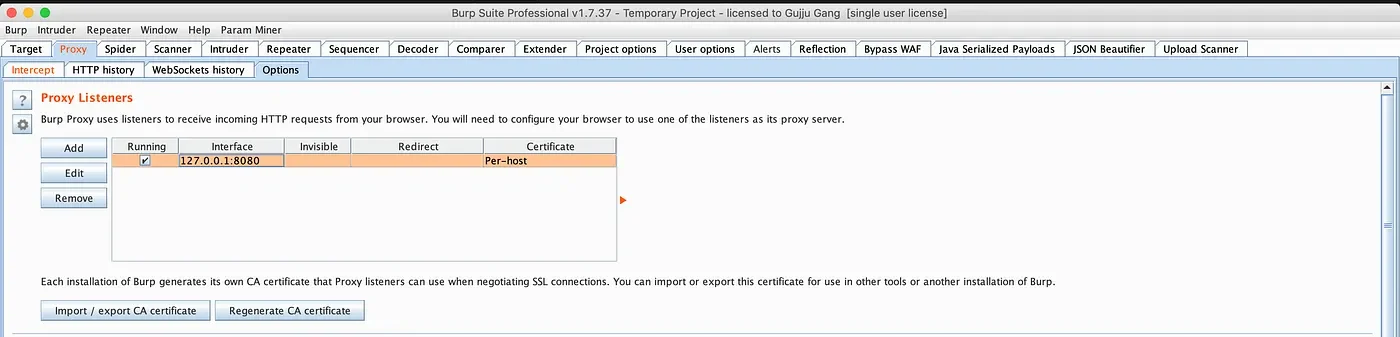
Configuring Burp Proxy

Getting cookies in a plain text
The report also refers to a video for better understanding, which is not reproduced here.
Root cause
Burp does not enforce SSL trust on an upstream proxy by design. By design, Burp does not enforce an SSL certificate on the upstream proxy, so Burp sends all the data to the upstream proxy in plain text. The browser-to-Burp leg is already plain text because the user installed Burp's CA certificate, so the whole path from browser to the intercepting tool is readable.
The existing defence, the CA certificate installed in the browser, only covers the browser-to-Burp hop. It does nothing for the Burp-to-upstream-proxy hop, which is where the data was exposed.
Impact
The researcher frames the impact around shared networks. If an attacker can get access to a penetration-testing consulting office's Wi-Fi, they can probably hack all the pen testers. At live hacking events, most hackers and bug hunters use Burp Suite, so an attacker on the same network could hack all the hackers present. If a company shares the same network as the hackers, company triagers are exposed to the same risk.
These are the report's own hedged scenarios: the exposure depends on the attacker being on the same network as a Burp user whose traffic is being intercepted as an upstream proxy.
Fix
The issue was reported to PortSwigger. Their reply, as quoted in the report, was that Burp does not enforce upstream SSL trust by design, but that they would push a feature with an SSL enable toggle option in the upstream proxy. The report does not state a version or date for that change.
Variants to test
- Run an interception tool on a shared network with a Burp user and check whether cookies and other sensitive data appear in plain text. A positive result is readable session cookies or credentials from HTTPS sites in the capture.
What happened, in plain words
A security researcher was sitting in an office, using a tool called Debookee. Debookee is a program that can watch the network traffic of other devices on the same network. While it was running, the researcher noticed something odd: it was showing Facebook cookies in readable, unencrypted text. That should not happen, because Facebook sends cookies over an encrypted connection (HTTPS), so they should look like scrambled data to anyone watching the network.
The researcher then checked other websites and found the same thing: traffic that should have been encrypted was arriving in plain text. Asking around the office, the researcher learned that a colleague had set up Burp Suite, a tool used by security testers, in their browser and was browsing Facebook and other sites through it. That explained where the traffic came from, but not why it was readable.
Digging deeper, the researcher found the cause. Burp Suite, by design, does not require encryption between itself and a second proxy it forwards traffic through (an "upstream proxy"). When Debookee appeared on the network, Burp treated it as that upstream proxy and sent all the data to it in plain text. The researcher reported this to PortSwigger, the company behind Burp Suite, and was told that Burp does not enforce upstream SSL trust by design, but that a feature with an SSL enable toggle would be added to the upstream proxy settings.
This article walks through the whole story from the beginning, explaining every term as it comes up.
Background: the tools involved
Burp Suite
Burp Suite is a program used by penetration testers and bug hunters. A penetration tester is someone paid to try to break into systems, with permission, to find weaknesses before criminals do. A bug hunter does similar work, often through bug bounty programmes where companies pay for reports of flaws.
Burp works as an "interception proxy". A proxy is a middleman: instead of your browser talking directly to a website, it talks to the proxy, and the proxy talks to the website. Burp sits in the middle so the tester can look at, and change, every request and response.
To read encrypted HTTPS traffic, the tester installs Burp's CA certificate in the browser. A certificate is a digital identity document. A CA certificate is one issued by a certificate authority, an organisation trusted to vouch for identities. When the browser trusts Burp's certificate, it accepts Burp as a legitimate middleman. This is called a man-in-the-middle (MITM) setup: the browser encrypts traffic to Burp, Burp decrypts it, reads it, and then re-encrypts it towards the real website. From the browser's point of view, Burp is the website; from the website's point of view, Burp is the browser.
Burp also supports an "upstream proxy": a second proxy that Burp itself sends its outgoing connections through. Think of it as a chain of middlemen. This report is about how Burp behaves towards that second middleman.
Debookee
The other tool in the story is Debookee, described in the report as a network traffic interception tool. According to the report, Debookee can intercept and monitor the traffic of any device on the same subnet through a man-in-the-middle attack. A subnet is a portion of a network, roughly "the devices that can reach each other directly", such as everything connected to the same office Wi-Fi. Debookee captures data from mobile devices on a Mac (iPhone, iPad, Android, BlackBerry), or from a printer, TV or fridge, without the need for a proxy. The interception is done in one click and is described as transparent, without network interruption.
The setup
The setup is an office network shared by colleagues. One colleague had configured Burp Proxy in a browser and was browsing Facebook and other websites through it. The researcher was running Debookee on the same subnet. No accounts, versions or special configuration beyond that are given in the report.
Finding it
While using Debookee in the office, the researcher noticed that the tool was intercepting Facebook cookies in plain text. A cookie is a small piece of data a website stores in your browser, and it is often used to keep you logged in. If someone else can read your cookies, they can often pretend to be you, which is why cookies are sensitive and why sites protect them with encryption.
That was not expected: Facebook uses SSL to transfer cookies and other data over HTTPS. SSL (Secure Sockets Layer) is the older name for the encryption technology behind HTTPS; HTTPS is the encrypted version of the web protocol HTTP. With HTTPS, anyone watching the network should only see scrambled data. Trying other sites gave the same result: the researcher was able to grab all websites' SSL traffic in plain text.
Asking around, the researcher learned that a colleague had configured Burp Proxy in a browser and was surfing Facebook and other sites through it. That explained the source of the traffic, but not why it was in plain text.
Exploitation
Step 1: Run Debookee on the shared network
The researcher ran Debookee on the same subnet as the Burp user. Debookee performed its man-in-the-middle interception of the colleague's device traffic. At this point the browser-to-Burp leg was already plain text, and the Burp-to-upstream-proxy leg was where the exposure happened. TLS (Transport Layer Security) is the modern name for the encryption used by HTTPS.
Step 2: Observe plain-text cookies
Instead of ciphertext (scrambled data that only the intended recipient can read), Debookee showed Facebook cookies in plain text, and the same for other websites. The report does not include the captured request or cookie values.
Step 3: Understand the chain
The researcher worked out the sequence of trust relationships:
- The Burp user installs Burp's CA certificate, which trusts Burp to intercept all SSL traffic and turn it into plain text.
- Once the proxy is set up, the browser sends all traffic to Burp in plain text.
- When Debookee runs on the network, Burp treats Debookee as an upstream proxy.
- By design, Burp does not enforce an SSL certificate on the upstream proxy, so Burp sends all the data to Debookee in plain text.
The report illustrates the browser-side configuration and the resulting capture:
Configuring Burp Proxy in firefox
Configuring Burp Proxy
Getting cookies in a plain text
The report also refers to a video for better understanding, which is not reproduced here.
Root cause
Burp does not enforce SSL trust on an upstream proxy by design. By design, Burp does not enforce an SSL certificate on the upstream proxy, so Burp sends all the data to the upstream proxy in plain text. The browser-to-Burp leg is already plain text because the user installed Burp's CA certificate, so the whole path from browser to the intercepting tool is readable.
The existing defence, the CA certificate installed in the browser, only covers the browser-to-Burp hop. It does nothing for the Burp-to-upstream-proxy hop, which is where the data was exposed.
Impact
The researcher frames the impact around shared networks. If an attacker can get access to a penetration-testing consulting office's Wi-Fi, they can probably hack all the pen testers. At live hacking events, most hackers and bug hunters use Burp Suite, so an attacker on the same network could hack all the hackers present. If a company shares the same network as the hackers, company triagers are exposed to the same risk. A triager is the person at a company who reads and sorts incoming bug reports.
These are the report's own hedged scenarios: the exposure depends on the attacker being on the same network as a Burp user whose traffic is being intercepted as an upstream proxy.
Fix
The issue was reported to PortSwigger. Their reply, as quoted in the report, was that Burp does not enforce upstream SSL trust by design, but that they would push a feature with an SSL enable toggle option in the upstream proxy. The report does not state a version or date for that change.
Variants to test
- Run an interception tool on a shared network with a Burp user and check whether cookies and other sensitive data appear in plain text. A positive result is readable session cookies or credentials from HTTPS sites in the capture.
Glossary
- Burp Suite: a program used by security testers to intercept and inspect web traffic between a browser and a website.
- Interception proxy: a middleman program that sits between your browser and a website so its traffic can be read and changed.
- Proxy: a middleman that forwards network traffic on your behalf.
- Upstream proxy: a second proxy that a proxy such as Burp forwards its own outgoing connections through.
- CA certificate: a digital identity document issued by a certificate authority, used to establish trust in encrypted connections.
- Certificate authority: an organisation trusted to vouch for the identity behind a certificate.
- Man-in-the-middle (MITM): an attack or setup where someone sits between two parties and can read or alter their traffic.
- HTTPS: the encrypted version of the web protocol HTTP.
- SSL: the older name for the encryption technology behind HTTPS.
- TLS: the modern name for the encryption used by HTTPS.
- Plain text: data that is readable as-is, not scrambled by encryption.
- Ciphertext: data that has been scrambled by encryption so only the intended recipient can read it.
- Cookie: a small piece of data a website stores in your browser, often used to keep you logged in.
- Session cookie: a cookie that identifies your logged-in session; if someone else reads it, they can often act as you.
- Subnet: a portion of a network, roughly the devices that can reach each other directly, such as everything on the same Wi-Fi.
- Penetration tester: someone paid to try to break into systems, with permission, to find weaknesses before criminals do.
- Bug hunter: someone who looks for security flaws, often through bug bounty programmes that pay for reports.
- Bug bounty programme: a scheme where a company pays people for reporting security flaws.
- Triager: the person at a company who reads and sorts incoming bug reports.
- PortSwigger: the company behind Burp Suite.
- Debookee: a network traffic interception tool that, according to the report, can capture traffic from devices on the same subnet.