Misconfigured $3 Bucket - A Semi Opened Environment
An S3 bucket belonging to Red Bull was misconfigured to allow unauthenticated uploads. An attacker could upload arbitrary files, which could then be made publicly readable, potentially enabling malware distribution or data corruption.
 Published on medium.com
First of all, just learn to recon and improve your methodology in recon don’t just follow another one’s recon tip if you do so there is no difference between you and them so if you see a #bugbountytip in Twitter or somewhere just wake your creativity up with that tip!
The full write-up lives on its author's site
It belongs to its author, so we link to it rather than copy it. The other two tabs are our own rewrites, checked against it.
Context
This is a write-up about an Amazon S3 bucket misconfiguration found in the Red Bull program on a public bug bounty platform. The asset involved is a bucket whose name was derived from Red Bull subdomains and acquisitions. The researcher, Yukesh Kumar (@3th1c_yuk1), had already reported more than 50 bugs in the program, all of which became duplicates or Not Applicable, so he changed his approach and went looking for S3 buckets instead of conventional web bugs.
An S3 bucket is normally a private object store: listing, reading and writing objects require the right IAM permissions, and a bucket that is exposed to the internet should still refuse anonymous access with AccessDenied. The bug here is that the bucket accepted a write, and the uploaded object could then be made publicly readable by setting an ACL on it.
Setup
The researcher used:
- A subdomain enumeration script of his own,
3th1c.sh, run in a loop over a domain list. - https://tools.whoisxmlapi.com/reverse-whois-search to collect Red Bull acquisitions, exported as CSV.
- Notepad to clean the CSV (replacing characters such as
,with spaces). - ProjectDiscovery's
httpxfor probing live hosts. - The AWS CLI, configured with
aws configureusing an access key ID and secret key from an AWS account.
No versions are given in the report. The only precondition for the AWS CLI steps is a configured profile.
Finding it
The first attempt appended the S3 path to every subdomain and looked at status codes:
cat redbull-domains.txt | httpx -status-code --path .s3.amazonaws.com
-status-code prints the status of each live host and --path appends the given path to the probed URL. This returned no 200, only 404 and some 503.
Because bucket names are often a single word chosen by the developer, he then reduced the subdomain list to first-level and second-level labels:
cat redbull-domains.txt | cut -d "." -f1 | sort -u | tee redbull-buckets.txt ; cat redbull-domains.txt | cut -d "." -f2 | sort -u | tee -a redbull-buckets.txt
cut -d "." -f1 takes the first dot-separated field, cut -d "." -f2 the second, sort -u removes duplicates, and tee/tee -a write the results to redbull-buckets.txt while still printing them.
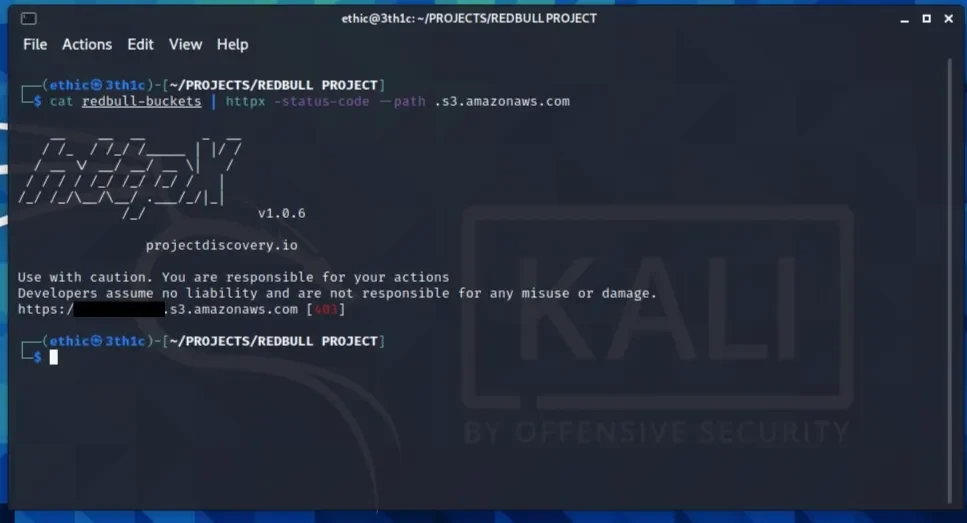
He then ran the same probe against that reduced list:
cat redbull-buckets.txt | httpx -status-code — path .s3.amazonaws.com
This time some hosts returned 403. Opening them one by one in the browser gave AccessDenied for all of them. The report notes that S3 buckets are sometimes not reachable through a browser but can still be checked with the AWS CLI.
Exploitation
Step 1: list the bucket
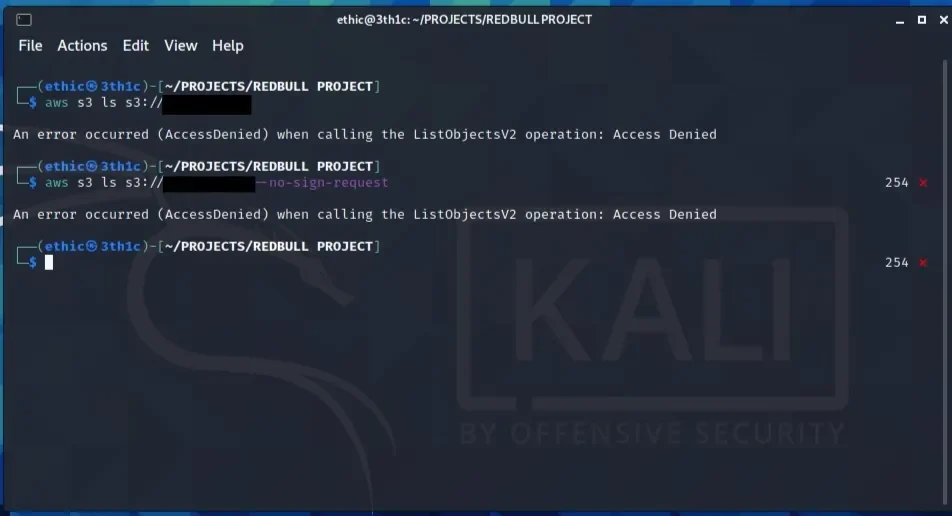
aws s3 ls s3://[bucket_name]
This lists the objects in a bucket. Against the 403 hosts it returned AccessDenied every time.
Step 2: try from the terminal
He retried the access from the terminal and still got Access Denied.
Step 3: write an object
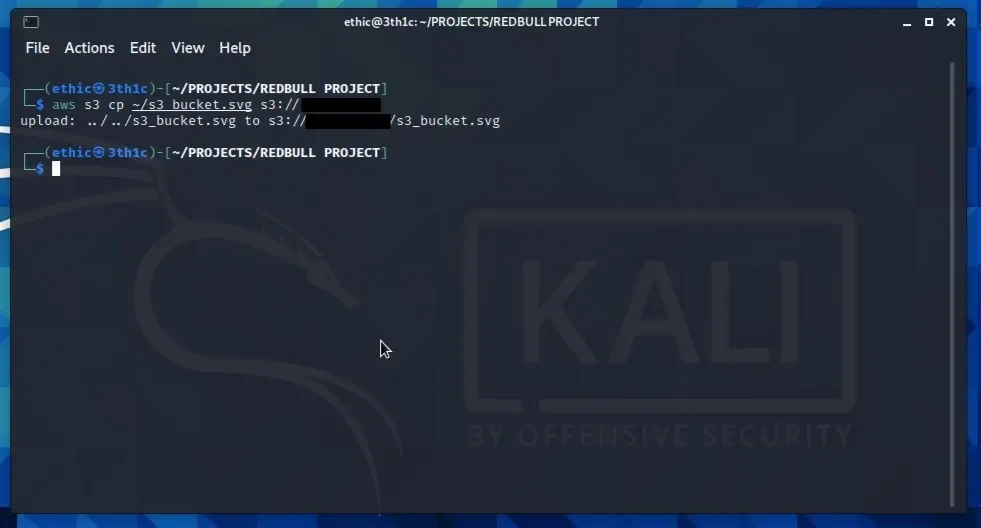
aws s3 cp [FILE] s3://[bucket_name]
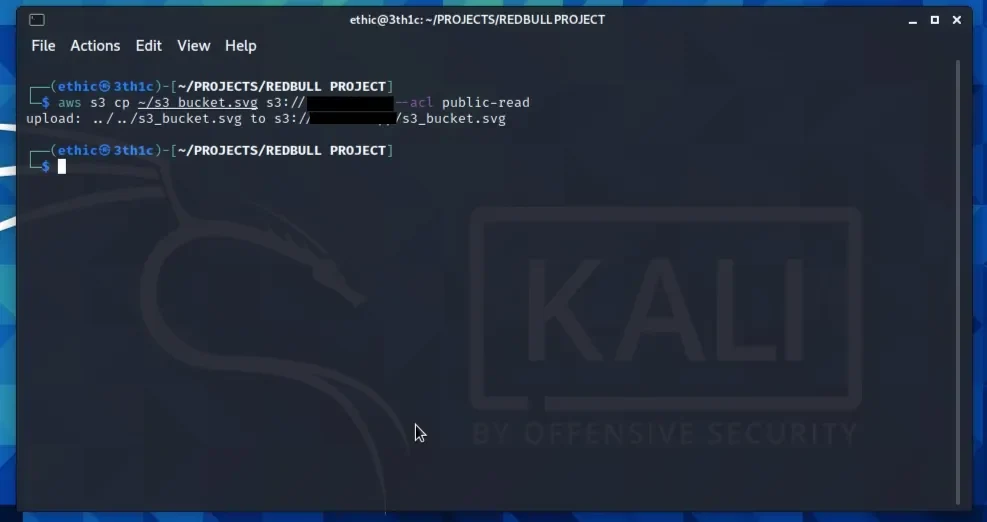
This copies a local file into the bucket. The result that caught his attention was an upload of ../[FILE] to s3://bucket_name/s3_bucket.svg, meaning the write itself succeeded even though listing and reading had been refused.
Step 4: read the uploaded object
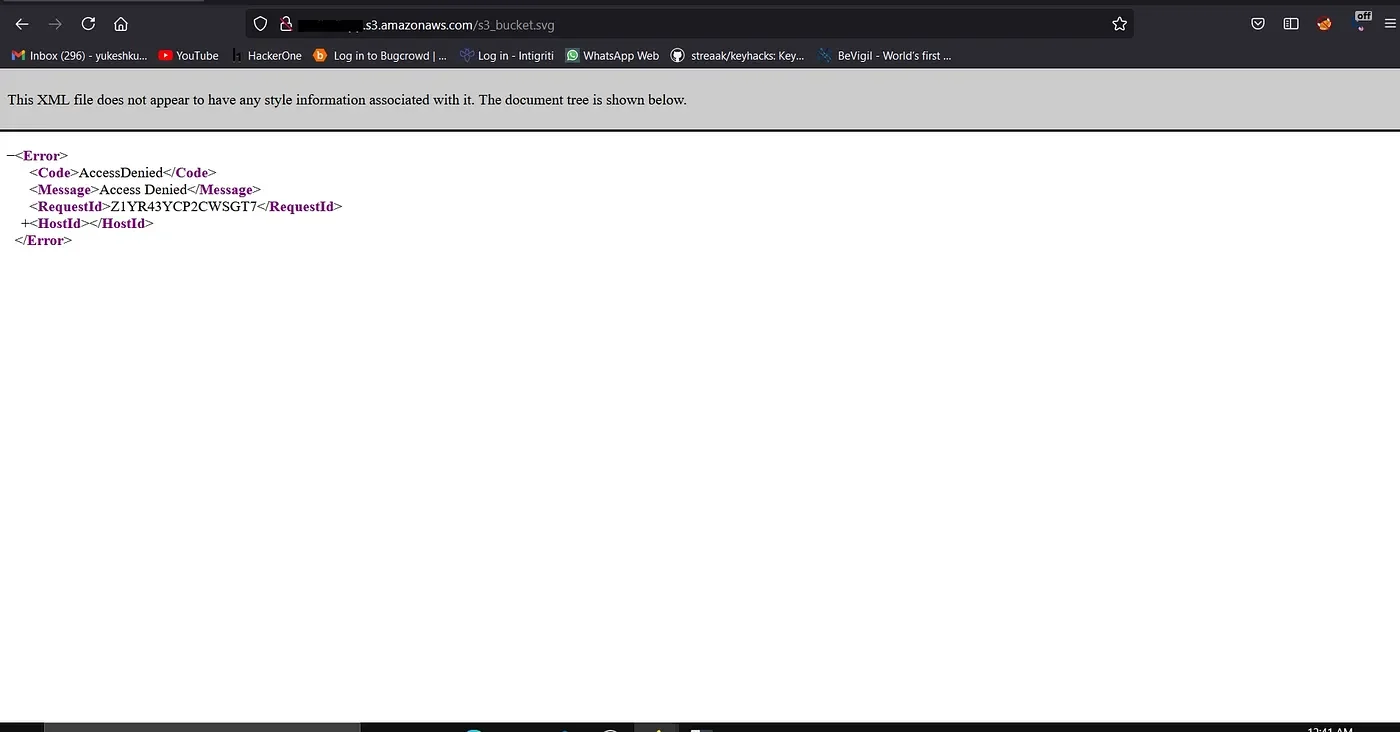
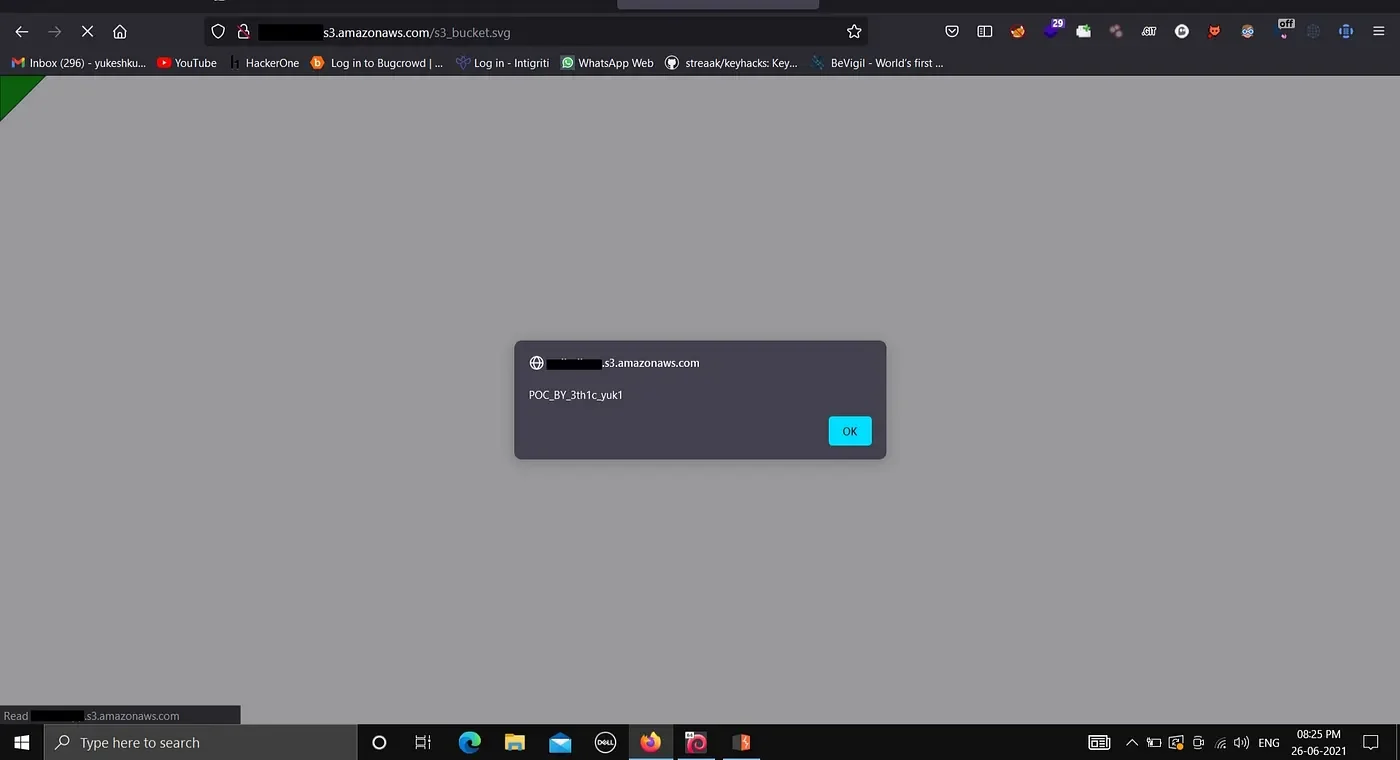
He visited the bucket and tried to view the file he had just uploaded, and got Access Denied again. The object existed but was not publicly readable.
Step 5: set a public ACL on upload
After reading the AWS documentation he learned that the bucket policy can be changed if the bucket is vulnerable. He used this command to make the object public:
aws s3 cp [FILE] s3://[bucket_name] --acl public-read
--acl public-read attaches a canned ACL that grants read access to everyone. After running it he could view the uploaded file publicly.
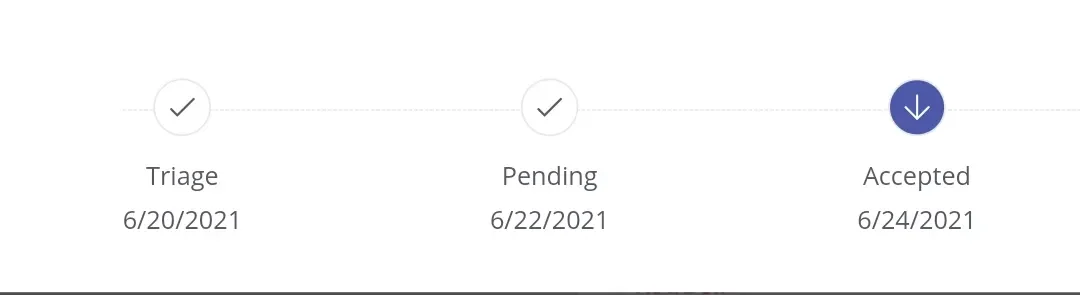
The report was submitted to Red Bull, validated, and accepted in four days. The report does not state the bounty amount.
Root cause
The bucket allowed a write while listing and reading were denied. The write permission alone is enough to place attacker-controlled content in the bucket, and because the bucket also honoured a public-read canned ACL supplied by the uploader, the attacker could make that content publicly readable. In other words, the bucket accepted writes and honoured a public-read ACL on the uploaded object. The report does not show the bucket policy itself, so the exact statement that allowed this is not documented.
Impact
As described in the report, a misconfigured S3 bucket can lead to data corruption, malware distribution and ransomware-style attacks. An attacker with CLI access to a writable bucket can perform unauthorised actions and can inject malicious code into a file and upload it to the bucket, which the report describes as a severe impact. The practical consequence here is that arbitrary content can be hosted on a trusted Red Bull bucket name and served publicly.
Fix
The report points to the AWS S3 security best practices documentation:
https://docs.aws.amazon.com/AmazonS3/latest/userguide/security-best-practices.html
Following the report's own reasoning, the bucket policy should deny anonymous writes and should not allow uploaders to set public ACLs.
Variants to test
- Write without read. For each 403 bucket, try
aws s3 cp [FILE] s3://[bucket_name]. A successful upload with no credentials for the bucket is the same signal seen here. - Public ACL on upload. Retry the write with
--acl public-read. If the object becomes readable over HTTP, the bucket honours uploader-supplied ACLs. - Delete and overwrite. The report lists
aws s3 rm s3://[bucket_name]/[FILE]as a CLI capability but does not say whether it worked. A successful delete or overwrite of an existing object would raise the impact considerably. - Name guessing from labels. Reduce subdomain lists to first and second labels as done here and probe each with the
.s3.amazonaws.comsuffix. - Browser versus CLI. A bucket that returns
AccessDeniedin the browser may still respond differently to CLI operations, so test both.
Takeaways from the report
- Be creative.
- Build your own methodology.
- Learn the basics of Linux.
- Learn at least the basics of programming.
What happened, in plain words
A security researcher was hunting for bugs in the Red Bull bug bounty program. A bug bounty program is a scheme where a company invites outside people to look for security problems in its systems and pays or thanks them for reporting what they find. He had already sent in more than 50 reports, and every one of them had been marked as a duplicate (someone else had reported the same thing first) or Not Applicable (the company decided it was not a real security problem). That is discouraging, so he decided to stop looking for the usual kind of web bug and try something different.
What he went looking for was a misconfigured storage bucket. Amazon S3 is a service that stores files in the cloud. You put files into a container called a bucket, and each bucket has a name. Normally a bucket is private: only people with the right permission can list what is inside, read a file, or add a file. If a bucket is set up badly, strangers on the internet can do things they should not be able to do, such as adding their own files to it.
In this case the researcher found a bucket that refused to show him its contents, but accepted a file he uploaded. He then found a way to make that uploaded file readable by anyone on the internet. He wrote it up, Red Bull confirmed the problem, and the report was accepted four days later.
A useful everyday comparison: think of a bucket as a filing cabinet in an office. The cabinet is locked for reading, so you cannot open the drawers and look at the folders. But the slot on top still accepts new paper, and once your paper is inside, you can put a sticker on it that says "anyone may read this". That is roughly what happened here.

The researcher's own advice before starting
He opens by telling readers to learn reconnaissance properly and to build their own method rather than copying someone else's tip from social media. Reconnaissance (often shortened to recon) means the information-gathering stage: finding out which computers, websites and services a company owns before you start testing anything. His point is that if you just copy a tip, you learn nothing; you should use the tip as a starting point and think of your own variation.
He introduces himself as Yukesh, also known as 3th1c_yuk1, and says this is his first write-up. A write-up is a public article explaining a bug after it has been fixed and disclosed.
He explains that a week earlier he had gone back to the Red Bull program. He had reported over 50 bugs there, all of which became duplicates or Not Applicable. He lost hope because the program covers a very large range of systems and many other researchers are constantly reporting bugs in it. So he decided to think differently.

Initial phase: collecting domain names
What a subdomain is
A domain name is the address you type in a browser, such as redbull.com. A subdomain is a name placed in front of it, such as shop.redbull.com or mail.redbull.com. Companies use subdomains to separate different services. Each subdomain can point to a completely different machine, so finding subdomains is a standard first step in recon: it widens the list of things you can look at.
An acquisition is a company that another company has bought. When Red Bull buys another business, that business's domain names and systems come along with it, and those systems are often less carefully maintained than the main brand's. That makes them interesting to a researcher.
Step 1: enumerate subdomains of redbull.com
He started by enumerating subdomains of redbull.com. Enumerating means producing a list, one by one. He had his own script to do this automatically, and says he will discuss the script in another write-up. A script is simply a small program that runs a series of commands for you so you do not have to type them by hand.
Step 2: find Red Bull's acquisitions
At the same time he collected Red Bull's acquisitions using this site:
https://tools.whoisxmlapi.com/reverse-whois-search
WHOIS is a public directory of who registered a domain name. A reverse WHOIS search works the other way round: you give it a piece of information, such as a company name, and it returns domain names registered with that information. The site has a feature to export the result as a CSV file. CSV stands for comma-separated values: a plain text file where each line is a row and the values in the row are separated by commas. It is the kind of file a spreadsheet program can open.
Step 3: clean the CSV in Notepad
He opened the CSV file in Notepad, a very simple text editor that comes with Windows, and replaced unwanted characters such as , with spaces. Why? Because his subdomain script expects one host name per line. If a line contains commas and other formatting, the script would treat the whole messy line as a host name and fail. Cleaning the file makes it usable as input.
Step 4: run the script over every domain in a loop
He then ran his subdomain enumeration script on the acquisition domains too, in a loop. A loop means running the same action over and over, once for each item in a list, instead of typing the command again for every item. He jokes that he likes to loop.
The command he used to loop his script
cat redbull-domains.txt | while read HOST ; do ( bash 3th1c.sh $HOST ) ; done | tee -a redbull-domains.txt
Line by line, in plain words:
cat redbull-domains.txtprints the contents of the fileredbull-domains.txtto the screen. Here the file holds the list of domains to work through.|is the pipe symbol. It takes whatever the command on its left produced and hands it to the command on its right as input. Think of it as a conveyor belt between two workers.while read HOSTmeans: as long as there are lines left on the conveyor belt, read the next line and store it in a variable calledHOST. A variable is just a named box that holds a value.; do ( bash 3th1c.sh $HOST ) ; doneis the body of the loop. For each value ofHOST, it runs the script3th1c.shand passes the host name to it as an argument. An argument is extra information you give a command on the same line. The parentheses group the command together.| tee -a redbull-domains.txttakes the output of the whole loop and sends it totee. Theteecommand is named after a T-junction pipe in plumbing: it splits the stream so the output is both shown on screen and written into a file. The-aflag means append, so new results are added to the end of the file rather than overwriting it.
His own breakdown in the report says the same things: cat reads the lines of the file, | sends output of one command to another, HOST is the first line of the file, do ... done is the loop syntax, and tee -a writes to both the screen and a file while appending.
Second phase: checking which hosts are alive
What probing means
After collecting subdomains, the next step is to check which of them actually respond. Many names in a list are dead: the machine no longer exists, or the name was never set up. Probing means sending a simple request to each name and seeing whether anything answers.
He used a tool called httpx from Project Discovery. It takes a list of host names and requests each one, reporting what came back. He notes that you should read a tool's usage and flags first so you can use it efficiently. A flag is an option you add to a command to change its behaviour, usually written with one or two dashes.
The command he used
cat redbull-domains.txt | httpx -status-code --path .s3.amazonaws.com
Line by line:
cat redbull-domains.txtprints the list of domains, as before.|passes that list tohttpx.httpxrequests each host in the list.-status-codetellshttpxto show the HTTP status code for each host. A status code is a three-digit number a web server sends back to say how the request went.200means success,403means forbidden (the server understood you but refuses),404means not found, and503means the service is temporarily unavailable.--path .s3.amazonaws.comtellshttpxto append that text to each host name before requesting it. So instead of requestingsomething.redbull.com, it requestssomething.redbull.com.s3.amazonaws.com. Why? Because S3 bucket addresses follow that pattern: a bucket calledsomethingcan be reached atsomething.s3.amazonaws.com. By appending the suffix, he was testing whether each subdomain name also happened to exist as a bucket name.
His own breakdown: status-code shows the status code of the probed live hosts, and --path is the path to append to the output.
This attempt produced no 200 responses, only 404 and some 503. In plain terms: none of the names he tried existed as a bucket at that address.
A different approach: guessing bucket names from labels
He changed tactic. Bucket names are often a single word chosen by the developer, and the developer is free to pick any name. So instead of testing the full subdomain, he reduced each subdomain to its first and second parts. For example, from shop.redbull.com you would take shop and redbull. Those single words are much more likely to match a bucket name.
The command he used
cat redbull-domains.txt | cut -d "." -f1 | sort -u | tee redbull-buckets.txt ; cat redbull-domains.txt | cut -d "." -f2 | sort -u | tee -a redbull-buckets.txt
Line by line:
cat redbull-domains.txtprints the domain list.cut -d "." -f1splits each line at the dot character and keeps the first piece.-dsets the delimiter, the character used to split, and-f1means field number one. Soshop.redbull.combecomesshop.sort -usorts the lines and removes duplicates.-ustands for unique. Without this, the same word would appear many times.tee redbull-buckets.txtwrites the result to a file calledredbull-buckets.txtand also shows it on screen.;separates two commands on one line, so the second command runs after the first finishes.- The second half repeats the same thing but with
cut -d "." -f2, which keeps the second piece. Soshop.redbull.combecomesredbull. tee -a redbull-buckets.txtappends this second set of results to the same file instead of overwriting it.
His own breakdown: cut is used to cut sections of each line, and sort -u removes duplicate output.
Final phase: finding a bucket that answers
He now had a file called redbull-buckets.txt containing first-level and second-level words, and he ran the same probing command against it.
The command he used
cat redbull-buckets.txt | httpx -status-code — path .s3.amazonaws.com
Line by line:
cat redbull-buckets.txtprints the reduced word list.|passes it tohttpx.httpxrequests each word with the S3 suffix appended.-status-codeshows the status code for each.— path .s3.amazonaws.comis the same path option as before, telling the tool to append the S3 suffix to each name.
This time some hosts returned 403. A 403 means the server understood the request but refuses it.
He collected all the 403 hosts and checked them one by one by copying and pasting each address into a browser. Every one returned AccessDenied. That is the standard refusal message from Amazon S3 when you are not allowed to do what you asked. He did not give up.
Why use the AWS CLI instead of a browser
He notes that S3 buckets are sometimes not accessible in a browser, but can be checked another way: the AWS CLI.
CLI stands for command line interface. It is a way of controlling a program by typing commands into a text window instead of clicking buttons. The AWS CLI is a single tool that lets you manage many Amazon Web Services products from that text window, and you can automate it with scripts. A browser only does what a browser does: it fetches a web page. The CLI can ask the storage service to do specific operations, such as listing files or uploading one, which is why it can reveal behaviour a browser cannot.
Setting up the AWS CLI
First you configure the AWS CLI in your terminal. A terminal is the text window where you type commands. You run aws configure, and you provide an access key ID and a secret key. These are like a username and password for a program rather than a person. You get them by creating an account on AWS and generating them there. The tool stores them so it can prove who you are on later commands.
He then lists four commands that cover most of what you need.
Commands
- For viewing the objects in a bucket:
aws s3 ls s3://[bucket_name] - For writing an object in a bucket:
aws s3 cp [FILE] s3://[bucket_name] - For downloading an object from a bucket:
aws s3 cp s3://[bucket_name]/[FILE] ~/ - For removing an object from a bucket:
aws s3 rm s3://[bucket_name]/[FILE]
What each one means:
aws s3 lslists the contents of a location, like listing the files in a folder.s3://is the prefix that says the location is an S3 bucket, and[bucket_name]is a placeholder for the actual name.aws s3 cpcopies a file. When the source is a local file and the destination is a bucket, it uploads. When the source is a bucket and the destination is a local folder, it downloads.~/means your home folder on your own computer.aws s3 rmremoves a file from a bucket.
An object is simply a file stored in a bucket, together with its details.
Step 1: try to list the bucket
aws s3 ls s3://[bucket_name]
This asks the storage service to show what is inside the bucket. Against the 403 hosts it returned AccessDenied every time. In plain words: he was not allowed to look inside.
Step 2: try again from the terminal
He retried the access from the terminal and still got Access Denied.
Step 3: try to write a file into the bucket
aws s3 cp [FILE] s3://[bucket_name]
This copies a local file into the bucket. The result that caught his attention was an upload of ../[FILE] to s3://bucket_name/s3_bucket.svg. In plain words: the upload succeeded. The bucket had refused to let him look inside, but it accepted a new file. That is the misconfiguration: the bucket accepted a write while reading and listing were closed.
Step 4: try to read the file he had just uploaded
He visited the bucket and tried to view the file he had just uploaded, and got Access Denied again. The file was there, but it was not publicly readable. This is an important distinction: being able to put something in does not automatically mean anyone can take it out.
Step 5: make the uploaded file public
After reading the AWS documentation he learned that the policy of the bucket can be changed if the bucket is vulnerable. A bucket policy is a set of rules saying who may do what with the bucket. An ACL, short for access control list, is a smaller, per-file set of permissions. One of the standard ACL settings is public-read, which means anyone may read the file.
He used this command to make his uploaded file public:
aws s3 cp [FILE] s3://[bucket_name] --acl public-read
Line by line:
aws s3 cpis the copy command, as before.[FILE]is the local file being uploaded.s3://[bucket_name]is the destination bucket.--acl public-readattaches thepublic-readpermission to the uploaded file at the moment of upload. In everyday terms, it is like putting a sticker on the envelope as you post it, saying "anyone may open and read this".
After he entered this command he could view his uploaded file publicly.
He wrote a report and submitted it to Red Bull. The team validated the security issue and accepted it in four days. The report does not state the reward amount.
Impact
As described in the report, a bad configuration of Amazon S3 buckets can have big impacts: corruption of data, distribution of malware, and even typical attacks such as ransomware. Ransomware is malicious software that locks or encrypts files and demands payment to unlock them. An attacker can perform unauthorised actions with the AWS CLI, and can inject malicious code into a file and upload it to the bucket, which the report describes as a severe impact.
The practical consequence here is that arbitrary content can be hosted under a bucket name and served publicly. The report does not describe any attempt to overwrite or delete existing files.
Mitigation
The report points to the AWS S3 security best practices documentation:
https://docs.aws.amazon.com/AmazonS3/latest/userguide/security-best-practices.html
Following the report's own reasoning, the bucket policy should refuse anonymous writes and should not allow whoever uploads a file to mark it public.
Few takeaways
- Be creative.
- Build your methodology.
- Learn the basics of Linux. Linux is the family of operating systems that most servers run, and the commands used here are Linux commands.
- Learn at least the basics of programming. He says he does not like to code but still knows the basics.
Timeline
Glossary
- Access control list (ACL): a per-file or per-bucket list of who is allowed to do what;
public-readis one standard setting that lets anyone read. - Access key ID and secret key: a pair of credentials a program uses to prove its identity to Amazon Web Services, like a username and password for software.
- Acquisition: a company that has been bought by another company; its systems come with it and are often less maintained.
- Argument: extra information given to a command on the same line.
- AWS CLI: Amazon Web Services Command Line Interface, a tool for managing AWS products by typing commands in a terminal.
- Bucket: a container in Amazon S3 that holds files.
- Bucket policy: a set of rules saying who may do what with a bucket.
- Bug bounty program: a scheme where a company invites outsiders to find and report security problems, often for a reward.
- CSV: comma-separated values, a plain text file where each line is a row and values are separated by commas.
- Command line interface (CLI): controlling a program by typing commands into a text window instead of clicking.
- Delimiter: the character used to split text into pieces, such as a dot in a domain name.
- Domain name: the address of a website, such as
redbull.com. - Duplicate: a report of a bug that someone else already reported first.
- Enumerate: to produce a list of items one by one.
- Flag: an option added to a command to change its behaviour, usually written with dashes.
- HTTP status code: a three-digit number a web server returns to say how a request went, such as
200success,403forbidden,404not found,503unavailable. - Loop: running the same action repeatedly, once for each item in a list.
- Misconfiguration: a setting that was left in an unsafe state, usually by mistake.
- Not Applicable: a report the company decided was not a real security problem.
- Object: a file stored in a bucket, together with its details.
- Phishing: tricking people into trusting a link or message so they hand over information or run something harmful.
- Pipe (
|): a symbol that passes the output of one command to another as input. - Probing: sending a simple request to each host in a list to see which ones respond.
- Ransomware: malicious software that locks or encrypts files and demands payment to unlock them.
- Reconnaissance (recon): the information-gathering stage of testing, finding out what a company owns.
- Reverse WHOIS: a search that takes a piece of information, such as a company name, and returns domain names registered with it.
- S3: Amazon Simple Storage Service, a cloud service for storing files in buckets.
- Script: a small program that runs a series of commands automatically.
- Subdomain: a name placed in front of a domain, such as
shop.redbull.com. - Terminal: the text window where you type commands.
- Variable: a named box that holds a value.
- WHOIS: a public directory of who registered a domain name.
- Write-up: a public article explaining a bug after it has been fixed and disclosed.



