Unrestricted File Upload on reddit.secure.force.com
The file upload form on a Salesforce instance allowed disallowed file types because the client-side check could be bypassed by using the browse button instead of drag-and-drop. An attacker could upload a malicious document, such as one exploiting the Follina vulnerability, to be sent to whoever handles the form.
 Originally disclosed on HackerOne
- Fixed in 46 days
- Paid in 46 days
- Disclosed after 3 months
Summary:
Reddit.secure.force.com is Reddit SalesForce instance. Attacker is able to send attachments of disallowed filetypes to this server. The attacker is able to send malicious documents such as CVE-2022-30190 Follina to the victim.
Impact:
Attacker can send malicious files to whoever handles the form behind https://reddit.secure.force.com/adhelp
Steps To Reproduce:
- Go to https://reddit.secure.force.com/adhelp
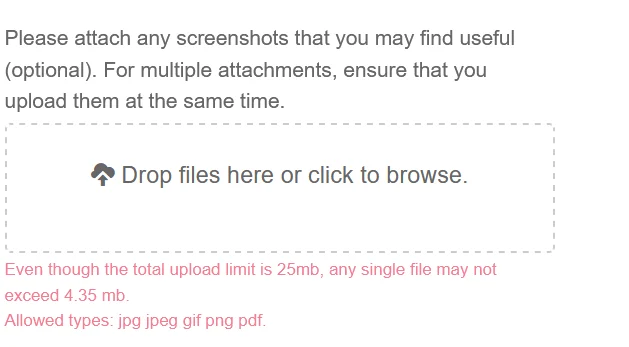
- Notice that the specified allowed filetype is: jpg jpeg gif png pdf as you can see with the image below:
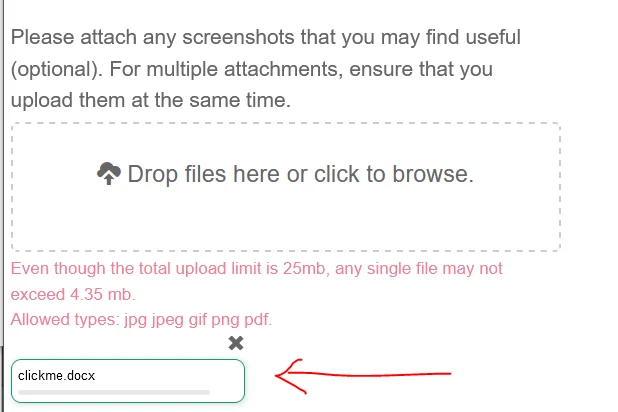
- If you try dragging and dropping a docx file to that box, there is a Javascript which forbids such action. But if you used the "Click to browse" option you can start uploading the file.
- The file upload request:
POST /adhelp/apexremote HTTP/1.1
Host: reddit.secure.force.com
████████
User-Agent: Mozilla/5.0 (Windows NT 10.0; Win64; x64; rv:91.0) Gecko/20100101 Firefox/91.0
Accept: */*
Accept-Language: en-US,en;q=0.5
Accept-Encoding: gzip, deflate
Referer: https://reddit.secure.force.com/adhelp/
X-User-Agent: Visualforce-Remoting
Content-Type: application/json
X-Requested-With: XMLHttpRequest
Content-Length: 15301
Origin: https://reddit.secure.force.com
Sec-Fetch-Dest: empty
Sec-Fetch-Mode: cors
Sec-Fetch-Site: same-origin
Te: trailers
Connection: close

{"action":"AdvertisingHelpController","method":"uploadFile","data":["UEsDBBQABgAIAAAAIQDfpNJsWgEAACAFAAATAAgCW0NvbnRlbnRfVHlwZXNdLnhtbCCiBAIooAACAAAAAAAAAAAAAAAAAAAAAAAAAAAAAAAAAAAAAAAAAAAAAAAAAAAAAAAAAAAAAAAAAAAAAAAAAAAAAAAAAAAAAAAAAAAAAAAAAAAAAAAAAAAAAAAAAAAAAAAAAAAAAAAAAAAAAAAAAAAAAAAAAAAAAAAAAAAAAAAAAAAAAAAAAAAAAAAAAAAAAAAAAAAAAAAAAAAAAAAAAAAAAAAAAAAAAAAAAAAAAAAAAAAAAAAAAAAAAAAAAAAAAAAAAAAAAAAAAAAAAAAAAAAAAAAAAAAAAAAAAAAAAAAAAAAAAAAAAAAAAAAAAAAAAAAAAAAAAAAAAAAAAAAAAAAAAAAAAAAAAAAAAAAAAAAAAAAAAAAAAAAAAAAAAAAAAAAAAAAAAAAAAAAAAAAAAAAAAAAAAAAAAAAAAAAAAAAAAAAAAAAAAAAAAAAAAAAAAAAAAAAAAAAAAAAAAAAAAAAAAAAAAAAAAAAAAAAAAAAAAAAAAAAAAAAAAAAAAAAAAAAAAAAAAAAAAAAAAAAAAAAAAAAAAAAAAAAAAAAAAAAAAAAAAAAAAAAAAAAAAAAAAAAAAAAAAAAAAAAAAAAAAAAAAAAAAAAAAAAAAAAAAAAAAAAAAAAAAAAAAAAAAAAAAAAAAAAAAAAAAAAAAAAAAAAAAAAAAAAAAAAAAAAAAAAAAAAAAAAAAAC0lMtuwjAQRfeV+g+Rt1Vi6KKqKgKLPpYtUukHGHsCVv2Sx7z+vhMCUVUBkQpsIiUz994zVsaD0dqabAkRtXcl6xc9loGTXmk3K9nX5C1/ZBkm4ZQw3kHJNoBsNLy9GUw2ATAjtcOSzVMKT5yjnIMVWPgAjiqVj1Ykeo0zHoT8FjPg973eA5feJXApT7UHGw5eoBILk7LXNX1uSCIYZNlz01hnlUyEYLQUiep86dSflHyXUJBy24NzHfCOGhg/mFBXjgfsdB90NFEryMYipndhqYuvfFRcebmwpCxO2xzg9FWlJbT62i1ELwGRztyaoq1Yod2e/ygHpo0BvDxF49sdDymR4BoAO+dOhBVMP69G8cu8E6Si3ImYGrg8RmvdCZFoA6F59s/m2NqciqTOcfQBaaPjP8ber2ytzmngADHp039dm0jWZ88H9W2gQB3I5tv7bfgDAAD//wMAUEsDBBQABgAIAAAAIQAekRq37wAAAE4CAAALAAgCX3JlbHMvLnJlbHMgogQCKKAAAgAAAAAAAAAAAAAAAAAAAAAAAAAAAAAAAAAAAAAAAAAAAAAAAAAAAAAAAAAAAAAAAAAAAAAAAAAAAAAAAAAAAAAAAAAAAAAAAAAAAAAAAAAAAAAAAAAAAAAAAAAAAAAAAAAAAAAAAAAAAAAAAAAAAAAAAAAAAAAAAAAAAAAAAAAAAAAAAAAAAAAAAAAAAAAAAAAAAAAAAAAAAAAAAAAAAAAAAAAAAAAAAAAAAAAAAAAAAAAAAAAAAAAAAAAAAAAAAAAAAAAAAAAAAAAAAAAAAAAAAAAAAAAAAAAAAAAAAAAAAAAAAAAAAAAAAAAAAAAAAAAAAAAAAAAAAAAAAAAAAAAAAAAAAAAAAAAAAAAAAAAAAAAAAAAAAAAAAAAAAAAAAAAAAAAAAAAAAAAAAAAAAAAAAAAAAAAAAAAAAAAAAAAAAAAAAAAAAAAAAAAAAAAAAAAAAAAAAAAAAAAAAAAAAAAAAAAAAAAAAAAAAAAAAAAAAAAAAAAAAAAAAAAAAAAAAAAAAAAAAAAAAAAAAAAAAAAAAAAAAAAAAAAAAAAAAAAAAAAAAAAAAAAAAAAAAAAAAAAAAAAAAAAAAAAAAAAAAAAAAAAAAAAAAAAAAAAAAAAAAAAAAAAAAAAAAAAAAAAAAAAAAAAAAAAAAAAAAAAAAAAAAAAAAAAAAAAAAAAAAAAArJLBasMwDEDvg/2D0b1R2sEYo04vY9DbGNkHCFtJTBPb2GrX/v082NgCXelhR8vS05PQenOcRnXglF3wGpZVDYq9Cdb5XsNb+7x4AJWFvKUxeNZw4gyb5vZm/cojSSnKg4tZFYrPGgaR+IiYzcAT5SpE9uWnC2kiKc/UYySzo55xVdf3mH4zoJkx1dZqSFt7B6o9Rb6GHbrOGX4KZj+xlzMtkI/C3rJdxFTqk7gyjWop9SwabDAvJZyRYqwKGvC80ep6o7+nxYmFLAmhCYkv+3xmXBJa/ueK5hk/Nu8hWbRf4W8bnF1B8wEAAP//AwBQSwMEFAAGAAgAAAAhANZks1H0AAAAMQMAABwACAF3b3JkL19yZWxzL2RvY3VtZW50LnhtbC5yZWxzIKIEASigAAEAAAAAAAAAAAAAAAAAAAAAAAAAAAAAAAAAAAAAAAAAAAAAAAAAAAAAAAAAAAAAAAAAAAAAAAAAAAAAAAAAAAAAAAAAAAAAAAAAAAAAAAAAAAAAAAAAAAAAAAAAAAAAAAAAAAAAAAAAAAAAAAAAAAAAAAAAAAAAAAAAAAAAAAAAAAAAAAAAAAAAAAAAAAAAAAAAAAAAAAAAAAAAAAAAAAAAAAAAAAAAAAAAAAAAAAAAAAAAAAAAAAAAAAAAAAAAAAAAAAAAAAAAAAAAAAAAAAAAAAAAAAAAAAAAAAAAAAAAAAAAAAAAAAAAAAAAAAAAAAAAAAAAAAAAAAAAAAAAAAAArJLLasMwEEX3hf6DmH0tO31QQuRsSiHb1v0ARR4/qCwJzfThv69ISevQYLrwcq6Yc8+ANtvPwYp3jNR7p6DIchDojK971yp4qR6v7kEQa1dr6x0qGJFgW15ebJ7Qak5L1PWBRKI4UtAxh7WUZDocNGU+oEsvjY+D5jTGVgZtXnWLcpXndzJOGVCeMMWuVhB39TWIagz4H7Zvmt7ggzdvAzo+UyE/cP+MzOk4SlgdW2QFkzBLRJDnRVZLitAfi2Myp1AsqsCjxanAYZ6rv12yntMu/rYfxu+wmHO4WdKh8Y4rvbcTj5/oKCFPPnr5BQAA//8DAFBLAwQUAAYACAAAACEAQBVauSsCAABTBgAAEQAAAHdvcmQvZG9jdW1lbnQueG1spJXfb9owEMffJ+1/iPwOSSi0VQRUA7qqD5OqsT1PxnESi9hn2Q4Z++t3zg/Cfqii5SXO+e4+9z07duYPP2UZHLixAtSCxOOIBFwxSIXKF+T7t8+jexJYR1VKS1B8QY7ckoflxw/zOkmBVZIrFyBC2aTWbEEK53QShpYVXFI7loIZsJC5MQMZQpYJxsMaTBpOojhq3rQBxq3FemuqDtSSDif/pYHmCp0ZGEkdmiYPJTX7So+QrqkTO1EKd0R2dNtjYEEqo5IOMToJ8ilJK6gb+gxzSd02ZdOtQFMxNLxEDaBsIfTQxntp6Cx6yOG1Jg6y7ONqHU+v24ONoTUOA/AS+WmbJMtW+evEOLpgRzzilHGJhD9r9kokFWoo/K6lOVvcePY2wORvgM6v25wnA5UeaOI62rPan1j+ZL+B1W3yeWv2OjHbgmo8gZIlz7kCQ3clKsItC3DVA/9ZkyXeODtIj37UQZ3gjZV+XZAomsU3j3cr0k9teEar0nnPOo7Xn1ZNpvEPt9xUUh6DDXV0HnrbPxvXDmDv75Kto8YhSqQI8ExFJSr58QQryvYkPI99VOkpMmxQ2rstZ+7F/Edhozzf/kIXftPxZDJtKhT4PrufNgwf8IX6ZAd49OJpG2JEXrjB3IFzIAe75NmZt+A05XiJ3U0aMwNwZ2ZeucbsyjEoLc5aTRlvY5ppvNqfjPDtlULxF+EYqry57ftsW2xe2y0Jh7/B8jcAAAD//wMAUEsDBBQABgAIAAAAIQCqUiXfIwYAAIsaAAAVAAAAd29yZC90aGVtZS90aGVtZTEueG1s7FlNixs3GL4X+h/E3B1/zfhjiTfYYztps5uE7CYlR3lGnlGsGRlJ3l0TAiU5Fgqlaemhgd56KG0DCfSS/pptU9oU8heq0XhsyZZZ2mxgKVnDWh/P++rR+0qPNJ7LV04SAo4Q45imHad6qeIAlAY0xGnUce4cDkstB3AB0xASmqKOM0fcubL74QeX4Y6IUYKAtE/5Duw4sRDTnXKZB7IZ8kt0ilLZN6YsgUJWWVQOGTyWfhNSrlUqjXICceqAFCbS7c3xGAcIHGYund3C+YDIf6ngWUNA2EHmGhkWChtOqtkXn3OfMHAESceR44T0+BCdCAcQyIXs6DgV9eeUdy+Xl0ZEbLHV7Ibqb2G3MAgnNWXHotHS0HU9t9Fd+lcAIjZxg+agMWgs/SkADAI505yLjvV67V7fW2A1UF60+O43+/Wqgdf81zfwXS/7GHgFyovuBn449Fcx1EB50bPEpFnzXQOvQHmxsYFvVrp9t2ngFSgmOJ1soCteo+4Xs11CxpRcs8Lbnjts1hbwFaqsra7cPhXb1loC71M2lACVXChwCsR8isYwkDgfEjxiGOzhKJYLbwpTymVzpVYZVuryf/ZxVUlFBO4gqFnnTQHfaMr4AB4wPBUd52Pp1dEgb17++Oblc3D66MXpo19OHz8+ffSzxeoaTCPd6vX3X/z99FPw1/PvXj/5yo7nOv73nz777dcv7UChA199/eyPF89effP5nz88scC7DI50+CFOEAc30DG4TRM5McsAaMT+ncVhDLFu0U0jDlOY2VjQAxEb6BtzSKAF10NmBO8yKRM24NXZfYPwQcxmAluA1+PEAO5TSnqUWed0PRtLj8IsjeyDs5mOuw3hkW1sfy2/g9lUrndsc+nHyKB5i8iUwwilSICsj04Qspjdw9iI6z4OGOV0LMA9DHoQW0NyiEfGaloZXcOJzMvcRlDm24jN/l3Qo8Tmvo+OTKTcFZDYXCJihPEqnAmYWBnDhOjIPShiG8mDOQuMgHMhMx0hQsEgRJzbbG6yuUH3upQXe9r3yTwxkUzgiQ25BynVkX068WOYTK2ccRrr2I/4RC5RCG5RYSVBzR2S1WUeYLo13XcxMtJ99t6+I5XVvkCynhmzbQlEzf04J2OIlPPymp4nOD1T3Ndk3Xu3si6F9NW3T+26eyEFvcuwdUety/g23Lp4+5SF+OJrdx/O0ltIbhcL9L10v5fu/710b9vP5y/YK41Wl/jiqq7cJFvv7WNMyIGYE7THlbpzOb1wKBtVRRktHxOmsSwuhjNwEYOqDBgVn2ARH8RwKoepqhEivnAdcTClXJ4PqtnqO+sgs2SfhnlrtVo8mUoDKFbt8nwp2uVpJPLWRnP1CLZ0r2qRelQuCGS2/4aENphJom4h0SwazyChZnYuLNoWFq3M/VYW6muRFbn/AMx+1PDcnJFcb5CgMMtTbl9k99wzvS2Y5rRrlum1M67nk2mDhLbcTBLaMoxhiNabzznX7VVKDXpZKDZpNFvvIteZiKxpA0nNGjiWe67uSTcBnHacsbwZymIylf54ppuQRGnHCcQi0P9FWaaMiz7kcQ5TXfn8EywQAwQncq3raSDpilu11szmeEHJtSsXL3LqS08yGo9RILa0rKqyL3di7X1LcFahM0n6IA6PwYjM2G0oA+U1q1kAQ8zFMpohZtriXkVxTa4WW9H4xWy1RSGZxnBxouhinsNVeUlHm4diuj4rs76YzCjKkvTWp+7ZRlmHJppbDpDs1LTrx7s75DVWK903WOXSva517ULrtp0Sb38gaNRWgxnUMsYWaqtWk9o5Xgi04ZZLc9sZcd6nwfqqzQ6I4l6pahuvJujovlz5fXldnRHBFVV0Ip8R/OJH5VwJVGuhLicCzBjuOA8qXtf1a55fqrS8Qcmtu5VSy+vWS13Pq1cHXrXS79UeyqCIOKl6+dhD+TxD5os3L6p94+1LUlyzLwU0KVN1Dy4rY/X2pVrb/vYFYBmZB43asF1v9xqldr07LLn9XqvU9hu9Ur/hN/vDvu+12sOHDjhSYLdb993GoFVqVH2/5DYqGf1Wu9R0a7Wu2+y2Bm734SLWcubFdxFexWv3HwAAAP//AwBQSwMEFAAGAAgAAAAhAARd7imqAwAArQkAABEAAAB3b3JkL3NldHRpbmdzLnhtbLRWbW/bNhD+PmD/QdDnKZbkl2RCncKx6zVFvA6V+wMokbKJ8A0kZccd9t93pMTISYvCW9FPJu+5N949d/Kbt0+cRQeiDZViHmdXaRwRUUtMxW4ef96uk5s4MhYJjJgUZB6fiInf3v76y5tjYYi1oGYicCFMwet5vLdWFaORqfeEI3MlFREANlJzZOGqdyOO9GOrklpyhSytKKP2NMrTdBb3buQ8brUoehcJp7WWRjbWmRSyaWhN+p9goS+J25msZN1yIqyPONKEQQ5SmD1VJnjj/9cbgPvg5PC9Rxw4C3rHLL3guUep8bPFJek5A6VlTYyBBnEWEqRiCDz5ytFz7CuI3T/RuwLzLPWn88yn/81B/sqBYZe8pIMeaKWR7njSP4PXxf1OSI0qBqyE50SQUXwLtPwiJY+OhSK6ht4Ap9M0HjkAKiKb0iJLADaKMOZJXjOCwOGx2GnEgZ5B4m0waVDL7BZVpZUKlA4I8r7Oe5f1HmlUW6JLhWrwtpTCasmCHpZ/SrsEqmvoRG/hiT+cym6IwEIgDi95MRgbiYnLrNX08mI7Ax8d6nEW8nUgCUOvKSZbV8HSnhhZQ/Il/UIWAn9ojaXg0Y/HD2TwvQSIcJE/Qs+3J0XWBNkWyvSTgvlOrBlVG6q11PcCAzd+WjDaNERDAApc2wB9qJZHX+f3BGHYtT8Yd3ROI9jc2ITDJyltUE3TZZYtF3ddpg4dkGk2fnf9TWSwGT375oXbbX/pcHJEiXhnsUS80hRFG7f9Rk6j0o93VAS8IjDO5Bwp2yqASdIBhiPG1jBJAfDjxQtMjVqRxp/ZBund4LfX0N+UwtR+ePbltgDRf2jZqg49aqQ6AgSVbDLpLamwD5QHuWmrMlgJWEBnUCvwx4P2dRrKcywsNNIP0gPyhPC6RCSfy54wTJeu2WSDlOo4U+2yeczobm8z12YLNwwfSX+pdnmP5R7LO8xfUO1eBtr9YZDlQXamNw6y8SCbBNlkkE2DbDrIZkE2c7I9TKuG1fkI9A1HJ28kY/JI8PsB/0rUFcHskSKrbrMCvWQn6FetiQ4FeYK9TTC18N9DUczRk1vj+cyZ99oMnWRrX+g6zCmrlx4wsigMzgtjT/FXubiNX1OgY3ni1bDIr7rEGTUw7Ap2vpU6YL95LJv6j4HdAosfobGfSHOHDME9hmV9j90nqrP5e7FYvVuspsskm+a/J5Pl5Ca5md2Mk+vx4m68zCfZcrb4p5/C8D/r9l8AAAD//wMAUEsDBBQABgAIAAAAIQCde05xqgEAAO0EAAASAAAAd29yZC9mb250VGFibGUueG1s3JLNauMwFIX3A/MORvvGspO0HVOn0JkGCsMshvYBFEW2L9WP0VXiydv3SnbSRSg0my7GBiGdI326Oty7+39GZ3vlEZytWTHjLFNWui3YtmYvz+urW5ZhEHYrtLOqZgeF7H71/dvdUDXOBszovMXKyJp1IfRVnqPslBE4c72yZDbOGxFo6dvcCP+666+kM70IsAEN4ZCXnF+zCeM/Q3FNA1L9cnJnlA3pfO6VJqKz2EGPR9rwGdrg/Lb3TipEerPRI88IsCdMsTgDGZDeoWvCjB4zVZRQdLzgaWb0O2B5GaA8AYysnlrrvNhoCp8qyQjGVlP62VBZYcj4KTRsPCSjF9ahKsjbC10zXvI1X9IY/wWfx5HlcaPshEcVIeNGPsqNMKAPRxUHQByNHoLsjvpeeIhFjRZCS8YON7xmjwvOy8f1mo1KQdVxUhY3D5NSxrvS92NS5ieFR0UmTloWI0cmzmkP3ZmPCZwl8QxGYfZHDdlfZ4T9IJGSX1MSS8ojJjO/KBGfuBclEt9/lsjN7fJLEpl6I/sNbRc+7JDYF/9ph0wTXL0BAAD//wMAUEsDBBQABgAIAAAAIQBbbf2TCQEAAPEBAAAUAAAAd29yZC93ZWJTZXR0aW5ncy54bWyU0cFKAzEQBuC74DssubfZFhVZui2IVLyIoD5Ams62wUwmzKSu9ekda61IL/WWSTIfM/yT2TvG6g1YAqXWjIa1qSB5Woa0as3L83xwbSopLi1dpASt2YKY2fT8bNI3PSyeoBT9KZUqSRr0rVmXkhtrxa8BnQwpQ9LHjhhd0ZJXFh2/bvLAE2ZXwiLEULZ2XNdXZs/wKQp1XfBwS36DkMqu3zJEFSnJOmT50fpTtJ54mZk8iOg+GL89dCEdmNHFEYTBMwl1ZajL7CfaUdo+qncnjL/A5f+A8QFA39yvErFbRI1AJ6kUM1PNgHIJGD5gTnzD1Auw/bp2MVL/+HCnhf0T1PQTAAD//wMAUEsDBBQABgAIAAAAIQCdg9/lbQEAAMcCAAAQAAgBZG9jUHJvcHMvYXBwLnhtbCCiBAEooAABAAAAAAAAAAAAAAAAAAAAAAAAAAAAAAAAAAAAAAAAAAAAAAAAAAAAAAAAAAAAAAAAAAAAAAAAAAAAAAAAAAAAAAAAAAAAAAAAAAAAAAAAAAAAAAAAAAAAAAAAAAAAAAAAAAAAAAAAAAAAAAAAAAAAAAAAAAAAAAAAAAAAAAAAAAAAAAAAAAAAAAAAAAAAAAAAAAAAAAAAAAAAAAAAAAAAAAAAAAAAAAAAAAAAAAAAAAAAAAAAAAAAAAAAAAAAAAAAAAAAAAAAAAAAAAAAAAAAAAAAAAAAAAAAAAAAAAAAAAAAAAAAAAAAAAAAAAAAAAAAAAAAAAAAAAAAAAAAAAAAAJxSTUvEMBC9C/6H0vs2XUERmY3IinjwC9rVc0imbTBNQpJd3H/vdOvWLt7Mad6bzOO9SeD2qzfZDkPUzq7yZVHmGVrplLbtKt/UD4vrPItJWCWMs7jK9xjzW35+Bm/BeQxJY8xIwsZV3qXkbxiLssNexILaljqNC71IBEPLXNNoifdObnu0iV2U5RXDr4RWoVr4STAfFW926b+iysnBX3yv9570ONTYeyMS8pdh0hTKpR7YxELtkjC17pGXRE8A3kSLkS+BjQV8uKAOeCxg3YkgZKL98SVNziDceW+0FIkWy5+1DC66JmWvB7fZMA5sfgUoQYVyG3TaDybmEJ60HW2MBdkKog3Cdz/eJgSVFAbXlJ03wkQE9kvA2vVeWJJjU0V6n3Hja3c/rOFn5JScZfzQqau8kIOXk7SzBlTEoiL7k4OJgEd6jmAGeZq1Larjnb+NYX/v47/ky8uipHNY2JGj2NOH4d8AAAD//wMAUEsDBBQABgAIAAAAIQDD4xk3cAEAAPkCAAARAAgBZG9jUHJvcHMvY29yZS54bWwgogQBKKAAAQAAAAAAAAAAAAAAAAAAAAAAAAAAAAAAAAAAAAAAAAAAAAAAAAAAAAAAAAAAAAAAAAAAAAAAAAAAAAAAAAAAAAAAAAAAAAAAAAAAAAAAAAAAAAAAAAAAAAAAAAAAAAAAAAAAAAAAAAAAAAAAAAAAAAAAAAAAAAAAAAAAAAAAAAAAAAAAAAAAAAAAAAAAAAAAAAAAAAAAAAAAAAAAAAAAAAAAAAAAAAAAAAAAAAAAAAAAAAAAAAAAAAAAAAAAAAAAAAAAAAAAAAAAAAAAAAAAAAAAAAAAAAAAAAAAAAAAAAAAAAAAAAAAAAAAAAAAAAAAAAAAAAAAAAAAAAAAAAAAAACcksFOwzAMhu9IvEOVe5u2QxOq2k4CtBOTkBgCcQuJt4W1SZR46/b2pO3WUbETNzv+/Nv5k3x2qKtgD9ZJrQqSRDEJQHEtpFoX5G05D+9J4JApwSqtoCBHcGRW3t7k3GRcW3ix2oBFCS7wSspl3BRkg2gySh3fQM1c5Anliytta4Y+tWtqGN+yNdA0jqe0BmSCIaOtYGgGRXKSFHyQNDtbdQKCU6igBoWOJlFCLyyCrd3Vhq7yi6wlHg1cRc/FgT44OYBN00TNpEP9/gn9WDy/dlcNpWq94kDKXPAMJVZQ5vQS+sjtvr6BY388JD7mFhhqWy4kt9rpFQaMc71T2JHnauv7Fo6NtsJ5jVHmMQGOW2nQv2Y/YXTg6Yo5XPjnXUkQD8drw/5CbZ+FvWz/SJl0xJDmJ8P7BUEE3qist/VceZ88Pi3npEzjNA3jaZhMl/FdlqZZHH+2O476L4L1aYF/K54FepvGn7X8AQAA//8DAFBLAwQUAAYACAAAACEAC0ZqEBsLAAAEcAAADwAAAHdvcmQvc3R5bGVzLnhtbLydXXPbuhGG7zvT/8DRVXuRyPJn4jnOGduJa0/jHJ/Iaa4hErJQg4TKj9jury8AUhLkJSguuPWVLVH7AMS7L4jlh/Tb78+pjH7xvBAqOxtN3u+NIp7FKhHZw9nox/3Vuw+jqChZljCpMn42euHF6PdPf/3Lb0+nRfkieRFpQFacpvHZaFGWy9PxuIgXPGXFe7Xkmd44V3nKSv0yfxinLH+slu9ilS5ZKWZCivJlvL+3dzxqMHkfiprPRcw/q7hKeVba+HHOpSaqrFiIZbGiPfWhPak8WeYq5kWhdzqVNS9lIltjJocAlIo4V4Wal+/1zjQ9sigdPtmz/6VyAzjCAfbXgDQ+vXnIVM5mUo++7kmkYaNPevgTFX/mc1bJsjAv87u8edm8sn+uVFYW0dMpK2Ih7nXLGpIKzbs+zwox0ls4K8rzQrDWjQvzT+uWuCidty9EIkZj02LxX73xF5Nno/391TuXpgdb70mWPaze49m7H1O3J85bM809G7H83fTcBI6bHav/Oru7fP3KNrxksbDtsHnJdWZNjvcMVAqTyPtHH1cvvldmbFlVqqYRC6j/rrFjMOI64XT6TWsX6K18/lXFjzyZlnrD2ci2pd/8cXOXC5XrTD8bfbRt6jenPBXXIkl45nwwW4iE/1zw7EfBk837f17ZbG3eiFWV6f8PTiY2C2SRfHmO+dLkvt6aMaPJNxMgzacrsWnchv9nBZs0SrTFLzgzE0A0eY2w3Uch9k1E4extO7N6te/2U6iGDt6qocO3aujorRo6fquGTt6qoQ9v1ZDF/D8bElnCn2sjwmYAdRfH40Y0x2M2NMfjJTTHYxU0x+MENMeT6GiOJ4/RHE+aIjilin1Z6CT7gSfbu7m7jxFh3N2HhDDu7iNAGHf3hB/G3T2/h3F3T+dh3N2zdxh392SN59ZLrehG2ywrB7tsrlSZqZJHJX8eTmOZZtmqiIZnDno8J9lJAkw9szUH4sG0mNnXuzPEmjT8eF6aQi5S82guHqpcF9NDO86zX1zqsjZiSaJ5hMCcl1XuGZGQnM75nOc8izllYtNBTSUYZVU6I8jNJXsgY/EsIR6+FZFkUlgntK6fF8YkgiCpUxbnanjXFCObH76KYvhYGUh0UUnJiVjfaFLMsobXBhYzvDSwmOGVgcUMLwwczaiGqKERjVRDIxqwhkY0bnV+Uo1bQyMat4ZGNG4Nbfi43YtS2ineXXVM+p+7u5TKnMce3I+peMiYXgAMP9w050yjO5azh5wtF5E5K92OdfcZ286FSl6ie4pj2ppEta63KXKp91pk1fAB3aJRmWvNI7LXmkdksDVvuMVu9TLZLNCuaeqZaTUrW01rSb1MO2Wyqhe0w93GyuEZtjHAlcgLMhu0Ywky+JtZzho5KWa+TS+Hd2zDGm6r17MSafcaJEEvpYofaabh65clz3VZ9jiYdKWkVE88oSNOy1zVueZaft9K0svyX9LlghXC1kpbiP6H+tUV8OiWLQfv0J1kIqPR7cu7lAkZ0a0gru9vv0b3amnKTDMwNMALVZYqJWM2ZwL/9pPP/k7TwXNdBGcvRHt7TnR6yMIuBcFBpiaphIikl5kiEyTHUMv7J3+ZKZYnNLS7nNc3nZSciDhl6bJedBB4S8+LT3r+IVgNWd6/WC7MeSEqU92TwJzThkU1+zePh09131REcmboj6q05x/tUtdG0+GGLxO2cMOXCFZNfXgw+Uuws1u44Tu7haPa2UvJikJ4L6EG86h2d8Wj3t/hxV/DU1Ll80rSDeAKSDaCKyDZECpZpVlBuceWR7jDlke9v4QpY3kEp+Qs7x+5SMjEsDAqJSyMSgYLo9LAwkgFGH6HjgMbfpuOAxt+r04NI1oCODCqPCM9/BNd5XFgVHlmYVR5ZmFUeWZhVHl28Dni87leBNMdYhwkVc45SLoDTVbydKlylr8QIb9I/sAITpDWtLtczc3TCCqrb+ImQJpz1JJwsV3jqET+yWdkXTMsyn4RnBFlUipFdG5tc8Cxkdv3ru0Ks09yDO7CnWQxXyiZ8NyzT/5YXS9P68cyXnffdqPXac+v4mFRRtPF+my/izne2xm5Kti3wnY32Dbmx6vnWdrCbnkiqnTVUfgwxfFB/2Cb0VvBh7uDNyuJrcijnpGwzePdkZtV8lbkSc9I2OaHnpHWp1uRXX74zPLH1kQ46cqfdY3nSb6TrixaB7c225VI68i2FDzpyqItq0TncWyuFkB1+nnGH9/PPP54jIv8FIyd/JTevvIjugz2nf8S5siOmTRte+u7J8C8bxfRvWbOPytVn7ffuuDU/6GuG71wygoetXIO+l+42ppl/OPYe7rxI3rPO35E7wnIj+g1E3nDUVOSn9J7bvIjek9SfgR6toJHBNxsBeNxsxWMD5mtICVkthqwCvAjei8H/Ai0USECbdQBKwU/AmVUEB5kVEhBGxUi0EaFCLRR4QIMZ1QYjzMqjA8xKqSEGBVS0EaFCLRRIQJtVIhAGxUi0EYNXNt7w4OMCiloo0IE2qgQgTaqXS8OMCqMxxkVxocYFVJCjAopaKNCBNqoEIE2KkSgjQoRaKNCBMqoIDzIqJCCNipEoI0KEWij1o8ahhsVxuOMCuNDjAopIUaFFLRRIQJtVIhAGxUi0EaFCLRRIQJlVBAeZFRIQRsVItBGhQi0Ue3FwgFGhfE4o8L4EKNCSohRIQVtVIhAGxUi0EaFCLRRIQJtVIhAGRWEBxkVUtBGhQi0USGiKz+bS5S+2+wn+LOe3jv2+1+6ajr13X2U20Ud9EeteuVn9X8W4UKpx6j1wcMDW2/0g4iZFMqeovZcVne59pYI1IXPPy67n/Bx6QO/dKl5FsJeMwXww76R4JzKYVfKu5GgyDvsynQ3Eqw6D7tmXzcSHAYPuyZd68vVTSn6cASCu6YZJ3jiCe+arZ1wOMRdc7QTCEe4a2Z2AuEAd83HTuBRZCbn19FHPcfpeH1/KSB0paNDOPETutISarWajqEx+ormJ/RVz0/oK6OfgNLTi8EL60ehFfajwqSGNsNKHW5UPwErNSQESQ0w4VJDVLDUEBUmNZwYsVJDAlbq8MnZTwiSGmDCpYaoYKkhKkxqeCjDSg0JWKkhASv1wAOyFxMuNUQFSw1RYVLDxR1WakjASg0JWKkhIUhqgAmXGqKCpYaoMKlBlYyWGhKwUkMCVmpICJIaYMKlhqhgqSGqS2p7FmVLapTCTjhuEeYE4g7ITiBucnYCA6olJzqwWnIIgdUS1GqlOa5ackXzE/qq5yf0ldFPQOnpxeCF9aPQCvtRYVLjqqU2qcON6idgpcZVS16pcdVSp9S4aqlTaly15JcaVy21SY2rltqkDp+c/YQgqXHVUqfUuGqpU2pcteSXGlcttUmNq5bapMZVS21SDzwgezHhUuOqpU6pcdWSX2pctdQmNa5aapMaVy21SY2rlrxS46qlTqlx1VKn1LhqyS81rlpqkxpXLbVJjauW2qTGVUteqXHVUqfUuGqpU2pPtTR+2voBJsO2P0imP1y+LLn5Dm7ngZmk/g7S5iKg/eBNsv6hJBNsehI1P0nVvG073FwwrFu0gbCpeKHbiptvT/I01XwL6voxHvsdqK8b9nxVqu3IZghWn26GdHMptP7c1mXPzn6XZsg7+mwl6RyjWjVfBz82abirh7o/M1n/aJf+5yZLNOCp+cGquqfJM6tRevsll/KW1Z9WS/9HJZ+X9dbJnn1o/tX2Wf39b9743E4UXsB4uzP1y+aHwzzjXX8jfHMF25uSxg0tw21vpxg60pu+rf4rPv0PAAD//wMAUEsBAi0AFAAGAAgAAAAhAN+k0mxaAQAAIAUAABMAAAAAAAAAAAAAAAAAAAAAAFtDb250ZW50X1R5cGVzXS54bWxQSwECLQAUAAYACAAAACEAHpEat+8AAABOAgAACwAAAAAAAAAAAAAAAACTAwAAX3JlbHMvLnJlbHNQSwECLQAUAAYACAAAACEA1mSzUfQAAAAxAwAAHAAAAAAAAAAAAAAAAACzBgAAd29yZC9fcmVscy9kb2N1bWVudC54bWwucmVsc1BLAQItABQABgAIAAAAIQBAFVq5KwIAAFMGAAARAAAAAAAAAAAAAAAAAOkIAAB3b3JkL2RvY3VtZW50LnhtbFBLAQItABQABgAIAAAAIQCqUiXfIwYAAIsaAAAVAAAAAAAAAAAAAAAAAEMLAAB3b3JkL3RoZW1lL3RoZW1lMS54bWxQSwECLQAUAAYACAAAACEABF3uKaoDAACtCQAAEQAAAAAAAAAAAAAAAACZEQAAd29yZC9zZXR0aW5ncy54bWxQSwECLQAUAAYACAAAACEAnXtOcaoBAADtBAAAEgAAAAAAAAAAAAAAAAByFQAAd29yZC9mb250VGFibGUueG1sUEsBAi0AFAAGAAgAAAAhAFtt/ZMJAQAA8QEAABQAAAAAAAAAAAAAAAAATBcAAHdvcmQvd2ViU2V0dGluZ3MueG1sUEsBAi0AFAAGAAgAAAAhAJ2D3+VtAQAAxwIAABAAAAAAAAAAAAAAAAAAhxgAAGRvY1Byb3BzL2FwcC54bWxQSwECLQAUAAYACAAAACEAw+MZN3ABAAD5AgAAEQAAAAAAAAAAAAAAAAAqGwAAZG9jUHJvcHMvY29yZS54bWxQSwECLQAUAAYACAAAACEAC0ZqEBsLAAAEcAAADwAAAAAAAAAAAAAAAADRHQAAd29yZC9zdHlsZXMueG1sUEsFBgAAAAALAAsAwQIAABkpAAAAAA==","","Dummy Data.docx","5005c000017FCu8AAG","118.70.7.113"],"type":"rpc","tid":3,"ctx":{"csrf":"VmpFPSxNakF5TWkwd05pMHlNMVF3T0Rvek1qb3lOQzQ0TURCYSxPeVQ1SlZBcnRoajJZQlJFS1c3QVlvLE5HVXhPRGN6","vid":"0661J000003FS4V","ns":"","ver":41}}
Here the data parameter contains the base64 encoded version of my clickme.docx file, which is based on the critical Follina vulnerability (Attachment on the original report: clickme.docx). This vulnerability can become a zero click exploit.
- Response returns 200, indicated that there is no existing server side check for filetype and the file was uploaded successfully:
HTTP/1.1 200 OK
Date: Mon, 20 Jun 2022 08:41:53 GMT
Strict-Transport-Security: max-age=63072000; includeSubDomains
X-Content-Type-Options: nosniff
X-XSS-Protection: 1; mode=block
Referrer-Policy: origin-when-cross-origin
Cache-Control: no-cache,must-revalidate,max-age=0,no-store,private
Content-Type: application/json;charset=UTF-8
X-Powered-By: Salesforce.com Visualforce
Vary: Accept-Encoding
Connection: close
Content-Length: 142

[{"statusCode":200,"type":"rpc","tid":3,"ref":false,"action":"AdvertisingHelpController","method":"uploadFile","result":"00P5c00001leROKEA2"}]
Impact
Attacker can send malicious files to whoever handles the form behind https://reddit.secure.force.com/adhelp
Context
reddit.secure.force.com is Reddit's Salesforce instance. Salesforce exposes customer-built pages on *.secure.force.com hosts, and this one carries a public advertising help form at /adhelp. The form is meant for people who need help with Reddit advertising, and it lets them attach supporting material to their submission.
The attachment feature is deliberately narrow. The form states that the allowed filetypes are jpg jpeg gif png pdf, so the intended use is images and PDFs: a screenshot of a broken ad, a creative that did not render, an invoice in PDF form. Anything outside that list is not supposed to reach the server.
The report's concern is that this list is only a statement of intent on the client side. The page behind the form is a Visualforce page, and its upload is performed through Visualforce Remoting: the browser sends a JSON RPC call to /adhelp/apexremote, naming a controller action and a method, with the file contents in the request body. If that endpoint does not re-check the filetype, the list on the form means nothing, and the form becomes a way to deliver arbitrary documents to whoever processes the submissions.
Setup
The only precondition the report describes is a publicly reachable Salesforce Visualforce page that offers a file upload. The /adhelp form on reddit.secure.force.com is the upload endpoint the report tests.
The report does not mention any account, role or privilege.
The tooling is equally minimal. A browser is enough to reach the form, see the allowed filetype list and attempt an upload. To see and replay the upload itself, the researcher captured the request, which is a POST to /adhelp/apexremote carrying a JSON body, and reproduced it with the file contents in place. The request body carries the file as a base64-encoded document.
The malicious document used in the test is a file called clickme.docx, based on the Follina vulnerability (CVE-2022-30190). The report attaches it to the original submission and notes that the vulnerability can become a zero-click exploit. Nothing else about how the document was built is given.
Two things are worth stating plainly because the rest of the write-up depends on them. First, the restriction the form advertises is enforced in the browser, so the test is about what the server does when that enforcement is skipped. Second, the upload is a Visualforce Remoting call, so the request has a fixed shape: an apexremote path, a controller action and method named in the JSON, and the file bytes carried as a base64 string inside a data array. Replaying that call with a different file is the whole of the technique.
Finding it
The starting point is the filetype list on the form itself. The page tells the user that only jpg jpeg gif png pdf are accepted, which is a clear statement of what the feature is designed to carry. A restriction that specific is worth testing, because it has to be enforced somewhere: either the browser refuses the file, or the server refuses it, or nobody does.
The researcher tested the browser side first. Dragging a .docx file onto the upload box is blocked: a JavaScript handler on the page forbids the drop. That is a client-side control, and it only covers one of the ways to get a file into the form. The "Click to browse" option is a separate path through the same widget, and it does not apply the same check, so a .docx selected through the file picker can be uploaded.
That asymmetry is the signal. The page has a check, but the check lives in the browser and covers only the drag-and-drop route, which means the filetype list is a presentation detail rather than a guarantee. Whatever the browser does, the file still has to travel to the server, and the server is the only place where the rule can actually be enforced. The question the researcher then set out to answer was whether the server re-checks the filetype when the upload arrives, or whether it trusts the page to have done so.
Because the upload is a Visualforce Remoting call, answering that question does not require fighting the page at all. The browser builds a JSON RPC request to /adhelp/apexremote with the file contents inside it, and that request can be captured and replayed with any file. If the server accepts a document outside the advertised list and returns a success result, the restriction is client-side only.
Exploitation
The reproduction follows the form from the page a normal visitor sees to the JSON RPC call that actually carries the file. Each step below is the researcher's, in order.
Step 1: Open the ad help form
The researcher navigated to:
https://reddit.secure.force.com/adhelp
The page states the allowed filetypes: jpg jpeg gif png pdf. That list is the feature's stated contract, and it is the baseline against which the rest of the test is measured. The screenshot below shows the form with that restriction displayed.
Step 2: Bypass the drag-and-drop check
With a .docx file in hand, the researcher tried dragging it onto the upload box. The drop is refused: a JavaScript handler on the page forbids that action. The check is real, but it only covers the drag-and-drop route.
The "Click to browse" option is a different path into the same widget. Selecting the .docx through the file picker is not blocked, so the file can be attached and the upload started. The screenshot below shows the file selected in the upload control.
At this point the browser has been persuaded to send a file the page says is not allowed. The remaining question is what the server does with it.
Step 3: The upload request
The upload is a Visualforce Remoting call. The upload request the page sends carries the clickme.docx contents:
Root cause
The allowed filetype list on /adhelp is enforced only in the browser. The page carries a JavaScript handler that refuses a dragged .docx, but that handler guards one input route, not the data. The file picker route reaches the same widget without the check, and the request that leaves the browser is a plain Visualforce Remoting call to /adhelp/apexremote naming AdvertisingHelpController.uploadFile with the file bytes in the data array.
Nothing in the response suggests the server inspects the content. The call returned 200 with a result of 00P5c00001leROKEA2, a Salesforce record id for the stored file, for a document outside the advertised list. The response suggests uploadFile accepted the base64 string and stored it without a server-side filetype check. The filename in the request, Dummy Data.docx, was not rejected either.
The design mistake is placing a security decision in the client. A restriction that exists only as JavaScript on the page can be skipped by anyone who can replay the RPC call, and the RPC call is the only thing the server sees. The server had no independent reason to trust the browser's claim that the file was one of jpg jpeg gif png pdf, and the report's test shows it did not check.
Impact
The upload endpoint accepts documents outside the advertised list, so the form can be used to deliver a file to whoever handles the submissions behind https://reddit.secure.force.com/adhelp. The researcher's test file, clickme.docx, is based on the Follina vulnerability (CVE-2022-30190), and the report notes that this vulnerability can become a zero-click exploit. The report notes that this vulnerability can become a zero-click exploit.
The audience is narrow but specific. The file does not go to an anonymous visitor: it goes to the people who process advertising help requests, the staff or support team behind the form. That is the group the researcher names as the target of the attack, and it is the group whose tooling and behaviour determine whether the document is ever opened or processed.
The conditions are the ones already established. The attacker needs to get past the browser check, which the file picker route does. The attacker needs the server to accept the file, which the 200 response and the returned file id show it does. What the report does not establish is what happens after the file is stored: it does not describe how submissions are reviewed, whether attachments are opened, scanned or sandboxed, or what defences sit between the stored file and the person handling it. The impact claim rests on the delivery step being possible, not on a demonstrated execution on the receiving side.
The impact section states that the attacker "can send" malicious files to whoever handles the form. That is the claim the evidence supports. Whether a given recipient is actually compromised depends on factors outside the test, and the report does not claim more than the ability to deliver.
Fix
The correction belongs on the server, in the handler behind AdvertisingHelpController.uploadFile. That method is the only component that sees every upload, regardless of which browser, page state or client sent it, so it is the only place where the jpg jpeg gif png pdf rule can be enforced reliably. The JavaScript on the page can stay as a convenience, but it cannot be the control.
Concretely, the handler should:
- Reject any upload whose filename extension is not in the allowed list, rather than trusting the name the client supplies.
- Validate the actual content, not just the name. Checking the file's magic bytes or MIME type against the allowed set stops a document renamed to
.pdffrom passing an extension check. - Return an error result for a rejected file instead of a success result with a stored file id, so the client cannot mistake a refusal for an acceptance.
- Apply the same rule to every route into the upload, since the drag-and-drop handler and the file picker both end at the same RPC call.
A defence in depth measure on the receiving side is also worth having: scanning or sandboxing attachments before anyone opens them, so that a document which slips through the upload check is still not handed to a person's office suite unchecked.
It records the finding, the reproduction and the impact, and the fix above is what the evidence points to rather than a description of a deployed patch.
Variants to test
The technique generalises to any Visualforce page that uploads files through Remoting. The shape of the request is fixed by the framework, so the work is in finding the endpoint and the controller action, then replaying the call with a file the page says it will not take.
-
Find the
apexremoteendpoint for another form. Load the page and watch for aPOSTto a path ending in/apexremotewhen a file is attached. TheX-User-Agent: Visualforce-Remotingheader and theX-Requested-With: XMLHttpRequestheader are the signals that the page uses Remoting rather than a plain form post. A positive result is a captured request whose JSON body names a controller action and auploadFile-style method with a base64 string indata. -
Replay the captured call with a disallowed extension. Keep the headers and the
ctxblock as they were sent, and change only the filename and the base64 payload in thedataarray to a document outside the advertised list. A positive result is a200response whose JSON body carries aresultfield with a record id, as in the report's response, rather than an error object. -
Check the status and the result together. A
200alone is not proof: the Remoting envelope can return200with an error inside the body. Look for"statusCode":200and a non-emptyresultstring. The report's response returned"result":"00P5c00001leROKEA2", a Salesforce record id for the stored file, which is what a successful upload looks like. -
Try the file picker route before touching the request. On the target page, attempt to select a disallowed file through "Click to browse" rather than dragging it. If the picker accepts it and the page sends the upload, the client-side check is already bypassed and the replay only confirms what the browser did.
-
Vary the filename independently of the content. Send a disallowed extension with a name that looks allowed, and an allowed extension with content that is not. If either is accepted, the server is not validating the name and the content together, which is the same gap the report describes.
-
Test other Remoting methods on the same controller. The
actionandmethodfields in the JSON name the server-side entry point. IfuploadFileis reachable, other methods onAdvertisingHelpControllermay be too, and their parameter handling is worth the same check. -
Look for the same pattern on other
*.secure.force.comhosts. Any customer Visualforce page with a public upload form is a candidate. The recon signal is the same: a stated filetype list on the page, a Remoting call in the background, and no evidence of a server-side check in the response.
Hunting notes
Client-side-only upload restrictions hide wherever a page states a rule that the server never sees. The pattern is a filetype list, a size limit or an extension block written into the page's JavaScript, with the upload itself going to an endpoint that takes the file as data. The page's rule is a convenience for honest users; the endpoint is the real boundary, and it is the thing to test.
On Salesforce, the signal that a page uses Visualforce Remoting is visible in the traffic. When a file is attached, the browser sends a POST to a path ending in /apexremote, with X-User-Agent: Visualforce-Remoting and X-Requested-With: XMLHttpRequest among the headers, and a JSON body naming a controller action and method. The report's request shows the shape:
POST /adhelp/apexremote HTTP/1.1
Host: reddit.secure.force.com
████████
User-Agent: Mozilla/5.0 (Windows NT 10.0; Win64; x64; rv:91.0) Gecko/20100101 Firefox/91.0
Accept: */*
Accept-Language: en-US,en;q=0.5
Accept-Encoding: gzip, deflate
Referer: https://reddit.secure.force.com/adhelp/
X-User-Agent: Visualforce-Remoting
Content-Type: application/json
X-Requested-With: XMLHttpRequest
Content-Length: 15301
Origin: https://reddit.secure.force.com
Sec-Fetch-Dest: empty
Sec-Fetch-Mode: cors
Sec-Fetch-Site: same-origin
Te: trailers
Connection: close
The action and method fields in the body name the server-side entry point, here AdvertisingHelpController and uploadFile, and the data array carries the file as a base64 string alongside the filename and other parameters. Once that request is captured, the page's JavaScript is irrelevant: the call can be replayed with any content.
The recon signals that point to this class of bug are therefore:
- A public
*.secure.force.compage with a file upload, reachable without an account. - A stated filetype list on the page, especially a short one like
jpg jpeg gif png pdf. - An
apexremoterequest in the background when a file is attached, with the Visualforce Remoting headers. - A client-side check that covers one input route but not another, as with the drag-and-drop handler that does not apply to the file picker.
The last point is the cheapest test and needs no proxy: if dragging a disallowed file is blocked but selecting it through "Click to browse" is not, the restriction is already known to be client-side, and the replay only confirms what the browser did.
Demonstrating impact comes down to the response. A 200 status on its own proves little, because the Remoting envelope can return 200 with an error inside the body. What the researcher showed was a 200 whose JSON body carried "statusCode":200 and a non-empty result:
HTTP/1.1 200 OK
Date: Mon, 20 Jun 2022 08:41:53 GMT
Strict-Transport-Security: max-age=63072000; includeSubDomains
X-Content-Type-Options: nosniff
X-XSS-Protection: 1; mode=block
Referrer-Policy: origin-when-cross-origin
Cache-Control: no-cache,must-revalidate,max-age=0,no-store,private
Content-Type: application/json;charset=UTF-8
X-Powered-By: Salesforce.com Visualforce
Vary: Accept-Encoding
Connection: close
Content-Length: 142

[{"statusCode":200,"type":"rpc","tid":3,"ref":false,"action":"AdvertisingHelpController","method":"uploadFile","result":"00P5c00001leROKEA2"}]
The response returned a result value of 00P5c00001leROKEA2. The response returned "statusCode":200 with a non-empty result.
What happened, in plain words
Reddit runs a help form for people who advertise on the platform. It lives at https://reddit.secure.force.com/adhelp. The form lets you describe your problem and attach a file, for example a screenshot of an advert that did not display properly or a PDF invoice. The page tells you which kinds of file it will take: jpg jpeg gif png pdf. In other words, pictures and PDFs, nothing else.
The researcher who wrote this report, heckintosh, found that this promise is only kept by the page in your browser. The page has a small piece of JavaScript, a program that runs inside the browser, which refuses a .docx file if you try to drag it onto the upload box. But there is a second way to choose a file, the "Click to browse" button, and that route is not blocked. More importantly, the server that receives the file did not reject the disallowed filetype. When the researcher sent a Word document to the server, the server returned a 200 response with a result value.
Why does that matter? Because the file does not stay on the server as a harmless curiosity. It goes to whoever handles the advertising help requests, the staff or support team behind the form. If an attacker uploads a malicious document instead of a screenshot, that document is delivered straight to those people. The researcher used a file called clickme.docx, built around a well-known vulnerability in Microsoft Office documents called Follina (CVE-2022-30190), which the report notes can become a zero-click exploit: the recipient may not need to click anything for it to matter.
The rest of this article walks through the same ground as the technical write-up, but from zero. It explains what each piece of the setup is, why the researcher did each step, and what the requests and responses in the report actually say, in plain words.
The pieces you need to know first
Before the steps make sense, a handful of ideas need to be in place. None of them is difficult on its own. They only look complicated because they have names. This section introduces each one where it first matters, with a comparison to something you already know.
The form, the browser and the server
A web form is the part of a page where you type things and press a button. A login box is a form. A contact page is a form. The advertising help form at /adhelp is a form: you describe your problem, and you can attach a file.
A file upload is the part of a form that lets you send a file from your computer to the website. When you attach a screenshot, your computer reads the file, turns it into data, and sends that data over the internet to the website's computer.
The two computers involved have names. Your computer, running your browser, is the client. The website's computer that receives the data and stores it is the server. Think of a restaurant: you are the client sitting at the table, the server is the kitchen. You hand over an order, the kitchen decides what to do with it. You can write "no onions" on the order slip, but whether the kitchen actually leaves the onions out is up to the kitchen, not up to your handwriting.
That last point is the heart of this whole report, so it is worth saying again in a different way. The client is the computer you control. The server is the computer the website controls. Anything the client does can be changed by whoever controls the client, because that is you. Anything the server does is under the website's control. So a rule that matters has to be enforced by the server.
Client-side and server-side checks
A check is a rule the website applies to what you send. "Only these filetypes are allowed" is a check. "This field cannot be empty" is a check.
A client-side check is a rule enforced by the browser, using code that runs on your computer. A server-side check is a rule enforced by the server, using code that runs on the website's computer.
The difference matters because client-side code is not a lock. It is more like a sign on a door that says "staff only". A polite visitor reads the sign and turns around. Anyone who wants in can ignore the sign and walk through, because the sign is not a lock. The browser's JavaScript is the sign. The server is the door. If the door has no lock, the sign does nothing.
In this report, the page's JavaScript refuses a dragged .docx. That is a sign. The question the researcher asked is whether the door behind it, the server, has a lock. It did not.
Salesforce, Visualforce and Remoting
Salesforce is a large company that sells software for managing customers, support requests and sales. Many businesses, Reddit included, use Salesforce to run things like help forms. When a company builds a page on Salesforce, Salesforce hosts it on a web address that ends in secure.force.com. That is why the form lives at reddit.secure.force.com: it is Reddit's page, but Salesforce's servers are running it.
Visualforce is Salesforce's way of building custom pages. A Visualforce page is a page a company has assembled on top of Salesforce, with its own layout, its own fields and its own buttons. The /adhelp page is a Visualforce page.
Visualforce Remoting is a feature of Visualforce that lets the page talk to the server without reloading. Normally, when you submit a form, the whole page disappears and a new page loads. Remoting avoids that: the page stays put, and a small message goes to the server in the background, which replies with a small message back. That is how the upload works here. You pick a file, the page sends a message to the server, the server replies, and the page updates without a reload.
That background message is called an RPC call. RPC stands for remote procedure call, which is a fancy way of saying "ask a program on another computer to run one of its functions for me". Think of it as phoning a restaurant and asking for a specific dish by name, rather than filling in a whole order form. You name the dish, you give the details, the kitchen makes it. In Remoting, the "dish" is a named action on the server, and the "details" are the data you send with it.
The message goes to a web address ending in /apexremote. That is the Remoting doorway. The message itself names two things: an action, which is the part of the server-side program that should handle the request, and a method, which is the specific function inside that action. In this report the action is AdvertisingHelpController and the method is uploadFile. Read it as "in the advertising help controller, run the upload file function".
JSON, base64 and record ids
The message the browser sends is written in JSON. JSON is a way of writing data as text so that both computers can read it. It uses curly braces for a bundle of named values, square brackets for a list, and quotes around text. A tiny example:
That says: here is a bundle with a name of Alice and an age of 30. JSON is just structured text. Nothing secret about it.
A file, however, is not text. A .docx is a bundle of bytes, and bytes do not survive being pasted into a JSON message as they are, because some byte values would break the text. So the file is converted into base64 first. Base64 is a way of writing any bytes as ordinary letters, digits and a couple of symbols. It is like translating a photo into a very long string of characters that can be sent as text and translated back on the other side. The string is roughly a third longer than the original file, which is why base64 blobs look enormous.
A record id is Salesforce's name for a saved item. When Salesforce stores something, a file, a customer, a support case, it gives it a unique identifier so it can be found again. The identifiers have a recognisable shape: a string of letters and digits starting with a few characters that hint at the type of item. In this report the server replies with 00P5c00001leROKEA2, which is the record id of the stored file. Think of it as a receipt number: it does not tell you what was bought, but it proves the shop recorded the sale.
HTTP requests, responses and status codes
Every time your browser talks to a website, it sends an HTTP request and gets back an HTTP response. HTTP is the language of the web. A request says what you want ("give me this page", or "here is some data, store it"). A response says what happened.
A request has a few parts. The method says what kind of action it is: GET means "give me something", POST means "here is something for you". The path says which part of the site. The headers are labelled lines of extra information, like the browser's name, the type of data being sent, and where the request came from. The body is the actual data, if there is any.
A response has a status code, a three-digit number that summarises the outcome. 200 means "OK, it worked". 404 means "not found". 500 means "the server had an error". There are many others.
Here is the catch that the report leans on: a 200 status code only means the request was understood and handled. It does not mean the thing you asked for actually succeeded in the way you hoped. A Remoting reply can come back with status 200 and still contain an error inside its body. So you have to read the body, not just the number. Think of a shop assistant saying "done" while handing you a form that says "out of stock". The word "done" is true, the outcome is not what you wanted.
Follina, CVE-2022-30190
A CVE is a catalogue number for a known security flaw. CVE stands for Common Vulnerabilities and Exposures. When a flaw is discovered and confirmed, it gets a number like CVE-2022-30190 so that everyone, researchers, vendors, defenders, can refer to the same thing without confusion. It is like a case number at a police station: it does not describe the crime, it just names the case.
CVE-2022-30190, nicknamed Follina, is a flaw in how Microsoft Office handles certain documents. A crafted document can cause Office to fetch and run code from elsewhere when the document is processed, without the user having to enable macros or click a button. The report describes it as able to become a zero-click exploit, meaning the recipient may not need to take any action at all for the document to do its work. The researcher's test file, clickme.docx, is built around this flaw. The report does not describe how the file was constructed beyond that.
With those pieces in place, the rest of the report reads like a sequence of ordinary actions: open a page, try to attach a file, watch what the browser sends, and see what the server says back.
Setting up the test
Before any testing could happen, the researcher needed a small set of things in place. None of them is exotic. Each one exists for a reason, and understanding why it is needed makes the steps that follow easier to follow.
The first requirement is a publicly reachable form. The /adhelp page on reddit.secure.force.com is the form the report tests. That matters because it is what makes the problem worth reporting. If the form were behind a login, only people with accounts could reach the upload, and the audience of potential attackers would be much smaller. Because it is open to the world, anyone who can load the page can also send a file to it.
The second requirement is a browser. That sounds trivial, and for the first part of the test it is. A browser is enough to open the form, read the list of allowed filetypes, and try to attach a file. The researcher used a browser to see the page's behaviour: what it says it accepts, and what it does when you try to give it something else. This is where the first clue appears, and no special tools are needed to see it.
The third requirement is a way to capture and replay the upload request. This is the part that needs a little explanation, because it is the step where most beginners would stop.
When you attach a file to a form and the page uploads it, the browser builds a message and sends it to the server. That message contains the file itself, converted into a long string of text (base64, as covered earlier). You never see this message in the normal course of using a website. It happens in the background, and the page simply updates to show that the file was attached.
Such a tool is often called an intercepting proxy. Think of it as a recorder placed on the phone line: every call the browser makes is written down, and you can play a recorded call back later, with changes if you like. What matters is the capability: see the message, then send it again yourself.
Why is replaying necessary? Because the page's own upload button will not let you send a .docx through the drag-and-drop route, and even the file picker route only gets you so far: the page still controls what it puts in the message. The request body carries the file as a base64-encoded document. The page's JavaScript no longer has any say. The server receives a message that looks exactly like a normal upload, except the file inside it is one the page said it would not accept. If the server accepts it anyway, the restriction was never real.
The fourth requirement is the malicious document itself. The researcher used a file called clickme.docx, built around the Follina vulnerability (CVE-2022-30190). The report attaches this file to the original submission and notes that the vulnerability can become a zero-click exploit. A .docx is a Word document, which is exactly the kind of file the form says it will not take. Using a real document of a disallowed type, rather than a harmless test file, is what turns the test from "does the server check the extension" into "can a dangerous file actually be delivered".
Those four things, a public form, a browser, a way to capture and replay the request, and a document to send, are the whole of the setup. There is no account to create, no special software beyond the capture tool, and no privileged position. The test is something any visitor to the page could attempt.
Finding the problem, step by step
The researcher's path from "the page says it only takes pictures and PDFs" to "the server takes anything" is short, and every step is something you could repeat yourself with a browser. The steps are worth following in order, because each one answers a question raised by the one before it.
The starting point is the filetype list on the form. The page tells the visitor that only jpg jpeg gif png pdf are accepted. That is a very specific rule, and a specific rule is always worth testing, because a rule has to be enforced by something. There are only three possibilities: the browser refuses the file, the server refuses the file, or nobody refuses it. The researcher's job was to find out which.
The first test was aimed at the browser. If the page's JavaScript is doing the refusing, then the browser is the place to look. The researcher tried to drag a .docx file onto the upload box, and the drop was refused: a JavaScript handler on the page forbids that action. So the browser does have a check, at least for that route.
But a check that covers one route is not the same as a check that covers the feature. The upload box has a second way in: the "Click to browse" button, which opens the ordinary file picker you know from every other website. The researcher tried that route with the same .docx, and it was not blocked. The file could be selected and the upload started.
That difference is the signal. The page has a rule, but the rule lives in the browser and only guards one of the two doors into the upload. That tells you the filetype list is a presentation detail, a convenience for honest users, rather than a guarantee. Whatever the browser does, the file still has to travel to the server, and the server is the only place where the rule can actually be enforced. So the researcher's next question was: when the upload arrives at the server, does the server check the filetype, or does it trust the page to have done so?
Answering that question does not require fighting the page at all. Because the upload is a Visualforce Remoting call, the browser builds a JSON message to /adhelp/apexremote with the file contents inside it. That message can be captured and sent again with any file you like. If the server accepts a document outside the advertised list and replies with a success result, the restriction was client-side only. The steps below show exactly how the researcher did that.
Step 1: Open the ad help form
The researcher navigated to:
https://reddit.secure.force.com/adhelp
This is the public advertising help form. Opening it needs nothing more than a browser and an internet connection: no account, no login, no special link. The researcher opened it as any visitor would, to see what the page promises before testing whether it keeps that promise.
The page states the allowed filetypes: jpg jpeg gif png pdf. That list is the feature's stated contract. It is what the page tells you it will accept, and it is the baseline against which everything that follows is measured. If the server later accepts something outside that list, the page's promise has been broken.
The screenshot below shows the form with that restriction displayed.
Why start here? Because a security test needs a claim to test. The filetype list is the claim. Without reading it first, there would be nothing to compare the server's behaviour against.
Step 2: Bypass the drag-and-drop check
With a .docx file in hand, the researcher tried dragging it onto the upload box. The drop is refused: a JavaScript handler on the page forbids that action. The check is real, but it only covers the drag-and-drop route.
The "Click to browse" option is a different path into the same widget. Selecting the .docx through the file picker is not blocked, so the file can be attached and the upload started. The screenshot below shows the file selected in the upload control.
Why does this matter? Because it shows the check is incomplete. A rule that guards one door but not the other is not really a rule about filetypes; it is a rule about dragging. The page's JavaScript is doing a small, specific job, and it is not the job of enforcing which files may reach the server. That job, if it is being done at all, must be happening somewhere else.
At this point the browser has been persuaded to send a file the page says is not allowed. The remaining question is what the server does with it. That is the question the next step answers.
Step 3: The upload request
The upload is a Visualforce Remoting call. The upload request the page sends carries the clickme.docx contents:
Why it works
The previous section ended with the captured upload request and the server's reply. This section explains why that reply was possible: what exactly was missing, and where. The short version is that the rule about filetypes was never a rule the server knew about. It existed only in the page, and the page is not the thing that decides what gets stored.
To see why, it helps to separate the two halves of the upload. The first half is the page in your browser: the upload box, the drag-and-drop handler, the "Click to browse" button, the JavaScript that builds the message. The second half is the server: the code behind AdvertisingHelpController.uploadFile, which receives the message and decides what to do with it. The filetype rule was written into the first half and never into the second.
The rule lives only in the page's JavaScript
The page carries a JavaScript handler that refuses a dragged .docx. That handler is a real piece of code doing a real job, but its job is narrow. It watches for a file being dropped onto the upload box and says no if the file's name does not end in one of the allowed extensions. It is a gatekeeper standing at one entrance.
Think again about the sign on the door. The sign says "staff only". It is useful: most people read it and turn around. But a sign is not a lock, and the building has more than one door. The JavaScript handler is the sign. It tells honest visitors what the page expects, and it stops the most obvious way of giving it something else. It does not, and cannot, stop anyone who walks around to another entrance or who ignores the page altogether and speaks to the building directly.
The reason it cannot is structural. JavaScript runs on your computer, in your browser. You control your computer. Anything your browser does, you can change, skip or replace, because the code is running on a machine you own. A rule that lives there is a suggestion to well-behaved software, not a barrier to anyone else. The only place a rule can be a barrier is on the server, because the server is the one machine in the exchange that the visitor does not control.
The file picker route skips the check
The upload box has two ways in. One is dragging a file onto it. The other is the "Click to browse" button, which opens the ordinary file picker. The JavaScript handler was attached to the drag-and-drop route only. The file picker route reaches the same upload widget without passing through that handler, so a .docx chosen through the picker is not refused.
This is the detail that turns a theoretical worry into a demonstrated problem. If both routes had been blocked, the researcher would still have suspected the server, but the page would at least have been consistent. Because one route was blocked and the other was not, the page itself showed that its check was partial. A partial check is a strong hint that the check is a convenience rather than a security control. The page is trying to be helpful, not to defend the server.
It is worth being precise about what this does and does not prove. It does not, by itself, prove the server accepts disallowed files. It proves the browser can be made to send one. The server might still refuse it on arrival. That is why the researcher did not stop here and instead looked at the message the browser sends, which is the next link in the chain.
uploadFile accepts whatever base64 string it is given
The message that leaves the browser is a Visualforce Remoting call to /adhelp/apexremote, naming AdvertisingHelpController.uploadFile. Inside that message, the file travels as a base64 string in the data array, alongside the filename and a few other values. The server-side function uploadFile receives that bundle and does something with it.
The response shows the upload succeeded for a disallowed filetype, returning a result value. There is no sign in the response that it checked the extension, the declared filename, or the actual bytes of the file. It behaved as though the string were a legitimate upload, because from its point of view nothing distinguished it from one: the message had the same shape, the same headers, the same action and method names, and a base64 string in the same place.
This is the core of the mistake. The server trusted the browser's claim that the file was acceptable. But the browser's claim is not evidence. The browser is the visitor's tool, and the visitor can make it say anything. A server that relies on the browser to enforce a rule is relying on the party it is supposed to be protected from. The rule has to be re-checked on the server, against the actual data that arrived, because that data is the only thing the server can see for itself.
A useful comparison is a bouncer at a club. If the bouncer checks IDs at the door, that is a real check, because the bouncer is employed by the club and stands at the only entrance. If instead the club puts up a poster saying "over 18s only" and lets everyone walk in, the poster is not a check. The page's JavaScript is the poster. uploadFile is the door with nobody standing at it.
The filename Dummy Data.docx was not rejected
The request carried the filename Dummy Data.docx. That name ends in .docx, which is not in the allowed list of jpg jpeg gif png pdf. If the server had been checking extensions, this name alone would have been enough to reject the upload. It was not rejected. The server accepted the file and stored it.
This is a small but telling detail. It means the server was not even doing the cheapest possible check, the one that looks only at the name the client supplied. A name check is weak, because a name can be changed freely, but it is at least a check. Its absence shows that the server was doing no filetype validation of any kind at this point in the flow. The name went through untouched, and so did the content behind it.
The server returned a record id for a disallowed document
The clearest evidence is the response itself. The server replied with status 200 and a body containing "statusCode":200 and "result":"00P5c00001leROKEA2". The response returned a result value of 00P5c00001leROKEA2.
The response returned "statusCode":200 with a non-empty result. The server did not merely fail to complain; it created a record for the document and handed back its identifier. The server returned a success response for the disallowed .docx.
Put the pieces together and the root cause is simple. The filetype rule was written into the page's JavaScript, where it guards one input route and can be skipped by anyone who uses another route or who sends the message by hand. The server-side function uploadFile accepted the disallowed file without a filetype check. The filename Dummy Data.docx was not rejected, and the server returned a record id for a document outside the advertised list. The restriction was client-side only, and a client-side restriction is not a restriction at all when the client is under the attacker's control.
What an attacker could do with this
The previous section explained why the server accepted the file. This section explains what that acceptance is worth to someone with bad intentions. The short version is that the form becomes a delivery service: an attacker can put a document of their choosing in front of the people who process advertising help requests, and those people have no reason to expect anything dangerous to arrive through a form that says it only takes pictures and PDFs.
The delivery route
The upload endpoint accepts documents outside the advertised list, so the form can be used to deliver a file to whoever handles the submissions behind:
https://reddit.secure.force.com/adhelp
That address is the same one any advertiser would use. The attacker does not need a special link, a hidden page or a compromised account. They open the public form, attach their document through the route that skips the browser check, and the server stores it. From that moment the file sits in the same place as every legitimate screenshot and invoice that arrives through the form, and it is handled by the same people in the same way.
Think of it as posting a letter to a company's support department. The envelope looks ordinary, it arrives through the ordinary post, and it lands on the ordinary desk. The only unusual thing is what is inside, and the person opening it has no particular reason to be suspicious, because the form told everyone that only harmless things come through this channel.
The document: Follina and the zero-click note
The researcher's test file, clickme.docx, is based on the Follina vulnerability (CVE-2022-30190). Follina is a flaw in how Microsoft Office handles certain documents: a crafted document can cause Office to fetch and run code from elsewhere when the document is processed. The report notes that this vulnerability can become a zero-click exploit.
"Zero-click" is worth unpacking, because it is the part that makes the impact serious. Many document-based attacks need the recipient to do something: open the file, then click "Enable editing", then click "Enable macros", then ignore a warning bar. Each of those steps is a chance for the person to stop. A zero-click exploit removes those chances. The recipient does not have to open the document and enable anything for it to matter; simply handling it can be enough. The zero-click point is the reason the delivery step matters, not a claim that a specific person was compromised.
Who the target is
The audience for this attack is narrow but specific. The file does not go to an anonymous visitor browsing the site. It goes to the people who process advertising help requests: the staff or support team behind the form. That is the group the researcher names as the target, and it is the group whose tools and habits decide whether the document is ever opened or processed.
Narrow does not mean unimportant. A support team is exactly the kind of recipient an attacker wants, because their job is to open attachments sent by strangers. A screenshot of a broken advert is a normal thing for them to look at. A Word document from a member of the public is not, but if it arrives through a form that is supposed to filter filetypes, the person handling it may reasonably assume the filter did its job.
The conditions the attack needs
For the attack to work, three things have to line up, and the report shows all three:
- No account is needed. The form is public, so the attacker can reach it as any visitor can. There is no registration, no login and no approval step standing between the attacker and the upload.
- The browser check can be bypassed. The page's JavaScript refuses a dragged
.docx, but the "Click to browse" route is not blocked, and the upload message can be captured and replayed by hand with any file inside it. Either way, the browser's rule does not stop the file from being sent. - The server accepts the file. The
200response and the returned record id00P5c00001leROKEA2show that the server stored the document rather than refusing it.
When all three hold, the attacker has delivered a file to the receiving team. That is the claim the evidence supports, and it is the claim the report makes.
What the report does not establish
What the report does not establish is what happens after the file is stored. The impact claim rests on the delivery step being possible, not on a demonstrated execution on the receiving side.
That gap is normal for a report of this kind, and it is worth understanding why. The researcher can prove what the server did with the upload, because the server's reply is visible in the captured traffic. The researcher cannot see inside Reddit's support workflow, so they cannot say whether a given employee would open the document, whether their mail or ticketing system would strip it, or whether an antivirus product would catch it first. Those are all real possibilities that could reduce the impact, and the report does not rule them out. It says the attacker "can send" malicious files to whoever handles the form, and that is exactly what was demonstrated.
The severity rating
The impact section states that the attacker "can send" malicious files to whoever handles the form. That combination makes sense once you separate the two halves of the problem. The missing server-side check is real and clearly demonstrated: a disallowed filetype reached storage and got a record id. A low rating reflects that: a genuine gap in validation, with a plausible path to something worse, but without proof that the worse thing occurs.
For a beginner, the lesson is not that low severity means unimportant. It means the report is honest about the boundary of its evidence. The researcher proved the delivery. Whether a given recipient is actually compromised depends on factors outside the test, and the report does not claim more than the ability to deliver.
How to fix it
The fix belongs on the server, in the handler behind AdvertisingHelpController.uploadFile. That method is the only component that sees every upload, no matter which browser, which page state or which client sent it. The JavaScript on the page can stay as a convenience for honest users, but it cannot be the control. The rule about jpg jpeg gif png pdf has to be enforced where the file actually arrives, and that is the server.
The reason is the one that runs through the whole report. The browser is the visitor's tool. The visitor can make it say anything, skip anything or send anything. The server is the website's tool, and it is the only machine in the exchange that the visitor does not control. A rule enforced there holds for everyone. A rule enforced in the browser holds only for people who choose to obey it.
Concretely, the handler should do four things.
-
Reject any upload whose filename extension is not in the allowed list. The request carried the filename
Dummy Data.docx, and that name alone was enough to show the file was outside the advertised list. The server should look at the end of the name, compare it againstjpg jpeg gif png pdf, and refuse anything else. This is the cheapest check, and it is the one that was missing entirely. It is not enough on its own, because a name can be changed freely, but it is the first line. -
Validate the actual content, not just the name. A name is a label, and a label can lie. Someone can rename a Word document to
invoice.pdfand the extension check will pass while the content is still a document. So the server should look at the bytes themselves. Two common ways to do that are magic bytes and MIME type. Magic bytes are the first few bytes of a file, which follow a fixed pattern for each real file format: a real PDF starts with a recognisable signature, a real JPEG starts with a different one. Checking those bytes tells you what the file actually is, regardless of what it is called. The MIME type is the label the browser attaches to say what kind of file it thinks it is sending, and it can be checked against the allowed set as well. Comparing the content against the allowed formats stops a document renamed to.pdffrom slipping through an extension check. -
Return an error result for a rejected file instead of a success result with a stored file id. In the report, the server replied with
"statusCode":200and"result":"00P5c00001leROKEA2", a record id for the stored file. That is what acceptance looks like. A refusal should look different: an error in the reply, with no record id, so the client cannot mistake a refusal for an acceptance. This matters for honest users too, because a page that shows "uploaded" when the server actually refused the file is confusing and hides problems. -
Apply the same rule to every route into the upload. The drag-and-drop handler and the "Click to browse" button both end at the same RPC call to
/adhelp/apexremote. That is exactly why the server check is the right place: one check at the endpoint covers both routes, and any future route someone adds to the page. The page's JavaScript can keep its drag-and-drop check as a courtesy, but the server must not depend on it.
A further measure on the receiving side is worth having as defence in depth. Defence in depth means layering protections so that if one fails, another still stands. Here it would mean scanning or sandboxing attachments before anyone opens them, so that a document which slips past the upload check is still not handed to a person's office suite unchecked. A sandbox is an isolated environment where a file can be opened or examined without letting it affect the real computer.
It records the finding, the reproduction and the impact. The fix above is what the evidence points to, not a description of a deployed patch.
Other places to look for the same mistake
The finding in this report is not really about Reddit, or about advertising, or even about Word documents. It is about a pattern: a rule that a page announces, enforced only in the browser, with a server behind it that never checks. That pattern is common, because it is easy to build and it looks fine from the outside. Once you know its shape, you can look for it elsewhere.
The technique generalises to any Visualforce page that uploads files through Remoting. The shape of the request is fixed by the framework, so the work is in finding the endpoint and the controller action, then replaying the call with a file the page says it will not take. The seven checks below are the same ones the technical write-up lists, explained from zero.
-
Find the
apexremoteendpoint for another form. Load the page in your browser and attach a file, any file, while watching the traffic with your capture tool. Look for aPOSTrequest whose path ends in/apexremote. Two headers are the giveaway that the page uses Remoting rather than a plain form submission:X-User-Agent: Visualforce-RemotingandX-Requested-With: XMLHttpRequest. A header is just a labelled line of extra information attached to a request, like the return address on an envelope. If you find such a request, read its body: it should be JSON naming a controller action and a method, with a base64 string in adataarray. That is the same shape as the request in this report, and it is the thing you will replay. -
Replay the captured call with a disallowed extension. Take the request you captured, keep its headers and its
ctxblock exactly as they were sent, and change only two things: the filename and the base64 payload in thedataarray. Put in a document outside the list the page advertises. Thectxblock is the small bundle of context values the page sends with every Remoting call, including acsrfvalue. CSRF stands for cross-site request forgery, and the value is a token the server uses to check that the call came from the page it was meant for. Keeping it unchanged means your replayed call looks like a normal one from that page. A positive result is a200response whose JSON body carries aresultfield with a record id, as in this report's response, rather than an error object. -
Check the status and the result together. A
200status on its own is not proof of anything, because the Remoting envelope can return200with an error inside the body. The envelope is the outer wrapper of the reply, the part that carries the status code and the type of message; the actual outcome sits inside it. So read both. Look for"statusCode":200and a non-emptyresultstring. In this report the reply contained"result":"00P5c00001leROKEA2", a Salesforce record id for the stored file, which is what a successful upload looks like. An error would show up as an error entry in the body instead, even though the outer status was200. -
Try the file picker route before touching the request. This is the cheapest test of all, and it needs no capture tool. On the target page, try to select a disallowed file through "Click to browse" rather than dragging it onto the box. If the picker accepts it and the page sends the upload, the client-side check is already bypassed, and the replay only confirms what the browser did on its own. This is exactly the asymmetry the researcher found here: dragging a
.docxwas refused, selecting it through the picker was not. -
Vary the filename independently of the content. Send a disallowed extension with a name that looks allowed, and an allowed extension with content that is not. For example, a Word document renamed to end in
.pdf, and a PDF renamed to end in.docx. If either is accepted, the server is not validating the name and the content together, which is the same gap this report describes. A server that checks only the name will take the renamed document; a server that checks only the content will take the renamed PDF. Only a server that checks both, and that they agree, closes the gap. -
Test other Remoting methods on the same controller. The
actionandmethodfields in the JSON name the server-side entry point. In this report they wereAdvertisingHelpControlleranduploadFile. A controller is a bundle of related functions on the server, anduploadFileis one of them. IfuploadFileis reachable, other methods onAdvertisingHelpControllermay be too, and their parameter handling is worth the same check. Each method takes its own inputs, and each input is a place where a check might be missing. -
Look for the same pattern on other
*.secure.force.comhosts. Any customer Visualforce page with a public upload form is a candidate. The recon signals are the same each time: a stated filetype list on the page, a Remoting call in the background when a file is attached, and no evidence of a server-side check in the response. Recon here means the early looking-around phase, before you try anything clever: reading pages, watching traffic, noting which ones have uploads and what they claim to accept.
None of these checks requires special access. They need a browser, a capture tool and a little patience. The pattern they are looking for is a page that states a rule and a server that never hears about it.
Tips for spotting this yourself
The checks above are specific tests. This section is about the habit behind them: knowing what a client-side-only restriction looks like, and knowing which signals in the traffic tell you where to look.
Client-side-only upload restrictions hide wherever a page states a rule that the server never sees. The pattern is a filetype list, a size limit or an extension block written into the page's JavaScript, with the upload itself going to an endpoint that takes the file as data. The page's rule is a convenience for honest users. The endpoint is the real boundary, and it is the thing to test. Whenever you see a page announce a limit, ask yourself where that limit is enforced. If the answer is "in the page", you have found something worth testing.
On Salesforce, the signal that a page uses Visualforce Remoting is visible in the traffic. When a file is attached, the browser sends a POST to a path ending in /apexremote, with X-User-Agent: Visualforce-Remoting and X-Requested-With: XMLHttpRequest among the headers, and a JSON body naming a controller action and method. The report's request shows the shape:
POST /adhelp/apexremote HTTP/1.1
Host: reddit.secure.force.com
████████
User-Agent: Mozilla/5.0 (Windows NT 10.0; Win64; x64; rv:91.0) Gecko/20100101 Firefox/91.0
Accept: */*
Accept-Language: en-US,en;q=0.5
Accept-Encoding: gzip, deflate
Referer: https://reddit.secure.force.com/adhelp/
X-User-Agent: Visualforce-Remoting
Content-Type: application/json
X-Requested-With: XMLHttpRequest
Content-Length: 15301
Origin: https://reddit.secure.force.com
Sec-Fetch-Dest: empty
Sec-Fetch-Mode: cors
Sec-Fetch-Site: same-origin
Te: trailers
Connection: close
Read it line by line and it tells you everything you need to know about where the request is going and what kind of request it is.
POST /adhelp/apexremote HTTP/1.1is the request line.POSTmeans "here is some data for you"./adhelp/apexremoteis the path on the server, the Remoting doorway for the ad help page.HTTP/1.1is the version of the web protocol being used.Host: reddit.secure.force.comnames the website the request is for. One server can host many sites, so the request has to say which one it wants.- The
████████line is a header the report has blanked out. It is not part of the technique; it is simply hidden in the published version. User-Agentsays which browser and operating system sent the request. Here it is Firefox 91 on 64-bit Windows.Acceptsays what kinds of reply the browser will take.*/*means "anything".Accept-Languagesays which languages the browser prefers, here US English.Accept-Encodingsays the browser can accept a compressed reply, to save bandwidth.Referersays which page the request came from, here the ad help page itself.X-User-Agent: Visualforce-Remotingis the header that announces this is a Remoting call rather than an ordinary page request. It is one of the two signals to watch for.Content-Type: application/jsonsays the body is JSON.X-Requested-With: XMLHttpRequestis the second signal. It says the request was made by the page's own JavaScript in the background, not by you typing an address and pressing Enter.Content-Length: 15301says the body is 15,301 bytes long, which is a large body for a form and a hint that a file is inside it.Originsays which site the request was made from. Here it matches the host, which is normal for a page talking to its own server.- The
Sec-Fetch-*headers are the browser's own notes about the request: it is not a page load (empty), it is a cross-origin style call (cors), and it is same-origin (same-origin). Te: trailerssays the browser can handle trailing headers after the body.Connection: closesays the connection should be closed after this exchange.
The action and method fields in the body name the server-side entry point, here AdvertisingHelpController and uploadFile, and the data array carries the file as a base64 string alongside the filename and other parameters. Once that request is captured, the page's JavaScript is irrelevant: the call can be replayed with any content.
The recon signals that point to this class of bug are therefore:
- A public
*.secure.force.compage with a file upload, reachable without an account. - A stated filetype list on the page, especially a short one like
jpg jpeg gif png pdf. - An
apexremoterequest in the background when a file is attached, with the Visualforce Remoting headers. - A client-side check that covers one input route but not another, as with the drag-and-drop handler that does not apply to the file picker.
The last point is the cheapest test and needs no proxy. If dragging a disallowed file is blocked but selecting it through "Click to browse" is not, the restriction is already known to be client-side, and the replay only confirms what the browser did.
Demonstrating impact comes down to the response. A 200 status on its own proves little, because the Remoting envelope can return 200 with an error inside the body. What the researcher showed was a 200 whose JSON body carried "statusCode":200 and a non-empty result:
HTTP/1.1 200 OK
Date: Mon, 20 Jun 2022 08:41:53 GMT
Strict-Transport-Security: max-age=63072000; includeSubDomains
X-Content-Type-Options: nosniff
X-XSS-Protection: 1; mode=block
Referrer-Policy: origin-when-cross-origin
Cache-Control: no-cache,must-revalidate,max-age=0,no-store,private
Content-Type: application/json;charset=UTF-8
X-Powered-By: Salesforce.com Visualforce
Vary: Accept-Encoding
Connection: close
Content-Length: 142

[{"statusCode":200,"type":"rpc","tid":3,"ref":false,"action":"AdvertisingHelpController","method":"uploadFile","result":"00P5c00001leROKEA2"}]
The same treatment, line by line, shows what the server is telling you.
HTTP/1.1 200 OKis the status line.200means the request was understood and handled, andOKis the short label for that code.Dateis when the server produced the reply.Strict-Transport-Securitytells the browser to keep using a secure connection to this site for a set period.max-age=63072000is that period in seconds, andincludeSubDomainsextends it to subdomains.X-Content-Type-Options: nosnifftells the browser not to guess the type of the content and to trust the declared type instead.X-XSS-Protection: 1; mode=blockis an older browser instruction about blocking suspected cross-site scripting. XSS is a class of attack where someone else's code runs in your page.Referrer-Policy: origin-when-cross-origincontrols how much of the referring address is passed on when you follow a link away from the site.Cache-Controlsays how the reply may be stored. The values here,no-cache,must-revalidate,max-age=0,no-storeandprivate, all push towards not keeping a copy.Content-Type: application/json;charset=UTF-8says the body is JSON, encoded in UTF-8, a common way of representing text.X-Powered-By: Salesforce.com Visualforcesays the page was built with Salesforce Visualforce. It is a small piece of information about the platform, and it confirms what kind of page you are dealing with.Vary: Accept-Encodingsays the reply may differ depending on whether the browser accepts compressed content.Connection: closesays the connection ends after this exchange.Content-Length: 142says the body is 142 bytes long.- The body itself is a JSON list with one entry.
statusCodeis200, matching the outer status.typeisrpc, confirming this is a Remoting reply.tidis3, the transaction id that ties the reply to the request that asked for it.refisfalse, meaning this is not a reference to something else.actionandmethodrepeat which server-side function handled the call.resultis00P5c00001leROKEA2, the record id of the stored file.
Glossary
- Apex: Salesforce's programming language for code that runs on its servers. The controller behind the form is written in it.
apexremote: the path on a Salesforce site that Visualforce Remoting calls are sent to, for example/adhelp/apexremote.- API: an agreed way for one program to ask another program to do something. The Remoting call is a small API between the page and the server.
- Base64: a way of writing any bytes as ordinary text characters, so a file can travel inside a text message and be turned back into a file on the other side.
- Bug bounty program: a scheme where a company pays researchers for reporting security problems to it.
- Check: a rule a website applies to what you send, such as "only these filetypes are allowed".
- Client: the computer you control, usually running your browser.
- Client-side check: a rule enforced by code running in your browser. It can be skipped by anyone who controls the browser.
- Controller: a bundle of related functions on the server that handle a page's actions. Here it is
AdvertisingHelpController. - CSRF: cross-site request forgery, an attack where another site makes your browser send a request you did not intend. The
csrfvalue in thectxblock is a token used to check that a call came from the right page. ctxblock: the small bundle of context values a Remoting call carries, including the CSRF token and other identifiers.- CVE: Common Vulnerabilities and Exposures, a catalogue number for a known security flaw, such as CVE-2022-30190.
- Defence in depth: layering protections so that if one fails, another still stands.
- Envelope: the outer wrapper of a Remoting reply, carrying the status code and message type, with the actual outcome inside it.
- File upload: the part of a form that sends a file from your computer to a website.
- Follina: the nickname for CVE-2022-30190, a flaw in how Microsoft Office handles certain documents.
- Header: a labelled line of extra information attached to an HTTP request or response, such as the browser's name or the type of data being sent.
- HTTP: the language browsers and websites use to talk to each other.
- HTTP request: the message your browser sends to a website, saying what it wants or giving it data.
- HTTP response: the message the website sends back, saying what happened.
- Intercepting proxy: a tool that sits between your browser and a server, records the traffic, and lets you send recorded requests again with changes.
- JavaScript: a programming language that runs inside your browser and makes pages interactive.
- JSON: a way of writing data as structured text, using curly braces for named values and square brackets for lists.
- Magic bytes: the first few bytes of a file, which follow a fixed pattern for each real file format and reveal what the file actually is.
- Method (HTTP): the kind of action a request is, such as
GET("give me something") orPOST("here is something for you"). - Method (Remoting): the specific function inside a controller that should handle a call, such as
uploadFile. - MIME type: the label attached to a file saying what kind of file it is, such as
application/pdf. - Record id: Salesforce's unique identifier for a stored item, such as
00P5c00001leROKEA2. - Recon: the early looking-around phase of a test, reading pages and watching traffic before trying anything.
- Remoting: see Visualforce Remoting.
- RPC: remote procedure call, asking a program on another computer to run one of its functions for you.
- Salesforce: a company that sells software for managing customers, support requests and sales, and hosts pages for its customers.
- Sandbox: an isolated environment where a file can be opened or examined without letting it affect the real computer.
- Server: the website's computer, which receives data and stores it.
- Server-side check: a rule enforced by code running on the server. It holds for everyone, because the visitor does not control the server.
- Severity: a rating of how serious a security issue is, here low.
- Status code: a three-digit number in an HTTP response summarising the outcome, such as
200for OK or404for not found. - Visualforce: Salesforce's way of building custom pages on top of its platform.
- Visualforce Remoting: a Visualforce feature that lets a page send background calls to the server without reloading, using JSON and an
apexremotepath. - Web form: the part of a page where you type things and press a button.
- Zero-click exploit: an attack that needs no action from the recipient, such as opening the file or enabling anything, for it to matter.
Tips for spotting this yourself
The checks in the previous section are specific tests you can run. This section is about the habit behind them: knowing what a client-side-only restriction looks like from the outside, and knowing which signals in the traffic tell you where to look next. None of it requires special access. It requires a browser, a capture tool and the willingness to read what the page and the server actually say.
Client-side-only restrictions
A client-side-only restriction hides wherever a page states a rule that the server never hears about.
There are only three answers: in the browser, on the server, or nowhere. If the answer is "in the browser", you have found something worth testing, because the browser belongs to the visitor and the visitor can make it do whatever they like. The page's JavaScript is a sign on the door. The server is the door. A sign is not a lock.
The trick is that a client-side restriction often looks convincing. It refuses the obvious attempt, it shows a helpful message, and it behaves exactly as a real check would for anyone who is not trying to get around it. You only find out it is not real by trying a second route or by looking at the message the browser sends. That is why the next few signals matter: they tell you where to look.
The Visualforce Remoting traffic signals
The report's request shows the shape:
POST /adhelp/apexremote HTTP/1.1
Host: reddit.secure.force.com
████████
User-Agent: Mozilla/5.0 (Windows NT 10.0; Win64; x64; rv:91.0) Gecko/20100101 Firefox/91.0
Accept: */*
Accept-Language: en-US,en;q=0.5
Accept-Encoding: gzip, deflate
Referer: https://reddit.secure.force.com/adhelp/
X-User-Agent: Visualforce-Remoting
Content-Type: application/json
X-Requested-With: XMLHttpRequest
Content-Length: 15301
Origin: https://reddit.secure.force.com
Sec-Fetch-Dest: empty
Sec-Fetch-Mode: cors
Sec-Fetch-Site: same-origin
Te: trailers
Connection: close
Read it line by line and it tells you where the request is going and what kind of request it is.
POSTmeans "here is some data for you".- Here it is Firefox 91 on 64-bit Windows.
*/*means "anything".
Why does this matter for spotting the bug? Because the two headers tell you, at a glance, that the page is not using an ordinary form submission. An ordinary form submission reloads the page and sends the file in a different format. A Remoting call stays in the background and sends the file as text inside JSON. That difference is the opening: a background call can be captured and replayed by hand, while a page reload is harder to interfere with. When you see X-User-Agent: Visualforce-Remoting and X-Requested-With: XMLHttpRequest on a request that carries a file, you are looking at a call you can take apart and put back together with different contents.
The recon signals
Recon means the early looking-around phase, before you try anything clever: reading pages, watching traffic, noting which ones have uploads and what they claim to accept. The signals that point to this class of bug are therefore:
- Public matters because it means anyone can reach the upload, not just customers.
- A short list is a specific claim, and a specific claim is easy to test.
- This tells you the upload is a call you can capture and replay.
- This tells you the page's rule is partial, which is a strong hint that it is a convenience rather than a control.
Each signal on its own is only a hint. Together they describe the shape of the problem: a public page, a stated rule, a background call that carries the file, and a check that guards one door but not the other.
The cheapest test
Why is this the cheapest test? Because it needs nothing but a browser. You do not have to capture anything, install anything or read any traffic. You open the page, try one route, then try the other, and compare. If the two routes behave differently, the page's rule is not a rule about filetypes; it is a rule about dragging. That is enough to tell you the check is not the real boundary, and the real boundary is the server. From there, the capture and replay step is only about proving what the server does.
It is also the safest test to start with, because it changes nothing. You are using the page as a visitor would, just trying both of its buttons. If the page refuses both routes, you have learned that the browser check is at least consistent, and you can decide whether the server is still worth testing. If it refuses one and allows the other, you have your answer without touching a proxy.
Why the record id is the proof
HTTP/1.1 200 OK
Date: Mon, 20 Jun 2022 08:41:53 GMT
Strict-Transport-Security: max-age=63072000; includeSubDomains
X-Content-Type-Options: nosniff
X-XSS-Protection: 1; mode=block
Referrer-Policy: origin-when-cross-origin
Cache-Control: no-cache,must-revalidate,max-age=0,no-store,private
Content-Type: application/json;charset=UTF-8
X-Powered-By: Salesforce.com Visualforce
Vary: Accept-Encoding
Connection: close
Content-Length: 142

[{"statusCode":200,"type":"rpc","tid":3,"ref":false,"action":"AdvertisingHelpController","method":"uploadFile","result":"00P5c00001leROKEA2"}]
HTTP/1.1 200 OKis the status line.
Pairing that with a document that matters to the recipient, here a Follina-based .docx, is what turns a missing validation into a report worth accepting.
Why insist on the record id rather than the status code? Because the status code is the outer wrapper, and the wrapper can say "handled" while the inside says "failed". A Remoting reply that carries an error still comes back with status 200, because the request itself was fine; it was the action that failed. If you see an error entry instead, it is not, no matter what the status line says.
That is the habit to take away from this report. When a page states a rule, find out where the rule is enforced. When the enforcement is in the browser, look at the message the browser sends. When the message is a background call, capture it and replay it with something the page said it would not take. And when you read the reply, do not stop at the status code: read the body, and look for the record id that proves the server did the thing rather than merely acknowledging the request.
Glossary
- Here it is
AdvertisingHelpController. - Remoting: see Visualforce Remoting.



