User Impersonation through sendMessage options
The sendMessage Meteor call accepted custom avatar and alias parameters, letting any user who could post in a room send messages that appeared to come from someone else. An attacker could use this to impersonate other members and carry out social engineering.

- Triaged in 26 hours
- Fixed in 14 months
- Disclosed after 3.7 years
Summary
Clients can use the avatar and alias parameter of outgoing messages to impersonate other users in group chats.
Description
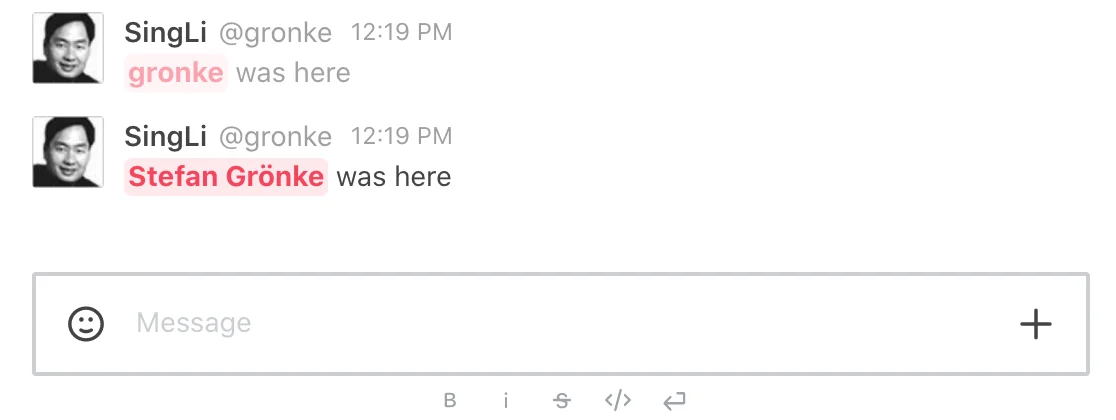
The Meteor call sendMessage allows usage of custom avatar and alias, which in combination allows impersonation of other chat room members. Spoofed message senders can potentially be used in social engineering attacks.
Meteor.call("sendMessage", {
  rid: "<ROOM ID>",
  msg: "@securityguard can you please walk the two technicians waiting at the entrance to the server room?",
  avatar: "/avatar/cto",
  alias: "Your CTO"
}, (...args) => console.log(...args));
Users could notice the attack when looking carefully at the user account @gronke in grey text next to the custom alias. Attackers on the other hand can change their account name to look similar to their targets ones.
Releases Affected:
- develop
Steps To Reproduce (from initial installation to vulnerability):
- Open Rocket.Chat
- Find Room ID (found in the image path of the thumbnail)
- Trigger
sendMessagewith Meteor.call() and malicious avatar and
Suggested mitigation
- Visually mark messages with alternative Alias or Avatar
- Prevent aliases that are claimed by another users profile
Impact
Attackers with permission to post messages in a channel or direct message can impersonate other users.
Attachments
Not written yet. The AI write-up for this report has not been written yet. The Original tab links to the source.
How it worked
Root cause
Likely the message-sending API trusted client-supplied avatar and alias fields without checking whether they belonged to another user.
Impact
An attacker who can post in a channel or direct message could impersonate other users, though careful users might notice the real account name shown in grey next to the alias.
What the attacker needed
Permission to post in the target room
The fix
The report suggests visually marking messages that use a custom alias or avatar and blocking aliases already claimed by another user's profile.
How it was found
- Open Rocket.Chat
- Find the Room ID from the image path of a thumbnail
- Call sendMessage with a chosen avatar and alias
Explained by bugbounty.wiki with AI from the original and checked against quotes from it; it can still be wrong. Read the original before relying on a detail.
Not written yet. The AI write-up for this report has not been written yet. The Original tab links to the source.
In a chat app, each message normally shows who sent it. Here the app let the sender attach a fake display name and picture to their own message, so it looked like a different person wrote it. Someone could then trick others into trusting instructions that seemed to come from a colleague.
What is UI spoofing?
The interface lies to the user: a framed page catches their clicks, or a browser shows the wrong address or a fake prompt. Paid when it leads to a sensitive action or convincing phishing.



