Content Spoofing - External Link Warning Page
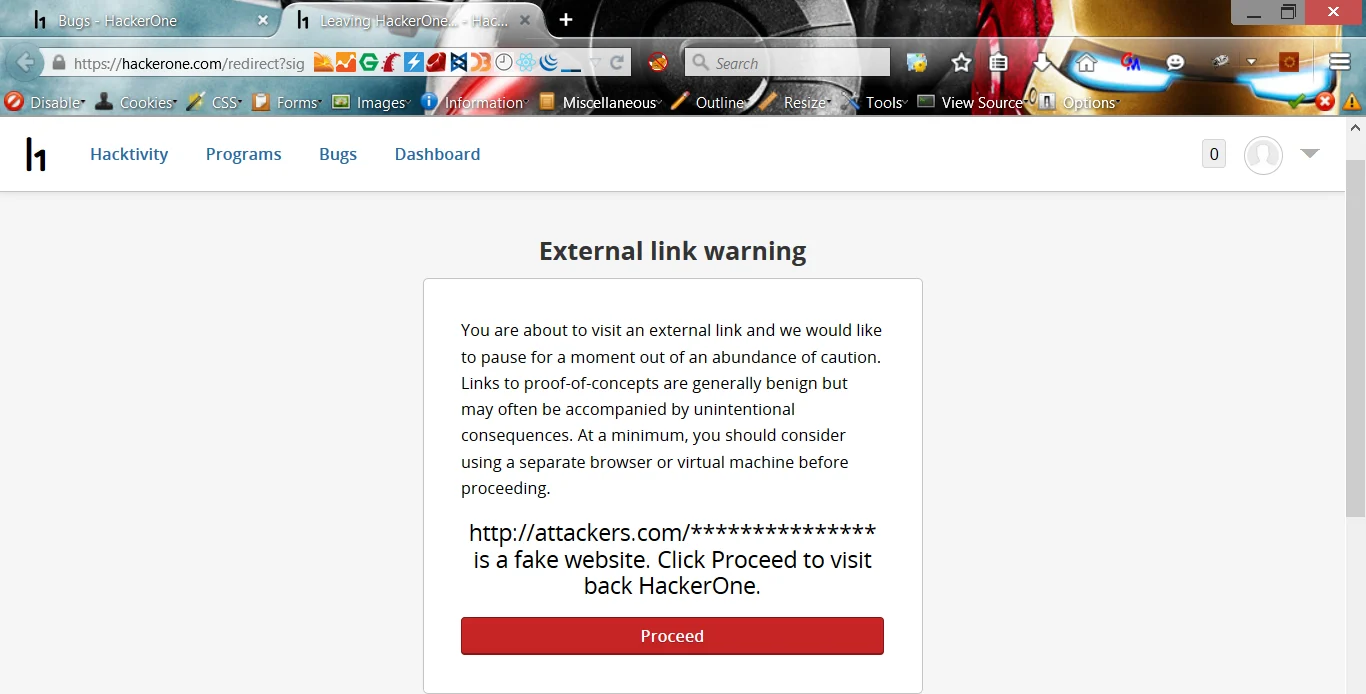
The external link warning page displayed the destination URL as plain text without encoding spaces, allowing an attacker to craft a URL that includes misleading sentences. A victim could be tricked into clicking 'Proceed' and then land on a phishing page that spoofs HackerOne.

- Triaged in 26 hours
- Fixed in 37 hours
- Paid in 37 hours
- Disclosed after 38 hours
Here is example link: [Click Here](http://attackers.com/*************** is a fake website. Click Proceed to visit back HackerOne.)
Raw Data:
[Click Here](http://attackers.com/*************** is a fake website. Click Proceed to visit back HackerOne.)
Issue: In External link warning page, this link shown as plain text and no forced URL encoded, leading an attacker to frame sentences and trick users. In given example, attacker can trick user to click 'Proceed' button saying it will redirect back to HackerOne but it wont. Though there will be written warning saying better to open in separate browser, bigger letter will be read by users first ;) . In redirected page, attacker can spoof HackerOne website or login page of same or any other phishing attacks.
Possible Fix: URL Encode spaces to %20 which will convert spoofing content look like link.
Attachments
Not written yet. The AI write-up for this report has not been written yet. The Original tab links to the source.
How it worked
Root cause
Likely the warning page inserted the destination URL into the page without encoding spaces or other characters, so the URL could contain readable text that looked like part of the warning.
Impact
An attacker could mislead users into visiting a phishing page that spoofs HackerOne or another login page, though the warning page still displays a caution message.
What the attacker needed
Victim clicks a crafted external link
The fix
The URL should be encoded (for example, spaces converted to %20) so that any injected text appears as part of the link rather than as readable warning text.
Explained by bugbounty.wiki with AI from the original and checked against quotes from it; it can still be wrong. Read the original before relying on a detail.
Not written yet. The AI write-up for this report has not been written yet. The Original tab links to the source.
When you click a link that goes to another website, a warning page often shows the address. Here, the address was shown as normal text, so an attacker could put a fake sentence inside the address. That sentence could say 'this is a fake website, click Proceed to go back to HackerOne', but clicking Proceed would actually take you to the attacker's site.
What is UI spoofing?
The interface lies to the user: a framed page catches their clicks, or a browser shows the wrong address or a fake prompt. Paid when it leads to a sensitive action or convincing phishing.