Users querying dim_hacker_reports table through Analytics API can determine data from dim_reports table using WHERE or HAVING query
The Analytics API query builder allowed referencing columns from the dim_reports table even when querying dim_hacker_reports, because both tables share the same underlying model and no alias was assigned. An attacker could infer the value of a column they should not access by observing whether the query returned a row.

- Triaged in under an hour
- Fixed in 48 days
- Disclosed after 48 days
The query builder for the Analytics API is vulnerable to a confusion attack. The dim_reports and dim_hacker_reports tables both pull their data from the Analytics::DimReport model. When applying a WHERE clause or HAVING clause with a FILTER in the HackerOne Analytics Query Language (HAQL), an attacker can create references to columns outside of the HAQL table schema. Assume that there is a table looking as following:
| report_id | is_triage_sla_missed |
|---|---|
| 27 | false |
And the following two schema definitions:
'dim_reports': {
  'model': 'Analytics::DimReport',
  'columns': {
    'report_id': TYPE_NUMBER,
    'is_triage_sla_missed': TYPE_BOOLEAN,
  }
}
'dim_hacker_reports': {
  'model': 'Analytics::DimReport',
  'columns': {
    'report_id': TYPE_NUMBER,
  }
}
The is_triage_sla_missed column can only be queried through the dim_reports table, which reporters of a report do not have access to. However, when querying the report_id from either table, it results in the following SQL to being executed:
SELECT
  "analytics"."dim_reports"."report_id" AS dim_hacker_reports__report_id
FROM
  "analytics"."dim_reports"
WHERE
  (
    "analytics"."dim_reports"."reporter_id" = ?
    AND "analytics"."dim_reports"."reporter_id" IS NOT NULL
  )
LIMIT
  1000 OFFSET 0
As can be seen, there is no alias assigned to the dim_reports table. This can be used to confuse the query builder by using a reference to the dim_reports table, even though that table wasn't queried from. As an example:
query {
  analytics(queries: [
    {
      select: [
        {
          field: dim_hacker_reports__report_id
        }
      ]
      from: dim_hacker_reports
      where: {
        predicates: [
          {
            left: {
              ref: dim_reports__is_triage_sla_missed
            }
            function: eq
            right: {
              boolean: false
            }
          }
        ]
      }
    }
  ]) {
    keys
    values
  }
}
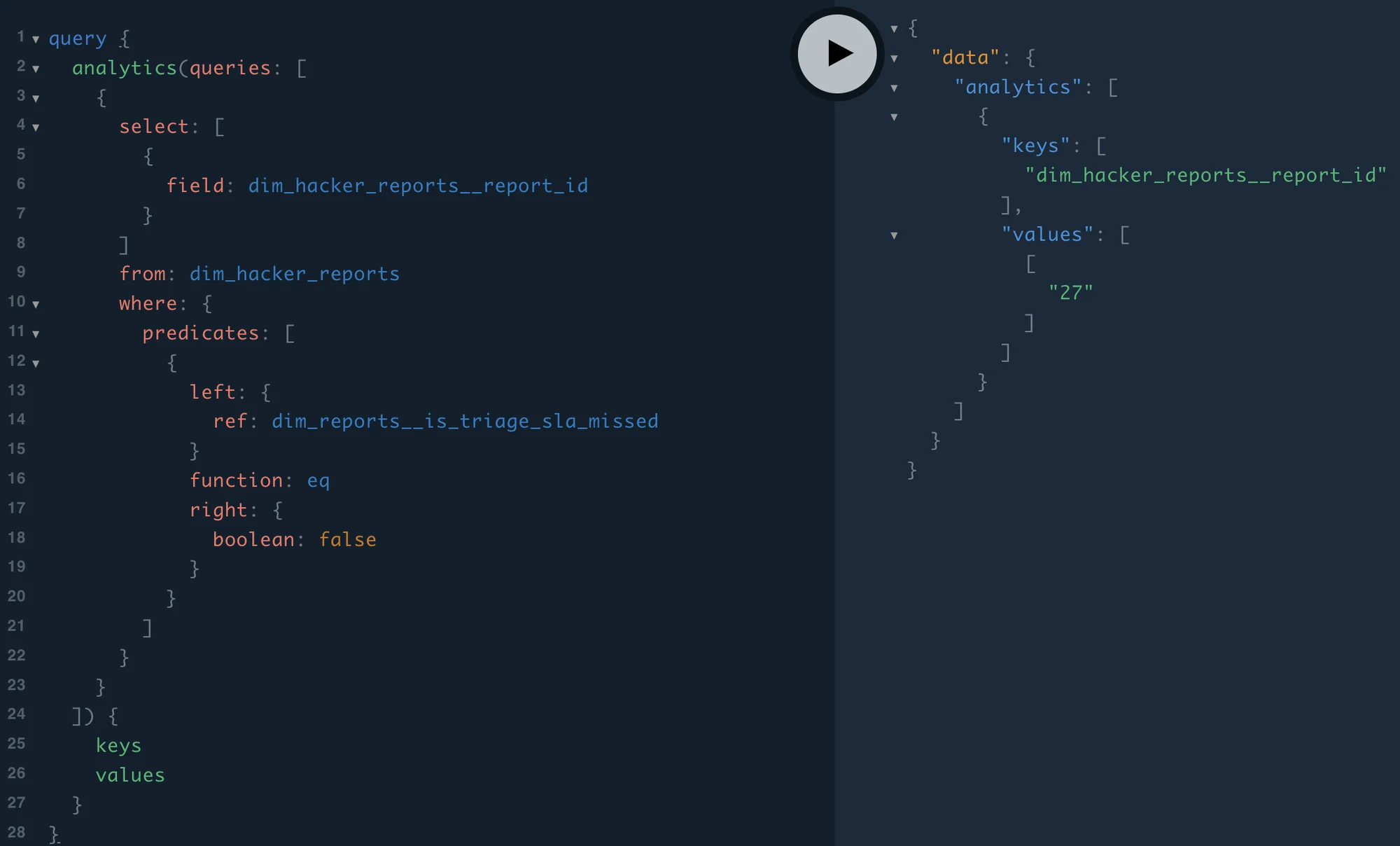
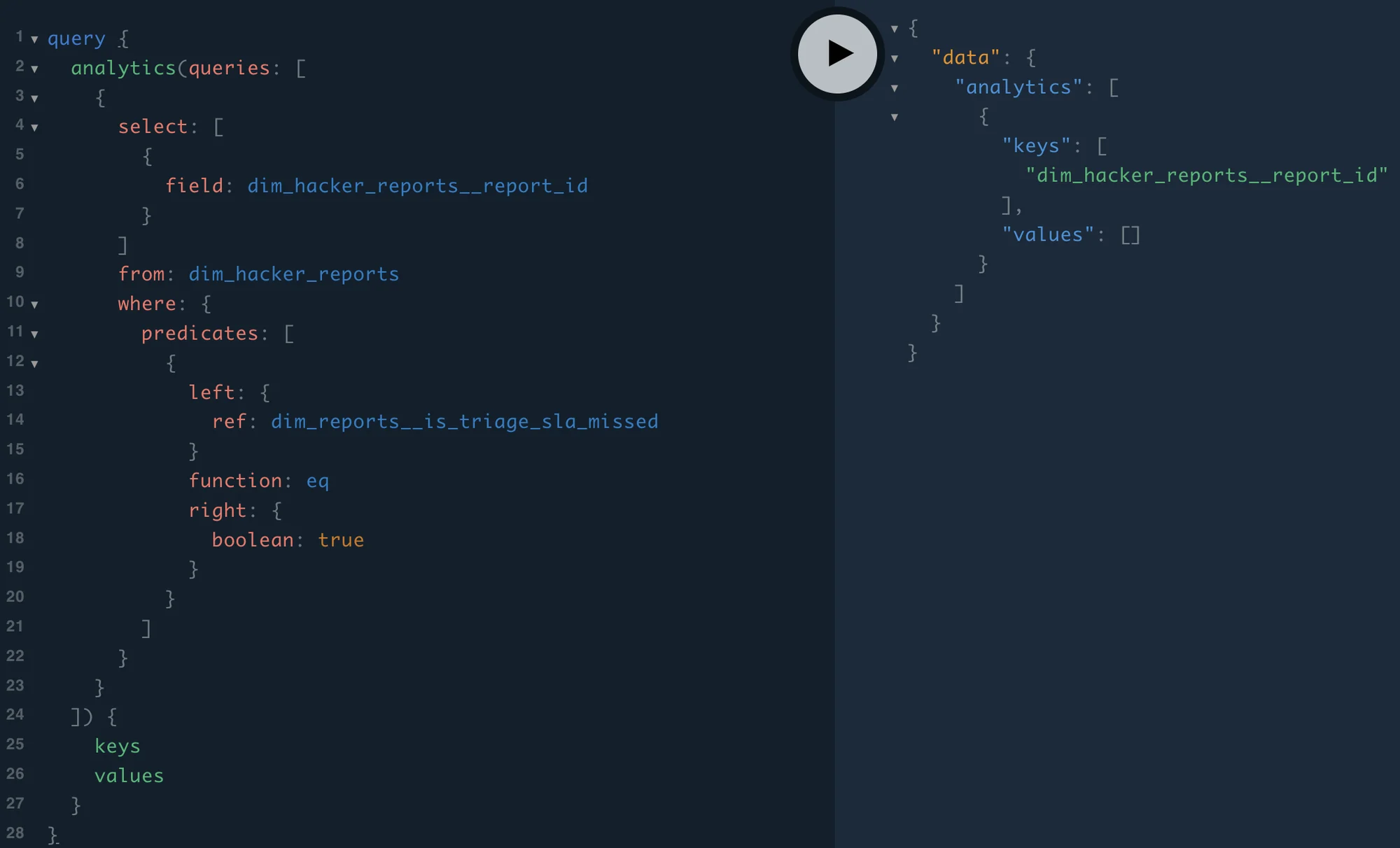
The dim_reports__is_triage_sla_missed reference should fail to be used, because dim_reports isn't being selected from or joined into the query. However, it misses this check, allowing the column to be referenced even though it isn't present in the dim_hacker_reports schema. Based on whether the query returns the row, the value of the column can be obtained:
Data in column was guessed correctly
Data in column does not match expectation
Impact
Even though there isn't any sensitive data that can be queried through the dim_reports table schema today, this may cause unauthorized access to sensitive data in the future.
Not written yet. The AI write-up for this report has not been written yet. The Original tab links to the source.
How it worked
Root cause
Likely the query builder did not validate that referenced columns belong to the selected table, and the shared model caused the SQL to omit a table alias, allowing cross-table column references.
Impact
An attacker could infer values of columns from the dim_reports table that they should not access, though the report notes there is no sensitive data in that schema today.
What the attacker needed
Access to the Analytics API
How it was found
- Send a query selecting report_id from dim_hacker_reports.
- Add a WHERE predicate referencing dim_reports__is_triage_sla_missed.
- Observe whether the query returns a row to infer the column value.
Explained by bugbounty.wiki with AI from the original and checked against quotes from it; it can still be wrong. Read the original before relying on a detail.
Not written yet. The AI write-up for this report has not been written yet. The Original tab links to the source.
The Analytics API lets users query tables, but some tables are restricted. The system failed to check that a column belongs to the table being queried, so a user could ask about a hidden column from another table. By seeing if the query returned a result, they could guess the hidden value.
What is Access control?
A user can do something their role should not allow: reach an admin function, act on a feature they have not paid for, or skip a permission check. IDOR is the special case where the object belongs to someone else.


