Worker container escape lead to arbitrary file reading in host machine [again]
A build service kept both a user-supplied config file and a symlink named as its hidden counterpart, so the symlink survived into the build output and pointed at files on the host machine. An attacker could then read arbitrary host files such as the system password file through the file listing shown after a build.
 Originally disclosed on HackerOne
- Triaged in 3 hours
- Fixed in 26 days
- Paid in 8 hours
- Disclosed after 33 days
Summary:
After a successful build, LGTM allow user to view the file list.
By default, only source code files and build config files are reserved (lgtm.yml and .lgtm.yml).
If there are both files in folder, LGTM will process lgtm.yml file and skip .lgtm.yml, but it still keeps both of files in directory.
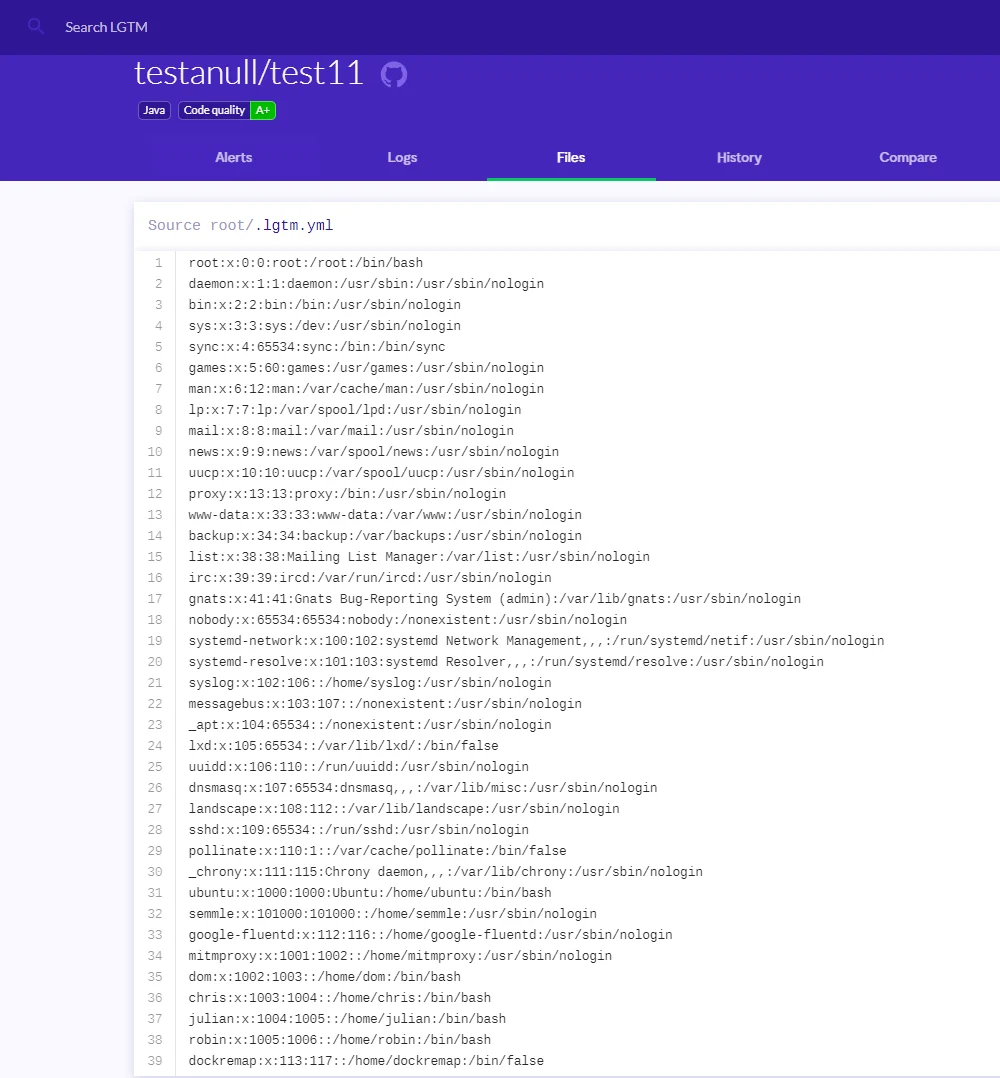
By making symlink to .lgtm.yml file, after successful build, it will point to HOST MACHINE file!
Steps To Reproduce:
- Create a simple project which LGTM can build successful.
In this report, I use this project (https://github.com/testanull/test11)
2. Create file: lgtm.yml with a valid config content, for example:
extraction:
  java:
    index:
      build_command:
      - ./custom-build
- Make a symlink point to a HOST MACHINE file/directory with name:
.lgtm.yml - After successful build,
.lgtm.ymlfile will contain the host machine file content!
##PoC of reading /etc/passwd is attached below
Impact
Give attacker ability to explore the host machine, expose more sensitive informations from it.
Attachments
Not written yet. The AI write-up for this report has not been written yet. The Original tab links to the source.
How it worked
Impact
An attacker could explore the host machine and expose sensitive information from it, including reading the system password file.
What the attacker needed
A project the service can build; ability to commit a symlink to the repo
How it was found
- Create a simple project that the service can build successfully.
- Add a valid configuration file named lgtm.yml.
- Create a symlink named .lgtm.yml that points to a file or directory on the host machine.
- After the build succeeds, the symlink exposes the host file's contents in the file listing.
Explained by bugbounty.wiki with AI from the original and checked against quotes from it; it can still be wrong. Read the original before relying on a detail.
Not written yet. The AI write-up for this report has not been written yet. The Original tab links to the source.
A symlink is a shortcut file that points at another file elsewhere on the disk. The build service copied the shortcut into its results without checking where it led, so opening it showed a file from the server itself rather than the project. That let the reporter read sensitive system files.
What is Path traversal?
Input that builds a file path escapes the intended folder, reading or writing files the application should never touch.