Ability to potentially hit internal NGINX locations on *.myshopify.com by making use of the `X-Accel-Redirect` header via a configured App Proxy
The NGINX configuration for Shopify's App Proxy did not ignore the X-Accel-Redirect header returned by the backend, allowing an attacker-controlled backend to redirect requests to internal NGINX locations. The reporter demonstrated that a request to the App Proxy could return the shop's own /collections/all page, but could not reach any internal routes.
 Originally disclosed on HackerOne
- Fixed in 8 days
- Paid in 12 days
- Disclosed after 3 months
Summary by the program
@francisbeaudoin reported an issue where the accelerated redirect functionality of Nginx could be used by an App Proxy to return the content of pages other than the one indicated by the URL. We were unable to determine any current security impact as a result of this behaviour, but awarded a $500 bonus in recognition of potential future impact.
The report
By making use of the Shopify App Proxy and the X-Accel feature of NGINX, it is possible to hit any configured internal NGINX location as your current configuration is not ignoring the X-Accel-Redirect header response from an upstream service.
The way it works is that NGINX allows internal redirection to a location determined by that header returned from a backend - in our case being the configured App Proxy backend controlled by the attacker.
For example, the following request would ends up hitting http://private-service/flag
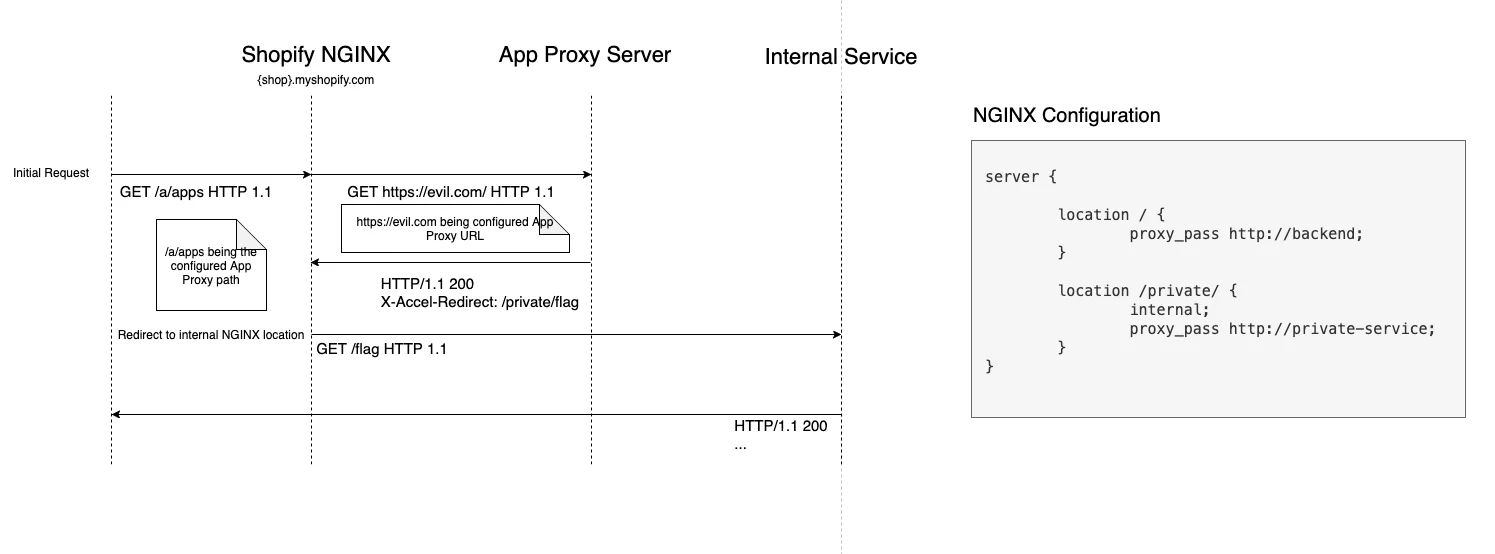
However, I did some very basic fuzzing and wasn't able to hit anything but still reporting and will let you guys assess the risk.
Steps to reproduce
Create a service that return a X-Accel-Redirect header
First step, is to create a server that is returning a response with the X-Accel-Redirect header.
- Open mocky.io
- Within the HTTP Headers section, enter:
{
	"X-Accel-Redirect": "/collections/all"
}
- Scroll down and click Generate my HTTP response and copy the Mock URL
Otherwise, you can simply use https://run.mocky.io/v3/d7cdfcbc-6994-4f3b-a323-fe8377535507 which is already configured per above steps
Setup the App Proxy
- Within Shopify Partners, create a new private application and install it on your shop
- From that application setup, go to Extensions > Online Store and setup an App proxy
- From that App proxy configuration, set the following values:
- Subpath prefix:
a - Subpath
apps - Proxy URL
https://run.mocky.io/v3/d7cdfcbc-6994-4f3b-a323-fe8377535507or enter your own mock URL
- Subpath prefix:
- Within your browser, open your
https://{shop}.myshopify.com/a/appsby taking care of replacing the{shop}placeholder with your actual shop name on which you installed the application
As a result, you are being proxied your current shop /collections/all page proving that your current NGINX configuration follows the X-Accel-Redirect directive.
Mitigation
To mitigate this issue, a proxy_ignore_headers X-Accel-Redirect directive should be set in your NGINX configuration as described in the NGINX documentation
Impact
As mentioned, I wasn't actually able to hit any of your internal routes but that could only mean that my URL fuzzing wasn't good enough or that you actually do not have any configured internal routes on that proxy.
Not written yet. The AI write-up for this report has not been written yet. The Original tab links to the source.
How it worked
Root cause
The NGINX proxy configuration did not ignore the X-Accel-Redirect header from the upstream App Proxy backend, allowing an attacker-controlled backend to trigger internal redirects.
Impact
The reporter could only redirect to public pages like /collections/all and was unable to reach any internal routes, so no security impact was confirmed.
What the attacker needed
A Shopify Partners account; a shop to install the app on; ability to host a service returning a header
The fix
The NGINX configuration should be updated to ignore the X-Accel-Redirect header from upstream responses.
How it was found
- Create a service that returns an X-Accel-Redirect header pointing to a target path.
- In Shopify Partners, create a private app and install it on a shop.
- Configure an App Proxy for the app with a subpath prefix and proxy URL pointing to the attacker service.
- Visit the App Proxy URL in a browser to trigger the internal redirect.
Explained by bugbounty.wiki with AI from the original and checked against quotes from it; it can still be wrong. Read the original before relying on a detail.
Not written yet. The AI write-up for this report has not been written yet. The Original tab links to the source.
NGINX is a web server that can act as a proxy, forwarding requests to other servers. It has a feature where a backend can tell it to internally redirect a request to a different location using a special header. Here, the backend was controlled by the attacker, so they could make NGINX redirect to internal pages that are normally not accessible from outside.
What is SSRF?
The server can be made to fetch an address the attacker chooses, reaching internal services, cloud metadata or other customers' data.




