Non-store owners can transfer Shopify-managed domain to another domain provider
A staff member without the required permission could transfer a Shopify-managed domain to another provider, despite documentation stating only store owners may do so. This allowed unauthorised domain transfers.
 Originally disclosed on HackerOne
- Disclosed after 12 months
Summary by the program
Shopify merchants can purchase and manage domains through Shopify. As part of this service, shop owners can delegate the Transfer domain to another Shopify store permission to shop staff, which allows staff to transfer domains from one shop to another.
Staff members without the Transfer domain to another Shopify store permission were able to transfer the shops domain to another provider.
The report
According to docs here, only store owners can transfer domains to another domain provider.
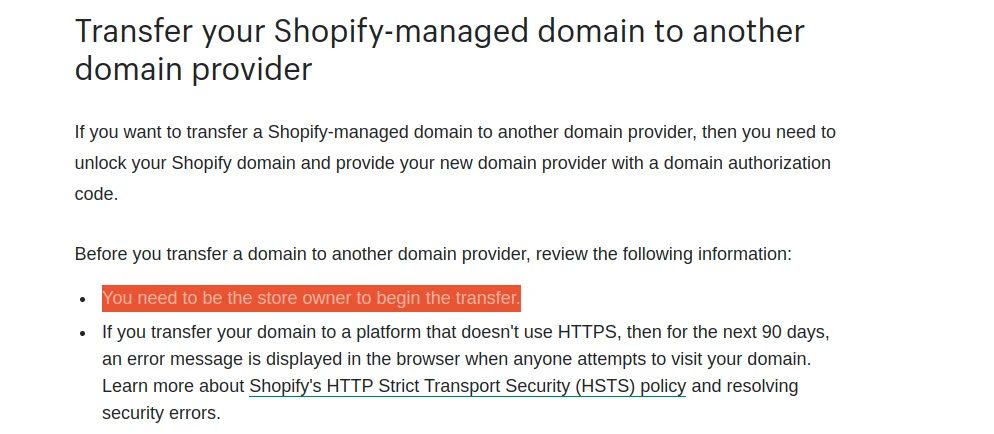
This is not enforced as users/staff members without the Transfer domain to another Shopify store permission can perform this action as well as staff members that aren't a store owner in themselves.
Shops Used to Test:
███
Steps To Reproduce:
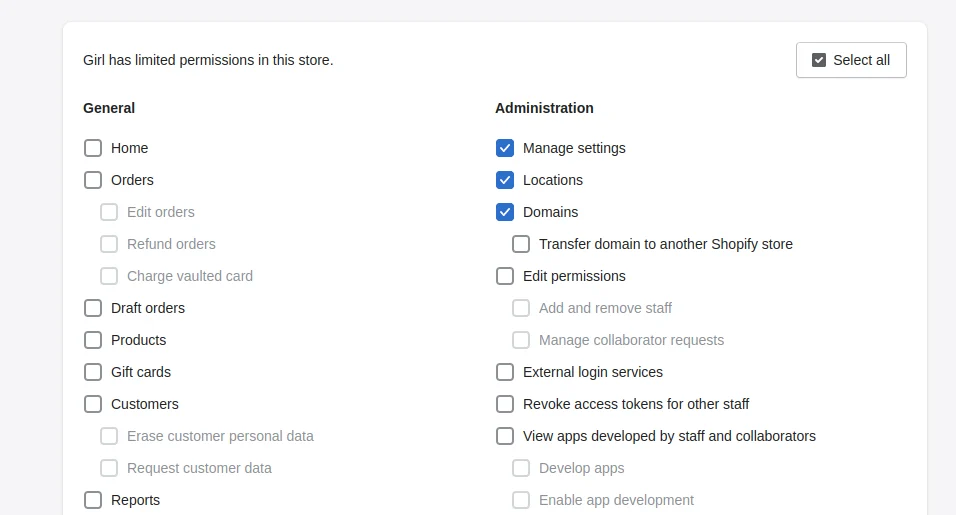
- Login as a staff member with these permissions only:
- From your Shopify admin, go to
Settings > Domains. - In the Shopify-managed domains section, click the name of the domain that you want to transfer.
- Click
Transfer domain > Transfer to another provider. - Review the information, and then click
Confirm. The domain authorization code is displayed on your domain's information page. - Give the domain authorization code to your new domain provider to verify the transfer.
- Done.
Supporting Material:
███████
Impact
Shopify-managed domains can be transferred to another domain provider by a staff member without Transfer domain to another Shopify store permission and a non-store owner.
Context
Shopify lets merchants buy and manage domains directly through the platform. As part of that service, a shop owner can delegate the Transfer domain to another Shopify store permission to shop staff, which allows those staff to move a domain from one shop to another. Separately, Shopify documents a flow for moving a Shopify-managed domain away from Shopify entirely, to another domain provider. According to the documentation the researcher cites, only store owners are supposed to be able to perform that transfer to another provider.
The asset in scope is a your-store.myshopify.com shop, and the feature under test is the domain management area of the Shopify admin, specifically Settings > Domains and the transfer options on a Shopify-managed domain.
Setup
The researcher tested with staff accounts on Shopify shops. The key precondition is a staff member who is not a store owner and who holds only a limited set of permissions, deliberately excluding Transfer domain to another Shopify store. The report does not list the exact permission set beyond the screenshot of the permissions screen, and the shops used for testing are redacted.
No special tooling is described: the whole flow is performed through the Shopify admin interface.
Finding it
The researcher compared the documented behaviour with what the admin actually allowed. The documentation states that only store owners can transfer a Shopify-managed domain to another domain provider:
The screenshot shows the documentation page describing the transfer of a Shopify-managed domain to another domain provider, which is the statement the researcher used as the expected behaviour.
What the researcher found is that this restriction is not enforced. Users and staff members without the Transfer domain to another Shopify store permission could perform the transfer, and so could staff members who are not store owners themselves. The permission that gates transfers between Shopify stores does not gate the transfer to an external provider, and the store-owner-only rule from the documentation is not enforced.
Exploitation
Step 1: Log in as a limited staff member
Log in as a staff member holding only the permissions shown below.
The screenshot shows the permissions screen for the staff account used in the test. The important point is that Transfer domain to another Shopify store is not among the granted permissions, and the account is not a store owner.
Step 2: Open the domains settings
From the Shopify admin, go to Settings > Domains.
Step 3: Select the domain
In the Shopify-managed domains section, click the name of the domain you want to transfer.
Step 4: Start the transfer
Click Transfer domain > Transfer to another provider.
Step 5: Confirm
Review the information, then click Confirm. The domain authorization code is displayed on the domain's information page.
Step 6: Hand the code to the new provider
Give the domain authorization code to the new domain provider to verify the transfer.
Step 7: Done
The transfer completes. The report records this as the end of the flow, with no further requests or responses shown.
Root cause
The authorisation check for the external transfer flow does not match the documented policy. Two separate controls exist in the product: the Transfer domain to another Shopify store permission, which can be delegated to staff, and the store-owner-only rule for transferring a domain to another provider. The report shows that the external transfer action is reachable by a staff member who lacks the transfer permission and who is not a store owner, so the owner-only restriction is not enforced on the action itself. The report does not identify the cause; it shows only that the documented owner-only restriction was not enforced.
Impact
A staff member without the Transfer domain to another Shopify store permission, and who is not a store owner, can transfer a Shopify-managed domain to another domain provider. Because the flow yields the domain authorization code, such a staff member can move a shop's domain away from Shopify, which is an action the documentation reserves for the store owner. The report does not describe further consequences beyond the transfer itself.
Fix
The report does not state what was changed. The fix implied by the finding is to enforce the store-owner check on the external transfer action server side, so that staff members, with or without the Transfer domain to another Shopify store permission, cannot initiate a transfer to another provider, and to hide the option in the admin for accounts that are not store owners.
Variants to test
- Other delegated permissions with a documented owner-only counterpart: check whether the owner-only action is enforced on the server, not just hidden in the UI. A positive result is a staff account completing the action the documentation reserves for the owner.
- Permission checks that exist only in the interface: call the action from a session whose role should not see it. A positive result is a successful state change rather than an error.
- Adjacent domain actions on the same domain page, such as other transfer or ownership operations, tested with the same limited staff account. A positive result is any of them succeeding without the corresponding permission.
- Cross-store delegation: a staff member delegated the transfer permission on one store attempting the same action on another store where they hold no such permission. A positive result is a transfer initiated on the second store.
Hunting notes
This kind of bug tends to sit where a product has two related controls: a delegable permission and a stricter owner-only rule described in the documentation. The gap appears when the code enforces one and the UI or endpoint relies on the other. During recon, read the help documentation for owner-only actions in the admin and compare it with what a low-privilege staff account can see and do. A signal is an action that appears in the interface for an account that should not have it, or an endpoint that responds successfully to a role that should be blocked.
To show impact, the researcher demonstrated the full flow end to end with a staff account that lacked the transfer permission and was not a store owner, and tied the expected behaviour to the vendor's own documentation. That combination, a documented restriction plus a reproducible action by a lower-privileged account, is what makes the finding concrete.
What happened, in plain words
Shopify is a platform that lets people run an online shop. Besides selling things, Shopify also lets a shop owner buy and manage the shop's web address (its domain, the name people type to reach the shop, like example.com) directly through Shopify. When Shopify manages the domain for you, it is called a Shopify-managed domain.
A shop owner can have helpers, called staff members, who log in to the same shop with only some of the owner's abilities. Each ability is a permission, a tick box that says "this person may do this thing". One of those permissions is called Transfer domain to another Shopify store, and it lets a staff member move a domain from one Shopify shop to another.
There is a second, stricter rule. Shopify's own help documentation says that moving a Shopify-managed domain away from Shopify entirely, to a different domain provider (a company that sells and hosts domain names), is something only the store owner can do.
The researcher found that this second rule was not actually enforced. A staff member who was not the store owner, and who did not even have the Transfer domain to another Shopify store permission, could still start the transfer to another provider and get the code needed to complete it. In other words, the help page promised one thing and the product allowed another.
This kind of mistake is called a broken access control problem: the product knows who is allowed to do something, but the check is missing or too loose when the action is actually carried out.
The product and the feature
Shopify's admin is the control panel a shop owner or staff member uses after logging in. Inside it there is a Settings area, and inside that a Domains page where domains are listed and managed.
On that page, a Shopify-managed domain has a Transfer domain menu. One of its options is Transfer to another provider, which is the flow for leaving Shopify. That flow ends by showing a domain authorization code, a short secret string that proves to the new provider that the move is authorised.
The asset involved is a your-store.myshopify.com shop, which is the standard address every Shopify shop gets. The feature under test is the domain management area, specifically Settings > Domains and the transfer options on a Shopify-managed domain.
Setting up the test
The researcher used staff accounts on Shopify shops. The important precondition is a staff member who is not a store owner and who has only a limited set of permissions, deliberately leaving out Transfer domain to another Shopify store.
The exact list of permissions is not written out in the report; it is only visible in the screenshot of the permissions screen. The shops used for testing are redacted.
No special tools are described. The whole flow is done by clicking through the Shopify admin in a normal browser.
Finding it
The researcher started by reading Shopify's help documentation and comparing it with what the admin actually let a limited account do. The documentation states that only store owners can transfer a Shopify-managed domain to another domain provider:
The screenshot shows that documentation page, the statement the researcher treated as the expected behaviour. Reading the docs first matters: it gives you a written promise to test the product against, instead of guessing what should happen.
What the researcher found is that the restriction is not enforced. Users and staff members without the Transfer domain to another Shopify store permission could perform the transfer, and so could staff members who are not store owners themselves. The permission that controls transfers between Shopify stores does not control the transfer to an outside provider, and the owner-only rule from the documentation is not enforced.
Walking through the exploit
Step 1: Log in as a limited staff member
Log in as a staff member holding only the permissions shown below.
The screenshot shows the permissions screen for the staff account used in the test. The key point is that Transfer domain to another Shopify store is not among the granted permissions, and the account is not a store owner. Starting from a deliberately weak account is what makes the result meaningful: if the account already had every permission, nothing would be proven.
Step 2: Open the domains settings
From the Shopify admin, go to Settings > Domains.
This is the normal place a shop owner manages domains, so it is the natural place to look for the transfer option.
Step 3: Select the domain
In the Shopify-managed domains section, click the name of the domain you want to transfer.
Clicking the name opens that domain's own information page, where its actions live.
Step 4: Start the transfer
Click Transfer domain > Transfer to another provider.
This is the exact action the documentation reserves for the store owner. The fact that the menu offers it at all to this account is already a hint that the check may be missing.
Step 5: Confirm
Review the information, then click Confirm. The domain authorization code is displayed on the domain's information page.
After confirming, the domain authorization code is displayed on the domain's information page.
Step 6: Hand the code to the new provider
Give the domain authorization code to the new domain provider to verify the transfer.
The new provider uses that code to confirm the move is authorised. Whoever holds the code can complete the transfer, which is why it is sensitive.
Step 7: Done
The transfer completes. The report records this as the end of the flow, with no further requests or responses shown.
Why it works
The authorisation check for the external transfer flow does not match the documented policy. Two separate controls exist in the product: the Transfer domain to another Shopify store permission, which can be handed to staff, and the store-owner-only rule for transferring a domain to another provider.
The report shows that the external transfer action can be reached by a staff member who lacks the transfer permission and who is not a store owner, so the owner-only restriction is not enforced on the action itself. The report does not identify the cause; it shows only that the documented owner-only restriction was not enforced.
A useful comparison: a building may have a staff badge that opens the front door, and a rule that only the manager may open the safe. If the safe room simply checks for any valid badge, the rule about the manager is never applied. Here the badge is the transfer permission and the safe is the move to another provider.
Impact
A staff member without the Transfer domain to another Shopify store permission, and who is not a store owner, can transfer a Shopify-managed domain to another domain provider. Because the flow hands back the domain authorization code, such a staff member can move a shop's domain away from Shopify, an action the documentation reserves for the store owner. The report does not describe further consequences beyond the transfer itself.
Fix
The report does not state what was changed. The fix implied by the finding is to enforce the store-owner check on the external transfer action on the server side, so that staff members, with or without the Transfer domain to another Shopify store permission, cannot start a transfer to another provider, and to hide the option in the admin for accounts that are not store owners.
"On the server side" matters because hiding a button only changes what you see. The real gate has to be where the request is processed, otherwise anyone who can send the request another way still gets through.
Variants to test
- Other delegated permissions with a documented owner-only counterpart: check whether the owner-only action is enforced on the server, not just hidden in the interface. A positive result is a staff account completing the action the documentation reserves for the owner.
- Permission checks that exist only in the interface: call the action from a session whose role should not see it. A positive result is a successful state change rather than an error.
- Adjacent domain actions on the same domain page, such as other transfer or ownership operations, tested with the same limited staff account. A positive result is any of them succeeding without the corresponding permission.
- Cross-store delegation: a staff member delegated the transfer permission on one store attempting the same action on another store where they hold no such permission. A positive result is a transfer started on the second store.
Hunting notes
This kind of bug tends to sit where a product has two related controls: a delegable permission and a stricter owner-only rule described in the documentation. The gap appears when the code enforces one and the interface or the action relies on the other. During recon, read the help documentation for owner-only actions in the admin and compare it with what a low-privilege staff account can see and do. A signal is an action that appears in the interface for an account that should not have it, or an action that responds successfully to a role that should be blocked.
To show impact, the researcher demonstrated the full flow end to end with a staff account that lacked the transfer permission and was not a store owner, and tied the expected behaviour to the vendor's own documentation. That combination, a documented restriction plus a reproducible action by a lower-privileged account, is what makes the finding concrete.
Glossary
- Domain: the name people type to reach a website, such as
example.com. - Domain provider: a company that sells and hosts domain names and handles the records that point a domain at a website.
- Shopify-managed domain: a domain bought and managed through Shopify rather than through an outside provider.
- Shopify admin: the control panel a shop owner or staff member uses after logging in.
- Store owner: the account that owns the shop and has the highest level of control.
- Staff member: a helper account on a shop, given only some of the owner's abilities.
- Permission: a tick box that allows an account to do a particular thing.
Transfer domain to another Shopify store: the permission that lets a staff member move a domain from one Shopify shop to another.- Transfer to another provider: the flow that moves a Shopify-managed domain away from Shopify to an outside domain provider.
- Domain authorization code: a short secret string that proves to the new provider that a domain transfer is authorised.
- Access control: the rules that decide who may do what; broken access control means those rules are missing or too loose when the action is carried out.
- Server side: the part of the product that processes requests, as opposed to the interface you see in the browser.
- Endpoint: the specific address inside a product that an action is sent to.
- Recon: the research phase where you read documentation and look around a product to decide what to test.
- Redacted: removed or blacked out, usually to hide private or identifying details.