Administrator access to a Django Administration Panel on *.sc-corp.net via bruteforced credentials
A Django administration panel and REST API were exposed on an IP address with a wildcard certificate for the target domain, and the administrator password was guessed through a small brute-force attack. The attacker could then log in as admin, add users and groups via the API, and potentially pivot to internal systems or use the admin access for further attacks.

- Fixed in 18 days
- Paid in 18 days
- Disclosed after 3 months
Hey team,
While doing some recon for Snapchat's domains, I came across a particular domain of interest - sc-corp.net. It seems that this domain hosts a lot of Snapchat's internal tools, web applications and staging environments such as Phabricator and other administration panels.
From analyzing SSL certificates, I came across the following IP address which contained a wild card common name of *.sc-corp.net:
https://146.148.42.38/
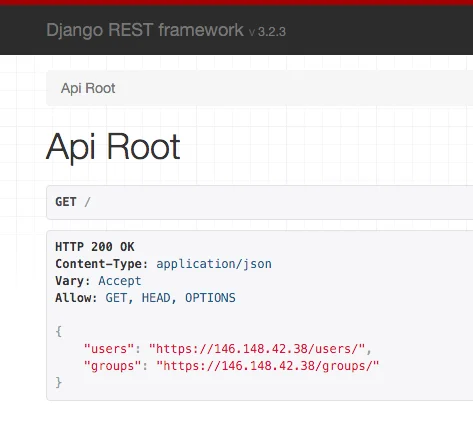
Upon visiting the above IP address, I was prompted with a basic authentication prompt. Even though I clicked cancel and did not authenticate to the panel, the Django REST API panel was returned - albeit in an unauthenticated state.
In order to gain authenticated access to the REST API and the Django administration panels, I ran a small scale bruteforce against the login endpoint located at https://146.148.42.38/api-auth/login/. The following HTTP request was used to perform the bruteforce attack in Burp Intruder:
POST /api-auth/login/ HTTP/1.1
Host: 146.148.42.38
Connection: close
Content-Length: 108
Cache-Control: max-age=0
Accept: text/html,application/xhtml+xml,application/xml;q=0.9,image/webp,*/*;q=0.8
Origin: https://146.148.42.38
Upgrade-Insecure-Requests: 1
User-Agent: Mozilla/5.0 (Macintosh; Intel Mac OS X 10_11_0) AppleWebKit/537.36 (KHTML, like Gecko) Chrome/49.0.2623.87 Safari/537.36
Content-Type: application/x-www-form-urlencoded
DNT: 1
Referer: https://146.148.42.38/api-auth/login/
Accept-Encoding: gzip, deflate
Accept-Language: en-US,en;q=0.8
Cookie: csrftoken=Gt5IRFhlh8BekC11btkUdo8doBniN2pJ

csrfmiddlewaretoken=Gt5IRFhlh8BekC11btkUdo8doBniN2pJ&next=%2F&username=admin&password=§password§&submit=Log+in
With a password list of approximately 10,000, I was able to determine the credentials for the Django administration panel after a total of 2459 requests. I've attached a screenshot of the Burp Intruder window showing the successful bruteforce attack (burp_intruder_snapchat_django.png).
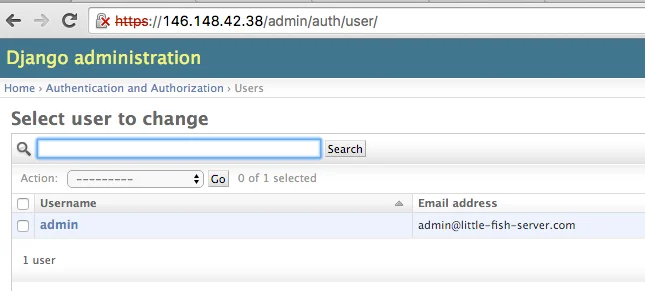
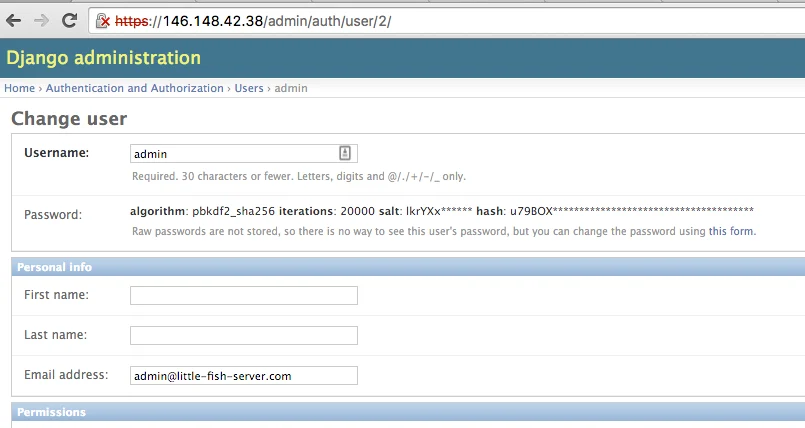
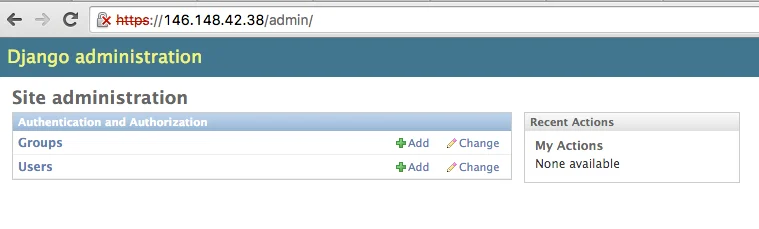
Since I now had the credentials (username: admin and password: research), I was then able to use them to access the Django administration panel located at https://146.148.42.38/admin/.
I've attached some screenshots to show the level of access I obtained to the administration panel (snapchat_django_admin_panel_[0-3].png).
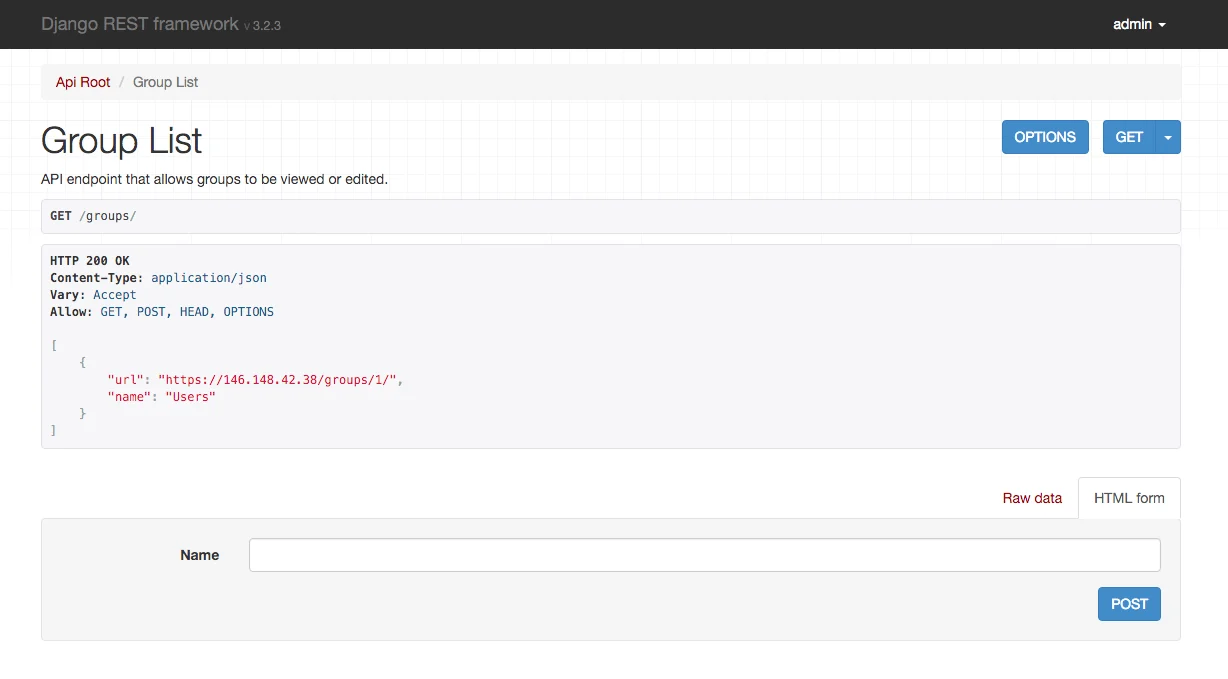
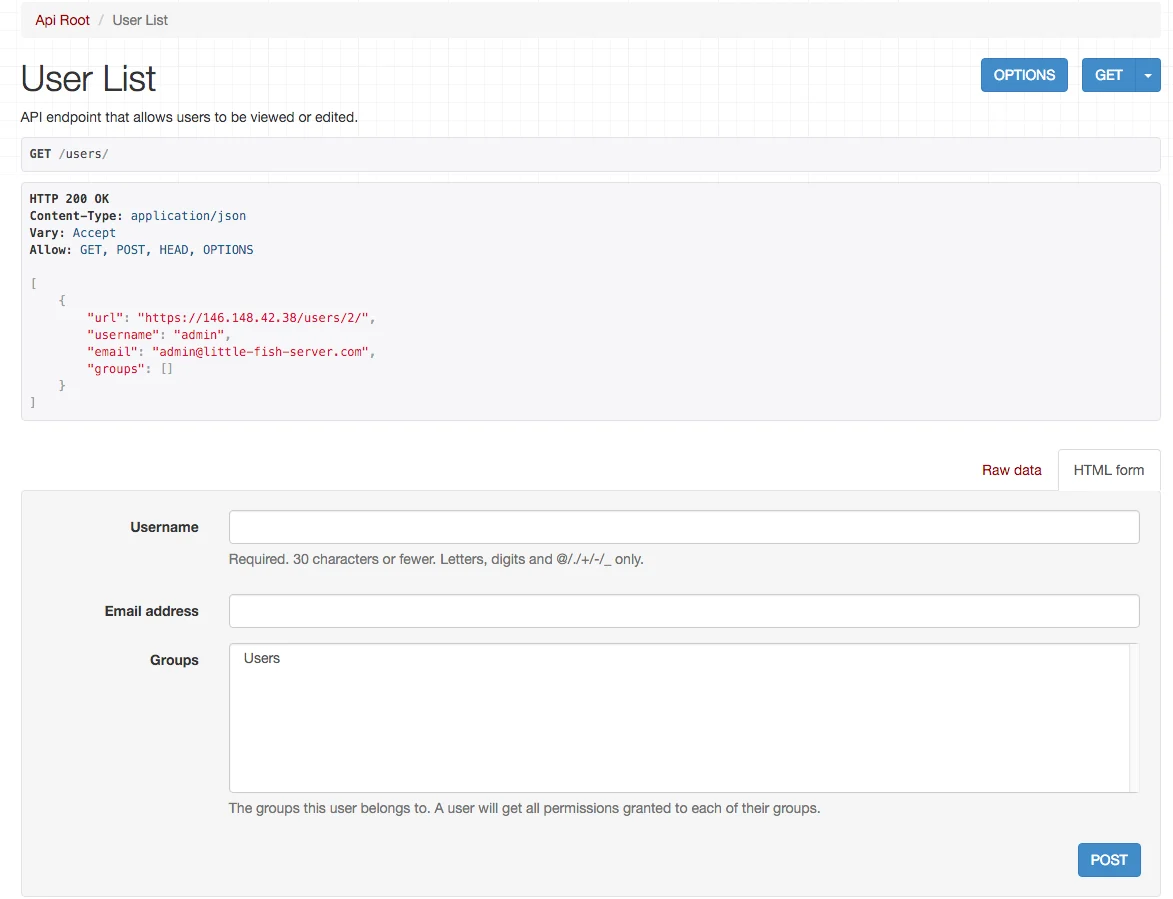
Additionally, with the credentials bruteforced, I was able to interact with the Django REST API without any restrictions - i.e. I was able to add new users and groups via the API. Screenshots attached (snapchat_django_rest_api_[0-3].png).
I made no further attempts to escalate privileges on the machine, nor attempted to gain a reverse shell.
I believe that since this machine's SSL certificate's CNAME was *.sc-corp.net, it's likely that there is an actual subdomain that is pointing to this IP. While I was unable to determine the subdomain's name via bruteforcing or enumeration, if there is a valid subdomain pointing to this IP, the severity of this issue could be much higher.
I also assume that since it's most likely within the sc-corp.net scope, the machine itself might have privileged access to the Snapchat internal network on Google Cloud. If I were a malicious attacker, I would attempt to first gain a shell on this machine using my now privileged access and then attempt to pivot onto the Snapchat internal network.
An alternate attack route would be to gain persistent cross-site scripting on the machine with my administrative access and then perform phishing / cookie stealing attacks for applications that run on a subdomain of sc-corp.net. For example, there's Phabricator running on ph.sc-corp.net and this would be a prime target for an attacker to gain access to. This would require the attacker to know the subdomain on sc-corp.net that points to 146.148.42.38.
Please don't hesitate if there are any questions or if you require any further information.
Cheers Shubs
Attachments

Context
Snapchat runs a domain, sc-corp.net, that hosts a large number of internal tools, web applications and staging environments, including Phabricator and other administration panels. The report describes an assessment of one host inside that estate: a Django application exposing both a Django administration panel and a Django REST API, reachable directly by IP address.
Django's admin is the framework's built-in management interface, normally protected by a login form and by staff/superuser flags on the account. The Django REST Framework's browsable API adds its own login view at /api-auth/login/, which accepts a username and password and, on success, establishes a session. Both interfaces are only as strong as the credentials behind them.
Setup
The researcher was doing reconnaissance against Snapchat's domains. The tools involved were a browser, Burp Suite's Intruder for the brute force, and a password list of approximately 10,000 entries. The host was reachable at the IP address found through the certificate.
Finding it
Reconnaissance started with the sc-corp.net domain and its many internal-facing applications. Analysing SSL certificates led to an IP address whose certificate carried a wildcard common name of *.sc-corp.net:
https://[redacted]/
Visiting that address produced a basic authentication prompt. The researcher clicked cancel and did not authenticate, yet the Django REST API panel was still returned, in an unauthenticated state. After cancelling the prompt, the Django REST API panel was still returned in an unauthenticated state.
Exploitation
Step 1: Locate the login endpoint
With the REST API panel reachable, the researcher identified the login endpoint used by the Django REST Framework browsable API:
https://[redacted]/api-auth/login/
Step 2: Brute force the credentials with Burp Intruder
The login was attacked with a small-scale brute force. The following HTTP request was sent through Burp Intruder, with the payload position on the password field:
POST /api-auth/login/ HTTP/1.1
Host: [redacted]
Connection: close
Content-Length: 108
Cache-Control: max-age=0
Accept: text/html,application/xhtml+xml,application/xml;q=0.9,image/webp,*/*;q=0.8
Origin: https://[redacted]
Upgrade-Insecure-Requests: 1
User-Agent: Mozilla/5.0 (Macintosh; Intel Mac OS X 10_11_0) AppleWebKit/537.36 (KHTML, like Gecko) Chrome/49.0.2623.87 Safari/537.36
Content-Type: application/x-www-form-urlencoded
DNT: 1
Referer: https://[redacted]/api-auth/login/
Accept-Encoding: gzip, deflate
Accept-Language: en-US,en;q=0.8
Cookie: csrftoken=[redacted]

csrfmiddlewaretoken=[redacted]&next=%2F&username=admin&[redacted]&submit=Log+in
The request is a standard form submission to the DRF login view. The body carries the Django CSRF token twice, once as csrfmiddlewaretoken and once in the csrftoken cookie, which the server compares; next=%2F tells Django where to redirect after a successful login; username is fixed to admin; and password is the Intruder payload position, marked with §password§. The submit=Log+in field mirrors the login button.
With a password list of approximately 10,000 entries, the credentials were recovered after a total of 2459 requests. The Burp Intruder window showing the successful run is attached to the report.
Step 3: Log in to the Django admin
The recovered credentials were username admin and password research. They were used against the Django administration panel at:
https://[redacted]/admin/
The screenshots attached to the report show the level of access obtained in the administration panel.
Step 4: Use the REST API
The same credentials also worked against the Django REST API, which the researcher could interact with without any restrictions. Specifically, new users and groups could be added through the API. Screenshots of that interaction are attached.
Step 5: Stop and assess
The researcher made no further attempts to escalate privileges on the machine and did not attempt to gain a reverse shell. The report is explicit about this limit: the demonstrated access is administrative access to the Django application, not code execution on the host.
Root cause
The immediate cause is a weak administrative password: the account admin was protected by the password research, which was recovered after 2,459 automated attempts. The report does not mention rate limiting, lockout, CAPTCHA or any other anti-automation control on /api-auth/login/.
A second observation is the basic authentication prompt seen at the IP address. Cancelling it still returned the Django REST API panel. The report does not explain how that prompt was configured.
Impact
With the brute-forced credentials the researcher held administrative access to both the Django admin panel and the REST API, including the ability to create users and groups. The report frames the wider risk conditionally:
- The certificate's common name was
*.sc-corp.net, so a real subdomain probably points at this IP. The researcher could not find that subdomain by brute forcing or enumeration, but if one exists, the severity would be much higher. - Because the host is most likely inside the
sc-corp.netscope, it may have privileged access to Snapchat's internal network on Google Cloud. A malicious attacker would try to get a shell on the machine using the privileged access and pivot into that internal network. - An alternative route would be persistent cross-site scripting planted through the administrative access, followed by phishing or cookie stealing against applications on subdomains of
sc-corp.net. Phabricator onph.sc-corp.netis named as a prime target. This route requires the attacker to know which subdomain ofsc-corp.netpoints to[redacted].
All of these beyond the direct admin access are stated as assumptions or possibilities, not as things the researcher demonstrated.
Fix
Variants to test
- DRF browsable API login on other Django hosts. Try
/api-auth/login/on any host that returns a DRF browsable API. A positive result is a login form that accepts form-encodedusernameandpasswordwith a reusable CSRF token, which makes automated guessing straightforward. - Django admin login. Try
/admin/login/with the same approach. A positive result is a login form that accepts form-encoded credentials. - Default or common admin usernames. The report fixed
username=admin; tryingadminand similar names is cheap. A positive result is a valid session for any of them. - Basic auth prompts that do not gate the app. Cancel the prompt and see what is returned. A positive result is application content, such as a REST API panel, served without authentication.
- Wildcard certificates on internal domains. Enumerate certificate common names such as
*.sc-corp.netand resolve the associated IPs. A positive result is a host serving internal tooling directly by IP.
Hunting notes
This bug sits at the intersection of recon and weak credentials. The signals worth watching are wildcard certificates on corporate domains that resolve to hosts serving staging or internal tooling, and basic authentication prompts that can be cancelled without losing access to the application behind them. Django and DRF hosts are easy to recognise from the browsable API and the /api-auth/login/ path.
The impact case here rests on what the admin account could do: create users and groups through the API and reach the administration panel, on a host that may sit inside the corporate network and may have a matching subdomain. The researcher was careful to state that no shell was obtained and no privilege escalation was attempted, and to present the pivot and XSS scenarios as hypothetical. That combination, a demonstrated admin compromise plus a clearly bounded description of what was not tried, is what the report puts forward.
What happened, in plain words
A security researcher was looking around Snapchat's web properties, the way you might walk around a building trying to read the signs on the doors. He found a domain called sc-corp.net that Snapchat uses for internal tools, web applications and staging environments. Staging environments are test copies of software, kept separate from the real thing so people can try changes safely.
One of the machines behind that domain was reachable directly by its numeric address, and it ran two things: a Django administration panel and a Django REST API. Django is a popular toolkit for building websites; its admin panel is a built-in management screen where staff can view and change data. An API is a way for programs to talk to each other, like a service counter where you ask for something and get an answer back rather than clicking through pages.
The researcher guessed the password for the admin account by trying thousands of common passwords automatically, a technique called brute forcing. The password turned out to be research. With it he could log in to the admin panel and use the API to create new users and groups. He stopped there and did not try to break further into the machine.
The pieces involved
Before the steps, here are the main parts, explained from scratch.
- Domain and subdomain. A domain is a name like
sc-corp.net. A subdomain adds a word in front, likeph.sc-corp.net. Names exist so people do not have to remember numbers. - IP address. The numeric address of a machine on the internet, the equivalent of a street address. The report refers to one as
[redacted]. - SSL certificate. A small file a website presents to prove it is who it claims to be, and to encrypt traffic. It contains a name it is valid for. A wildcard certificate covers every subdomain at once: a certificate for
*.sc-corp.netis valid for any name ending in.sc-corp.net. - Django. A framework for building websites in the Python language. It ships with an administration panel, a ready-made management interface, normally behind a login form and limited to accounts flagged as staff or superuser.
- Django REST API. An add-on that exposes the site's data to other programs. It also offers a browsable interface you can open in a browser, and that interface has its own login page at
/api-auth/login/. - HTTP basic authentication prompt. The small pop-up box a browser shows asking for a username and password. It is a separate gate from a normal web login form.
- Cookie. A small piece of data a website stores in your browser so it can recognise you on the next request. A session cookie is the one that says "this is the person who logged in".
- CSRF token. A random value a site puts in a form to make sure the form was really generated by the site and not forged by another website. Django checks that the value in the form matches the value in a cookie.
- Brute force. Trying many passwords automatically until one works, like testing every key on a keyring on a lock.
- Burp Suite and Intruder. Burp Suite is a tool that sits between your browser and a website so you can inspect and modify requests. Intruder is its component for sending the same request many times with one part changed each time.
Both the admin panel and the API are only as strong as the password behind them.
Setup
The researcher had no account or prior credentials. The tools were a browser, Burp Suite's Intruder for the password guessing, and a list of roughly 10,000 common passwords. The machine was reachable at the IP address found through the certificate.
Finding it
Reconnaissance started with the sc-corp.net domain and the many internal-facing applications on it. Analysing SSL certificates led to an IP address whose certificate carried a wildcard common name of *.sc-corp.net:
https://[redacted]/
Visiting that address produced a basic authentication prompt. The researcher clicked cancel and did not authenticate, yet the Django REST API panel was still returned, in an unauthenticated state. After cancelling the prompt, the Django REST API panel was still returned in an unauthenticated state. Think of a building with a reception desk that waves you through even when you refuse to sign in.
Exploitation
Step 1: Locate the login endpoint
With the REST API panel reachable, the researcher identified the login endpoint used by the Django REST Framework browsable API:
https://[redacted]/api-auth/login/
An endpoint is a specific address on a site that does a specific job, like a particular counter in a large office. This one is the counter where you hand over a username and password.
Step 2: Brute force the credentials with Burp Intruder
The login was attacked with a small-scale brute force. The following HTTP request was sent through Burp Intruder, with the payload position on the password field:
POST /api-auth/login/ HTTP/1.1
Host: [redacted]
Connection: close
Content-Length: 108
Cache-Control: max-age=0
Accept: text/html,application/xhtml+xml,application/xml;q=0.9,image/webp,*/*;q=0.8
Origin: https://[redacted]
Upgrade-Insecure-Requests: 1
User-Agent: Mozilla/5.0 (Macintosh; Intel Mac OS X 10_11_0) AppleWebKit/537.36 (KHTML, like Gecko) Chrome/49.0.2623.87 Safari/537.36
Content-Type: application/x-www-form-urlencoded
DNT: 1
Referer: https://[redacted]/api-auth/login/
Accept-Encoding: gzip, deflate
Accept-Language: en-US,en;q=0.8
Cookie: csrftoken=[redacted]

csrfmiddlewaretoken=[redacted]&next=%2F&username=admin&[redacted]&submit=Log+in
Line by line, in plain words:
POST /api-auth/login/ HTTP/1.1says "I am sending data to this address", using version 1.1 of the HTTP protocol, the language browsers and servers speak.Host: [redacted]names the machine being talked to.Connection: closeasks the server to close the connection after answering.Content-Length: 108states how many bytes of data follow the blank line.Cache-Control,Accept,Accept-Encoding,Accept-LanguageandDNTare preferences: what kind of answer the browser would like, in what language, and a request not to track.Origin: https://[redacted]says which site the request came from.Upgrade-Insecure-Requests: 1asks the server to prefer the encrypted version of the site.User-Agentidentifies the browser and operating system that made the request.Content-Type: application/x-www-form-urlencodedsays the data is formatted like a normal web form.Referersays which page the request was sent from.Cookie: csrftoken=[redacted]carries the CSRF token cookie described above.- The last line is the form data itself:
csrfmiddlewaretokenrepeats the token so the server can compare it with the cookie;next=%2Ftells Django where to send the browser after a successful login (%2Fis a slash, meaning the front page);username=adminfixes the account name;[redacted] is the spot Intruder fills with each candidate password, marked by the section signs; andsubmit=Log+in` mirrors the login button.
With a password list of approximately 10,000 entries, the credentials were recovered after a total of 2459 requests. The Burp Intruder window showing the successful run is attached to the report.
Step 3: Log in to the Django admin
The recovered credentials were username admin and password research. They were used against the Django administration panel at:
https://[redacted]/admin/
The screenshots attached to the report show the level of access obtained in the administration panel.
Step 4: Use the REST API
The same credentials also worked against the Django REST API, which the researcher could interact with without any restrictions. Specifically, new users and groups could be added through the API. Screenshots of that interaction are attached.
Step 5: Stop and assess
The researcher made no further attempts to escalate privileges on the machine and did not attempt to gain a reverse shell. A reverse shell is a way of turning a web application into a remote command line on the machine, so the attacker can type commands as if sitting at it. The report is explicit about this limit: the demonstrated access is administrative access to the Django application, not code execution on the host.
Root cause
The immediate cause is a weak administrative password: the account admin was protected by the password research, which was recovered after 2,459 automated attempts. The report does not mention rate limiting, lockout, CAPTCHA or any other anti-automation control on /api-auth/login/. Rate limiting means refusing or slowing requests after too many arrive; lockout means disabling the account after a number of failures; a CAPTCHA is the puzzle that is meant to be hard for a program.
A second observation is the basic authentication prompt seen at the IP address. Cancelling it still returned the Django REST API panel. The report does not explain how that prompt was configured.
Impact
With the brute-forced credentials the researcher held administrative access to both the Django admin panel and the REST API, including the ability to create users and groups. The report frames the wider risk conditionally:
- The certificate's common name was
*.sc-corp.net, so a real subdomain probably points at this IP. The researcher could not find that subdomain by brute forcing or enumeration, but if one exists, the severity would be much higher. - Because the host is most likely inside the
sc-corp.netscope, it may have privileged access to Snapchat's internal network on Google Cloud. A malicious attacker would try to get a shell on the machine using the privileged access and pivot into that internal network. Pivoting means using one compromised machine as a stepping stone to reach others. - An alternative route would be persistent cross-site scripting planted through the administrative access, followed by phishing or cookie stealing against applications on subdomains of
sc-corp.net. Cross-site scripting means getting a site to run an attacker's code in other people's browsers; persistent means the code is stored on the site and served to every visitor. Phabricator onph.sc-corp.netis named as a prime target. This route requires the attacker to know which subdomain ofsc-corp.netpoints to[redacted].
All of these beyond the direct admin access are stated as assumptions or possibilities, not as things the researcher demonstrated.
Fix
Variants to test
- DRF browsable API login on other Django hosts. Try
/api-auth/login/on any host that returns a DRF browsable API. A positive result is a login form that accepts form-encodedusernameandpasswordwith a reusable CSRF token, which makes automated guessing straightforward. - Django admin login. Try
/admin/login/with the same approach. A positive result is a login form that accepts form-encoded credentials. - Default or common admin usernames. The report fixed
username=admin; tryingadminand similar names is cheap. A positive result is a valid session for any of them. - Basic auth prompts that do not gate the app. Cancel the prompt and see what is returned. A positive result is application content, such as a REST API panel, served without authentication.
- Wildcard certificates on internal domains. Enumerate certificate common names such as
*.sc-corp.netand resolve the associated IPs. A positive result is a host serving internal tooling directly by IP.
Hunting notes
This bug sits at the intersection of recon and weak credentials. The signals worth watching are wildcard certificates on corporate domains that resolve to hosts serving staging or internal tooling, and basic authentication prompts that can be cancelled without losing access to the application behind them. Django and DRF hosts are easy to recognise from the browsable API and the /api-auth/login/ path.
The impact case here rests on what the admin account could do: create users and groups through the API and reach the administration panel, on a host that may sit inside the corporate network and may have a matching subdomain. The researcher was careful to state that no shell was obtained and no privilege escalation was attempted, and to present the pivot and XSS scenarios as hypothetical. That combination, a demonstrated admin compromise plus a clearly bounded description of what was not tried, is what the report puts forward.
Glossary
- API: a way for programs to exchange requests and answers, like a service counter rather than a web page.
- Basic authentication prompt: the browser pop-up asking for a username and password, separate from a normal login form.
- Brute force: trying many passwords automatically until one works.
- Burp Suite: a tool that sits between browser and website so requests can be inspected and changed.
- CAPTCHA: a puzzle meant to be easy for a person and hard for a program.
- Common name: the name a certificate is valid for.
- Cookie: a small piece of data a site stores in your browser to recognise you later.
- Cross-site scripting (XSS): getting a site to run an attacker's code in other people's browsers.
- CSRF token: a random value in a form that proves the form came from the site itself.
- Django: a framework for building websites in Python, with a built-in admin panel.
- Django REST API: an add-on that exposes a Django site's data to other programs, with a browsable interface.
- Domain: a name like
sc-corp.netthat stands in for a numeric address. - Endpoint: a specific address on a site that performs a specific job.
- Enumeration: systematically listing names or items, such as subdomains, to find ones that exist.
- HTTP: the language browsers and servers use to exchange requests and answers.
- Intruder: the Burp Suite component that repeats a request many times with one part changed.
- IP address: the numeric address of a machine on the internet.
- Lockout: disabling an account after too many failed logins.
- Persistent XSS: cross-site scripting where the malicious code is stored on the site and served to visitors.
- Phishing: tricking someone into handing over credentials or clicking something harmful.
- Pivot: using one compromised machine as a stepping stone to reach others.
- Rate limiting: refusing or slowing requests after too many arrive.
- Reverse shell: turning a web application into a remote command line on the machine.
- Session cookie: the cookie that identifies you as logged in.
- SSL certificate: a file a site presents to prove its identity and encrypt traffic.
- Staging environment: a test copy of software kept separate from the live version.
- Subdomain: a name with a word in front of a domain, like
ph.sc-corp.net. - Superuser: a Django account with full administrative rights.
- Wildcard certificate: a certificate valid for every subdomain of a domain, written
*.sc-corp.net.

