Full Api Access and Run All Functions via Starbucks App
The Starbucks Turkey Android app sent requests to a mobile inbox API path that was excluded from SSL pinning, and the request carried a Basic authentication token. Reusing that token in a browser gave access to the API server and its Swagger documentation, and the researcher could call almost all GET methods without logging in, returning masked card values, API tokens and user information.

- Triaged in 15 days
- Fixed in 39 days
- Disclosed after 2 months
Summary by the researcher
When i tried to pentest the starbucks android app, i could not see the traffic between client and the server because of the SSL Pinning.
First, i wanted to SSL Unpinning then continue the testing, however, i released that developers forgot to add /MobileInbox/ path for the ssl validation. (i dont know they forgot or leave it like that)
Currently, I had a request thanks to forgotten/leaving a path for ssl validation. When i have a directory, always i check the sub or parent directory because of that I tried to reach this link directly on browser but i faced a basic http authentication pop-up. There must be a problem because i have an access with burp, then i check the HTTP Headers bingo! there was a Authorization-Token. I added this token automatically when i request a link then second bingo i have an access directly on browser.
Now try to digg sensitive things. I went to homepage and it directed me to /edgeapidoc/index/ . There was a link on that page which /swagger/docs/v1/ . I hoped that was the documents of the API usage. Yeapp that was the documentation of the API usage. I saw all methods of the app, first thing which came in my mind, am i eligible to use this all of things. yeap i was :)
I did not want to change anything on the server, because of that did not use any POST method. I just used almost all GET methods :D all of them were working such as, masked credit card values, api tokens, user informations etc.
The report
The tested application is Starbucks Turkey Android App. https://play.google.com/store/apps/details?id=com.starbucks.tr&hl=en
All these things are made without any login. I did not login the app.
- I tried to intercept traffic between starbucks app and server with burp suite. I could not be successful because of the ssl pinning.
- Before the unpinnig ssl, I look around the app's all screens.
- When i look at the messages tab i saw a proccess on my burp history.
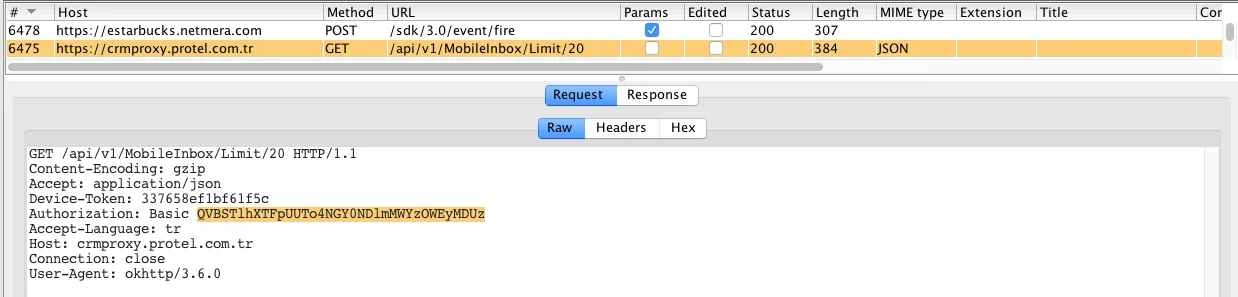
- Application sent a request to https://crmproxy.protel.com.tr/api/v1/MobileInbox/Limit/20 this url and it took a response.
- I evaluated this request then i saw the Authorization: Basic QVBSTlhXTFpUUTo4NGY0NDlmMWYzOWEyMDUz token.
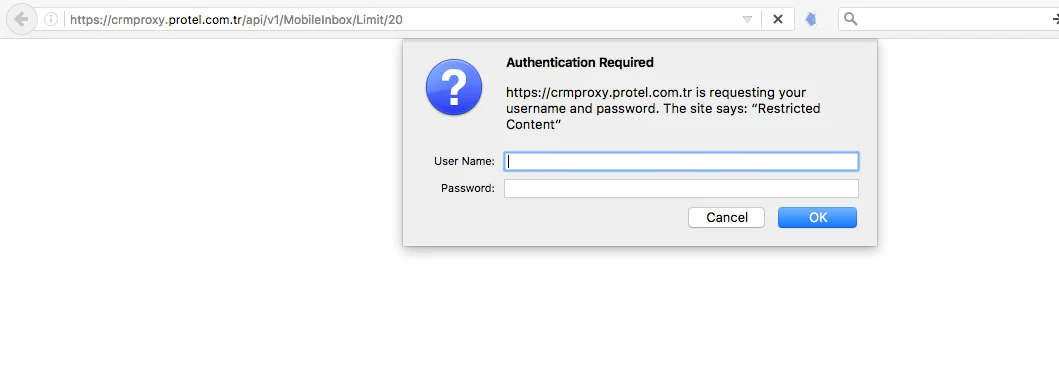
- I tried to reach this url via browser however, i couldnt because it wants to basic authentication and i tried the default password which comes to mind but i couldnt be successful.
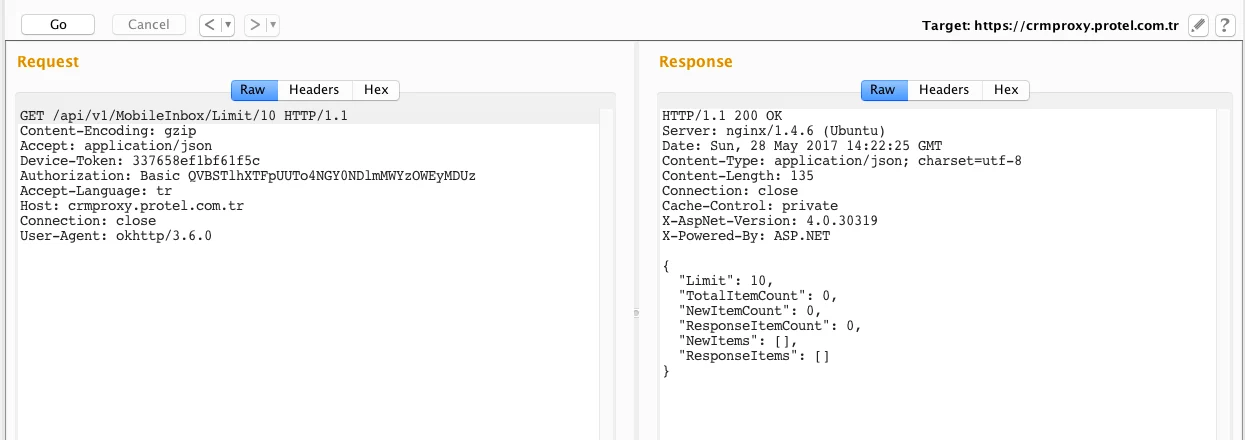
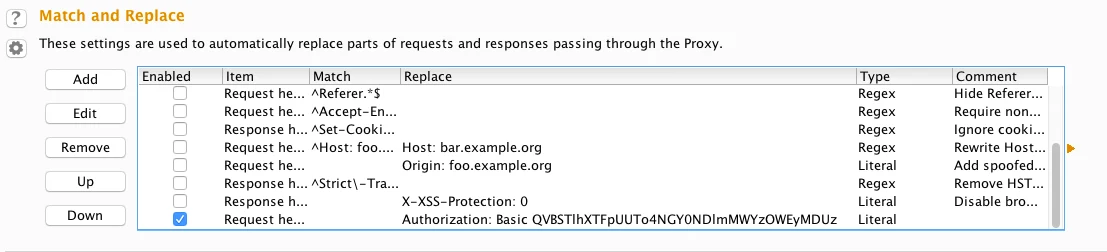
- I remembered when there was a request on burp which has Authorization: Basic QVBSTlhXTFpUUTo4NGY0NDlmMWYzOWEyMDUz token and i tried to add this token in my all request while trying to access via browser.
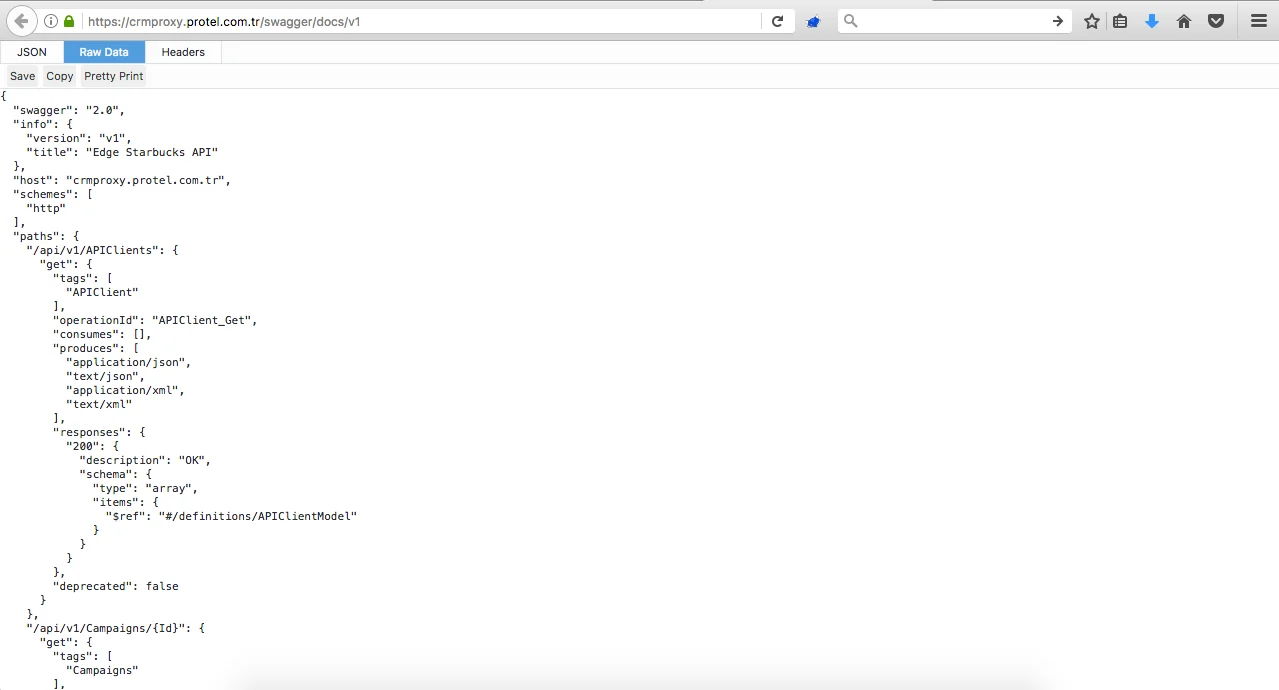
- Bingoooo! It worked! I reach the https://crmproxy.protel.com.tr this api server and i looked around it then i found the api docs.
- Finally, i tried to sent all request in api docs, i was successful in all of them.
I added to all screenshots below. If there is any question, i may answer them.
Thank you,
Yunus Y.
Attachments

Context
The target was the Starbucks Turkey Android app, published on Google Play as com.starbucks.tr. The researcher was testing the app's communication with its backend, which lives on a host called crmproxy.protel.com.tr. One of the app's features is a messages tab, which talks to a MobileInbox endpoint on that host. The report describes how a single request captured from that tab led to full access to the API server and to its API documentation, without any login.
Setup
The only tool named in the report is Burp Suite, used as an intercepting proxy. No versions are given. The researcher did not create an account and did not log in to the app at any point: every step described was performed without authentication. The precondition that shaped the whole exercise was SSL pinning in the app, which blocked the proxy from seeing most of the traffic.
Finding it
When the researcher tried to intercept traffic between the app and the server, SSL pinning prevented it. The plan was to unpin the app first, but before doing that the researcher browsed the app's screens. On the messages tab, a request appeared in the Burp history anyway. The developers had apparently left the /MobileInbox/ path out of the SSL validation, so that one path was visible through the proxy while the rest of the app was not. The researcher notes not knowing whether this was an oversight or deliberate.
That request was enough to start from. The researcher's habit, stated in the report, is to check parent and child directories whenever a directory is found, and that is how the server root was reached from the captured path.
Exploitation
Step 1: capture the request that escaped pinning
The app sent this request and received a response:
https://crmproxy.protel.com.tr/api/v1/MobileInbox/Limit/20
Because this path was not covered by the app's SSL validation, the request and its response were visible in Burp despite the pinning on the rest of the app.
Step 2: read the Authorization header
Inspecting the captured request revealed a Basic authentication header:
Authorization: Basic [redacted]
The value is what HTTP Basic authentication carries: a base64-encoded credential. This header was the credential the app sent on that request, and it was sitting in plain view in the intercepted request.
Step 3: hit the server directly from the browser
Requesting the same URL in a browser did not work at first: the server answered with a Basic authentication prompt. The researcher tried the default passwords that came to mind and none worked. Remembering the header seen in Burp, the researcher then added that same Authorization: Basic ... value to the requests made from the browser.
With the header attached, the browser reached https://crmproxy.protel.com.tr, the API server itself. The researcher looked around the server and found its API documentation.
Step 4: read the API documentation
The server's homepage redirected to /edgeapidoc/index/. On that page there was a link to /swagger/docs/v1/, which turned out to be the Swagger documentation of the API. It listed all the methods the app uses.
Step 5: call the documented methods
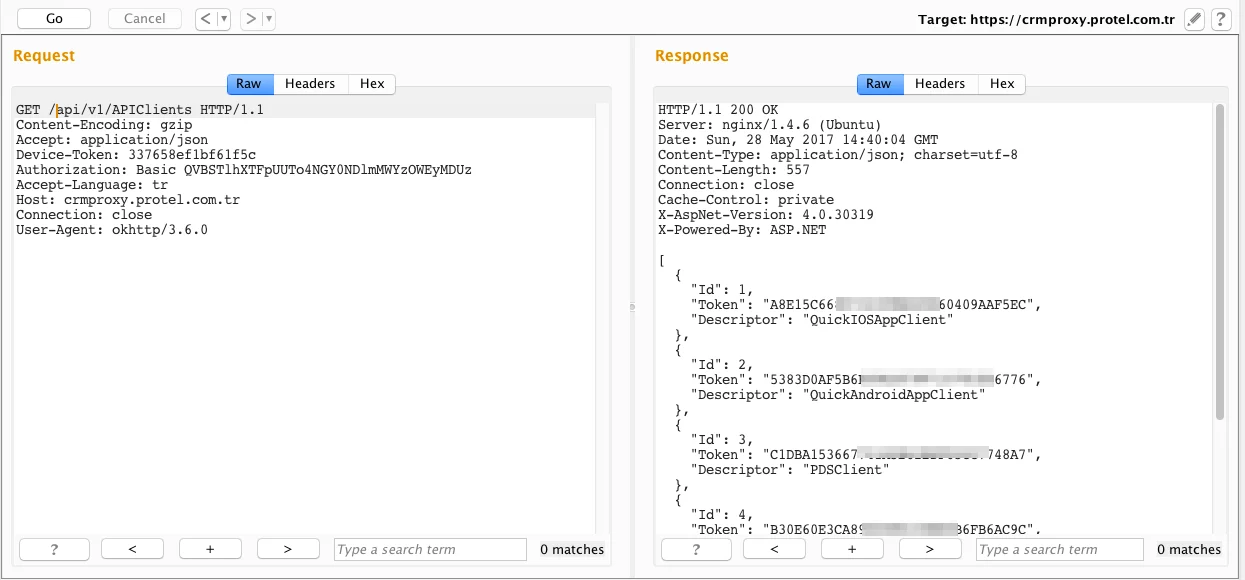
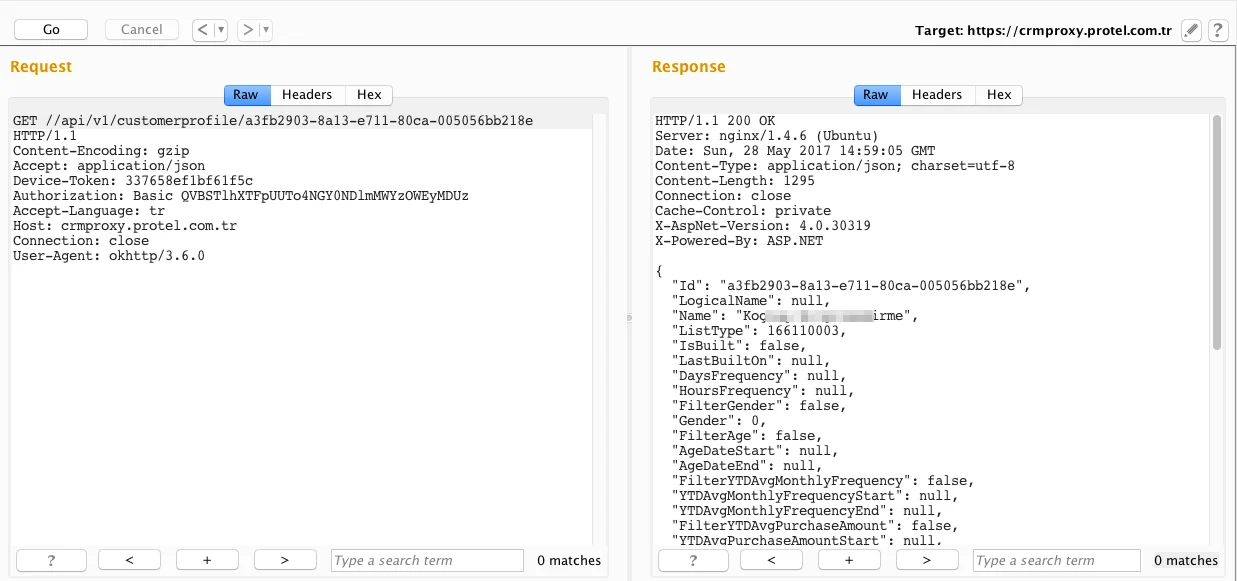
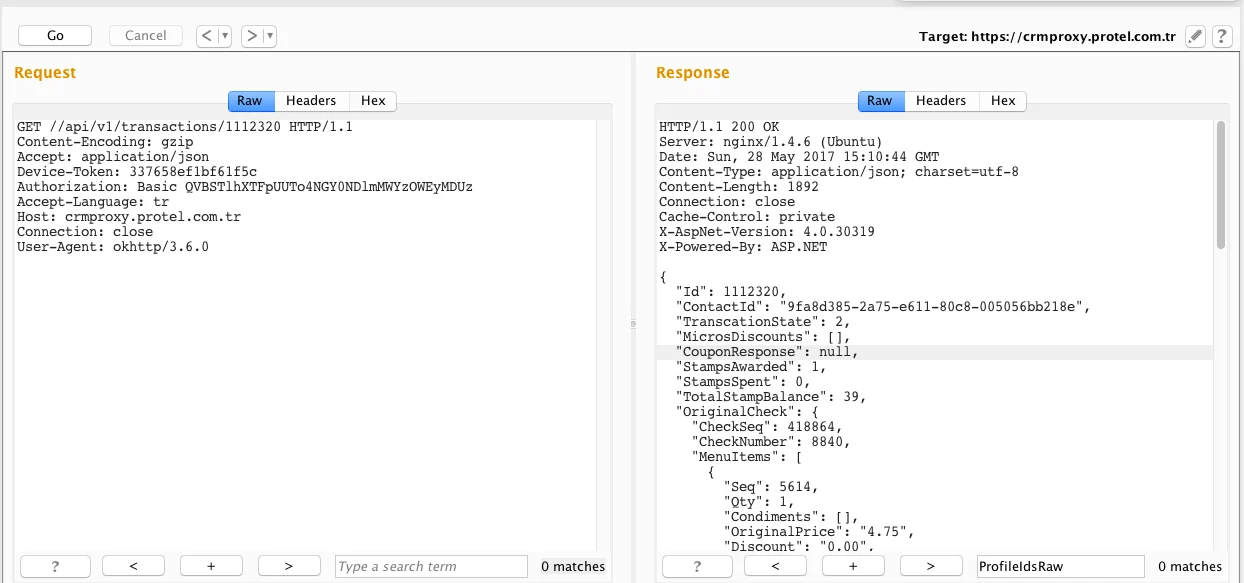
The researcher then tried the documented requests. Every one of them succeeded. To avoid changing anything on the server, no POST method was used; only GET methods were exercised. According to the report, these returned masked credit card values, API tokens, user information and more.
Root cause
Two mistakes combine here. The first is that the /MobileInbox/ path was excluded from the app's SSL validation, so its traffic, including the Basic credential, could be read by anyone who can place a proxy between the app and the server. The second is that the API server accepted that Basic credential for the documentation and for the GET endpoints the researcher tried. The researcher never logged in, and the same header value worked from a browser as well as from the app. The Basic prompt on the server was the only barrier, and it fell to a credential the client already carried. The report does not describe any rate limiting, scoping or additional check that would have limited what the credential could reach.
Impact
Anyone able to observe the app's traffic on that one unpinned path, for example through a proxy, can read a credential that the researcher used to reach the API server, its documentation and its GET endpoints. In the researcher's testing those endpoints returned masked credit card values, API tokens and user information, all without a login. The researcher deliberately avoided POST methods, so the report does not show whether write operations were possible; it only shows that every GET method tried worked. The report is rated medium severity with the weakness classified as improper authentication.
Fix
Based on what was found, the changes needed are to bring /MobileInbox/ under the same SSL validation as the rest of the app, so the credential is no longer readable in transit, and to stop treating one static Basic credential as authorisation for the entire API. The documentation endpoint in particular should not be reachable with the client's own credential, and data endpoints should require authentication tied to the individual user.
Variants to test
- Look for paths excluded from pinning. Walk every screen of a pinned app with the proxy running and watch for any request that still appears. A positive result is a request and response visible in Burp on an app that otherwise blocks the proxy.
- Read every Authorization header you capture. Decode Basic values and note whether they are static across sessions. A positive result is the same credential appearing in requests from a fresh install with no login.
- Replay the credential from a browser or curl. Send the captured header to the API host directly. A positive result is a successful response where an unauthenticated request got a Basic prompt.
- Check parent and child directories of any discovered path. Request the host root and the documentation paths that commonly sit beside an API, such as Swagger UI locations. A positive result is a documentation page listing the API's methods.
- Call documented GET methods with the same credential. Start with read-only methods and confirm whether they return real data. A positive result is user information, tokens or masked card data returned without a login.
What happened, in plain words
A security researcher was testing the Starbucks Turkey Android app, the one you can download from Google Play under the name com.starbucks.tr. The app talks to a server behind the scenes, and the researcher wanted to watch that conversation. Normally you do this by putting a special program between the app and the server, like a person standing in the middle of a phone call and writing down what both sides say. The app, however, had a protection called SSL pinning that stopped this from working for most of its traffic.
Despite that protection, one small part of the app's traffic slipped through and was visible. Inside that one visible request was a password-like value the app uses to prove to the server who it is. The researcher copied that value, used it from an ordinary web browser, and found that it opened the door to the API server, including a page that documents the API's methods. From there, every read-only function the researcher tried worked, without ever logging in. This article walks through that story step by step, explaining each idea as it comes up.
Background: what the app and the server are doing
Most phone apps are thin front ends. The screens you tap are drawn by the app, but the actual information, your messages, your account details, your order history, comes from a computer somewhere on the internet called a server. The app asks the server a question, the server answers, and the app shows you the answer. This back-and-forth is what people mean by traffic.
The set of questions a server is willing to answer, and the format in which it wants them asked, is called an API (Application Programming Interface). A useful comparison is a restaurant menu: the menu lists the dishes the kitchen will make, and the kitchen will not make something that is not on the menu. An API is the menu of things a server will do for an app.
In this case the server lives at a host called crmproxy.protel.com.tr. One of the app's features is a messages tab, and that tab talks to a part of the server whose address contains MobileInbox. The report is about how a single request captured from that tab led to full access to the API server and to its documentation, all without any login.
The tools and the starting conditions
The only tool named in the report is Burp Suite, used as an intercepting proxy. A proxy is a program that sits between your app and the internet and passes messages back and forth. When it is set up to intercept, it also shows you each message so you can read it, and lets you change it before passing it on. Think of a postal worker who, instead of just delivering your letters, opens each one, photocopies it for you, and then seals it again. No version numbers are given in the report.
The researcher did not create an account and did not log in to the app at any point. Every step described was performed without authentication, which means without proving to the server who you are. That detail matters: the access described here was not tied to any particular user.
The precondition that shaped the whole exercise was SSL pinning. To understand it, you first need to know what SSL (more precisely, TLS) does. When your app talks to a server, the connection is normally encrypted, so anyone watching the network sees only scrambled data. Encryption is set up using a certificate, a kind of digital ID card that the server presents to prove it is really the server you meant to talk to. Your app checks that ID card against a list of trusted authorities, the same way you might check that a passport was issued by a real government.
SSL pinning is a stricter version of that check. Instead of trusting any authority on the list, the app is told in advance: only accept this one specific certificate, the one our server uses. The comparison is a bouncer at a club who has been shown one photo and will only let that exact person in, no matter how convincing anyone else's ID looks. The practical effect is that an intercepting proxy cannot pretend to be the server, because its certificate is not the pinned one, so the app refuses to talk through it. That is why the researcher could not see most of the traffic.
Finding it
When the researcher tried to intercept traffic between the app and the server, SSL pinning prevented it. The plan was to remove the pinning first, a process called unpinning, but before doing that the researcher browsed the app's screens. This is a sensible habit: look at what the app does normally before you start changing things, so you know what normal looks like.
On the messages tab, a request appeared in the Burp history anyway. The developers had apparently left the /MobileInbox/ path out of the SSL validation, so that one path was visible through the proxy while the rest of the app was not. The researcher notes not knowing whether this was an oversight or deliberate. Either way, one visible request was enough to start from.
The researcher's stated habit is to check parent and child directories whenever a directory is found. A directory here means a part of a web address, the pieces separated by slashes. If you find example.com/shop/, the parent is example.com/ and a child might be example.com/shop/orders/. Servers often keep related things next to each other, so looking around a discovered address is a cheap way to find more. That habit is how the researcher moved from the captured path towards the server root.
Exploitation
Step 1: capture the request that escaped pinning
The app sent this request and received a response:
https://crmproxy.protel.com.tr/api/v1/MobileInbox/Limit/20
Reading it piece by piece: https:// means the connection is encrypted. crmproxy.protel.com.tr is the name of the server. /api/v1/ says this is version 1 of the API, a common way for servers to keep old and new versions side by side. /MobileInbox/ is the messages feature. /Limit/20 is a parameter, a value passed to the server, here apparently asking for a limited number of messages. Because this path was not covered by the app's SSL validation, the request and its response were visible in Burp despite the pinning on the rest of the app.
Step 2: read the Authorization header
Inspecting the captured request revealed a Basic authentication header:
Authorization: Basic [redacted]
A header is extra information attached to a request, like the label on a parcel that tells the postal service how to handle it. Authorization is a standard header used to carry proof of who is asking. Basic authentication is one of the simplest forms of that proof: the client sends a username and password joined by a colon, and encodes the result in base64. Base64 is not encryption; it is just a way of writing data using a safe set of characters, and anyone can decode it. The comparison is writing a note in a simple substitution cipher that everyone knows: it hides nothing from anyone who cares to look.
So the value after Basic is a base64-encoded credential, the form HTTP Basic authentication uses. This header is the credential the app itself uses to talk to the API, and it was sitting in plain view in the intercepted request. A credential is anything you use to prove identity, such as a password, a key or a token. The important property here is that it was sent by the app itself, in plain view, on a request the proxy could read.
Step 3: hit the server directly from the browser
Requesting the same URL in a browser did not work at first: the server answered with a Basic authentication prompt. That prompt is the little pop-up box a browser shows asking for a username and password. The researcher tried the default passwords that came to mind and none worked. Default passwords are the factory settings many devices and services ship with, such as admin and admin, and trying them is a standard first move because they are so often left unchanged.
Remembering the header seen in Burp, the researcher then added that same Authorization: Basic ... value to the requests made from the browser. The researcher added the same Authorization: Basic ... value to the requests made from the browser. The idea is to make the browser behave like the app: present the same proof of identity that the app presents.
The screenshot shows the Basic authentication prompt that appeared when the server was opened directly, the barrier the researcher had to get past.
With the header attached, the browser reached https://crmproxy.protel.com.tr, the API server itself. The researcher looked around the server and found its API documentation. This is the key moment: a credential captured from one request opened the API server itself.
This image shows the captured request in Burp, the one that carried the Authorization header.
Here the request is repeated in Burp, confirming that the same request can be sent again and still works.
This screenshot shows the token being matched and replaced, the step where the captured header value was reused in the browser's requests.
Step 4: read the API documentation
The server's homepage redirected to /edgeapidoc/index/. A redirect is the server telling your browser "not here, look over there", and the browser follows automatically. On that page there was a link to /swagger/docs/v1/, which turned out to be the Swagger documentation of the API. Swagger is a widely used format for describing an API: it lists every address the server accepts, what each one does, and what input it expects. The comparison is the full menu with descriptions and prices, rather than just the list of dish names. It listed all the methods the app uses.
This image shows the API documentation being accessed.
This one shows the API page itself, reached through the browser with the captured credential.
Step 5: call the documented methods
The researcher then tried the documented requests. Every one of them succeeded. To avoid changing anything on the server, no POST method was used; only GET methods were exercised. These two words describe the type of request. GET means "give me this information"; it should not change anything on the server. POST means "here is some data, do something with it", and it can create, modify or delete things. Sticking to GET is the careful choice when testing someone else's live system: you read, you do not write.
According to the report, these returned masked credit card values, API tokens, user information and more. Masked means partly hidden, for example showing only the last four digits of a card number. That is better than showing the full number, but it is still sensitive data that should not be handed out to anyone who asks. An API token is a string that acts like a password for programmatic access; if someone else has it, they can act as the holder.
This screenshot shows the API clients listed by the server.
Here customer information is returned by one of the documented methods.
This image shows transaction data returned in the same way.
Why this worked
Two mistakes combine here. The first is that the /MobileInbox/ path was excluded from the app's SSL validation, so its traffic, including the Basic credential, could be read by anyone who can place a proxy between the app and the server. The second is that the API server accepted that Basic credential for the documentation and for the GET endpoints the researcher tried.
Authorisation is the question of what you are allowed to do once you have proved who you are. Authentication is proving who you are in the first place. The researcher never logged in, and the same header value worked from a browser as well as from the app. The Basic prompt on the server was the only barrier, and it fell to a credential the client already carried. The report does not describe any rate limiting, scoping or additional check that would have limited what the credential could reach.
The weakness is classified as improper authentication, which is the general label for a system that lets someone in without properly checking who they are, or that accepts a shared secret as if it identified an individual.
What it means in practice
Anyone able to observe the app's traffic on that one unpinned path, for example through a proxy, can read a credential that the researcher used to reach the API server, its documentation and its GET endpoints. In the researcher's testing those endpoints returned masked credit card values, API tokens and user information, all without a login. The researcher deliberately avoided POST methods, so the report does not show whether write operations were possible; it only shows that every GET method tried worked. The report is rated medium severity with the weakness classified as improper authentication.
How it should be fixed
Based on what was found, the changes needed are to bring /MobileInbox/ under the same SSL validation as the rest of the app, so the credential is no longer readable in transit, and to stop treating one static Basic credential as authorisation for the entire API. The documentation endpoint in particular should not be reachable with the client's own credential, and data endpoints should require authentication tied to the individual user.
Things to try yourself
These are the same ideas, phrased so you can practise them on systems you are allowed to test.
- Look for paths excluded from pinning. Walk every screen of a pinned app with the proxy running and watch for any request that still appears. A positive result is a request and response visible in Burp on an app that otherwise blocks the proxy.
- Read every Authorization header you capture. Decode Basic values and note whether they are static across sessions. A positive result is the same credential appearing in requests from a fresh install with no login.
- Replay the credential from a browser or curl. Send the captured header to the API host directly. A positive result is a successful response where an unauthenticated request got a Basic prompt.
- Check parent and child directories of any discovered path. Request the host root and the documentation paths that commonly sit beside an API, such as Swagger UI locations. A positive result is a documentation page listing the API's methods.
- Call documented GET methods with the same credential. Start with read-only methods and confirm whether they return real data. A positive result is user information, tokens or masked card data returned without a login.
Glossary
- API: the set of questions a server will answer and the format it expects, like a restaurant menu for programs.
- API token: a string that acts like a password for programmatic access; whoever holds it can act as the holder.
- Authentication: proving who you are, for example with a username and password.
- Authorisation: what you are allowed to do once you have proved who you are.
- Base64: a way of writing data using safe characters; it is encoding, not encryption, and anyone can decode it.
- Basic authentication: a simple login scheme where the client sends a username and password joined by a colon, encoded in base64.
- Burp Suite: a tool that sits between an app and the internet, showing and letting you change the messages that pass through.
- Certificate: a digital ID card a server presents to prove it is the server you meant to talk to.
- Credential: anything used to prove identity, such as a password, key or token.
- Endpoint: one specific address on a server that does one specific thing.
- GET: a request type that asks for information and should not change anything on the server.
- Header: extra information attached to a request, like a label on a parcel.
- Improper authentication: a weakness where a system lets someone in without properly checking who they are, or accepts a shared secret as if it identified an individual.
- Intercepting proxy: a proxy that shows you each message and lets you change it before passing it on.
- Masked: partly hidden, for example showing only the last four digits of a card number.
- POST: a request type that sends data to the server and can create, modify or delete things.
- Proxy: a program that sits between your app and the internet and passes messages back and forth.
- Redirect: the server telling your browser to look at a different address instead.
- SSL / TLS: the encryption that protects the connection between an app and a server.
- SSL pinning: telling an app in advance to accept only one specific certificate, so an intercepting proxy cannot pretend to be the server.
- Static credential: a credential that is the same every time, rather than different per user or per session.
- Swagger: a widely used format for describing an API, listing its addresses, what each does and what input it expects.
- Unpinning: removing SSL pinning from an app so its traffic can be intercepted.

