Unauthenticated users can access all food.grammarly.io user's data
The Meteor publications on food.grammarly.io did not require authentication, allowing anyone to subscribe and retrieve user data including emails, OAuth tokens, and admin status. An attacker could list all users and their sensitive information without logging in.
 Originally disclosed on HackerOne
- Triaged in 15 hours
- Fixed in 9 days
- Paid in 41 hours
- Disclosed after 9 months
Summary: The food.grammarly.io site uses the Meteor framework, which uses publications and methods to communicate between the backend and frontend. Although the site seems to require being authenticated as a Grammarly employee to use it, most methods and publications work without being authenticated. I was able to list user data including emails, access tokens and admin status just by using the Chrome Developer tools.
Description: I discovered that the following Meteor publications work without being authenticated:
- activeUsers
- allExtraFood
- allOrders(date)
- allUsers
- allUserStats
- allVendors
- allVendorsItems
- extraFoodFromToday
- foodEventLog
- foodSettings
- itemsLimits
- monthlyTop
- vendorByName
- vendorHistoryFromToday
- vendorItemsByName
- vendorsHistory
This means I can access the data stored in the following Meteor collections:
- Meteor.users
- ExtraFood
- OrderItems
- UserStats
- Vendors
- VendorsItems,
- FoodEventLog
- FoodSettings
- VendorsItemsLimits
- MontlyTopItems
- VendorsHistory
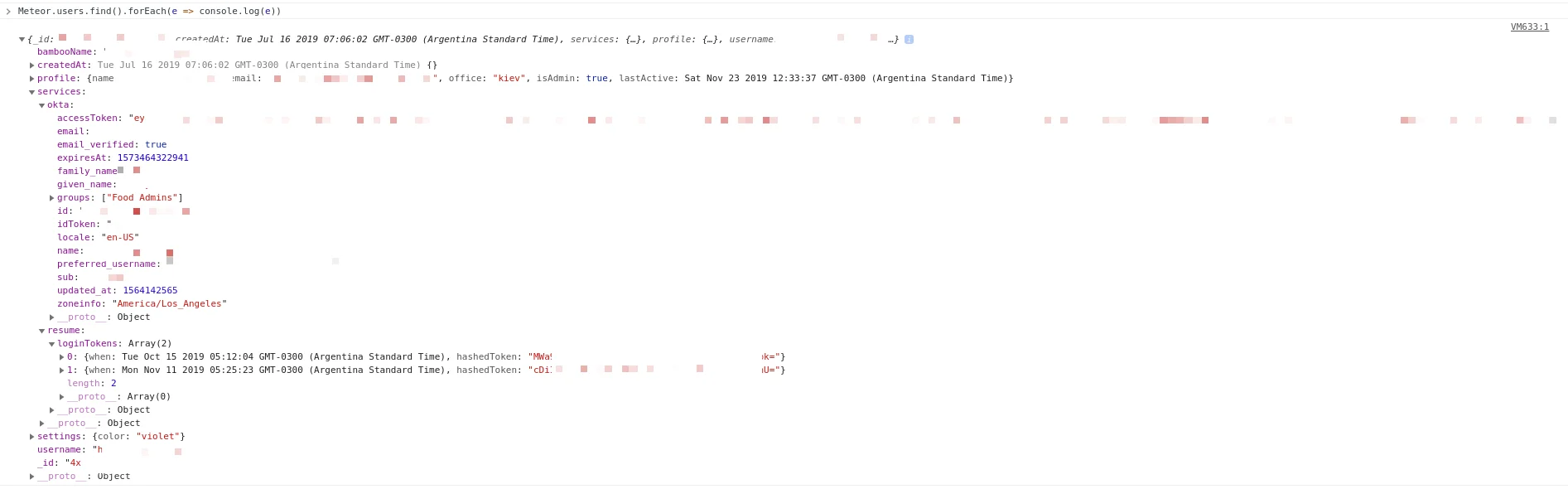
The Meteor.users collection includes the email address of 300+ employees of Grammarly, along with their Okta and Google oauth access tokens, a hash of their login tokens, and their admin status. The FoodSettings collection also exposes some Grammarly user emails.
Based on the source code of the app, it seems that most Meteor methods also don't perform any authentication checks. But because they could perform destruction of data, I preferred not no use them when testing.
Browsers Verified In:
- Chrome
- Firefox
Steps To Reproduce:
(Add details for how we can reproduce the issue)
- Visit https://food.grammarly.io and open the Chrome Developer Tools
- In the console, run
Meteor.subscribe('activeUsers') - Wait a few seconds, and run
Meteor.users.find().forEach(e => console.log(e)) - You will see all user's information, as seen in the screenshots
Supporting Material/References:
- The Meteor Security page explains how this vulnerabilities can be fixed by implementing proper access control in the Meteor methods and publications
Impact
An attacker could use this vulnerability to get information about Grammarly employees. He/she could know which employees have admin privileges and target them in other attacks.
I wasn't able to use the Okta and Google tokens for anything of high impact. Also, the hashedLoginToken requires the attacker to reverse a SHA256 hash of a random secret, so exploiting it seems difficult.
Attachments

Not written yet. The AI write-up for this report has not been written yet. The Original tab links to the source.
How it worked
Root cause
Likely the Meteor publications and methods were not configured with authentication checks, allowing unauthenticated access to data.
Impact
An attacker could obtain employee emails, OAuth tokens, and admin status, potentially targeting admins, though the tokens were not usable for high-impact actions and the hashed login token is difficult to exploit.
What the attacker needed
No authentication required; access to the website
How it was found
- Visit the site and open Chrome Developer Tools
- In the console, run Meteor.subscribe('activeUsers')
- Wait a few seconds, then run Meteor.users.find().forEach(e => console.log(e))
- Observe all user information in the console
Explained by bugbounty.wiki with AI from the original and checked against quotes from it; it can still be wrong. Read the original before relying on a detail.
Not written yet. The AI write-up for this report has not been written yet. The Original tab links to the source.
This website used a framework called Meteor, which lets the browser ask the server for data through 'publications'. The site forgot to check if the person asking was logged in, so anyone could ask for and receive private user information.
What is Access control?
A user can do something their role should not allow: reach an admin function, act on a feature they have not paid for, or skip a permission check. IDOR is the special case where the object belongs to someone else.

