Hunting Tesla Model Y Secrets in the Parts Catalog
The Tesla Parts Catalog trusted a client-side cookie to decide a user's permissions, so an unprivileged user could edit it to gain internal access and view unreleased Model Y parts. Separately, the parts search API did not check the requested catalog model, letting any logged-in user query Model Y part data.
 Published on medium.com
After buying a Model 3 in June of 2019, I began deep diving into understanding how my new car works. My interest largely being the infotainment system.
The full write-up lives on its author's site
It belongs to its author, so we link to it rather than copy it. The other two tabs are our own rewrites, checked against it.
Context
The Tesla Parts Catalogue (EPC) is a web application at https://epc.tesla.com/ that lets users look up parts and schematics for Tesla vehicles. It supports logins from the general public: anyone with a Tesla account can sign in, and the site presents the catalogue appropriate to that user. Internally, Tesla staff and body shop users see more: additional tabs, ordering functions and catalogs that are not meant for the public. The application talks to a separate API host, https://epcapi.tesla.com, and authenticates API calls with a bearer token.
The researcher came to this from hardware research on his own Model 3, registered with Tesla as a hardware security researcher in August 2019, and occasionally looked at Tesla's web properties as well. With the Model Y release approaching, the web research shifted to whether Model Y data could be reached before it was public. That led back to the parts catalogue, a site where something interesting had been noticed before but which had not held sensitive data at the time.
Setup
The only precondition is an ordinary Tesla account, used to sign in to the EPC site as a general public user. No special role, internal account or body shop account is needed. The researcher read the cookie and inspected the network requests made while searching, and captured an API call with curl. The user agent in the captured request was Chrome 79 on macOS 10.14.6.
Finding it
While browsing the site after signing in, the researcher noticed a cookie called EPCClaim. Its value was base64 encoded, and decoding it produced a JSON object describing the logged-in user:
{"employeeId":0,"firstName":"General","lastName":"Public","email":"[redacted]","countryCode":"US","languageId":null,"languageCode":null,"currencyCode":null,"isInternalUser":false,"isBodyShopUser":false,"isGeneralPublic":true,"tabs":false,"locationId":null,"bodyShopId":0,"bodyShopName":null,"bodyShopCategory":null,"permissions":[]}
The object carries identity fields and, importantly, a permissions array that is empty for a general public user, plus boolean flags isInternalUser, isBodyShopUser and isGeneralPublic. A client-side claim like this is worth testing: if the server trusts it, the user controls their own authorisation.
To learn what the permission values mean, the researcher read the JavaScript source at https://epc.tesla.com/scripts/scripts.8c9383be.js and found a mapping of permission names to string values:
{accountManagement:"ACCOUNT_MANAGEMENT",bodyShopManagement:"BODY_SHOP_MANAGEMENT",bodyShopAccountManagement:"BODY_SHOP_ACCOUNT_MANAGEMENT",repairOrder:"REPAIR_ORDER",orderPane:"ORDER_PANE",admins:"ADMINS",epcUser:"EPC_USER",addToolingData:"ADD_TOOLING_DATA",model3Catalog:"MODEL3_CATALOG",modelYCatalog:"READONLY_CATALOG",toolingCatalog:"TOOLING_CATALOG",serviceToolingCatalog:"SERVICE_TOOLING_CATALOG",returns:"RETURNS",statements:"STATEMENTS",creditmemos:"CREDIT_MEMO",genealogy:"GENEALOGY",generalAccountManagement:"GENERAL_ACCOUNT_MANAGEMENT",orderModel3:"ORDER_MODEL3",orderModelX:"ORDER_MODELX",orderRoadster:"ORDER_ROADSTER",orderModelS:"ORDER_MODELS",orderTooling:"ORDER_TOOLING",orderServiceTooling:"ORDER_SERVICE_TOOLING",orderModelSR:"ORDER_MODELSR"}
The entry that mattered was modelYCatalog:"READONLY_CATALOG": a permission value that unlocks the Model Y catalogue. The researcher had checked the site before and found nothing sensitive behind cookie edits, but checking again ahead of the Model Y launch changed that.
Exploitation
Step 1: sign in and inspect the claim
- Sign in to the EPC site with a Tesla account.
- Read the
EPCClaimcookie and base64 decode it, giving the general public JSON shown above.

The screenshot shows the cookie as it appears in the browser, which is where the base64 value is taken from.
Step 2: edit the claim
The researcher changed isGeneralPublic to false and isInternalUser to true, and set permissions to the Model Y value found in the JavaScript. The resulting plaintext was:
This was base64 encoded again and written back as the EPCClaim cookie value.
Step 3: reload the catalogue
With the edited cookie, the researcher returned to https://epc.tesla.com/. Model Y now appeared as an option, and going through the catalogue showed Model Y parts. The researcher describes being able to see what seemed to be just about, if not every, component used in the Model Y, and notes that some of it was a surprise and could not be shared before launch.
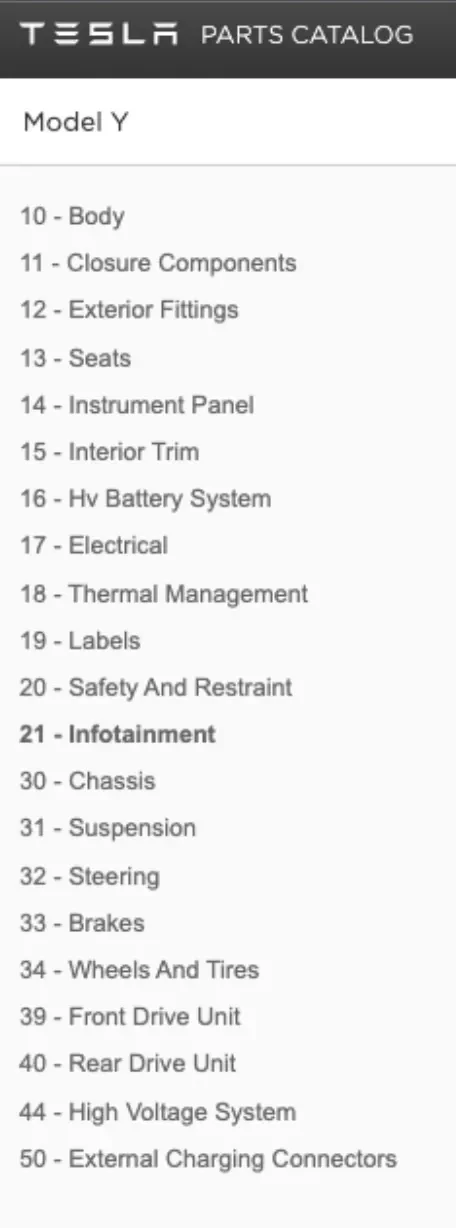
Most permission values only added options to the UI. Their corresponding API endpoints were correctly restricted to authorised users holding a bearer token, and would not return or accept data. The Model Y catalogue was the exception: with the edited claim, Model Y appeared as an option and the catalogue showed Model Y parts.
Step 4: look again at search
The researcher went back to the EPC site to see whether Model Y data could be reached another way. The search function searches all parts in the catalogue for a given vehicle, and filters results by the catalogue being viewed: searching while in the Model 3 catalogue only finds Model 3 parts. Inspecting the network requests made while searching showed the endpoint used for search suggestions:
https://epcapi.tesla.com/api/searchSuggestions
The query parameters are CatalogModel, countryCode and Term. For example, searching for "bumper" in the 3 catalogue calls:
https://epcapi.tesla.com/api/searchSuggestions?catalogModel=Model3&countryCode=US&term=bumper
The request is authenticated with a bearer token generated at login and saved in local storage under the key EPCToken. Queries for Model Y data were not restricted: anyone with a valid bearer token, which any general public login provides, could search Model Y parts by specifying CatalogModel=ModelY. The captured request looks like this:
curl 'https://epcapi.tesla.com/api/searchSuggestions?catalogModel=ModelY&countryCode=US&term=XYZ_Part_Name' -H 'Connection: keep-alive' -H 'Accept: application/json, text/plain, */*' -H 'Authorization: Bearer [redacted]' -H 'Accept-Language: en-us' -H 'User-Agent: Mozilla/5.0 (Macintosh; Intel Mac OS X 10_14_6) AppleWebKit/537.36 (KHTML, like Gecko) Chrome/79.0.3945.130 Safari/537.36' -H 'Origin: https://epc.tesla.com' -H 'Sec-Fetch-Site: same-site' -H 'Sec-Fetch-Mode: cors' -H 'Referer: https://epc.tesla.com/' -H 'Accept-Encoding: gzip, deflate, br' --compressed
The response contains the name of each matching item, its part number, title and notes. It also contains systemGroupId, the group of parts the matching record belongs to. With that identifier, all parts in the group can be requested from:
https://epcapi.tesla.com/api/catalogs/XXX/categories/0/subcategories/0/systemGroups/XXXXX?vin=
Because the Model 3 is the most similar vehicle to the Model Y in parts, public Model 3 data gives the keywords needed to search for most Model Y parts and see whether they are the same or different, and the titles and notes in the responses give specific details in some cases. Finding one part in each group and then querying by systemGroup reveals more parts and more detail on each.
Root cause
Authorisation was decided from data the client supplies. The EPCClaim cookie is a base64 encoded JSON object, and editing its content changed what was displayed to the user. With the edited cookie set, the site showed Model Y as an option and displayed Model Y parts. On the API side, the search endpoint took the catalogue to search from the catalogModel parameter and did not check that the caller was entitled to that catalogue; a bearer token from any general public login was enough. The other permission values' API endpoints were correctly restricted to authorised users with a bearer token, which is why only the Model Y path was exposed. The report does not describe the server-side code, so the exact check that was missing is not stated.
Impact
An unprivileged user with an ordinary Tesla account could view Model Y parts and schematics that were not yet public, by editing a cookie. The same user could search Model Y parts through the API and enumerate parts by system group, learning part names, part numbers, titles and notes. The researcher notes that some of what was visible could not be shared before launch. The report does not give a count of affected records or a severity rating.
Fix
Tesla took action on both reports. For the first, Model Y content was taken down on 30 Jan 2020, the same day the report was triaged. For the second, the Model Y catalogue was taken offline on 19 Feb 2020, the day it was reported.
Timeline
| Time (EST) | Event |
|---|---|
| 30 Jan 2020 14:30:36 | Reported |
| 30 Jan 2020 15:28:34 | Triaged |
| 30 Jan 2020 16:34:27 | Model Y content taken down |
| 11 Feb 2020 18:44:27 | Bounty and resolution |
| 19 Feb 2020 12:53:43 | Second issue reported |
| 19 Feb 2020 14:15:49 | Model Y catalogue taken offline |
| 19 Feb 2020 17:06:47 | Bounty and resolution |
Variants to test
- Decode every cookie that looks like base64 JSON and look for role or permission fields. A positive result is a decoded object with flags such as
isInternalUseror a permissions list that you can change and have reflected in the UI or in API responses. - Change boolean flags one at a time and reload. A positive result is a new menu, tab or catalogue appearing that was not there before.
- Read the JavaScript bundle for permission name to value mappings, then set a permission value the UI never offers you. A positive result is a feature or dataset becoming reachable.
- For each permission that adds a UI option, call the endpoint behind it directly with your own bearer token. A positive result is data returned where the UI would have hidden the option; a negative result is the endpoint refusing to return data, as the other permissions' endpoints did here.
- Take a search or filter parameter that names a catalogue, tenant or dataset (
catalogModelhere) and substitute a value you are not entitled to. A positive result is results from the other dataset coming back with your ordinary token. - Take an identifier returned in search results (
systemGroupIdhere) and request the collection it belongs to. A positive result is the full group of records being returned, letting you enumerate beyond what the search exposed. - Use public data on a similar, already released product to guess keywords for the unreleased one, then confirm matches by part number and title. A positive result is records for the unreleased product appearing in responses.
What happened, in plain words
Tesla has a website called the Parts Catalogue, or EPC for short, at https://epc.tesla.com/. It is the place where people look up the individual parts that make up a Tesla car, with diagrams showing where each part goes. You can think of it like the exploded diagrams you sometimes get with flat-pack furniture, except for a whole car and with part numbers you can order.
The site is not only for Tesla staff. Anyone who owns a Tesla account can sign in, and the site shows them the catalogue for their car. Tesla staff and body shop users see more: extra tabs, ordering screens and catalogs that the public is not supposed to see.
The site does not do all its work in the browser. It talks to a separate computer, called an API, at https://epcapi.tesla.com. An API is simply a way for one program to ask another program for data, like a waiter taking your order to the kitchen and bringing back the dish. The browser asks the API for parts, and the API answers with data.
The researcher who found this had started out looking at the hardware of his own Model 3, the electronics inside the car. He registered with Tesla as a hardware security researcher in August 2019 and occasionally looked at Tesla's websites too. As the launch of the Model Y approached, he turned his web research towards one question: could Model Y information be reached before Tesla made it public? That question brought him back to the parts catalogue, a site where he had noticed something odd before, but where nothing sensitive had been at the time.
What he found was that by editing a cookie, an ordinary user could browse pages and data that were meant for Tesla internally. A cookie is a small piece of text that a website stores in your browser so it can remember who you are between page loads, like a cloakroom ticket that lets you collect your coat later. If the website trusts what the ticket says without checking it, and you can write your own ticket, you can claim someone else's coat. That is the heart of this bug: the site decided what you were allowed to see from information your own browser supplied.
There were two separate problems. The first was the cookie itself, which let an unprivileged user open the Model Y catalogue in the site. The second, found on a second look, was a search API that would return Model Y part details to anyone with an ordinary login, without any cookie editing at all. Tesla fixed both quickly, and the researcher was impressed with the speed of the fixes and of the awards.
Setup
The only thing you need to repeat this is an ordinary Tesla account, used to sign in to the EPC site as a general public user. No special role, no internal account and no body shop account is required. The researcher read the cookie and inspected the network requests made while searching, and captured an API call with curl. The captured request shows Chrome 79 on macOS 10.14.6.
Finding it
The cookie that describes you
After signing in, the researcher noticed a cookie called EPCClaim. Its value was base64 encoded. Base64 is a way of writing any data using only ordinary letters, digits and a couple of symbols, so it can travel safely inside text fields. It is not encryption: anyone can decode it, and it hides nothing. Decoding the cookie produced a JSON object, which is a way of writing structured data as text, with names and values in curly brackets. It described the logged-in user:
{"employeeId":0,"firstName":"General","lastName":"Public","email":"[redacted]","countryCode":"US","languageId":null,"languageCode":null,"currencyCode":null,"isInternalUser":false,"isBodyShopUser":false,"isGeneralPublic":true,"tabs":false,"locationId":null,"bodyShopId":0,"bodyShopName":null,"bodyShopCategory":null,"permissions":[]}
Line by line, in plain words:
employeeIdis0, meaning this user is not a numbered employee.firstNameandlastNameareGeneralandPublic, the placeholder identity of an ordinary member of the public.emailis the account's email address, which is personal data and is redacted here.countryCodeisUS, and thelanguageId,languageCodeandcurrencyCodefields arenull, meaning they are not set.isInternalUserisfalse: this person is not Tesla staff.isBodyShopUserisfalse: this person does not work at a body shop.isGeneralPublicistrue: this person is an ordinary member of the public.tabsisfalse, and thelocationId,bodyShopId,bodyShopNameandbodyShopCategoryfields are empty ornull, because none of those apply to a public user.permissionsis an empty list[], meaning this user has been granted no special abilities.
That last field is the interesting one. The object carries identity fields and, importantly, a permissions list that is empty for a general public user, plus the three true/false flags isInternalUser, isBodyShopUser and isGeneralPublic. A true/false flag is just a switch. When a piece of information like this comes from the browser and the server trusts it, the user effectively controls their own authorisation, which is the set of things they are allowed to do. That is worth testing: change the switch and see whether the server believes you.
Reading the site's own instructions
To learn what the permission values mean, the researcher read the JavaScript source at https://epc.tesla.com/scripts/scripts.8c9383be.js. JavaScript is the programming language that runs in the browser and makes a page interactive. The browser has to download it to run it, so anyone can read it, and it often contains the site's own list of names and values. In it he found a mapping of permission names to string values:
{accountManagement:"ACCOUNT_MANAGEMENT",bodyShopManagement:"BODY_SHOP_MANAGEMENT",bodyShopAccountManagement:"BODY_SHOP_ACCOUNT_MANAGEMENT",repairOrder:"REPAIR_ORDER",orderPane:"ORDER_PANE",admins:"ADMINS",epcUser:"EPC_USER",addToolingData:"ADD_TOOLING_DATA",model3Catalog:"MODEL3_CATALOG",modelYCatalog:"READONLY_CATALOG",toolingCatalog:"TOOLING_CATALOG",serviceToolingCatalog:"SERVICE_TOOLING_CATALOG",returns:"RETURNS",statements:"STATEMENTS",creditmemos:"CREDIT_MEMO",genealogy:"GENEALOGY",generalAccountManagement:"GENERAL_ACCOUNT_MANAGEMENT",orderModel3:"ORDER_MODEL3",orderModelX:"ORDER_MODELX",orderRoadster:"ORDER_ROADSTER",orderModelS:"ORDER_MODELS",orderTooling:"ORDER_TOOLING",orderServiceTooling:"ORDER_SERVICE_TOOLING",orderModelSR:"ORDER_MODELSR"}
This is one long list of pairs. On the left of each colon is a friendly name used inside the site's code, and on the right, in quotes, is the exact text that gets stored in the permission. For example, accountManagement maps to "ACCOUNT_MANAGEMENT", repairOrder maps to "REPAIR_ORDER", and model3Catalog maps to "MODEL3_CATALOG". There are entries for body shop management, admins, tooling data, returns, statements, credit memos, genealogy, and ordering for the Model 3, Model X, Roadster, Model S, tooling and service tooling.
The entry that mattered was modelYCatalog:"READONLY_CATALOG": a permission value that unlocks the Model Y catalogue, in read-only form. The researcher had checked the site before and found nothing sensitive behind cookie edits, but checking again ahead of the Model Y launch changed that.
Exploitation
Step 1: sign in and inspect the claim
- Sign in to the EPC site with a Tesla account.
- Read the
EPCClaimcookie and base64 decode it, giving the general public JSON shown above.
The screenshot shows the cookie as it appears in the browser, which is where the base64 value is taken from. This step is done first because you cannot change a value you have not read, and because the decoded object tells you exactly which fields the site uses to decide who you are.
Step 2: edit the claim
The researcher changed isGeneralPublic to false and isInternalUser to true, and set permissions to the Model Y value found in the JavaScript. The resulting plaintext was:
Compared with the original, three things changed and nothing else did:
isInternalUserwent fromfalsetotrue, so the site would treat the user as Tesla staff.isGeneralPublicwent fromtruetofalse, so the site would stop treating the user as an ordinary member of the public.permissionswent from an empty list[]to the single value"READONLY_CATALOG", the Model Y permission taken from the JavaScript.
All the other fields, the name, the email, the country and the empty body shop fields, were left as they were. This was base64 encoded again and written back as the EPCClaim cookie value. The reason for editing rather than adding a new cookie is that the site already reads this one; you are changing the answer it gives, not introducing a new question.
Step 3: reload the catalogue
With the edited cookie, the researcher returned to https://epc.tesla.com/. Model Y now appeared as an option, and going through the catalogue showed Model Y parts. The researcher describes being able to see what seemed to be just about, if not every, component used in the Model Y, and notes that some of it was a surprise and could not be shared before launch.
Most permission values only added options to the interface. Their corresponding API endpoints were correctly restricted to authorised users holding a bearer token, and would not return or accept data. A bearer token is a long random string that the server hands you when you log in, and that you show on every later request to prove you are the same person, like a wristband at an event. The other endpoints were correctly restricted to authorised users with a bearer token, which is why only the Model Y path was exposed.
Step 4: look again at search
The researcher went back to the EPC site to see whether Model Y data could be reached another way. The search function searches all parts in the catalogue for a given vehicle, and filters results by the catalogue being viewed: searching while in the Model 3 catalogue only finds Model 3 parts. Inspecting the network requests made while searching showed the endpoint used for search suggestions:
https://epcapi.tesla.com/api/searchSuggestions
This is the address the browser calls when you type into the search box. The query parameters are CatalogModel, countryCode and Term. A query parameter is the part of a web address after the question mark that carries the details of your request, like the filled-in fields on a form. CatalogModel says which car's catalogue to search, countryCode says which country's data to use, and Term is what you typed. For example, searching for "bumper" in the 3 catalogue calls:
https://epcapi.tesla.com/api/searchSuggestions?catalogModel=Model3&countryCode=US&term=bumper
Reading it left to right: the address is the search suggestions endpoint, catalogModel=Model3 asks for the Model 3 catalogue, countryCode=US asks for United States data, and term=bumper is the word being searched for. The request is authenticated with a bearer token generated at login and saved in local storage under the key EPCToken. Local storage is a small storage area inside the browser, separate from cookies, where a site can keep data; the key is the name under which the token is filed.
Queries for Model Y data were not restricted: anyone with a valid bearer token, which any general public login provides, could search Model Y parts by specifying CatalogModel=ModelY. The captured request looks like this:
curl 'https://epcapi.tesla.com/api/searchSuggestions?catalogModel=ModelY&countryCode=US&term=XYZ_Part_Name' -H 'Connection: keep-alive' -H 'Accept: application/json, text/plain, */*' -H 'Authorization: Bearer [redacted]' -H 'Accept-Language: en-us' -H 'User-Agent: Mozilla/5.0 (Macintosh; Intel Mac OS X 10_14_6) AppleWebKit/537.36 (KHTML, like Gecko) Chrome/79.0.3945.130 Safari/537.36' -H 'Origin: https://epc.tesla.com' -H 'Sec-Fetch-Site: same-site' -H 'Sec-Fetch-Mode: cors' -H 'Referer: https://epc.tesla.com/' -H 'Accept-Encoding: gzip, deflate, br' --compressed
Line by line, in plain words:
curlis a command-line program that sends a web request and prints the answer, useful for repeating a request outside the browser.- The address in quotes is the search suggestions endpoint, with
catalogModel=ModelYasking for the Model Y catalogue,countryCode=USfor United States data, andterm=XYZ_Part_Nameas the placeholder search word. -H 'Connection: keep-alive'is a header, which is an extra line of information attached to a request. This one asks to keep the connection open.-H 'Accept: application/json, text/plain, */*'tells the server which formats the client can understand.-H 'Authorization: Bearer [redacted]'is the wristband: the bearer token proving who is asking. It is redacted here because it is a secret.-H 'Accept-Language: en-us'asks for English (United States) responses.-H 'User-Agent: ...'identifies the browser and operating system that made the request, here Chrome 79 on macOS 10.14.6.-H 'Origin: https://epc.tesla.com'says which site the request came from.-H 'Sec-Fetch-Site: same-site',-H 'Sec-Fetch-Mode: cors'and-H 'Referer: https://epc.tesla.com/'are browser-supplied hints about where the request originated and how it is being made.-H 'Accept-Encoding: gzip, deflate, br'says the client can accept compressed responses.--compressedtellscurlto decompress the answer automatically.
The response contains the name of each matching item, its part number, title and notes. It also contains systemGroupId, the group of parts the matching record belongs to. With that identifier, all parts in the group can be requested from:
https://epcapi.tesla.com/api/catalogs/XXX/categories/0/subcategories/0/systemGroups/XXXXX?vin=
Here XXX stands for the catalogue identifier and XXXXX for the system group identifier, and vin= is an empty vehicle identification number parameter. The point of this second address is that once a search tells you one part in a group, you can ask for the whole group, which reveals more than the single search result did.
Because the Model 3 is the most similar vehicle to the Model Y in parts, public Model 3 data gives the keywords needed to search for most Model Y parts and see whether they are the same or different, and the titles and notes in the responses give specific details in some cases. Finding one part in each group and then querying by systemGroup reveals more parts and more detail on each. In other words, the already public Model 3 catalogue acts as a dictionary of likely words, and each hit in the Model Y catalogue acts as a door to the rest of its group.
Root cause
Authorisation was decided from data the client supplies. The EPCClaim cookie is a base64 encoded JSON object, and editing its content changed what was displayed to the user. A signed token is one the server has stamped in a way the user cannot forge, like a wax seal; this cookie had no such seal. With the edited cookie set, the site showed Model Y as an option and displayed Model Y parts. On the API side, the search endpoint took the catalogue to search from the catalogModel parameter and did not check that the caller was entitled to that catalogue; a bearer token from any general public login was enough. The other permission-gated endpoints did check the bearer token against the user's real entitlements, which is why only the Model Y path was exposed. The report does not describe the server-side code, so the exact check that was missing is not stated.
Impact
An unprivileged user with an ordinary Tesla account could view Model Y parts and schematics that were not yet public, by editing a cookie. The same user could search Model Y parts through the API and enumerate parts by system group, learning part names, part numbers, titles and notes. To enumerate means to walk through a collection item by item and collect what you find. The researcher notes that some of what was visible could not be shared before launch. The report does not give a count of affected records or a severity rating.
Fix
Tesla took action on both reports. For the first, Model Y content was taken down on 30 Jan 2020, the same day the report was triaged. Triaged means the report was reviewed and confirmed as a real issue. For the second, the Model Y catalogue was taken offline on 19 Feb 2020, the day it was reported.
Timeline
| Time (EST) | Event |
|---|---|
| 30 Jan 2020 14:30:36 | Reported |
| 30 Jan 2020 15:28:34 | Triaged |
| 30 Jan 2020 16:34:27 | Model Y content taken down |
| 11 Feb 2020 18:44:27 | Bounty and resolution |
| 19 Feb 2020 12:53:43 | Second issue reported |
| 19 Feb 2020 14:15:49 | Model Y catalogue taken offline |
| 19 Feb 2020 17:06:47 | Bounty and resolution |
Variants to test
These are the general lessons, written so that someone new to security can try them on other sites.
- Decode every cookie that looks like base64 JSON and look for role or permission fields. A positive result is a decoded object with flags such as
isInternalUseror a permissions list that you can change and have reflected in the interface or in API responses. - Change true/false flags one at a time and reload. A positive result is a new menu, tab or catalogue appearing that was not there before.
- Read the JavaScript bundle for permission name to value mappings, then set a permission value the interface never offers you. A positive result is a feature or dataset becoming reachable.
- For each permission that adds an interface option, call the endpoint behind it directly with your own bearer token. A positive result is data returned where the interface would have hidden the option; a negative result is the endpoint refusing to return data, as the other permissions' endpoints did here.
- Take a search or filter parameter that names a catalogue, tenant or dataset (
catalogModelhere) and substitute a value you are not entitled to. A positive result is results from the other dataset coming back with your ordinary token. - Take an identifier returned in search results (
systemGroupIdhere) and request the collection it belongs to. A positive result is the full group of records being returned, letting you enumerate beyond what the search exposed. - Use public data on a similar, already released product to guess keywords for the unreleased one, then confirm matches by part number and title. A positive result is records for the unreleased product appearing in responses.
Glossary
- API: a way for one program to ask another program for data, like a waiter carrying orders to a kitchen and bringing back the dish.
- Authorisation: the set of things a user is allowed to do, as opposed to authentication, which is proving who the user is.
- Base64: a way of writing any data using only ordinary letters, digits and a few symbols so it can travel inside text. It hides nothing and anyone can decode it.
- Bearer token: a long random string handed out at login and shown on later requests to prove identity, like a wristband at an event.
- Body shop user: a user account belonging to a repair shop that works on Tesla vehicles, which sees more of the catalogue than the public.
- Boolean flag: a value that is either true or false, a switch.
- Cookie: a small piece of text a website stores in your browser to remember who you are between page loads, like a cloakroom ticket.
- curl: a command-line program that sends a web request and prints the response.
- Endpoint: a specific address on a server that accepts a particular kind of request.
- Enumerate: to walk through a collection item by item and collect what you find.
- EPC: the Tesla Parts Catalogue, the website at
https://epc.tesla.com/for looking up vehicle parts and schematics. - Header: an extra line of information attached to a web request or response, such as who is asking or what formats are accepted.
- JSON: a way of writing structured data as text, using names and values inside curly brackets.
- JavaScript: the programming language that runs in the browser and makes a page interactive; its source can be read by anyone.
- Local storage: a small storage area inside the browser, separate from cookies, where a site can keep data such as a token.
- Permission: a named ability granted to a user, such as access to a particular catalogue.
- Query parameter: the part of a web address after the question mark that carries the details of a request, like filled-in form fields.
- Root cause: the underlying reason a vulnerability exists, as opposed to its visible symptom.
- Signed token: a token the server has stamped in a way the user cannot forge, like a wax seal.
- System group: a group of related parts in the catalogue, identified by a
systemGroupId. - Triaged: reviewed and confirmed as a real issue by the receiving team.
- User agent: a header that identifies the browser and operating system making a request.
- VIN: vehicle identification number, the unique serial number of a car.
- Vulnerability: a weakness in a system that lets someone do something they should not be able to do.