How I made it into the United Nations hall of fame as I slept
A reflected XSS vulnerability was found in a parameter called 'redirectTo' on a United Nations domain, where the parameter did not filter characters like <, >, quotes. An attacker could inject malicious code that executes in a victim's browser.

This article is going to be about how I got my name in the United Nations hall of fame for finding a reflected XSS bug as I slept.
The full write-up lives on its author's site
It belongs to its author, so we link to it rather than copy it. The other two tabs are our own rewrites, checked against it.
Context
This is a write-up of a reflected XSS found on the United Nations programme, which earned the researcher a place in its hall of fame. The report does not describe the specific application or feature behind the vulnerable endpoint; what it does show is that a parameter named redirectTo reflected user input without filtering the characters <, >, " and ', which was enough to trigger reflected XSS. The work was done against un.org and its subdomains, with the scan itself run overnight on a remote server.
The article is framed around the standard beginner methodology for hunting reflected XSS, and then around the automation that let the researcher run that methodology at scale while asleep.
Setup
The classic methodology the researcher describes has four steps:
- collect all the URLs from
waybackurlsorgau - select all the links that require parameters (those that contain
=) - parse all the links to
kxssand look for the links that do not filter characters like<,>,",' - target those links and try to inject code into those parameters
Those steps can be collapsed into a one-liner, where qsreplace parses the unique links to kxss and saves time:
waybackurls un.org | grep = | qsreplace test | kxss
The researcher notes that the full methodology is a little longer, involving collecting all alive domains and taking screenshots, and that recon tasks like this are long and boring. Two practical problems came up: long scans were interrupted by network and battery issues, and the repetitive work ate the first half hour of hunting, when concentration is at its maximum.
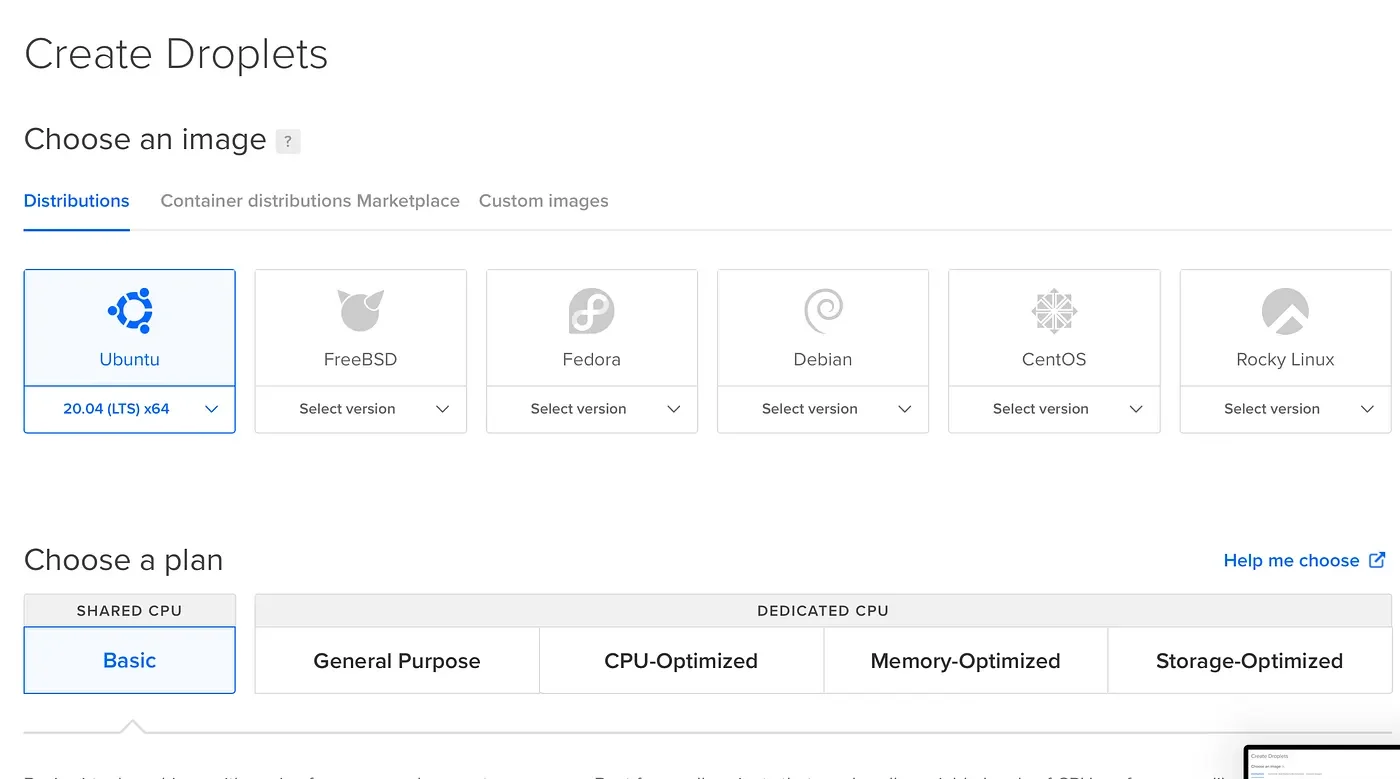
The fix for the interruption problem was a VPS from Digital Ocean. The researcher set up a Linux server, installed the necessary tools, and ran the commands inside a tmux pane so that sessions would be saved even after logging out.
Finding it
While running waybackurls on the target, the researcher noticed something odd about the tool's behaviour across subdomains.
Case 1: running waybackurls on un.org returns web archive links for that domain from all the subdomains.
>> waybackurls un.org
un.org/eg0
un.org/eg1
un.org/eg2
x.un.org/eg0
x.un.org/eg1
y.un.org/eg0
In that example only two results come back from x.un.org. In case 2, running the tool only on x.un.org:
>> waybackurls x.un.org
x.un.org/eg0
x.un.org/eg1
x.un.org/eg2
x.un.org/eg3
x.un.org/eg4
More results come back for a given subdomain when it is given to the tool separately. To increase attack surface, waybackurls therefore has to be run on every subdomain, which is too tedious to do by hand, so the researcher wrote a script for it.
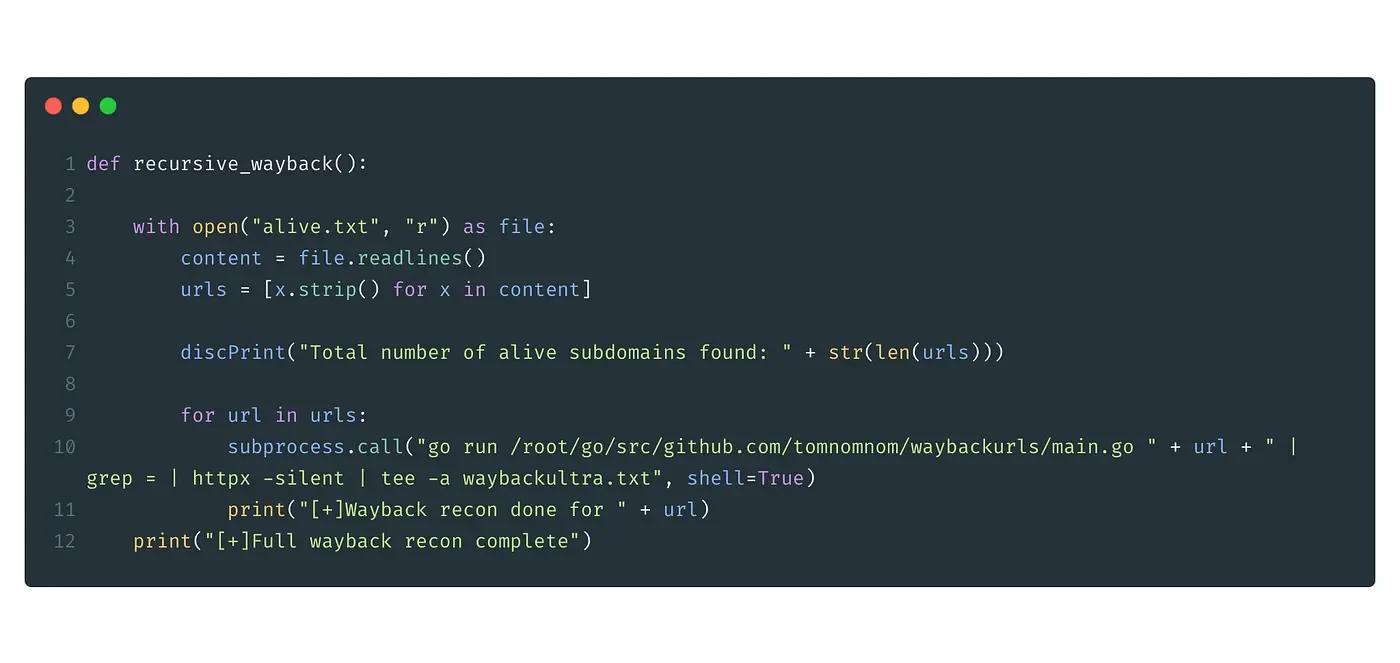
5-minute code to get the links from all domains (try threading to speed up the process)
The script was combined with other code that collects domains from tools such as subfinder, amass and findomain, then extracts all the alive domains from http, and feeds that list to recursive_wayback(). Once the list was created it was piped to kxss. With the list of all the URLs and their list of unfiltered characters, the researcher could look for points vulnerable to reflected XSS.
Exploitation
Step 1: run the scan overnight
The scan was started before the researcher went to sleep. Six hours later (the article jokes about eight, struck through) the report was ready.

Simple grep to instantly find vulnerable parameters
Step 2: identify the unfiltered parameter
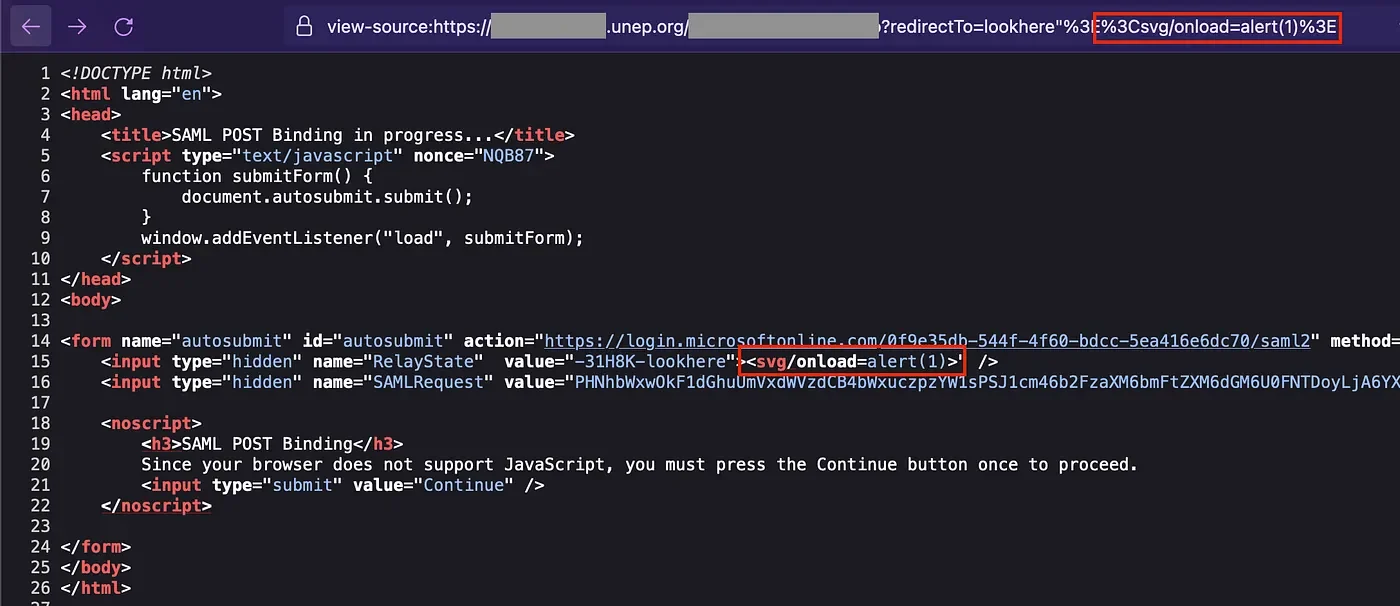
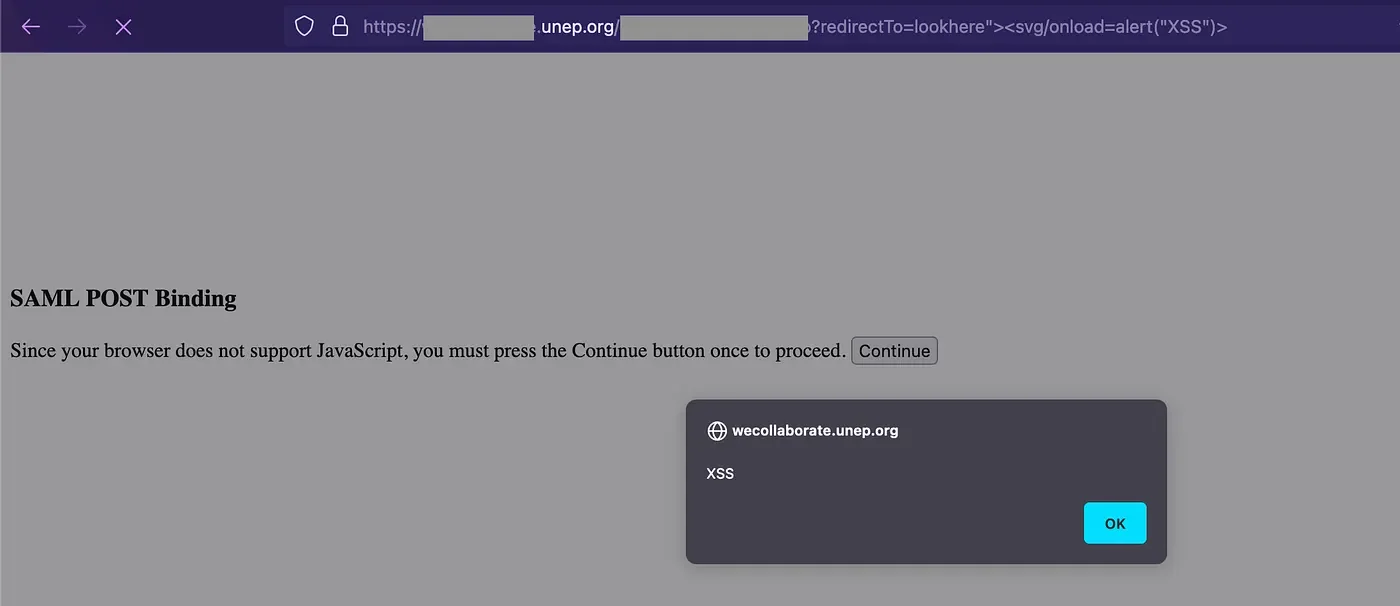
Among the results, the redirectTo parameter did not filter <, >, " and '. That was enough to know an XSS vulnerability could be triggered.
XSS!
The report does not include the exact payload or the full request that was sent; it only records that the redirectTo parameter reflected these characters unfiltered and that this produced the XSS.
Step 3: report and track the fix
The timeline recorded in the article:
| Event | Date |
|---|---|
| Reported | 16th April 2022 |
| Fixed | 21st April 2022 |
| Acknowledged | 25th April 2022 |
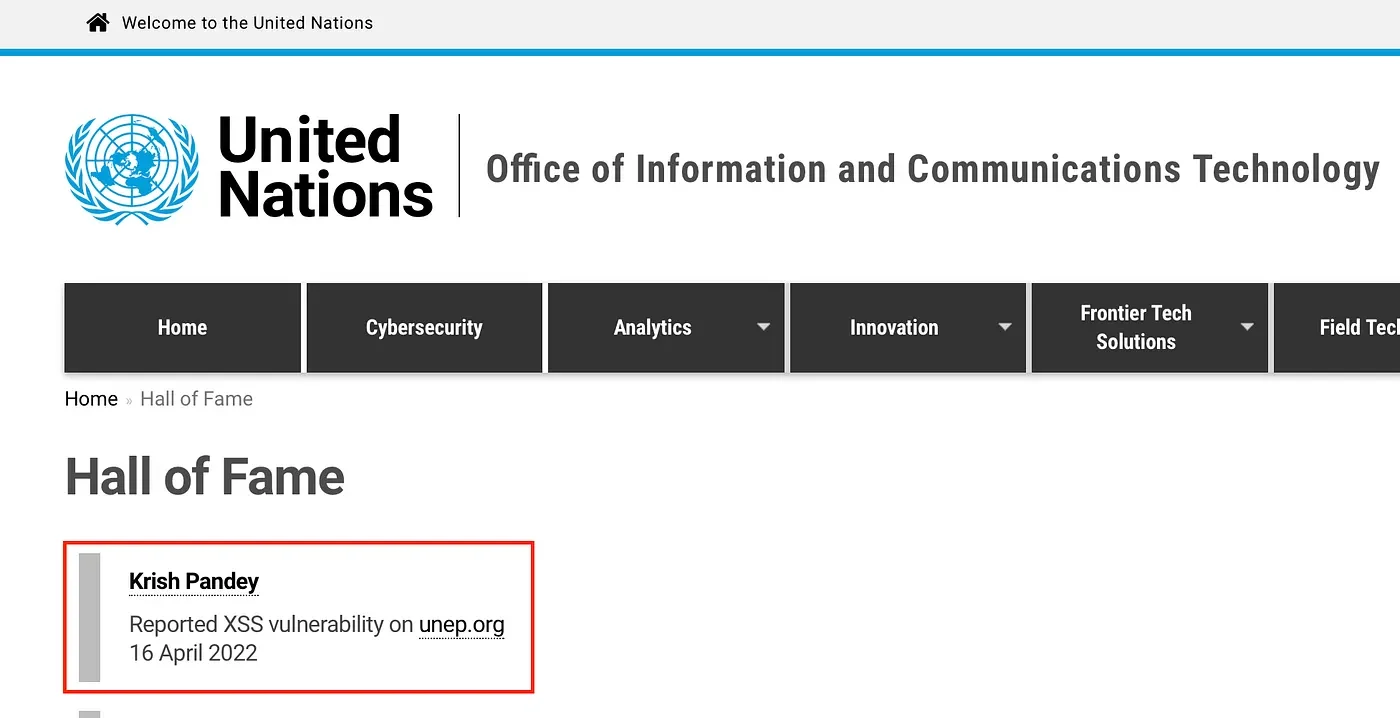
Done!
Root cause
The redirectTo parameter reflected user-supplied input back into the response without filtering <, >, " and '. Because those characters reached the page intact, an attacker could break out of the surrounding context and inject markup and script, giving reflected XSS. The report does not show the server-side code, so the exact context into which the value was reflected is not stated; the absence of output encoding on that parameter is the observable cause.
Impact
An attacker who can get a victim to open a crafted link to the vulnerable endpoint can execute script in the victim's browser in the context of the affected United Nations domain. Exploitation depends on the victim following the crafted link, as with any reflected XSS.
Fix
The article records a fix date of 21st April 2022, five days after the report date. The general fix for this class of bug is to encode or filter the redirectTo value on output so that <, >, " and ' cannot break out of the context in which the parameter is reflected.
Variants to test
The methodology here generalises well to other targets:
- Run
waybackurlsper subdomain rather than on the apex domain, since the tool returns more archived URLs for a subdomain when it is queried on its own. A positive result is a larger set of parameterised URLs than the apex run produced. - Pipe the combined URL list through
grep =,qsreplaceandkxssto find parameters that reflect<,>,"and'unfiltered. A positive result is a parameter whose characters come back unencoded in the response. - Prioritise parameters such as
redirectTothat reflect special characters unfiltered. A positive result is the parameter value appearing verbatim in the response body. - Run the whole chain on a VPS inside
tmuxso long scans survive disconnects and can run overnight. A positive result is a completed scan whose output is waiting when you return.
What happened, in plain words
A security researcher found a bug in a website belonging to the United Nations. The bug is called reflected cross-site scripting, or reflected XSS for short. It let an attacker slip their own instructions (code) into a page that other people view, so that the code runs in the visitor's browser. The researcher reported it, the article records a fix date, and the researcher was added to the organisation's hall of fame, a public list of people who have reported security problems. The whole scan that found the bug ran on a rented computer in a data centre while the researcher slept.
This article retells that story for someone who has never done security testing. It explains every term as it comes up, and it follows the same steps in the same order as the original write-up.
The classic way to hunt for reflected XSS
Before the details, two ideas need explaining.
What is a parameter? Many web addresses carry extra information after a question mark. For example, https://example.com/search?q=shoes has a parameter named q with the value shoes. The part before the = is the name, the part after is the value. Websites use parameters to decide what to show: a search term, a page number, a language, and so on. The = sign is the giveaway that a link carries a parameter.
What is reflected XSS? Imagine a receptionist who reads your name aloud exactly as you wrote it on the sign-in sheet. If you write a rude word, the receptionist repeats the rude word to everyone in the lobby. A website does the same when it takes a value from the address bar and pastes it into the page it sends back. If the site pastes the value without cleaning it, and the value contains characters that the browser treats as code, the browser will run that code. The code is not stored on the server; it bounces back with the page, which is why it is called reflected. The danger is that an attacker can craft a link containing the code and trick a victim into opening it. The code then runs in the victim's browser, on the real website's domain, with whatever access the victim has there.
The researcher describes the standard beginner recipe for finding this kind of bug. It has four steps:
- Collect all the URLs from
waybackurlsorgau. - Select all the links that require parameters (those that contain
=). - Parse all the links to
kxssand look for the links that do not filter characters like<,>,",'. - Target those links and try to inject code into those parameters.
Each tool in that list does one small job:
waybackurlsasks the Internet Archive (the Wayback Machine, a service that has saved copies of web pages for years) for every URL it has ever recorded for a domain. Old links are useful because they often still work and are less tested than the main pages.gaudoes a similar job, gathering URLs from several public sources.kxsstakes a list of URLs, sends a test value to each parameter, and reports which ones echo special characters back without cleaning them.qsreplacerewrites the value of every parameter in a list of URLs to a single test string, so that the same test is applied everywhere and duplicate work is avoided.
Those steps can be collapsed into a one-liner, where qsreplace parses the unique links to kxss and saves time:
waybackurls un.org | grep = | qsreplace test | kxss
Line by line:
waybackurls un.orgproduces a long list of archived URLs for the domainun.org.|is a pipe. It takes the output of the command on its left and hands it to the command on its right, like passing a bucket along a line of people.grep =keeps only the lines that contain an equals sign, that is, only URLs that carry at least one parameter.qsreplace testreplaces the value of every parameter in each URL with the wordtest, so every link is tested in the same way.kxsssends each of those URLs to its server and reports which parameters return the special characters unfiltered.
The researcher notes that the full methodology is a little longer, involving collecting all alive domains and taking screenshots, and that recon tasks like this are long and boring. Recon, short for reconnaissance, means the information-gathering phase before any testing: finding out which machines and pages exist. Two practical problems came up: long scans were interrupted by network and battery issues, and the repetitive work ate the first half hour of hunting, when concentration is at its maximum.
Setting up a virtual private server
The fix for the interruption problem was a VPS from Digital Ocean. A VPS (virtual private server) is a computer in a data centre that you rent by the month and control remotely. It stays switched on and connected whether your laptop is open or closed, so a scan running there is not affected by your Wi-Fi dropping or your battery dying. Digital Ocean is a company that rents such servers. The researcher set up a Linux server, installed the necessary tools, and ran the commands inside a tmux pane so that sessions would be saved even after logging out.
tmux is a program that keeps a terminal session alive on the server. Normally, when you close your SSH connection (the encrypted remote login), anything running in that terminal stops. With tmux, the session keeps running in the background, and you can reconnect later and see the output as if you had never left. It is like leaving a pot on a stove in a kitchen you can lock and return to, rather than carrying the pot with you.
Making waybackurls work harder
While running waybackurls on the target, the researcher noticed something odd about the tool's behaviour across subdomains. A subdomain is a prefix added to a domain name: in x.un.org, the x part makes it a subdomain of un.org. Large organisations have many subdomains, each possibly a different application.
Case 1: running waybackurls on un.org returns web archive links for that domain from all the subdomains.
>> waybackurls un.org
un.org/eg0
un.org/eg1
un.org/eg2
x.un.org/eg0
x.un.org/eg1
y.un.org/eg0
In that example only two results come back from x.un.org. In case 2, running the tool only on x.un.org:
>> waybackurls x.un.org
x.un.org/eg0
x.un.org/eg1
x.un.org/eg2
x.un.org/eg3
x.un.org/eg4
More results come back for a given subdomain when it is given to the tool separately. The >> in these examples is just a prompt symbol showing the command that was typed; the lines below it are the output. The URLs are placeholders (eg0, eg1, and so on) used to illustrate the pattern, not real pages.
To increase attack surface, waybackurls therefore has to be run on every subdomain. Attack surface means the total set of places an attacker can try to interact with: every page, every parameter, every subdomain. The more of them you test, the better your chance of finding a bug. Running the tool once per subdomain is too tedious to do by hand, so the researcher wrote a script for it.
5-minute code to get the links from all domains (try threading to speed up the process)
The script was combined with other code that collects domains from tools such as subfinder, amass and findomain, then extracts all the alive domains from http, and feeds that list to recursive_wayback(). Those three tools are subdomain finders: they query public sources to discover subdomains that the organisation may not advertise. Alive means the server actually responds when contacted, rather than being an old name that no longer resolves. recursive_wayback() is the researcher's own function that calls waybackurls on each subdomain in turn. Once the list was created it was piped to kxss. With the list of all the URLs and their list of unfiltered characters, the researcher could look for points vulnerable to reflected XSS.
Finding the bug
Step 1: run the scan overnight
The scan was started before the researcher went to sleep. Six hours later (the article jokes about eight, struck through) the report was ready.
Simple grep to instantly find vulnerable parameters
grep is a command-line search tool: it prints only the lines that match a pattern. Here it was used to pull out, from the large scan output, the lines that showed a parameter returning special characters unfiltered, so the researcher did not have to read thousands of lines by hand.
Step 2: identify the unfiltered parameter
Among the results, the redirectTo parameter did not filter <, >, " and '. Those four characters are the building blocks of HTML and JavaScript: < and > start and end tags, and quotes delimit attribute values and strings. If a website echoes them back unchanged, an attacker can close whatever context the value sits in and open their own tag, for example a script tag. That was enough to know an XSS vulnerability could be triggered.
XSS!
The report does not include the exact payload or the full request that was sent; it only records that the redirectTo parameter reflected these characters unfiltered and that this produced the XSS. A payload is the specific piece of text an attacker sends to trigger the bug.
Step 3: report and track the fix
The timeline recorded in the article:
| Event | Date |
|---|---|
| Reported | 16th April 2022 |
| Fixed | 21st April 2022 |
| Acknowledged | 25th April 2022 |
Done!
Why it worked
The redirectTo parameter reflected user-supplied input back into the response without filtering <, >, " and '. Because those characters reached the page intact, an attacker could break out of the surrounding context and inject markup and script, giving reflected XSS. The report does not show the server-side code, so the exact context into which the value was reflected is not stated; the absence of output encoding on that parameter is the observable cause. Output encoding means converting special characters into harmless equivalents before placing them in a page, so that a < becomes something the browser displays as text rather than treats as the start of a tag.
What an attacker could have done
An attacker who can get a victim to open a crafted link to the vulnerable endpoint can execute script in the victim's browser in the context of the affected United Nations domain. The report does not describe what session data, cookies or functionality were reachable from that origin, so the concrete consequences beyond script execution in the victim's browser are not stated. Exploitation depends on the victim following the crafted link, as with any reflected XSS. A cookie is a small piece of data a website stores in your browser to remember who you are; if script runs on the same site, it may be able to read or act with that identity, which is why XSS matters.
The fix
The article records a fix date of 21st April 2022, five days after the report date. The general fix for this class of bug is to encode or filter the redirectTo value on output so that <, >, " and ' cannot break out of the context in which the parameter is reflected.
Variants to test
The methodology here generalises well to other targets:
- Run
waybackurlsper subdomain rather than on the apex domain, since the tool returns more archived URLs for a subdomain when it is queried on its own. A positive result is a larger set of parameterised URLs than the apex run produced. - Pipe the combined URL list through
grep =,qsreplaceandkxssto find parameters that reflect<,>,"and'unfiltered. A positive result is a parameter whose characters come back unencoded in the response. - Prioritise parameters such as
redirectTothat reflect special characters unfiltered. A positive result is the parameter value appearing verbatim in the response body. - Run the whole chain on a VPS inside
tmuxso long scans survive disconnects and can run overnight. A positive result is a completed scan whose output is waiting when you return.
Glossary
- Attack surface: the total set of places an attacker can try to interact with, such as pages, parameters and subdomains.
- Cookie: a small piece of data a website stores in your browser to remember who you are between visits.
- Cross-site scripting (XSS): a bug where a website lets an attacker's code run in another visitor's browser.
- Digital Ocean: a company that rents virtual private servers.
- Domain: the main name of a website, such as
un.org. - gau: a tool that gathers URLs for a domain from several public sources.
- grep: a command-line tool that prints only the lines matching a pattern.
- kxss: a tool that tests URLs for parameters that reflect special characters unfiltered.
- Output encoding: converting special characters into harmless equivalents before placing them in a page.
- Parameter: the name=value pair after the
?in a URL, used by the site to decide what to show. - Payload: the specific text an attacker sends to trigger a bug.
- Pipe (
|): a shell operator that passes the output of one command as input to the next. - qsreplace: a tool that replaces the value of every parameter in a list of URLs with a chosen test string.
- Recon (reconnaissance): the information-gathering phase before testing, such as finding subdomains and URLs.
- Reflected XSS: XSS where the malicious value bounces back from the server in the page it returns, rather than being stored.
- SSH: an encrypted remote login protocol used to control a server.
- Subdomain: a prefix added to a domain name, such as
xinx.un.org. - tmux: a program that keeps terminal sessions running on a server after you disconnect.
- VPS (virtual private server): a rented computer in a data centre that you control remotely and that stays online.
- waybackurls: a tool that lists archived URLs for a domain from the Internet Archive.




