How I secured the United Nations Hall of Fame
A reflected cross-site scripting vulnerability was found in a test script within a vendor directory on a UN subdomain. An attacker could inject a script that executes in a victim's browser when they visit a crafted link.
 Published on medium.com
Greetings, fellow cybersecurity enthusiasts! My name is Kamil Rahuman, Today, I’m thrilled to share my exhilarating journey of securing the United Nations Hall of Fame by uncovering a critical XSS vulnerability.
The full write-up lives on its author's site
It belongs to its author, so we link to it rather than copy it. The other two tabs are our own rewrites, checked against it.
Context
The target here is the United Nations Environment Programme (UNEP) web estate, specifically the domain unep.org and its subdomains. The researcher, Kamil Rahuman, found a reflected cross-site scripting (XSS) issue on a host called apps.unep.org, in a path that belongs to a bundled third-party library: kriswallsmith/buzz, a PHP HTTP client. The interesting part of the path is the test/server.php script and a card_scan.php file reached through it, which takes query parameters and reflects one of them back into the page.
The report identifies the flaw as CVE-2020-14413. The write-up does not describe what the page normally does beyond accepting the parameters shown, so the functional purpose of card_scan.php is not stated.
Setup
The work needed no accounts or special roles. The tools used were:
- Subfinder, for subdomain enumeration.
- Nuclei, an open-source scanner with a template library, used to flag the vulnerability.
- A browser, to confirm the alert fired.
The only precondition was network access to the target's public subdomains. The researcher notes that at first they had little idea what the /test/server.php endpoint was for.
Finding it
Recon started with subdomain enumeration against the target domain:
subfinder -d unep.org > unep.txt
This produced around 92 subdomains. Going through them, the researcher picked out apps.unep.org, which exposed the endpoint /test/server.php.
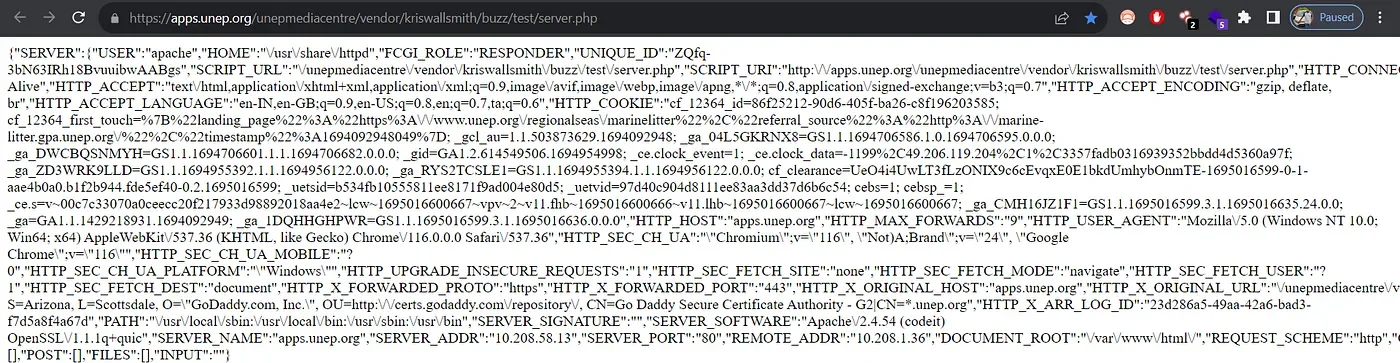
The screenshot shows apps.unep.org appearing in the subdomain listing.
Not knowing what the endpoint did, the researcher turned to Nuclei:

Nuclei flagged a potential vulnerability: an XSS flaw in the UN web application, identified as CVE-2020-14413. The researcher explains XSS in the usual terms, as a flaw that lets an attacker inject scripts into pages viewed by other users. The scanner's template library and extensibility are credited with surfacing the issue where other tools might have missed it.
Exploitation
Step 1: identify the base endpoint
The base URL flagged was:
https://apps.unep.org/unepmediacentre/vendor/kriswallsmith/buzz/test/server.php
The path shows the script sitting inside a vendor directory for the kriswallsmith/buzz library, under a test folder. Test scripts shipped inside production vendor trees are a common source of exactly this kind of exposure.
Step 2: craft the reflected payload
The researcher built a URL that appends card_scan.php to the base path and supplies three parameters, with the payload in CardFormatNo:
https://apps.unep.org/unepmediacentre/vendor/kriswallsmith/buzz/test/server.php/card_scan.php?No=0000&ReaderNo=0000&CardFormatNo=%3Cimg%20src%3Dx%20onerror%3Dalert%28document.domain%29%3E
Decoded, the CardFormatNo value is:
The No and ReaderNo parameters are set to 0000. The CardFormatNo value is an image tag with a deliberately broken src (x), so the browser fires the onerror handler, which calls alert(document.domain). The payload calls alert(document.domain).
Step 3: confirm execution
Loading the crafted URL caused the payload to be reflected and executed:
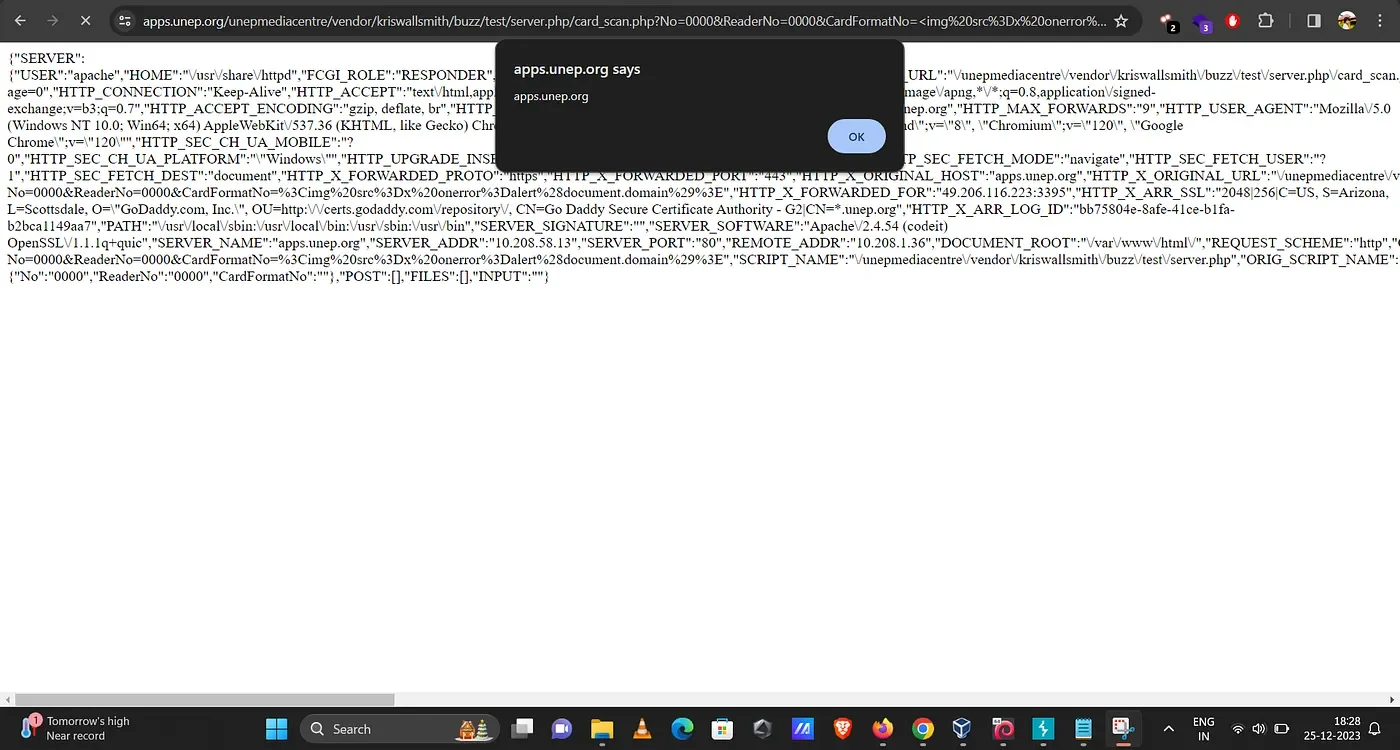
The screenshot shows the reflected XSS firing.

A second screenshot shows the alert box.
That is the whole of the exploitation shown: a reflected payload in a query parameter, executed in the page context.
Root cause
The flaw is a reflected XSS in a test script bundled with the kriswallsmith/buzz library, tracked as CVE-2020-14413. The CardFormatNo parameter is reflected into the response, and the browser runs the event handler.
The deeper issue is deployment: a vendor test directory was reachable on a public host. Test scripts are not written with production input handling in mind, and . The report does not describe the server-side code, so the exact encoding failure is not shown.
Impact
An attacker who can get a victim to open the crafted URL runs script in the origin of apps.unep.org. Because the payload uses document.domain, the proof shows execution in that origin, which is what would let an attacker act as the site towards the victim: read what the page exposes to script, and perform actions the victim's session permits on that host. The impact depends on a victim following the link, which is the normal condition for reflected XSS.
Fix
The report gives the timeline rather than the patch detail:
| Event | Date |
|---|---|
| Reported | 25th December 2023 |
| Fixed | 1st January 2024 |
| Acknowledged | 23th January 2024 |
The vulnerability was patched before acknowledgement. What was changed is not described.
Recognition
After the fix, the United Nations listed the researcher in its information security Hall of Fame:
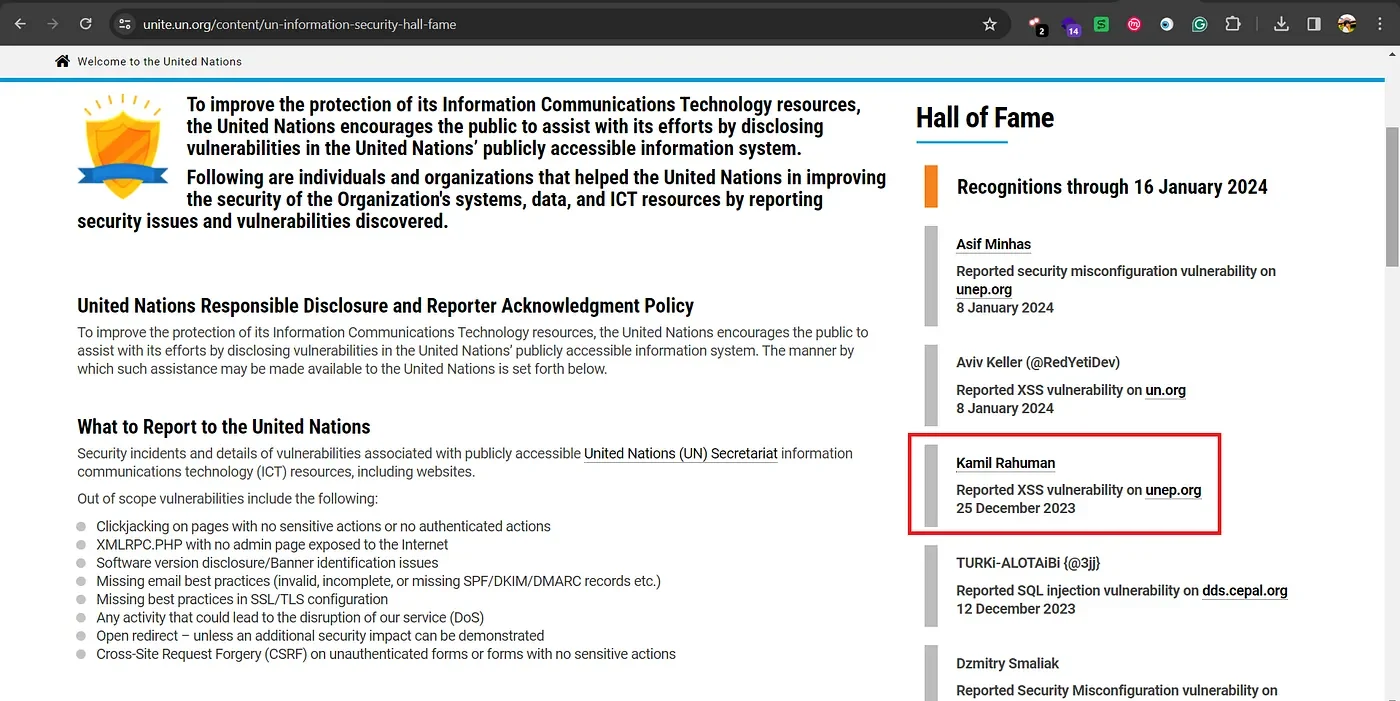
The Hall of Fame page is at https://unite.un.org/content/hall-fame/list.

Variants to test
- Vendor test directories on other hosts. Request paths such as
/vendor/<library>/test/and look for directory listings or scripts that accept input. A positive result is a script that reflects a parameter into the response. - Known CVEs in bundled libraries. Run a scanner with templates for known component vulnerabilities against subdomains found during recon. A positive result is a template match you can then confirm manually in a browser.
- Reflection in numeric-looking parameters. Send a marker like
CardFormatNo=test123and see whether it comes back verbatim. If it does, replace it with an event-handler payload and check whether it executes. - Origin proof. Use
alert(document.domain)rather than a fixed string, so a firing alert confirms execution in the target's origin rather than a sandboxed or unrelated context.
What happened, in plain words
A security researcher named Kamil Rahuman found a bug on a website belonging to the United Nations Environment Programme (UNEP). The bug let a crafted link run a small piece of code in the visitor's browser, in the context of the site. He reported it privately, the UN fixed it, and they put his name on their information security Hall of Fame.
This article walks through the whole story from the beginning, assuming you have never done security work before. You only need to know how to use a browser and a computer. Every technical word is explained the first time it appears, and there is a glossary at the end.

The background ideas you need first
Before the steps make sense, here are a few everyday ideas.
A domain and a subdomain. A domain is the main address of a website, like unep.org. A subdomain is a smaller address that sits in front of it, like apps.unep.org. Think of a large company building: the domain is the building's main address, and subdomains are different departments inside it, each with its own door. One organisation can have dozens or hundreds of subdomains, and each one is a separate website that has to be kept secure on its own.
A URL and its parts. A URL is the full address you type into a browser. The part after the domain, like /test/server.php, is called the path: it points to a particular file or page on that server. After a question mark you can add extra pieces of information called parameters, written as name=value pairs joined by &. For example, ?No=0000&ReaderNo=0000 sends two parameters, No with the value 0000 and ReaderNo with the value 0000. Websites use parameters to receive input from the visitor, such as a search term or a page number.
A server and a script. A server is the computer that stores a website and sends pages to visitors. A script is a small program that runs on the server to produce a page. When you request a page, the script reads your parameters and builds the response.
A vendor directory. Many websites are built with ready-made pieces of software called libraries, written by other people. When a library is copied into a website's files, it usually goes into a folder called vendor. Libraries often come with a test folder containing small scripts the developers used to check that the library worked. Those test scripts are not meant for the public, but sometimes they end up reachable on the live website.
Cross-site scripting (XSS). XSS is a bug where a website takes something a visitor supplied and puts it into the page without cleaning it first. If the visitor supplies ordinary text, nothing bad happens. But if they supply something that a browser treats as code, the browser runs it, believing it came from the website. The everyday comparison: imagine a noticeboard where visitors can pin notes, and the person in charge copies whatever is written on a note straight onto the official letterhead without reading it. Someone could write an instruction on the note, and everyone would treat it as coming from the office. XSS is the web version of that.
Reflected XSS. There are different kinds of XSS. In reflected XSS, the dangerous input is not stored on the server; it is sent in the URL, bounced straight back into the page, and runs only for the person who opens that particular link. That is why the attacker has to trick a victim into clicking.
JavaScript and the browser. JavaScript is the programming language that browsers run to make pages interactive. A browser will run JavaScript that appears in a page, because it assumes the website put it there on purpose. That assumption is exactly what XSS abuses.
document.domain. This is a JavaScript expression that returns the address of the website the code is running on. Researchers use it in a test alert because it proves the code is running in the context of the real target site, not somewhere unrelated.
A scanner and a template. A vulnerability scanner is a program that automatically checks a website for known weaknesses. Nuclei is one such scanner, and it works from a library of templates: small recipe files, each describing how to test for one particular weakness. Running Nuclei is like running a checklist of known problems against a site instead of testing each one by hand.
A CVE. CVE stands for Common Vulnerabilities and Exposures. It is a public catalogue number given to a known security flaw so that everyone can refer to the same issue by the same name. CVE-2020-14413 is the catalogue entry for the flaw in this story.
Responsible disclosure. This is the practice of telling the organisation about a bug privately, giving them time to fix it, and only then talking about it publicly. It protects real users while the problem still exists.
Getting started: finding subdomains
The researcher began with reconnaissance, usually shortened to recon. Recon means gathering information about what a target has exposed on the internet before testing anything. The first question was: which subdomains does unep.org have? The tool used for this was Subfinder, which queries public sources to discover subdomains.

The command run was:
subfinder -d unep.org > unep.txt
Line by line:
subfinderis the name of the program being run.-d unep.orgtells it which domain to investigate. The-dpart is an option meaning domain.> unep.txtmeans save the output into a file calledunep.txtinstead of printing it on screen. The>symbol redirects output to a file.
Why this step: you cannot test what you do not know exists. Each subdomain is a separate website with its own software, and a weakness on one does not necessarily exist on another. Listing them gives you the full set of doors to look at.
The result was around 92 subdomains. Going through the list, the researcher noticed one called apps.unep.org, which showed an endpoint at /test/server.php. An endpoint is simply a specific address on a server that accepts requests, in this case a particular script file.
The screenshot shows apps.unep.org appearing in the subdomain listing.
At that point the researcher did not know what this endpoint was for. That is normal in recon: you often find addresses whose purpose is not obvious, and the next step is to test them.
Using Nuclei to look for known problems
Rather than guess, the researcher used Nuclei, an open-source scanner with a large library of templates.
Why this step: many weaknesses are already known and catalogued, and scanners can check for them quickly and consistently. Nuclei's template library and its ability to be extended are what the researcher credits with finding the issue where other tools might have missed it. The scanner flagged a potential vulnerability: an XSS flaw in the UN web application, identified as CVE-2020-14413.
A scanner flag is only a hint, not proof. It says "this looks like the known problem"; a human still has to confirm it. That is what the rest of the story does.
Confirming the XSS by hand
Step 1: the base address
The address the scanner pointed at was:
https://apps.unep.org/unepmediacentre/vendor/kriswallsmith/buzz/test/server.php
Reading the path from left to right: unepmediacentre is the part of the site, vendor is the folder holding third-party libraries, kriswallsmith/buzz is the name of one such library (a tool for making web requests, written in the PHP language), and test/server.php is a test script inside it. Test scripts sitting in a public vendor folder are a common source of exactly this kind of exposure, because they were written for developers to check things quickly, not to handle input from strangers safely.
Step 2: building the test link
The researcher then built a URL that appends card_scan.php to that path and supplies three parameters, putting the test code in CardFormatNo:
https://apps.unep.org/unepmediacentre/vendor/kriswallsmith/buzz/test/server.php/card_scan.php?No=0000&ReaderNo=0000&CardFormatNo=%3Cimg%20src%3Dx%20onerror%3Dalert%28document.domain%29%3E
Line by line:
- The first part, up to
server.php, is the base address from step 1. /card_scan.phpis the script being asked for.?starts the list of parameters.No=0000sends a parameter calledNowith the value0000.&separates one parameter from the next.ReaderNo=0000sends a second parameter with the value0000.&separates again.CardFormatNo=starts the third parameter, and everything after the equals sign is its value.- The value itself is written in percent-encoding, a way of writing characters that are not allowed directly in a URL.
%3Cis<,%20is a space,%3Dis=,%28is(and%29is). Browsers and servers decode these back to normal characters, so the server receives the same text a person would have typed.
The No and ReaderNo values are both 0000. The report does not say what the page normally does beyond accepting these parameters, so the everyday purpose of card_scan.php is not stated.
Decoded, the CardFormatNo value is:
Line by line:
<img ...>is the HTML tag for displaying a picture.src=xtells the browser the picture is at the addressx. There is no such address, so the picture will fail to load.onerror=...is an event handler: an instruction the browser runs automatically when something goes wrong, here when the picture fails to load.alert(document.domain)is the instruction.alertmakes the browser pop up a small box with a message, anddocument.domainis the address of the current site. So the box will show the site's own address.
Why this particular payload: the broken image guarantees the error happens, which guarantees the handler runs. The payload calls alert(document.domain). If the box shows the target's address, the code really executed there.
Step 3: seeing it work
Loading the crafted URL caused the payload to be reflected and executed.
The screenshot shows the reflected XSS firing.
A second screenshot shows the alert box.
That is the whole of the demonstration: a value supplied in a URL parameter came back in the page, the browser treated it as HTML, and the event handler ran as code.
Why the bug existed
The flaw is a reflected XSS in a test script bundled with the kriswallsmith/buzz library, tracked as CVE-2020-14413. The CardFormatNo parameter is reflected into the response. Encoding means converting characters that have special meaning in HTML, such as < and >, into a safe form so the browser displays them as text instead of treating them as markup. Because that did not happen, the browser parsed the attacker's markup as HTML and ran its event handler as script.
The deeper issue is deployment: a vendor test directory was reachable on a public host. Test scripts are not written with production input handling in mind, and . A content security policy is a set of rules a site can send to the browser saying which scripts are allowed to run; a strict one would have blocked this handler. The report does not describe the server-side code, so the exact encoding failure is not shown.
What an attacker could have done
An attacker who gets a victim to open the crafted URL runs script in the context of apps.unep.org. Because the payload uses document.domain, the proof shows execution in that site's context, which is what would let an attacker act as the site towards the victim: read what the page exposes to script, and perform actions the victim's session permits on that host. A session is the state of being logged in; the browser holds a cookie, a small piece of data the site gave it, which proves who the visitor is. Script running in the site's context can, in principle, use that session.
The impact also depends on a victim following the link, which is the normal condition for reflected XSS: the attacker cannot make it happen on its own.
Reporting it and getting it fixed
The researcher reported the finding privately to the UN security team, with a detailed description of the flaw, its potential impact and suggested mitigations. The report gives the timeline rather than the patch detail:
| Event | Date |
|---|---|
| Reported | 25th December 2023 |
| Fixed | 1st January 2024 |
| Acknowledged | 23th January 2024 |
The vulnerability was patched before acknowledgement. What was changed is not described.
Recognition
After the fix, the United Nations listed the researcher in its information security Hall of Fame.
The Hall of Fame page is at https://unite.un.org/content/hall-fame/list.
Things worth trying on your own
If you want to practise the same thinking on sites you are allowed to test:
- Vendor test directories on other hosts. Request paths such as
/vendor/<library>/test/and look for directory listings or scripts that accept input. A positive result is a script that reflects a parameter into the response. - Known CVEs in bundled libraries. Run a scanner with templates for known component vulnerabilities against subdomains found during recon. A positive result is a template match you then confirm by hand in a browser.
- Reflection in numeric-looking parameters. Send a marker like
CardFormatNo=test123and see whether it comes back verbatim. If it does, replace it with an event-handler payload and check whether it executes. - Context proof. Use
alert(document.domain)rather than a fixed string, so a firing alert confirms execution in the target's context rather than a sandboxed or unrelated one.
Glossary
- Acknowledged: the point at which the organisation formally recognised the researcher's report, here after the fix.
- Alert: a browser pop-up box used in testing to show that code has run.
- Content security policy: rules a site sends to the browser saying which scripts may run, used to block injected code.
- Cookie: a small piece of data a site stores in the browser, often used to remember that you are logged in.
- Cross-site scripting (XSS): a flaw where a site puts visitor-supplied input into a page without cleaning it, so the browser runs it as code.
- CVE: Common Vulnerabilities and Exposures, a public catalogue number for a known security flaw.
document.domain: a JavaScript expression that returns the address of the site the code is running on.- Domain: the main address of a website, such as
unep.org. - Encoding (output encoding): converting characters with special meaning in HTML into a safe form so they are shown as text, not treated as markup.
- Endpoint: a specific address on a server that accepts requests, such as a particular script.
- Event handler: an instruction a browser runs automatically when something happens, such as an image failing to load.
HttpOnly: a cookie setting that hides the cookie from JavaScript.- JavaScript: the programming language browsers run to make pages interactive.
- Library: a ready-made piece of software written by someone else and reused in a website.
- Nuclei: an open-source vulnerability scanner that works from a library of templates.
- Parameter: a
name=valuepair added to a URL after a question mark, used to send input to a site. - Path: the part of a URL after the domain that points to a file or page.
- Percent-encoding: a way of writing characters that are not allowed directly in a URL, such as
%3Cfor<. - Recon (reconnaissance): gathering information about what a target has exposed before testing it.
- Reflected XSS: XSS where the dangerous input is sent in the URL, bounced back into the page, and runs only for the person who opens that link.
- Responsible disclosure: telling an organisation about a bug privately and giving them time to fix it before talking about it publicly.
- Scanner: a program that automatically checks a site for known weaknesses.
- Script: a small program; on a server it builds pages, in a browser it makes pages interactive.
- Server: the computer that stores a website and sends pages to visitors.
- Session: the state of being logged in to a site, usually tracked with a cookie.
- Subdomain: a smaller address in front of a domain, such as
apps.unep.org. - Subfinder: a tool that discovers subdomains from public sources.
- Template: a small recipe file used by a scanner describing how to test for one particular weakness.
- URL: the full address of a page, including domain, path and any parameters.
- Vendor directory: a folder holding third-party libraries copied into a website's files.




