stored XSS and stored HTML Injection in United Nations Website
The United Nations website stored user-supplied profile fields without sanitisation, so a script or HTML entered in the first or last name field executed when the page was saved and reloaded. An attacker could run script in the browser of anyone who viewed the affected page.
 Published on medium.com
Hello all i am very happy to publish another Writeup after a long time of missing.
The full write-up lives on its author's site
It belongs to its author, so we link to it rather than copy it. The other two tabs are our own rewrites, checked against it.
Context
The target was a subdomain of the United Nations website. The report does not name the subdomain or the specific application. The feature involved is the user registration process: after registering, a user can set profile fields such as first name and last name, and those values are displayed back on the site. The researcher found that script and HTML markup placed in these fields were rendered by the browser.

Setup
The only precondition described is completing the registration process on the subdomain. No tools, versions or special roles are mentioned. The researcher used a normal account and tested the profile fields (first name, last name) that are editable after registration.

Finding it
After registering, the researcher changed the profile parameters one by one, starting with first name and last name, and submitted a simple script payload in them. The payload was:
<script>alert(‘XSS’)</script>
On submission, multiple alert popups fired. The same fields were then tested with an HTML injection payload, a link to the OWASP site:
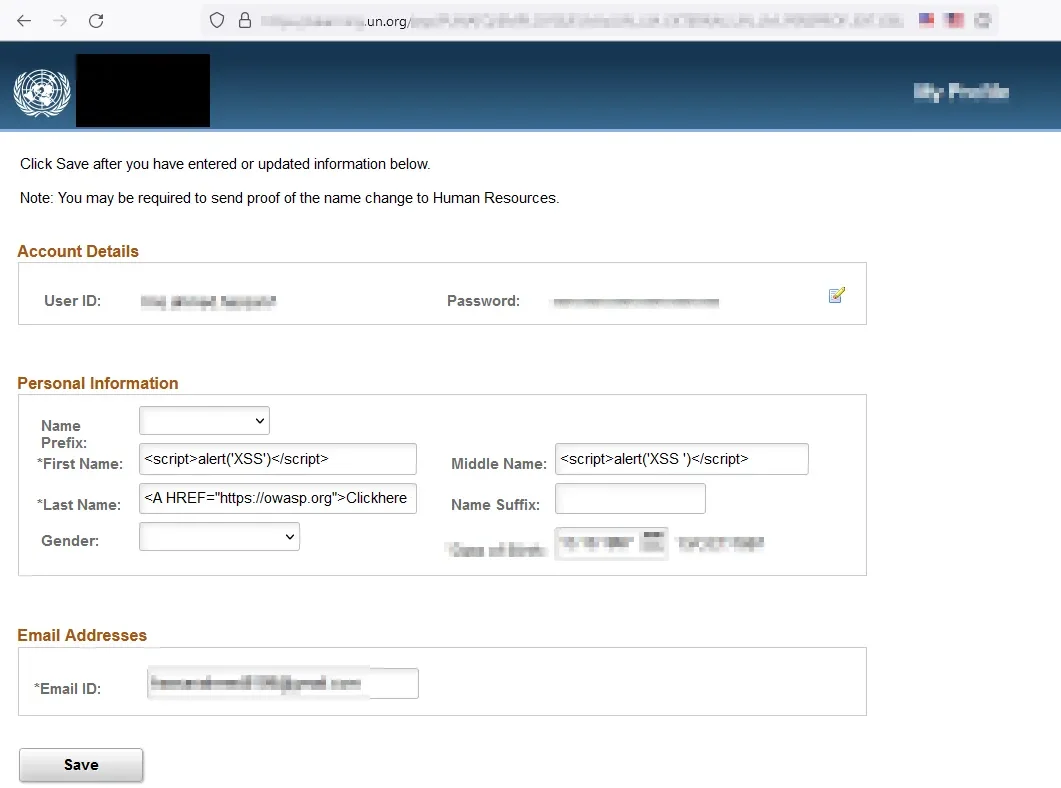
After saving and reloading the page, the number of XSS alert popups was a surprise to the researcher.
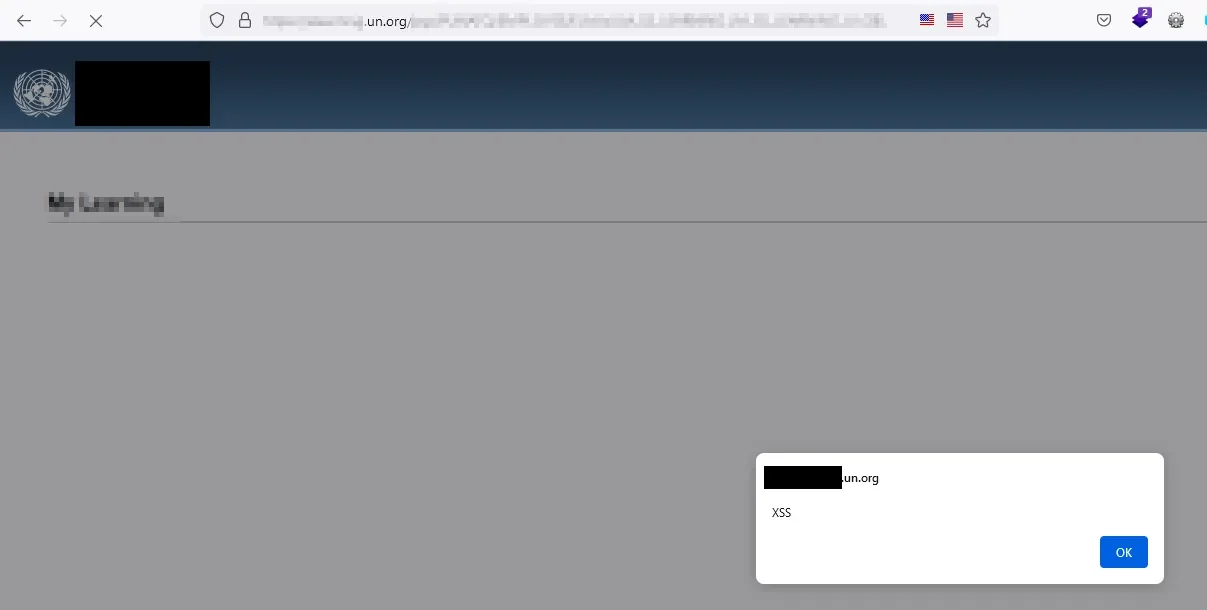
Exploitation
Step 1: Inject into profile fields
The fields accepted the script payload, and an anchor tag was also submitted. The script executed when the values were submitted and again after the page was reloaded.
Step 2: Confirm the HTML injection renders
To check whether the HTML payload had actually been stored and rendered, the researcher inspected the page in depth. The output appeared in a different colour and linked to the OWASP homepage. The visible text was the word CL in blue, and hovering over or clicking it redirected to whatever URL was placed in the payload, in this case owasp.org.
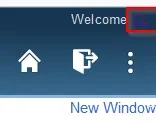
At this point the researcher treated the behaviour as a good indication of reflected XSS and HTML injection, but continued testing.

Step 3: Test persistence across sessions
To distinguish reflected from stored behaviour, the researcher logged out and logged in again. The question was whether the payloads would run automatically again without any interaction from the attacker.

They did. All the payloads ran automatically after the new login, with no attacker interaction, which the researcher took as stored XSS and stored HTML injection.

Through this process the researcher found multiple stored XSS and HTML injection vulnerabilities on the subdomain.
Root cause
The report does not include the server-side code, so the exact mistake is not shown. The behaviour is consistent with profile field values being stored and later written into the HTML response without output encoding or sanitisation, so the browser parses injected markup and script as part of the page. The fact that the payloads executed again after logout and login shows the values were persisted server-side rather than reflected from the request. Which defences were present or absent is not described.
Impact
The stored payloads executed automatically after logging out and back in, without any interaction from the attacker. The HTML injection rendered a link to owasp.org in the page. The report does not describe what other users or administrators would see, so the impact on other accounts is not established here. The researcher describes the vulnerabilities as multiple, on a subdomain of the United Nations.
Fix
The report says the vulnerabilities were submitted to the United Nations Security Team, that all of them were accepted, and that the team was working on the fix at the time of writing. The appropriate fix would be to encode profile field values on output, or sanitise them on input, so that markup and script are not rendered.

Variants to test
- Other profile fields: apply the same script and anchor payloads to every editable field and reload the profile page. A positive result is an alert firing or a rendered link after saving.
- Persistence check: log out and log back in after saving a payload. A positive result is the payload executing again without resubmitting the form, which confirms stored rather than reflected behaviour.
- HTML-only injection: submit an anchor tag without script and inspect the rendered page. A positive result is a clickable link to the supplied URL appearing in the output.
- Edit path: submit the payload through the profile edit form and reload the page. A positive result is execution from either path, which shows both write paths lack encoding.

What happened, in plain words
A security researcher was looking at a part of the United Nations website where people can create an account. After signing up, you can fill in details about yourself, such as your first name and your last name. Those details are then shown back to you on the site.
The researcher discovered that whatever was typed into those fields ended up rendered in the web page. That meant the researcher could type in a small piece of computer code instead of a name, and the browser ran it. This kind of trick is called cross-site scripting, or XSS for short. A related, milder version is called HTML injection, where you can add things like links to a page rather than running code.
The important part is that the code kept working after the researcher logged out and logged back in. That means the site had saved the code permanently, not just shown it once. This is called stored XSS, because the code is saved and runs again later.
The researcher reported the problem to the United Nations security team, and the team accepted the findings and started working on a fix.
The ideas you need first
Before walking through the steps, here are a few everyday ideas that make the rest easier to follow.
- A web page is just text. When you visit a website, your browser receives a file full of text and instructions, and it turns that text into the page you see. Some of that text is ordinary words, and some of it is special instructions called HTML that tell the browser how to arrange things, make links, and so on.
- HTML is the language used to describe the structure of a page. For example, a piece of HTML can say "make this word a link to that address".
- JavaScript is a programming language that runs inside your browser. It can do things like show a pop-up message. A short JavaScript instruction wrapped in
<script>tags tells the browser to run it. - A pop-up alert is a small box that appears on screen with a message. Security researchers often use
alert(...)as a harmless test: if the box appears, they know their code ran. - Input fields are the boxes on a form where you type things, like your name. Whatever you type is called input.
- Sanitising or encoding input means cleaning it up before using it, so that special characters are treated as plain text rather than as instructions. Think of it like a mailroom that opens every parcel and removes anything dangerous before passing it on.
- Reflected versus stored. A reflected problem only appears once, in the same moment you send something, like an echo. A stored problem is saved on the server and comes back every time the page is loaded, like a note pinned to a noticeboard that everyone sees again and again.
- A subdomain is a smaller section of a larger website. If the main site is
example.com, thenshop.example.comis a subdomain. The report does not name the specific subdomain involved.
With those ideas in hand, the rest of the story is straightforward.
Step by step: how the researcher found it
1. Signing up and looking at the profile fields
The researcher first went through the normal registration process, creating an account like any ordinary visitor would. Once registered, the site lets you edit details about yourself, including your first name and last name. These are the fields the researcher decided to test.
The reasoning is simple: any place where you can type something and the site shows it back to you is a candidate for this kind of problem. If the site does not clean up what you typed, your text might be treated as instructions by the browser.
2. Trying a harmless script
The researcher typed the following into the name fields:
<script>alert(‘XSS’)</script>
Here is what each part means:
<script>tells the browser "the following is a piece of JavaScript code, please run it".alert(‘XSS’)is the instruction to show a pop-up box containing the textXSS.</script>marks the end of the code.
If the site treats this as ordinary text, you would just see the words <script>alert(‘XSS’)</script> displayed on the page, which is harmless. If the site treats it as instructions, the browser runs the code and a pop-up appears.
When the researcher submitted the payload, several pop-up boxes appeared at once. That was the first sign that the site was not cleaning up the input.
3. Trying a link instead of a script
Next, the researcher tested a different kind of input, one that adds a clickable link rather than running code. This is called HTML injection. The payload was:
Line by line:
<A ...>starts a link (the letter A stands for anchor).HREF=”https://owasp.org”says where the link should go when clicked. Here it points to the OWASP website, a well-known security organisation.Clickhereis the visible text of the link.</A>closes the link.
If the site had cleaned this up, you would see the literal text of the tag on the page. If it had not, you would see a working link with the words "Clickhere" that takes you to owasp.org.
4. Reloading and seeing the result
After saving and reloading the page, the researcher was surprised by how many alert pop-ups appeared. This showed the script was run by the browser again after reloading the page.
5. Checking whether the link actually worked
The researcher then wanted to know whether the HTML link had really been rendered as a link, not just shown as text. So they inspected the page closely. The output appeared in a different colour, and the visible word was "CL" in blue. Hovering over it or clicking it took you to whatever address was placed in the payload, in this case owasp.org.
This is a strong sign that the site is not encoding its output. In plain terms, the site is taking what you typed and pasting it directly into the page as if it were part of the site's own instructions.
At this point the researcher had good evidence of both reflected XSS and HTML injection, but decided to go one step further.
6. Testing whether the problem sticks around
Here is the key question: was the code only running because the researcher had just submitted it, or had the site actually saved it? To find out, the researcher logged out and then logged back in.
The idea is simple. If the code only runs when you submit the form, it is reflected: it echoes back once and is gone. If the code runs again after a fresh login, without the researcher doing anything, then the site has stored it. That is the more serious case.
And that is exactly what happened. All the payloads ran automatically after logging back in, with no action from the researcher. This confirmed stored XSS and stored HTML injection.
Through this process, the researcher found several stored XSS and HTML injection problems on the subdomain.
Why this happens
The report does not include the code that runs on the server, so we cannot see the exact mistake. But the behaviour fits a common pattern: the site saves whatever you type into the profile fields, and later, when it builds the page to show your profile, it drops that saved text straight into the page without encoding it. The browser then treats the saved text as instructions, not as plain words.
The fact that the payloads ran again after logging out and back in tells us the values were saved on the server, not just echoed back from the form. The report does not describe which protections were present or missing.
What the impact was
The stored payloads ran automatically after logging out and back in, without the attacker needing to do anything. The HTML injection rendered a link to owasp.org on the page. The researcher describes the problems as multiple, on a subdomain of the United Nations.
What was done about it
The researcher submitted the findings to the United Nations security team. The team accepted all of them and was working on a fix at the time of writing. The appropriate fix would be to encode profile field values when they are shown on the page, or to sanitise them when they are saved, so that markup and script are not treated as instructions.
Other places worth testing
If you want to try this kind of testing yourself on a site you are allowed to test, here are some variations the researcher's approach suggests:
- **Other profile fields. Try the same script and link payloads in every editable field and reload the profile page. A positive result is a pop-up appearing or a working link showing up after saving.
- Persistence check. Log out and log back in after saving a payload. A positive result is the payload running again without resubmitting the form, which confirms it was stored rather than reflected.
- HTML-only injection. Submit a link tag without any script and inspect the rendered page. A positive result is a clickable link to the address you supplied appearing in the output.
- **Edit path. Submit the payload through the profile edit form and reload the page. A positive result is execution from either path, which shows both ways of saving data lack encoding.
Glossary
- XSS (cross-site scripting): a class of problem where a website lets an attacker's code run in another visitor's browser, usually because input is not cleaned up before being shown on the page.
- Stored XSS: XSS where the malicious input is saved on the server and runs again every time the page is loaded, rather than only once.
- Reflected XSS: XSS where the malicious input is echoed back once in the same response, without being saved.
- HTML injection: a milder problem where an attacker can add HTML markup (such as links or formatting) to a page, but not run code.
- HTML: the language used to describe the structure and content of a web page.
- JavaScript: a programming language that runs inside a browser and can make pages interactive.
- Payload: the specific piece of input an attacker sends to test or exploit a weakness.
- Sanitising / encoding: cleaning up input so that special characters are treated as plain text rather than as instructions.
- Input field: a box on a form where a user types information.
- Subdomain: a smaller section of a larger website, such as
shop.example.comwithinexample.com. - Alert: a small pop-up box shown by the browser, often used by researchers as a harmless test to confirm code ran.
- Anchor tag: the HTML element used to create a clickable link.
- HREF: the part of an anchor tag that says where the link points.
- OWASP: a well-known non-profit organisation focused on web application security.
- Server: the computer that stores a website and sends pages to visitors.
- Browser: the program you use to view websites, such as Chrome, Firefox, or Safari.
- Registration process: the steps a new user goes through to create an account on a website.
- Profile fields: the editable details about a user, such as first name and last name.
- Output encoding: converting saved text into a safe form before placing it on a page, so the browser shows it as words rather than running it as instructions.