How I got into the United Nations’ Hall of Fame
A phpMyAdmin setup endpoint on a subdomain was accessible without authentication, allowing direct entry to the database administration portal. An attacker could configure the servers and download the site's database.
 Published on blog.bugzero.io
Bug Bounty Writeup
The full write-up lives on its author's site
It belongs to its author, so we link to it rather than copy it. The other two tabs are our own rewrites, checked against it.
Context
This is a short account of how I earned a place in the United Nations' Hall of Fame, run by the UN Office of Information and Communications Technology. The target was a subdomain of unep.org. The feature involved is a phpMyAdmin installation exposed on that subdomain, which normally requires a username and password before it will let anyone in.
Setup
I am Ameya, an independent security researcher from India. No accounts, roles or special access were needed for this work. The tools I used were:
- Manual browsing of subdomains.
- The dirb tool for directory brute-force and fuzzing.
I picked the domain from the UN's Responsible Disclosure page, which is where the programme and its Hall of Fame are described.
Finding it
I gathered all the subdomains of unep.org and started checking each one manually. On one subdomain, which I refer to here as redacted.unep.org, I found a phpMyAdmin portal at:
That portal asked for a username and password. I tried default credentials and they did not work. Rather than stop there, I ran a directory brute-force with dirb against the host to look for other paths.
Exploitation
Step 1: Brute-force the directories
I used dirb for fuzzing the host. The report does not give the exact command line, only that dirb was the tool used.
Step 2: Find the unauthenticated endpoint
Dirb turned up an endpoint that returned a 200 OK response status:
Step 3: Open the endpoint
I opened the endpoint in the browser and was taken straight into the phpMyAdmin portal without any login. The /phpadmin/ path had demanded credentials; this /dbadmin/ path did not.
That is a broken authentication vulnerability at that endpoint.
Root cause
The report describes the issue as broken authentication: the phpMyAdmin interface was reachable through a second path that did not enforce the login that the first path enforced. The original does not explain how the two paths were configured, so the precise cause is not stated. The default-credential attempt against /phpadmin/ failed, and the /dbadmin/ path let me in without a login.
Impact
In the author's words, it is possible for an attacker to configure the servers without the information of the application administrator, and the database of the site could be downloaded.
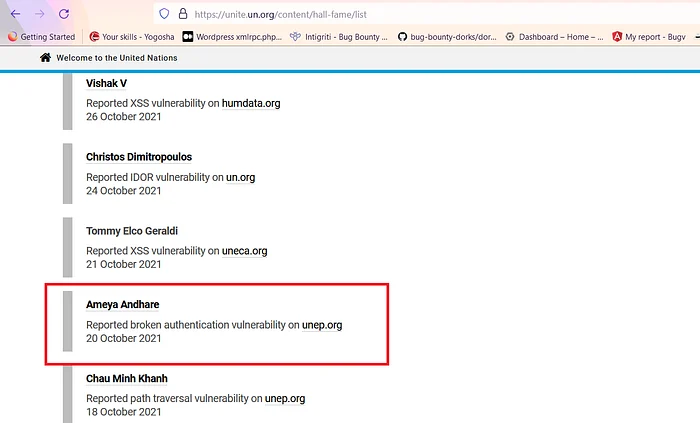
The screenshot shows the United Nations Hall of Fame.
Fix
The obvious remediation is to put the same authentication in front of the /dbadmin/ path as the /phpadmin/ path, or to remove the second path entirely so only the protected interface is reachable.
Variants to test
- Look for alternate paths to the same administrative interface. A positive result is a second path (for example a differently named directory) that returns 200 OK and renders the application without a login prompt.
- Run directory brute-force against hosts that already expose a login-protected admin panel. A positive result is any sibling path that serves the same panel unauthenticated.
- Compare responses from the protected and unprotected paths. A positive result is the protected path returning a login form while the other returns the application itself.
- Check whether the unauthenticated session carries database privileges. A positive result is being able to browse, export or modify data without supplying credentials.
What happened, in plain words
A security researcher found a database management page on a United Nations website that opened in a browser without logging in. Normally that page asks for a username and password. A second address on the same server skipped the login entirely. From that open page, the researcher says an attacker could change server settings and download the site's database. The researcher earned a place in the United Nations' Hall of Fame.
This article walks through the same steps the researcher took, explaining each idea from scratch. You only need a browser and a computer to follow the story.
Context
This is a short account of how I earned a place in the United Nations' Hall of Fame, run by the UN Office of Information and Communications Technology. The target was a subdomain of unep.org. The feature involved is a phpMyAdmin installation exposed on that subdomain, which normally requires a username and password before it will let anyone in.
A few terms first, because they come up constantly:
- A domain is the main name of a website, such as
unep.org. A subdomain is a name placed in front of it, such assomething.unep.org, and it can point to a completely different server or application. Think of a domain as a building's street address and subdomains as the different flats inside it: same building, different doors. - phpMyAdmin is a free web application for managing MySQL databases. A database is an organised store of information, and phpMyAdmin gives you a web page where you can look at tables, run queries, export data and change settings. It is a powerful tool, which is why it is normally locked behind a login.
- The Hall of Fame is a page where an organisation lists researchers who have reported genuine security issues to it. It is a recognition page, not a reward page in this case.
Setup
I am Ameya, an independent security researcher from India. No accounts, roles or special access were needed for this work. The tools I used were:
- Manual browsing of subdomains.
- The dirb tool for directory brute-force and fuzzing.
I picked the domain from the UN's Responsible Disclosure page, which is where the programme and its Hall of Fame are described.
Two ideas to unpack here:
- Responsible disclosure is a published process that tells researchers how to report a security problem to an organisation, and what the organisation promises in return. Reading that page first matters because it tells you which systems you are allowed to test. Testing a system without permission can be illegal, so the rules page is the starting point, not an afterthought.
- Directory brute-force means trying a long list of common folder and file names against a website automatically, one after another, and watching which ones come back as existing. It is like walking down a corridor trying every door handle with a big bunch of keys instead of guessing which single key fits. The tool dirb comes with a built-in word list of common names such as
admin,backupordbadmin.
Finding it
I gathered all the subdomains of unep.org and started checking each one manually. On one subdomain, which I refer to here as redacted.unep.org, I found a phpMyAdmin portal at:
Line by line, this address says:
https://is the secure version of the web protocol, the one browsers use for encrypted connections.redacted.unep.orgis the subdomain. The researcher replaced the real name withredactedso the report does not point readers at a live system./phpadmin/is the path, the folder-like part of the address that tells the server which page you want. Here it is the folder holding the phpMyAdmin login page.
That portal asked for a username and password. I tried default credentials and they did not work. Rather than stop there, I ran a directory brute-force with dirb against the host to look for other paths.
Default credentials are the factory username and password that software ships with, such as admin and admin, or root with a blank password. Many installations never change them, so trying them is a quick, cheap check. Here it failed, which is a useful result: it tells you the login is genuinely in place on this path, and that the interesting question is whether some other path exists that does not ask at all.
Exploitation
Step 1: Brute-force the directories
I used dirb for fuzzing the host. The report does not give the exact command line, only that dirb was the tool used.
Fuzzing here means feeding the server many candidate names and observing the differences in its replies. The point is not to guess a password but to discover pages that exist but are not linked anywhere on the site, which is exactly the kind of page a careless deployment leaves behind.
Step 2: Find the unauthenticated endpoint
Dirb turned up an endpoint that returned a 200 OK response status:
What this means:
- An endpoint is simply an address on a server that responds to requests. Every URL you can open is an endpoint.
- 200 OK is the standard HTTP status code meaning the request succeeded and the server is returning the page. Other codes tell a different story: 404 means not found, 403 means forbidden, 401 means you must log in first. Seeing 200 where you expected a login wall is the signal that something is open.
- The path here is
/dbadmin/, a different folder name from the/phpadmin/seen earlier. Same host, different door.
Step 3: Open the endpoint
I opened the endpoint in the browser and was taken straight into the phpMyAdmin portal without any login. The /phpadmin/ path had demanded credentials; this /dbadmin/ path did not.
That is a broken authentication vulnerability at that endpoint.
Broken authentication is the general name for any flaw where a system fails to properly check who you are before letting you in. It does not mean the password was cracked. It means a route existed that never asked for the password at all. The everyday comparison: a building where the front door has a lock and a guard, but the side door was left unlocked because the person who fitted it assumed nobody would walk round the back.
Root cause
The report describes the issue as broken authentication: the phpMyAdmin interface was reachable through a second path that did not enforce the login that the first path enforced. The original does not explain how the two paths were configured, so the precise cause is not stated. The default-credential attempt against /phpadmin/ failed, and the /dbadmin/ path let me in without a login.
An alias is a second name that points at the same thing, like a nickname for the same person. If the server treats /dbadmin/ as another name for the same phpMyAdmin installation but the login protection was only attached to the /phpadmin/ name, then the protection is bypassed simply by using the other name.
Impact
In the author's words, it is possible for an attacker to configure the servers without the information of the application administrator, and the database of the site could be downloaded.
Privileges are the permissions an account holds: what it is allowed to read, change or delete. A database account with broad privileges can do far more damage than one limited to reading a single table.
The screenshot shows the United Nations Hall of Fame.
Fix
The obvious remediation is to put the same authentication in front of the /dbadmin/ path as the /phpadmin/ path, or to remove the second path entirely so only the protected interface is reachable.
Remediation means the change made to close the hole. In plain terms: either lock the side door the same way as the front door, or brick it up so there is only one way in.
Variants to test
- Look for alternate paths to the same administrative interface. A positive result is a second path (for example a differently named directory) that returns 200 OK and renders the application without a login prompt.
- Run directory brute-force against hosts that already expose a login-protected admin panel. A positive result is any sibling path that serves the same panel unauthenticated.
- Compare responses from the protected and unprotected paths. A positive result is the protected path returning a login form while the other returns the application itself.
- Check whether the unauthenticated session carries database privileges. A positive result is being able to browse, export or modify data without supplying credentials.
Glossary
- 200 OK: the HTTP status code a server returns when a request succeeds and the page is being delivered.
- Alias: a second name that points at the same resource, so reaching it reaches the same application.
- Broken authentication: a flaw where a system does not properly verify who a visitor is before granting access.
- Database: an organised store of information that an application reads from and writes to.
- Default credentials: the factory username and password that software ships with, often left unchanged.
- Directory brute-force: automatically trying a long list of common folder and file names against a website to discover which exist.
- Domain: the main name of a website, such as
unep.org. - Endpoint: an address on a server that responds to requests.
- Fuzzing: sending many varied inputs to a system and observing how its replies differ, to discover hidden behaviour.
- Hall of Fame: a public list where an organisation recognises researchers who reported valid security issues.
- HTTP status code: a number in a server's reply that summarises the outcome, such as 200 for success or 404 for not found.
- Path: the folder-like part of a URL that tells the server which page is wanted.
- phpMyAdmin: a web application for managing MySQL databases through a browser.
- Privileges: the permissions an account holds, determining what it may read, change or delete.
- Remediation: the change made to close a security hole.
- Responsible disclosure: a published process for reporting security problems to an organisation and the rules that govern testing.
- Subdomain: a name placed in front of a domain, such as
something.unep.org, which can host a separate application. - URL: the full address of a page or resource on the web.

