I Got United Nation’s Hall Of Fame With This Simple Technique!
The United Nations registration form did not filter the less-than and greater-than characters in the First Name and Last Name fields, so an attacker could inject HTML into the email sent after registration. This allowed execution of a simple HTML tag in the email, demonstrating HTML injection.
 Published on faiyazhacks.medium.com
Hi everyone! I hope you all are good and having a wonderful day.
The full write-up lives on its author's site
It belongs to its author, so we link to it rather than copy it. The other two tabs are our own rewrites, checked against it.
Context
This is a short account of a bug bounty finding on the United Nations bug bounty program. The feature involved is user registration: an endpoint that accepts a first name and a last name and later uses those values inside an email. The researcher's goal was narrow from the start: find HTML injection in email, a class of misconfiguration he describes as often ignored by developers.
The article is split into two parts. The first is a general method for approaching a target; the second is the story of how the method was applied to the United Nations program.
Setup
No accounts, roles, tool versions or special preconditions are described beyond a scope of United Nations owned domains. The only tooling named in the finding itself is Google dorking. In the method section the researcher lists tools that can be used to collect links and parameters: arjun, katana, gau, waybackurl, dirsearch and google dork, and suggests automating the process with a bash script.
Finding it
The method the researcher describes is to look for one vulnerability at a time. Pick the vulnerability first, then use tools and manual work to hunt only that class until the target has been covered for it, rather than jumping between bug types. He notes this works best on targets with huge assets in scope.
His worked example uses a hypothetical *.example.com running PHP with many input fields. The reasoning is that if the application takes a lot of input, the vulnerabilities worth looking for are those that are exploited through input fields. For the example he settles on Cross Site Scripting, then looks for the places where XSS usually occurs: GET parameters and POST forms. The goal of that step is to collect all possible GET parameters and forms.
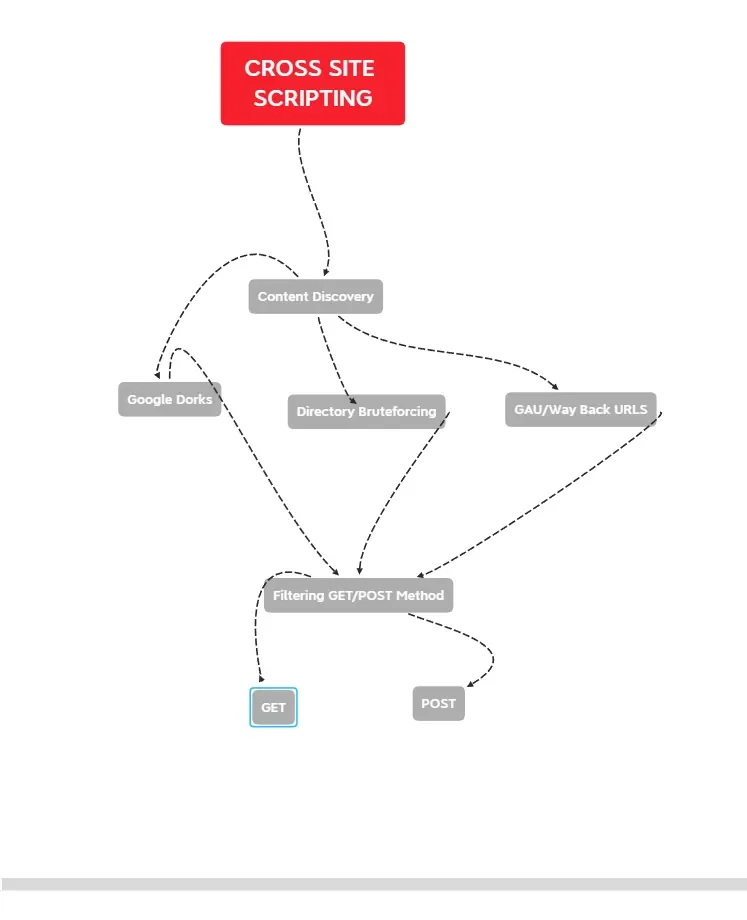
The image shows a common method to extract GET and POST parameters.
On the real target, the chosen class was HTML injection in email. The first step was to enumerate endpoints with registration functionality using a Google dork:
site:<un_owned_domains> inurl:register
The site: operator restricts results to the owned domains, and inurl:register keeps only URLs whose path contains the registration keyword. The researcher notes that this simple query returns a lot of results with registration functionality.
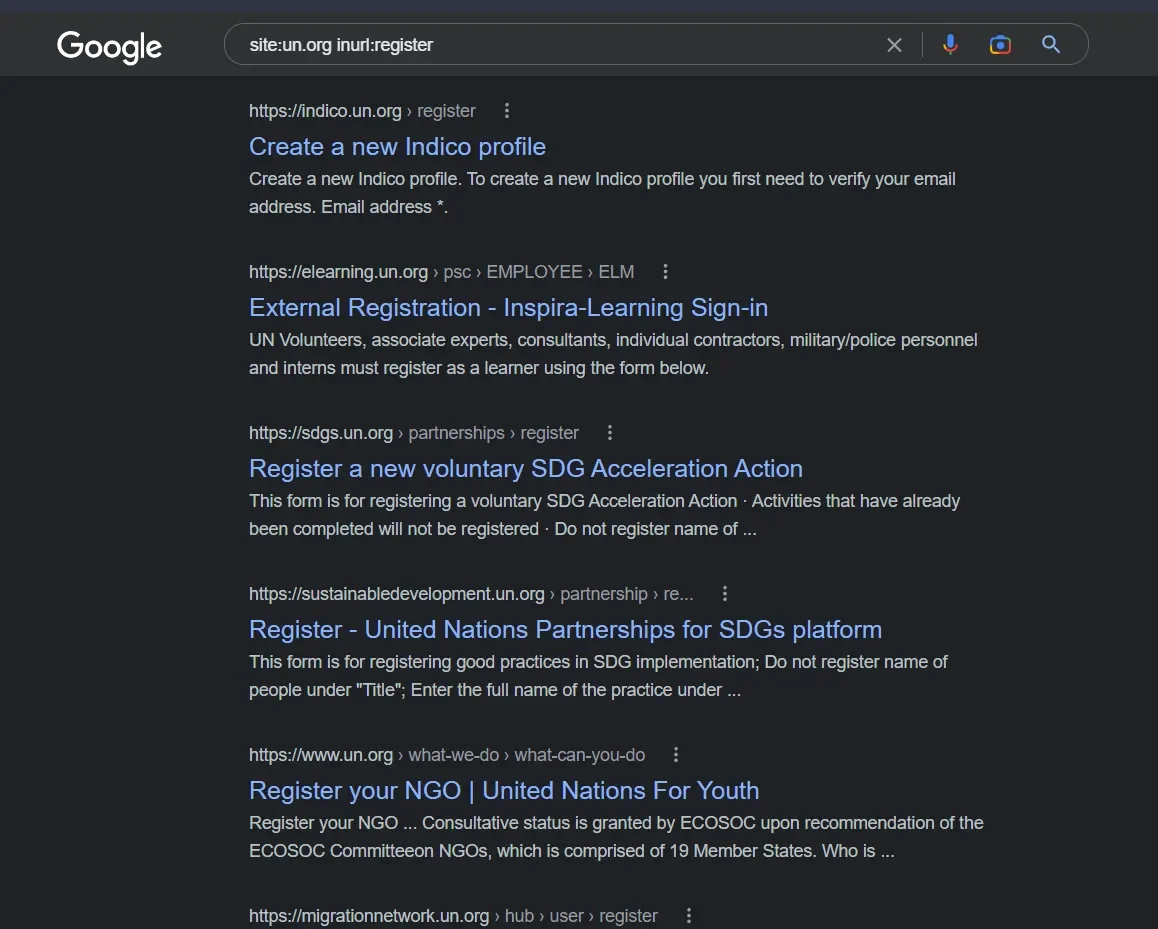
He then manually checked a few subdomains for the HTML Injection vulnerability and found one after a few minutes.
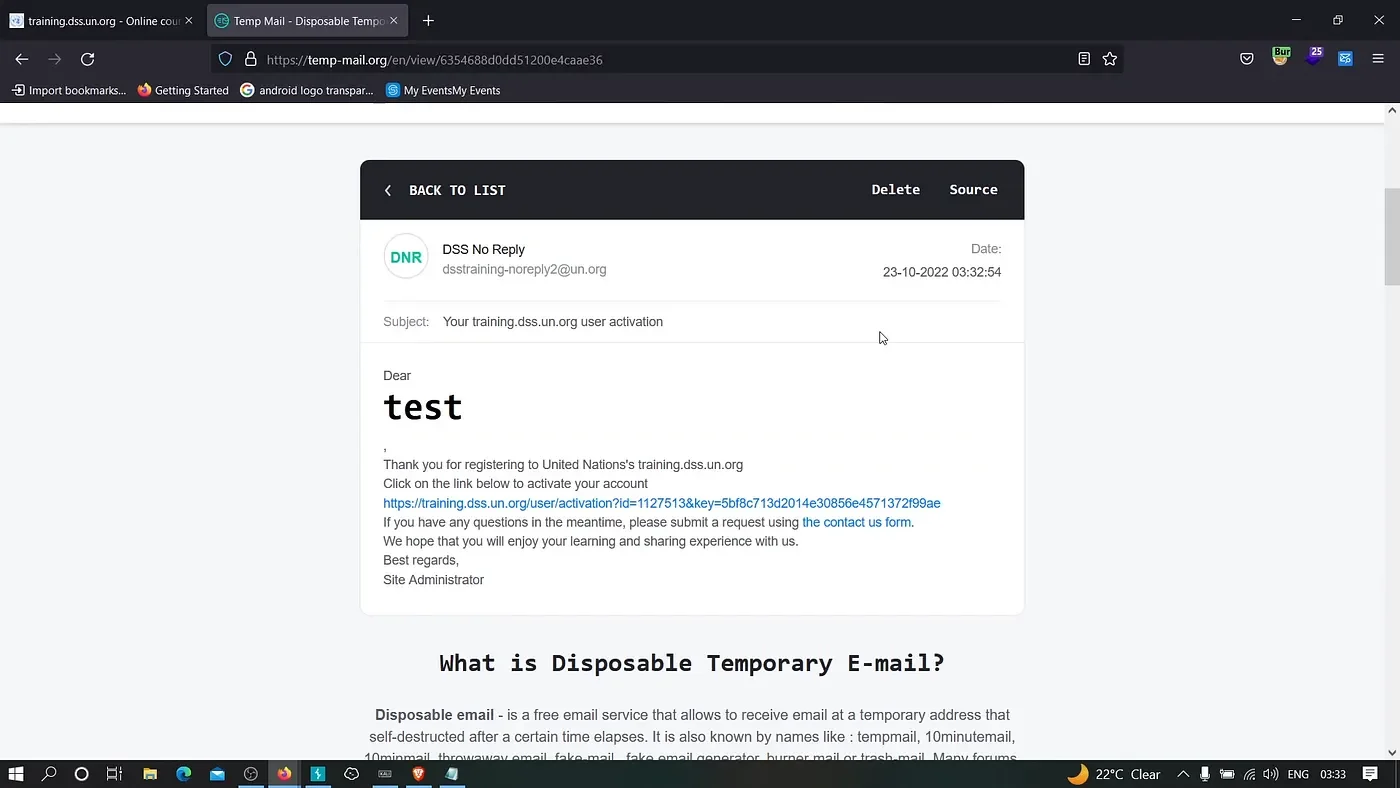
Exploitation
Step 1: Register with HTML in the name fields
The registration form did not filter the dangerous < and > characters in the First Name and Last Name fields. Supplying a simple HTML tag in those fields was enough to have it rendered in the email:
<h1>Test</h1>
Step 2: Observe the email
The researcher states he was able to execute a simple HTML tag in the email. The researcher does not show the request or the email body itself.
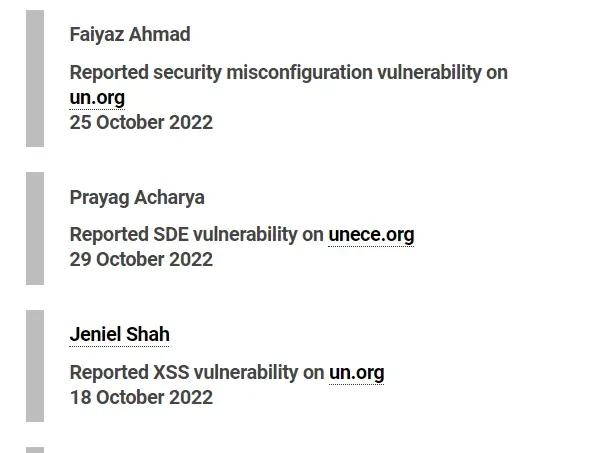
Step 3: Report
The vulnerability was reported to the security team, and the researcher's name was listed in the program's Hall of Fame after a week.
Root cause
The registration form did not filter the dangerous < and > characters in the First Name and Last Name fields, and the values ended up in an email. The report does not describe the server-side code, so the exact point where output encoding was missing is not stated.
Impact
Supplying HTML in the First Name and Last Name fields resulted in the tag appearing in the email. The researcher frames this as HTML injection, not script execution, and the payload shown is a heading tag. The report does not demonstrate script execution, does not describe which recipients beyond the registering user receive the email, and does not state any further consequence.
Fix
Variants to test
- Run the same dork against other scopes:
site:<target_domains> inurl:register. A positive result is a list of registration endpoints worth checking by hand. - Submit
<h1>Test</h1>in the First Name and Last Name fields of a registration form and check the email. A positive result is a rendered heading instead of literal text. - A positive result is rendered markup in the received message.
- Apply the one-bug-at-a-time method to other input-driven classes on the same endpoints, such as XSS in GET parameters and POST forms, using the parameter and link collection tools listed above. A positive result is a reflected or stored payload that executes in the browser.

What happened, in plain words
A security researcher spent some time hunting on the United Nations bug bounty program. A bug bounty program is an arrangement where an organisation invites outside people to look for security problems in its systems and report them, usually in exchange for recognition or a reward. The researcher picked one specific problem to look for before starting: HTML injection in email. HTML injection means that a place which is supposed to show plain text instead treats what you typed as instructions for how to display a page, so you can slip in formatting or page elements of your own. He found it in the registration form, the page where a new user creates an account. The form asked for a first name and a last name, and it did not block the characters < and >. Those two characters are how HTML marks the start and end of a tag, a piece of markup that tells a browser or an email program how to display something. Because the names were later placed into an email, the researcher could put a heading tag into his own name and have it execute in the email. He reported it, and a week later his name was on the program's Hall of Fame, a public list of people who have reported valid issues.
The article has two halves. The first half explains a general way of working: choose one kind of bug, then hunt only that kind until you have covered the target. The second half is the story of applying that approach to the United Nations program.
Before the technical part, the author mentions that he has been busy with his YouTube channel and with a project called BePractical, a platform he is building with friends to publish cybersecurity and web development material.
Part 1: the method
The idea is simple: look for one vulnerability at a time. A vulnerability is a weakness in a system that someone can use to make it behave in a way its owners did not intend. Instead of opening a target and poking at everything, you first decide which single kind of weakness you are hunting. Then you use whatever tools and manual checks you need to search for that one kind, and you do not move on to other bug types until you have either found it or covered the target for it. The author says this works especially well on targets with a huge number of assets in scope, meaning many websites, subdomains and services that the program allows you to test.
He uses a made-up target, *.example.com, as a worked example. The asterisk is a wildcard meaning any subdomain of example.com.
Step 1: study the target in depth. Find out what technology the web application is built with, which ports are open on the server, and similar facts. A port is a numbered channel on a computer that a service listens on, a bit like a numbered door in a large building: the address gets you to the building, the port number tells you which door to knock on. Suppose example.com runs on PHP, a programming language commonly used for websites, and has lots of input fields. An input field is any box on a page where you can type something: a search box, a login form, a comment area. The question then is which vulnerability to look for.

The answer: the ones that are exploited through an input field. If the application takes a lot of input from visitors, the weaknesses worth hunting are the ones that abuse that input. For the example he picks Cross Site Scripting, usually shortened to XSS. XSS is a weakness where text you type into a site is later shown to someone else as if it were part of the page, so your text can run as code in their browser. A browser is the program you use to view websites, and it runs small programs called scripts that pages include; if an attacker can get their own script into a page another person views, that script runs with the trust of the site.
Step 2: with XSS chosen, find the places where XSS usually appears. Those are mostly GET parameters and POST forms. A GET parameter is the part of a web address after a question mark, such as ?name=value, which a site uses to pass information along with the request. A POST form is a form on a page whose contents are sent in the body of the request rather than in the address, typically used for logins, registrations and anything that changes data. The goal of this step is to collect every possible GET parameter and form you can find.
A common method to extract GET and POST parameters
The author suggests tools that help collect links and parameters: arjun, katana, gau, waybackurl, dirsearch and Google dorking. Google dorking means using special search operators in Google to find pages that match a pattern, rather than searching for words. He also suggests automating the collection with a bash script, a small program written for the command line, or asking an AI assistant to write one.
Step 3: start testing the collected data for XSS. The hope is that, with enough links and parameters gathered, one of them will turn out to be vulnerable.

Part 2: the story
The researcher was hunting on the United Nations bug bounty program. This time he decided in advance to look only for HTML injection in email, because he knows this kind of misconfiguration is often ignored by developers. A misconfiguration is a setting or behaviour that is wrong or unsafe, as opposed to a flaw in the code itself. The researcher says this kind of misconfiguration is often ignored by developers.
The first thing he did was to find every endpoint with registration functionality, using a Google dork. An endpoint is a specific address on a server that accepts requests and does something with them, such as a page or a service. Registration functionality means the part of a site that lets you create an account.
site:<un_owned_domains> inurl:register
Line by line:
site:<un_owned_domains>restricts the search results to the domains owned by the organisation. The angle brackets are a placeholder for the actual list of domains, not something you type literally.inurl:registerkeeps only results whose web address contains the wordregister, which is a common name for a sign-up page.- Together, the query asks Google for sign-up pages that live on the organisation's own domains.
The author notes that this simple query returns a lot of results with registration functionality.
He then manually checked a few subdomains for the HTML injection vulnerability. A subdomain is a site that sits under a main domain, for example shop.example.com under example.com. After a few minutes he found one.
It turned out that the registration form did not filter the dangerous < and > characters in the First Name and Last Name fields. Filtering means checking input and removing or rejecting anything that should not be allowed. Because those characters were accepted, he could put a simple HTML tag into his name and have it appear in the email:
<h1>Test</h1>
Line by line:
<h1>is an opening tag that tells the email program to display the following text as a top-level heading, in large bold type.Testis the text that will be shown as the heading.</h1>is the closing tag that marks the end of the heading.
The researcher states he was able to execute a simple HTML tag in the email. That is the whole of the HTML injection: the < and > characters were not filtered in the name fields. Encoding means converting special characters into a safe form, so that < becomes something the email program displays as a character rather than reading as the start of a tag.
He reported the vulnerability to the security team, and a week later his name was listed in the program's Hall of Fame.
😁
Conclusion
The author's key point is to understand the target in depth, because the better you understand it, the more weaknesses you will find. And always look for a single vulnerability at a time: doing so not only helps you find bugs but also deepens your understanding of that particular bug class.
He invites readers to ask questions and to join his Telegram channel for updates, and points to a video of his on finding hidden links in JavaScript files. JavaScript is the programming language that browsers run, and sites often load it from separate files that can mention addresses the site uses behind the scenes.
Glossary
- Bug bounty program: an arrangement where an organisation invites outside researchers to find and report security problems, usually in exchange for recognition or a reward.
- Hall of Fame: a public list of people who have reported valid issues to a program.
- Vulnerability: a weakness in a system that someone can use to make it behave in a way its owners did not intend.
- HTML: the markup language used to describe the structure and formatting of web pages and HTML emails.
- HTML injection: a weakness where text you supply is treated as HTML markup instead of plain text, so you can add formatting or page elements of your own.
- Tag: a piece of HTML markup, written between
<and>, that tells a browser or email program how to display something. - Encoding: converting special characters into a safe form so they are displayed as characters rather than interpreted as markup.
- Filtering: checking input and removing or rejecting anything that should not be allowed.
- Input field: any box on a page where a visitor can type something.
- Endpoint: a specific address on a server that accepts requests and does something with them.
- Registration functionality: the part of a site that lets a visitor create an account.
- Subdomain: a site that sits under a main domain, such as
shop.example.comunderexample.com. - Wildcard: a symbol such as
*that stands for any value, used here to mean any subdomain. - Port: a numbered channel on a computer that a service listens on.
- PHP: a programming language commonly used to build websites.
- Cross Site Scripting (XSS): a weakness where text you type into a site is later shown to someone else as if it were part of the page, so your text can run as code in their browser.
- Script: a small program that a page includes and a browser runs.
- Browser: the program you use to view websites.
- GET parameter: the part of a web address after a question mark, such as
?name=value, used to pass information along with the request. - POST form: a form whose contents are sent in the body of the request rather than in the address.
- Google dorking: using special search operators in Google to find pages that match a pattern rather than words.
- Bash script: a small program written for the command line.
- Misconfiguration: a setting or behaviour that is wrong or unsafe, as opposed to a flaw in the code itself.
- JavaScript: the programming language that browsers run.
- Telegram channel: a broadcast channel on the Telegram messaging service.




