Session replay vulnerability in www.urbandictionary.com
The server did not invalidate session cookies when a user signed out, so an attacker who obtained a session cookie and anti-CSRF token could replay them to perform privileged actions. The report demonstrates modifying a user handle after logout.

- Fixed in 55 days
- Disclosed after 3 months
Session replay vulnerability in www.urbandictionary.com
I considered titling this bug "Session tokens not expiring", which is what you need to tell your development team. But I titled it as I did to emphasize at least one attack made possible by the bug. There may be others.
Description
Privileged functions, e.g., /handle.save.php can still be used after the user has clicked the "sign out" link. The cause of the vulnerability seems to be that the server is not invalidating session cookies when the user "signs out". I observed session tokens remaining valid even 72 hours after being issued.
Exploitation requires the anti-CSRF authenticity_token from the privileged page from before the victim "logged out", and any one of the victim's _rails_session cookies from before the victim "logged out". Note that because the server issues a new cookie with each Response, the attacker may choose from among many cookies.
Impact
- Cookies that never expire can impact the security of the user:
- The user's session is susceptible to hijacking or replay.
- The user has no way of causing the application to invalidate their session. This is important in shared computing environments.
- Cookies that never expire can impact the security of the server:
- The time window to brute-force a valid session token is increased.
- If many session tokens remain valid, brute-forcing has that many more chances to guess correctly.
Step-by-step Reproduction Instructions
-
Set up an HTTP intercept proxy like Burp Suite or ZAP.
-
Authenticate to
http://www.urbandictionary.com/users.phpvia the Gmail OAuth function, receiving a valid session cookie fromwww.urbandictionary.com, and then "sign out" by clickinghttp://www.urbandictionary.com/auth/logout. -
Send a
POSTrequest tohttps://www.urbandictionary.com/handle.save.phpcontaining:- The
authenticity_tokenfrom the privileged page from before the user "logged out". - Any one of the user's
_rails_sessioncookies from before the user "logged out". - In the body of the POST set
user[handle]to a new value. I've usedH.H. Vong. - In the body of the POST set
committoSave.
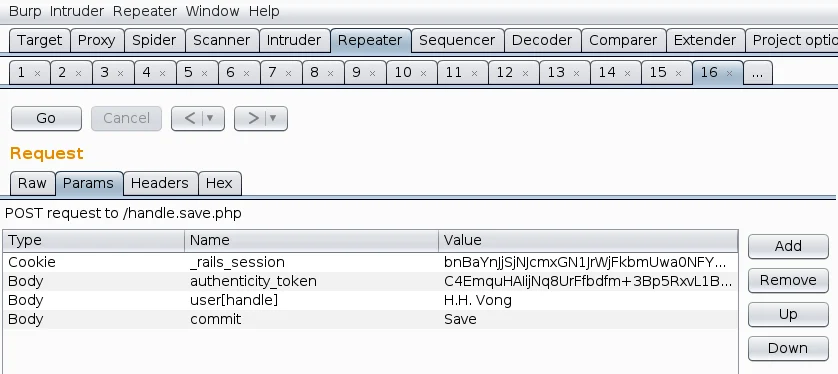
handle.save.php.png From the original on HackerOne The screen-shot above shows how to use Burp Repeater to replay a session and modify the user handle.
Here is that request as a curl command:
$ curl -L -i -s -k -X $'POST' -H $'User-Agent: Mozilla/5.0 (X11; Linux x86_64; rv:45.0) Gecko/20100101 Firefox/45.0' -H $'Referer: https://www.urbandictionary.com/handle.php' -H $'Content-Type: application/x-www-form-urlencoded' -b $'_rails_session=bnBaYnJjSjNJcmxGN1JrWjFkbmUwa0NFY05GdThtcmtHQU0zTHhsem1iQngyQmhvYUdKQTRCVmNHNlBGRTEvRm9aczFwRXc5ekVUV2FEVDM4RSswQU9rejBReGc1M3dxVGhRV0REQmFCUWFkYWcwQ1RhV2NIN1VUalQyM09tNHAwS3lkc0JaRlJqNkxKd2xNZVdKQzhYOFpBdlhqRHhoYVplWmczTFZBL3hlb3E2YUxkVmp4NEkzZUxtZXBQa1ozME9MUFdXRHRDQStOWXdUT2xkcTRSdz09LS1LNXVZWmFBL0F5STRIUjkwTmdnczR3PT0%3D--4ea5f8f5d73379881a6db43b9b8cdcc9d7c89773' --data-binary $'authenticity_token=C4EmquHAIijNq8UrFfbdfm%2B3Bp5RxvL1BpzMdf3%2FJgtw%2FSn%2FgTt4AlFlIDWFivaesfXJFgNqrWS8DD85obbnpA%3D%3D&user%5Bhandle%5D=H.H.+Vong&commit=Save' $'https://www.urbandictionary.com/handle.save.php' - The
-
The response will be a
302/Foundwith theLocationfield set tohttps://www.urbandictionary.com/users.php. Your browser will follow the302redirect, issuing aGETrequest for the URL in theLocationfield. The server will respond with a200/OKstatus code.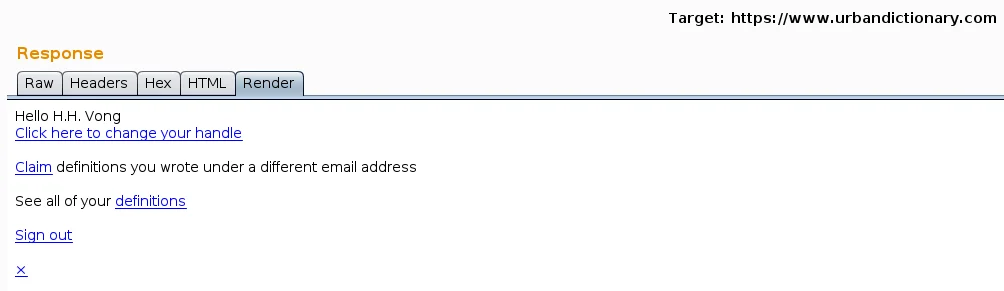
after-redirect.png From the original on HackerOne The screen-shot above shows the Burp Repeater response with the rendered HTML displaying the successfully modified user handle.
If you're verifying this with
curl, you could justgrepfor the modified value. Append this to thecurlcommand previously specified:| grep -i vong. Two lines of the HTML in the returned page will contain the newly modified handle:<title>Urban Dictionary: Hello H.H. Vong</title> <span>Hello H.H. Vong</span>
Suggested Mitigation/Remediation Actions
- Configure the server side application to invalidate a user's submitted session token:
- When a new token is issued by the server side application, so that only one token is valid at any given time.
- When the user submits a valid session token to
/auth/logout. - When a valid session token has not been submitted to the server side application for greater than n seconds where n is some value consistent with your own internal policy.
- When a valid session token, stored on the server, is older than m seconds, where m is the maximum age allowed for a session cookie, based on your own internal policy.
Product, Version, and Configuration
- Kali Linux 2016.2
- Mozilla Firefox 45.7.0
- Burp Suite 1.7.17
curl7.52.1
Please let me know if you need more information about this issue. Thanks.
Not written yet. The AI write-up for this report has not been written yet. The Original tab links to the source.
How it worked
Root cause
Likely the server did not invalidate session tokens on logout or enforce expiry, allowing old cookies to remain valid.
Impact
An attacker with a stolen session cookie and anti-CSRF token could replay the session to perform privileged actions, such as changing the user handle, even after the victim logged out.
What the attacker needed
Victim has an account; attacker obtains session cookie and token; victim has logged out
The fix
The server should invalidate session tokens on logout, on new token issuance, after inactivity, and after a maximum age.
How it was found
- Set up an HTTP intercept proxy like Burp Suite or ZAP.
- Authenticate via Gmail OAuth and then sign out.
- Send a POST request to /handle.save.php with the old authenticity_token and _rails_session cookie, setting user[handle] to a new value and commit to Save.
- Observe a 302 redirect to users.php and a 200 response showing the modified handle.
Explained by bugbounty.wiki with AI from the original and checked against quotes from it; it can still be wrong. Read the original before relying on a detail.
Not written yet. The AI write-up for this report has not been written yet. The Original tab links to the source.
When you log in to a website, the server gives your browser a session cookie to remember you. Normally, logging out should make that cookie useless. Here, the cookie kept working even after logout, so anyone who stole it could still act as you.
What is Access control?
A user can do something their role should not allow: reach an admin function, act on a feature they have not paid for, or skip a permission check. IDOR is the special case where the object belongs to someone else.


