Missing Server Side Validation of CSRF Middleware Token in Change Password Request
The change password form did not validate the CSRF middleware token on the server side, so the request succeeded even when the token was removed. An attacker could potentially submit a password change request without a valid token, though the report does not demonstrate a cross-site attack.

- Triaged in 14 hours
- Fixed in 15 days
- Disclosed after 3 months
Hello Team,
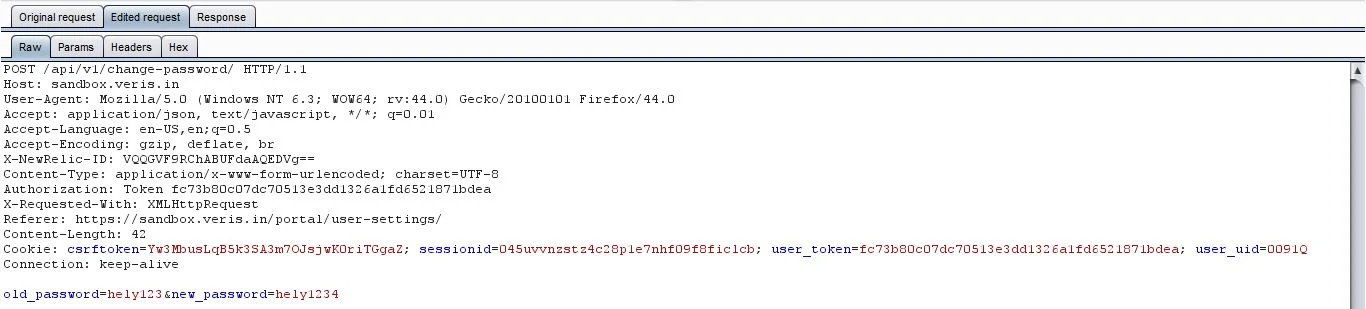
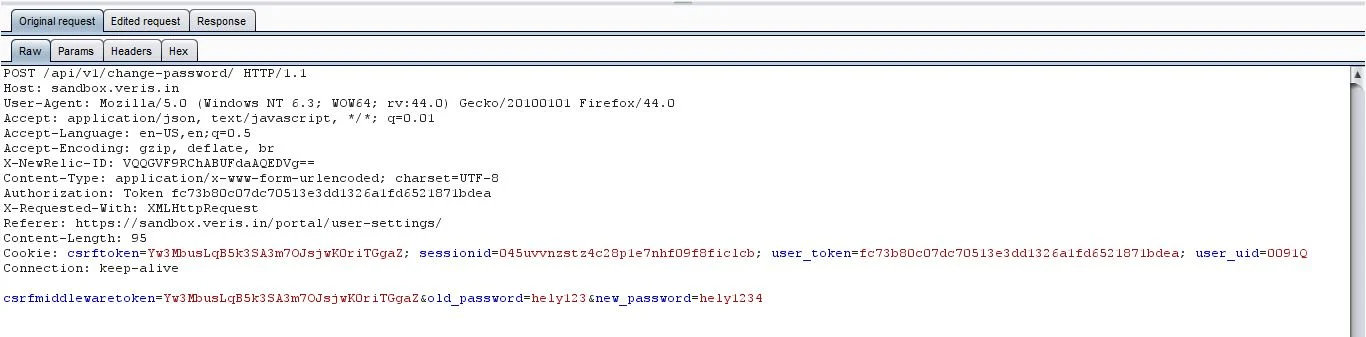
I have found that CSRF Middleware Token is not getting validated at server side in CHANGE PASSWORD request. This request even works without csrfmiddlewaretoken.
Steps to Reproduce:
- Login to your Veris View Account.
- Go to Settings.
- Change your password.
- Submit the form.
- Intercept this request in burp suite.
- Remove csrfmiddlewaretoken parameter from the request.
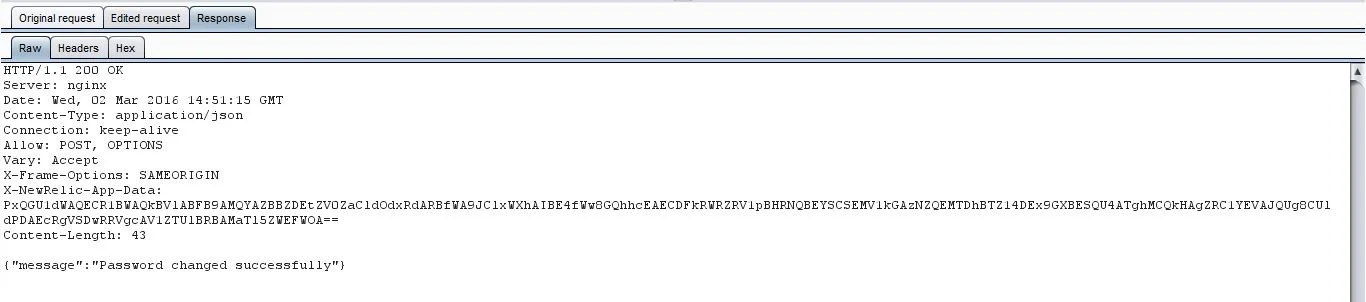
- Forward the request.
- You'll notice the success message as Password changed Successfully.
Proof of Concept: Please find it attached.
Do evaluate it and inform me accordingly.
Best Regards,
Hely H. Shah
Attachments
Not written yet. The AI write-up for this report has not been written yet. The Original tab links to the source.
How it worked
Root cause
Likely the server-side change password handler did not check the CSRF token, or the CSRF middleware was not applied to that endpoint.
Impact
The change password endpoint could be triggered without a valid CSRF token, which may allow cross-site request forgery against logged-in users, though the report does not show a working cross-site exploit.
What the attacker needed
A logged-in account; ability to intercept requests
How it was found
- Log in to the account.
- Go to Settings and open the change password form.
- Submit the form and intercept the request in a proxy.
- Remove the csrfmiddlewaretoken parameter.
- Forward the request.
- Observe the success message confirming the password change.
Explained by bugbounty.wiki with AI from the original and checked against quotes from it; it can still be wrong. Read the original before relying on a detail.
Not written yet. The AI write-up for this report has not been written yet. The Original tab links to the source.
A CSRF token is a secret value a website puts in forms to prove a request came from its own pages, not from another site. Here the server ignored that token for the change password form, so it accepted a request that had no token at all. This weakens protection against cross-site request forgery, where another site tricks a logged-in user's browser into sending a request.
What is CSRF?
Another site makes a signed-in user's browser perform an action they did not intend.

