How I got $4000 from Visma for RCE
A WordPress theme contained an unauthenticated file upload script that allowed an attacker to upload a PHP shell and gain remote code execution on the server. The attacker could then access the whole server.
 Published on medium.com
Hello friends, This is Ratnadip Gajbhiye. This is my first article, so if there is any mistake in it forgive me.
The full write-up lives on its author's site
It belongs to its author, so we link to it rather than copy it. The other two tabs are our own rewrites, checked against it.
Context
Visma runs a bug bounty programme, and this write-up covers a finding on one of its subdomains, citrix.visma.com. The researcher, Ratnadip Gajbhiye, deliberately avoided the main domain and worked only against a subdomain, which he describes as his usual habit.
The feature at fault is the Uploadify script as bundled with the WordPress theme Konzept. Uploadify is a file upload component, and in the form described here it lets anyone upload anything to the site without any authentication. The theme ships the script under wp-content/themes/konzept/includes/uploadify/, and the upload endpoint is reachable directly over HTTP.
Setup
The report lists no accounts, roles or special tooling. The report states no accounts, roles or special tooling; the exploit notes say it was tested on Lubuntu. The exploit notes say it was tested on Lubuntu. The researcher mentions a friend, whose name is partly redacted here, who handed him the site for security testing.
Finding it
The researcher started by looking for an admin panel on the subdomain:
https://citrix.visma.com/admin
That URL redirected him to the WordPress admin panel, which told him the target was a WordPress installation. From there he looked for theme and plugin issues using material from Exploit DB, and specifically for the Konzept theme path. He tried four Google dorks against the URL without success; the fifth dork returned the upload section. The report does not record what the five dorks were.
Exploitation
Step 1: reach the upload endpoint
The upload section he landed on is the Uploadify handler inside the Konzept theme:
https://citrix.visma.com//wp-content/themes/konzept/includes/uploadify/uploadify.php
The double slash after the host is as it appears in the report. This script is the component that accepts files without authentication.
Step 2: upload a shell
Without any further preparation he uploaded a c99.php shell through that endpoint. The report gives no request body, headers or form fields for the upload, only the result: he obtained access to the whole server.
Step 3: confirm execution
The uploaded file is then reachable at a predictable location under the same theme directory:
https://citrix.visma.com//wp-content/themes/konzept/includes/uploadify/uploads/c99_locus7s.php
The report lists that URL as the location of the uploaded C99 shell. The report's proof of concept header summarises the issue as "Remote Code Execution via Arbitrary File Upload" and records the Google dork wp-content/themes/konzept.
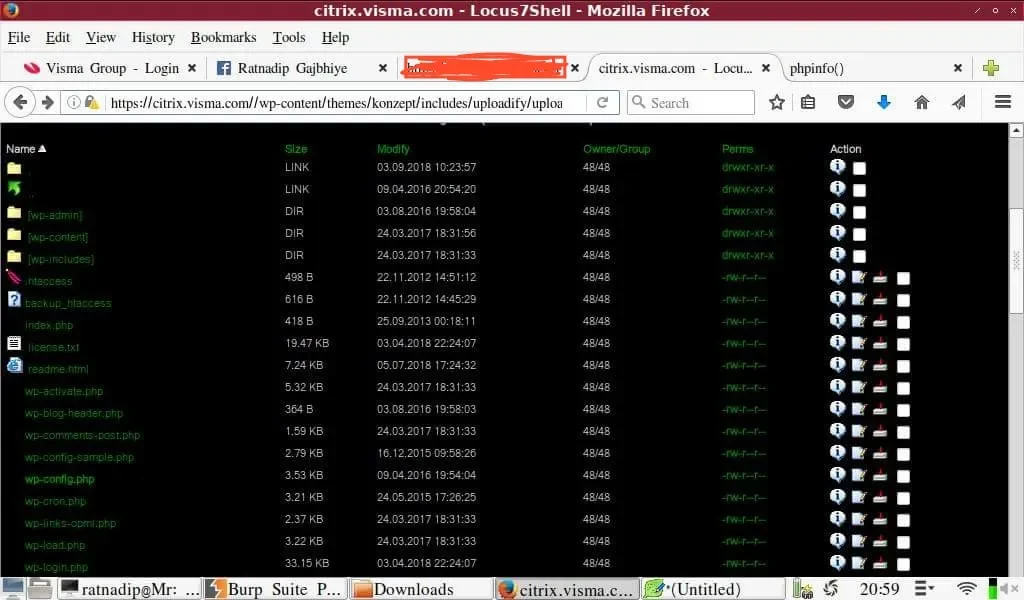
The image shows the exploit notes with the upload section URL and the location of the uploaded C99 shell.
Root cause
The mistake is in the theme's bundled Uploadify handler: it accepts file uploads without authentication and without restricting what is written, so a PHP file lands inside the web root and is served and executed like any other script in the theme directory. The report does not include the handler's source, so the exact checks it omits are not shown; the observable behaviour is that an unauthenticated upload of a PHP shell succeeded. The report does not include the handler's source, so the exact checks it omits are not shown.
Impact
An unauthenticated attacker who can reach the endpoint can upload arbitrary files, including a PHP shell, and then execute code on the server. In this case the researcher states he got access to the whole server. The researcher states he got access to the whole server.
Fix
The report does not describe the code change. It records the timeline instead: the site replied within five minutes, saying the report had been passed to the IT team to fix as soon as possible, and the vulnerability was fixed within two hours. On day two the hole was patched and the shell removed, though the researcher notes it would probably take more time to go through the server before declaring it properly secured again. The bounty of $4000 USD was confirmed on day six.
Variants to test
The report's own dork, wp-content/themes/konzept, is the starting point: search for other sites exposing that path and check whether the Uploadify handler under includes/uploadify/ responds.
More generally, the same pattern applies to any theme or plugin that bundles Uploadify or a similar upload script inside wp-content.
What happened, in plain words
A security researcher found a way to make one of Visma's web servers run code that he chose, without logging in. He uploaded a small program (a "shell") through a file upload feature that was left open to anyone, and got access to the whole server. Visma paid him $4000 USD for reporting it.
The interesting part for a beginner is that none of this needed a clever password guess or a complicated tool. It needed knowing where to look, and understanding what a file upload feature does when nobody checks who is uploading.
The pieces you need to know first
Before the steps make sense, here are the ideas they rely on. Each one is explained from zero.
A website is a set of files on a computer
When you visit a site, your browser asks a computer (the server) for a page. The server sends back files. Some of those files are text and pictures. Some are small programs that the server itself runs before sending anything back. A file ending in .php is one of those programs: the server reads it and executes it, rather than just handing it to your browser.
That distinction is the whole story here. If you can put a .php file onto a server and then ask for it, the server may run your program. That is called remote code execution (RCE): someone else's computer runs code you wrote, from a distance.
Subdomains
A domain is the main address of a company, like visma.com. A subdomain is a prefix on it, like citrix.visma.com. Companies often run many subdomains for different services, and each one can be a separate machine with its own software and its own mistakes. The researcher says he always targets a subdomain rather than the main domain, and that is what he did here.
WordPress, themes and plugins
WordPress is a very common system for building websites. You do not write every page by hand; you install WordPress and then add a theme (which controls how the site looks) and plugins (which add features). Themes and plugins are made by many different people, and they sometimes contain mistakes.
A theme lives in a folder on the server. For the theme in this report, called Konzept, that folder is wp-content/themes/konzept/. Everything after that is files inside the theme.
Uploadify and what a file upload feature does
Uploadify is a component that adds a file upload button to a website: you pick a file on your computer, and it is sent to the server and stored there. Normally an upload feature should check two things: who is uploading (are you logged in and allowed?), and what you are uploading (is it a picture, or is it a program?).
In the version described here, it checks neither. The report puts it plainly: Uploadify "allows anyone to upload anything they want to your site without any authentication". Authentication means proving who you are, usually by logging in. Without it, a stranger is treated the same as the site's owner.
A shell
A "shell" in this context is a program you upload to a server so that you can then give it commands and see the results through your browser. The one used here is called C99, a well-known shell script. Uploading it is only half the job; the other half is getting the server to run it.
Google dorks
A dork is a search query written to find pages with a particular pattern, rather than pages about a topic. For example, searching for a folder name that only appears on sites running a certain theme will list sites running that theme. Researchers use dorks to find exposed files across the internet. The report does not record the five dorks the researcher tried, only that the fifth one worked.
Exploit DB
Exploit DB is a public collection of documented vulnerabilities and proof-of-concept code. The researcher used it to learn about known mistakes in themes and plugins, so he knew what to look for.
Finding it
He began by looking for an admin panel on the subdomain:
https://citrix.visma.com/admin
Line by line: https:// means a normal encrypted web connection. citrix.visma.com is the subdomain. /admin is a guess at a folder name that many sites use for their management area.
Why do this? Because an admin login page tells you what software the site runs. If the page that comes back is the WordPress admin login, you now know the site is WordPress, and you can start thinking about WordPress themes and plugins.
That is exactly what happened: the URL redirected him to the WordPress admin panel. From there he looked for known theme and plugin problems using Exploit DB, focusing on the Konzept theme path. He tried four dorks without success; the fifth returned the upload section. The report does not say what the five dorks were.
Exploitation
Step 1: reach the upload endpoint
The upload section he landed on is the Uploadify handler inside the Konzept theme:
https://citrix.visma.com//wp-content/themes/konzept/includes/uploadify/uploadify.php
Line by line: the address is the same subdomain, followed by the path to the theme folder wp-content/themes/konzept/, then includes/uploadify/, then the file uploadify.php. The double slash after the host name is exactly as it appears in the report.
Why this matters: uploadify.php is the program that receives uploaded files. Because it can be requested directly by anyone with a browser, there is no login screen standing in front of it. That is the flaw: the door that accepts files has no lock.
Step 2: upload a shell
Without any further preparation, he uploaded a c99.php shell through that endpoint. The report gives no request body, headers or form fields for the upload, only the result: he obtained access to the whole server.
The report gives no request body, headers or form fields for the upload, only the result.
Step 3: confirm execution
The uploaded file is then reachable at a predictable location under the same theme directory:
https://citrix.visma.com//wp-content/themes/konzept/includes/uploadify/uploads/c99_locus7s.php
Line by line: this is the same path as before, but instead of uploadify.php it points into the uploads/ folder and names the file c99_locus7s.php. That is where the handler stored what he sent.
The report lists that address as the location of the uploaded C99 shell.
The report's proof of concept header summarises the issue as "Remote Code Execution via Arbitrary File Upload" and records the Google dork wp-content/themes/konzept.
The image shows the exploit notes with the upload section URL and the location of the uploaded C99 shell.
Why it worked
The mistake is in the theme's bundled Uploadify handler. It accepts file uploads without authentication and without restricting what is written. So a PHP file lands inside the part of the server that serves the website, and it is served and executed like any other script in the theme folder.
The report does not include the handler's source, so the exact checks it omits are not shown. What is observable is that an unauthenticated upload of a PHP shell succeeded.
A simple comparison: it is like a hotel that lets anyone drop a parcel at the front desk, puts the parcel in a room, and then, when someone asks for that room, reads out whatever instructions are inside the parcel and follows them.
Impact
Someone who can reach the endpoint, with no account and no login, can upload arbitrary files, including a PHP shell, and then execute code on the server. In this case the researcher states he got access to the whole server. The researcher states he got access to the whole server.
Fix
The report does not describe the code change. It records the timeline instead:
- The site replied within five minutes, saying the report had been passed to the IT team to fix as soon as possible, and the vulnerability was fixed within two hours.
- On day two the hole was patched and the shell removed, though the researcher notes it would probably take more time to go through the server before declaring it properly secured again.
- The bounty of $4000 USD was confirmed on day six.
Variants to test
The report's own dork, wp-content/themes/konzept, is the starting point: search for other sites exposing that path and check whether the Uploadify handler under includes/uploadify/ responds.
More generally, the same pattern applies to any theme or plugin that bundles Uploadify or a similar upload script inside wp-content.
Glossary
- Authentication: proving who you are, usually by logging in, so the site can decide whether to let you in.
- Bounty: a reward a company pays to someone who reports a security problem responsibly.
- Bug bounty programme: a scheme where a company invites researchers to look for problems in its systems and pays for valid reports.
- C99 shell: a well-known shell program used to run commands on a server through a browser.
- Domain: the main address of a site, such as
visma.com. - Dork: a search query written to find pages with a particular technical pattern rather than a topic.
- Endpoint: a specific address on a server that accepts a request, such as the file that receives uploads.
- Exploit DB: a public collection of documented vulnerabilities and proof-of-concept code.
- Handler: the program on the server that receives and processes a request, here the file that accepts uploads.
- PHP: a programming language used to build websites; files ending in
.phpare run by the server. - Plugin: an add-on for WordPress that adds a feature.
- Remote code execution (RCE): making someone else's computer run code you wrote, from a distance.
- Shell: a program uploaded to a server that lets you give it commands and see the results.
- Subdomain: a prefix on a domain, such as
citrix.visma.com, often a separate machine with its own software. - Theme: a package that controls how a WordPress site looks, stored in a folder on the server.
- Uploadify: a file upload component used on websites, which in this case accepted files without authentication.
- WordPress: a very common system for building and running websites.
wp-content: the folder in a WordPress installation that holds themes, plugins and uploaded files.


