How i was able to exploit the same endpoint 2 times ( multiple xss & open Redirection on 10 subdomain)
A reflected cross-site scripting flaw existed in the redirectTo parameter of an authentication whitelist endpoint, and after a first fix the same parameter allowed open redirection and XSS again via a login button. An attacker could run script in a victim's browser on the affected subdomains or redirect users to an arbitrary site.
 Published on medium.com
This is my second article, so if there is any type of mistake in it forgive me.🙄
The full write-up lives on its author's site
It belongs to its author, so we link to it rather than copy it. The other two tabs are our own rewrites, checked against it.
Context
Sanity.io runs a hosted content platform, and its API lives on api.sanity.io. When you open the API host in a browser, it does not serve a page directly: it sends you to the login flow on accounts.sanity.io. The redirect chain carries a redirectTo parameter, and the API host exposes an endpoint at /v1/auth/whitelist that takes that same redirectTo value.
The researcher's interest was in that parameter. The endpoint takes a destination in redirectTo; the researcher tested it for open redirect and XSS. Two behaviours were found in it over time: reflected XSS through the value, and an open redirect that only fires when the login button is clicked.
Setup
No account, role or special access was needed. The work was done from a browser against public hosts. The tools used were:
dnsdumpster.comfor the first round of subdomain enumeration, entering the domain name (for examplesanity.io) and pressing search.knockpyfor the second round, which turned up subdomains of subdomains.- The browser's view-source tab and the element inspector, which turned out to be the decisive tools.
The starting point was a LinkedIn post from a friend who had been rewarded by the site. The researcher's stated approach is to target subdomains rather than the main domain, so api.sanity.io was picked from the dnsdumpster results.
Finding it
Opening api.sanity.io immediately redirected to the login page:
https://accounts.sanity.io/login/redirectTo=https%3A%2F%2Faccounts.sanity.io%2Fapi%2Fv1%2Foauth%2Fauthorize%3Fresponse_type%3Dcode%26redirect_uri%3Dhttps%253A%252F%252Fapi.sanity.io%252Fv1%252Fauth%252Fcallback%252Fsanity%26state%3Du3vRNiBfJA4DvEwolSJbPKYF%26client_id%3Doc-3I2pHriWuK29
Opening the host again and copying the URL into a notepad gave the endpoint of interest:
https://api.sanity.io/v1/auth/whitelist?redirectTo=https://accounts.sanity.io/login/redirectTo=https%3A%2F%2Faccounts.sanity.io%2Fapi%2Fv1%2Foauth%2Fauthorize%3Fresponse_type%3Dcode%26redirect_uri%3Dhttps%253A%252F%252Fapi.sanity.io%252Fv1%252Fauth%252Fcallback%252Fsanity%26state%3Du3vRNiBfJA4DvEwolSJbPKYF%26client_id%3Doc-3I2pHriWuK29
The ?redirectTo= parameter was the obvious candidate. The first test was open redirection: http://evil.com was placed after ?redirectTo=, and the response was a 404. The second test was XSS, using basic payloads such as an img tag and an svg tag with alert(1). Nothing fired.
Viewing the source showed no reflection of the payload, which suggested XSS was not there. The turning point was a memory of a previous finding on braze.com: input that does not appear in the source can still appear in the DOM. Inspecting the element of the error page and searching for the input showed it was reflected, yet the XSS still did not execute.
Exploitation
Step 1: reflected XSS with a prompt payload
The payload was changed from alert to prompt:
https://api.sanity.io/v1/auth/whitelist?redirectTo=XSS_Payload
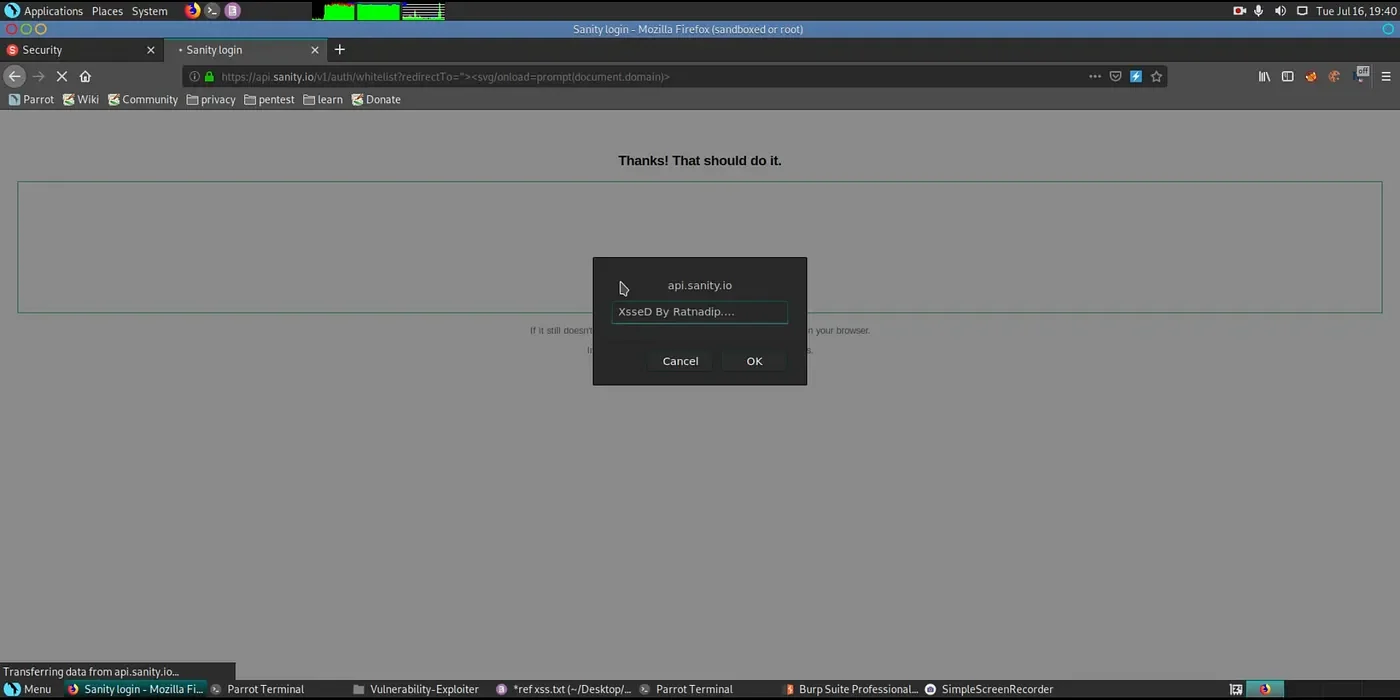
The XSS fired. The conclusion drawn was that alert was blocked, which is why the earlier payloads did not execute. The input was reflected in the DOM, and the prompt payload fired.
Step 2: the same XSS on subdomains of the API host
A second enumeration pass with knockpy produced subdomains of subdomains, for example:
https://1goh1ap5.api.sanity.io/
https://v475t82f.api.sanity.io/
https://w7l5ei8i.api.sanity.io/
https://wb68e9ma.api.sanity.io/
These also redirected to https://accounts.sanity.io/login. Putting the XSS payload after ?redirectTo= on one of them triggered the same execution:
https://1goh1ap5.api.sanity.io/v1/auth/whitelist?redirectTo=XSS_Payload
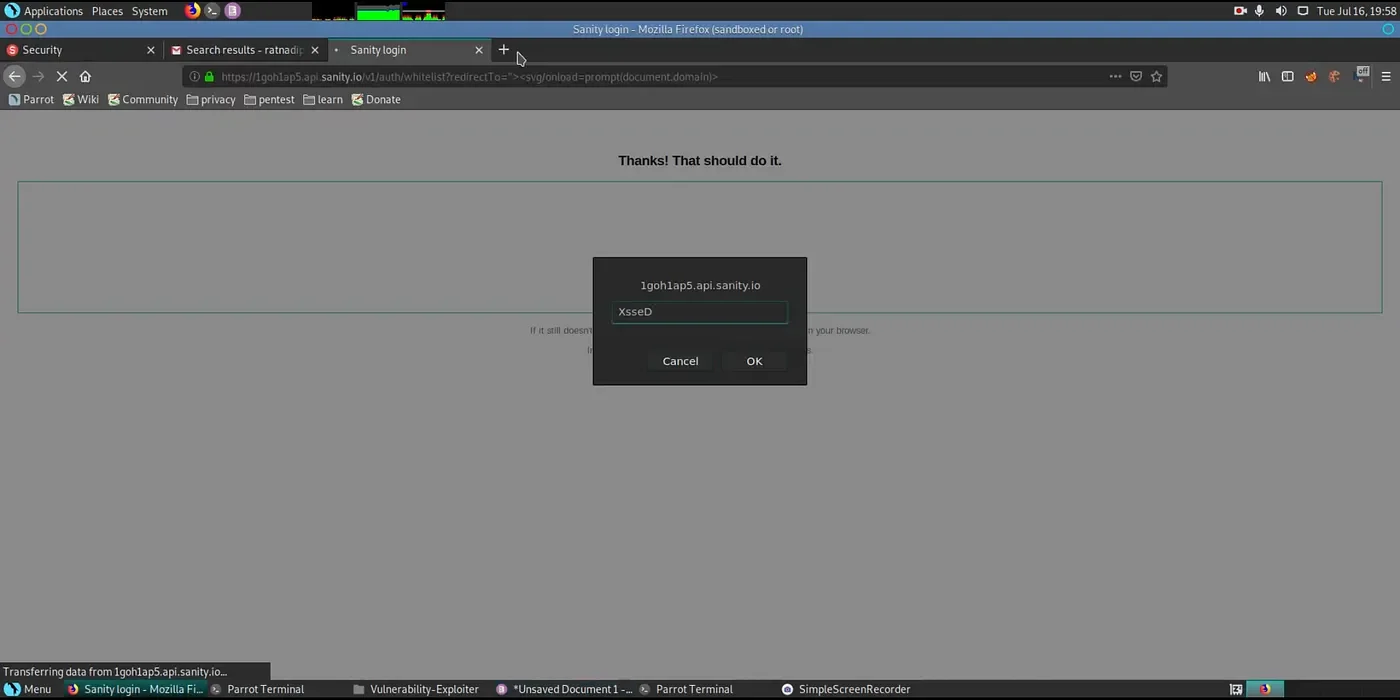
In total, 10 subdomains were affected by the reflected XSS. The issue was reported to the security team, fixed within a few days, and rewarded.
Step 3: the endpoint changes behaviour after the fix
Seven days later, api.sanity.io no longer redirected anywhere on opening. Reopening the vulnerable URL produced no pop-up and no error:
https://api.sanity.io/v1/auth/whitelist?redirectTo=
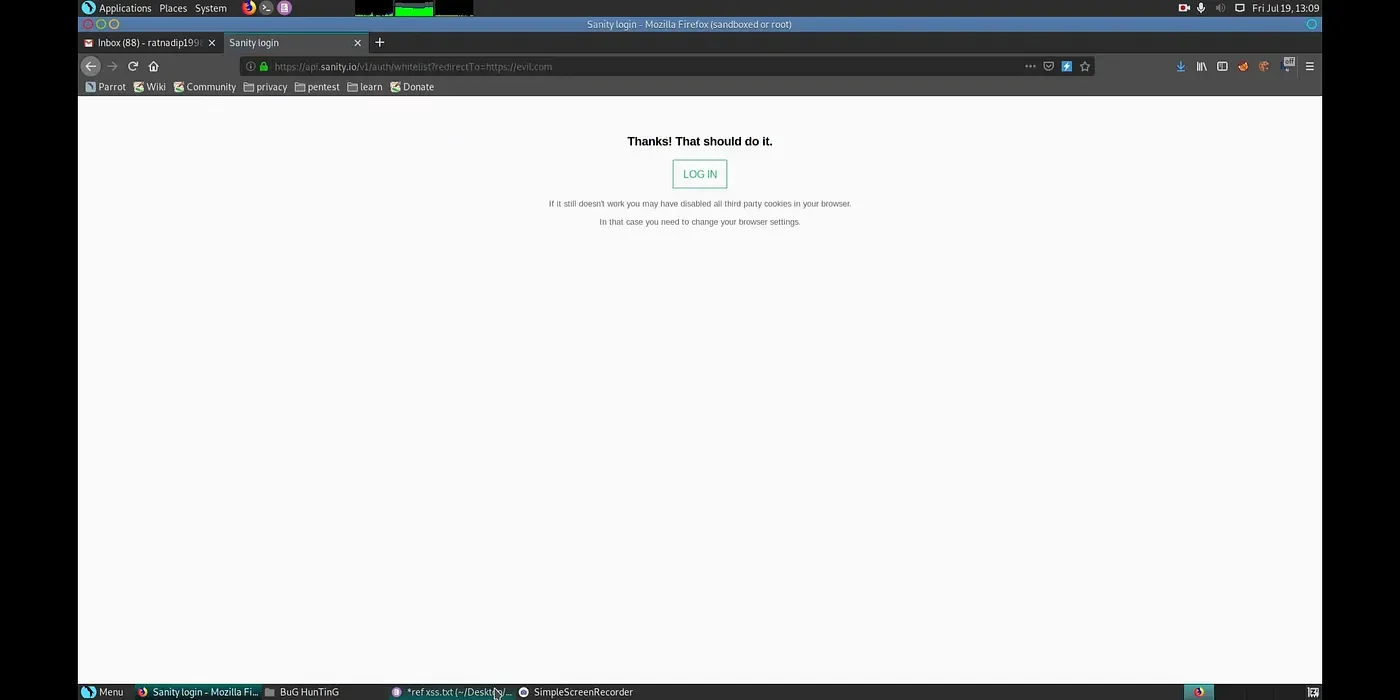
Instead, the page now showed a login button. With evil.com placed after ?redirectTo= and the login button clicked, the browser was sent to evil.com. That is the open redirect, and it only fires on the button click rather than on page load.
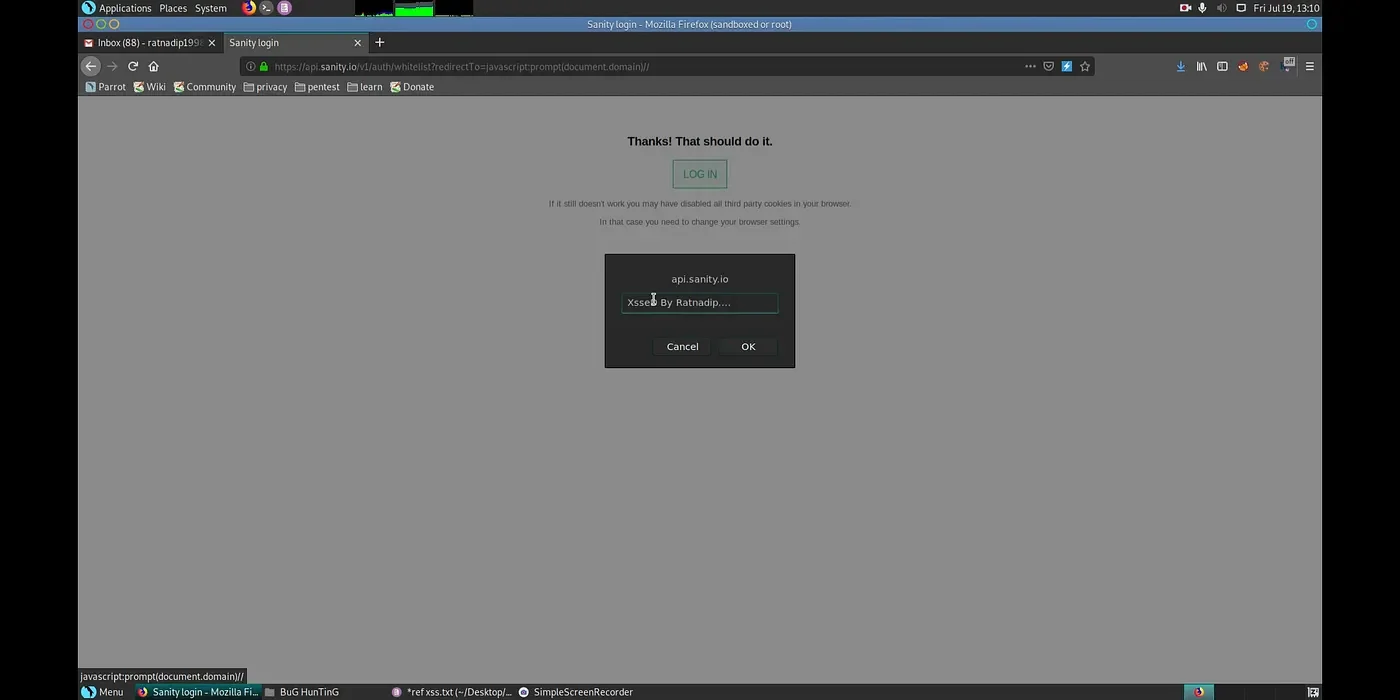
Step 4: XSS again, through the login button
Replacing evil.com with the XSS payload and clicking the login button triggered XSS a second time on the same endpoint. Since the same 10 subdomains were affected before, they were all vulnerable to this second variant as well.
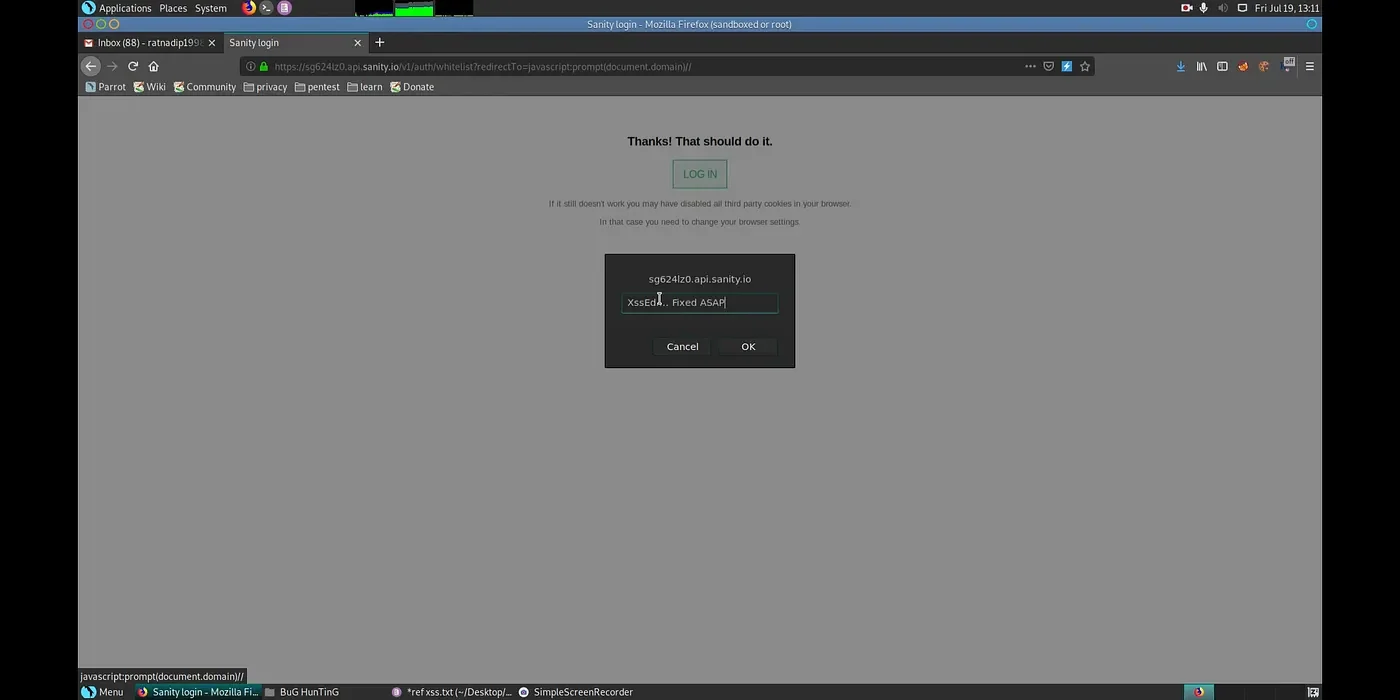
This second issue was reported and also fixed. Two video proofs of concept were published alongside the write-up:
https://youtu.be/rc4K4l1avxk
https://youtu.be/M20jtNcPyvc
Root cause
The redirectTo value is taken from the query string and written into the page. The reflection is not visible in the raw HTML source but is present in the DOM, which is why the element inspector found the input when view-source did not. The value is reflected into the page and a payload placed there executes. The alert function being blocked did not prevent execution; it only hid it from the first round of testing, and prompt demonstrated the same sink.
After the first fix, the endpoint stopped redirecting on load and began rendering a login button instead. The redirectTo value was still used as the destination when that button was clicked, and it was still written into the page, so both the open redirect and the XSS returned through the new interaction.
Impact
An attacker who can get a victim to open a crafted /v1/auth/whitelist?redirectTo= URL can run script in the origin of api.sanity.io and its affected subdomains, or send the victim to an arbitrary site after they press the login button. The first XSS fired on page load; the open redirect and the second XSS fired after the login button was clicked. The report does not describe what session data or actions were reachable from that origin, so the practical ceiling of the XSS is not established here. The affected surface was 10 subdomains under api.sanity.io.
Fix
The report states that the team fixed the issue after each of the two reports. It does not describe the code change.
Variants to test
- Open the API host and copy the full redirect chain into a notepad. Any parameter that carries a URL, such as
redirectTo,redirect_uri,return, ornext, is a candidate. A positive result is a 404 or error page whose DOM contains your input when inspected, even if view-source does not show it. - Send a benign marker such as
XSS_Payloadin the parameter and inspect the error page element by element. A positive result is the marker appearing in the DOM. - If
alertdoes not fire, trypromptorconfirm. A positive result is a dialog appearing wherealertproduced nothing. - Enumerate subdomains of the API host with
dnsdumpster.comand thenknockpy, and repeat the payload on each host that redirects to the same login page. A positive result is the same execution on hosts that share the endpoint. - After a fix, reload the endpoint with an empty value and look for a changed interaction, such as a button that performs the navigation. Put an external domain in the parameter and click the button. A positive result is a redirect to that domain.
- Put the XSS payload back in the parameter and click the same button. A positive result is execution through the click path, which shows the fix only covered the load path.
What happened, in plain words
A security researcher found a bug in a website called Sanity.io. Sanity.io is a service that stores and delivers content for other websites and apps. Its main technical door, called an API, lives at api.sanity.io. An API is the part of a service that other programs talk to, rather than the part a person clicks around in. Think of a restaurant: the dining room is the website you see, and the kitchen door where orders are handed in is the API.
The researcher found that one address on that API, /v1/auth/whitelist, took a value from the address bar called redirectTo and used it unsafely. First, it put the value into the page in a way that let an attacker run their own code in a victim's browser. That class of bug is called cross-site scripting, or XSS. Second, it used the value to send the visitor to another website of the attacker's choosing. That is called an open redirect.
The interesting part is that the researcher found the same endpoint broken twice. The first time, the XSS fired. The team fixed it. A week later, the page behaved differently: it showed a login button. The same value was still trusted, and the open redirect and XSS came back through the button click. The researcher also found the first bug on 10 subdomains. A subdomain is a smaller address under a main one, like a room number inside a building.
The starting point
The researcher saw a LinkedIn post from a friend who had been paid a reward by this site. Companies often run bug bounty programmes: if you find a security problem and report it privately, they pay you. The researcher decided to look for anything the friend might have missed.
The stated habit is to target subdomains rather than the main domain. The reasoning is practical: big companies guard their front door carefully, but the many smaller doors underneath are easy to forget. A subdomain is any name that sits to the left of the main domain, such as api.sanity.io under sanity.io.
Setup: finding the doors
No account or special access was needed. Everything was done from a normal browser against public addresses. Three tools were used:
dnsdumpster.com, a free website that lists subdomains for a domain you type in. The researcher entered the domain name (for examplesanity.io) and pressed search. Within seconds it returned a list of subdomains.knockpy, a command-line tool that does the same kind of search but more thoroughly. It was used later and turned up subdomains of subdomains.- The browser's view-source tab and its element inspector. These turned out to be the decisive tools, as you will see.
DNS, by the way, is the internet's address book: it translates a name like sanity.io into the numeric address of a server. A tool like dnsdumpster reads public records from that address book to guess which names exist.
From the dnsdumpster results, the researcher picked api.sanity.io as the target.
Finding it
Opening api.sanity.io in the browser did not show a page. It immediately sent the browser to a login page on a different host, accounts.sanity.io:
https://accounts.sanity.io/login/redirectTo=https%3A%2F%2Faccounts.sanity.io%2Fapi%2Fv1%2Foauth%2Fauthorize%3Fresponse_type%3Dcode%26redirect_uri%3Dhttps%253A%252F%252Fapi.sanity.io%252Fv1%252Fauth%252Fcallback%252Fsanity%26state%3Du3vRNiBfJA4DvEwolSJbPKYF%26client_id%3Doc-3I2pHriWuK29
This is a redirect chain. The first address sends you to a second address, which may send you to a third. The %3A and %2F pieces are encoded characters: %3A is a colon and %2F is a slash. Browsers encode addresses this way so that special characters do not get confused with the structure of the address. The redirectTo= part tells the login page where to send you once you are done. The state and client_id values are part of the login handshake, called OAuth, which lets one site ask another site to confirm who you are.
Opening the host again and copying the address into a notepad gave the endpoint of interest:
https://api.sanity.io/v1/auth/whitelist?redirectTo=https://accounts.sanity.io/login/redirectTo=https%3A%2F%2Faccounts.sanity.io%2Fapi%2Fv1%2Foauth%2Fauthorize%3Fresponse_type%3Dcode%26redirect_uri%3Dhttps%253A%252F%252Fapi.sanity.io%252Fv1%252Fauth%252Fcallback%252Fsanity%26state%3Du3vRNiBfJA4DvEwolSJbPKYF%26client_id%3Doc-3I2pHriWuK29
An endpoint is one specific address that a service answers on, like one counter in a large office. The part after the ? is the query string: a list of named values sent along with the request. Here the name is redirectTo and the value is the long login address. A parameter is simply one of those named values. The name redirectTo is a strong hint: it says "where to send the user next". Any parameter that carries a destination is worth testing, because if the server trusts it blindly, an attacker can supply their own destination.
The first test was open redirection. An open redirect is a bug where a site will send a visitor to any address an attacker puts in the link. It is dangerous because the link starts with the real company's name, so victims trust it. The researcher put http://evil.com after ?redirectTo=. The response was a 404 error, which means "page not found". So the redirect did not happen, at least not on page load.
The second test was XSS. Cross-site scripting means getting your own JavaScript to run inside someone else's website, in the victim's browser. JavaScript is the programming language that browsers run to make pages interactive. If an attacker can run their script on a trusted site, the script can read what the page can read and act as the logged-in user. The researcher tried basic payloads, such as an img tag and an svg tag containing alert(1). A payload here is just the text you put into the parameter hoping the site will treat it as code. alert(1) is the classic test: if it runs, a small pop-up box appears. Nothing fired.
Viewing the page source showed no sign of the payload. View-source shows the HTML the server sent, the raw text of the page before the browser has done anything with it. Seeing nothing there suggested XSS was not present.
The turning point was a memory of an earlier finding on braze.com. In that case, the input did not appear in the source, but it did appear when inspecting the element. The element inspector is a browser tool that shows the live page after the browser has built it, which can differ from the raw source. The browser builds a structure called the DOM, short for Document Object Model: a tree of objects representing everything on the page. Scripts on the page can add to or change that tree after it loads. So input can be missing from view-source yet present in the DOM.
Inspecting the error page and searching for the input showed it was reflected, meaning the site had copied the input back into the page. Yet the XSS still did not execute. So the value was reaching the page, but something was stopping the code from running.
Exploitation
Step 1: reflected XSS with a prompt payload
The payload was changed from alert to prompt:
https://api.sanity.io/v1/auth/whitelist?redirectTo=XSS_Payload
This time the XSS fired. The conclusion was that alert was blocked, which is why the earlier payloads did nothing. prompt is another built-in browser function that shows a dialog box asking for input. If a site blocks one dialog function, another may still work. The reflection had been in the DOM all along; only the function call was being suppressed. This is a common lesson: a failed payload does not prove the bug is absent, only that your particular payload did not run.
Step 2: the same XSS on subdomains of the API host
A second enumeration pass with knockpy produced subdomains of subdomains, for example:
https://1goh1ap5.api.sanity.io/
https://v475t82f.api.sanity.io/
https://w7l5ei8i.api.sanity.io/
https://wb68e9ma.api.sanity.io/
These are separate hostnames, each with its own random-looking prefix, all sitting under api.sanity.io. They also redirected to https://accounts.sanity.io/login. Putting the XSS payload after ?redirectTo= on one of them triggered the same execution:
https://1goh1ap5.api.sanity.io/v1/auth/whitelist?redirectTo=XSS_Payload
In total, 10 subdomains were affected by the reflected XSS. The issue was reported to the security team, fixed within a few days, and rewarded. Reporting privately first is the norm in bug bounty work: it gives the company time to fix the problem before anyone can abuse it.
Step 3: the endpoint changes behaviour after the fix
Seven days later, api.sanity.io no longer redirected anywhere when opened. Reopening the vulnerable URL produced no pop-up and no error:
https://api.sanity.io/v1/auth/whitelist?redirectTo=
Notice the value after redirectTo= is empty. Instead of an error page, the page now showed a login button. This is a change in how the page works, and changes after a fix are worth studying: a fix often closes one path while leaving another open.
With evil.com placed after ?redirectTo= and the login button clicked, the browser was sent to evil.com. That is the open redirect, and this time it only fires on the button click rather than on page load. The destination was still being trusted, just at a different moment.
Step 4: XSS again, through the login button
Replacing evil.com with the XSS payload and clicking the login button triggered XSS a second time on the same endpoint. Since the same 10 subdomains were affected before, they were all vulnerable to this second variant as well.
This second issue was reported and also fixed. Two video proofs of concept were published alongside the write-up:
https://youtu.be/rc4K4l1avxk
https://youtu.be/M20jtNcPyvc
A proof of concept is a small demonstration that shows a bug is real, usually a recording or a set of steps someone else can repeat.
Root cause
The redirectTo value is taken from the query string and written into the page. The reflection is not visible in the raw HTML source but is present in the DOM, which is why the element inspector found the input when view-source did not. The value is reflected into the page and a payload placed there executes. An origin is the combination of scheme, host and port, such as https://api.sanity.io; scripts from one origin are normally kept apart from another. Neutralising, or encoding, means turning characters that have special meaning into harmless text so the browser shows them instead of running them. The alert function being blocked did not prevent execution; it only hid it from the first round of testing, and prompt demonstrated the same sink. A sink is the place where untrusted data finally gets used in a dangerous way, such as being inserted into the page as code.
After the first fix, the endpoint stopped redirecting on load and began rendering a login button instead. The redirectTo value was still used as the destination when that button was clicked, and it was still written into the page, so both the open redirect and the XSS returned through the new interaction. Validation means checking the value against a list of allowed destinations; encoding means making it safe to display.
Impact
An attacker who can get a victim to open a crafted /v1/auth/whitelist?redirectTo= URL can run script in the origin of api.sanity.io and its affected subdomains, or send the victim to an arbitrary site after they press the login button. The first XSS fired on page load; the open redirect and the second XSS fired after the login button was clicked. The report does not describe what session data or actions were reachable from that origin, so the practical ceiling of the XSS is not established here. The affected surface was 10 subdomains under api.sanity.io.
Fix
The report states that the team fixed the issue after each of the two reports. It does not describe the code change. An allowlist is the opposite of a blocklist: instead of listing what is forbidden, you list exactly what is allowed and reject everything else.
Variants to test
- Open the API host and copy the full redirect chain into a notepad. Any parameter that carries a URL, such as
redirectTo,redirect_uri,return, ornext, is a candidate. A positive result is a 404 or error page whose DOM contains your input when inspected, even if view-source does not show it. - Send a benign marker such as
XSS_Payloadin the parameter and inspect the error page element by element. A positive result is the marker appearing in the DOM. - If
alertdoes not fire, trypromptorconfirm. A positive result is a dialog appearing wherealertproduced nothing. - Enumerate subdomains of the API host with
dnsdumpster.comand thenknockpy, and repeat the payload on each host that redirects to the same login page. A positive result is the same execution on hosts that share the endpoint. - After a fix, reload the endpoint with an empty value and look for a changed interaction, such as a button that performs the navigation. Put an external domain in the parameter and click the button. A positive result is a redirect to that domain.
- Put the XSS payload back in the parameter and click the same button. A positive result is execution through the click path, which shows the fix only covered the load path.
Glossary
- API: the part of a service that other programs talk to, rather than the part a person clicks around in.
- Subdomain: a smaller name under a main domain, such as
api.sanity.ioundersanity.io. - DNS: the internet's address book, which translates names into server addresses.
- Endpoint: one specific address that a service answers on.
- Query string: the part of an address after the
?, made of named values sent with the request. - Parameter: one named value inside a query string.
- Redirect: an instruction from a server telling the browser to go to another address.
- Redirect chain: a series of redirects, each address sending the browser to the next.
- URL encoding: replacing special characters with codes such as
%3Aand%2Fso they are not confused with the structure of the address. - OAuth: a login handshake that lets one site ask another site to confirm who you are.
- XSS (cross-site scripting): getting your own JavaScript to run inside someone else's website, in the victim's browser.
- JavaScript: the programming language browsers run to make pages interactive.
- Payload: the text you put into a parameter hoping the site will treat it as code.
alert: a built-in browser function that shows a small pop-up box, used as the classic XSS test.prompt: a built-in browser function that shows a dialog asking for input; used here whenalertwas blocked.confirm: a built-in browser function that shows a yes/no dialog.- Open redirect: a bug where a site will send a visitor to any address an attacker puts in the link.
- 404: the error meaning "page not found".
- View-source: a browser view showing the raw HTML the server sent, before the browser has built the page.
- DOM (Document Object Model): the live tree of objects the browser builds from the page, which scripts can change after load.
- Element inspector: a browser tool that shows the live DOM, which can differ from the raw source.
- Reflection: when a site copies your input back into the page.
- Origin: the combination of scheme, host and port, such as
https://api.sanity.io; scripts from one origin are normally kept apart from another. - Sink: the place where untrusted data finally gets used in a dangerous way, such as being inserted into the page as code.
- Neutralising / encoding: turning characters that have special meaning into harmless text so the browser shows them instead of running them.
- Validation: checking a value against a list of allowed destinations.
- Allowlist: a list of exactly what is permitted, with everything else rejected.
- Bug bounty programme: a scheme where a company pays people who find and privately report security problems.
- Proof of concept: a small demonstration that shows a bug is real and can be repeated.
knockpy: a command-line tool that searches for subdomains more thoroughly.