How to find & access Admin Panel by digging into JS files…🥰
A staging admin panel was exposed on an origin server behind Cloudflare, and the author found its IP via Shodan/Censys and accessed it directly. The panel accepted default admin credentials, giving full administrative access.
 Published on medium.com
I’m back again with a new write-up…Again this article is about Admin Panel Access…( This is my 5th write-up on Admin Access more on the way…)😄
The full write-up lives on its author's site
It belongs to its author, so we link to it rather than copy it. The other two tabs are our own rewrites, checked against it.
Context
This is a write-up about gaining access to an administrative panel, found through JavaScript file analysis rather than through the usual injection classes. The researcher had received an invitation to a private HackerOne program a few days before, and refers to the company throughout as "target.com". The program had more than 100 resolved reports at the time, which shaped the decision not to spend effort on common issues such as XSS, CRLF or header injection.
The feature at the centre of the report is a login page on a staging host, https://stagging-dev.target.com, which the researcher reached from a URL extracted out of a production JavaScript bundle. Behind Cloudflare, that host resisted the usual login bypass attempts. The panel eventually reached was a "Barracuda system Panel", served from an origin IP address rather than from the hostname.
Setup
The work needs no account on the target: everything starts from public data. The tools used were:
- wayback urls, gau and OTX, to collect historical and known URLs for
target.com fff, to filter the collected URLs down to live onesgrep, to narrow the live list by path keywordsNemesis(https://github.com/machinexa2/Nemesis), for recon and secret extraction from a single JavaScript file- Shodan and Censys, to look for the origin IP behind Cloudflare
- Firefox, to open the candidate IP and accept the certificate warning
The only precondition worth noting is that the target served its front end as chunked JavaScript bundles under a static path, and that one of those bundles referenced a non-production host.
Finding it
The researcher started by pulling every JavaScript URL for the domain:
cat jslist.txt | fff | grep 200 | cut -d “ “ -f1 | tee livejs.txt
fff reads the list on stdin and the pipeline keeps only the entries whose status is 200, cuts the URL field and writes the result to livejs.txt. That left more than 300 live JavaScript URLs. Since not all of them are useful, the list was filtered again by path keyword:
cat livejs.txt | grep dev
cat livejs.txt | grep app
cat livejs.txt | grep static
These keep only URLs whose path contains dev, app or static. In this case the interesting file was:
https://target.com/static/js/main.235e6842.chunk.js
The bundle was then run through Nemesis:
The -e flag produced a batch of information including a number of HTTP and HTTPS URLs. Opening those URLs by hand in a browser surfaced one that served a login page:
https://stagging-dev.target.com
That is the finding: a staging hostname embedded in a production JavaScript chunk, reachable from the internet.
Exploitation
Step 1: try the obvious against the login page
On https://stagging-dev.target.com the researcher tried redirect bypass, force browsing, SQL bypass and default-credential brute force. None of them worked. Brute forcing the admin panel caused Cloudflare to block the source IP. The URL was saved to notepad and, after some time, the IP was unblocked.
Step 2: find the origin behind Cloudflare
With the hostname protected, the next move was to locate the origin. Shodan and Censys searches produced an IP address for the site, shown in the report as 20.xxx.xxx.x8. To check whether that address really belonged to the same organisation, the researcher opened it directly:
https://20.xxx.xxx.x8
Firefox refused the connection with a certificate error stating that the certificate was not valid for the IP and was only valid for *.target.com and target.com. That mismatch confirmed the IP belonged to the same organisation.
Step 3: accept the certificate and reach the panel
The warning was bypassed with Firefox's "Accept the risk and continue" button. The IP then redirected to an admin panel, this time a "Barracuda system Panel", at:
https://20.xxx.xxx.x8/cgi-mod/index.cgi?locale=en_US
Step 4: log in with default credentials
The researcher entered admin in both the username and password fields and clicked the login button. Access to the admin panel was granted.
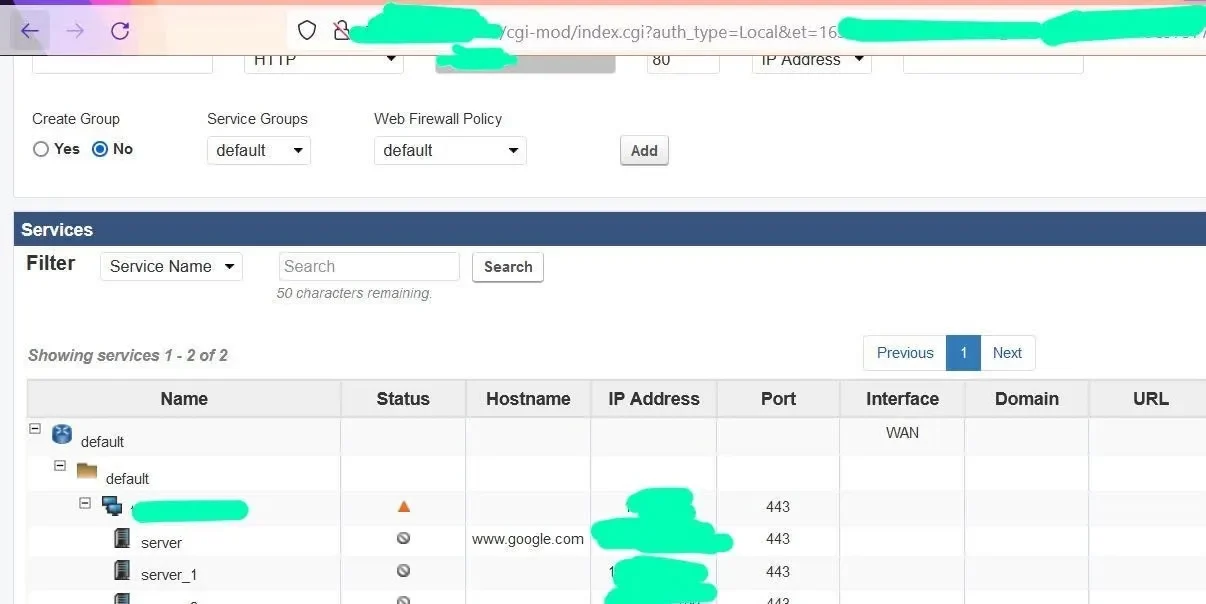
The screenshot shows the Barracuda panel reached at the origin IP after logging in with admin in both fields.
No further digging into the panel was done. A video proof of concept was recorded and submitted to the program. The HackerOne team triaged the report and set the severity to High 8.3 within an hour.
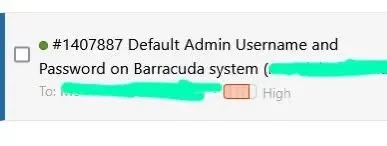
The issue was reported, then fixed within days.
Root cause
Two weaknesses combine here. The first is information exposure: a production JavaScript bundle referenced a staging hostname, which gave an outsider a target that was presumably meant to be internal or at least not advertised. The second is that the staging host sat behind Cloudflare while an origin IP belonging to the same organisation could be reached directly. On top of that, the Barracuda panel on the origin accepted admin in both the username and password fields.
Cloudflare did stop the brute-force attempt against the hostname, so the protection was working at that layer. The report does not describe how the origin IP was exposed beyond the Shodan and Censys searches.
Impact
An unauthenticated attacker who can reach the origin IP obtains administrative access to the Barracuda system panel by entering admin in both fields. The researcher did not explore the panel after logging in, so the report does not describe what an administrator could do there. The severity assigned by the triage team was High 8.3, and the issue was fixed within days of the report.
Fix
Based on the findings, the fixes that address each layer are: remove the staging hostname from production JavaScript bundles, restrict the origin so it only accepts traffic from Cloudflare (or otherwise is not reachable directly by IP), and change the admin credentials on the Barracuda panel.
Variants to test
- Pull JavaScript bundles for a target and grep the live list for
dev,stag,staging,test,internal,adminandapi. A positive result is a hostname in a bundle that resolves and serves an application, especially one that is not linked from the main site. - Run a secret and URL extractor such as Nemesis over each bundle. A positive result is an absolute URL, API base or credential that the front end does not otherwise expose.
- For any hostname found, resolve the origin through Shodan or Censys and open the IP over HTTPS. A positive result is a certificate error naming the target's domains, which confirms the IP belongs to the organisation.
- After accepting the certificate, check whether the IP serves the same application without the WAF in front. A positive result is a login page or panel that responds directly, where the hostname was blocked or rate-limited.
- Try default credentials on any administrative panel reached this way, starting with
admin/admin. A positive result is a session in the panel; stop there and report rather than exploring further. - Repeat the brute-force attempt against the hostname and note whether Cloudflare blocks the IP, then retry against the origin. A positive result is that the origin responds where the hostname was blocked.
What happened, in plain words
A security researcher was invited to a private bug bounty program on HackerOne. A bug bounty program is a scheme where a company pays people to look for security problems in its systems and report them privately, instead of the company finding out the hard way. The researcher calls the company "target.com" throughout, which is a stand-in name so the real company stays anonymous.
The program already had more than 100 resolved reports. A resolved report is one the company has looked at and closed, either because it was fixed or because it was not a real problem. Seeing that many, the researcher decided not to spend time on the usual, well-trodden bug types such as XSS, CRLF or header injection. Those are common classes of web bug that many people test for, so the chance of finding something new there is lower.
Instead, the researcher went looking in JavaScript files. JavaScript is the programming language that runs inside your browser and makes websites interactive. Modern websites ship their JavaScript as files the browser downloads, and those files sometimes contain leftovers from development: internal addresses, test servers, comments, and links that were never meant to be public. Reading them is like finding a company's internal phone directory in a leaflet they handed out on the street.
That is how the researcher found a login page on a staging host. A staging host is a copy of a website used for testing before changes go live, and it is usually not meant to be reachable by the public. The host was https://stagging-dev.target.com. It sat behind Cloudflare, a service that sits in front of a website, hides its real server and blocks suspicious traffic. The usual tricks to get past the login did not work, and trying many passwords got the researcher's IP address blocked by Cloudflare. An IP address is the numeric address of a computer on the internet, a bit like a postal address for a machine.
The researcher then used search engines for internet-connected devices, Shodan and Censys, to find the real server sitting behind Cloudflare. That real server is called the origin: the machine that actually runs the site, which Cloudflare forwards traffic to. Opening the origin's IP address directly in Firefox produced a certificate warning. A certificate is the digital ID a website presents to prove it is who it claims to be, and browsers check it automatically. The warning said the certificate was only valid for *.target.com and target.com, which confirmed the IP belonged to the same company.
After accepting the warning, the IP address led to a "Barracuda system Panel", an administrative login page. The researcher typed admin into both the username and password fields and got in. A video proof of concept was recorded and submitted. A proof of concept is a small demonstration that a bug is real, here a recording showing the login succeeding. The HackerOne team triaged the report, meaning they confirmed and rated it, and set the severity to High 8.3 within an hour. Severity is a score for how serious a bug is. The issue was fixed within days.
Setup
Nothing here needs an account on the target. Everything starts from information the company publishes publicly, which is what makes this approach so accessible to a beginner.
The tools used were:
- wayback urls, gau and OTX, to collect historical and known URLs for
target.com. A URL is a web address, the thing you type in the address bar. These services keep records of addresses that have been seen on the internet, including old ones that may no longer be linked anywhere. fff, to filter the collected URLs down to live ones. "Live" means the address still responds when you ask for it, rather than returning an error.grep, a command-line tool that searches text for a pattern and prints only the matching lines.Nemesis(https://github.com/machinexa2/Nemesis), for recon and secret extraction from a single JavaScript file. Recon is short for reconnaissance: gathering information about a target before attacking it, like casing a building before a burglary.- Shodan and Censys, to look for the origin IP behind Cloudflare. These are search engines that index internet-connected machines rather than web pages.
- Firefox, to open the candidate IP and accept the certificate warning.
The only precondition worth noting is that the target served its front end as chunked JavaScript bundles under a static path. A bundle is several JavaScript files packed into one download to save requests, and "chunked" means the site splits its code into several such bundles. One of those bundles referenced a non-production host, meaning a server that is not the live public one.
Finding it
The researcher started by pulling every JavaScript URL for the domain:
cat jslist.txt | fff | grep 200 | cut -d “ “ -f1 | tee livejs.txt
This is a pipeline, a chain of commands where the output of one is fed into the next, like a series of pipes carrying water. Line by line:
cat jslist.txtprints the contents of a file calledjslist.txt, which holds the list of JavaScript URLs gathered earlier.| fffsends that list intofff, a tool that checks each URL and reports whether it is alive.| grep 200keeps only the lines containing200. In web terms, 200 is the status code a server returns when a page loads successfully, so this keeps only the URLs that actually work.| cut -d “ “ -f1splits each line on a space and keeps the first field, which is the URL itself, dropping any extra textfffadded.| tee livejs.txtwrites the result to a file calledlivejs.txtwhile also showing it on screen.
That left more than 300 live JavaScript URLs. Since not all of them are useful, the list was filtered again by path keyword:
cat livejs.txt | grep dev
cat livejs.txt | grep app
cat livejs.txt | grep static
Each line prints the file and keeps only the URLs whose path contains dev, app or static. The reasoning is simple: a path containing dev might point at a development server, app at an application, and static at the folder where built files live. These are the places where interesting leftovers tend to hide. In this case the interesting file was:
https://target.com/static/js/main.235e6842.chunk.js
The bundle was then run through Nemesis:
Here -u tells Nemesis which URL to fetch, and -e tells it to extract things of interest from the file. The result was a batch of information including a number of HTTP and HTTPS URLs. Opening those URLs by hand in a browser surfaced one that served a login page:
https://stagging-dev.target.com
That is the finding: a staging hostname embedded in a production JavaScript chunk, reachable from the internet. The production code was effectively advertising a test server that nobody had meant to expose.
Exploitation
Step 1: try the obvious against the login page
On https://stagging-dev.target.com the researcher tried redirect bypass, force browsing, SQL bypass and default-credential brute force. In plain terms:
- A redirect bypass means trying to make the site send you somewhere you are not supposed to go, for example by tampering with the address it redirects to.
- Force browsing means requesting pages directly by their address, hoping the site forgot to check whether you are logged in.
- SQL bypass means putting special characters into a login form to confuse the database behind it, so that the check is skipped. SQL is the language databases use to store and look up data.
- Default-credential brute force means trying the factory usernames and passwords that products ship with, such as
admin/admin, in case nobody changed them.
None of them worked. Brute forcing the admin panel caused Cloudflare to block the source IP. The URL was saved to notepad and, after some time, the IP was unblocked. This is a useful lesson: a block is often temporary, and the protection was clearly doing its job at that layer.
Step 2: find the origin behind Cloudflare
With the hostname protected, the next move was to locate the origin. Shodan and Censys searches produced an IP address for the site, shown in the report as 20.xxx.xxx.x8. To check whether that address really belonged to the same organisation, the researcher opened it directly:
https://20.xxx.xxx.x8
Firefox refused the connection with a certificate error stating that the certificate was not valid for the IP and was only valid for *.target.com and target.com. That mismatch confirmed the IP belonged to the same organisation. The wildcard *.target.com means any subdomain of target.com, so the certificate covers the company's own names but not a bare IP address.
Step 3: accept the certificate and reach the panel
The warning was bypassed with Firefox's "Accept the risk and continue" button. The IP then redirected to an admin panel, this time a "Barracuda system Panel", at:
https://20.xxx.xxx.x8/cgi-mod/index.cgi?locale=en_US
This address is worth reading slowly. cgi-mod is a folder, index.cgi is the script that handles the login, and ?locale=en_US is a parameter telling the page to display in US English. A parameter is a piece of information passed in the address, after the question mark.
Step 4: log in with default credentials
The researcher entered admin in both the username and password fields and clicked the login button. Access to the admin panel was granted.
The screenshot shows the Barracuda panel reached at the origin IP after logging in with admin in both fields.
No further digging into the panel was done. A video proof of concept was recorded and submitted to the program. The HackerOne team triaged the report and set the severity to High 8.3 within an hour.
The issue was reported, then fixed within days.
Root cause
Two weaknesses combine here. The first is information exposure: a production JavaScript bundle referenced a staging hostname, which gave an outsider a target that was presumably meant to be internal or at least not advertised. The second is that the staging host sat behind Cloudflare while an origin IP belonging to the same organisation could be reached directly. A WAF, or web application firewall, is the filter Cloudflare provides that inspects traffic and blocks attacks. On top of that, the Barracuda panel on the origin accepted admin in both the username and password fields.
Cloudflare did stop the brute-force attempt against the hostname, so the protection was working at that layer. The report does not describe how the origin IP was exposed beyond the Shodan and Censys searches.
Impact
An unauthenticated attacker who can reach the origin IP obtains administrative access to the Barracuda system panel by entering admin in both fields. Unauthenticated simply means without logging in first. The researcher did not explore the panel after logging in, so the report does not describe what an administrator could do there. The severity assigned by the triage team was High 8.3, and the issue was fixed within days of the report.
Fix
Based on the findings, the fixes that address each layer are: remove the staging hostname from production JavaScript bundles, restrict the origin so it only accepts traffic from Cloudflare (or otherwise is not reachable directly by IP), and change the admin credentials on the Barracuda panel.
Variants to test
- Pull JavaScript bundles for a target and grep the live list for
dev,stag,staging,test,internal,adminandapi. A positive result is a hostname in a bundle that resolves and serves an application, especially one that is not linked from the main site. - Run a secret and URL extractor such as Nemesis over each bundle. A positive result is an absolute URL, API base or credential that the front end does not otherwise expose. An API is the interface one program uses to talk to another, like a service counter where you make a request and get a response.
- For any hostname found, resolve the origin through Shodan or Censys and open the IP over HTTPS. A positive result is a certificate error naming the target's domains, which confirms the IP belongs to the organisation.
- After accepting the certificate, check whether the IP serves the same application without the WAF in front. A positive result is a login page or panel that responds directly, where the hostname was blocked or rate-limited.
- Try default credentials on any administrative panel reached this way, starting with
admin/admin. A positive result is a session in the panel; stop there and report rather than exploring further. A session is the logged-in state the server remembers for you, usually tracked with a cookie, a small piece of data your browser stores and sends back with each request. - Repeat the brute-force attempt against the hostname and note whether Cloudflare blocks the IP, then retry against the origin. A positive result is that the origin responds where the hostname was blocked.
Glossary
- Bug bounty program: a scheme where a company pays people to find and privately report security problems in its systems.
- Resolved report: a report the company has reviewed and closed, either as fixed or as not a real issue.
- XSS: cross-site scripting, a bug where an attacker gets their own code to run in another user's browser.
- CRLF injection: a bug where special line-break characters are slipped into a request to confuse the server.
- Header injection: a bug where an attacker adds or alters HTTP headers, the extra lines of information sent with every web request.
- JavaScript: the programming language that runs in the browser and makes websites interactive.
- Bundle: several JavaScript files packed into one download to save requests.
- Chunk: one part of a site's code when it is split into several bundles.
- Staging host: a copy of a website used for testing before changes go live, usually not meant to be public.
- Cloudflare: a service that sits in front of a website, hides its real server and filters traffic.
- WAF: web application firewall, the filter that inspects traffic and blocks attacks.
- IP address: the numeric address of a computer on the internet.
- Origin: the real server that runs a site, which a front service like Cloudflare forwards traffic to.
- Certificate: the digital ID a website presents to prove its identity, checked automatically by browsers.
- Wildcard certificate: a certificate covering any subdomain of a domain, written as
*.target.com. - URL: a web address, the thing you type in the address bar.
- Live URL: an address that still responds successfully rather than returning an error.
- Status code 200: the code a server returns when a page loads successfully.
- grep: a command-line tool that prints only the lines of text matching a pattern.
- Pipeline: a chain of commands where the output of one is fed into the next.
- Recon: reconnaissance, gathering information about a target before attacking it.
- Shodan / Censys: search engines that index internet-connected machines rather than web pages.
- Redirect bypass: trying to make a site send you somewhere you are not supposed to go.
- Force browsing: requesting pages directly by address, hoping the site forgot to check whether you are logged in.
- SQL: the language databases use to store and look up data.
- SQL bypass: putting special characters into a login form to confuse the database and skip the check.
- Brute force: trying many usernames and passwords automatically until one works.
- Default credentials: the factory username and password a product ships with, such as
admin/admin. - Parameter: a piece of information passed in a URL, after the question mark.
- Proof of concept: a small demonstration that a bug is real, here a video recording.
- Triaged: confirmed and rated by the program's security team.
- Severity: a score for how serious a bug is.
- Unauthenticated: without logging in first.
- API: the interface one program uses to talk to another, like a service counter where you make a request and get a response.
- Session: the logged-in state the server remembers for you.
- Cookie: a small piece of data your browser stores and sends back with each request, often used to track a session.