Broken Access Control Exposes Email Verification Status and Privacy Settings via API Endpoint
The user profile API endpoint returns email verification status and privacy preference fields for any username without proper authorization checks. An attacker can enumerate accounts and learn whether a user's email is confirmed or intended to be private.
 Originally disclosed on HackerOne
- Disclosed after 3 days
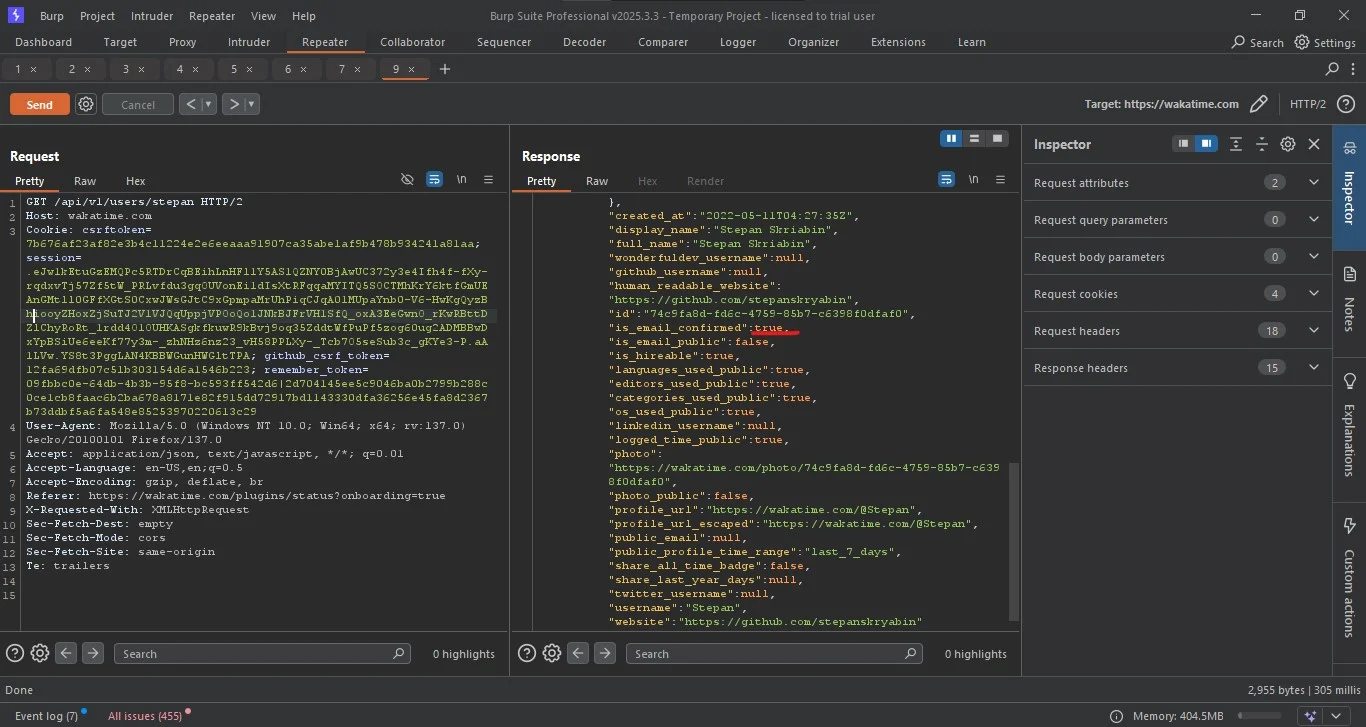
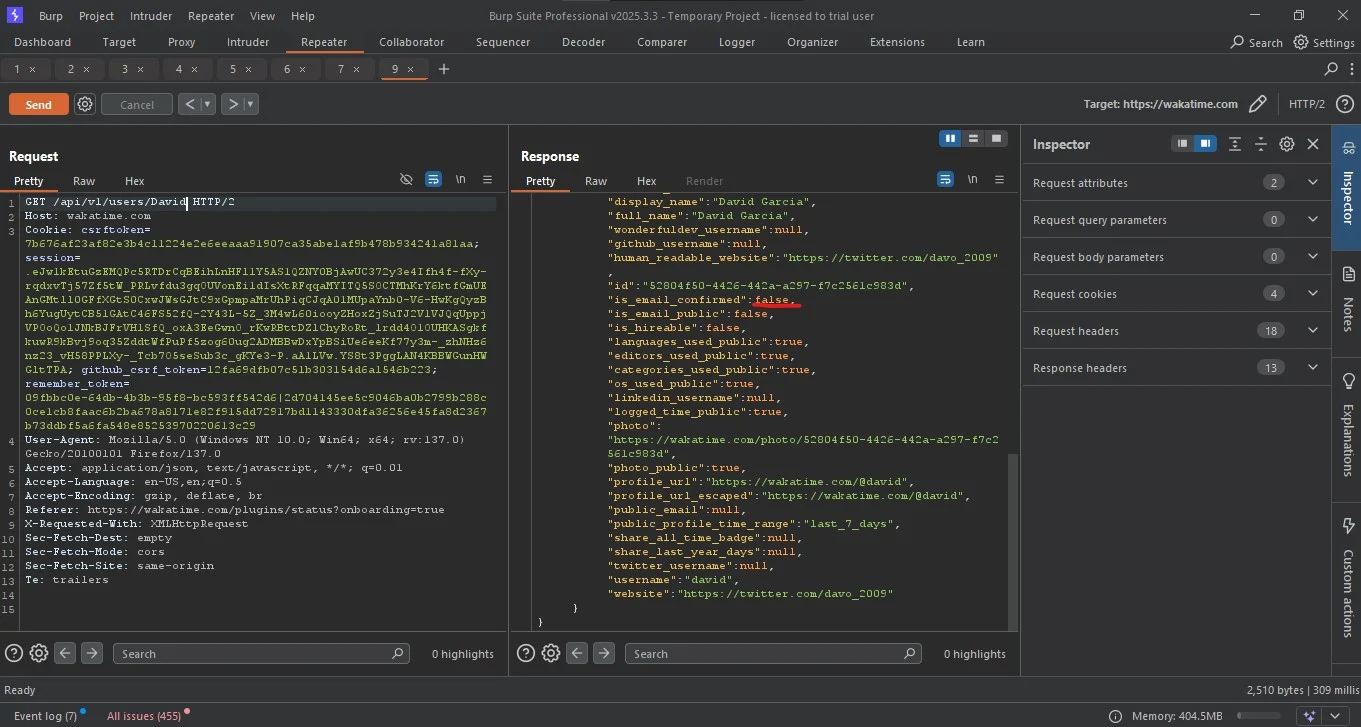
The /api/v1/users/{username} endpoint leaks sensitive email-related metadata (e.g., is_email_confirmed, is_email_public) without proper authorization checks. Attackers can abuse this to: Identify verified/active accounts for targeted attacks. Determine users’ email privacy preferences (even if the email itself is hidden). This behavior allows me to distinguish whether an account's email address is confirmed or not.
#Steps to Reproduce
- Authenticate as a valid user (e.g. user/current).
- Intercept a request to your own profile:
GET /api/v1/users/attacker_user HTTP/2
Host: wakatime.com
Cookie:
- Modify the username in the URL to access another user’s data:
GET /api/v1/users/<any name> HTTP/2
Host: wakatime.com
Cookie:
- Observe the response:
{
  "is_email_confirmed": true,
  "is_email_public": false,
  "public_email": null,
  // ... other sensitive fields
}
Impact
Account Enumeration: Attackers can confirm valid/verified accounts (is_email_confirmed: true), enabling targeted credential stuffing or phishing.
Privacy Violations: Knowing a user’s email privacy preference (is_email_public: false) leaks their intent to keep their email private.
Attack Surface Expansion: Combined with other vulnerabilities (e.g., password reset flaws), attackers can prioritize high-value accounts.
Attachments
Context
WakaTime exposes a public API under wakatime.com, and one of its endpoints is /api/v1/users/{username}. That endpoint returns profile data for a given username. The report focuses on two fields in that response that describe the state of the user's email address: is_email_confirmed and is_email_public.
The weakness is classified as improper access control (generic), rated low severity, and was disclosed on 29 April 2025.
Setup
The only precondition the report describes is a valid authenticated account. The researcher authenticates as a normal user (referred to as user/current) and then uses that session to query the profile endpoint. The requests are shown as HTTP/2 calls to wakatime.com carrying a Cookie header. No specific tool, version or additional role is named.
Finding it
The researcher noticed that the /api/v1/users/{username} endpoint leaks sensitive email-related metadata, specifically is_email_confirmed and is_email_public, without proper authorisation checks. The concern is not that the endpoint returns a profile, but that it returns the email verification state and the email privacy preference of arbitrary accounts. That lets a caller distinguish whether an account's email address is confirmed or not, and infer the user's privacy preference even when the email address itself is hidden.
Exploitation
Step 1: Authenticate as a valid user
The researcher starts from a valid session, for example user/current. This establishes that the requests below are made by an ordinary authenticated user, not an anonymous visitor.
Step 2: Intercept a request to your own profile
With the session in place, the request to the researcher's own profile is captured:
GET /api/v1/users/attacker_user HTTP/2
Host: wakatime.com
Cookie:
The path segment attacker_user is the username being looked up. The report shows the header name with an empty value, so the actual cookie contents are not reproduced here.
Step 3: Change the username to another user's
The only change is the username in the URL:
GET /api/v1/users/<any name> HTTP/2
Host: wakatime.com
Cookie:
The same authenticated session can be pointed at another account by changing the username.
Step 4: Observe the response
The response for the other user still contains the email-related fields:
{
  "is_email_confirmed": true,
  "is_email_public": false,
  "public_email": null,
  // ... other sensitive fields
}
is_email_confirmed: true tells the caller that the account has verified its email address. is_email_public: false tells the caller that the user has chosen to keep the email private. The comment in the response indicates that further sensitive fields are present alongside these, though the report does not enumerate them.
The two screenshots attached to the report show the proof of concept:
Root cause
The endpoint returns per-user email metadata for the username in the path. The report states that the authorisation checks are missing, so the handler does not verify that the caller is allowed to see these fields for the requested account. The fields are part of the profile response returned to an authenticated caller who supplies a username. The report does not describe the server-side implementation, so the exact location of the missing check is not stated.
Impact
The researcher lists three consequences:
- Account enumeration. An attacker can confirm valid and verified accounts (
is_email_confirmed: true), which enables targeted credential stuffing or phishing. - Privacy violations. Learning a user's email privacy preference (
is_email_public: false) leaks their intent to keep their email private. - Attack surface expansion. Combined with other vulnerabilities, such as password reset flaws, an attacker can prioritise high-value accounts.
The researcher lists these effects without stating their scope. The report does not claim that email addresses themselves are disclosed; the leak is the verification state and the privacy preference.
Fix
The report does not describe a fix or a change made by the vendor.
Variants to test
- Other user-scoped endpoints. Look for endpoints that take a username, user ID or slug in the path and return account state fields. A positive result is a response for another user that includes verification flags, privacy settings or similar metadata.
- Field-level filtering. Check whether the same endpoint returns different fields depending on who asks. If your own profile includes
is_email_confirmedbut another user's profile should not, compare the two responses directly. - Related metadata. Test for other account-state fields beyond email, such as whether an account is active, has two-factor authentication enabled, or has a linked identity. A positive result is any of these appearing for an account you do not own.
- Anonymous access. Repeat the request without a session to see whether the fields are exposed even more widely. A positive result is the same metadata returned to an unauthenticated caller.
Hunting notes
During recon, look for API paths of the form /api/v1/users/{identifier} and similar, then compare the response for your own account with the response for a second account you control. Fields that describe account state rather than public profile content are the signal.
What happened, in plain words
It has a website at wakatime.com and, alongside the website, an API: a set of addresses on the server that programs (and browsers) can talk to in order to read or change data. Think of the website as the shop counter with a friendly assistant, and the API as the back door where delivery drivers pick up parcels: same building, same stock, but a different way in, and it expects you to show your paperwork.
One of those API addresses is /api/v1/users/{username}. The {username} part is a placeholder: you replace it with the name of the account you want information about, and the server sends back that account's profile data. The researcher found that this response includes two fields describing the state of the user's email address: is_email_confirmed (has this person clicked the link that proves the email address is really theirs?) and is_email_public (has this person chosen to show their email address on their profile?).
The problem is that these two fields come back for another username you put in the address while logged in. There is no check that you are allowed to see them. The weakness is classed as improper access control (a broad label for "the server did not check whether this person is allowed to do this"), rated low severity, and it was disclosed on 29 April 2025.
A useful comparison: imagine a gym where the front desk will tell anyone who is a member the membership number of any other member, just because they asked politely. Nothing secret like a password leaks, but information that should be private to each member is handed out on request.
Setup
The only thing you need before trying this is a normal, logged-in WakaTime account. The researcher signs in as an ordinary user (called user/current in the report) and then uses that same login to ask the server about other people's profiles.
The requests in the report are shown as HTTP/2 calls. HTTP is the language browsers and servers use to exchange requests and responses; HTTP/2 is simply a newer version of that language. Each request has a method (GET, meaning "give me this"), a path (the address on the server), a Host (which website the request is for) and headers (extra labelled lines of information).
One of those headers is Cookie. A cookie is a small piece of text that a website stores in your browser after you log in, and your browser sends it back with every request so the server can recognise you. It works like a wristband at an event: you show it once at the entrance, and after that the staff glance at your wrist instead of asking for your ID again. In these requests the cookie is what proves the researcher is logged in.
The report shows the Cookie header with an empty value, so the actual contents are not reproduced here. No specific tool or version is named in the report.
Finding it
The researcher noticed that /api/v1/users/{username} gives away email-related information, specifically is_email_confirmed and is_email_public, without checking whether the person asking is entitled to it. The point is not that the endpoint returns a profile at all: profiles are meant to be looked at. The point is that it also returns the email verification state and the email privacy preference of accounts that are not yours.
That means anyone with a login can tell whether a given account has confirmed its email address, and can work out that the user wants their email kept private, even though the email address itself is never shown.
Exploitation
Step 1: Authenticate as a valid user
The researcher starts from a valid session, for example user/current. If the data were only visible to anonymous visitors, that would be a different (and in some ways worse) bug; here the question is what a normal member can see.
Step 2: Intercept a request to your own profile
With the session in place, the researcher intercepts a request to their own profile:
GET /api/v1/users/attacker_user HTTP/2
Host: wakatime.com
Cookie:
Line by line:
GET /api/v1/users/attacker_user HTTP/2is the request line.GETasks the server to return something without changing it./api/v1/users/attacker_useris the path: the API (/api), version 1 (/v1), the users collection (/users), and the specific userattacker_user.HTTP/2says which version of the protocol is being used.Host: wakatime.comtells the server which website the request is aimed at. One server can host many sites, so this line says which one you want.Cookie:is the header that carries the session. The value is left blank in the report, so the actual cookie is not shown.
Capturing your own request first is a standard technique: you already know what the answer should look like for you, so you have a baseline to compare against when you start changing things.
Step 3: Change the username to another user's
The only change is the username in the URL:
GET /api/v1/users/<any name> HTTP/2
Host: wakatime.com
Cookie:
GET /api/v1/users/<any name> HTTP/2is the same request as before, except thatattacker_userhas been replaced by<any name>, a placeholder for any other account's username.Host: wakatime.comis unchanged: still the same website.Cookie:is unchanged: still the researcher's own session.
This is the heart of the test. Nothing about the login changes; only the name in the address changes. If the server answers with the other person's data, it means the server did not check whether this session is allowed to see that person's email settings.
Step 4: Observe the response
The response for the other user still contains the email-related fields:
{
"is_email_confirmed": true,
"is_email_public": false,
"public_email": null,
// ... other sensitive fields
}
This is JSON, a text format for structured data: curly braces hold an object, and each line inside is a name in quotes, a colon, and a value.
"is_email_confirmed": truesays the account has verified its email address."is_email_public": falsesays the user has chosen to keep their email address private."public_email": nullis one of the fields in the response.// ... other sensitive fieldsis a comment in the report noting that more sensitive fields are present alongside these. The report does not list them.
So even though the email address itself stays hidden, the server tells you two things about it: that it is verified, and that the owner wants it private.
The two screenshots attached to the report show the proof of concept:
Root cause
The endpoint returns a user's email metadata for the username in the path. The report states that the authorisation checks are missing: the code that handles the request never verifies that the caller is allowed to see these fields for the requested account. The fields are part of the profile response returned to a logged-in caller who supplies a username.
A comparison: a hotel receptionist who hands out room keys to anyone who can name a guest, without checking that the person asking is the guest. The list of guests is not secret; the keys are.
The report does not describe how the server is built, so the exact place where the check should have been is not stated.
Impact
The researcher lists three consequences:
- Account enumeration. An attacker can confirm valid and verified accounts (
is_email_confirmed: true). Enumeration means systematically working out which accounts are real, for example by trying many usernames and seeing which ones answer. Verified accounts are attractive targets for credential stuffing (taking username and password pairs leaked from one site and trying them on another, because people reuse passwords) and for phishing (sending a fake message that tricks someone into handing over their password). - Privacy violations. Learning that a user has set
is_email_public: falsereveals that they deliberately want their email kept private. That is information about their intentions, even without the address itself. - Attack surface expansion. Combined with other weaknesses, such as flaws in password reset, an attacker can decide which accounts to go after first. "Attack surface" means the total set of ways an attacker could get in; each extra piece of information widens it.
The researcher lists these effects without stating their scope. The report does not claim that email addresses themselves are disclosed: what leaks is the verification state and the privacy preference.
Fix
The report does not describe a fix or any change made by the vendor.
Variants to test
- Other user-scoped endpoints. Look for addresses that take a username, user ID or slug in the path and return account state fields. A positive result is a response about another user that includes verification flags, privacy settings or similar metadata.
- Field-level filtering. Check whether the same endpoint returns different fields depending on who asks. If your own profile includes
is_email_confirmedbut another user's profile should not, compare the two responses directly. - Related metadata. Test for other account-state fields beyond email, such as whether an account is active, has two-factor authentication enabled, or has a linked identity. A positive result is any of these appearing for an account you do not own.
- Anonymous access. Repeat the request without a session to see whether the fields are exposed even more widely. A positive result is the same metadata returned to a caller who is not logged in at all.
Hunting notes
During recon (the exploratory phase where you map out what a target offers), look for API paths of the form /api/v1/users/{identifier} and similar, then compare the response for your own account with the response for a second account you control. Fields that describe account state rather than public profile content are the signal.
Glossary
- API: a set of addresses on a server that programs use to read or change data, separate from the pages a person clicks through in a browser.
- Endpoint: one specific address in an API, such as
/api/v1/users/{username}, that performs one job. - HTTP: the language browsers and servers use to exchange requests and responses.
- HTTP/2: a newer version of HTTP, used for the requests in this report.
- GET: an HTTP method that asks the server to return something without changing it.
- Host header: the line in a request that says which website the request is for.
- Header: an extra labelled line of information sent with an HTTP request or response.
- Cookie: a small piece of text stored by your browser after you log in and sent back with each request so the server recognises you.
- Session: the logged-in state that a cookie represents; the server's memory of who you are.
- Intercepting proxy: a tool that sits between your browser and the server so you can read and edit requests.
- JSON: a text format for structured data, using curly braces for objects and quoted names for fields.
- Field: one named piece of data inside a JSON object, such as
is_email_confirmed. null: a value meaning "nothing here".- Improper access control: a weakness where the server does not check whether the person making a request is allowed to do it.
- Authorisation: the check that decides whether a logged-in user is permitted to perform a particular action or see particular data.
- IDOR (insecure direct object reference): swapping an identifier you are allowed to use, such as your own username, for one you are not, to see whether the server notices.
- Account enumeration: systematically working out which accounts exist, for example by trying many usernames.
- Credential stuffing: trying username and password pairs leaked from one site on another site, relying on people reusing passwords.
- Phishing: sending a fake message that tricks someone into handing over credentials or other sensitive information.
- Attack surface: the total set of ways an attacker could get into a system; more information or features widen it.
- Serialiser: the code that turns data into a format such as JSON before sending it.
- Recon: the exploratory phase of mapping out what a target offers before testing it.
- Severity: a rating of how serious a bug is; this one is rated low.