Email verification over an unencrypted channel
The account confirmation email sent by the service contained an HTTP link instead of HTTPS, allowing a man-in-the-middle attacker to intercept the confirmation token and redirect the user to a fake site. The attacker could then use the token to take over the account because clicking the link automatically logged the user in.

- Fixed in 1 hour
- Disclosed after 20 days
Hey guys,
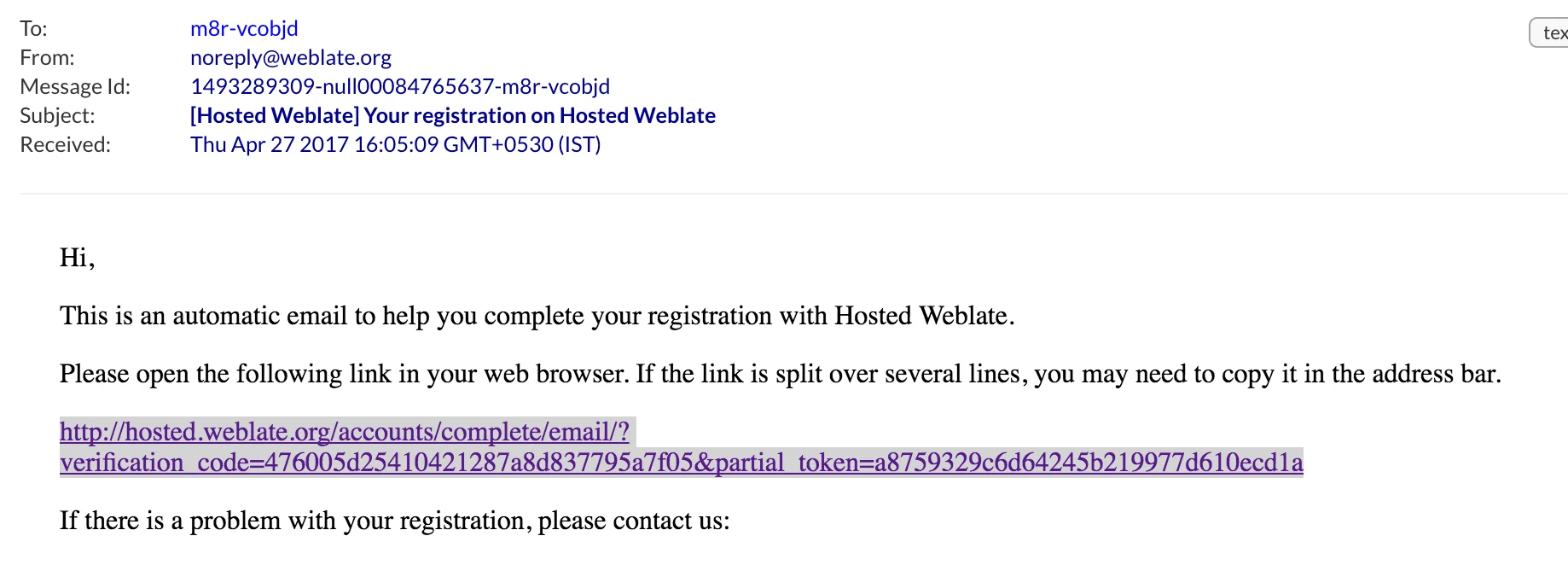
When registered for an account, the confirmation email sent out, has a http link (refer the attachment) and allows a man-in-the-middle attacker to take over the account. He can do the following:
- Obtain the confirmation tokens while transmitting to the weblate infra and redirect the user to a fake site.
- On clicking the link, the user is auto logged in to the account. The attacker can take over the account if he obtains the tokens in the transmission.
Steps to reproduce:
- Navigate to https://hosted.weblate.org/accounts/register/
- Fill up the form and submit
- Open the email inbox
- See the link contains http://. Verify both the visible text as well as the actually link is http://.
- Note that all other links are http:// too
Suggested Fix:
- Change the confirmation link sent through the email, to https://. Both the text visible as well as the actual link.
- Avoid automatic logging into the account when the link is clicked. Display a message saying *Your account is verified. Please login to continue.
Affected area: https://hosted.weblate.org/accounts/register/
Attachments
Not written yet. The AI write-up for this report has not been written yet. The Original tab links to the source.
How it worked
Root cause
Likely the application generated confirmation links using the HTTP scheme instead of HTTPS, and the link automatically authenticated the user upon click.
Impact
A man-in-the-middle attacker could obtain the confirmation token and take over the account, as clicking the link automatically logs the user in.
What the attacker needed
Attacker on the network path (MITM); victim registers an account; victim clicks the confirmation link
The fix
The confirmation link should be changed to HTTPS in both the visible text and the actual link, and clicking the link should not automatically log the user in but instead show a message asking them to log in.
How it was found
- Go to the registration page.
- Fill in the form and submit it.
- Open the email inbox.
- Check that the confirmation link uses http:// in both the visible text and the actual link.
- Note that all other links in the email also use http://.
Explained by bugbounty.wiki with AI from the original and checked against quotes from it; it can still be wrong. Read the original before relying on a detail.
Not written yet. The AI write-up for this report has not been written yet. The Original tab links to the source.
When you sign up, the service sends an email with a link to confirm your account. That link used 'http' instead of 'https', so anyone sitting on the network between you and the service could read the secret code inside the link. With that code, they could log in as you.
What is Account takeover?
Getting into someone else's account through a flaw in sign-in, password reset, second factor, single sign-on or session handling.