Authenticated Cross-site Scripting in Template Name
The WordPress theme editor printed the template name from a file's header comment into the page without escaping it. An attacker who could edit a theme file could store a script in the template name, and it would run in the browser of anyone who opened that file in the editor.

- Triaged in 19 days
- Fixed in 5 months
- Paid in 6 months
- Disclosed after 7 months
###Explanation
During my research on latest WordPress I found that $file_description and $description from wp-admin/theme-editor.php are not filtering name of the template allowing attacker to do XSS attack.
...
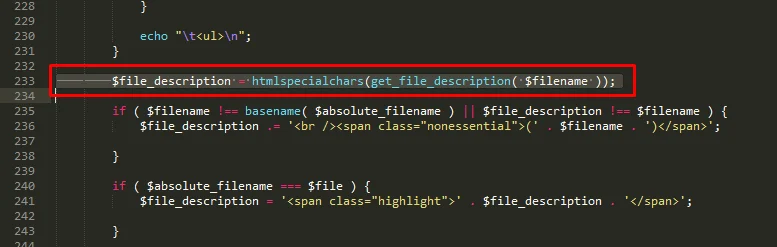
$file_description = get_file_description( $filename );
if ( $filename !== basename( $absolute_filename ) || $file_description !== $filename ) {
$file_description .= '<br /><span class="nonessential">(' . $filename . ')</span>';
}
if ( $absolute_filename === $file ) {
$file_description = '<span class="highlight">' . $file_description . '</span>';
}
$previous_file_type = $file_type;
?>
<li><a href="theme-editor.php?file=<?php echo urlencode( $filename ) ?>&theme=<?php echo urlencode( $stylesheet ) ?>"><?php echo $file_description; ?></a></li>
<?php
endforeach;
?>
From this code we can see that $file_description = get_file_description( $filename ); is getting declared and later on under <li><a> tags template name is printed on the page ...<?php echo $file_description; ?></a></li>
$file_description variable should be filtered before displayed to the user. For example using htmlspecialchars() function (example: F175759 )
However, if victim click on the file that contain XSS payload, XSS will be executed because $description = get_file_description( $relative_file ); is displaying name of the active file you are editing.
###Steps to replicate
- Go to Appearance > Editor
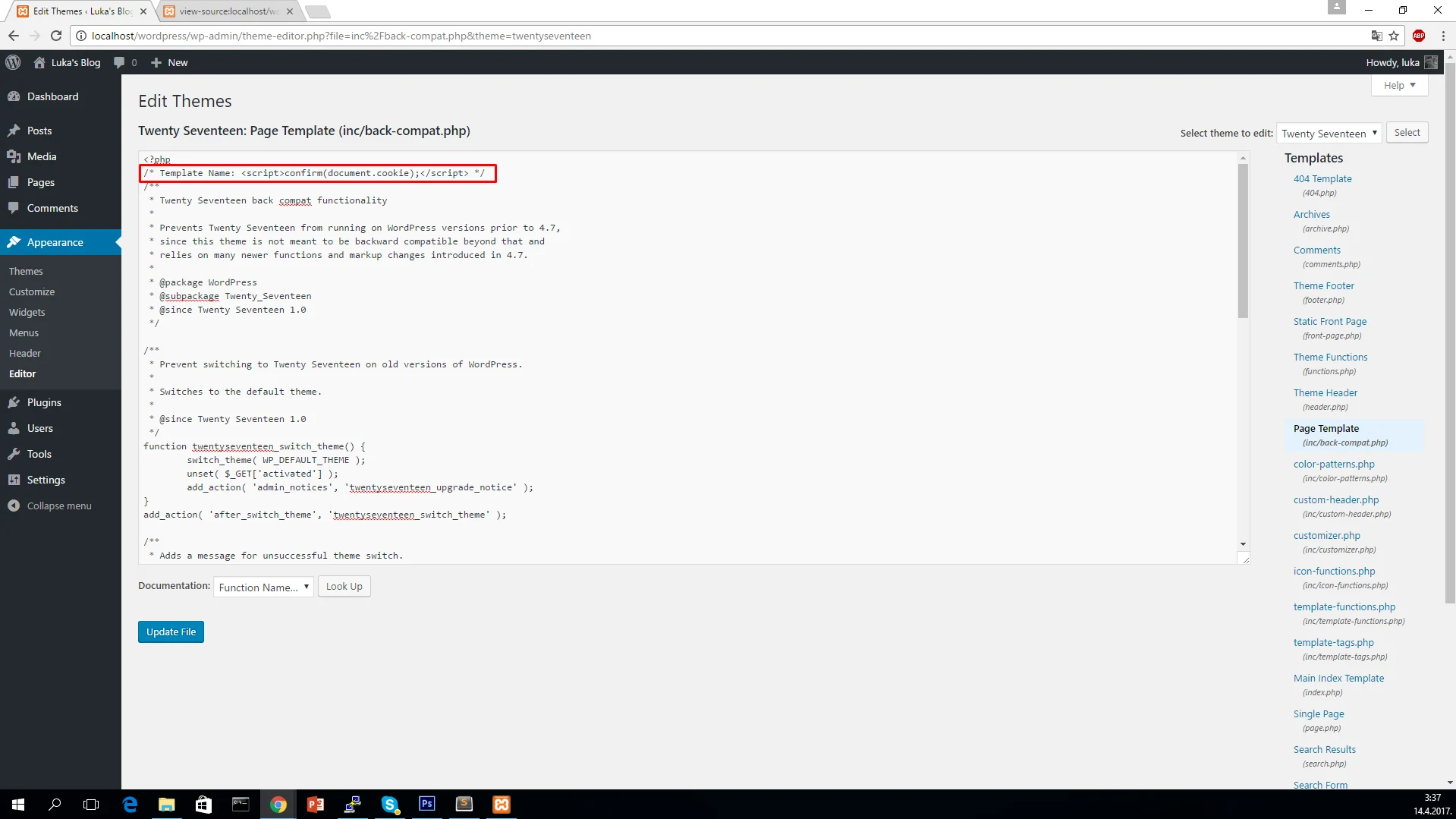
- Select file you want to edit (don't select files that already have name - Archives, Theme Footer for example). I used "back-compat.php" F175758
- At the very top of the file add following comment:
/* Template Name: <script>confirm(document.cookie);</script> */ Like this: F175758
4. Click on Update File.
5. XSS Popup will be prompted. F175757
###Technology used: Google Chrome 57.0.2987.133 (64-bit) - Latest
Attachments
Not written yet. The AI write-up for this report has not been written yet. The Original tab links to the source.
How it worked
Root cause
The template name read from the file header was echoed into the page without HTML escaping.
Impact
An attacker with theme-editing rights could run script in the browser of another user who opens the affected file in the editor, though the attacker already needed the ability to edit theme files.
What the attacker needed
Ability to edit theme files; victim opens the affected file in the editor
The fix
The template name should be escaped with htmlspecialchars() before it is printed to the page.
How it was found
- Open the theme editor under Appearance.
- Pick a file that does not already have a fixed display name.
- Add a template name comment at the top of the file containing a script.
- Save the file with Update File.
- The script runs as a popup when the file is viewed in the editor.
Explained by bugbounty.wiki with AI from the original and checked against quotes from it; it can still be wrong. Read the original before relying on a detail.
Not written yet. The AI write-up for this report has not been written yet. The Original tab links to the source.
A theme file can start with a comment that gives it a name, and the editor shows that name on the page. The editor put the name into the page as raw HTML instead of plain text, so a name containing a script tag became a working script. Anyone who opened that file in the editor would run the attacker's script in their own logged-in session.
What is XSS?
Script an attacker supplies runs in another user's browser, on the target's origin, with that user's session.



