Mssing Authorization on Private Message replies (BuddyPress)
The private message reply function in BuddyPress did not verify that the user was a participant in the thread, allowing any logged-in user to post a reply to any thread by changing the thread ID. An attacker could inject messages into all private conversations, leading to spam or phishing.

- Triaged in 4 days
- Fixed in 24 days
- Paid in 50 days
- Disclosed after 33 days
Description:
Users can reply to private message threads which they are not participants of by changing the thread_id parameter in the messages_send_reply ajax action. This affects both the Legacy and Nouveau Template packs.
Steps To Reproduce:
- Login to your account
- Send the following request (change
Host/Cookie/nonce/thread_idas needed)
POST /wp-admin/admin-ajax.php HTTP/1.1 Host: 127.0.0.1 User-Agent: Mozilla/5.0 (Windows NT 10.0; Win64; x64; rv:64.0) Gecko/20100101 Firefox/64.0 Accept: / Accept-Language: en-GB,en;q=0.5 Accept-Encoding: gzip, deflate Referer: http://127.0.0.1/members/test2/messages/view/4/ Content-Type: application/x-www-form-urlencoded; charset=UTF-8 X-Requested-With: XMLHttpRequest Content-Length: 76 Connection: close Cookie: >wordpress_ab0994624b8d5b17fddb1aec29329218=test2%7C1549395197%7ClRQfd96VkhuRpR4fpB3MhZOw2SGrl19nFG7wIClGYaf%7C64fbdf07238d2f448b8e53f6f1db7c64b014d7833386229505fefa70c9b2976e; wordpress_test_cookie=WP+Cookie+check; >wordpress_logged_in_ab0994624b8d5b17fddb1aec29329218=test2%7C1549395197%7ClRQfd96VkhuRpR4fpB3MhZOw2SGrl19nFG7wIClGYaf%7Ca309bfd19a1c2e4504e37959bd4ceac28944fce81857c2f7587022a4e6d2b7aa
action=messages_send_reply&cookie=&_wpnonce=d037f67211&content=Test+Message&thread_id=1
Notes:
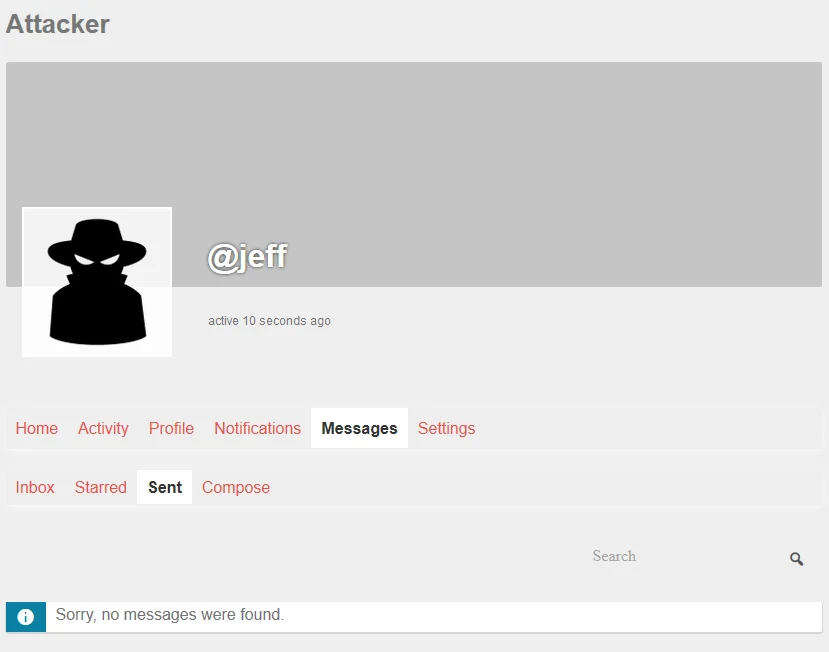
Even though an attacker can send a reply to a thread, they cannot view the thread afterwards. The reply they send does not appear in the attackers sentbox (see image below)
Nor do any future replies appear in the attackers inbox, nor is the attacker able to star the reply. This means that there is no information exposure.
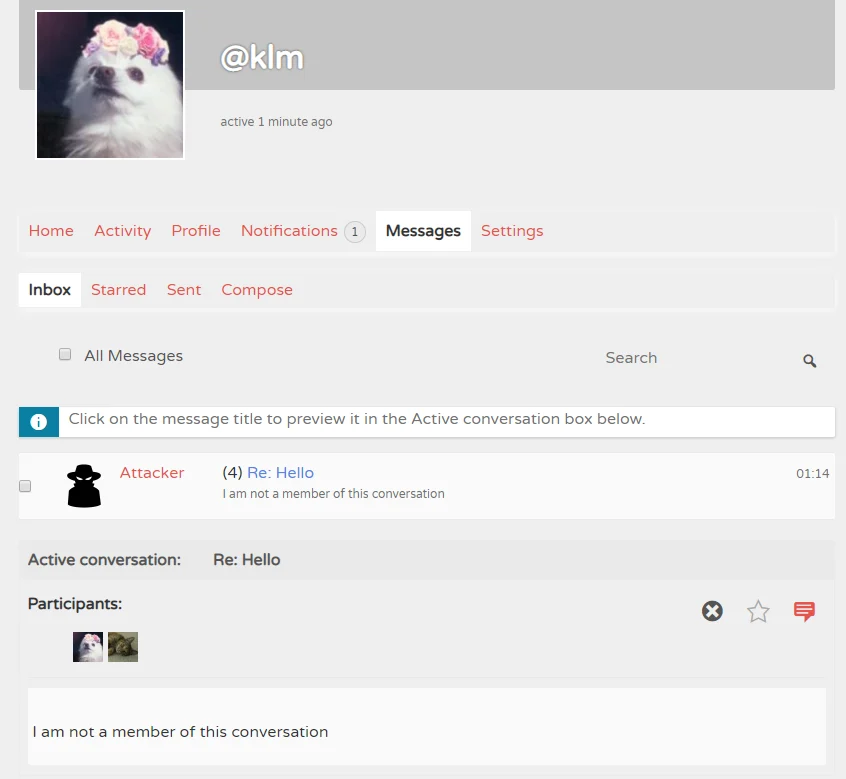
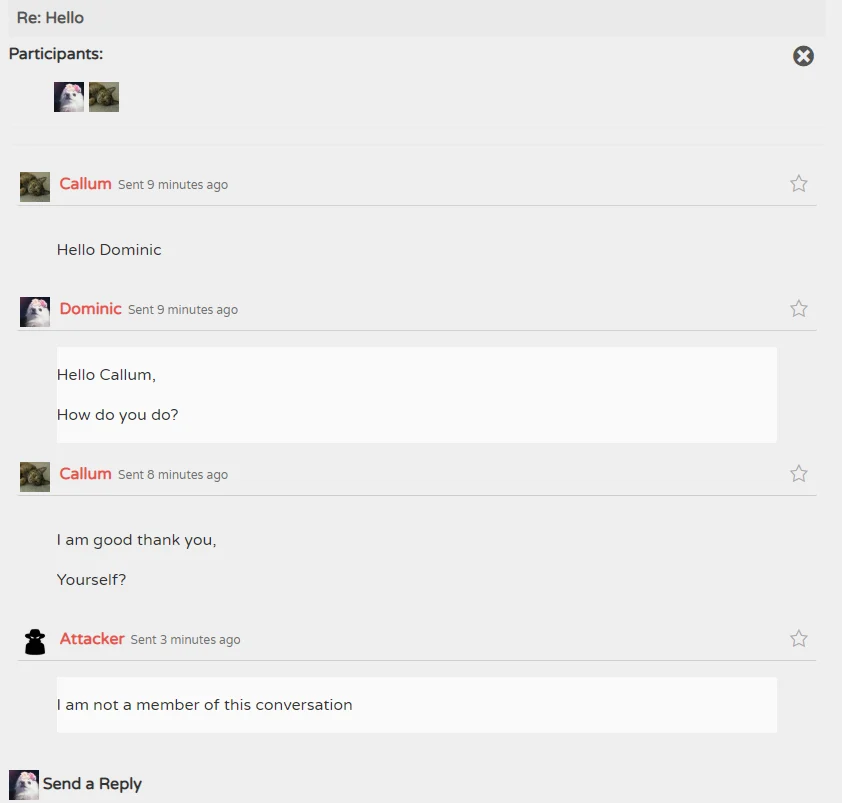
When participants view the thread they will see the attackers reply, however the attacker does not appear in the participants list (see images below)
Inbox:
View:
Proof of Concept:
I have developed a small Python (3.6+) script to inject a message into every private message thread. It achieves this by creating a new conversation between the attacker and himself to get the current private message max index and then iterates from 1 -> max index, posting a message into each thread. (Attachment on the original report: inject_messages.py) It will try to reply to threads that may have been deleted but since thread_id's are sequential, if every thread from 1 to the thread the attacker created is replied to then we can be sure that every thread that exists when the script is ran has been injected into.
Impact
Just by itself this can only really lead to spam / phishing attacks. However, if the component is vulnerable to other flaws such as #487081 (not public) then it can widen an attack surface and becomes a more serious issue.
Context
BuddyPress is the social networking plugin for WordPress. Among its features are private messages: a user starts a conversation (a thread) with one or more other members, and only the participants of that thread are supposed to be able to read it and post replies into it. The reply form in the front end submits to the messages_send_reply AJAX action, which takes the message body and the thread_id of the conversation being answered.
The report covers BuddyPress Core and states that the behaviour affects both the Legacy and the Nouveau template packs, so the problem is in the handling of the AJAX action rather than in one theme's markup.
Setup
The researcher worked against a local WordPress installation reachable at [redacted], logged in as an ordinary member (test2 in the captured request). Two accounts are enough to demonstrate the issue: the attacker's account and a second member who owns or participates in a private thread. The only tooling shown is a browser or intercepting proxy to replay the AJAX request, plus a small Python 3.6+ script written for the proof of concept.
The precondition is simply that the attacker is an authenticated user of the site and knows, or can guess, the thread_id of a conversation they are not part of. Thread identifiers are sequential, which the proof of concept relies on.
Finding it
The reply request carries the target conversation in a client-supplied thread_id parameter. Nothing in the request ties that identifier to the caller: the server is expected to check that the current user is a participant of the thread before accepting the reply. Changing thread_id to a value belonging to somebody else's conversation and sending the reply showed that this check was missing. The researcher notes that the same behaviour is present in both template packs.
Exploitation
Step 1: log in
Authenticate to the site as a normal member. The captured request below uses the account test2.
Step 2: send the reply with a foreign thread_id
The researcher sends the following request, changing Host, Cookie, nonce and thread_id as needed:
POST /wp-admin/admin-ajax.php HTTP/1.1
Host: [redacted]
User-Agent: Mozilla/5.0 (Windows NT 10.0; Win64; x64; rv:64.0) Gecko/20100101 Firefox/64.0
Accept: */*
Accept-Language: en-GB,en;q=0.5
Accept-Encoding: gzip, deflate
Referer: http://[redacted]/members/test2/messages/view/4/
Content-Type: application/x-www-form-urlencoded; charset=UTF-8
X-Requested-With: XMLHttpRequest
Content-Length: 76
Connection: close
Cookie: [redacted]=[redacted]; wordpress_test_cookie=WP+Cookie+check; [redacted]=[redacted]

action=messages_send_reply&cookie=&_wpnonce=d037f67211&content=Test+Message&thread_id=1
The body selects the AJAX action with action=messages_send_reply, carries the WordPress nonce in _wpnonce, the message text in content, and the conversation to reply to in thread_id. In the example the attacker's own view page is thread 4 (/members/test2/messages/view/4/), while the reply is directed at thread_id=1, a thread the attacker does not participate in. The request carries a WordPress nonce in _wpnonce.
The reply is accepted and stored in the target thread.
Step 3: confirm what the attacker can and cannot see
The researcher documents the limits carefully. Although the reply is written into the foreign thread, the attacker cannot view that thread afterwards. The reply does not appear in the attacker's sentbox:
Future replies in that thread do not appear in the attacker's inbox either, and the attacker cannot star the reply. The researcher concludes from this that there is no information exposure: the flaw is write-only.
On the participants' side the injected message is visible. When they open the thread they see the attacker's reply, but the attacker does not appear in the participants list. The inbox view of the thread:
And the thread view itself:
Step 4: inject into every thread
The proof of concept is a Python 3.6+ script, inject_messages.py, attached to the report. It first creates a new conversation between the attacker and himself, which yields the current maximum private message index. It then iterates thread_id from 1 to that maximum, posting a message into each thread. Threads that have been deleted simply fail; because thread identifiers are sequential, replying to every id from 1 up to the thread the attacker just created guarantees that every thread existing at the time the script runs has been injected into.
Root cause
The messages_send_reply AJAX handler trusts the thread_id supplied by the client and does not verify that the current user is a participant of that thread before writing the reply. The report does not discuss the nonce's role beyond its presence in the request. The report does not include the handler code, so the exact location of the missing check is not shown here.
Impact
The issue is described as, by itself, useful mainly for spam and phishing. and describes it as, by itself, useful mainly for spam and phishing: an authenticated attacker can place arbitrary content into any private conversation on the site, where the participants will read it as a message in their thread, while the attacker remains absent from the participant list. There is no read access, so no private information is exposed.
The researcher adds that if the component is vulnerable to other flaws, such as #487081 (not public), the ability to write into arbitrary threads widens the attack surface and the issue becomes more serious.
Fix
The report does not describe a fix or a patch. The change it implies is a server-side authorisation check in the messages_send_reply handler: before storing the reply, confirm that the current user is a participant of the thread identified by thread_id, and reject the request otherwise. The report does not describe a fix.
Variants to test
- Other BuddyPress message actions. Try actions that take a thread or message identifier, such as deleting, starring or marking a thread read, with an identifier belonging to another user. A positive result is the action succeeding on a thread the test account is not part of.
- Sequential identifiers elsewhere. Wherever an object id is passed in a request body or query string, substitute an id owned by a second account. A positive result is a state change on that object, or a response that reveals its existence.
- Nonce scope. Reuse a nonce obtained from one page in a request targeting a different object. If the request is accepted, the nonce is not binding the action to the object and only authentication is being enforced.
- Template pack parity. Repeat each test with both the Legacy and Nouveau template packs enabled. A positive result is the behaviour differing between packs, which points to where the check is (or is not) implemented.
- Write-only confirmation. After a suspected injection, check the attacker's sentbox, inbox and starring state, and view the thread as a participant. A positive result is the message appearing to participants while remaining invisible to the sender, matching the pattern described here.
What happened, in plain words
BuddyPress is a free add-on (a plugin) for WordPress, the software many websites use to publish blogs and small community sites. BuddyPress adds social features to a WordPress site: member profiles, friend lists, groups and private messages. A private message is a conversation, called a thread, that one member starts with one or more other members. Only the people in that thread are supposed to be able to read it and to post replies into it.
This report shows that this rule was not actually enforced. A logged-in member could send a reply into any private thread on the site, including threads they were never part of, simply by changing one number in the request their browser sends when they press the reply button. The report describes it as a missing authorisation check on the reply action.
The report describes the issue as, by itself, useful mainly for spam and phishing. On its own it lets an attacker put unwanted text into other people's private conversations, which is useful for spam and phishing. The attacker cannot read the thread afterwards, so no private information is exposed. The researcher notes that combined with other bugs it could become more serious.
The problem was found in BuddyPress Core, and the report says it affects both of BuddyPress's built-in designs for its pages, called template packs: the older Legacy pack and the newer Nouveau pack. Because both are affected, the mistake is in the code that handles the reply on the server, not in the look of one particular theme.
Background you need before reading the steps
A few ideas come up again and again in this report. Here they are from zero.
AJAX and admin-ajax.php. When you click a button on a modern website, the page often does not reload. Instead, the browser quietly sends a small request in the background and inserts the answer into the page. This is called AJAX. WordPress funnels many of these background requests through a single file, /wp-admin/admin-ajax.php, and the request says which job it wants done in a parameter called action. Think of it as a post office with one counter: every envelope goes to the same address, and the word written on the envelope (action=...) tells the clerk which service you want.
Parameters and the request body. When a browser submits a form, it sends the field values to the server as a list of name and value pairs, for example content=Test+Message. Each pair is a parameter. The part of the request that carries these pairs is called the body. The server reads the body and acts on it.
Cookies and sessions. A website needs to know who you are on every request, but the web was designed to forget. The trick is a cookie: a small piece of text the site stores in your browser and your browser sends back with every request to that site. WordPress uses cookies whose names start with wordpress_logged_in_ to remember that you are logged in. The long scrambled value inside is a session identifier, a kind of temporary pass. Anyone who copies that cookie can act as you until it expires, which is why it is sensitive and is hidden in this article.
Nonces. A nonce (the name comes from "number used once") is a short random-looking code that WordPress puts into forms and background requests. Its job is to prove that a request came from a page the site itself generated for you, and not from a malicious page in another tab trying to make your browser send requests without your knowledge. That kind of attack is called cross-site request forgery, or CSRF. A nonce is tied to your session, not to a particular conversation, which matters later.
Identifiers and sequential numbers. Every thread in BuddyPress has a number, its thread_id. The report notes that these numbers are handed out in order: 1, 2, 3 and so on. That is convenient for the site and also convenient for an attacker, because guessing a valid number is trivial.
The vulnerability class. The report labels the weakness as improper access control, also called missing authorisation. Authorisation is the question "is this person allowed to do this thing?" Authentication is the earlier question "who is this person?" The site answered the second question (the user was logged in) but never asked the first (is this user a participant of this thread?). The everyday comparison: a hotel checks your key card at the front door (authentication) but then lets any guest open any room door (missing authorisation).
The feature under test. In BuddyPress, a member opens a private conversation and types a reply. The reply form submits to the messages_send_reply action, sending the text of the message and the thread_id of the conversation being answered. The server is supposed to look at the thread_id, look at who is logged in, and refuse if that person is not in the thread.
Setting up the test
The researcher tested against a WordPress site running on their own computer, reachable at the address [redacted]. That address always means "this computer" and is a common way to run a test copy of a website safely. They were logged in as an ordinary member, whose username in the captured request is test2.
Two accounts are enough to demonstrate the problem: the attacker's account, and a second member who owns or takes part in a private thread. The tools shown are a browser or an intercepting proxy (software that sits between the browser and the site so you can edit a request before it is sent), plus a small Python script written for the proof of concept.
The only precondition is that the attacker has a normal account on the site and knows, or can guess, the thread_id of a conversation they are not part of. Because thread numbers are sequential, guessing is easy.
Finding it
The reply request carries the target conversation in a parameter called thread_id, and that value is supplied by the client, meaning the browser, meaning the attacker. Nothing in the request ties that number to the person sending it. The server is expected to check that the current user is a participant of the thread before accepting the reply. By changing thread_id to a number belonging to somebody else's conversation and seeing that the message was still saved, the researcher showed that this check was missing. The same behaviour appears in both template packs.
Exploitation
Step 1: log in
Log in to the site as a normal member. The captured request below uses the account test2. This step matters because the attack requires a real account: the site does check that you are logged in, and the nonce and cookies in the request only work for a logged-in session.
Step 2: send the reply with a foreign thread_id
The researcher sends the following request, changing Host, Cookie, nonce and thread_id as needed:
POST /wp-admin/admin-ajax.php HTTP/1.1
Host: [redacted]
User-Agent: Mozilla/5.0 (Windows NT 10.0; Win64; x64; rv:64.0) Gecko/20100101 Firefox/64.0
Accept: */*
Accept-Language: en-GB,en;q=0.5
Accept-Encoding: gzip, deflate
Referer: http://[redacted]/members/test2/messages/view/4/
Content-Type: application/x-www-form-urlencoded; charset=UTF-8
X-Requested-With: XMLHttpRequest
Content-Length: 76
Connection: close
Cookie: [redacted]=[redacted]; wordpress_test_cookie=WP+Cookie+check; [redacted]=[redacted]

action=messages_send_reply&cookie=&_wpnonce=d037f67211&content=Test+Message&thread_id=1
Line by line:
POST /wp-admin/admin-ajax.php HTTP/1.1is the first line of the request.POSTmeans "I am sending data to the server", as opposed toGET, which just asks for a page. The path/wp-admin/admin-ajax.phpis the single WordPress file that handles background requests.HTTP/1.1is the version of the web protocol being spoken.Host: [redacted]tells the server which site name the request is for. On a test machine it is the local address.User-Agent: ...identifies the browser and operating system. Here it claims to be Firefox 64 on 64-bit Windows. Servers often log this, and tools sometimes need it to look like a normal browser.Accept,Accept-Language,Accept-Encodingdescribe what kinds of response the browser can handle and in which language and compression. They are ordinary browser headers.Referer: http://[redacted]/members/test2/messages/view/4/says which page the request came from. Read it carefully: it is the attacker's own view of thread 4. The reply, however, is aimed at thread 1. That mismatch is the heart of the bug.Content-Type: application/x-www-form-urlencoded; charset=UTF-8says the body is a list of name and value pairs, the same format a normal HTML form uses.X-Requested-With: XMLHttpRequestis a header browsers add to background requests. It marks the request as AJAX rather than a full page load.Content-Length: 76is the size of the body in bytes, so the server knows when the body ends.Connection: closeasks the server to close the network connection after answering.Cookie: ...carries the login cookies. The long values are session identifiers and are hidden here because anyone holding them could act as the user.wordpress_test_cookie=WP+Cookie+checkis a harmless cookie WordPress uses to check that your browser accepts cookies at all.- The blank line separates the headers from the body.
action=messages_send_replyselects the job: send a private message reply.cookie=is an empty parameter carried by the form._wpnonce=d037f67211is the WordPress nonce, the anti-CSRF code described above.content=Test+Messageis the text of the message. The+signs stand for spaces in this encoding, so the message reads "Test Message".thread_id=1is the conversation being answered. This is the value the attacker changed: it points at a thread they are not part of.
The request carries a WordPress nonce in _wpnonce.
The reply is accepted and stored in the target thread.
Step 3: confirm what the attacker can and cannot see
The researcher documents the limits carefully. Although the reply is written into the foreign thread, the attacker cannot view that thread afterwards. The reply does not appear in the attacker's sentbox:
Future replies in that thread do not appear in the attacker's inbox either, and the attacker cannot star the reply. From this the researcher concludes that there is no information exposure: the flaw is write-only. In everyday terms, the attacker can slip a letter into someone else's mailbox but cannot open the mailbox to read what is inside.
On the participants' side the injected message is visible. When they open the thread they see the attacker's reply, but the attacker does not appear in the participants list. Here is the inbox view of the thread:
And here is the thread view itself:
Step 4: inject into every thread
The proof of concept is a Python 3.6+ script, inject_messages.py, attached to the report. Python is a programming language often used for small automation scripts; 3.6+ means it needs at least version 3.6 to run. The script works in two stages. First it creates a new conversation between the attacker and himself. That gives the attacker a thread with the highest number currently in use, which reveals the current maximum private message index. Then it loops thread_id from 1 up to that maximum, posting a message into each thread.
Threads that have been deleted simply fail, which is harmless. Because thread identifiers are sequential, replying to every id from 1 up to the thread the attacker just created guarantees that every thread existing at the time the script runs has been injected into. The comparison: if you know every house on a street is numbered 1 to 50, walking up to each door in turn means you cannot miss one, even if a few houses have been demolished.
Root cause
The messages_send_reply handler on the server trusts the thread_id supplied by the client and does not verify that the current user is a participant of that thread before writing the reply. The report does not discuss the nonce's role beyond its presence in the request. The report does not include the handler code, so the exact place where the check is missing is not shown.
Impact
The researcher rates this as low severity and describes it as, by itself, useful mainly for spam and phishing. An authenticated attacker can place arbitrary content into any private conversation on the site, where the participants will read it as a message in their thread, while the attacker stays absent from the participant list. There is no read access, so no private information is exposed.
The researcher adds that if the component is vulnerable to other flaws, such as #487081 (not public), the ability to write into arbitrary threads widens the attack surface and the issue becomes more serious. Attack surface is simply the total set of ways an attacker can interact with a system; more ways in means more chances to combine weaknesses.
Fix
The report does not describe a fix or a patch. The change it implies is a server-side authorisation check in the messages_send_reply handler: before storing the reply, confirm that the current user is a participant of the thread identified by thread_id, and reject the request otherwise. The report does not describe a fix.
Variants to test
These are directions for looking for similar problems.
- Other BuddyPress message actions. Try actions that take a thread or message identifier, such as deleting, starring or marking a thread read, with an identifier belonging to another user. A positive result is the action succeeding on a thread the test account is not part of.
- Sequential identifiers elsewhere. Wherever an object id is passed in a request body or query string, substitute an id owned by a second account. A positive result is a state change on that object, or a response that reveals its existence.
- Nonce scope. Reuse a nonce obtained from one page in a request targeting a different object. If the request is accepted, the nonce is not binding the action to the object and only authentication is being enforced.
- Template pack parity. Repeat each test with both the Legacy and Nouveau template packs enabled. A positive result is the behaviour differing between packs, which points to where the check is, or is not, implemented.
- Write-only confirmation. After a suspected injection, check the attacker's sentbox, inbox and starring state, and view the thread as a participant. A positive result is the message appearing to participants while remaining invisible to the sender, matching the pattern described here.
Glossary
- AJAX: a way for a web page to send a small request to the server in the background, without reloading the page.
admin-ajax.php: the single WordPress file that handles most of these background requests, choosing the job from theactionparameter.- Authentication: proving who you are, usually by logging in.
- Authorisation: deciding whether the person you have identified is allowed to do the thing they are asking for.
- Body: the part of an HTTP request that carries data such as form fields.
- BuddyPress: a WordPress plugin that adds social features, including member profiles, groups and private messages.
- Cookie: a small piece of text a site stores in your browser and your browser sends back with each request, used to remember your session.
- Cross-site request forgery (CSRF): an attack where a malicious page makes your browser send a request to another site using your existing login.
- CVSS: a standard scoring system for the severity of a vulnerability. The report gives no score.
- Handler: the piece of server code that receives a request and carries out the action.
- Header: a line of metadata at the top of an HTTP request or response, such as
HostorCookie. - HTTP: the protocol browsers and servers use to exchange requests and responses.
- Identifier (id): a number or string that names a particular object, such as a thread.
- Improper access control: a weakness where the system fails to check whether a user is allowed to perform an action.
- Legacy and Nouveau template packs: the two built-in designs BuddyPress can use for its pages.
- Nonce: a short code WordPress puts into forms and background requests to prove the request came from a page the site generated for you, protecting against CSRF.
- Parameter: a name and value pair sent with a request, such as
thread_id=1. - Phishing: tricking someone into trusting a message so they hand over information or click a harmful link.
- Plugin: an add-on that extends what a piece of software can do.
- POST: an HTTP method used when sending data to the server.
- Proof of concept (PoC): a small demonstration, often a script, that shows a vulnerability is real.
- Python: a programming language commonly used for small scripts and automation.
- Referer: an HTTP header telling the server which page the request came from.
- Request: a message a browser or tool sends to a server asking it to do something.
- Response: the server's reply to a request.
- Sentbox: the folder in a messaging system showing messages you have sent.
- Session: the period during which a site remembers you as logged in, identified by a cookie value.
- Severity: how serious a vulnerability is judged to be, here low.
- Spam: unwanted bulk messages.
- Template pack: a set of page templates that controls how a plugin's pages look and are structured.
- Thread: a private conversation between members in BuddyPress.
thread_id: the number identifying a particular thread.- User-Agent: an HTTP header identifying the browser and operating system making the request.
- Vulnerability: a weakness in software that an attacker can use to do something the software's owner did not intend.
- WordPress: the widely used software for building websites and blogs that BuddyPress plugs into.


