A Easy Vertical Privilege Escalation via Session Storage
A CRM portal stored user permissions in browser session storage, and the application trusted this client-side data for access control. A normal user could edit the stored permission list to match an admin's and gain administrative access.

I hope all is well. After a gap of one month, I’m back with another write-up.
The full write-up lives on its author's site
It belongs to its author, so we link to it rather than copy it. The other two tabs are our own rewrites, checked against it.
Context
The target was a CRM portal with two user roles: Normal User and Admin. Normal Users had access to only a limited set of resources and features and could not modify data within the portal. Admins had complete access to resources and features and could modify data within the portal. The portal kept a JSON array of the logged-in user's permissions in browser Session Storage under the key userPermissionsList.
The researcher found the issue on a private program and received a three-digit bounty. The report does not name the program or the portal.
Setup
Two accounts were used: a Normal User account and an Admin account. The researcher logged in with each in turn and checked Local Storage and Session Storage. No other tooling, versions or preconditions are described.
Finding it
While browsing the portal as a Normal User, the researcher checked Local Storage and Session Storage. In Session Storage, the userPermissionsList object held a JSON array of the user's permissions.
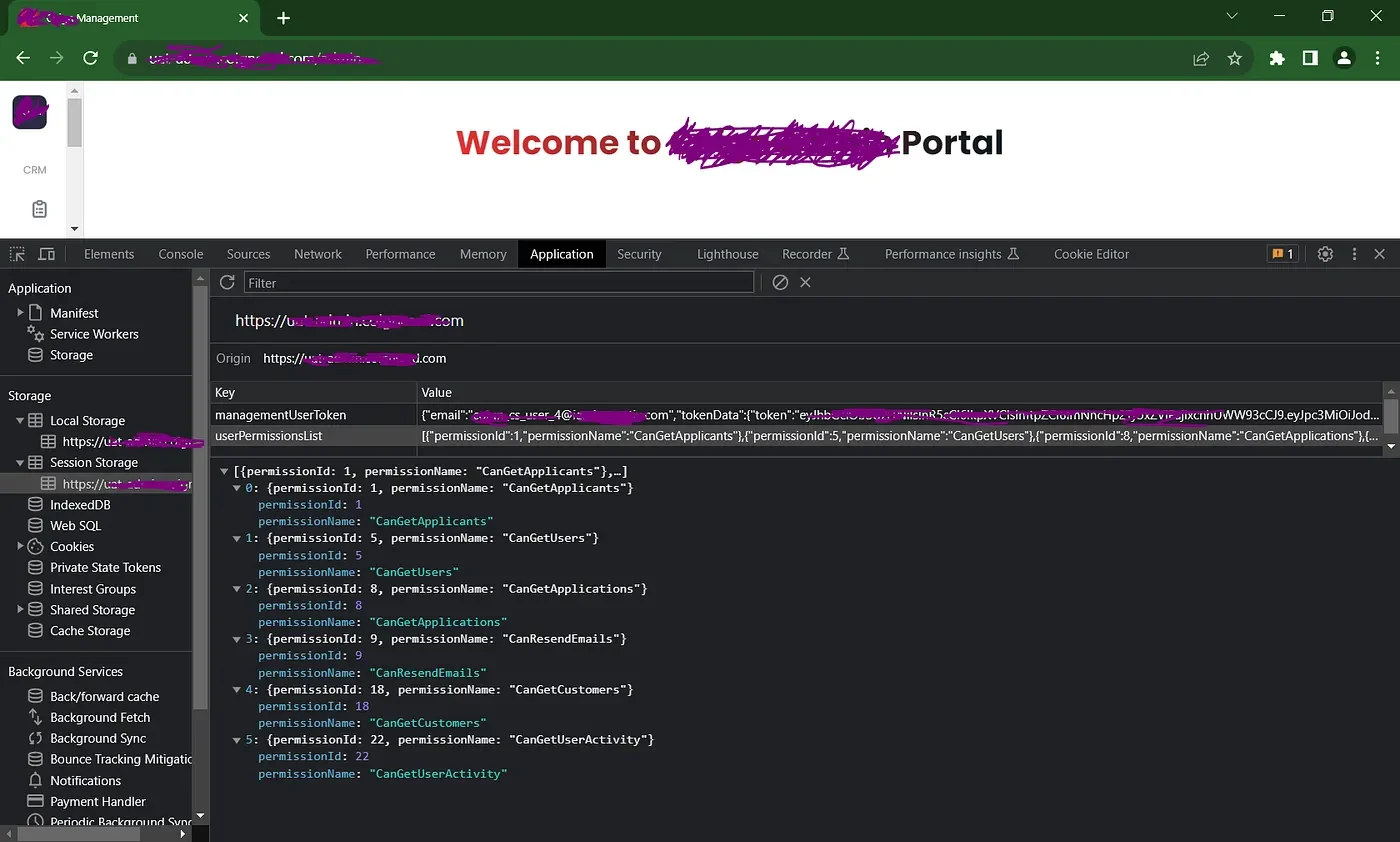
The researcher then logged in as an Admin and compared the two userPermissionsList objects. The Normal User array contained six permissions:
[ {"permissionId": 1, "permissionName": "CanGetApplicants"}, {"permissionId": 5, "permissionName": "CanGetUsers"}, {"permissionId": 8, "permissionName": "CanGetApplications"}, {"permissionId": 9, "permissionName": "CanResendEmails"}, {"permissionId": 18, "permissionName": "CanGetCustomers"}, {"permissionId": 22, "permissionName": "CanGetUserActivity"}]
The Admin array contained many more entries, including create, update and management permissions:
[ {"permissionId": 1, "permissionName": "CanGetApplicants"}, {"permissionId": 2, "permissionName": "CanCreateApplicants"}, {"permissionId": 3, "permissionName": "CanUpdateApplicants"}, {"permissionId": 4, "permissionName": "CanManageAccounts"}, {"permissionId": 5, "permissionName": "CanGetUsers"}, {"permissionId": 6, "permissionName": "CanCreateUsers"}, {"permissionId": 7, "permissionName": "CanUpdateUsers"}, {"permissionId": 8, "permissionName": "CanGetApplications"}, {"permissionId": 9, "permissionName": "CanResendEmails"}, {"permissionId": 10, "permissionName": "CanGetDocuments"}, {"permissionId": 11, "permissionName": "CanUploadDocuments"}, {"permissionId": 12, "permissionName": "CanCreateIndividualInvitations"}, {"permissionId": 14, "permissionName": "CanQueryIndividualInvitations"}, {"permissionId": 15, "permissionName": "CanGetBulkInvitations"}, {"permissionId": 16, "permissionName": "CanUploadBulkInvitationsFile"}, {"permissionId": 17, "permissionName": "CanUpdateFormStatus"}, {"permissionId": 18, "permissionName": "CanGetCustomers"}, {"permissionId": 19, "permissionName": "CanResendInvitations"}, {"permissionId": 20, "permissionName": "CanResendEvaluations"}, {"permissionId": 21, "permissionName": "CanResendManualReviews"}, {"permissionId": 22, "permissionName": "CanGetUserActivity"}, {"permissionId": 23, "permissionName": "CanGetDeliveredDocuments"}, {"permissionId": 24, "permissionName": "CanGetBillingTables"}, {"permissionId": 25, "permissionName": "CanGetBillingTableHistoricalRecords"}, {"permissionId": 26, "permissionName": "CanGetBillingTableDraftUpdateRecords"}, {"permissionId": 27, "permissionName": "CanGetFeedbacks"}, {"permissionId": 28, "permissionName": "CanUpdateBillingTables"}, {"permissionId": 29, "permissionName": "CanUpdateUserEmail"}, {"permissionId": 30, "permissionName": "CanGetTemplates"}, {"permissionId": 31, "permissionName": "CanResendApplicationEmail"}, {"permissionId": 32, "permissionName": "CanDeleteUpcomingUpdates"}, {"permissionId": 33, "permissionName": "CanCreatePolls"}, {"permissionId": 34, "permissionName": "CanGetPolls"}, {"permissionId": 35, "permissionName": "CanUpdatePolls"}, {"permissionId": 36, "permissionName": "CanNotifyIndividualInvitations"}, {"permissionId": 37, "permissionName": "CanSendInvitationEmail"}]
Upon reviewing the two permission lists, the researcher discerned a potential vulnerability.
Exploitation
Step 1: Log in as a Normal User and open Session Storage
The researcher logged in with the Normal User account and navigated to the Session Storage section, where the userPermissionsList object was present.
Step 2: Replace the Normal User permission list with the Admin one
Still in the Normal User session, the researcher modified the userPermissionsList object in Session Storage.
Step 3: Refresh the page
After the change, the researcher refreshed the page. The portal then granted access to administrative-level resources and features, a vertical privilege escalation.

Root cause
The portal stored the user's permissions in Session Storage, and editing that array changed what the portal granted access to. Because Session Storage is writable by any script running in the page and by the user through the developer tools, the permission list was under the attacker's control. The report does not describe any server-side check that would have rejected the tampered list, so the likely root cause is that authorisation decisions relied on client-side state rather than on the server verifying the user's role for each request.
Impact
A Normal User could escalate to administrative-level access within the portal and reach administrative resources and features. The escalation required only a logged-in Normal User account and the ability to edit Session Storage.
Fix
The fix implied by the finding is to enforce authorisation on the server for every request, deriving the user's permissions from the authenticated session or token on the server side, and to treat any client-side permission list as display-only data that cannot grant access.
Variants to test
- Look for other client-side stores that drive access control, such as Local Storage, Session Storage, cookies or hidden form fields holding role or permission values. A positive result is that editing the value and refreshing or navigating reveals features or data that the original role could not reach.
- Compare the permission arrays of a low-privilege and a high-privilege account on the same application. A positive result is that the low-privilege array is a strict subset and the application accepts a substituted superset.
- After tampering with the client-side list, perform a state-changing action such as creating or updating a record. A positive result is that the server accepts the request and the change persists, showing the check is missing server-side rather than only in the UI.
- Check whether the same permission identifiers are accepted in API requests, for example as a parameter or header. A positive result is that the server honours a permission the account was never granted.
What happened, in plain words
A security researcher was testing a CRM portal. CRM stands for Customer Relationship Management: software a company uses to keep track of its customers, applicants, documents, invitations and so on. The portal had two kinds of accounts: a Normal User and an Admin. A Normal User could look at a limited set of things and was not supposed to change any data. An Admin could see and change everything.
The portal kept a list of what the logged-in person is allowed to do inside the browser itself, in a storage area called Session Storage. That list was a small piece of text in a format called JSON (explained below) and it was stored under the name userPermissionsList. The list was stored in the browser, where the user could edit it.
After comparing the two lists, the researcher discerned a potential vulnerability. So they logged in as a Normal User, modified the userPermissionsList object in Session Storage, and refreshed the page. The portal then granted access to administrative-level resources and features. That is a vertical privilege escalation: moving from a lower level of permission to a higher one. The researcher reported it to the private bug bounty program and received a three-digit bounty. The report does not name the program or the portal.

Some words you will need
Before the steps, a few everyday comparisons for the terms used throughout.
- Browser developer tools: a panel built into every browser (usually opened with F12) that lets you look at the page's internals. Think of it as the maintenance hatch of a machine you are allowed to open.
- Local Storage and Session Storage: two small lockers that a website can use inside your browser to keep data. Local Storage keeps its contents until they are deleted, even after you close the browser. Session Storage keeps its contents only for the current tab and clears them when the tab is closed. Both are readable and writable by the page's JavaScript, and also by you through the developer tools.
- JSON: a way of writing data as text using curly braces, square brackets, names and values. It looks like
{"name": "value"}for one item, and[ ... ]for a list of items. It is just a text format, like a shopping list written in a fixed layout. - JSON array: the
[ ... ]form, an ordered list. In this report the array is a list of permission objects. - Object: one item in that list, written with curly braces, holding a name and a value, for example a permission identifier and a permission name.
- Permission: a single allowed action, such as "can get users" or "can create users". The portal gives each one a number (
permissionId) and a name (permissionName). - Front end: the part of the website that runs in your browser and draws the pages. The back end (or server) is the computer elsewhere that stores the real data and answers requests. A useful comparison: the front end is the waiter who takes your order, the back end is the kitchen that actually cooks it.
- API: a way for the front end to ask the back end for data or to make a change, usually over the network. Think of it as the order window between the waiter and the kitchen: a fixed set of requests the kitchen understands.
- Authorisation: the decision about what a logged-in person is allowed to do. Authentication is proving who you are (logging in); authorisation is what you may then do. A building comparison: your badge proves you work there (authentication), the doors it opens decide your access (authorisation).
- Client-side: happening in your browser, on your machine. Server-side: happening on the company's computer. Anything client-side can be changed by the person using the browser.
- Vertical privilege escalation: going from a lower role to a higher one, for example Normal User to Admin. (Going sideways between two accounts of the same level is called horizontal, but that is not what happened here.)
- Bug bounty program: a scheme where a company invites researchers to report security problems and pays for valid ones. A private program is one you can only join by invitation.
Setting up
The researcher used two accounts: a Normal User account and an Admin account. They logged in with each one in turn and checked the browser's Local Storage and Session Storage. The report does not describe any other tools, software versions or conditions needed to reproduce the issue.
Why two accounts? Because to prove that a low-privilege user can become an admin, you first need to see what a real admin's browser holds, so you know what to compare against and what to try copying.
Finding it
While browsing the portal as a Normal User, the researcher checked Local Storage and Session Storage. In Session Storage, the userPermissionsList object held a JSON array of the user's permissions.
Why look there at all? Because the browser's storage is where a website often keeps information it needs on every page, and it is easy to forget that the user can read and change it. Many testers only look at the visible page and never open this panel.
The researcher then logged in as an Admin and compared the two userPermissionsList objects. The Normal User array contained six permissions:
[ {"permissionId": 1, "permissionName": "CanGetApplicants"}, {"permissionId": 5, "permissionName": "CanGetUsers"}, {"permissionId": 8, "permissionName": "CanGetApplications"}, {"permissionId": 9, "permissionName": "CanResendEmails"}, {"permissionId": 18, "permissionName": "CanGetCustomers"}, {"permissionId": 22, "permissionName": "CanGetUserActivity"}]
Line by line, in plain words:
- The outer
[and]mean this is a list. - Each
{ ... }inside the list is one permission. "permissionId": 1is the number the portal uses internally to identify the permission."permissionName": "CanGetApplicants"is the human-readable name: this permission lets the user get (view) applicants.- The six entries are all "get" style permissions: view applicants, view users, view applications, resend emails, view customers, view user activity. Nothing here creates, updates or deletes anything, which matches the description of a Normal User who cannot modify data.
The Admin array contained many more entries, including create, update, delete and management permissions:
[ {"permissionId": 1, "permissionName": "CanGetApplicants"}, {"permissionId": 2, "permissionName": "CanCreateApplicants"}, {"permissionId": 3, "permissionName": "CanUpdateApplicants"}, {"permissionId": 4, "permissionName": "CanManageAccounts"}, {"permissionId": 5, "permissionName": "CanGetUsers"}, {"permissionId": 6, "permissionName": "CanCreateUsers"}, {"permissionId": 7, "permissionName": "CanUpdateUsers"}, {"permissionId": 8, "permissionName": "CanGetApplications"}, {"permissionId": 9, "permissionName": "CanResendEmails"}, {"permissionId": 10, "permissionName": "CanGetDocuments"}, {"permissionId": 11, "permissionName": "CanUploadDocuments"}, {"permissionId": 12, "permissionName": "CanCreateIndividualInvitations"}, {"permissionId": 14, "permissionName": "CanQueryIndividualInvitations"}, {"permissionId": 15, "permissionName": "CanGetBulkInvitations"}, {"permissionId": 16, "permissionName": "CanUploadBulkInvitationsFile"}, {"permissionId": 17, "permissionName": "CanUpdateFormStatus"}, {"permissionId": 18, "permissionName": "CanGetCustomers"}, {"permissionId": 19, "permissionName": "CanResendInvitations"}, {"permissionId": 20, "permissionName": "CanResendEvaluations"}, {"permissionId": 21, "permissionName": "CanResendManualReviews"}, {"permissionId": 22, "permissionName": "CanGetUserActivity"}, {"permissionId": 23, "permissionName": "CanGetDeliveredDocuments"}, {"permissionId": 24, "permissionName": "CanGetBillingTables"}, {"permissionId": 25, "permissionName": "CanGetBillingTableHistoricalRecords"}, {"permissionId": 26, "permissionName": "CanGetBillingTableDraftUpdateRecords"}, {"permissionId": 27, "permissionName": "CanGetFeedbacks"}, {"permissionId": 28, "permissionName": "CanUpdateBillingTables"}, {"permissionId": 29, "permissionName": "CanUpdateUserEmail"}, {"permissionId": 30, "permissionName": "CanGetTemplates"}, {"permissionId": 31, "permissionName": "CanResendApplicationEmail"}, {"permissionId": 32, "permissionName": "CanDeleteUpcomingUpdates"}, {"permissionId": 33, "permissionName": "CanCreatePolls"}, {"permissionId": 34, "permissionName": "CanGetPolls"}, {"permissionId": 35, "permissionName": "CanUpdatePolls"}, {"permissionId": 36, "permissionName": "CanNotifyIndividualInvitations"}, {"permissionId": 37, "permissionName": "CanSendInvitationEmail"}]
Line by line, in plain words:
- It is the same list format, but much longer.
- It contains every entry the Normal User had (numbers 1, 5, 8, 9, 18 and 22), so the admin list is a superset of the normal one.
- It adds permissions that change things:
CanCreateApplicants,CanUpdateApplicants,CanCreateUsers,CanUpdateUsers,CanUpdateBillingTables,CanDeleteUpcomingUpdates, and so on. - It adds management permissions such as
CanManageAccountsandCanUpdateUserEmail. - It adds permissions for documents, invitations, evaluations, reviews, billing tables, feedback, templates and polls.
- The numbers are not perfectly consecutive: there is no 13. That is normal; identifiers are just labels and do not have to run without gaps.
Upon reviewing the two permission lists, the researcher discerned a potential vulnerability. In other words: if the page decides what to show by reading a list that the user can rewrite, then rewriting the list may be enough to see more.
Exploitation
Step 1: Log in as a Normal User and open Session Storage
The researcher logged in with the Normal User account and navigated to the Session Storage section, where the userPermissionsList object was present.
Why this step? To be in the low-privilege session, the one that is supposed to be limited, so that any extra access afterwards clearly comes from the change and not from the account itself.
Step 2: Replace the Normal User permission list with the Admin one
Still in the Normal User session, the researcher modified the userPermissionsList object in Session Storage.
Why this step? Because the suspicion was that the page reads this list to decide what to show. If that is true, putting the admin list in the normal user's storage should make the page behave as if the user were an admin. This is the whole test: change one value, change nothing else, and see whether access changes.
Step 3: Refresh the page
After the change, the researcher refreshed the page. The portal then granted access to administrative-level resources and features, a vertical privilege escalation.
Why refresh? Because the page reads the list when it loads. Reloading makes it read the edited list, just as reopening a notebook makes you read the page you just wrote on.
Why it worked
The portal stored the user's permissions in Session Storage, and editing that array changed what the portal granted access to. Because Session Storage is writable by any script running in the page and by the user through the developer tools, the permission list was under the attacker's control.
A comparison: imagine a club where the bouncer asks you to read out your own membership level, and lets you in based on what you say. The problem is not that you can speak; it is that nobody checks your name against the list at the door.
What it means in practice
A Normal User could escalate to administrative-level access within the portal and reach administrative resources and features. The escalation required only a logged-in Normal User account and the ability to edit Session Storage.
How it should be fixed
The fix implied by the finding is to enforce authorisation on the server for every request, deriving the user's permissions from the authenticated session or token on the server side, and to treat any client-side permission list as display-only data that cannot grant access. In the club comparison: the bouncer should check your name against the list kept behind the desk, not trust what you tell them.
Other places to look for the same mistake
- Look for other client-side stores that drive access control, such as Local Storage, Session Storage, cookies or hidden form fields holding role or permission values. A positive result is that editing the value and refreshing or navigating reveals features or data that the original role could not reach.
- Compare the permission arrays of a low-privilege and a high-privilege account on the same application. A positive result is that the low-privilege array is a strict subset and the application accepts a substituted superset.
- After tampering with the client-side list, perform a state-changing action such as creating or updating a record. A positive result is that the server accepts the request and the change persists, showing the check is missing server-side rather than only in the UI.
- Check whether the same permission identifiers are accepted in API requests, for example as a parameter or header. A positive result is that the server honours a permission the account was never granted.
Glossary
- Admin: the higher-privilege account role in the portal, able to access all resources and features and to modify data.
- API: the fixed set of requests the front end uses to ask the back end for data or to make changes.
- Authentication: proving who you are, usually by logging in.
- Authorisation: deciding what a logged-in person is allowed to do.
- Back end: the server-side part of the application that stores data and answers requests.
- Bug bounty program: a scheme where a company pays researchers for valid security reports; a private program is invitation-only.
- Client-side: running in the user's browser, and therefore editable by the user.
- Cookie: a small piece of data a website asks the browser to store and send back with requests; often used to keep you logged in.
- CRM: Customer Relationship Management software, used to track customers, applicants, documents and similar records.
- Developer tools: the built-in browser panel used to inspect and edit a page's storage, network traffic and code.
- Front end: the part of the website that runs in the browser and draws the pages.
- JSON: a text format for data using braces, brackets, names and values.
- JSON array: a list written in JSON, enclosed in square brackets.
- Local Storage: a browser storage area that keeps data until deleted, even after the browser is closed.
- Normal User: the lower-privilege account role in the portal, limited to viewing a small set of resources and unable to modify data.
- Object: one item of data written in JSON with curly braces, holding names and values.
- Permission: a single allowed action, identified here by a number (
permissionId) and a name (permissionName). - Privilege escalation: gaining a higher level of access than the account was given.
- Server-side: happening on the company's computer, out of the user's reach.
- Session Storage: a browser storage area that keeps data for the current tab only and clears it when the tab is closed.
- Superset / subset: a superset contains everything a subset contains, plus more; here the admin permission list is a superset of the normal user list.
- Token: a piece of data, often a long string, that a website uses to recognise a logged-in session or to prove an identity.
- Vertical privilege escalation: moving from a lower role to a higher one, for example Normal User to Admin.

